Week - 4
AIM
To implement control logic of a “washing machine” using Stateflow as per the defined sequence and also to create a Simulink chart for the “Gear shift” logic as per the defined conditions.
INTRODUCTION
1. SIMULINK:
Simulink is a MATLAB-based graphical programming environment for modeling, simulating, and analyzing multidomain dynamical systems. Its primary interface is a graphical block diagramming tool and a customizable set of block libraries. It offers tight integration with the rest of the MATLAB environment and can either drive MATLAB or be scripted from it. Simulink is widely used in automatic control and digital signal processing for multidomain simulation and model-based design. [1]
2. STATEFLOW:
Stateflow® provides a graphical language that includes state transition diagrams, flow charts, state transition tables, and truth tables. One can use Stateflow to describe how MATLAB® algorithms and Simulink® models react to input signals, events, and time-based conditions. Stateflow enables you to design and develop supervisory control, task scheduling, fault management, communication protocols, user interfaces, and hybrid systems. With Stateflow, the user can model combinatorial and sequential decision logic that can be simulated as a block within a Simulink model or executed as an object in MATLAB. Graphical animation enables the user to analyze and debug the logic while it is executing. Edit-time and run-time checks ensure design consistency and completeness before implementation. [2]
3. WASHING MACHINE:
[3] A washing machine (laundry machine, clothes washer, or washer) is a home appliance used to wash laundry. The term is mostly applied to machines that use water as opposed to dry cleaning (which uses alternative cleaning fluids and is performed by specialist businesses) or ultrasonic cleaners. The user adds laundry detergent, which is sold in liquid or powder form, to the wash water. The earliest washing machines simply carried out a washing action when loaded with clothes and soap, filled with hot water, and started. Over time machines became more and more automated, first with complex electromechanical controllers, then fully electronic controllers; users put clothes into the machine, select a suitable program via a switch, start the machine, and come back to remove clean and slightly damp clothes at the end of the cycle. The controller starts and stops many different processes including pumps and valves to fill and empty the drum with water, heating, and rotating at different speeds, with different combinations of settings for different fabrics.
Washing: Many front-loading machines have internal electrical heating elements to heat the wash water, to near boiling if desired. The rate of chemical cleaning action of the detergent and other laundry chemicals increases greatly with temperature, in accordance with the Arrhenius equation. Washing machines with internal heaters can use special detergents formulated to release different chemical ingredients at different temperatures, allowing different type of stains and soils to be cleaned from the clothes as the wash water is heated up by the electrical heater. However, higher-temperature washing uses more energy, and many fabrics and elastics are damaged at higher temperatures. Temperatures exceeding 40 °C (104 °F) have the undesirable effect of inactivating the enzymes when using biological detergent. Many machines are cold-fill, connected to cold water only, which they heat to operating temperature. Where water can be heated more cheaply or with less carbon dioxide emission than by electricity, cold-fill operation is inefficient. Front loaders need to use low-sudsing detergents because the tumbling action of the drum folds air into the clothes load that can cause over-sudsing and overflows. However, due to efficient use of water and detergent, the sudsing issue with front-loaders can be controlled by simply using less detergent, without lessening cleaning action.
Rinsing: Washing machines perform several rinses after the main wash to remove most of the detergent. Modern washing machines use less water due to environmental concerns; however, this has led to the problem of poor rinsing on many washing machines on the market, which can be a problem to people who are sensitive to detergents. The Allergy UK website suggests re-running the rinse cycle or rerunning the entire wash cycle without detergent. In response to complaints, many washing machines allow the user to select additional rinse cycles, at the expense of higher water usage and longer cycle time. Bosch for example, in its allergy wash program, incorporates an additional 3-minute rinse cycle with water of at least 60 degree Celsius to rinse off detergent residues and any allergen.
Spinning: Higher spin speeds, along with larger tub diameters, remove more water, leading to faster drying. On the other hand, avoid ironing can be obtained not using spin cycle in the washing machine. If a heated clothes-dryer is used after the wash and spin, energy use is reduced if more water has been removed from clothes. However, faster spinning can crease clothes more. Also, mechanical wear on bearings increases rapidly with rotational speed, reducing life. Early machines would spin at 300 rpm and, because of lack of any mechanical suspension, would often shake and vibrate. In 1976, most front-loading washing machines spun at around 700 rpm, or less. Separate spin-driers, without washing functionality, are available for specialized applications. For example, a small high-speed centrifuge machine may be provided in locker rooms of communal swimming pools to allow wet swimsuits to be substantially dried to a slightly damp condition after daily use.
Maintenance wash: Many home washing machines use a plastic, rather than metal, outer shell to contain the wash water; residue can build up on the plastic tub over time. Some manufacturers advise users to perform a regular maintenance or "freshening" wash to clean the inside of the washing machine of any mold, bacteria, encrusted detergent, and unspecified dirt more effectively than with a normal wash. A maintenance wash is performed without any laundry, on the hottest wash program if there is a heater, adding substances such as white vinegar, 100 grams of citric acid, a detergent with bleaching properties, or a proprietary washing machine cleaner. The first injection of water goes into the sump so the machine can be allowed to fill for about 30 seconds before adding cleaning substances.
4. GEAR SHIFTING:
[4] A gear stick (rarely spelled gearstick), gear lever (both UK English), gearshift or shifter (both U.S. English) is a metal lever attached to the shift assembly in an automobile transmission. The term gear stick mostly refers to the shift lever of a manual transmission, while in an automatic transmission, a similar lever is known as a gear selector. A gear stick will normally be used to change gear whilst depressing the clutch pedal with the left foot to disengage the engine from the drivetrain and wheels.
A knob, variously called gear knob, shift knob, gear shift knob or stick shift knob, forms the handle for the gear stick. Typically, the gear knob includes a diagram of the shift pattern of the gear selection system, i.e. the positions to which the gear stick should be moved when selecting a gear. In some older manual transmission vehicles, the knob may incorporate a switch to engage an overdrive; in some automatic transmission vehicles it may incorporate a switch to engage a special mode such as a sports mode or to disengage overdrive. Both of the above-mentioned switches may also be found on the console or on steering column stalks instead. Manual shifters on the steering column, if having only three forward speeds, are typically called a "three on the tree". The lowest of these gears, if set at a much lower ratio than a typical 1st-gear ratio, is often called a "granny gear".
Starting the car in gear with the clutch engaged causes it to lurch forwards or backward since the starter motor by itself produces sufficient torque to move the whole vehicle; this can be highly dangerous, especially if the parking brake is not firmly applied and can be injurious to the starter and drivetrain. Therefore, novice drivers are taught to rock the knob of a manual gearbox from side to side before starting the engine to confirm that the gearbox is in neutral. For the same reason, modern cars require the clutch pedal to be depressed before the starter will engage (though some modern vehicles have a button that disables the clutch start requirement if held down when starting, for rare situations when starting the car in gear is necessary).
OBJECTIVES
- To implement control logic of a “washing machine” using Stateflow as per the defined sequence.
- To create a Simulink chart for the “Gear shift” logic as per the defined conditions.
PROBLEM SPECIFICATION AND SOLVING:
PROBLEM STATEMENT I:
Implement control logic of a “washing machine” using Stateflow as per given sequence:
- If the power supply is available, the system gets activated.
- If the Water supply is not available, stop the process & indicate through LED.
- Soaking time should be 200s followed by Washing time of 100s.
- Then rinsing happens for next 20s & dryer runs for 50s.
After all the processes have completed turn on the finished LED
EXPLANATION AND OBSERVATION:
- Initially, a chart block is created on the model window and is renamed as ‘Washing Machine Working Logic’.
CHART BLOCK: This block is used to implement control logic with finite state machine. A finite state machine is a representation of an event-driven (reactive) system. In an event-driven system, the system responds to an event by making a transition from one state (mode) to another. This transition occurs if the condition defining the change is true. A Stateflow® chart is a graphical representation of a finite state machine. States and transitions form the basic elements of the system. One can also represent stateless flow charts. For example, the user can use Stateflow charts to control a physical plant in response to events such as a temperature and pressure sensors, clocks, and user-driven events. One can also use a state machine to represent the automatic transmission of a car. The transmission has these operating states: park, reverse, neutral, drive, and low. As the driver shifts from one position to another, the system makes a transition from one state to another, for example, from park to reverse. A Stateflow chart can use MATLAB or C as the action language to implement control logic. [5]
Representation:

- On double clicking the chart, a new window similar to a subsystem opens where in a Stateflow can be created.
- A state is selected from the explorer bar (as shown below) and is placed on the chart window. Since the it is the first state, it inherently comes with a ‘default transition’.
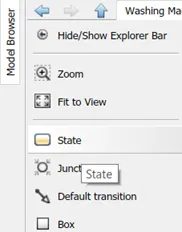
- The state is named as ‘Power Supply’ and is fed with the information to exit when power equals the value 1. This indicates that if there is a power supply, the program moves forward to the next state exiting the current state.
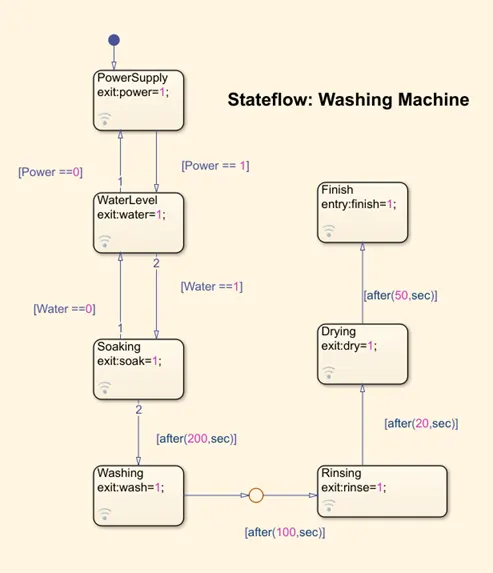
- Another state is chosen from the explorer bar and is named as ‘Water supply’ and is fed with the information to exit when water equals 1.
- The current state is connected to first state using two arrows going in different directions. Each direction is loaded with a condition.
- An input variable “Power” is chosen and if the power is ‘on’ it equals the numerical value 1 and proceeds to the next state or else, it equals 0 and remains in the same state.
- Similarly, “Water”, an input variable equals 1 if there is an availability of water supply and then proceeds to the next state or else it returns a value 0 and remains in the same state.
- Consequently, a state named ‘Soaking’ is created and a single arrow is used to connect it with a condition, ‘after’. As per the problem statement, soaking is to occur for 200 sec.
- In this, an output variable named ‘soak’ is introduced and the program exits the state as soak reached the value 1.
- The next state is washing which is supposed to take place for 100 sec after the soaking process. An output variable ‘wash’ is introduced, and the program exits the state when the water attains the value 1. (attached to previous state by an arrow and an after clause)
- Succeeding Soaking, ‘Rinsing’ is created, and an output variable ‘rinse’ is introduced, and the program exists after 20 sec when the variable rinse attains the value 1. (attached to previous state by an arrow and an after clause)
- Following Rinsing, a new state ‘Drying’ is created that takes place for 50 sec and when the output variable ‘dry’ approaches the value 1, then, the state is exited.
- The last process state is named ‘Finish’ is declared to indicate the end of the process.
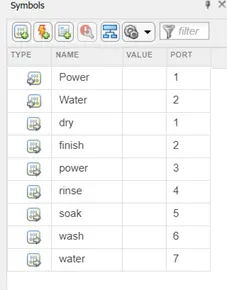
- On the toolbar, select ‘Symbols Pane’ under the category prepare. This pane gives the programmer to assign appropriate types of variables. In this chart, there are two input variables [Power and Water] and seven output variables.
- On going back to the main model, two inputs as constants with values one are fed to the two inputs of the chart.
- The seven outputs are assigned to display individually. When the display shows the value 1, the process is ongoing. Else, the process is under pause/stop.
- Lamps are introduced and are connected to corresponding inputs and outputs by using the connect option. Once connect option is chosen, the chart is right clicked to get the options to which we desire to connect the lamp.
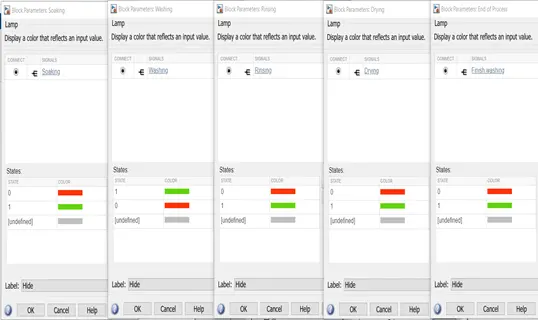
- Once the lamps are connected, the states in the lamp are defined. when the lamp is off, red is used to indicate that under the numerical value 0 and the lamp represents green when the process is ongoing and the numerical corresponding to this state is 1. This procedure is used for power input and water supply.
- The label on each lamp is selected to be hidden.
- Each lamp is named based on the process it indicates.
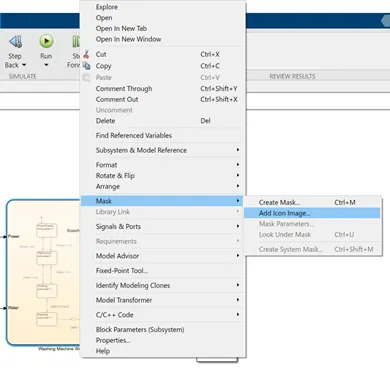
- The chart is added with an image appropriate to the process and is done as shown below. On right clicking the chart, select mask in the list of operations that are available. Then it is required to select ‘add image’. Accordingly browse the image and the select apply.
- It is necessary to connect the lamps to the elements outside the chart only.
- Only one condition is needed to describe the process in each state, be it either entry or exit.
- After constructing the model, it is mandatory for the user to save the model. The run time is set to 450 instead of 370.
PROBLEM STATEMENT II:
Make a Simulink chart for the “Gear shift” logic as per below conditions:
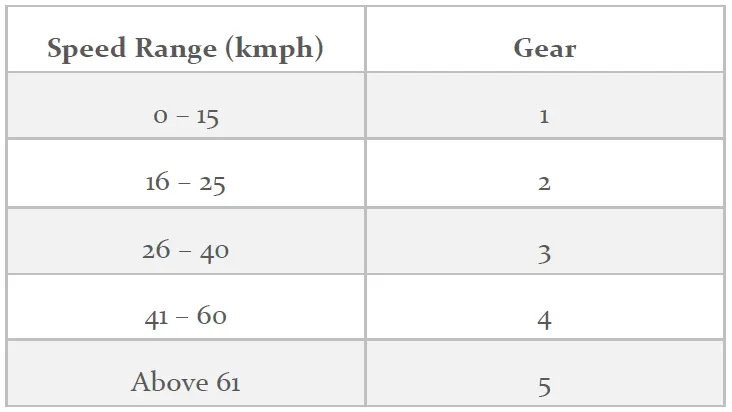
- Give speed input while the simulation is running & display the gear number.
EXPLANATION AND OBSERVATION:
- Initially, a chart block is created on the model window and is renamed as ‘Gear Shift Logic’.On double clicking the chart, a new window similar to a subsystem opens where in a Stateflow can be created.
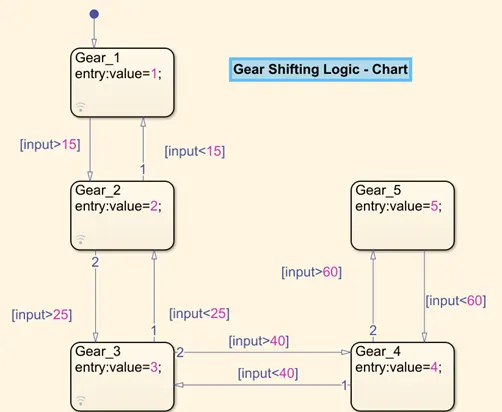
- First state from the explorer bar is selected and it is named as ‘Gear_1’ and an input variable named ‘value’ is selected and it is set to 1 on entry.
- A next state is chosen, naming it ‘Gear_2’ and the same variable is chosen to set its entry value to 2.
- These two state are connected by conditions that are mentioned in the problem statement. These conditions set the appropriate gear into motion. In this case, if the ‘input’, an input variable is assigned which indicates the speed.
- If the value of ‘input’ is greater than 15 then it moves to the state gear_2 or else remains in the gear_1.
- Similarly, Gear_3 is created and is attached to gear two with input condition being greater and less than 25. The ‘value’ in this gear is set to 3.
- In the same way, Gear_4 and Gear_5 is created with input conditions being </>40 and </>60 respectively and the ‘value’ at the entry changes as ‘4’ and ‘5’ respectively.
- In this way, the logic is created and by selecting ‘Symbols Pane’ in the toolbar section under prepare, ‘input’ is assigned to input variable and ‘value’ is assigned to output variable. The chart is then saved, and the further process is carried out in the model window.
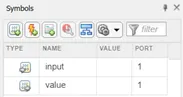
- In the model window, as required in the problem statement, it is needed to give inputs to the system even during the simulation and therefore, a block named ‘Slider Gain’ is used and is renamed as ‘Speed (km/hr)’
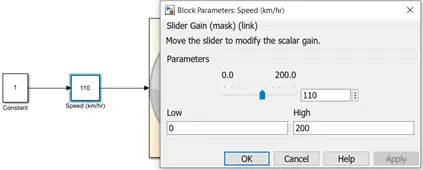
- The minimum value is set to 0 while the maximum value is set to 200.It is fed with an input of a constant with numerical value ‘1’.
- This set up is connected to the input port of the chart and the output port named ‘value’ is connected to a display on the model window.
- To make this further aesthetically pleasing, lamps are introduced and by varying their colors and connecting them with the output ‘value’. Moreover, these are further edited to glow in different colors to indicate different gears.
- Each set lamp is set based on the entry values in the chart.
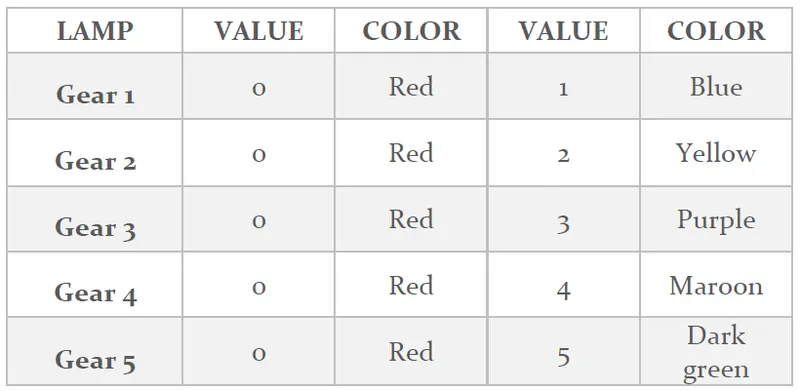
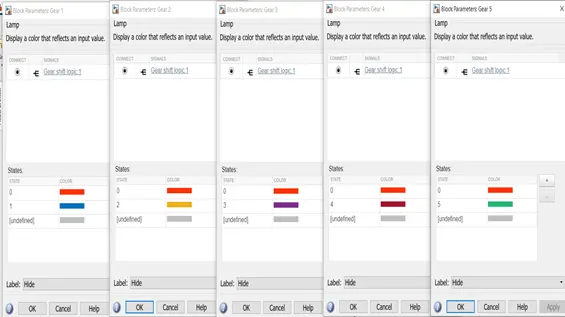
- The chart on the model window is covered with a mask using an image.
- The model is then ready and is set to different values of speed to identify the working of the gear system.
- It is mandatory to notice that the exit value in the chart is kept in accordance with their gear number.
RESULTS
- The layout of the working of the washing machine are as follows:
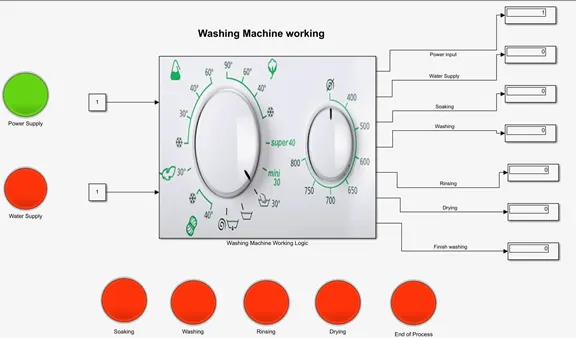
Figure 1. Power ON condition
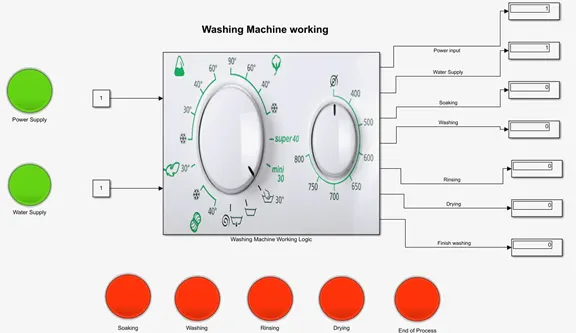
Figure 2. Water Supply ON condition
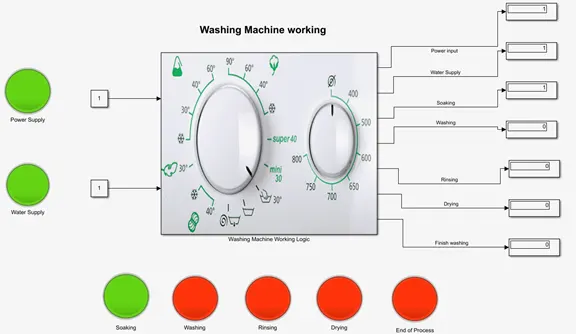
Figure 3. Soaking ON condition
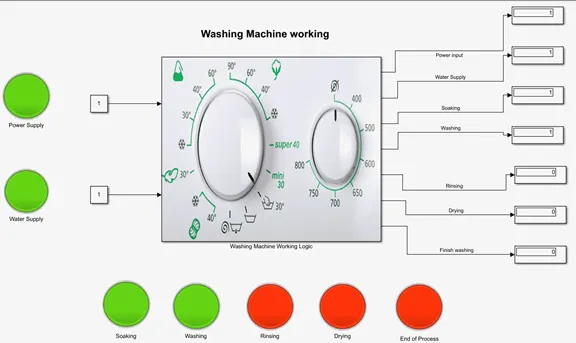
Figure 4. Washing ON condition
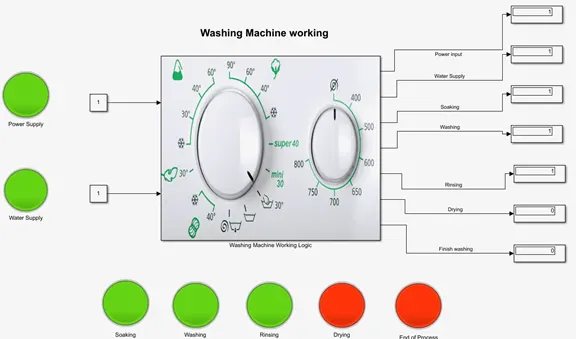
Figure 5. Rinsing ON condition
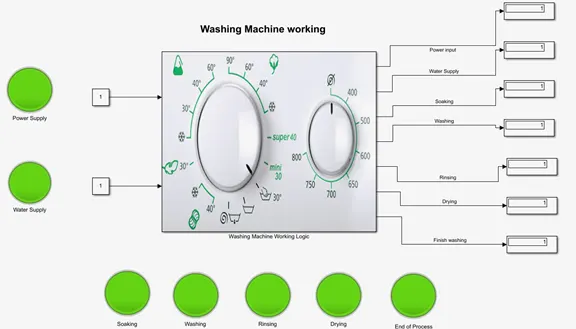
Figure 6. End of Process condition
- The results of the gear logic system are shown below:
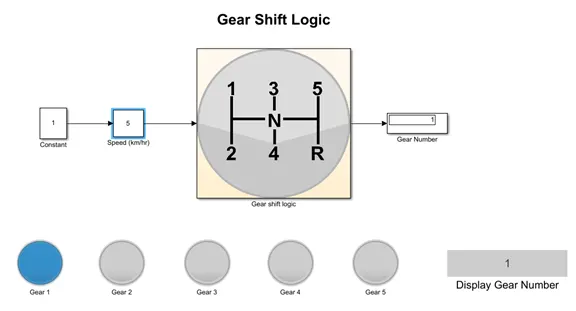
Figure 7. Gear_1 activation
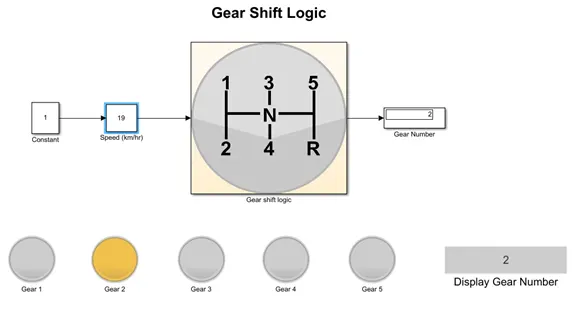
Figure 8. Gear_2 activation
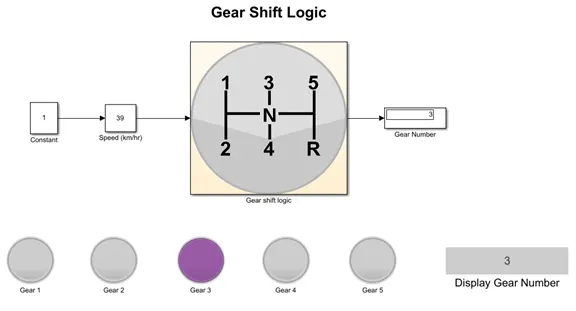
Figure 9. Gear_3 activation
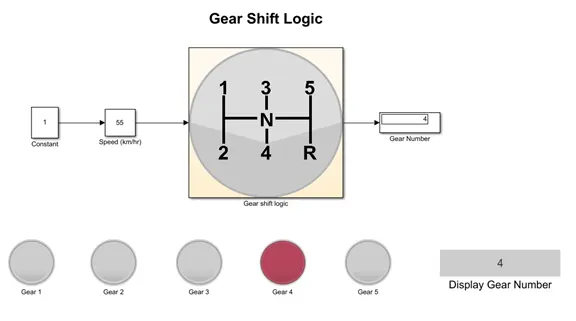
Figure 10. Gear_4 activation
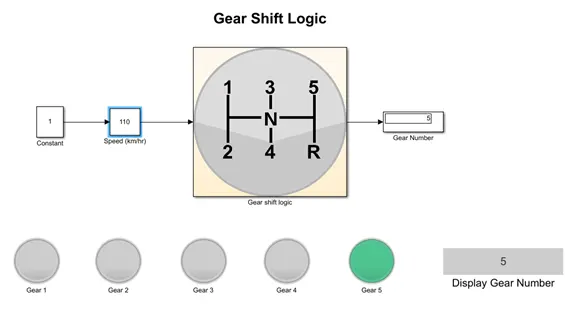
Figure 11. Gear_5 activation
CONCLUSION
The required problems have been solved and justified with appropriate results. The working of a washing machine and a gear shifting system have been understood and the application of those systems in Stateflow have been thoroughly understood.
BIBLIOGRAPHY
- https://en.wikipedia.org/wiki/Simulink#:~:text=Simulink%20is%20a%20MATLAB%2Dbased,customizable%20set%20of%20block%20libraries.
- https://in.mathworks.com/products/stateflow.html
- https://en.wikipedia.org/wiki/Washing_machine
- https://en.wikipedia.org/wiki/Gear_stick
- https://in.mathworks.com/help/stateflow/ref/chart.html