Week 3 - Solving second order ODEs
Solving Second Order ODES
AIM:
To simulate the pendulum motion and to use the second order ode as a function to determine the plots of angular displacement and velocity with respect to time using matlab.to create a animation of it.
OBJECTIVE:
- Write a program to solve the second ode equation.
- To Determine the function to get the plots of angular displacement and velocity.
- To animate or simulate motion of the pendulum motion.
Theory:
In Engineering, ODE is used to describe the transient behavior of a system. A simple example is a pendulum
A Simple pendulum consists of string with a length (l)which is fixed at one end and the other end is free.the freeend is fixed with ball with constant mass(m).From this motion we can undersatnd the newton second law of motion. due to motion of ball with respect to time we can determine angular displacement and velocity. this motion also decribes the motion of damper ,spring and mass in were the simple pendulum works.
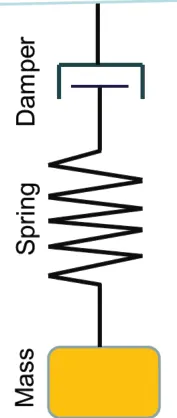
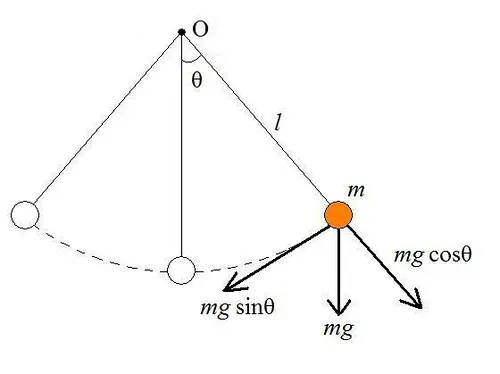
The way the pendulum moves depends on the Newtons second law. When this law is written down, we get a second order Ordinary Differential Equation that describes the position of the "ball" with respect to time.
EQUATION:
This ODE represents the equation of motion of a simple pendulum with damping
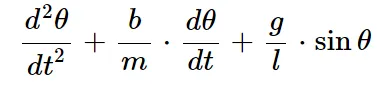
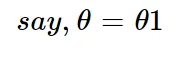
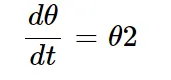
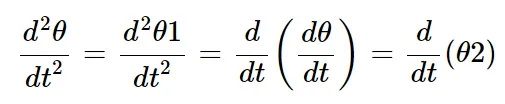
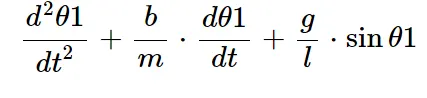
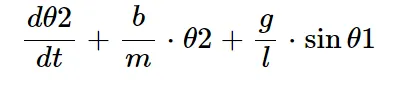
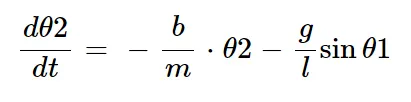
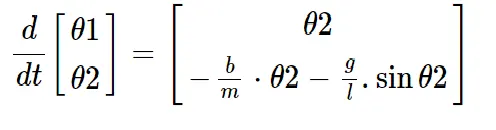
In above equation we have to include the values of gravity,length of the string,damping coefficient,mass of the ball in kg.
g = gravity in m/s2,
L = length of the pendulum in m,
m = mass of the ball in kg,
b=damping coefficient.
value given to solve the ode function are
use,
L=1 metre.
m=1 kg.
b=0.05.
g=9.81 m/s2.
the given values for simple pendulum and solving the second order differential equation are programmed or coded by matlab. for solving this equation we required in-build code known as ode 45 is used and this ode function use the values of length,damping coeeficient ,gravity,mass of the ball. for deriving or converting the second order differential into first order differential . matlab ode function is used
Function used in ode
function [dtheta_dt]= ode_func(t,theta,b,g,l,m)
theta1=theta(1);
theta2=theta(2);
dtheta1_dt=theta2;
dtheta2_dt=-(b/m)*theta2-(g/l)*sind(theta1);
[dtheta_dt]=[dtheta1_dt;dtheta2_dt];
end
this value derived from the function is used for converting second order differential into first order differential.thif function include to the main code for deriving the plots of angular displacement and angular velocity.
Main Code
clear all
close all
clc


b=0.05;
g=9.81;
l=1;
m=1;

%inital condition
theta_0=[0,3]

%time point
t_span= linspace(0,20,500);

%solve ode
[t,results]=ode45(@(t,theta)ode_func(t,theta,b,g,l,m),t_span,theta_0);

figure(1)
plot(t,results(:,1));
hold on
plot(t,results(:,2));
ylabel('displacement/angular velocity');
xlabel('time');
legend('displacement','velocity')

ct=1;
for i=1:length(t_span)
    angle=(results(:,1))
    ANGLE=angle(i)

 figure(2)

 % coordinates
    x0=0;
    y0=1;
    x1=1*sin(ANGLE);
    y1=-l*cos(ANGLE);
    plot([x0 x1],[y0 y1],'linewidth',3);
    hold on
    line([-2,2],[1,1],'linewidth',3);
    plot(x1,y1,'.','markersize',30,'markerfacecolor','r');
    hold off
    grid on
     axis([-3 3 -3 3])
    M(ct)=getframe(gcf);
    ct=ct+1;
end
movie(M)
videofile = VideoWriter('simple_pendulum.avi','Uncompressed AVI');
open(videofile)
writeVideo(videofile,M)
close(videofile)
Code Explanation:
clear all,close all and clc removes and gives us a clean sheet.the initial values are given for solving the ode which are damping coefficient ,gravity , length of the string and mass. as the mass as constant.inital condition for theta is given with angular displacement and velocity.which is(thetha_0=[0,3]).for solving the second order ode function a in-build code is used (ode45(@(t,theta)ode_function(t,theta,b,g,l,m),t_span,theta_o)).the angular displacement and velocity is determined with respect to time .so %time point is used with the values(t_span=linspace(0,20,500)).by values of displacement and velocity we can plot the values of the results with respect to time.
plotting values of ode function is saved in figure(1).
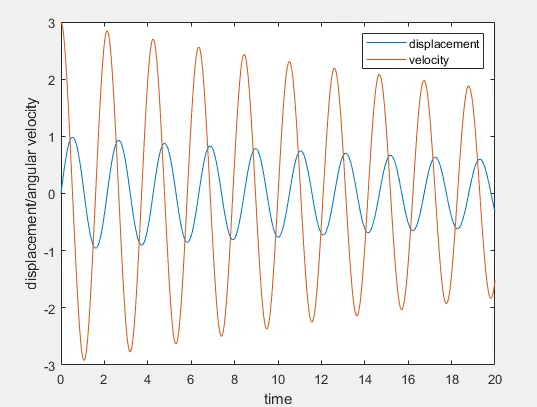
figure(1): plots of angular displacemnt and velocity with respect to time
After plotting the results of the ode function .Animation of the simple pendulum have to be constructed or created using matlab code .in this code animation figures are provided with frame.from those frame movie is created.
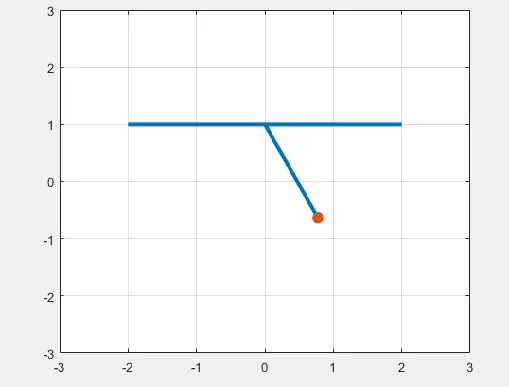
figure(2): Image Of animated simple pendulum.
- for animation for loop is used and (for i=1:length(reults(t_span))) ':'represent the range operator . where the values are considered from 1 to the length of t_span.t_span consists of 500 values .which is provided in linspace command and angle is the results of ode function displacement or velocity.this angle is represented as 'ANGLE'.
- END of the string which is freeend connected to ball with respect to time are x1 and x2.the end of the fixed end are x0 and y0.value of fixed and free end is plotted with linewidth od 3.
- 'hold on' command is used for connecting the fixed end and free end with the ball with respect to time.the ball is created with marker command with marker size '30' with marker face color'red'.grid on command is used for providing a graphical view to the plots. axis command has limits from equal sign where their is negative thier will equal positive value which defines the position of the figure.
- frame which is nothing but image are gathered by getframe command and movie command makes the animation of the simple pendulum.
video of the animation is provided with you tube link simple pendulum simulation
conculsion
The program sucessfully converted second ode into first ode using ode function .the simulation and animation of the simple pendulum is also created sucesfullyusing matlab.