Week 3 - Solving second order ODEs
AIM:
TO CREATE A PENDULUM ANIMATION USING ODE45 IN BULID COMMAND IN MATLAB.
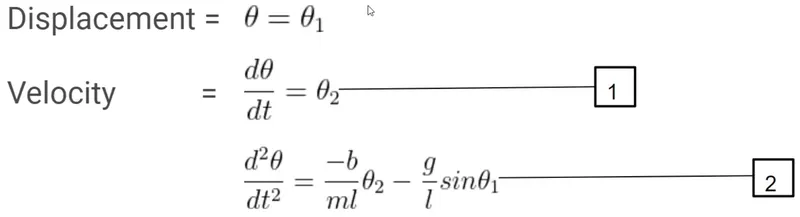
GOVERNING EQUATION OF PENDULUM:
In the above equation,
g = gravity in m/s2,
L = length of the pendulum in m,
m = mass of the ball in kg,
b = damping coefficient.
q = displacement.
t = time in sec.
HERE, INITIAT WE ASSUMED THE VALUES OF ABOVE
g = 9.81
L = 1
m = 0.1
b = 0.05
DISCRETISATION OF AN ODE
The equation cannot be directly solves using the MATLAB solver and the so, we should convert the same into the 1st order differential equation.
WHAT IS ODE45 COMMAND IN MATLAB?
The equation cannot be directly solves using the matlab solver and the so we should convert the same into the 1st order differential equation
THIS IS SYNTAX OF ODE45
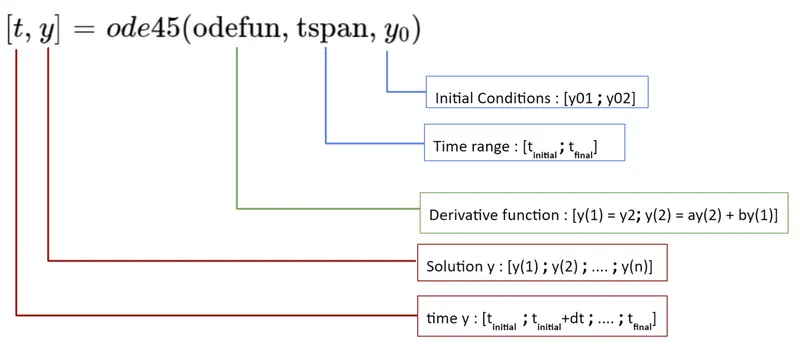
[t,results]=ode45(@(t,theta)ode_func(t,theta,b,g,l,m),t_span,theta_0)
IN ABOVE STATEMENT THE ode45@(t,theta) is ANONYMUS FUNCTION
Anonymous functions are very much similar to the regular user-defined functions in MATLAB, but with some distinct individual traits, Anonymous functions are not stored as function files or codes, instead it is just a data type which makes use of 'function handle' data type.
BODY OF THE CONTENT OF CODE:
clear
close
clc

%%% INPUT PARAMETERS

b=0.05;
g=9.81;
l=1;
m=0.1;

%Intial Condition
theta_0=[0;3];

%Time Points
t_span=linspace(0,20,500);
% Solve ODE
[t,results]=ode45(@(t,theta) ode_func(t,theta,b,g,l,m),t_span,theta_0);

%TO RUN A LOOP FOR DIFFERENT VALUES OF THETA
ct = 1 ;
for i= 1:length(results(:,1))
  x0=0;
  y0=0;
  x1=l*sin(results(i,1));
  y1 = -1*cos(results(i,1));
  plot([1 1],[0 0],'LineWidth',4,'color','k');
  hold on
  plot([x0 x1] , [y0 y1],'linewidth',2,'color','b');
  hold on

  %marker is important to denote the dark embeded circle which will reflect BOB

  plot(x1,y1,'-o','markers',20,'markerfacecolor','r');
  xlabel('X AXIS');
  ylabel('Y AXIS');
  title('ANIMATION OF PENDULUM MOTION')
  grid on;
  axis([-1.5 1.5 -1.5 0.5])
  pause(0.000003);
  hold off
  q(ct) = getframe(gcf);
  %Text = sprintf("pendulum%d.png",ct);
  %saveas(1,Text)
  ct = ct+1;
end
movie(q)
videofile=VideoWriter('Pendulum_damped.avi','uncompressed avi');
open(videofile)
writeVideo(videofile,q)
close(videofile)
FUNCTION USED IN ODE45 COMMAND:
function [dtheta_dt]=ode_func(t,theta,b,g,l,m)
theta1=theta(1);
theta2=theta(2);
dtheta1_dt=theta2;
dtheta2_dt=-(b/m)*theta2-(g/l)*sin(theta1);
dtheta_dt=[dtheta1_dt;dtheta2_dt];
end
EXPLANTION OF THE CODE LOGICS:
- INTIAL INPUT HAVE BEEN GIVEN.
- THEN INTIAL CONDTION AND TIME POINTS HAVE TAKE AS INPUT.
- THEN USING ODE45 THE VELCOITY , DISPLACEMENT, AND RESPECTIVED TIME HAVE BEEN CALCULATED.
- IN THE ODE45 COMMAND THE FUNCTION “ODE_FUNC” HAS BEEN USED, IN THAT FUNCTION FORMULA FOR THE VELOCITY AND DISPLACEMENT HAS BEEN CALCULATED AND THEN IT IS SAVE RESULT HAS 2D ARRAY.
- FOR PLOTTING WE NEED FOR LOOP TO PLOT ALL THE VELOCITY AND DISCPLACEMENT VALUES RESPECTIVELY.
- IN THAT CASE THE INTIAL ORIGN OF X AND Y ARE THE FIXED SO , THAT X0 AND Y0 ARE (0,0) WITH RESPECTIVE THIS ORIGN X1 AND Y1 ARE VARIED.
- THEN USING THE MOVIE COMMAND THE NEW VIDEO FILE HAVE BEEN OPENED AND THE WRITEVIDEO MEAN THE THEN ABOVE THE ALL THE FIGURE WINDOW ARE SHOULD IN THE WRITED IN FILE AS ANIMATION AND FILE HAS BEEN CLOSED.
THE ANIMATION OF PENDULUM MOTION CAN BE SEEN THE BELOW LINK:
COCLUSION:
FINALLY USING THE ODE45 COMMAND TOOL THE PENDULUM HAS BEEN ANIMATED AND UPLOADED AND
IT IS VERY INTERESTING TO SOLVE THIS TYPES OF PROBLEM.