Parsing NASA Thermodynamic Data
1. AIM:
- Write a function code in MATLAB to parse the NASA thermodynamic data file and then calculate the thermodynamic properties of various gas species.
2. GOVERNING EQUATIONS IF ANY:
- Here Cp(KJ/(Kg*K)) is Specific Heat, H(KJ) is Enthalpy & S(KJ/K) is Entropy,
`(Cp)/R=a1+a2*T+a3*T^2+ a4*T^3+ a5*T^4`
`H/(RT)=a1+(a2 * T)/2+(a3 * T^2)/3+(a4 * T^3)/4+(a5 * T^4)/5+(a6)/T`
`S/R=a1*ln(T)+a2*T+(a3 * T^2)/2+(a4 * T^3)/3+(a5 * T^4)/4+a7`
- Here R(KJ/(K*mol)) is the universal gas constant, T(K) is the temperature.
- From the data file, the FIRST 7 coefficients are HIGH-temperature coefficients and the SECOND 7 coefficients are LOW-temperature coefficients & also use the LOCAL TEMPERATURE RANGES which is unique for each species, not the GLOBAL TEMPERATURE RANGE.
3. OBJECTIVES OF THE PROJECT:
- Write a function that extracts the 14 coefficients and calculates the enthalpy, entropy, and specific heats for all the species in the data file. You will be reading this file NASA thermodynamic data.
- Calculate the molecular weight of each species and display it in the command window.
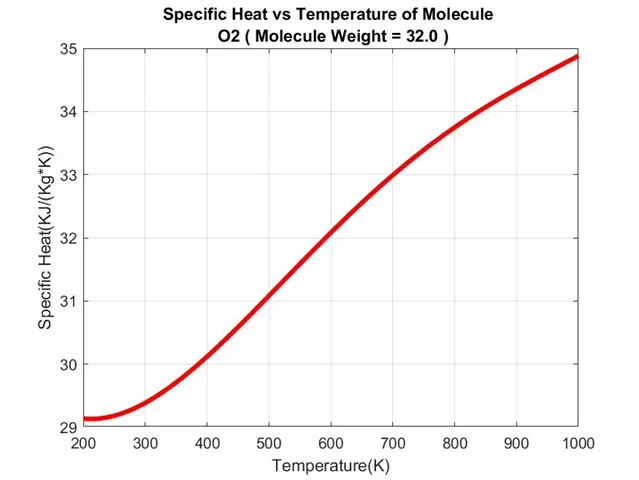
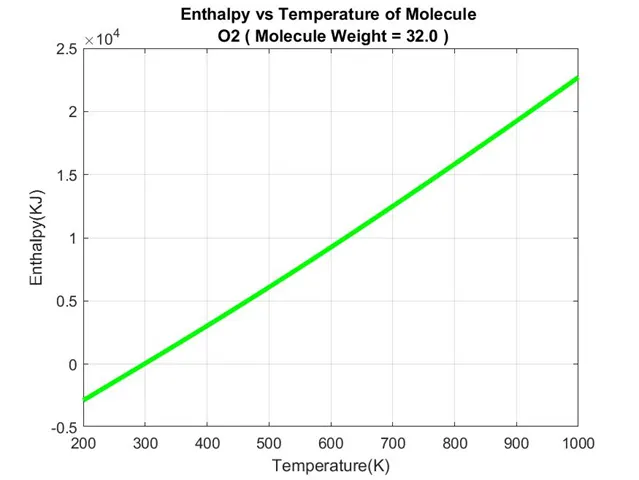
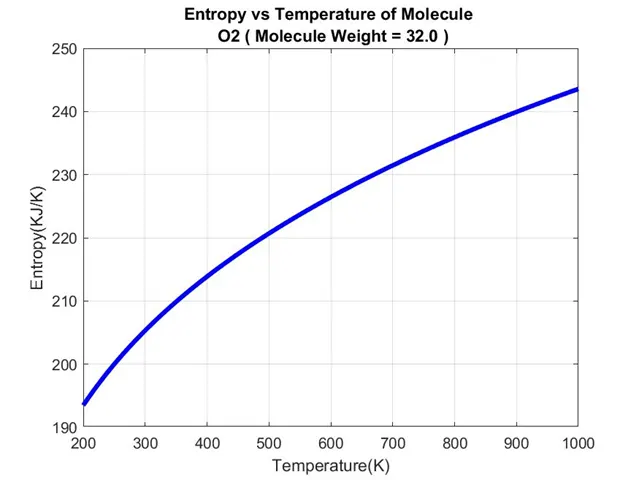
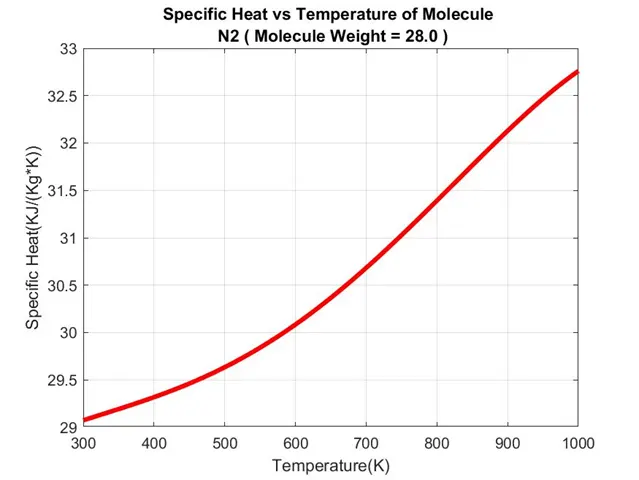
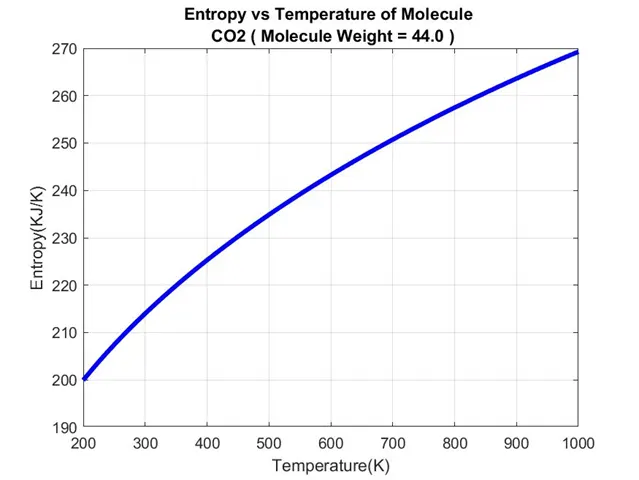
- Plot the Cp, Enthalpy, and Entropy for the local temperature range
(low temperature : high temperature) specific for each species. - Save the plots as images with appropriate names and dump them in separate folders for each species with a suitable name. All these should be generated automatically.
- The main program that you will submit will just take the "THERMO.dat" file as an input and generate Cp, H, and S plots.
- Please write a detailed report to describe your logic.
- Attachments needed:
- Screenshot of the window where all the folders are saved.
- Plots for o2, N2, and Co2 species (your program should be case insensitive if it is going to take the species name as an input).
- The workflow of the project is explained in the further part of this file.
4. BODY OF THE CONTENT:
- MATLAB Programming language is used.
- Before starting the programming or coding of the program first we need to observe the "THERMO.dat" properly.
- A window-snap of the "THERMO.dat" file is shown below.
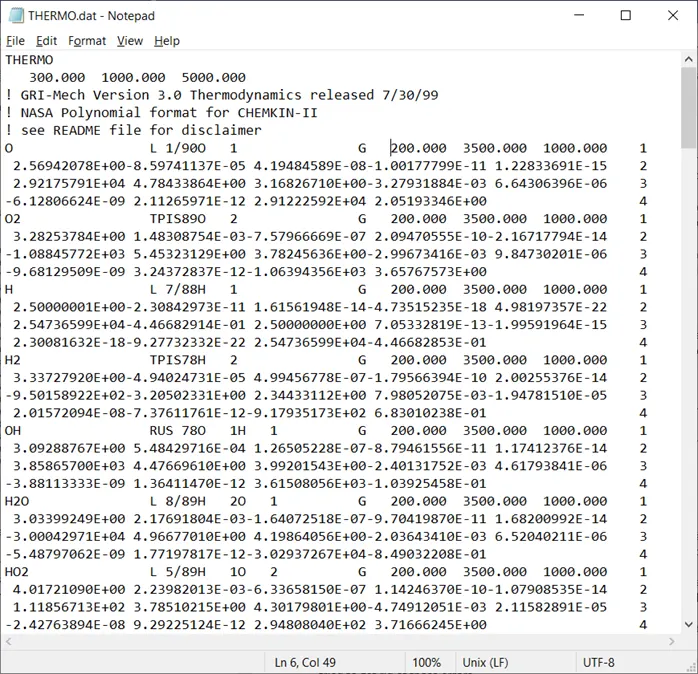
- By carefully observing it we understand that:
- Line No. and Column No. are viewed in the status bar (at the bottom of the window) of the file while opened in notepad.
- 1st Line is a file name.
- 2nd Line has 3 numbers which are Global Low-Mid-High temperature values.
- 3rd-5th Lines are some comment lines with some data.
- Then from the 6th Line onwards there is a pattern till 217th Line for every 4 consecutive lines repeating.
- When we observe these 4 lines column 80th from that line, it tells us the sequence of these 4 lines as 1-2-3-4.
- 1st Line of it has Molecule/Species Name at start of a line from 1st column to max 6th column considering every Molecule/Species Name from the "THERMO.dat" file, then some kind of data/information then at the end it has 3 numeric values starting from 49th column to 75th column, which are the Local Low-Mid-High temperature values respectively of the Molecule/Species.
- 2nd Line contains 5 numeric values from the 1st column to 75th each with a length of 15 columns, these are the first 5 coefficient values we need to solve Thermal Equations.
- The 3rd Line contains 5 numeric values from the 1st column to 75th each with a length of 15 columns, these are the next 5 coefficients values we need to solve Thermal Equations.
- The 4th Line contains 4 numeric values from 1st column to 60th each with a length of 15 columns, these are the last 4 coefficients values we need to solve Thermal Equations.
- According to the information provided, among these 14 Coefficients values, we observe the first 7 coefficients are High-Temperature Coefficients values and the next 7 coefficients are Low-Temperature Coefficients values.
- The 218th Line tells us it's “END” of the file data. & Next 5 lines are blank.
- Main Program/Code
- File Name : NASA_Thermo.m
- The Program/Code is explained in sections below to better understand the working of the program.
- A tic & toc commands are used at the start and end of the program to collect - Program Run Time to Collect & Write Data from File.
- Step-Wise Explanation is provided in the code by using next to its comments.
- Reading & Collecting data from the first 5 lines.
- Command “tic” is used to start the stopwatch.
- Using “fopen” command is used to open the "THERMO.dat" file and obtain information from the file.
- In these 5 lines as observations made earlier, we first collect the Title of the file.
- Then by using the “strsplit” command we collect the Global Low-Mid-High Temperature Values & then by using the “str2num” command to save them under global low-mid-high temp variables respectively.
- Then we skip the next 3 lines as it just contains comments and some information which we don”t need to extract.
%Parsing NASA Thermodynamic Data

close all

clear all

clc


tic; %Start Stopwatch Timer.

f1 = fopen('THERMO.dat','r'); %Open file, & read information from it.


%Collecting Title.

Title=fgetl(f1); %Read line from File.


%Collecting Global Temperature Range Values.

txt_1=fgetl(f1); %Read line from File.

g_temp=strsplit(txt_1,' '); %Splitting string at specified delimiter.

global_low_temp=str2num(g_temp{2}); %Collecting Global Low Temperature Value & converting string to number.

global_mid_temp=str2num(g_temp{3}); %Collecting Global Mid Temperature Value & converting string to number.

global_high_temp=str2num(g_temp{4}); %Collecting Global High Temperature Value & converting string to number.


%Skipping Comments Line.

fgetl(f1); %Read line from File.

fgetl(f1); %Read line from File.

fgetl(f1); %Read line from File.- Since the next 212 lines contain the data of molecules in the pattern of 4 lines each for each Molecule/Species – A “FOR” loop is used to repeat the procedure for each Molecule/Species to calculate its Molecular Weight, Thermal Values, & then Plot Graph of it.
- This “FOR” loop is repeated for 212/4 = 53 times i.e. there is a total of 53 molecules of data in this file.
- The upcoming sections i.e. from section 2nd to section 7th are all inside the “FOR” loop to repeat the procedure for every Molecule/Species.
- The “FOR” loop starts from here.
for i=1:53 %Using 'FOR' loop to collect and Generate Outputs for Each Molecule/Species.- Reading the Molecule/Species Information Line.
- Using the “fgetl” command we collect the information of the 1st line from these 4 lines and store it under the variable “l1”.
- According to observations made earlier, from the start of the line i.e. from 1st column to till max 6th column, we get Molecule/Species name, and then from 49th column to 75th column, we get its Local Low-Mid-High temperature values respectively.
- So we use the command “strsplit” command to split the line data into sections and the “append” command only to collect information about names and their temperature range values and store it under the “L1” variable.
- Then by using the “string” & “str2num” command we save molecule/species name and its local low-mid-high temperature values under its separate respective variables.
    %Reading the Molecule/Species Information Line.

    l1=fgetl(f1); %Read line from File & Saving it as variable 'l1'.

    L1=strsplit(append(l1(1:15),l1(49:75)),' '); %Splitting string at specified delimiter & Collecting Molecule/Species name and its Global Temperature Values.

    Molecules(i,:)=string(L1{1}); %Collecting Molecules/Species Name & converting it into string.

    local_low_temp(i,:)=str2num(L1{2}); %Collecting Local Low Temperature Value & converting string to number.

    local_mid_temp(i,:)=str2num(L1{3}); %Collecting Local Mid Temperature Value & converting string to number.

local_high_temp(i,:)=str2num(L1{4}); %Collecting Local High Temperature Value & converting string to number.- Reading the next 3 Coefficients Lines.
- Using the “fgetl” command we collect the information of these 3 lines from these 4 lines and store it under the variable l2, l3, l4 variables respectively.
    %Reading the Coefficient lines.

    l2=fgetl(f1); %Read line from File & Saving it as variable 'l2'.

    l3=fgetl(f1); %Read line from File & Saving it as variable 'l3'.

l4=fgetl(f1); %Read line from File & Saving it as variable 'l4'.- Collecting the Coefficients values from lines.
- According to observations made earlier, there are 5 variables sequentially each with a size of 15 columns and without any gap/space between them, and similarly, 5 variables and 4 variables are there in the next 2 lines.
- So by using the “str2num” command and knowing the location and size of the variable we extract these 14 variables values and save them under the variables name from a01 to a014 each respectively.
- The first 7 variables are high-temperature variables and the next 7 variables are low-temperature variables of the respective molecule/species.
    %Colleting the Coefficients data from lines.

    %First 7 are High-Temperature Coefficients.

    a01(i,:)=str2num(l2(01:15)); %Collecting Variable Value & converting string to number.

    a02(i,:)=str2num(l2(16:30)); %Collecting Variable Value & converting string to number.

    a03(i,:)=str2num(l2(31:45)); %Collecting Variable Value & converting string to number.

    a04(i,:)=str2num(l2(46:60)); %Collecting Variable Value & converting string to number.

    a05(i,:)=str2num(l2(61:75)); %Collecting Variable Value & converting string to number.

    a06(i,:)=str2num(l3(01:15)); %Collecting Variable Value & converting string to number.

    a07(i,:)=str2num(l3(16:30)); %Collecting Variable Value & converting string to number.


    %Second 7 are Low-Temperature Coefficients.

    a08(i,:)=str2num(l3(31:45)); %Collecting Variable Value & converting string to number.

    a09(i,:)=str2num(l3(46:60)); %Collecting Variable Value & converting string to number.

    a10(i,:)=str2num(l3(61:75)); %Collecting Variable Value & converting string to number.

    a11(i,:)=str2num(l4(01:15)); %Collecting Variable Value & converting string to number.

    a12(i,:)=str2num(l4(16:30)); %Collecting Variable Value & converting string to number.

    a13(i,:)=str2num(l4(31:45)); %Collecting Variable Value & converting string to number.

a14(i,:)=str2num(l4(46:60)); %Collecting Variable Value & converting string to number.- Calculating Thermal Values for each Molecule/Species.
- According to formulas listed in GOVERNING EQUATIONS earlier, to calculate the thermal values of molecule we need the values of the universal gas constant, temperature values & coefficients values.
- So then providing R=8.314, we provide Universal Gas Constant.
- Using the “linspace” command we create 500 temperature values ranging from local low temperature to local high temperature of the respective molecule/species.
- And in the earlier section, we have already collected the coefficient values required to solve the thermal equation.
- Using the “FOR” loop we calculate the thermal values for each temperature value between local low temperature & local high temperature.
- Since there are 7 coefficients each for low & high temperature by differentiating it by local mid-temperature, we use the “IF” condition to compare the temperature and then using the coefficients according to it.
    %Calculating Thermal Values for each Molecule/Species.

    R=8.314; %Universal Gas Constant for Calculating Other Thermal Values.

    temp(i,:)=linspace(local_low_temp(i,:),local_high_temp(i,:),500); %Creating temperature values to plot Graphs.

    for j=1:500 %Using 'FOR' loop to calculate Thermal Values for each temperature value within a given range.

        if temp(i,j)<=local_mid_temp(i,:) %Using 'IF' loop to check temperature value is lower or higher, and to solve equations depending on the condition.

            Cp(i,j)=R*(a08(i)+a09(i)*temp(i,j)+a10(i)*temp(i,j)^2+a11(i)*temp(i,j)^3+a12(i)*temp(i,j)^4); %Equation to Calculate Specific Heat(Cp) under the given conditions.

            H(i,j)=R*temp(i,j)*(a08(i)+[a09(i)*temp(i,j)]/2+[a10(i)*temp(i,j)^2]/3+[a11(i)*temp(i,j)^3]/4+[a12(i)*temp(i,j)^4]/5+a13(i)/temp(i,j)); %Equation to Calculate Enthalpy(H) under the given conditions.

            S(i,j)=R*(a08(i)*log(temp(i,j))+a09(i)*temp(i,j)+[a10(i)*temp(i,j)^2]/2+[a11(i)*temp(i,j)^3]/3+[a12(i)*temp(i,j)^4]/4+a14(i)); %Equation to Calculate Entropy(S) under the given conditions.

        else %Using ELSE to solve the equations on another condition.

            Cp(i,j)=R*(a01(i)+a02(i)*temp(i,j)+a03(i)*temp(i,j)^2+a04(i)*temp(i,j)^3+a05(i)*temp(i,j)^4); %Equation to Calculate Specific Heat(Cp) under the given conditions.

            H(i,j)=R*temp(i,j)*(a01(i)+[a02(i)*temp(i,j)]/2+[a03(i)*temp(i,j)^2]/3+[a04(i)*temp(i,j)^3]/4+[a05(i)*temp(i,j)^4]/5+a06(i)/temp(i,j)); %Equation to Calculate Enthalpy(H) under the given conditions.

            S(i,j)=R*(a01(i)*log(temp(i,j))+a02(i)*temp(i,j)+[a03(i)*temp(i,j)^2]/2+[a04(i)*temp(i,j)^3]/3+[a05(i)*temp(i,j)^4]/4+a07(i)); %Equation to Calculate Entropy(S) under the given conditions.

        end %Ending 'IF' loop.

    end %Ending 'FOR' loop.
- Calculating the weight of Molecule/Species.
- First, we need to observe every molecule/species from the “THERMO.dat” file and understand which atoms are used to form all the molecules.
- After knowing every atom from every molecule/species we create the matrix for that atom's list and also create the matrix of its atomic weight respectively.
- Using “char” we collect each character from the molecule/species name sequentially.
- We use two “FOR” loops to repeat the program check each character from molecule/species with each atom from the list of Atoms.
- Using “IF” & “strcmpi” we compare each character from the Molecule/Species name to each atom from the Atoms matrix, and if the value returns to be true we update the molecule weight according to its respective atom and its weight.
- After comparing with the atoms, we end the second “FOR” loop. And we are still inside the 1st “FOR” loop.
- There are also some no. in the molecule/species name which represents the no. atom in that molecule of the atom just before the no.
- So, if no. is there and it will be always greater than 1, we need to update the molecule/species weight.
- By using the “str2num” command we store the no. value and compare it using the “IF” command, if it is greater than 1 then we update the molecule/species weight according to it.
- In the “THERMO.dat” there is only one molecule name “AR” and also “AR” atom is not repeated anywhere in the file. While using the “char” command it separates molecule name “AR” into “A” & “R” so while comparing its atoms list, it doesn’t compare it properly.
- So I have used the “IF” command to check if mol==“AR” then its weight will be 40.
    %Calculating weight of Molecule/Species.

    Atoms=["H","C","N","O","AR"]; %Creating Atoms matrix with each atom from file.

    aw=[1 12 14 16 40]; %Creating Atomic weight matrix for each atom from atoms matrix respectively.

    MW(i,:)=0; %Initial Molecule/Species Weight.

    mol=char(Molecules(i)); %Collecting each character from the Molecule/Species name.

    for j=1:length(mol); %Using 'FOR' loop to compare every character with atoms.

        for k=1:length(Atoms); %Using 'FOR' loop to compare character with each atom.

            if strcmpi(mol(j),Atoms(k)); %Using 'IF' loop to compare each character(Case Sensitive) of Molecule/Species with Atoms.

                MW(i,:)=MW(i,:)+aw(k); %Updating Molecule/Species Weight.

                m=k; %Storing value of k

            end %Ending 'IF' loop.

        end %Ending 'FOR' loop.

        n=str2num(mol(j)); %Collecting No. values from Molecule/Species Name.

        if n>1 %Using 'IF' loop to check if no. is greater than 1.

            MW(i,:)=MW(i,:)+aw(m)*(n-1); %Updating Molecule/Species Weight.

        end %Ending 'IF' loop.

        if mol=="AR" %Using 'IF' loop to compare the character of Molecule/Species with Atoms.

            MW(i,:)=40; %Updating Molecule/Species Weight.

        end %Ending 'IF' loop.

end %Ending 'FOR' loop.- Plotting and Saving it into its respective Molecule/Species folder.
- First, we open the directory where the program is saved.
- Then we create the new folder with the name of the respective Molecule/Species & then open that folder.
- After that, we create a 1st figure of plotting Specific Heat vs Temperature of respective molecule/species and then by using “saveas” command we save the figure in molecule/species folder under the name of “Specific Heat”
- Similarly, we plot the 2nd & 3rd figure of Enthalpy vs Temperature & Entropy vs Temperature and save them under the same folder under the name of “Enthalpy” & “Entropy” respectively.
- Now, I have created a data file to save the Thermal Values for each temperature value in table form view of its respective molecule/species under the same folder.
- Here I have open the file using the “fopen” command, naming it “Data of Molecule or Species.txt” and giving it writing permission.
- In the first line, I write its molecule/species name and its molecular weight.
- In the second line, I have written the title for each column with reserving as 20 columns length in the data file for each column title.
- From the next line to the end of the file for each line I have written Temperature value, Specific Heat, Enthalpy, and Entropy sequentially with reserving as 20 columns length in the data file for each Value.
- And then we close the file using the “fclose” command.
- After that, I change the directory back to where the main program file is saved.
    %Plotting and Saving Graphs and Data File of each Molecule/Species into its respective Molecule/Species Folder

    cd('C:UsersamchiDocumentsMATLABChallenges8. Parsing NASA thermodynamic data') %Change current folder.

    Name=sprintf('%s ',Molecules(i)); %Creating character variable of Molecules/Species.

    mkdir(Name) %Making New Folder.

    cd(Name) %Change current folder.


    figure(1); %Figure for Plotting Specific Heat vs Temperature.

    plot(temp(i,:),Cp(i,:),'linewidth',3,'color','r'); %Plotting Specific Heat vs Temperature.

    xlabel('Temperature(K)') %Labelling the X-Axis.

    ylabel('Specific Heat(KJ/(Kg*k))') %Labelling the Y-Axis.

    txt_Cp=sprintf('Specific Heat vs Temperature of Molecule n %s ( Molecule Weight = %3.1f )',Molecules(i),MW(i));  %Text to display as Title.

    title(txt_Cp) %Display Title.

    grid on %Display Axis Grid Lines.

    saveas(figure(1),'Specific Heat.jpg') %Save figure to specific file format.


    figure(2); %Figure for Plotting Enthalpy vs Temperature.

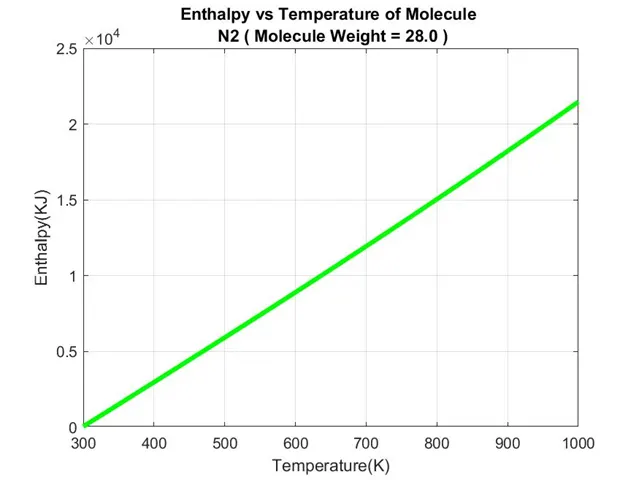
    plot(temp(i,:),H(i,:),'linewidth',3,'color','g'); %Plotting Enthalpy vs Temperature.

    xlabel('Temperature(K)') %Labelling the X-Axis.

    ylabel('Enthalpy(KJ)') %Labelling the Y-Axis.

    txt_H=sprintf('Enthalpy vs Temperature of Molecule n %s ( Molecule Weight = %3.1f )',Molecules(i),MW(i));  %Text to display as Title.

    title(txt_H) %Display Title.

    grid on %Display Axis Grid Lines.

    saveas(figure(2),'Enthalpy.jpg') %Save figure to specific file format.


    figure(3); %Figure for Plotting Entropy vs Temperature.

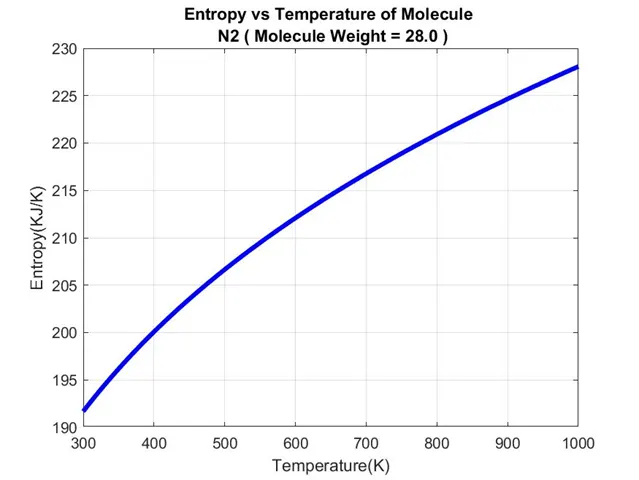
    plot(temp(i,:),S(i,:),'linewidth',3,'color','b'); %Plotting Entropy vs Temperature.

    xlabel('Temperature(K)') %Labelling the X-Axis.

    ylabel('Entropy(KJ/K)') %Labelling the Y-Axis.

    txt_S=sprintf('Entropy vs Temperature of Molecule n %s ( Molecule Weight = %3.1f )',Molecules(i),MW(i));  %Text to display as Title.

    title(txt_S) %Display Title.

    grid on %Display Axis Grid Lines.

    saveas(figure(3),'Entropy.jpg') %Save figure to specific file format.


    f2 = fopen('Data of Molecule or Species.txt','w'); %Open file, & write information in it.

    txt_d=sprintf('Data of Molecule/Species : %s ( Molecule Weight = %3.1f )',Molecules(i),MW(i));  %Text to Print.

    fprintf(f2,txt_d); %Write data to text file.

    fprintf(f2,'n %20s  %20s  %20s  %20s n','Temperature(K)','Specific Heat(KJ/(Kg*K))','Enthalpy(KJ)','Entropy(KJ/K)'); %Write data to text file.

    for j=1:length(temp(i,:)) %Using 'FOR' loop to write multiple similar data.

        fprintf(f2,'%20.10f  %20.10f  %20.10f  %20.10f n',temp(i,j),Cp(i,j),H(i,j),S(i,j)); %Write data to text file.

    end %Ending 'FOR' loop.

    fclose(f2); %Close File.


    cd('C:UsersamchiDocumentsMATLABChallenges8. Parsing NASA thermodynamic data') %Change current folder.
- The “FOR” loop ends now.
end %Ending 'FOR' loop.- Creating and Writing data file of Molecular Weight.
- To write the data file of Molecular Weight I have used the “fopen” command, naming it “Molecular Weight.txt” and giving it writing permission.
- Since earlier in the program, the Molecule/Species name and its Weight are already saved under its respective variable.
- We just now use the “fprintf” command to print/write the data of each molecule name and its molecular weight respectively.
- And then we close the file using the “fclose” command.
%Creating and Writing data file of Molecular Weight.

f3 = fopen('Molecular Weight.txt','w'); %Open file, & write information in it.

for i=1:length(Molecules) %Using 'FOR' loop to write multiple similar data.

    fprintf(f3,'Molecular Weight of Molecule/Species %6s is %3.0f n',Molecules(i),MW(i)); %Write data to text file.

end %Ending 'FOR' loop.

fclose(f3); %Close File.- Displaying the Molecular Weight of each species in the command window.
- To displaying the molecular weight of each species in the command window I have opened the “Molecular Weight.txt” file by using the command “fopen” and giving it reading permission.
- Using the “FOR” loop to read every line.
- We just now use the “fgetl” command inside the “disp” command to read each line and display it in the command window.
- And then we close the file using the “fclose” command.
%Displaying Molecular Weight of each species in the command window.

f4 = fopen('Molecular Weight.txt','r'); %Open file, & read information from it.

for i=1:length(Molecules) %Using 'FOR' loop to write multiple similar data.

    disp(fgetl(f4)) %Displaying line data.

end %Ending 'FOR' loop.

fclose(f4); %Close File.- At the end of the program now,
- We close the main “THERMO.dat” data file
- Stop the stopwatch timer
- And then display the program runtime in the command window.
fclose(f1); %Close File.

t=toc; %Stop Stopwatch Timer and collect time data.
fprintf('n Program Run Time to Collect & Write Data from File is %4.2f Seconds.n',t) %Displaying time taken to collect data from file.- Now the whole program is shown below.
%Parsing NASA Thermodynamic Data

close all

clear all

clc


tic; %Start Stopwatch Timer.

f1 = fopen('THERMO.dat','r'); %Open file, & read information from it.


%Collecting Title.

Title=fgetl(f1); %Read line from File.


%Collecting Global Temperature Range Values.

txt_1=fgetl(f1); %Read line from File.

g_temp=strsplit(txt_1,' '); %Splitting string at specified delimiter.

global_low_temp=str2num(g_temp{2}); %Collecting Global Low Temperature Value & converting string to number.

global_mid_temp=str2num(g_temp{3}); %Collecting Global Mid Temperature Value & converting string to number.

global_high_temp=str2num(g_temp{4}); %Collecting Global High Temperature Value & converting string to number.


%Skipping Comments Line.

fgetl(f1); %Read line from File.

fgetl(f1); %Read line from File.

fgetl(f1); %Read line from File.


for i=1:53 %Using 'FOR' loop to collect and Generate Outputs for Each Molecule/Species.


    %Reading the Molecule/Species Information Line.

    l1=fgetl(f1); %Read line from File & Saving it as variable 'l1'.

    L1=strsplit(append(l1(1:15),l1(49:75)),' '); %Splitting string at specified delimiter & Collecting Molecule/Species name and its Global Temperature Values.

    Molecules(i,:)=string(L1{1}); %Collecting Molecules/Species Name & converting it into string.

    local_low_temp(i,:)=str2num(L1{2}); %Collecting Local Low Temperature Value & converting string to number.

    local_mid_temp(i,:)=str2num(L1{3}); %Collecting Local Mid Temperature Value & converting string to number.

    local_high_temp(i,:)=str2num(L1{4}); %Collecting Local High Temperature Value & converting string to number.


    %Reading the Coefficient lines.

    l2=fgetl(f1); %Read line from File & Saving it as variable 'l2'.

    l3=fgetl(f1); %Read line from File & Saving it as variable 'l3'.

    l4=fgetl(f1); %Read line from File & Saving it as variable 'l4'.


    %Colleting the Coefficients data from lines.

    %First 7 are High-Temperature Coefficients.

    a01(i,:)=str2num(l2(01:15)); %Collecting Variable Value & converting string to number.

    a02(i,:)=str2num(l2(16:30)); %Collecting Variable Value & converting string to number.

    a03(i,:)=str2num(l2(31:45)); %Collecting Variable Value & converting string to number.

    a04(i,:)=str2num(l2(46:60)); %Collecting Variable Value & converting string to number.

    a05(i,:)=str2num(l2(61:75)); %Collecting Variable Value & converting string to number.

    a06(i,:)=str2num(l3(01:15)); %Collecting Variable Value & converting string to number.

    a07(i,:)=str2num(l3(16:30)); %Collecting Variable Value & converting string to number.


    %Second 7 are Low-Temperature Coefficients.

    a08(i,:)=str2num(l3(31:45)); %Collecting Variable Value & converting string to number.

    a09(i,:)=str2num(l3(46:60)); %Collecting Variable Value & converting string to number.

    a10(i,:)=str2num(l3(61:75)); %Collecting Variable Value & converting string to number.

    a11(i,:)=str2num(l4(01:15)); %Collecting Variable Value & converting string to number.

    a12(i,:)=str2num(l4(16:30)); %Collecting Variable Value & converting string to number.

    a13(i,:)=str2num(l4(31:45)); %Collecting Variable Value & converting string to number.

    a14(i,:)=str2num(l4(46:60)); %Collecting Variable Value & converting string to number.


    %Calculating Thermal Values for each Molecule/Species.

    R=8.314; %Universal Gas Constant for Calculating Other Thermal Values.

    temp(i,:)=linspace(local_low_temp(i,:),local_high_temp(i,:),500); %Creating temperature values to plot Graphs.

    for j=1:500 %Using 'FOR' loop to calculate Thermal Values for each temperature value within a given range.

        if temp(i,j)<=local_mid_temp(i,:) %Using 'IF' loop to check temperature value is lower or higher, and to solve equations depending on the condition.

            Cp(i,j)=R*(a08(i)+a09(i)*temp(i,j)+a10(i)*temp(i,j)^2+a11(i)*temp(i,j)^3+a12(i)*temp(i,j)^4); %Equation to Calculate Specific Heat(Cp) under the given conditions.

            H(i,j)=R*temp(i,j)*(a08(i)+[a09(i)*temp(i,j)]/2+[a10(i)*temp(i,j)^2]/3+[a11(i)*temp(i,j)^3]/4+[a12(i)*temp(i,j)^4]/5+a13(i)/temp(i,j)); %Equation to Calculate Enthalpy(H) under the given conditions.

            S(i,j)=R*(a08(i)*log(temp(i,j))+a09(i)*temp(i,j)+[a10(i)*temp(i,j)^2]/2+[a11(i)*temp(i,j)^3]/3+[a12(i)*temp(i,j)^4]/4+a14(i)); %Equation to Calculate Entropy(S) under the given conditions.

        else %Using ELSE to solve the equations on another condition.

            Cp(i,j)=R*(a01(i)+a02(i)*temp(i,j)+a03(i)*temp(i,j)^2+a04(i)*temp(i,j)^3+a05(i)*temp(i,j)^4); %Equation to Calculate Specific Heat(Cp) under the given conditions.

            H(i,j)=R*temp(i,j)*(a01(i)+[a02(i)*temp(i,j)]/2+[a03(i)*temp(i,j)^2]/3+[a04(i)*temp(i,j)^3]/4+[a05(i)*temp(i,j)^4]/5+a06(i)/temp(i,j)); %Equation to Calculate Enthalpy(H) under the given conditions.

            S(i,j)=R*(a01(i)*log(temp(i,j))+a02(i)*temp(i,j)+[a03(i)*temp(i,j)^2]/2+[a04(i)*temp(i,j)^3]/3+[a05(i)*temp(i,j)^4]/4+a07(i)); %Equation to Calculate Entropy(S) under the given conditions.

        end %Ending 'IF' loop.

    end %Ending 'FOR' loop.


    %Calculating weight of Molecule/Species.

    Atoms=["H","C","N","O","AR"]; %Creating Atoms matrix with each atom from file.

    aw=[1 12 14 16 40]; %Creating Atomic weight matrix for each atom from atoms matrix respectively.

    MW(i,:)=0; %Initial Molecule/Species Weight.

    mol=char(Molecules(i)); %Collecting each character from the Molecule/Species name.

    for j=1:length(mol); %Using 'FOR' loop to compare every character with atoms.

        for k=1:length(Atoms); %Using 'FOR' loop to compare character with each atom.

            if strcmpi(mol(j),Atoms(k)); %Using 'IF' loop to compare each character(Case Sensitive) of Molecule/Species with Atoms.

                MW(i,:)=MW(i,:)+aw(k); %Updating Molecule/Species Weight.

                m=k; %Storing value of k

            end %Ending 'IF' loop.

        end %Ending 'FOR' loop.

        n=str2num(mol(j)); %Collecting No. values from Molecule/Species Name.

        if n>1 %Using 'IF' loop to check if no. is greater than 1.

            MW(i,:)=MW(i,:)+aw(m)*(n-1); %Updating Molecule/Species Weight.

        end %Ending 'IF' loop.

        if mol=="AR" %Using 'IF' loop to compare the character of Molecule/Species with Atoms.

            MW(i,:)=40; %Updating Molecule/Species Weight.

        end %Ending 'IF' loop.

    end %Ending 'FOR' loop.


    %Plotting and Saving Graphs and Data File of each Molecule/Species into its respective Molecule/Species Folder

    cd('C:UsersamchiDocumentsMATLABChallenges8. Parsing NASA thermodynamic data') %Change current folder.

    Name=sprintf('%s ',Molecules(i)); %Creating character variable of Molecules/Species.

    mkdir(Name) %Making New Folder.

    cd(Name) %Change current folder.


    figure(1); %Figure for Plotting Specific Heat vs Temperature.

    plot(temp(i,:),Cp(i,:),'linewidth',3,'color','r'); %Plotting Specific Heat vs Temperature.

    xlabel('Temperature(K)') %Labelling the X-Axis.

    ylabel('Specific Heat(KJ/(Kg*K))') %Labelling the Y-Axis.

    txt_Cp=sprintf('Specific Heat vs Temperature of Molecule n %s ( Molecule Weight = %3.1f )',Molecules(i),MW(i));  %Text to display as Title.

    title(txt_Cp) %Display Title.

    grid on %Display Axis Grid Lines.

    saveas(figure(1),'Specific Heat.jpg') %Save figure to specific file format.


    figure(2); %Figure for Plotting Enthalpy vs Temperature.

    plot(temp(i,:),H(i,:),'linewidth',3,'color','g'); %Plotting Enthalpy vs Temperature.

    xlabel('Temperature(K)') %Labelling the X-Axis.

    ylabel('Enthalpy(KJ)') %Labelling the Y-Axis.

    txt_H=sprintf('Enthalpy vs Temperature of Molecule n %s ( Molecule Weight = %3.1f )',Molecules(i),MW(i));  %Text to display as Title.

    title(txt_H) %Display Title.

    grid on %Display Axis Grid Lines.

    saveas(figure(2),'Enthalpy.jpg') %Save figure to specific file format.


    figure(3); %Figure for Plotting Entropy vs Temperature.

    plot(temp(i,:),S(i,:),'linewidth',3,'color','b'); %Plotting Entropy vs Temperature.

    xlabel('Temperature(K)') %Labelling the X-Axis.

    ylabel('Entropy(KJ/K)') %Labelling the Y-Axis.

    txt_S=sprintf('Entropy vs Temperature of Molecule n %s ( Molecule Weight = %3.1f )',Molecules(i),MW(i));  %Text to display as Title.

    title(txt_S) %Display Title.

    grid on %Display Axis Grid Lines.

    saveas(figure(3),'Entropy.jpg') %Save figure to specific file format.


    f2 = fopen('Data of Molecule or Species.txt','w'); %Open file, & write information in it.

    txt_d=sprintf('Data of Molecule/Species : %s ( Molecule Weight = %3.1f )',Molecules(i),MW(i));  %Text to Print.

    fprintf(f2,txt_d); %Write data to text file.

    fprintf(f2,'n %20s  %20s  %20s  %20s n','Temperature(K)','Specific Heat(KJ/(Kg*K))','Enthalpy(KJ)','Entropy(KJ/K)'); %Write data to text file.

    for j=1:length(temp(i,:)) %Using 'FOR' loop to write multiple similar data.

        fprintf(f2,'%20.10f  %20.10f  %20.10f  %20.10f n',temp(i,j),Cp(i,j),H(i,j),S(i,j)); %Write data to text file.

    end %Ending 'FOR' loop.

    fclose(f2); %Close File.


    cd('C:UsersamchiDocumentsMATLABChallenges8. Parsing NASA thermodynamic data') %Change current folder.


end %Ending 'FOR' loop.


%Creating and Writing data file of Molecular Weight.

f3 = fopen('Molecular Weight.txt','w'); %Open file, & write information in it.

for i=1:length(Molecules) %Using 'FOR' loop to write multiple similar data.

    fprintf(f3,'Molecular Weight of Molecule/Species %6s is %3.0f n',Molecules(i),MW(i)); %Write data to text file.

end %Ending 'FOR' loop.

fclose(f3); %Close File.


%Displaying Molecular Weight of each species in the command window.

f4 = fopen('Molecular Weight.txt','r'); %Open file, & read information from it.

for i=1:length(Molecules) %Using 'FOR' loop to write multiple similar data.

    disp(fgetl(f4)) %Displaying line data.

end %Ending 'FOR' loop.

fclose(f4); %Close File.


fclose(f1); %Close File.


t=toc; %Stop Stopwatch Timer and collect time data.

fprintf('n Program Run Time to Collect & Write Data from File is %4.2f Seconds.n',t) %Displaying time taken to collect data from file.- Results of the program.
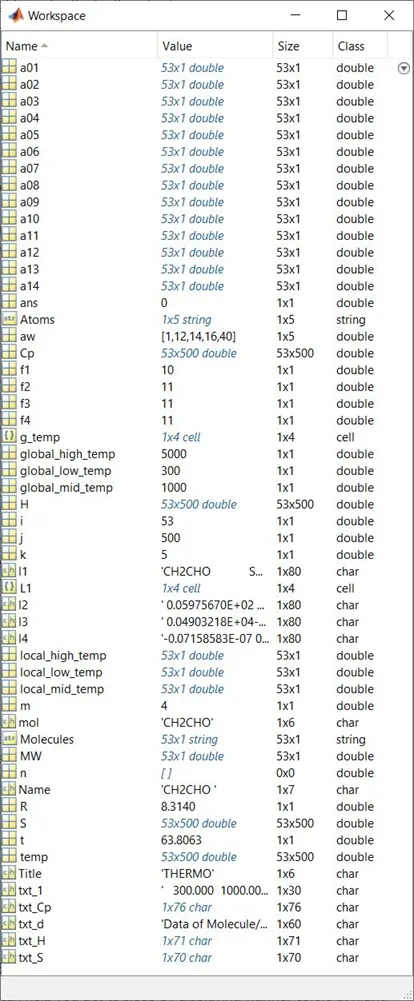
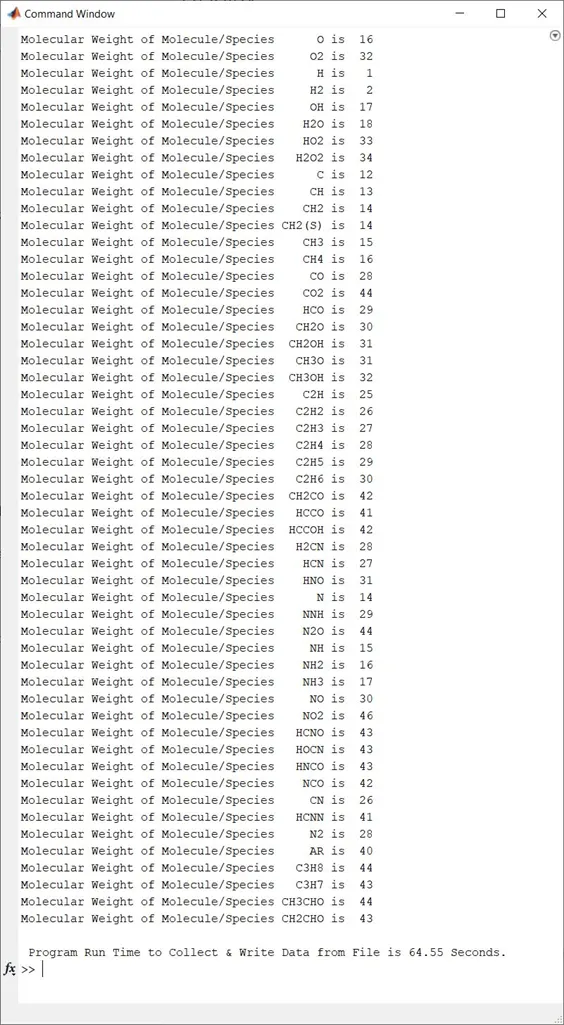
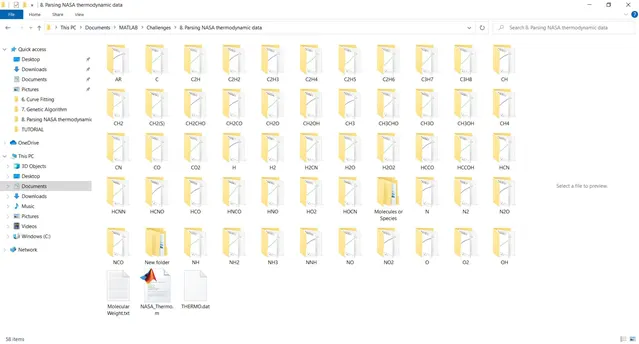
- Plots for O2
- Plots for N2
- Plots for CO2
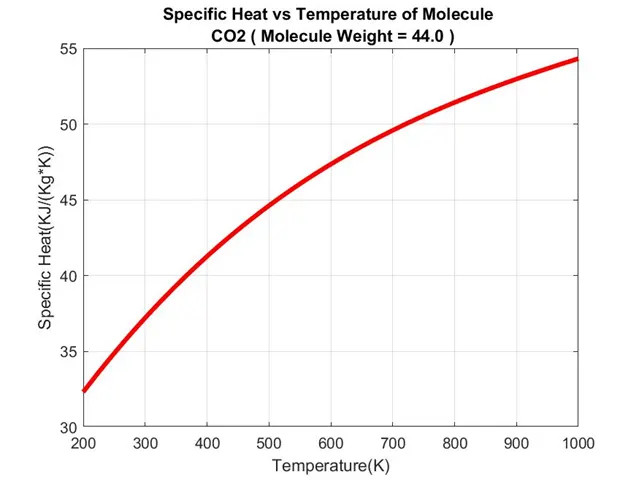
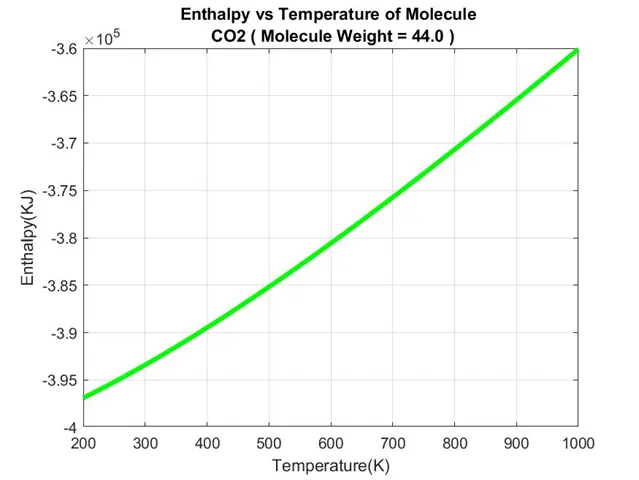
5. CONCLUSION:
- We have successfully extracted the 14 coefficients and calculates the enthalpy, entropy, and specific heats for all the species in the data file, and plot the graphs of it.
- We have also successfully calculated the Molecular Weight of each Molecule/Species and displayed it in the command window.
- I had come across the problem while writing the program, that for some time I used the same variables for a FOR-Loop inside another FOR-Loop and there were no errors but the output results were not accurate, after checking the program many times I realized the above problem and then used the different variables while running FOR-Loop inside the another FOR-Loop the results came to be accurate.
- The limitation of the project is while calculating the molecular weight it cannot contain the molecule/species which has an atom in it that couldn’t contain more than a single letter.
- While performing this project I observe that there is one molecule/species “AR”, which is a Single Atom with two letters and it is never repeated anywhere in the file.
- Since it was only one time in the file, I used the “IF” command to calculate its molecular weight only when the molecule/species was “AR”.
6. REFERENCES: