Week 9- Unsteady moving zones Approach
In this project, a transient simulation on a generic turbomachinery component will be performed in ANSYS Fluent. The main objective is to use the Moving Mesh Approach, the mesh moves along with the geometry hence a new mesh is generated for every timestep.
Geometry & Mesh
The geometry consists of three .msh files, one for each domain. These files are imported into Fluent and appended to each other using the Append tool in Fluent.
This is the geometry seen in Fluent:
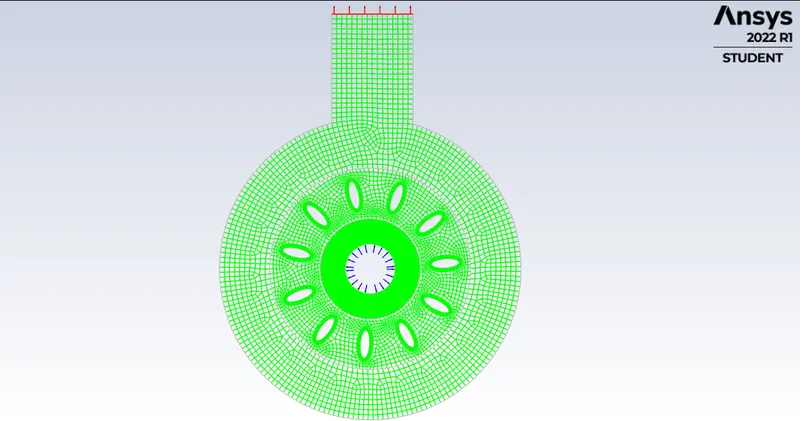
There are three distinct regions, they are:
1. Inner region - this region is stationary, and acts as an intermediate region between the blades and the inlet.
2. Middle region - this region undergoes rotational motion, and contains 10 airfoils placed 36 degrees apart from each other. The blades/airfoils will rotate at a speed of 300 rpm.
3. Outer region - this region is stationary, and acts as a buffer region between the blades and the outlet. There is also an outlet tube for fluid to exit the domain.
Simulation Setup
General
The simulated used a trasient, pressure based and planar solver.
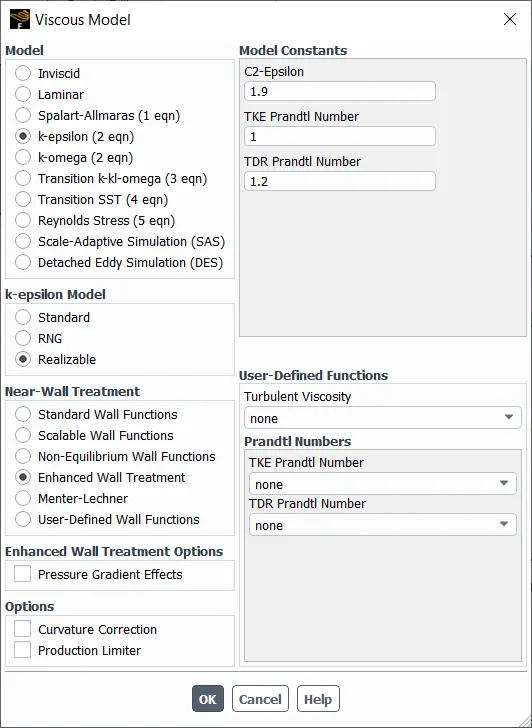
Turbulence Model
k-epsilon Realizable was used as it is excellent at modelling interior rotary flow.
Cell Zones
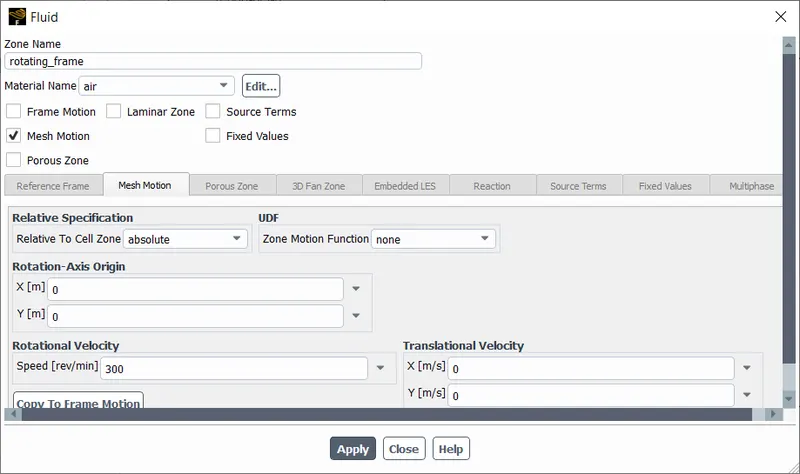
All zones were set to type "fluid" as fluid flow occurs through all of them. The middle zone was set to mesh motion to enable Moving Mesh Approach.
Boundary Conditions
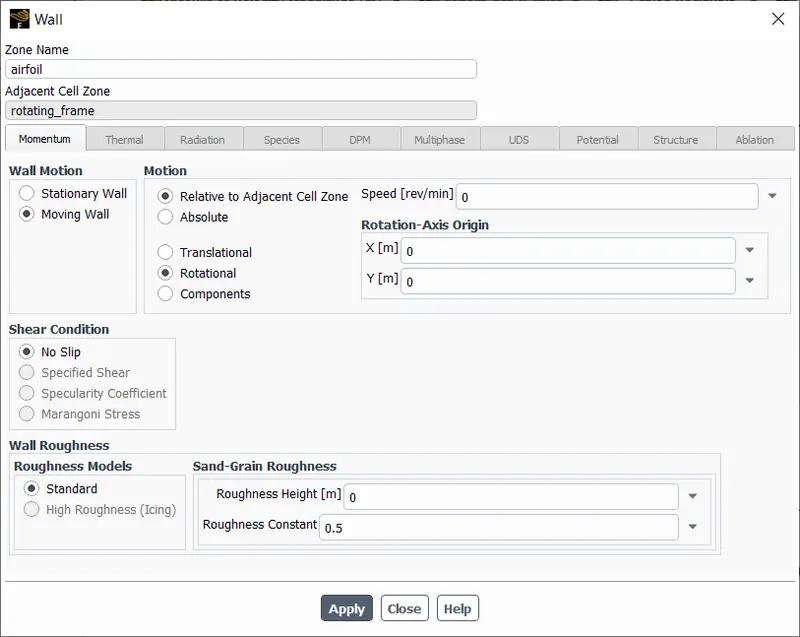
airfoil - set to rotary motion to simulate rotation of blades
inlet - pressure-inlet with a gauge pressure of 0 Pa.
outlet - pressure-outlet with a gauge pressure of 0 Pa.
others were set to interface or wall, depending upon their position in the domain
Mesh Interface
Since the three regions share boundaries with each other (as an interface), it is necessary to include a conforming mesh to ensure proper data flow between the regions. To do that, the mesh regions have to be linked with each other, this is done by Mesh Interfacing.
The mesh interface can be created automatically and checked for errors.
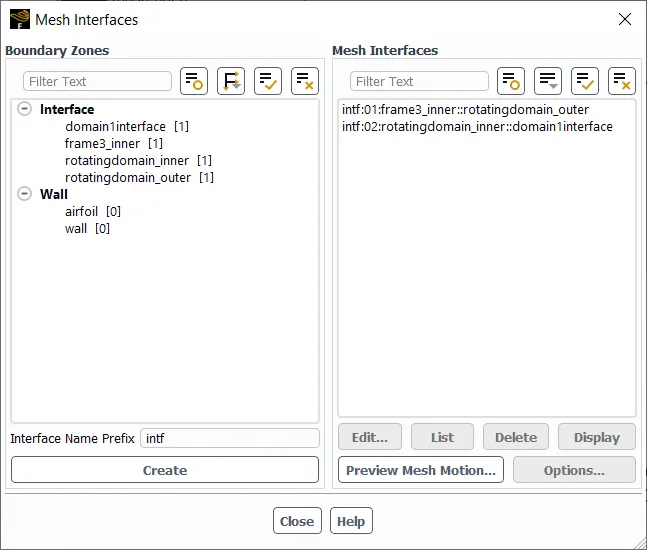
The first interface joins the middle region and the outer region.
The second interface joins the middle region and inner region.
Reports
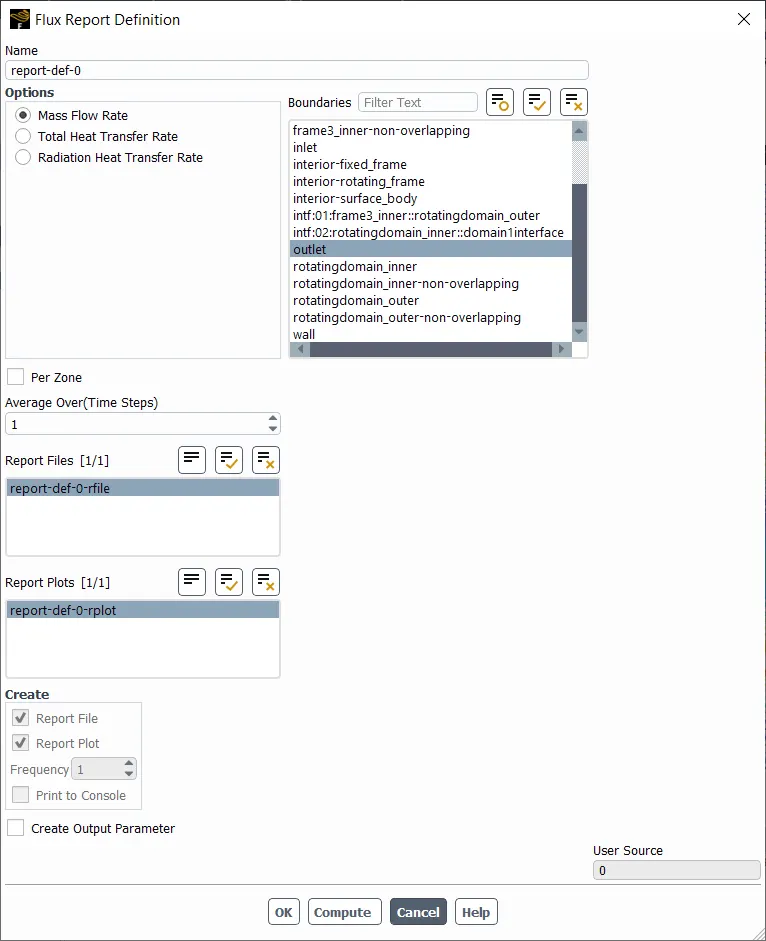
One report, mass flow rate at the outlet was created, for every timestep.
Solution Controls
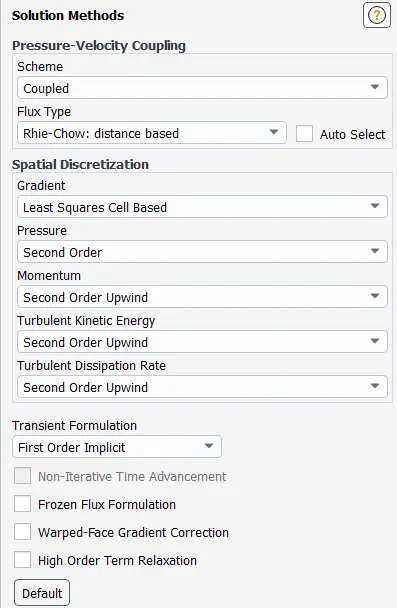
The courant number was limited to 10.
The solution was hybrid initalised and performed for 2700 timesteps with a timestep of 0.0002s.
Results
These were taken in Fluent.
Residuals
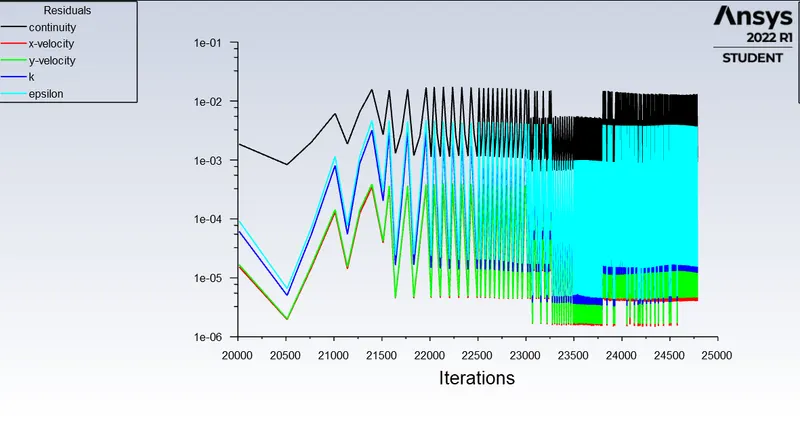
In total, this simulation took 24789 iterations.
Mass Flow Rate at outlet
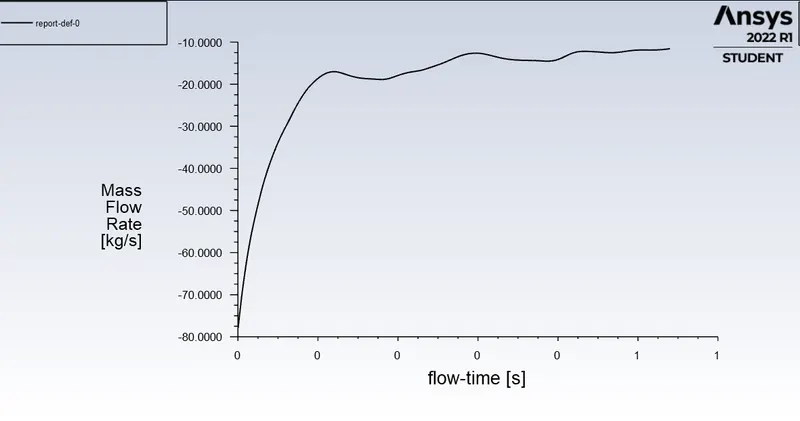
Since the mass flow rate has plateau-ed, it can be safely said that the solution has attained steady state.
Mass Flow Rate at outlet: 11.56`kg//m^3` (negative sign since fluid is leaving the domain)
Final Velocity Contour
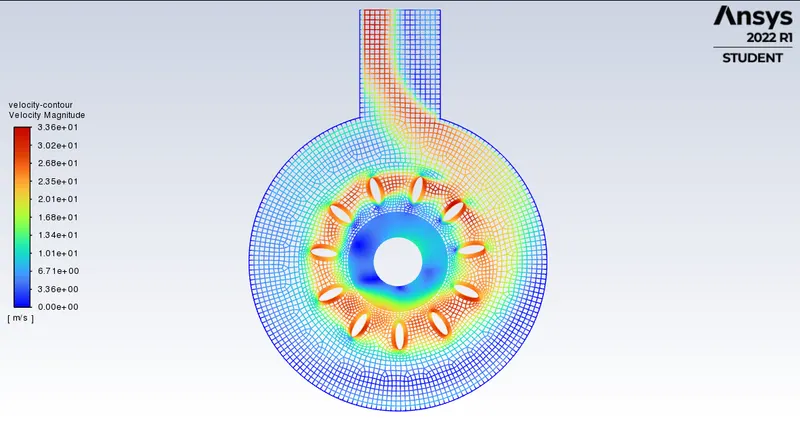
The maximum velocity is aroumd 33.6 m/s, seen near the blades. This is expected as the airfoils rotate, due to flow separation and accumulation the velocity of fluid increases.
The contour also shows the path taken by air into the outlet pipe, and it is seen that most of the space in the domain actually has low to very low magnitudes of velocity and hence, flow.
Final Pressure Contour
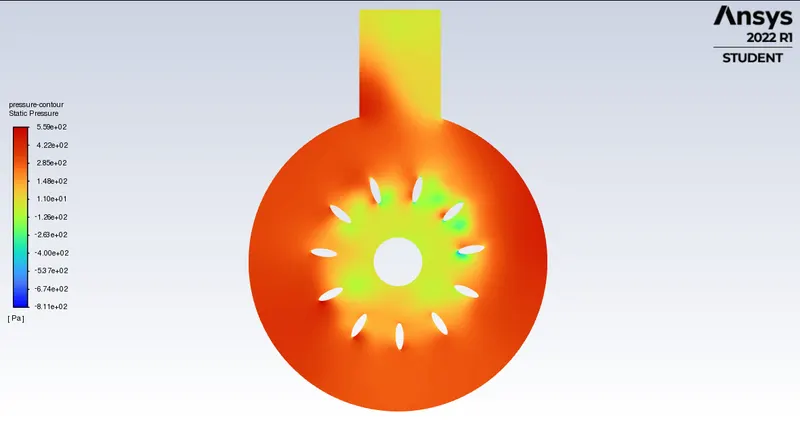
The maximum pressure is around 550Pa and the minimum pressure is around 611 Pa. Most regions have higher pressure due to accumulation of air as the blades rotate, the inlet and outlet have low pressures due to the existence of boundary conditions.
Animation - Velocity Contour
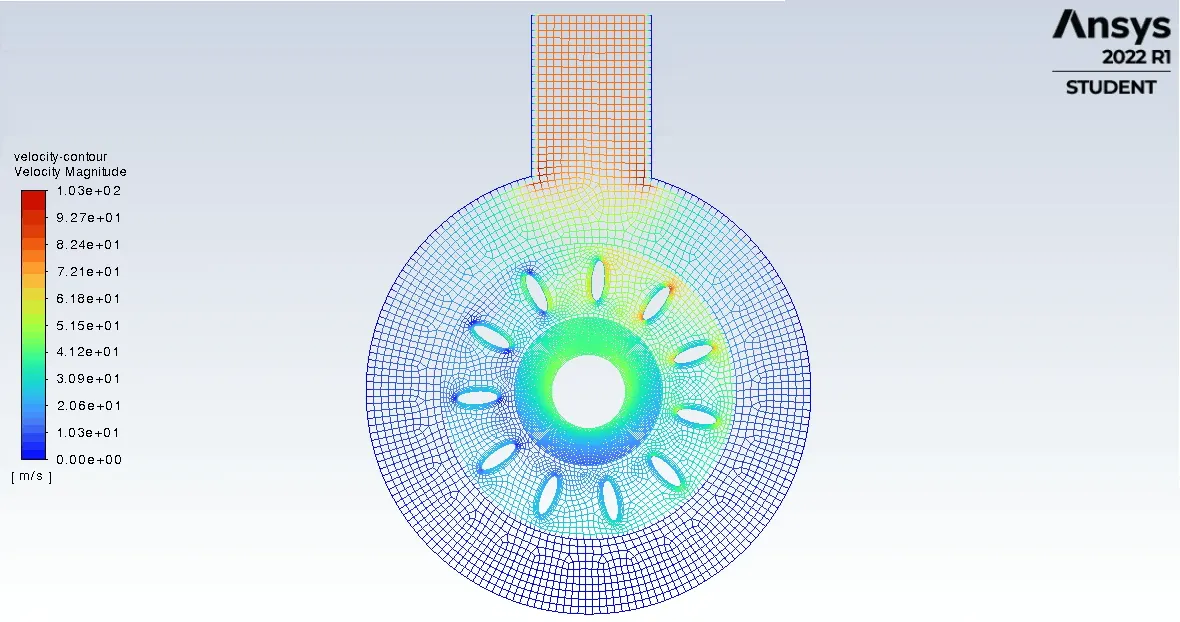
Direct link: https://imgur.com/a/reLWU12
As the solution reaches steady state, the regions where air move can be clearly seen.
Note: Due to extremely high number of timesteps and the data associated with it, ANSYS was unable to generate full animations for all timesteps without crashing several times.
Animation - Pressure Contour
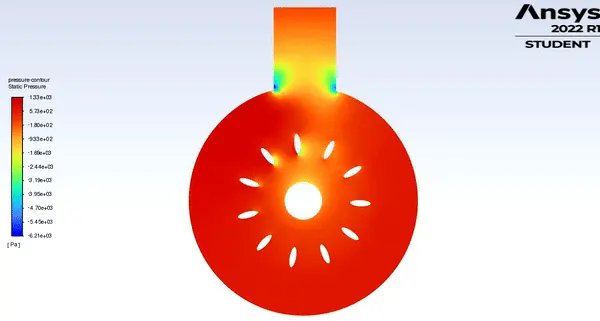
Direct link: https://imgur.com/oW622UZhttps://imgur.com/a/reLWU12https://imgur.com/oW622UZhttps://imgur.com/oW622UZhttps://imgur.com/oW622UZhttps://imgur.com/oW622UZ
Some pressure flucuations are seen but the overall trend is that pressure near the walls are high due to accumulation of fluid flow.
Note: Due to extremely high number of timesteps and the data associated with it, ANSYS was unable to generate full animations for all timesteps without crashing several times.
Conclusion
A Moving Mesh Approach based simulation was performed in ANSYS Fluent, the results were verified qualitatively. It can also be noted that the moving mesh approach takes a lot of time to simulate, compared to the moving reference fram approach. But, as a trade off, the results are more accurate for each interval/timestep.
- Sasikumar Dharmarajhii