Simulation of a backward facing step in OpenFOAM
Objective: To simulate an incompressible-laminar-viscous flow through the backward-facing step geometry and perform a transient simulation.
Case 1 - Simulate the flow without using any grading factor (i.e., GF = 1)
Case 2 - Simulate the flow with a grading factor of 0.2. The cells should be finer near the walls (including the step wall).
Mesh specification
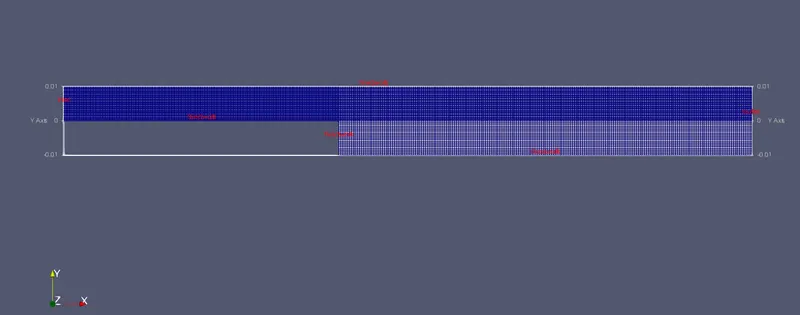
- Number of cells along the x direction (longer dimension) = 200
- Number of cells along with the longer y-direction = 20;
Boundary condition specification
The domain specifications are provided in the following figure.
Geometry Creation:
Let us consider creating the geometry using 5 blocks as shown in the figure below,
Vertices for each block by referring following sketch:
STEPS FOLLOWED IN ORDER TO GET RESULT IN OpenFOAM:
- In order to start the simulation, open the terminal window by ctrl+alt+T or by right-clicking on Terminal.
- Now we are going to simulate our problem in OpenFOAM and we are going to solve our problem using the tutorial file present in OpenFOAM. Type 'tut' to open the tutorial directory and then type 'ls' to see what kind of file is present inside the directory.
- We have to solve incompressible flow simulation for this problem, so select an incompressible directory by typing 'cd' and then type 'ls' in order to explore files in the incompressible folder.
- In the incompressible folder, we see different types of solvers hence for this problem we need a solver for laminar viscous flow therefore here we choose 'icoFoam'.(icoFoam is a solver in OpenFOAM which is used as a transient solver for incompressible, laminar flow of Newtonian fluids. Therefore selecting this folder by typing 'cd icoFoam' and then using the 'ls' command for exploring the folder.
- Here we have two options cavity and elbow, they both are part of the icoFoam solver. Here we use the cavity folder for our required domain. But we are not going to make any changes here in the tutorial section, because OpenFOAM does not allow us to make any changes to their official tutorials.
- So we are going to copy the cavity folder using the 'cp-r cavity' command and paste it into the OpenFOAM run folder by typing 'cp-r cavity $FOAM_RUN/cavity_test'. Now we can make changes to this cavity_test folder which will never affect the OpenFOAM official file. Open cavity_test folder, here we can provide the specification for our block mesh in a system folder.
- There are 4 script file system folders and by opening blockMeshdict, we can create a domain and provide the specification for block mesh. So open this file by typing 'gedit blockMeshdict. Now make required changes in the blockMeshdict script file. First, in this file, we go to lines where hex word is found. These lines specify the faces of the blocks and the number of cells in the X, Y, and Z directions. Here there are 21 vertices and 5 blocks. Also, specify the faces as the inlet, outlet, and walls. Save and close this file.
- The next step is to navigate to the controlDict folder and specify simulation time. Then, we have to define initial values for velocity and pressure. In order to that, going back to the cavity_test folder and select the 'O' folder which stands for initial values. We set an initial boundary condition for pressure and velocity at each face and also update the name of the boundary same as we changed the inlet-outlet name in blockMeshdict.
- At this point, our problem statement is set, we can now proceed to deploy mesh using the 'blockmesh' command, and then we use the 'checkmesh' command to check whether there is an error. After deploying mesh, now we are ready to run our simulation.
- The simulation that we selected was 'icoFoam'. Hence just type 'icoFoam' and the simulation will start. Now, let us view the results in ParaView by using the 'paraFoam' command.
Case 1 - Simulate the flow without using any grading factor (i.e., GF = 1)
BlockMesh file is edited as follows:
/*--------------------------------*- C++ -*----------------------------------*
  =========                 |
  \      /  F ield         | OpenFOAM: The Open Source CFD Toolbox
   \    /   O peration     | Website:  https://openfoam.org
    \  /    A nd           | Version:  8
     \/     M anipulation  |
*---------------------------------------------------------------------------*/
FoamFile
{
    version     2.0;
    format      ascii;
    class       dictionary;
    object      blockMeshDict;
}
// * * * * * * * * * * * * * * * * * * * * * * * * * * * * * * * * * * * * * //

convertToMeters 0.01;

vertices
(
    (0 0 0)    //0
    (8 0 0)    //1
    (8 0.5 0)  //2
    (0 0.5 0)  //3
    (8 1 0)    //4
    (0 1 0)    //5
    (20 1 0)   //6
    (20 0.5 0) //7
    (20 0 0)   //8
    (20 -1 0)  //9
    (8 -1 0)   //10
    (0 0 0.1)  //11
    (8 0 0.1)  //12
    (8 0.5 0.1) //13
    (0 0.5 0.1) //14
    (8 1 0.1)   //15
    (0 1 0.1)   //16
    (20 1 0.1)  //17
    (20 0.5 0.1) //18
    (20 0 0.1)  //19
    (20 -1 0.1)  //20
    (8 -1 0.1)  //21
);

blocks
(
    hex (0 1 2 3 11 12 13 14) (200 20 1) simpleGrading (1 1 1)
    hex (3 2 4 5 14 13 15 16) (200 20 1) simpleGrading (1 1 1)
    hex (2 7 6 4 13 18 17 15) (200 20 1) simpleGrading (1 1 1)
    hex (1 8 7 2 12 19 18 13) (200 20 1) simpleGrading (1 1 1)
    hex (10 9 8 1 21 20 19 12) (200 20 1) simpleGrading (1 1 1)
);

edges
(
);

boundary
(
    inlet
    {
        type wall;
        faces
        (
            (0 11 14 3)
            (3 14 16 5)
        );
    }
    outlet
    {
        type wall;
        faces
        (
            (9 8 19 20)
            (8 7 18 19)
            (7 6 17 18)
        );
    }
    fixedwalls
    {
        type wall;
        faces
        (
            (5 16 15 4)
            (0 1 12 11)
            (4 15 17 6)
            (10 9 20 21)
            (10 21 12 1)
          );
    frontAndBack
    {
        type empty;
        faces
        (
            (11 12 13 14)
            (14 13 15 16)
            (13 18 17 15)
            (12 19 18 13)
            (21 20 19 12)
            (0 3 2 1)
            (3 5 4 2)
            (2 4 6 7)
            (1 2 7 8)
            (10 1 8 9)
        );
    }

       }
);

mergePatchPairs
(
);

// ************************************************************************* //
Controldict file is edited as follows:
/*--------------------------------*- C++ -*----------------------------------*
  =========                 |
  \      /  F ield         | OpenFOAM: The Open Source CFD Toolbox
   \    /   O peration     | Website:  https://openfoam.org
    \  /    A nd           | Version:  8
     \/     M anipulation  |
*---------------------------------------------------------------------------*/
FoamFile
{
    version     2.0;
    format      ascii;
    class       dictionary;
    location    "system";
    object      controlDict;
}
// * * * * * * * * * * * * * * * * * * * * * * * * * * * * * * * * * * * * * //

application     icoFoam;

startFrom       startTime;

startTime       0;

stopAt          endTime;

endTime         0.2;

deltaT          0.00001;

writeControl    timeStep;

writeInterval   20;

purgeWrite      0;

writeFormat     ascii;

writePrecision  6;

writeCompression off;

timeFormat      general;

timePrecision   6;

runTimeModifiable true;


// ************************************************************************* //
Initial Setting for Velocity:
/*--------------------------------*- C++ -*----------------------------------*
  =========                 |
  \      /  F ield         | OpenFOAM: The Open Source CFD Toolbox
   \    /   O peration     | Website:  https://openfoam.org
    \  /    A nd           | Version:  8
     \/     M anipulation  |
*---------------------------------------------------------------------------*/
FoamFile
{
    version     2.0;
    format      ascii;
    class       volVectorField;
    object      U;
}
// * * * * * * * * * * * * * * * * * * * * * * * * * * * * * * * * * * * * * //

dimensions      [0 1 -1 0 0 0 0];

internalField   uniform (0 0 0);

boundaryField
{
    inlet
    {
        type            fixedValue;
        value           uniform (1 0 0);
    }

    outlet
    {
        type            zeroGradient;
    }

    fixedwalls
    {
        type            noSlip;
        value           uniform (0 0 0);
    }

    frontAndBack
    {
        type            empty;
    }
}

// ************************************************************************* //
Initial Setting for Pressure:
/*--------------------------------*- C++ -*----------------------------------*
  =========                 |
  \      /  F ield         | OpenFOAM: The Open Source CFD Toolbox
   \    /   O peration     | Website:  https://openfoam.org
    \  /    A nd           | Version:  8
     \/     M anipulation  |
*---------------------------------------------------------------------------*/
FoamFile
{
    version     2.0;
    format      ascii;
    class       volScalarField;
    object      p;
}
// * * * * * * * * * * * * * * * * * * * * * * * * * * * * * * * * * * * * * //

dimensions      [0 2 -2 0 0 0 0];

internalField   uniform 0;

boundaryField
{
    inlet
    {
        type            zeroGradient;
    }

    outlet
    {
        type            fixedValue;
        value           uniform 0;
    }

    fixedwalls
    {
        type            zeroGradient;
    }

    frontAndBack
    {
        type            empty;
    }
}

// ************************************************************************* //
RESULTS:
1. Without Grading Factor:
1.1 Mesh Grid
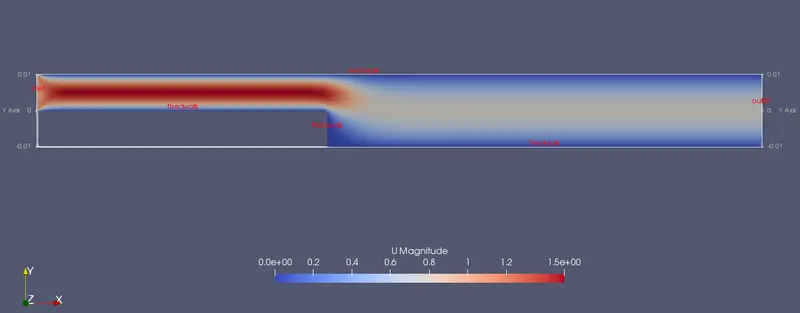
1.2 Velocity Distribution along the domain area:
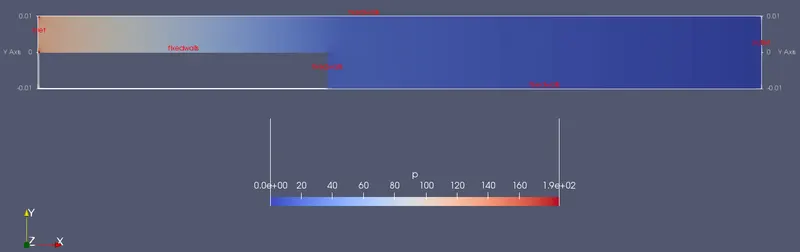
1.3 Pressure Distribution along the domain area:
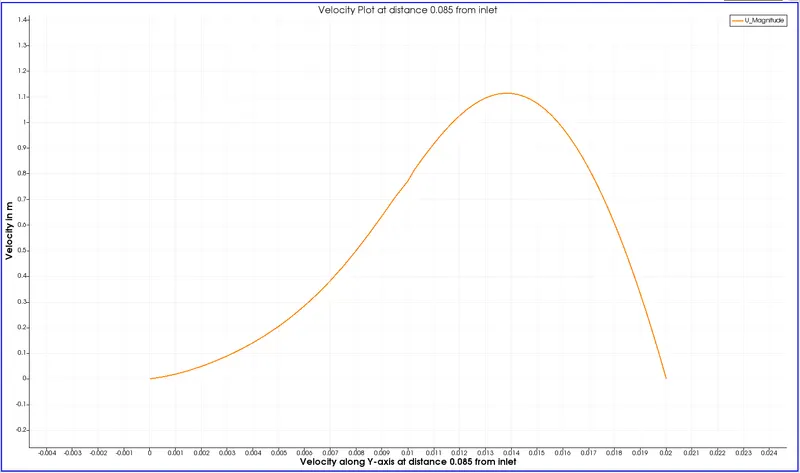
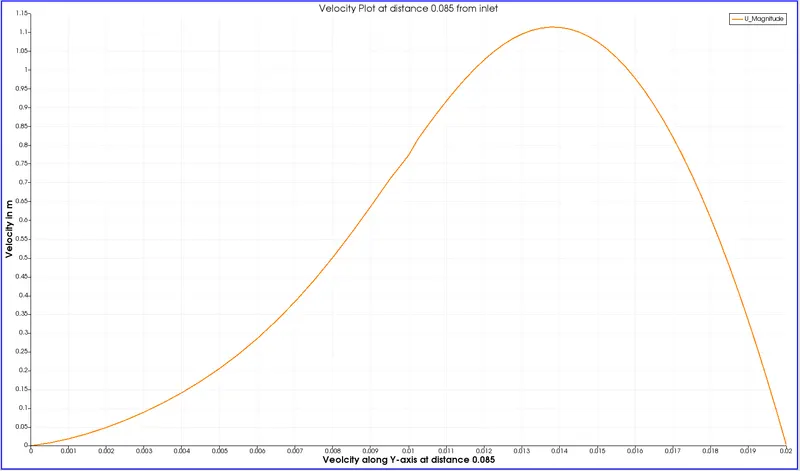
1.4 Velocity plot at distance 0.085 from the inlet:
Case 2 - Simulate the flow with a grading factor of 0.2. The cells should be finer near the walls (including the step wall).
Why Grading/Growth factor is essential for meshing?
- The grading factor is the ratio of the size of the end cell to the size of starting cell.
- This helps in getting more detailing at some positions as per the grading factor.
- The grading factor helps us to increase the cell number at the start or end of the block. The change can be seen clearly with the proper grading factor.
For this case, the procedure is the same as above only change is in the Blockmesh file. Hence editing file for 0.2 grading factor:
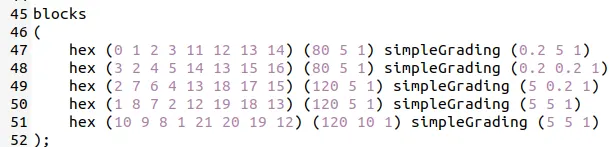
2. With Grading Factor 0.2:
2.1 Mesh Grid:
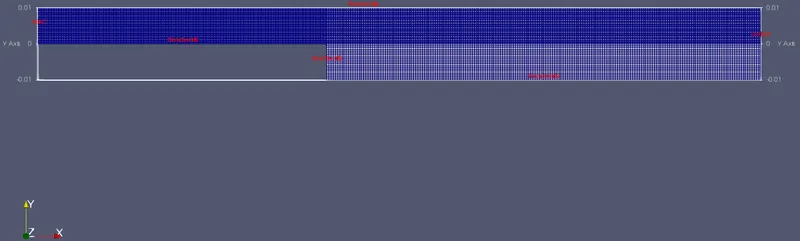
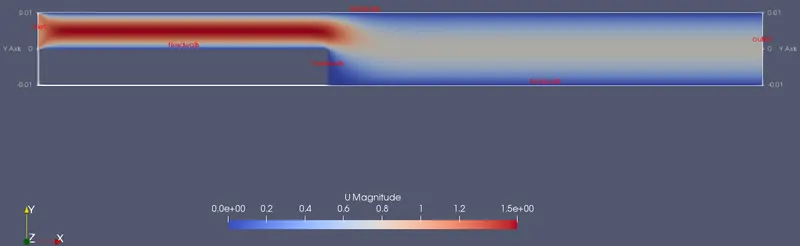
2.2 Velocity Distribution along the domain area:
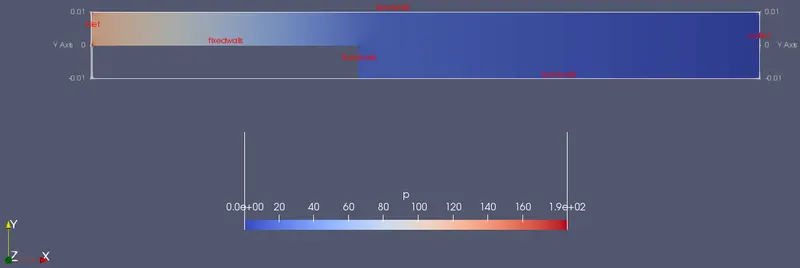
2.3 Pressure Distribution along the domain area:
2.4 Velocity plot at distance 0.085 from the inlet:
References:
https://www.openfoam.com/documentation/user-guide/standard-solvers.php