Simulation of Flow through a pipe in OpenFoam
Objective:
- To simulate an axisymmetric laminar flow by applying the wedge boundary condition.
- Validate your results with the Hagen- Poiseuille's equations for the fully developed flow.
Theory:
In nonideal fluid dynamics, the Hagen–Poiseuille equation, also known as the Hagen–Poiseuille law, Poiseuille law, or Poiseuille equation, is a physical law that gives the pressure drop in an incompressible and Newtonian fluid in laminar flow flowing through a long cylindrical pipe of the constant cross-section.
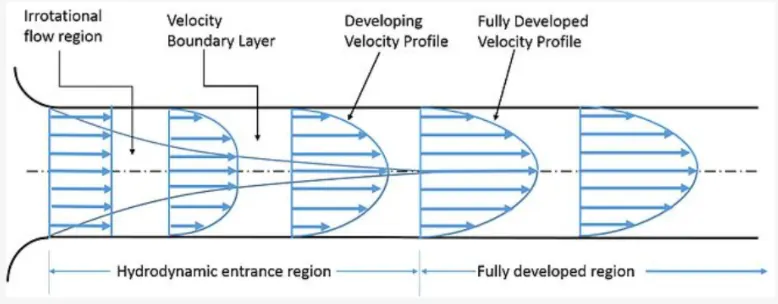
At the entrance, the flow is said to be in the hydrodynamic entrance region where the velocity profile gradually takes shape of a parabola from a straight line. As soon as the parabolic velocity profile becomes state it is said to be in its fully developed state. Hagen–Poiseuille equation, is applicable for fully developed flow to calculate pressure drop.
The pressure drop is given by;
`triangle P= (32muLV)/D^2`
where,
`triangle P` is the pressure drop
`mu` is the dynamic viscosity
'L' is the length of pipe
'V' is Velocity
Assumption made:
Geometry: Axisymmetric
Reynold's number: 2100
Working Fluid: Water
Diameter of pipe: 0.02m
theta: 4
PROCEDURE :
- We start with copying the cavity file from the tutorial to the FOAM_RUN folder.
- In order to run the simulation, we make required changes in the blockMeshDict file, controlDict, and in an initial folder as per the geometry for this problem.
- Here we are using Matlab code to generate the blockMeshDict file and parse it to run folder. After creating the wedge assign the boundary conditions, and also setting the simulation start and end time, and in transport properties enter the kinematic viscosity.
- Run the blockMesh command and then by using checkMesh command check the mesh. Now simulation is ready to run, run it using the icoFoam solver.
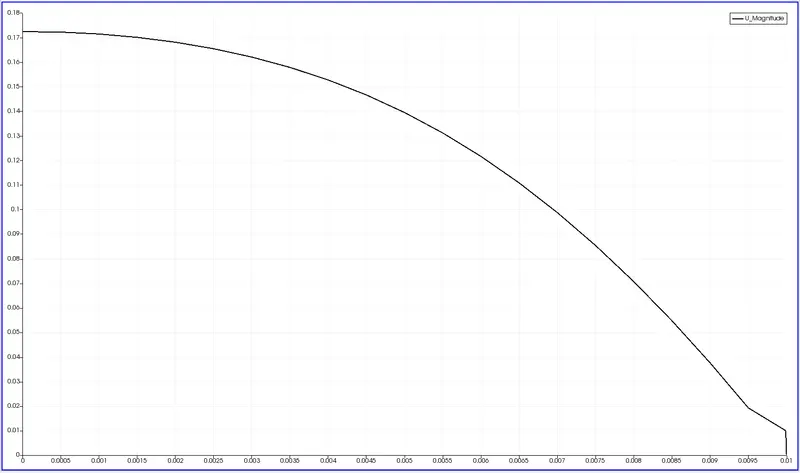
- After the simulation, use paraFoam to view the flow inside the wedge and use plot over line commands to plot the velocity and shear stress changes at a point after the hydrodynamical entry region so that we analyze the fully developed fluid region.
MATLAB Code for blockMeshDict file:
clear all
close all
clc
%Inputs
D=0.02;
r=D/2;
theta=4;
Re=2100;
L_h= 0.05*Re*D;
L_pipe= L_h;
scale=1;

%vertices
v0=[0 0 0];
v1= [0 r*cosd(theta/2) r*sind(theta/2)];
v2= [0 r*cosd(theta/2) -r*sind(theta/2)];
v3= [L_pipe 0 0];
v4=[L_pipe r*cosd(theta/2) r*sind(theta/2)];
v5=[L_pipe r*cosd(theta/2) -r*sind(theta/2)];

%Number of cells
nx=20;
ny=1;
nz=200;

%grading factor
gx=1;
gy=1;
gz=1;

%writing to a file
f1=fopen('blockMeshDict_7','w');

%header region
fprintf(f1,'%sn','/*------------------------------------*-C++ -*-------------------------------*');
fprintf(f1,'%sn','    =========                |');
fprintf(f1,'%sn','          /  F ield        | OpenFOAM: The Open Source CFD Toolbox');
fprintf(f1,'%sn','         /   O peration    | Website: https://openfoam.org');
fprintf(f1,'%sn','        /    A nd          | Version: 8');
fprintf(f1,'%sn','       /     M anipulation |');
fprintf(f1,'%sn','*------------------------------------------------------------------------------*/');
fprintf(f1,'%sn','FoamFile');
fprintf(f1,'%sn','{');
fprintf(f1,'%sn','     version      2.0;');
fprintf(f1,'%sn','     format       ascii;');
fprintf(f1,'%sn','     class        dictionary;');
fprintf(f1,'%sn','     object       blockMeshDict;');
fprintf(f1,'%sn','}');
fprintf(f1,'%sn','// * * * * * * * * * * * * * * * * * * * * * * * * * * * * * * * * * * * * * * * //');
fprintf(f1,'n');

%initial inputs
fprintf(f1,'%s','convertToMeters ');
fprintf(f1,'%g',scale);
fprintf(f1,'%sn',';');
fprintf(f1,'n');
fprintf(f1, '%sn', 'vertices');
fprintf(f1,'(n');
fprintf(f1,'        (%d %d %d)n',v0);
fprintf(f1,'        (%g %g %g)n',v1);
fprintf(f1,'        (%g %g %g)n',v2);
fprintf(f1,'        (%g %g %g)n',v3);
fprintf(f1,'        (%g %g %g)n',v4);
fprintf(f1,'        (%g %g %g)n',v5);
fprintf(f1,');n');
fprintf(f1,'n');
%Defining the wedge block
fprintf(f1,'%sn', 'blocks');
fprintf(f1,'(n');
fprintf(f1,'    %s (%g %g %g %g %g %g %g %g)','hex(0 2 1 0 3 5 4 3)');
fprintf(f1,'%g %g %g)',nx,ny,nz);
fprintf(f1,' %s (%g %g %g)n','simpleGrading',gx,gy,gz);
fprintf(f1,');');
fprintf(f1,'n');

%edges(if needed to add arc,etc.)
fprintf(f1,'%sn', 'edges');
fprintf(f1,'(n');
fprintf(f1, '   %s (%g %g %g)n','arc 1 2' ,0,r,0);
fprintf(f1, '   %s (%g %g %g)n','arc 1 2' ,L_pipe,r,0);
fprintf(f1,');n');
fprintf(f1,'n');

%Boundary Conditions
fprintf(f1,'%sn', 'boundary');
fprintf(f1,'(n');

%Inlet
fprintf(f1,'    %sn', 'inlet');
fprintf(f1,'    {n');
fprintf(f1,'         %sn','type patch;');
fprintf(f1,'         %sn','faces');
fprintf(f1,'         (n');
fprintf(f1,'            %sn','(0 1 2 0)');
fprintf(f1,'        );n');
fprintf(f1,'     }n');


%Outlet
fprintf(f1,'    %sn', 'outlet');
fprintf(f1,'    {n');
fprintf(f1,'         %sn','type patch;');
fprintf(f1,'         %sn','faces');
fprintf(f1,'         (n');
fprintf(f1,'            %sn','(3 4 5 3)');
fprintf(f1,'        );n');
fprintf(f1,'     }n');

%Front wall
fprintf(f1,'     %sn', 'front');
fprintf(f1,'     {n');
fprintf(f1,'          %sn','type wedge;');
fprintf(f1,'          %sn','faces');
fprintf(f1,'          (n');
fprintf(f1,'              %sn','(2 5 3 0)');
fprintf(f1,'       );n');
fprintf(f1,'     }n');

%Back wall
fprintf(f1,'     %sn', 'Back');
fprintf(f1,'     {n');
fprintf(f1,'          %sn','type wedge;');
fprintf(f1,'          %sn','faces');
fprintf(f1,'          (n');
fprintf(f1,'              %sn','(0 3 4 1)');
fprintf(f1,'       );n');
fprintf(f1,'     }n');

%Top wall
fprintf(f1,'     %sn', 'pipe');
fprintf(f1,'     {n');
fprintf(f1,'          %sn','type wall;');
fprintf(f1,'          %sn','faces');
fprintf(f1,'          (n');
fprintf(f1,'              %sn','(1 4 5 2)');
fprintf(f1,'       );n');
fprintf(f1,'     }n');

%Bottom wall
fprintf(f1,'     %sn', 'axis');
fprintf(f1,'     {n');
fprintf(f1,'          %sn','type empty;');
fprintf(f1,'          %sn','faces');
fprintf(f1,'          (n');
fprintf(f1,'              %sn','(0 3 3 0)');
fprintf(f1,'       );n');
fprintf(f1,'     }n');
fprintf(f1,');n');

%Merging Patch pairs
fprintf(f1,'%sn','mergePatchPair');
fprintf(f1,'(n');
fprintf(f1,');n');
fprintf(f1,'%sn','// **************************************************************************//');


fclose(f1)
blockMeshDict file:
/*------------------------------------*-C++ -*-------------------------------*
    =========                |
          /  F ield        | OpenFOAM: The Open Source CFD Toolbox
         /   O peration    | Website: https://openfoam.org
        /    A nd          | Version: 8
       /     M anipulation |
*------------------------------------------------------------------------------*/
FoamFile
{
     version      2.0;
     format       ascii;
     class        dictionary;
     object       blockMeshDict;
}
// * * * * * * * * * * * * * * * * * * * * * * * * * * * * * * * * * * * * * * * //

convertToMeters 1;

vertices
(
        (0 0 0)
        (0 0.00999391 0.000348995)
        (0 0.00999391 -0.000348995)
        (2.1 0 0)
        (2.1 0.00999391 0.000348995)
        (2.1 0.00999391 -0.000348995)
);

blocks
(
    hex (0 2 1 0 3 5 4 3) (20 1 200) simpleGrading (1 1 1)
);
edges
(
   arc 1 2 (0 0.01 0)
   arc 4 5 (2.1 0.01 0)
);

boundary
(
    inlet
    {
         type patch;
         faces
         (
            (0 1 2 0)
        );
     }
    outlet
    {
         type patch;
         faces
         (
            (3 4 5 3)
        );
     }
     front
     {
          type wedge;
          faces
          (
              (2 5 3 0)
       );
     }
     Back
     {
          type wedge;
          faces
          (
              (0 3 4 1)
       );
     }
     pipe
     {
          type wall;
          faces
          (
              (1 4 5 2)
       );
     }
     axis
     {
          type empty;
          faces
          (
              (0 3 3 0)
       );
     }
);
mergePatchPairs
(
);
// **************************************************************************//
Pressure File:
/*--------------------------------*- C++ -*----------------------------------*
  =========                 |
        /  F ield         | OpenFOAM: The Open Source CFD Toolbox
       /   O peration     | Website:  https://openfoam.org
      /    A nd           | Version:  8
     /     M anipulation  |
*---------------------------------------------------------------------------*/
FoamFile
{
    version     2.0;
    format      ascii;
    class       volScalarField;
    object      p;
}
// * * * * * * * * * * * * * * * * * * * * * * * * * * * * * * * * * * * * * //

dimensions      [0 2 -2 0 0 0 0];

internalField   uniform 0;

boundaryField
{
    inlet
    {
        type            zeroGradient;
    }

    outlet
    {
        type            fixedValue;
        value           uniform 0.01687;
    }

    front
    {
        type            wedge;
    }

    Back
    {
        type            wedge;
    }
    pipe
    {
        type            zeroGradient;
    }
    axis
    {
        type            empty;
    }
}

// ************************************************************************* //
Velocity File:
/*--------------------------------*- C++ -*----------------------------------*
  =========                 |
        /  F ield         | OpenFOAM: The Open Source CFD Toolbox
       /   O peration     | Website:  https://openfoam.org
      /    A nd           | Version:  8
     /     M anipulation  |
*---------------------------------------------------------------------------*/
FoamFile
{
    version     2.0;
    format      ascii;
    class       volVectorField;
    object      U;
}
// * * * * * * * * * * * * * * * * * * * * * * * * * * * * * * * * * * * * * //

dimensions      [0 1 -1 0 0 0 0];

internalField   uniform (0 0 0);

boundaryField
{
    inlet
    {
        type            fixedValue;
        value           uniform (0.09373 0 0);
    }

    outlet
    {
        type            zeroGradient;
    }

    front
    {
        type            wedge;
    }
    Back
    {
        type            wedge;
    }
    pipe
    {
        type            noSlip;
    }
    axis
    {
        type            empty;
    }
}

// ************************************************************************* //
ControlDict File:
/*--------------------------------*- C++ -*----------------------------------*
  =========                 |
        /  F ield         | OpenFOAM: The Open Source CFD Toolbox
       /   O peration     | Website:  https://openfoam.org
      /    A nd           | Version:  8
     /     M anipulation  |
*---------------------------------------------------------------------------*/
FoamFile
{
    version     2.0;
    format      ascii;
    class       dictionary;
    location    "system";
    object      controlDict;
}
// * * * * * * * * * * * * * * * * * * * * * * * * * * * * * * * * * * * * * //

application     icoFoam;

startFrom       startTime;

startTime       0;

stopAt          endTime;

endTime         10;

deltaT          0.001;

writeControl    timeStep;

writeInterval   20;

purgeWrite      0;

writeFormat     ascii;

writePrecision  6;

writeCompression off;

timeFormat      general;

timePrecision   6;

runTimeModifiable true;


// ************************************************************************* //
RESULTS:
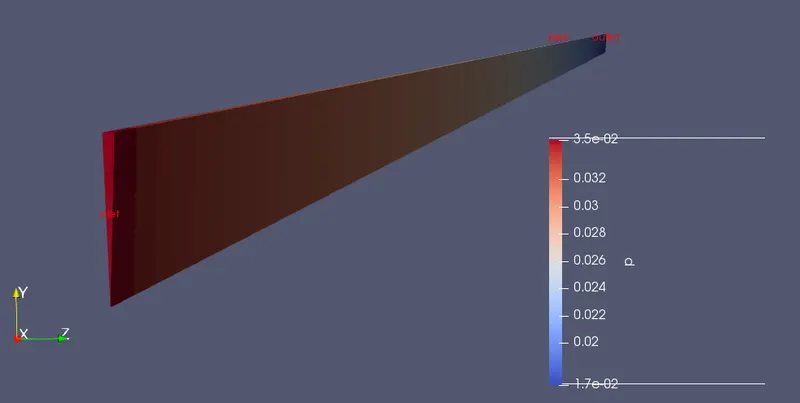
1. Pressure flow in the wedge for fully developed flow:
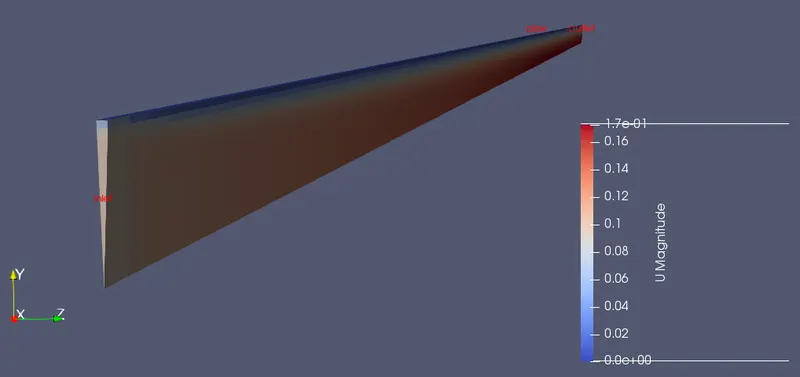
2. Velocity:
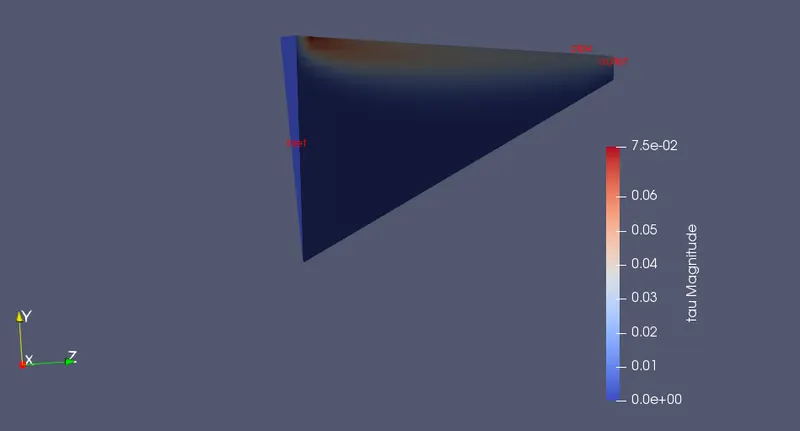
3. Shear Stress:
4. Velocity profile for fully developed flow region:
5. Shear Stress plot:
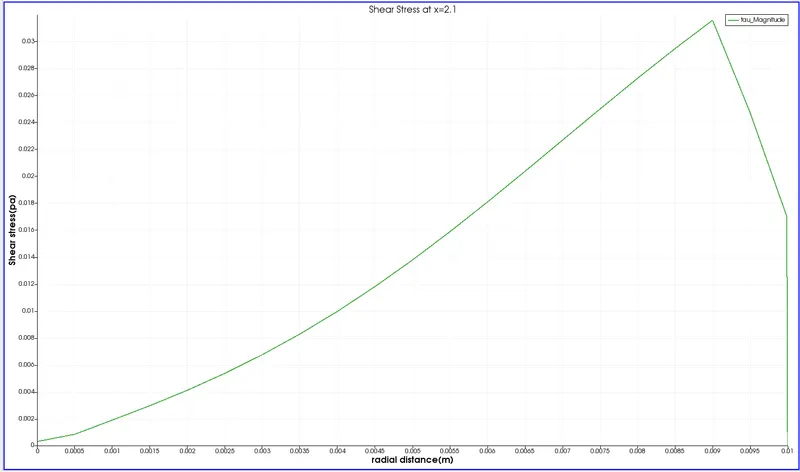
Comparison between the Analytical and Numerical Solutions:
| Variables | Analytical | Numerical |
| Velocity | 0.1874 | 0.1720 |
| Shear Stress | 0.0334 | 0.0320 |
REFERENCES:
- Versteeg, H. K. and Malalasekera "Introduction to Computational Fluid Dynamics: The Finite Volume Method"
- https://skill-lync.com/knowledgebase/how-to-create-shear-stress-plot-inside-paraview
- https://www.youtube.com/watch?v=fjhKZHHwji0