Week - 8 - Morphing
Aim: To Perform Morphing on Given Model Using
Morphing Procedure Includes:
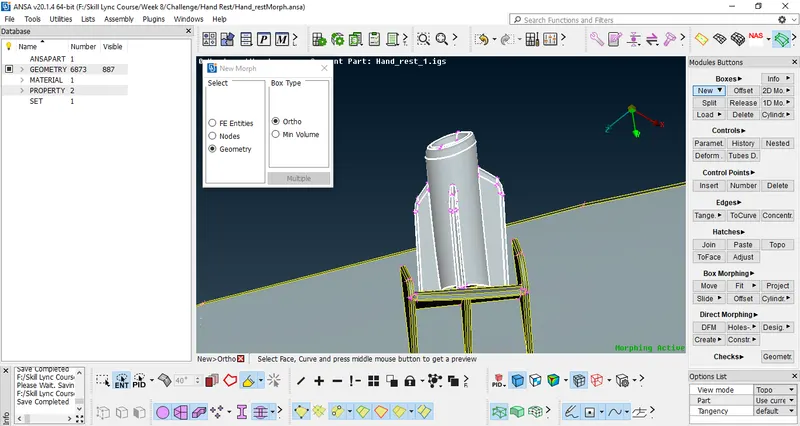
1.Creating Morphing Ortho Box
--Select New Ortho Tool and Capture the Area to be selected to create Morphing box mention Below
Tool location Morphing Deck-> Boxes->New(Ortho)->Select area
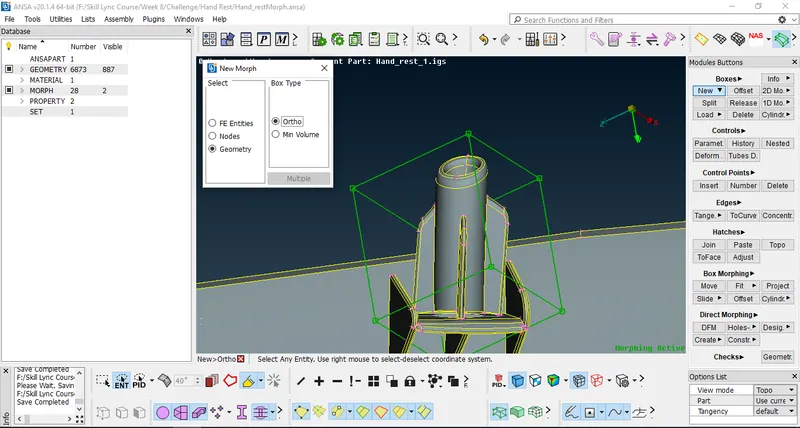
2.After Creation of Morphing Box it shows in green colour with Nodes Called as Control Nodes
3.Now moving Element Height w.r.t Control Nodes (or) Grids
Procedure:
---Select Move Tool and select the nodes or node which we want to move
---after selection of node move the node as per required direction and confirm it by Middle Mouse Click
After move command applied
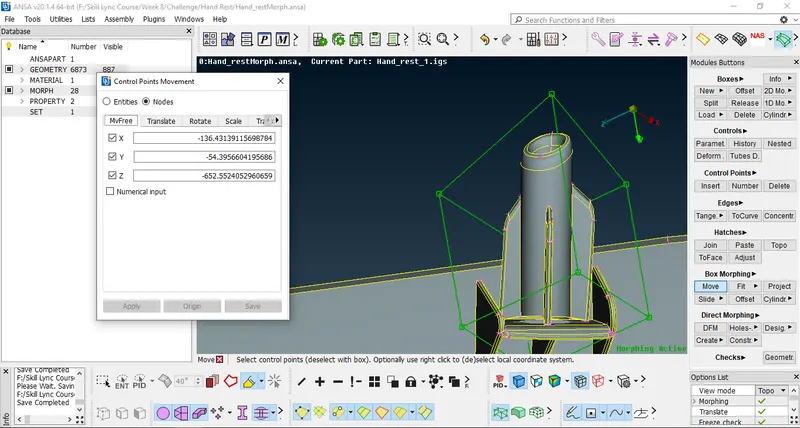
4.Perform same operation for remaining element area
5.Save .ANSA File Updated with Morphed Operation
Learning OutComes:
-Learned How to Perform Morphing on any Component to change its FE or CAD shape.
Conclusion:
After Completion of This Challange I can Perform Morphing to any Given Model.
Applications Of Mophing in Industries
--It is Used in Animation Industries to change Shapes of Characters Seamlessly
--It is Used in Aerospace Industries to Change shapes of Different Aerospace Parts and Shape of Planes etc., and Introduce the Model with New Name (or) versions in Market.
--It is Used in Various Automobile Industries to Introduce New Models of Cars (or) Bikes with New Shapes in Market.
--It is Used in Medicine Industries to Create new Shapes of Medicines w.r.to Old Medicine Shapes.