Week 8 - BlockMesh Drill down challenge
1) Procedure followed
a) We access the file 'cavity' located in the incompressible folder of icoFoam application.
b) This file is copied onto the run folder,
c) Using Blockmesh dict we create the geometry required for this problem, making use of the steps available in the lecture. Each vertices are given co ordinates. Vertices are grouped into blocks thereby forming the geometry.Mesh grading factors are factored as per problem state
d) Boundary conditions as specified.
e) We run the simulation using the command icoFoam
2) Modification of code
- BlockMesh dict
/*--------------------------------*- C++ -*----------------------------------*\
  =========                 |
  \\      /  F ield         | OpenFOAM: The Open Source CFD Toolbox
   \\    /   O peration     | Website:  https://openfoam.org
    \\  /    A nd           | Version:  8
     \\/     M anipulation  |
\*---------------------------------------------------------------------------*/
FoamFile
{
    version     2.0;
    format      ascii;
    class       dictionary;
    object      blockMeshDict;
}
// * * * * * * * * * * * * * * * * * * * * * * * * * * * * * * * * * * * * * //

convertToMeters 0.01;

vertices
(
    (0 0 0)//point 0
    (8 0 0)//point 1
    (8 0.5 0)//point 2
    (0 0.5 0)//point 3
    (8 1 0)//point 4
    (0 1 0)//point 5
    (20 1 0)//point 6
    (20 0.5 0)//point 7
    (20 0 0)//point 8
    (20 -1 0)//point 9
    (8 -1 0)//point 10
    (0 0 0.1)//point 11
    (8 0 0.1)//point 12
    (8 0.5 0.1)//point 13
    (0 0.5 0.1)//point 14
    (8 1 0.1)//point 15
    (0 1 0.1)//point 16
    (20 1 0.1)//point 17
    (20 0.5 0.1)//point 18
    (20 0 0.1)//point 19
    (20 -1 0.1)//point 20
    (8 -1 0.1)//point 21
);

blocks
(
    hex (0 1 2 3 11 12 13 14) (80 5 1) simpleGrading (1 1 1)
    hex (3 2 4 5 14 13 15 16) (80 5 1) simpleGrading (1 1 1)
    hex (2 7 6 4 13 18 17 15) (120 5 1) simpleGrading (1 1 1)
    hex (1 8 7 2 12 19 18 13) (120 5 1) simpleGrading (1 1 1)
    hex (10 9 8 1 21 20 19 12) (120 5 1) simpleGrading (1 1 1)
);

edges
(
);

boundary

(
    inlet
    {
        type patch;
        faces
        (
            (0 11 14 3)
            (3 14 16 5)
        );
    }
    outlet
    {
        type patch;
        faces
        (
            (9 8 19 20)
            (8 7 18 19)
            (7 6 17 18)

        );
    }
    frontAndBack
    {
        type empty;
        faces
        (
            (0 3 2 1)
            (3 5 4 2)
            (10 1 8 9)
            (1 2 7 8)
            (2 4 6 7)
            (11 12 13 14)
            (14 13 15 16)
            (21 20 19 12)
            (12 19 18 13)
            (13 18 17 15)
        );
        }
        Noslipwalls
        {
        type wall;
        faces
        (
        (5 16 15 4)
        (4 15 17 6)
        (0 1 12 11)
        (10 21 12 1)
        (10 9 20 21)
          );

    }
);


mergePatchPairs
(
);

// ************************************************************************* //
- Control Dict
/*--------------------------------*- C++ -*----------------------------------*\
  =========                 |
  \\      /  F ield         | OpenFOAM: The Open Source CFD Toolbox
   \\    /   O peration     | Website:  https://openfoam.org
    \\  /    A nd           | Version:  8
     \\/     M anipulation  |
\*---------------------------------------------------------------------------*/
FoamFile
{
    version     2.0;
    format      ascii;
    class       dictionary;
    location    "system";
    object      controlDict;
}
// * * * * * * * * * * * * * * * * * * * * * * * * * * * * * * * * * * * * * //

application     icoFoam;

startFrom       startTime;

startTime       0;

stopAt          endTime;

endTime         0.1;

deltaT          1e-04;

writeControl    timeStep;

writeInterval   20;

purgeWrite      0;

writeFormat     ascii;

writePrecision  6;

writeCompression off;

timeFormat      general;

timePrecision   6;

runTimeModifiable true;


// ************************************************************************* //
-Pressure
/*--------------------------------*- C++ -*----------------------------------*\
  =========                 |
  \\      /  F ield         | OpenFOAM: The Open Source CFD Toolbox
   \\    /   O peration     | Website:  https://openfoam.org
    \\  /    A nd           | Version:  8
     \\/     M anipulation  |
\*---------------------------------------------------------------------------*/
FoamFile
{
    version     2.0;
    format      ascii;
    class       volScalarField;
    object      p;
}
// * * * * * * * * * * * * * * * * * * * * * * * * * * * * * * * * * * * * * //

dimensions      [0 2 -2 0 0 0 0];

internalField   uniform 0;

boundaryField
{
    inlet
    {
        type            zeroGradient;
    }

    outlet
    {
        type            fixedValue;
        value           uniform 0;
    }

    front
    {
        type            empty;
    }
    Back
    {
        type            empty;
    }
    Noslipwalls
    {
        type            zeroGradient;
    }
}

// ************************************************************************* //
-Velocity
/*--------------------------------*- C++ -*----------------------------------*\
  =========                 |
  \\      /  F ield         | OpenFOAM: The Open Source CFD Toolbox
   \\    /   O peration     | Website:  https://openfoam.org
    \\  /    A nd           | Version:  8
     \\/     M anipulation  |
\*---------------------------------------------------------------------------*/
FoamFile
{
    version     2.0;
    format      ascii;
    class       volVectorField;
    object      U;
}
// * * * * * * * * * * * * * * * * * * * * * * * * * * * * * * * * * * * * * //

dimensions      [0 1 -1 0 0 0 0];

internalField   uniform (1 0 0);

boundaryField
{
    inlet
    {
        type            fixedValue;
        value           uniform (0.05 0 0);
    }

    outlet
    {
        type            zeroGradient;
    }

    front
    {
        type            empty;
    }
    back
    {
        type            empty;
    }
    Noslipwalls
    {
        type            noSlip;
    }
}

// ************************************************************************* //
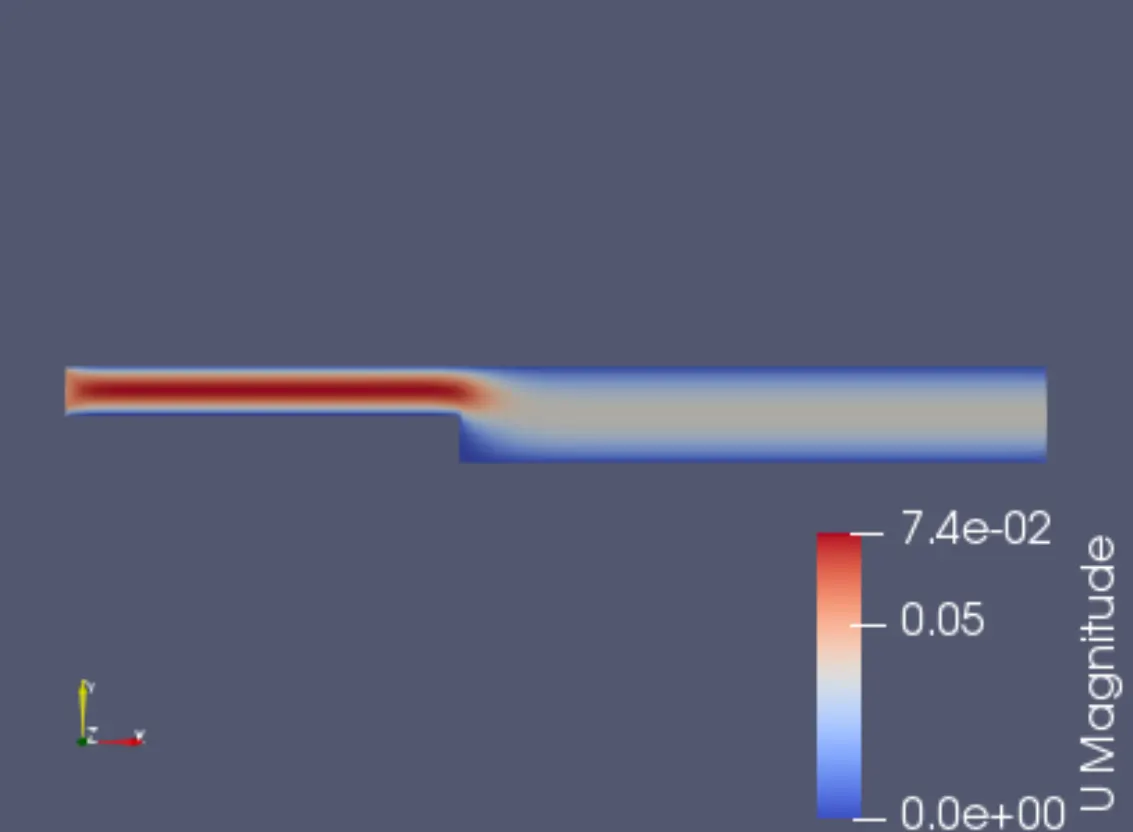
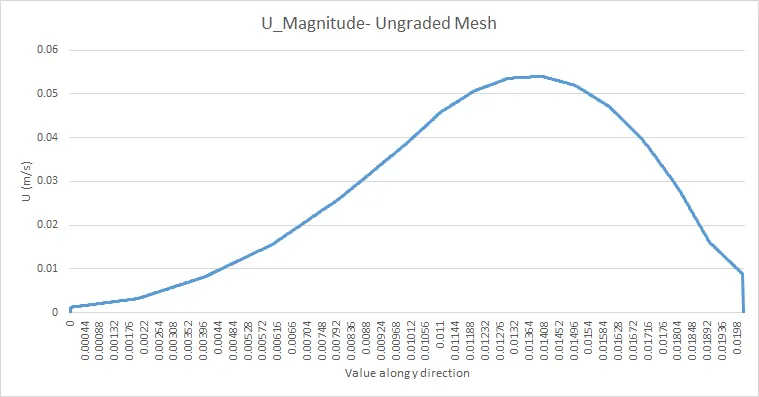
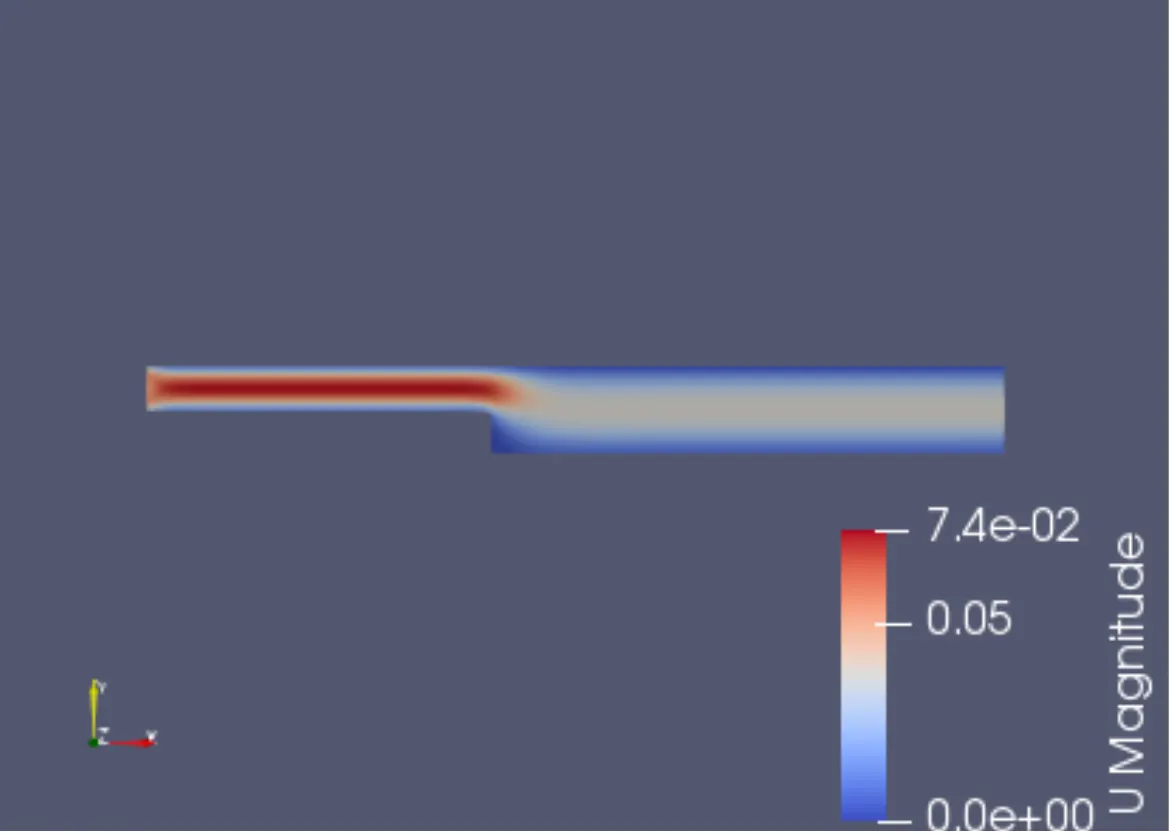
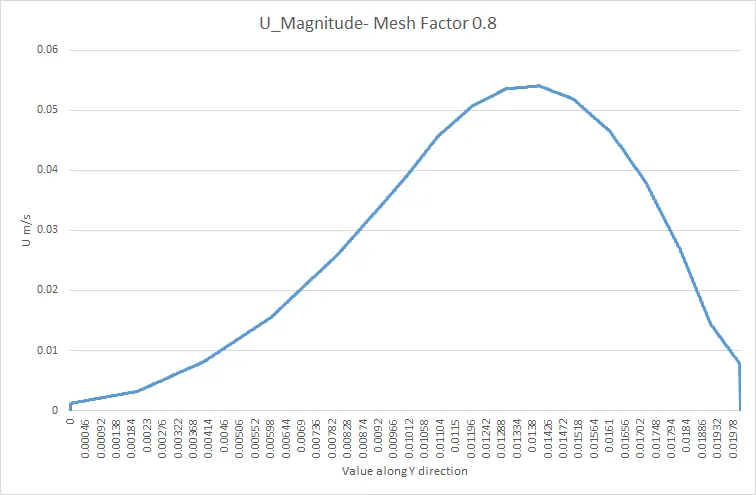
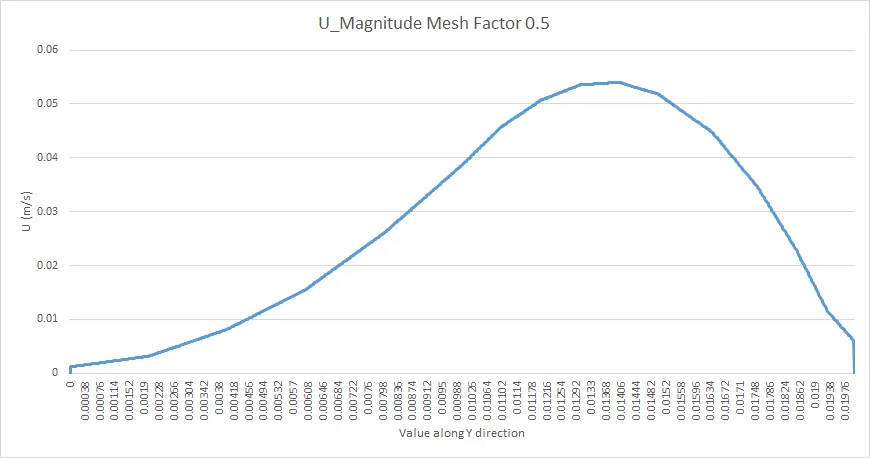
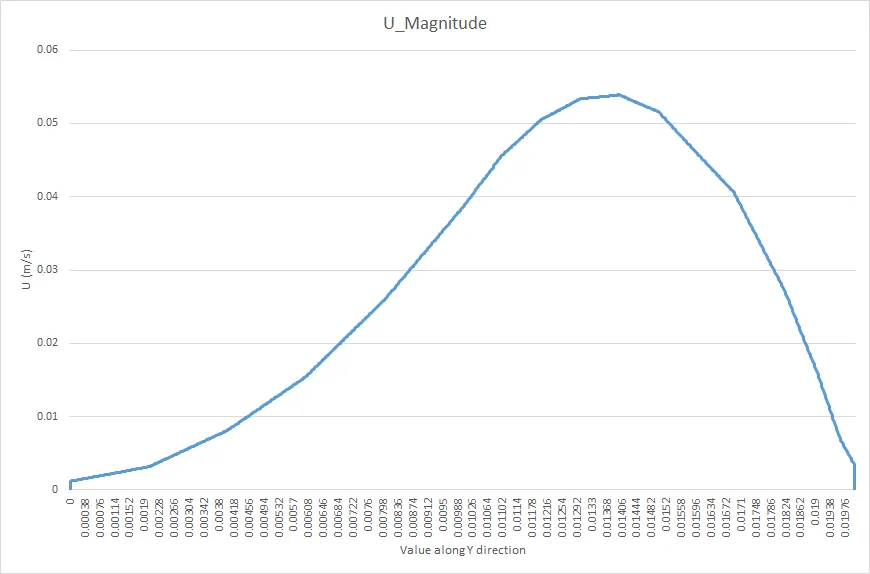
- Plots obtained for Velocity profile at x=0.085m for different grading factors
1) Ungraded
- Velocity Contour
- Velocity Profile
2) x =0.8
- Changes to blockmesh Dict file
blocks
(
    hex (0 1 2 3 11 12 13 14) (80 5 1) simpleGrading (0.8 1 1)
    hex (3 2 4 5 14 13 15 16) (80 5 1) simpleGrading (0.8 0.8 1)
    hex (2 7 6 4 13 18 17 15) (120 5 1) simpleGrading (1 0.8 1)
    hex (1 8 7 2 12 19 18 13) (120 5 1) simpleGrading (1 1 1)
    hex (10 9 8 1 21 20 19 12) (120 5 1) simpleGrading (1 1 1)
);
- Velocity contour
-Velocity Profile
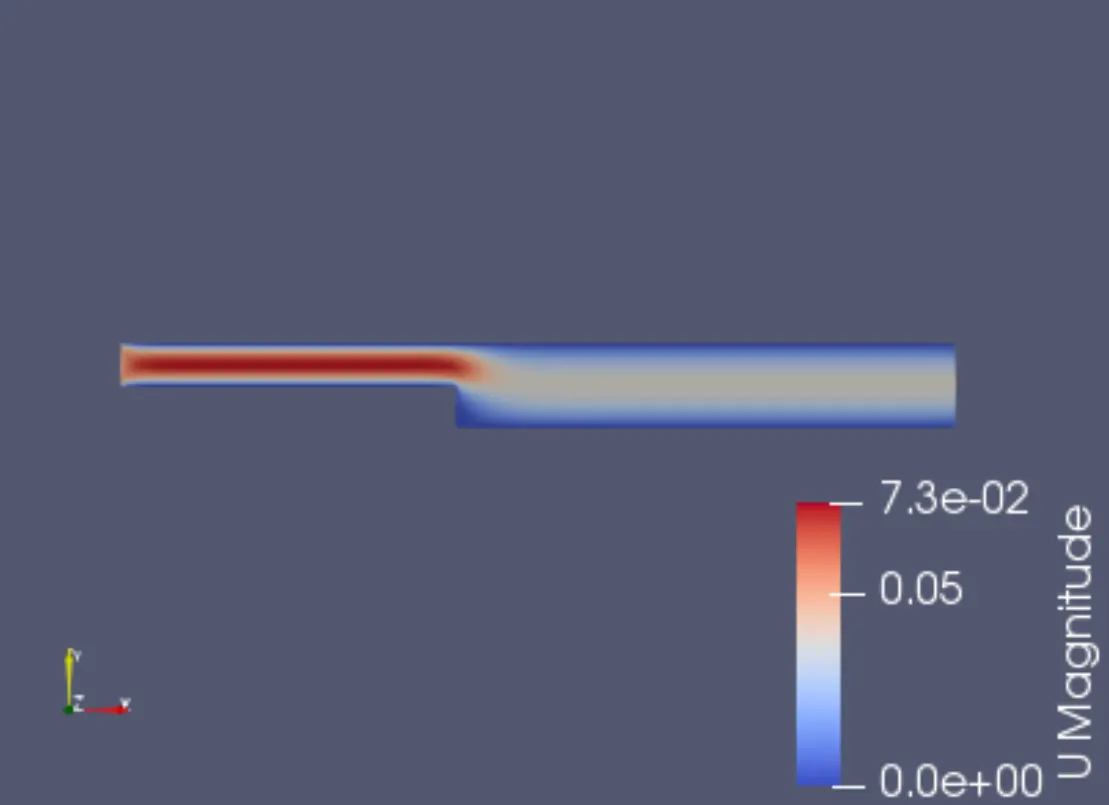
3) x=0.5
- Changes to blockmesh dict file
blocks
(
    hex (0 1 2 3 11 12 13 14) (80 5 1) simpleGrading (0.5 1 1)
    hex (3 2 4 5 14 13 15 16) (80 5 1) simpleGrading (0.5 0.5 1)
    hex (2 7 6 4 13 18 17 15) (120 5 1) simpleGrading (1 0.5 1)
    hex (1 8 7 2 12 19 18 13) (120 5 1) simpleGrading (1 1 1)
    hex (10 9 8 1 21 20 19 12) (120 5 1) simpleGrading (1 1 1)
);
-Velocity Contour
-Velocity Profile
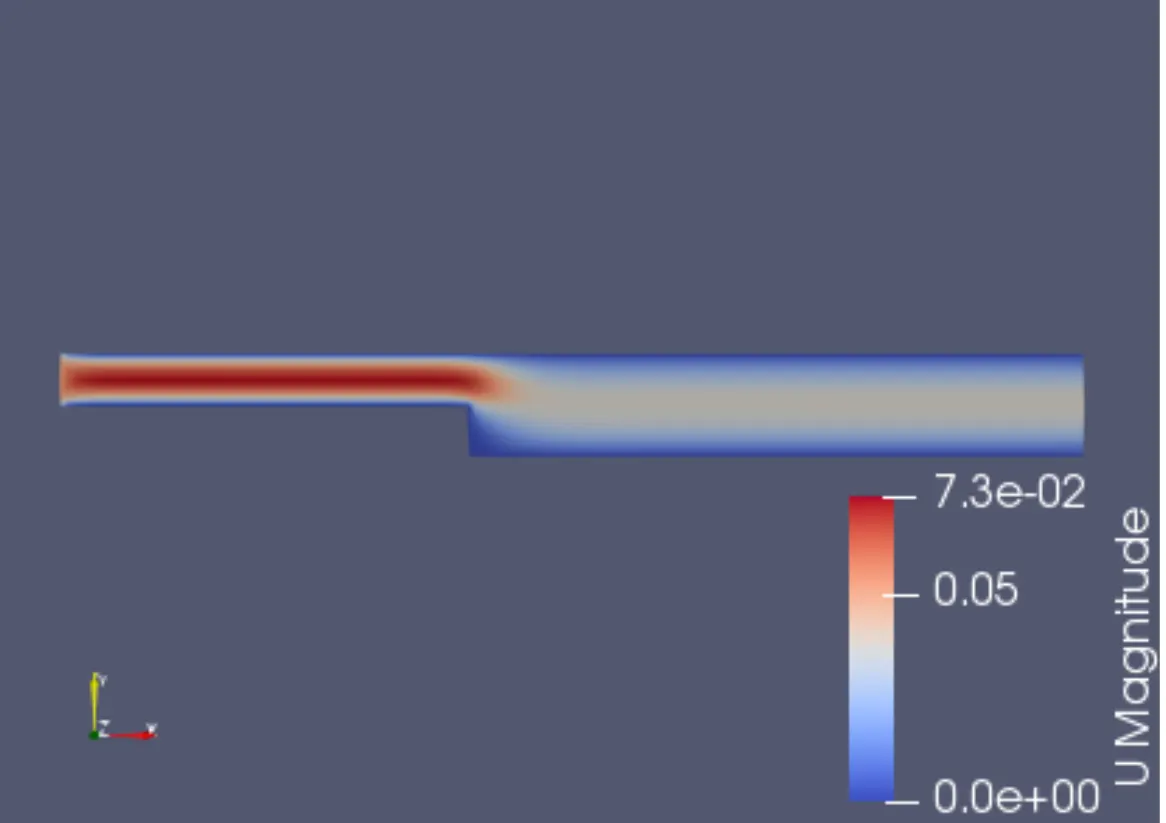
3) x=0.2
Changes to Blockmesh dict file
blocks
(
    hex (0 1 2 3 11 12 13 14) (80 5 1) simpleGrading (0.2 1 1)
    hex (3 2 4 5 14 13 15 16) (80 5 1) simpleGrading (0.2 0.2 1)
    hex (2 7 6 4 13 18 17 15) (120 5 1) simpleGrading (1 0.2 1)
    hex (1 8 7 2 12 19 18 13) (120 5 1) simpleGrading (1 1 1)
    hex (10 9 8 1 21 20 19 12) (120 5 1) simpleGrading (1 1 1)
);
-Velocity Contour
-Velocity Profile
Conclusion
From the above plots we notice that as the mesh becomes finer, more data is captured and we obtain more accurate values. There is no discernable variation in the plots , however when observing the values we notice that the finer mesh produces more accurate values.