BlockMesh Drill down challenge
Objective: To find the change in Velocity magnitude profile with respect to simple grading for a choosen geometry.
Geometry:
Mesh specification
- Number of cells along the x direction (longer dimension) = 200
- Number of cells along the y direction = 10
- Use a graded mesh. Grading factor near all walls should be 0.2, 0.5, 0.8 in each case respectively.
OpenFoam Code to create the above gemetry and meshing
blockMeshDict
/*--------------------------------*- C++ -*----------------------------------*
  =========                 |
  \      /  F ield         | OpenFOAM: The Open Source CFD Toolbox
   \    /   O peration     | Website:  https://openfoam.org
    \  /    A nd           | Version:  8
     \/     M anipulation  |
*---------------------------------------------------------------------------*/
FoamFile
{
    version     2.0;
    format      ascii;
    class       dictionary;
    object      blockMeshDict;
}
// * * * * * * * * * * * * * * * * * * * * * * * * * * * * * * * * * * * * * //

convertToMeters 1;

vertices
(
    (0 0 0)                 //vertex 1
    (0.08 0 0)              //vertex 2
    (0.08 0.005 0)          //vertex 3
    (0 0.005 0)             //vertex 4
    (0.08 0.01 0)           //vertex 5
    (0 0.01 0)              //vertex 6
    (0.2 0.01 0)            //vertex 7
    (0.2 0.005 0)           //vertex 8
    (0.2 0 0)               //vertex 9
    (0.2 -0.01 0)           //vertex 10
    (0.08 -0.01 0)          //vertex 11
    (0 0 0.03)              //vertex 12
    (0.08 0 0.03)           //vertex 13
    (0.08 0.005 0.03)       //vertex 14
    (0 0.005 0.03)          //vertex 15
    (0.08 0.01 0.03)        //vertex 16
    (0 0.01 0.03)           //vertex 17
    (0.2 0.01 0.03)         //vertex 18
    (0.2 0.005 0.03)        //vertex 19
    (0.2 0 0.03)            //vertex 20
    (0.2 -0.01 0.03)        //vertex 21
    (0.08 -0.01 0.03)       //vertex 21
    );

blocks
(
    hex (0 1 2 3 11 12 13 14) (200 10 1) simpleGrading (1 5 1)      //block 0
    hex (3 2 4 5 14 13 15 16) (200 10 1) simpleGrading (1 0.5 1)    //block 1
    hex (2 7 6 4 13 18 17 15) (200 10 1) simpleGrading (1 0.5 1)    //block 2
    hex (1 8 7 2 12 19 18 13) (200 10 1) simpleGrading (1 5 1)      //block 3
    hex (10 9 8 1 21 20 19 12) (200 10 1) simpleGrading (1 5 1)     //block 4
);

edges
(
);

boundary
(
    inlet
    {
        type patch;
        faces
        (
            (0 11 14 3)
            (3 14 16 5)
        );
    }
     outlet
    {
        type patch;
        faces
        (
            (9 8 19 20)
            (8 7 18 19)
            (7 6 17 18)
        );
    }
   TopandBottomfaces
    {
        type wall;
        faces
        (
            (5 4 15 16)
            (4 6 17 15)
            (0 11 12 1)
            (10 21 20 9)
            (1 12 21 10)
        );
    }
    frontAndBack
    {
        type empty;
        faces
        (
           (0 1 2 3)
           (3 2 4 5)
           (4 2 7 6)
           (2 1 8 7)
           (1 10 9 8)
           (14 13 12 11)
           (14 16 15 13)
           (13 15 17 18)
           (12 13 18 19)
           (21 12 19 20)
        );
    }
);

mergePatchPairs
(
);

// ************************************************************************* //

The above geomtry is with 0.2 simple grading
OpenFoam code for solver setup
transportProperties - to set kinematic viscosity of chosen fluid
/*--------------------------------*- C++ -*----------------------------------*
  =========                 |
  \      /  F ield         | OpenFOAM: The Open Source CFD Toolbox
   \    /   O peration     | Website:  https://openfoam.org
    \  /    A nd           | Version:  8
     \/     M anipulation  |
*---------------------------------------------------------------------------*/
FoamFile
{
    version     2.0;
    format      ascii;
    class       dictionary;
    location    "constant";
    object      transportProperties;
}
// * * * * * * * * * * * * * * * * * * * * * * * * * * * * * * * * * * * * * //

nu              [0 2 -1 0 0 0 0] 1e-6;           //kinematic viscosity of water at 20C is 1e-6


// ************************************************************************* //
To calculate velocity, we know that
`Re =( V*L)/nu`
where `Re` is renolds number
`V` is Velocity of fluid
`L` is characterstic length of domain
`nu` is Kinematic viscosity of water
Let us assume the flow is laminar, then
`Re = 2100 ; L = 0.2 ; nu = 1e-6`
`V = (2100 * 1e-6)/0.2 = 0.0105m/s`
End time = 100sec
dt = 0.001
p - to set pressure
/*--------------------------------*- C++ -*----------------------------------*
  =========                 |
  \      /  F ield         | OpenFOAM: The Open Source CFD Toolbox
   \    /   O peration     | Website:  https://openfoam.org
    \  /    A nd           | Version:  8
     \/     M anipulation  |
*---------------------------------------------------------------------------*/
FoamFile
{
    version     2.0;
    format      ascii;
    class       volScalarField;
    object      p;
}
// * * * * * * * * * * * * * * * * * * * * * * * * * * * * * * * * * * * * * //

dimensions      [0 2 -2 0 0 0 0];

internalField   uniform 0;

boundaryField
{
    inlet
    {
        type            zeroGradient;
    }
    outlet
     {
        type            fixedValue;
        value           uniform 0;
    }


    TopandBottomfaces
    {
        type            zeroGradient;
    }

    frontAndBack
    {
        type            empty;
    }
}

// ************************************************************************* //
U - to set initial velocity
/*--------------------------------*- C++ -*----------------------------------*
  =========                 |
  \      /  F ield         | OpenFOAM: The Open Source CFD Toolbox
   \    /   O peration     | Website:  https://openfoam.org
    \  /    A nd           | Version:  8
     \/     M anipulation  |
*---------------------------------------------------------------------------*/
FoamFile
{
    version     2.0;
    format      ascii;
    class       volVectorField;
    object      U;
}
// * * * * * * * * * * * * * * * * * * * * * * * * * * * * * * * * * * * * * //

dimensions      [0 1 -1 0 0 0 0];

internalField   uniform (0 0 0);

boundaryField
{
    inlet
    {
        type            fixedValue;
        value           uniform (0.0105 0 0);
    }
    outlet
    {
        type            zeroGradient;
    }


    TopandBottomfaces
    {
        type            noSlip;
    }

    frontAndBack
    {
        type            empty;
    }
}

// ************************************************************************* //
controlDict - to set end time & dt
/*--------------------------------*- C++ -*----------------------------------*
  =========                 |
  \      /  F ield         | OpenFOAM: The Open Source CFD Toolbox
   \    /   O peration     | Website:  https://openfoam.org
    \  /    A nd           | Version:  8
     \/     M anipulation  |
*---------------------------------------------------------------------------*/
FoamFile
{
    version     2.0;
    format      ascii;
    class       dictionary;
    location    "system";
    object      controlDict;
}
// * * * * * * * * * * * * * * * * * * * * * * * * * * * * * * * * * * * * * //

application     icoFoam;

startFrom       startTime;

startTime       0;

stopAt          endTime;

endTime         100;

deltaT          0.001;

writeControl    timeStep;

writeInterval   500;

purgeWrite      0;

writeFormat     ascii;

writePrecision  6;

writeCompression off;

timeFormat      general;

timePrecision   6;

runTimeModifiable true;


// ************************************************************************* //
Output:
The above video shows the flow of fluid in the domain
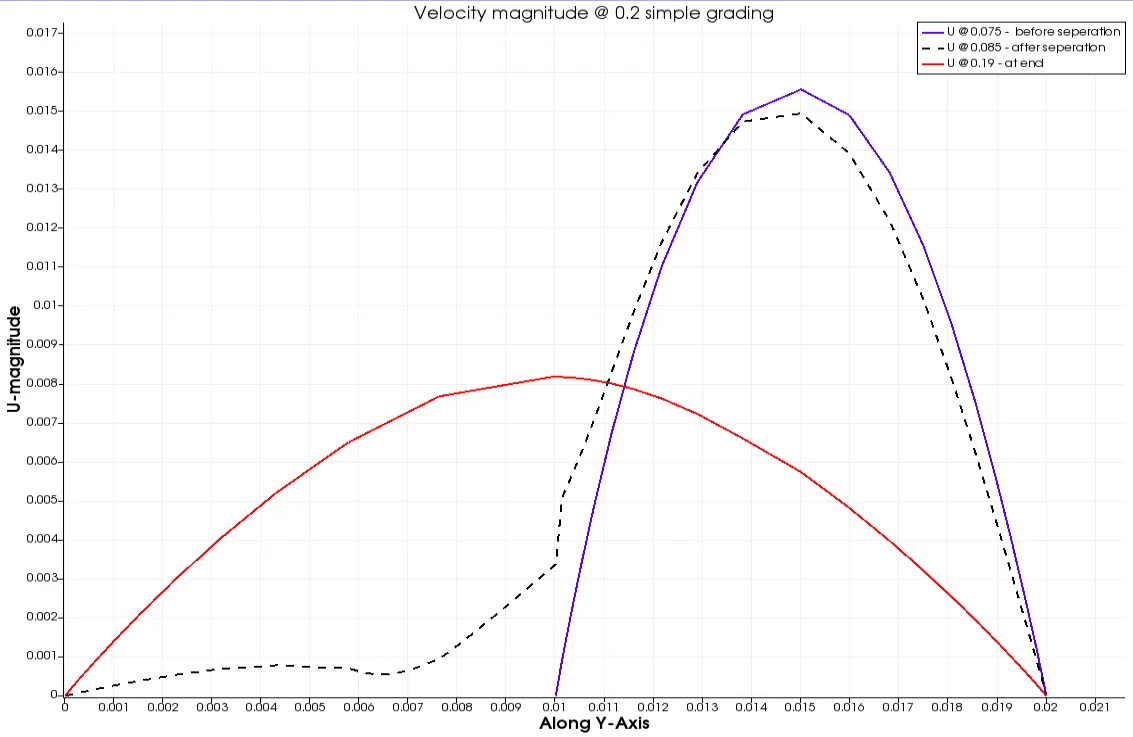
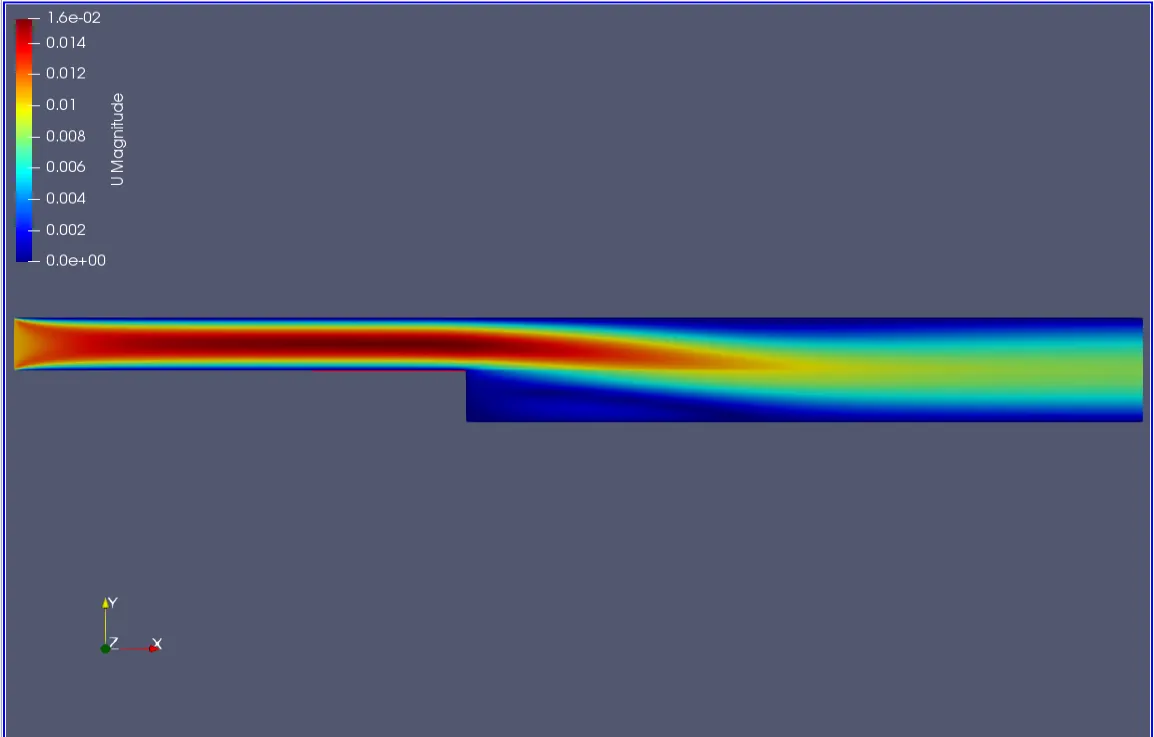
Line over plot @ 0.2 simple grading
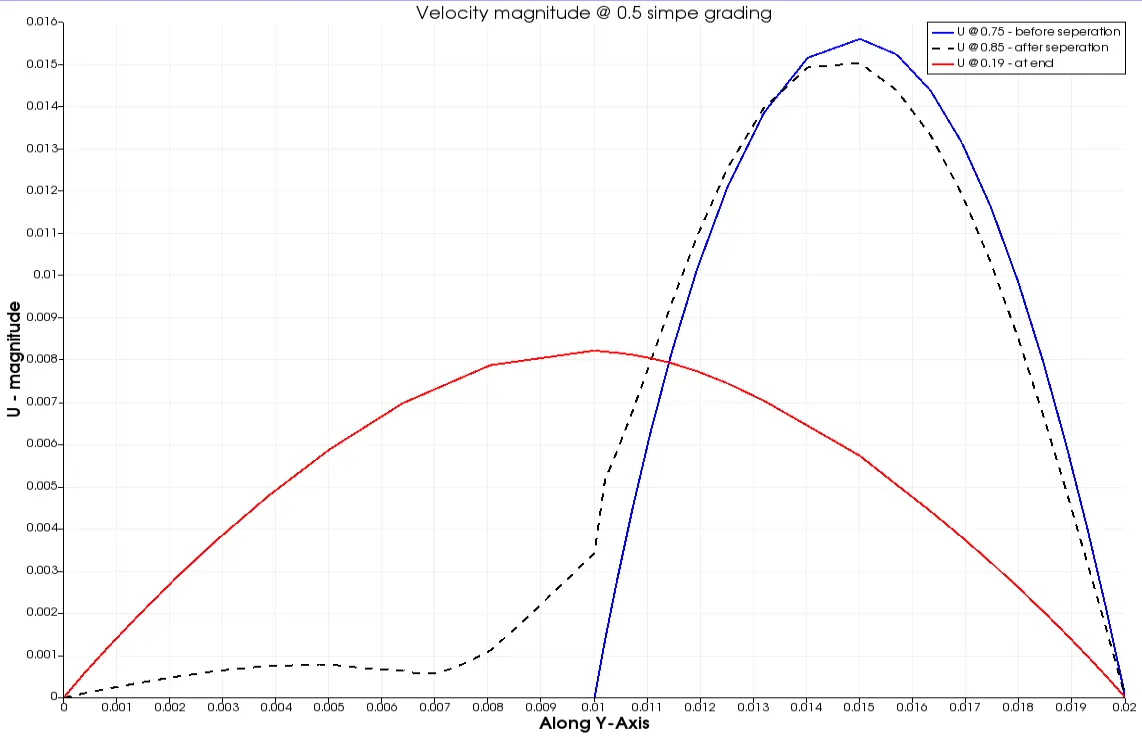
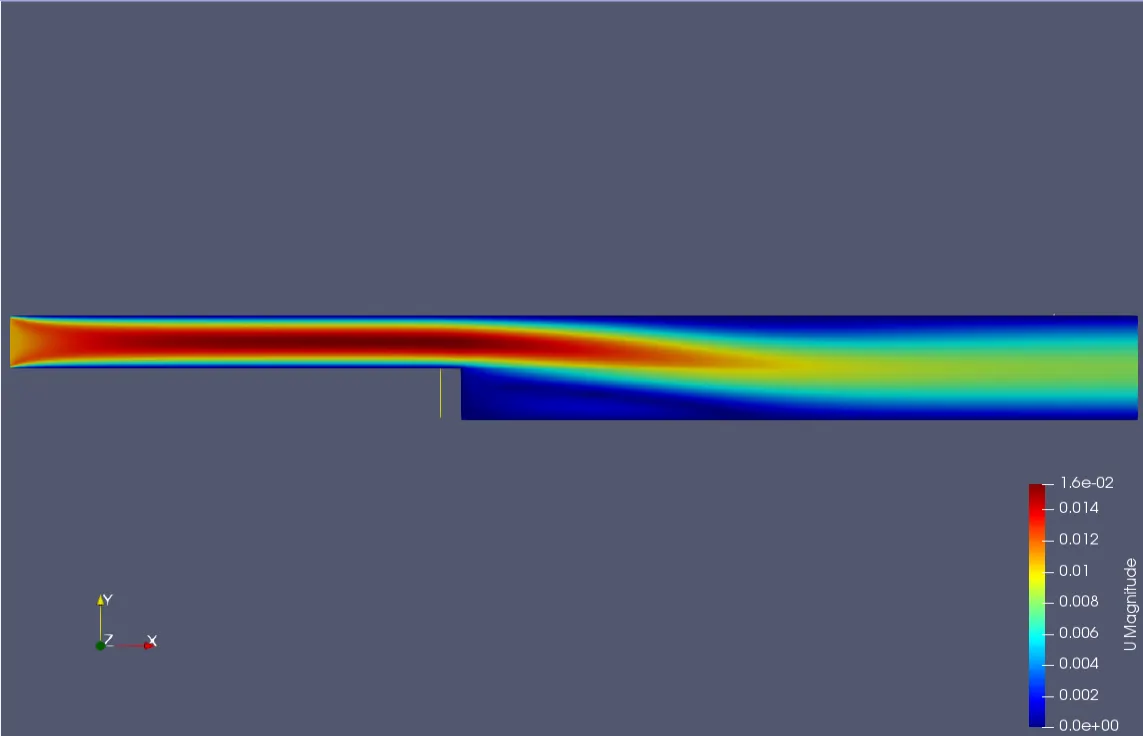
Line over plot @ 0.5 simple grading
Line over plot @ 0.8 simple grading
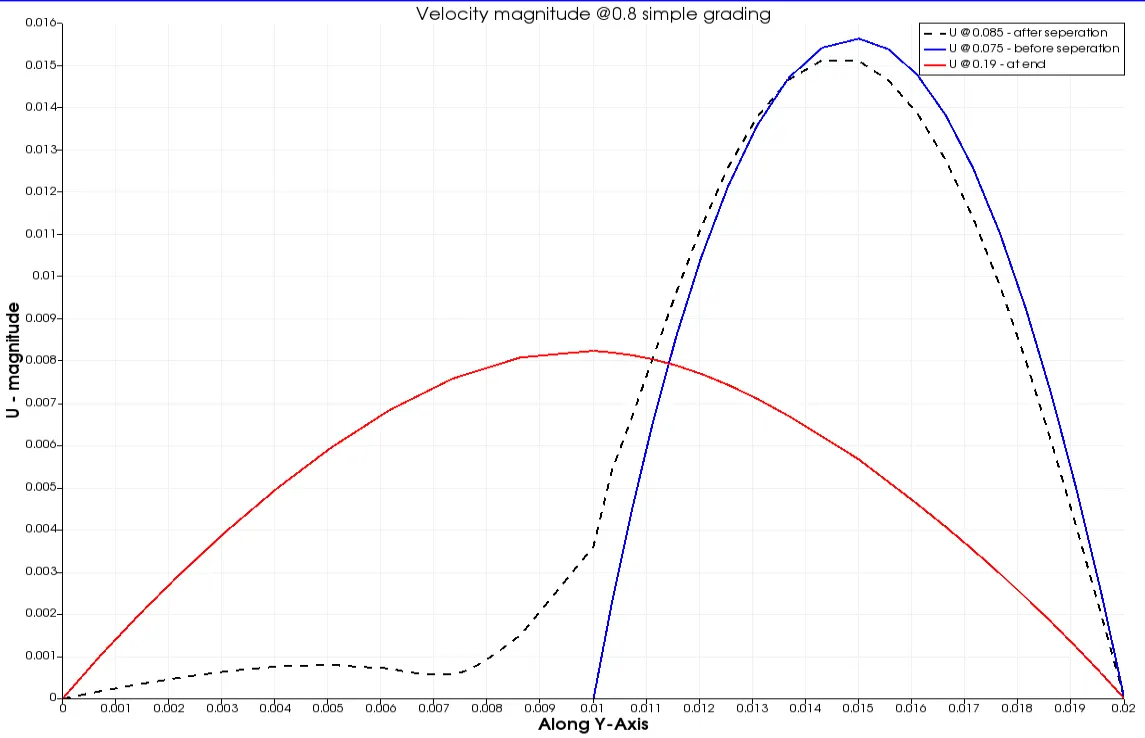
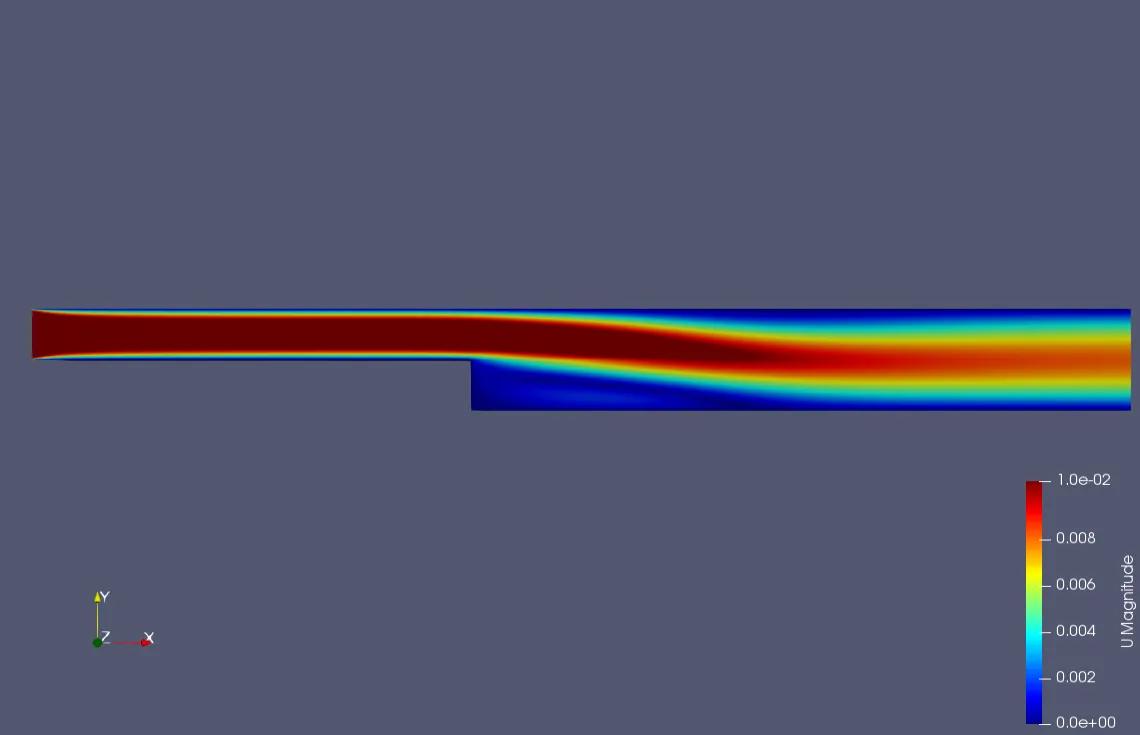
Plot 1 , 3 , 5 represent the line over plot at points 0.075(before step region), 0.085(after step region), 0.19(at end)
Plot 2, 4, 6 shows the contour plots of velocity magnitude of fluid in the domain
Conclusion
From contour plots, we can observe that as simple grading is increasing (i.e 0.2,0.5,0.8) the velocity is increasing at the step region.
From line over plots, we can observe that as simple grading is increasing (i.e 0.2,0.5,0.8) the velocity magnitude curve at a distance is becoming more smoother( decrease in sharp edges) respectively.