Auto ignition analysis of combustible mixture methane under different conditions using Cantera and Python
Objective: To study auto-ignition using Cantera.
Following are the tasks to perform using Cantera:
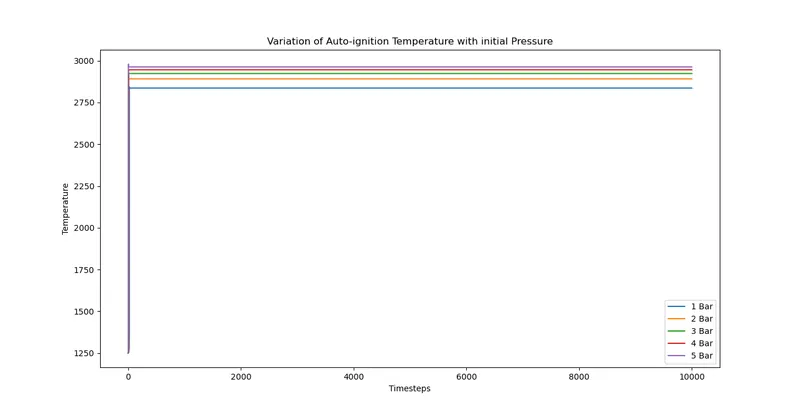
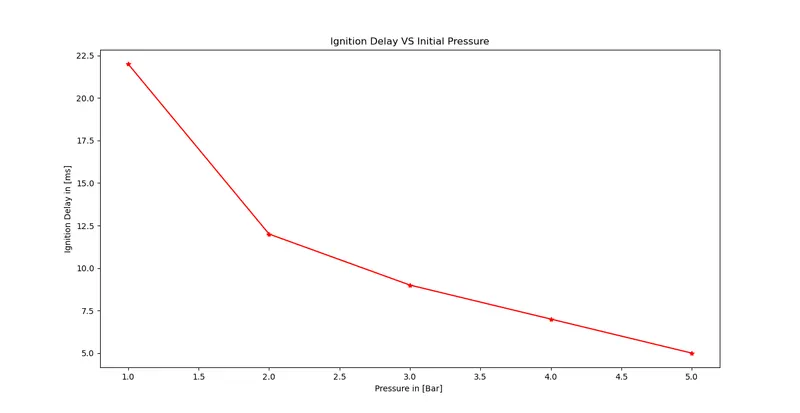
- Plot the variation of Auto Ignition time of Methane with a constant temperature of 1250K and pressure varying from 1 to 5 atm.
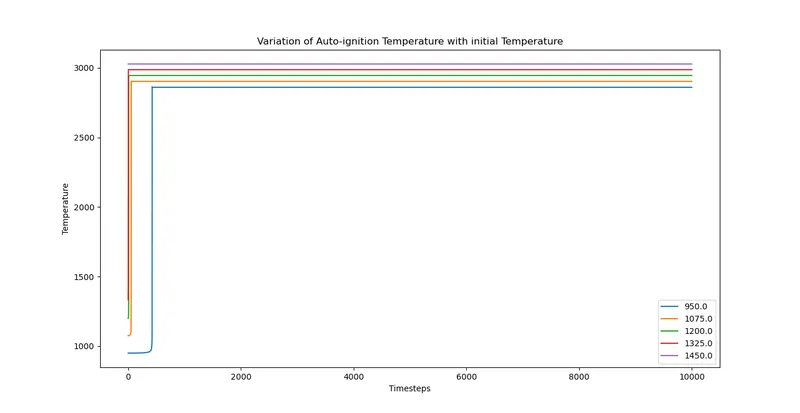
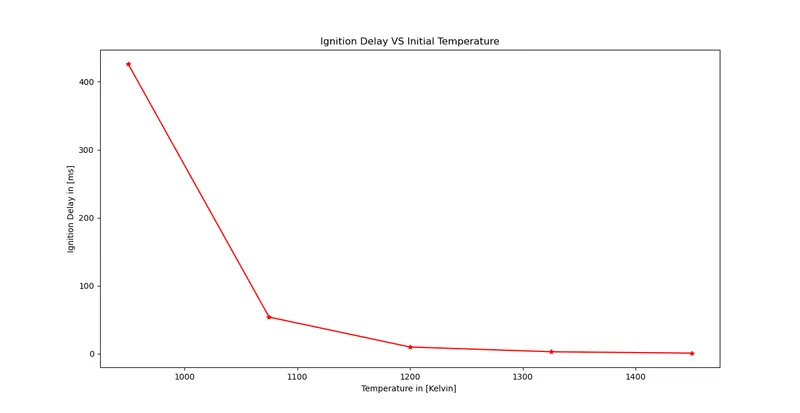
- Plot the variation of Auto Ignition time of Methane with a constant pressure of 5 atm and temperature varying from 950K to 1450K.
- To observe and print the rate of change of molar concentrations of the given elements "H2O, O2, OH" with respect to the time.
Explain the behavior of the graph for 2 cases,
- When Temperature is 1000K and pressure 5 bar.
- When Temperature is 500K and pressure 5 bar.
Theory:
`tt"Auto-Ignition Temperature"`
In the context of a combustible fuel mixture, the auto-ignition temperature is the lowest temperature at which the fuel will spontaneously ignite in a normal atmosphere without an external source of ignition such as a flame or spark.
This temperature is sometimes referred to as the kindling point of the fuel. Raising the temperature of the fuel to its auto-ignition point provides the energy required to initiate the chemical reaction needed for combustion. The auto-ignition temperature for a given fuel decreases as the pressure increases or as the oxygen concentration increases.
`tt"Reactor & Rector Networks "`
Reactor:
A Cantera Reactor() represents the simplest form of a chemically reacting system. It corresponds to an extensive thermodynamic control volume V, in which all state variables are homogeneously distributed. The system is generally unsteady i.e. all states are a function of time. In particular, transient state changes due to chemical reactions are possible. However, the thermodynamic (not chemical) equilibrium is assumed to be present throughout the reactor at all instants of time.
Reactors can interact with the surrounding environment in multiple ways:
- Expansion/Compression work: By moving the wall of the reactor, its volume can be changed and expansion or compression work can be done by or on the reactor.
- Heat transfer: An arbitrary heat transfer rate can be defined to cross the boundaries of the reactor.
- Mass transfer: The reactor can have multiple inlets and outlets. For inlets, arbitrary states can be defined. Fluid with the current state of the reactor exits the reactor at the outlet.
- Surface interaction: One or multiple walls can influence the chemical reaction in the reactor. This is not just restricted to catalytic reactions, but mass transfer between the surface and the fluid can also be modeled.
All of this interaction does not have to be constant but can vary as a function of time or states. For example, heat transfer can be described as a function of the temperature difference between the reactor and the environment, or the wall movement can be modeled depending on the pressure difference.
In addition to single reactors, Cantera is also able to interconnect reactors into a Reactor Network. Each reactor in a network may be connected so that the contents of one reactor flow into another. Reactors may also be in contact with one another or the environment via walls that conduct heat or move to do work.
`tt"Governing Equations for Single Reactors:"`
The state variables for Cantera’s general reactor model are
- `m`, the mass of the reactor’s contents (in kg)
- `V`, the reactor volume (in m3) (not a state variable for
ConstPressureReactor()andIdealGasConstPressureReactor()) - A state variable describing the energy of the system, depending on the configuration (see Energy Conservation for further explanation):
-
General
Reactor(): `U`, the total internal energy of the reactors contents (in J) -
ConstPressureReactor(): `H`, the total enthalpy of the reactors contents (in J) -
IdealGasReactor()andIdealGasConstPressureReactor(): `T`, the temperature (in K)
-
4.`Y_k`, the mass fractions for each species (dimensionless)
Ideal Gas Reactor
In the case of the Ideal Gas Reactor Model, the reactor temperature TT is used instead of the total internal energy UU as a state variable. For an ideal gas, we can rewrite the total internal energy in terms of the mass fractions and temperature:
Substituting the corresponding derivatives yields an equation for the temperature:
`mc_v(dU)/(dt)= -p(dV)/(dt)-dotQ+sum_("in") dotm_("in")(h_("in")-sum_ku_kY_("k,in"))-(pV)/msum_(out)dotm_("out")-sum_kdotm_("k,gen")u_k`
While this form of the energy equation is somewhat more complicated, it significantly reduces the cost of evaluating the system Jacobian, since the derivatives of the species equations are taken at constant temperature instead of constant internal energy.
`tt"General Usage in Cantera:"`
In Cantera, the following steps are typically necessary to investigate a reactor network:
- Define
Solutionobjects for the fluids to be flowing through your reactor network. - Define the reactor type(s) and reservoir(s) that describe your system. Chose Ideal Gas (Constant Pressure) Reactor(s) if you only consider ideal gas phases.
- Optional: Set up the boundary conditions and flow devices between reactors or reservoirs.
- Define a reactor network that contains all the reactors previously created.
- Advance the simulation in time, typically in a for- or while-loop. Note that only the current state is stored in Cantera by default. If you want to observe the transient states, you manually have to keep track of them.
- Analyze the data.
Note that Cantera always solves a transient problem. If you are interested in steady-state conditions, you can run your simulation for a long time until the states are converged
Solutions:
CASE-1: Effect of Variation of pressure from 1 bar to 5 bar on auto-ignition.
Python script:
import sys
import cantera as ct
import numpy as np
import matplotlib.pyplot as plt

# Tp define initial pressure and temperature
T= 1250; # Initial Temperature in Kelvin
Pressure= np.linspace(1,5,5); # Range of Inlet Pressure

# Array to store state values
state_T= []
t_autoI = []

# For loop to execute for all values of pressure
for i in Pressure:

	P= i * 101325 # in kPa
	gas = ct.Solution('gri30.xml')
	gas.TPX= T,P,{'CH4':1,'O2':2,'N2':7.52}

	# Instance object to create a reactor which defines governing equation to solve
	r= ct.IdealGasReactor()
	r.insert(gas)

	# To define reactor network to do solving part
	sim= ct.ReactorNet([r])

	time= 0.0 # Start time
	t_end= 10 # Total simulation time
	timestep= 1e-3 # timesteps to perform time integration

	n= int((t_end-time)/timestep);

	# To create solution array contianing temperature, pressure, species etc. values
	states= ct.SolutionArray(gas, extra=['time_in_ms','t'])

	for n in range(n):
		time+= 1e-3
		sim.advance(time)
		states.append(r.thermo.state, time_in_ms= time*1e3, t=time)
	state_T.append(states.T)

	print(states.T)

	# To find out time at which autoignition starts
	for j in range(n):
		Error= states.T[j] - T - 400
		if Error > 0:
			t_auto= states.time_in_ms[j]
			break
	t_autoI.append(t_auto)


state_T= np.array(state_T)
for k in range(len(Pressure)):
	plt.figure(1)
	plt.plot(state_T[k])
	plt.xlabel("Timesteps")
	plt.ylabel("Temperature")
	plt.title("Variation of Auto-ignition Temperature with initial Pressure")
	plt.legend(['1 Bar','2 Bar','3 Bar','4 Bar','5 Bar'])

plt.figure(2)
plt.plot(Pressure,t_autoI,'r-*')
plt.xlabel("Pressure in [Bar] ")
plt.ylabel("Ignition Delay in [ms]")
plt.title("Ignition Delay VS Initial Pressure")

plt.show()
Results:
Observations:
- From the graphs we got after solving, we can observe that the initial temperature is enough to auto-ignite the air fuel mixture.
- As we are increasing the pressure inside reactor on air-fuel mixture, the ignition delay is getting reduced.
- Increasing pressure also increases the final temperature, we can observe from above temperature vs timesteps plot.
CASE-2: Effect of Variation of temperature from 950 k to 1450 k on auto-ignition.
Python script:
import sys
import cantera as ct
import numpy as np
import matplotlib.pyplot as plt

P= 5 * 101325; # Range of Inlet Pressure
Temperature= np.linspace(950,1450,5,endpoint=True); # Initial Temperature in Kelvin
state_T= []
t_autoI = []

for i in Temperature:
	T= i
	gas = ct.Solution('gri30.xml')
	gas.TPX= T,P,{'CH4':1,'O2':2,'N2':7.52}


	r= ct.IdealGasReactor()
	r.insert(gas)
	sim= ct.ReactorNet([r])

	time= 0.0
	t_end= 10 # in sec
	timestep= 1e-3
	n= int((t_end-time)/timestep);

	states= ct.SolutionArray(gas, extra=['time_in_ms','t'])

	for n in range(n):
		time+= 1e-3
		sim.advance(time)
		states.append(r.thermo.state, time_in_ms= time*1e3, t=time)
	state_T.append(states.T)

	print(states.T)

	for j in range(n):
		Error= states.T[j] - T - 400
		if Error > 0:
			t_auto= states.time_in_ms[j]
			break
	t_autoI.append(t_auto)


state_T= np.array(state_T)
for k in range(len(Temperature)):
	plt.figure(1)
	q= Temperature[k]
	plt.plot(state_T[k],label=str(q))
	plt.xlabel("Timesteps")
	plt.ylabel("Temperature")
	plt.title("Variation of Auto-ignition Temperature with initial Temperature")
	plt.legend()

plt.figure(2)
plt.plot(Temperature,t_autoI,'r-*')
plt.xlabel("Temperature in [Kelvin] ")
plt.ylabel("Ignition Delay in [ms]")
plt.title("Ignition Delay VS Initial Temperature")

plt.show()
Results:
Observation:
- From the above plots we can observe that, lower initial temeprature cause increase in ignition delay.
- As we started increasing the initial temperature there is sudden drop in ignition delay.
- Further increase in temperature doesnot contribute more in reducing ignition delay.
CASE-3: Plot the rate of change of molar concentrations of the given elements "H2O, O2, OH" with respect to the time.
Python script(Variation of temperature and mole fraction):
import sys
import cantera as ct
import numpy as np
import matplotlib.pyplot as plt

P= 5 * 101325; # Range of Inlet Pressure
Temperature= np.linspace(950,1450,5,endpoint=True); # Initial Temperature in Kelvin
state_T= []
t_autoI = []

for i in Temperature:
	T= i
	gas = ct.Solution('gri30.xml')
	gas.TPX= T,P,{'CH4':1,'O2':2,'N2':7.52}


	r= ct.IdealGasReactor()
	r.insert(gas)
	sim= ct.ReactorNet([r])

	time= 0.0
	t_end= 10 # in sec
	timestep= 1e-3
	n= int((t_end-time)/timestep);

	states= ct.SolutionArray(gas, extra=['time_in_ms','t'])

	for n in range(n):
		time+= 1e-3
		sim.advance(time)
		states.append(r.thermo.state, time_in_ms= time*1e3, t=time)
	state_T.append(states.T)

	print(states.T)

	for j in range(n):
		Error= states.T[j] - T - 400
		if Error > 0:
			t_auto= states.time_in_ms[j]
			break
	t_autoI.append(t_auto)


state_T= np.array(state_T)
for k in range(len(Temperature)):
	plt.figure(1)
	q= Temperature[k]
	plt.plot(state_T[k],label=str(q))
	plt.xlabel("Timesteps")
	plt.ylabel("Temperature")
	plt.title("Variation of Auto-ignition Temperature with initial Temperature")
	plt.legend()

plt.figure(2)
plt.plot(Temperature,t_autoI,'r-*')
plt.xlabel("Temperature in [Kelvin] ")
plt.ylabel("Ignition Delay in [ms]")
plt.title("Ignition Delay VS Initial Temperature")

# For mole fraction calculation of species
H2O_species= states.X[:,gas.species_index('H2O')]
O2_species= states.X[:,gas.species_index('O2')]
OH_species= states.X[:,gas.species_index('OH')]

print(H2O_species)
print(O2_species)
print(OH_species)

fig, ax= plt.subplots(3)

ax[0].plot(H2O_species)
ax[0].set_title('H2O_species')
ax[0].set_xlabel('Timesteps')
ax[0].set_ylabel('H2O mole fraction')
ax[0].grid('on')
fig.suptitle("Rate of change of molar concentrations of species H20, O2 & OH with respect to timesteps")

ax[1].plot(O2_species)
ax[1].set_title('O2_species')
ax[1].set_xlabel('Timesteps')
ax[1].set_ylabel('O2 mole fraction')
ax[1].grid('on')

ax[2].plot(OH_species)
ax[2].set_title('OH_species')
ax[2].set_xlabel('Timesteps')
ax[2].set_ylabel('OH mole fraction')
ax[2].grid('on')

fig.tight_layout()

plt.show()
Results:
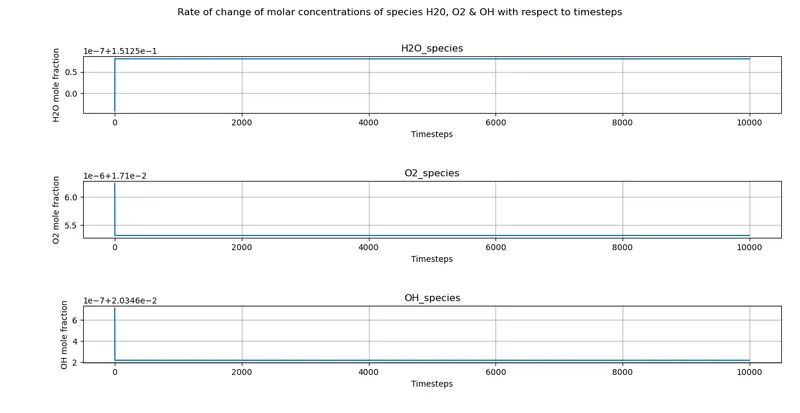
Python script(Variation of pressure and mole fraction):
import sys
import cantera as ct
import numpy as np
import matplotlib.pyplot as plt

# Tp define initial pressure and temperature
T= 1250; # Initial Temperature in Kelvin
Pressure= np.linspace(1,5,5); # Range of Inlet Pressure

# Array to store state values
state_T= []
t_autoI = []

# For loop to execute for all values of pressure
for i in Pressure:

	P= i * 101325 # in kPa
	gas = ct.Solution('gri30.xml')
	gas.TPX= T,P,{'CH4':1,'O2':2,'N2':7.52}

	# Instance object to create a reactor which defines governing equation to solve
	r= ct.IdealGasReactor()
	r.insert(gas)

	# To define reactor network to do solving part
	sim= ct.ReactorNet([r])

	time= 0.0 # Start time
	t_end= 10 # Total simulation time
	timestep= 1e-3 # timesteps to perform time integration

	n= int((t_end-time)/timestep);

	# To create solution array contianing temperature, pressure, species etc. values
	states= ct.SolutionArray(gas, extra=['time_in_ms','t'])

	for n in range(n):
		time+= 1e-3
		sim.advance(time)
		states.append(r.thermo.state, time_in_ms= time*1e3, t=time)
	state_T.append(states.T)

	print(states.T)

	# To find out time at which autoignition starts
	for j in range(n):
		Error= states.T[j] - T - 400
		if Error > 0:
			t_auto= states.time_in_ms[j]
			break
	t_autoI.append(t_auto)


state_T= np.array(state_T)
for k in range(len(Pressure)):
	plt.figure(1)
	plt.plot(state_T[k])
	plt.xlabel("Timesteps")
	plt.ylabel("Temperature")
	plt.title("Variation of Auto-ignition Temperature with initial Pressure")
	plt.legend(['1 Bar','2 Bar','3 Bar','4 Bar','5 Bar'])

plt.figure(2)
plt.plot(Pressure,t_autoI,'r-*')
plt.xlabel("Pressure in [Bar] ")
plt.ylabel("Ignition Delay in [ms]")
plt.title("Ignition Delay VS Initial Pressure")

# For mole fraction calculation of species
H2O_species= states.X[:,gas.species_index('H2O')]
O2_species= states.X[:,gas.species_index('O2')]
OH_species= states.X[:,gas.species_index('OH')]

print(H2O_species)
print(O2_species)
print(OH_species)


fig, ax= plt.subplots(3)

ax[0].plot(H2O_species)
ax[0].set_title('H2O_species')
ax[0].set_xlabel('Timesteps')
ax[0].set_ylabel('H2O mole fraction')
ax[0].grid('on')
fig.suptitle("Rate of change of molar concentrations of species H20, O2 & OH with respect to timesteps")

ax[1].plot(O2_species)
ax[1].set_title('O2_species')
ax[1].set_xlabel('Timesteps')
ax[1].set_ylabel('O2 mole fraction')
ax[1].grid('on')

ax[2].plot(OH_species)
ax[2].set_title('OH_species')
ax[2].set_xlabel('Timesteps')
ax[2].set_ylabel('OH mole fraction')
ax[2].grid('on')

fig.tight_layout()
plt.show()
Results:
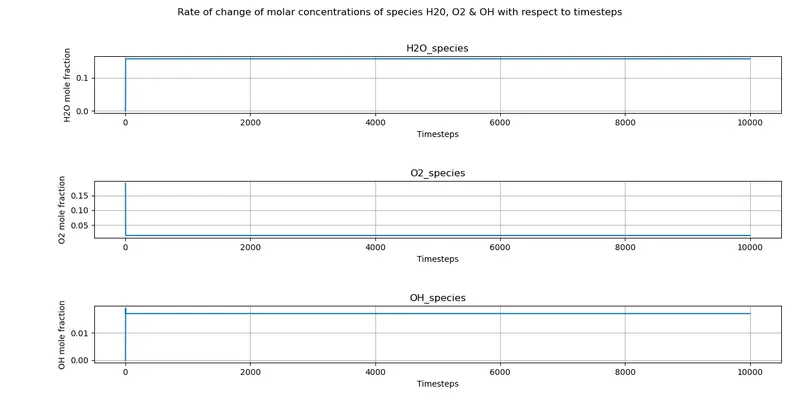
Observation:
- As we can see, there are sudden changes in mole fractions of the above species when the mixture is auto-ignite.
- Oxygen present in the mixture gets reduced to form a water species and OH species.
CASE-4: Behaviour graphs with two different conditions
Python scripts:
import sys
import cantera as ct
import numpy as np
import matplotlib.pyplot as plt

T= 500
P= 5* 101325
gas = ct.Solution('gri30.xml')
gas.TPX= T,P,{'CH4':1,'O2':2,'N2':7.52}


r= ct.IdealGasReactor()
r.insert(gas)
sim= ct.ReactorNet([r])

time= 0.0
t_end= 10 # in sec
timestep= 1e-3
n= int((t_end-time)/timestep);

states= ct.SolutionArray(gas, extra=['time_in_ms','t'])

for n in range(n):
	time+= 1e-3
	sim.advance(time)
	states.append(r.thermo.state, time_in_ms= time*1e3, t=time)

H2O_species= states.X[:,gas.species_index('H2O')]
O2_species= states.X[:,gas.species_index('O2')]
OH_species= states.X[:,gas.species_index('OH')]

print(H2O_species)
print(O2_species)
print(OH_species)


fig, ax= plt.subplots(3)

ax[0].plot(H2O_species)
ax[0].set_title('H2O_species')
ax[0].set_xlabel('Timesteps')
ax[0].set_ylabel('H2O mole fraction')
ax[0].grid('on')
fig.suptitle("Rate of change of molar concentrations of species H20, O2 & OH with respect to timesteps")

ax[1].plot(O2_species)
ax[1].set_title('O2_species')
ax[1].set_xlabel('Timesteps')
ax[1].set_ylabel('O2 mole fraction')
ax[1].grid('on')

ax[2].plot(OH_species)
ax[2].set_title('OH_species')
ax[2].set_xlabel('Timesteps')
ax[2].set_ylabel('OH mole fraction')
ax[2].grid('on')

fig.tight_layout()
plt.show()
Results:
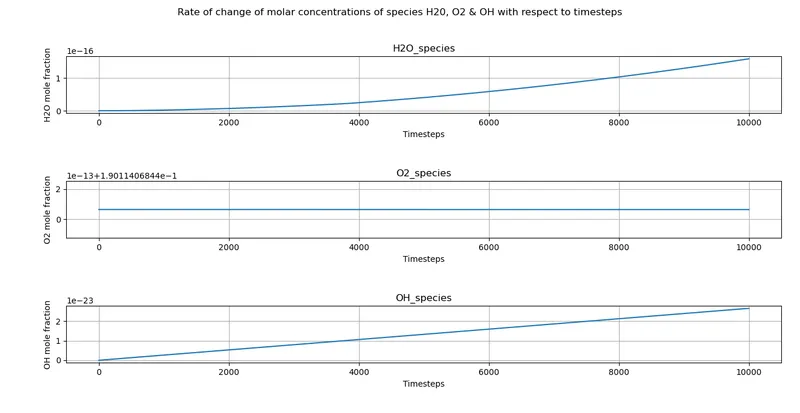
- When Temperature is 500K and pressure 5 bar
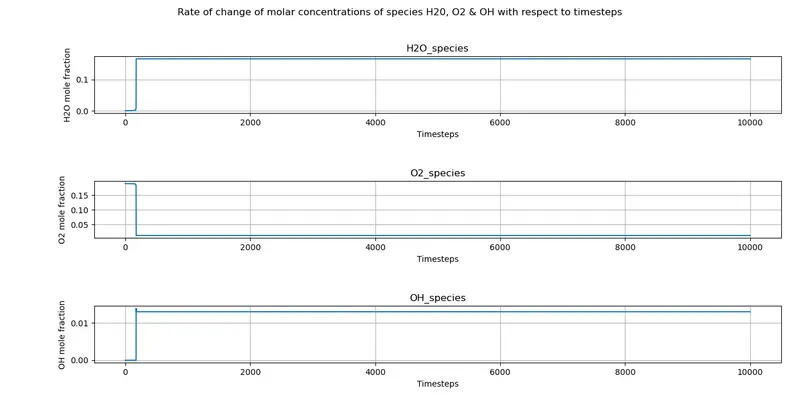
2. When Temperature is 1000K and pressure 5 bar
Observation:
- The initial temperature of 500k is not high enough to auto-ignite the mixture even we have taken the system to 5 bar pressure and it will not auto-ignite the mixture even if we increase the pressure to a higher magnitude.
- the temperature at 1000k will take very less time to auto-ignite.