Simulink Project: Control logic of a “washing machine” using Stateflow
Aim:
To implement control logic of a washing machine using state flow.
Problem Statement:
The control logic should be as per the following sequence:
- If the power supply is available, the system gets activated.
- If the water supply is not available, stop the process and indicate through LED.
- Soaking time should be 200s followed by Washing time of 100s.
- Then rinsing happens for next 20s and dryer runs for 50s.
- After all the processes have completed, turn on the finished LED.
Theory:
Stateflow in Simulink provides a graphical language that includes state transition diagrams, flow charts, state transition tables, and truth tables [1]. Stateflow is a programming language that can be used to describe how MATLAB algorithms and Simulink models react to input signals, events, and time-dependent conditions. It lets to create supervisory controls, task scheduling, fault management, communication protocols, user interfaces, and hybrid systems, among other things. Stateflow also allows to create combinatorial and sequential decision logic that can be simulated as a Simulink block or performed as a MATLAB object. One can inspect and troubleshoot your reasoning while it's running thanks to the graphical animation. Prior to implementation, edit-time and run-time tests confirm that the design is consistent and comprehensive.
Washing Machine
A washing machine is a type of home equipment that is used to clean clothes. The word is most commonly used to describe devices that clean with water rather than dry cleaning or ultrasonic cleaners. The user adds laundry detergent to the wash water, which is available in liquid or powder form. The power supply and water supply are required to run the machine. It also cleans garments by soaking, washing, rinsing, drying, and doing a variety of other tasks as well. A schematic representation of the working of the washing machine is shown in Figure 1.
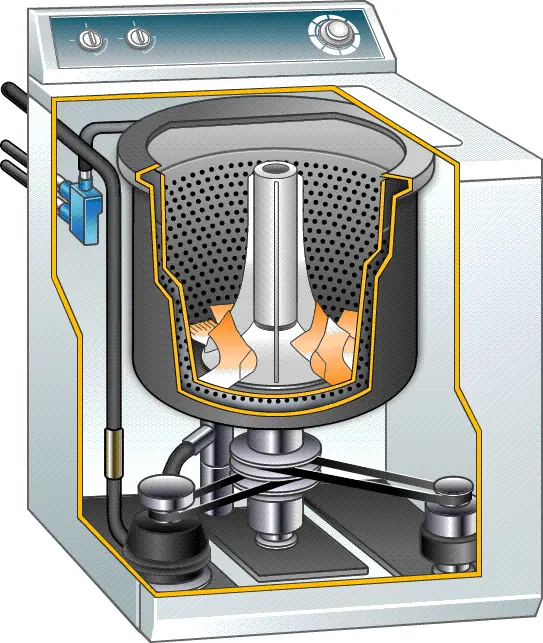
Figure 1: Working of Washing Machine [2].
Objectives:
- Understand the concept of Stateflow in Simulink and its usage in models.
- Understand the basic working concept of washing machines and its various process states.
- Develop a Simulink model for washing machine with control logic.
- Analysis of the developed model.
Simulink Model:
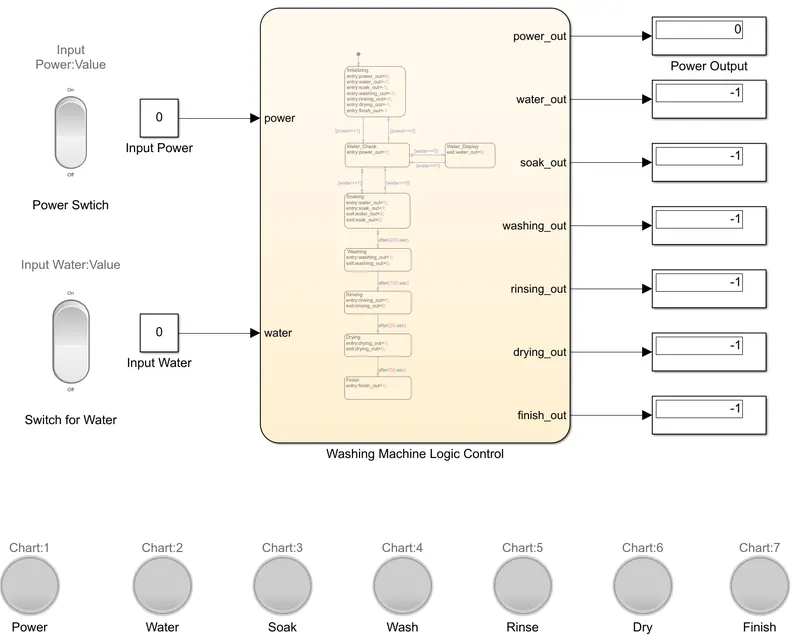
The Simulink model consist of two inputs, Input Power and Input Water which can be controlled using Rocker Switch blocks, Power Switch and Switch for Water. This switches toggle the value of the connected block parameter between two values during the simulation. Here, they are assigned with default values 0 and 1, which means that if the switch is in ON position, it passes on the value 1 as input else if it in OFF mode, it passes the value 0 as input. These inputs are passed on to the chart Washing Machine Logic Control, where the logic control of stateflow of the working conditions of the washing machine takes place. The state flow can be viewed below. There are seven outputs from the control chart, which is connected to the displays. These displays are connected with the block Lamp, which can light up various colours according to the input. These lamps are to show status of power supply, water supply, soaking process, washing process, rinsing process, drying process and the finish. Further explanation of the working is discussed in the coming sections.
Stateflow:
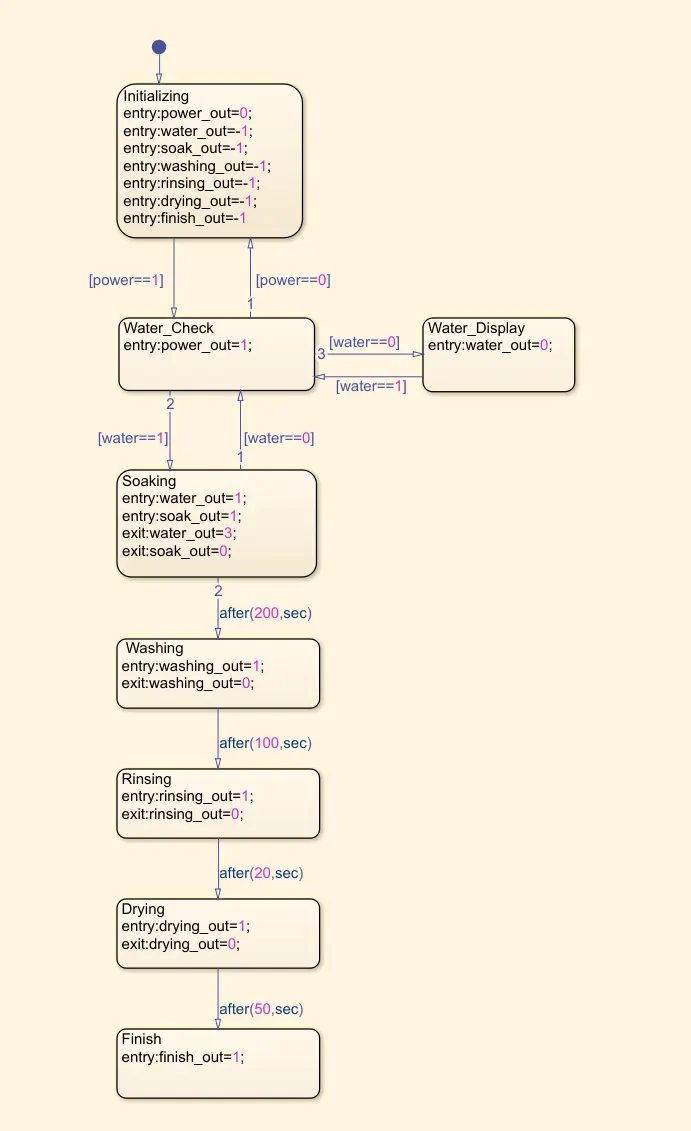
Explanation of the Logic Control with Outputs:
Nine data are used in the chart as shown in Figure 2, where power and water are inputs, while power_out, water_out, soak_out, washing_out, rinsing_out, drying_out, and finish_out are outputs.
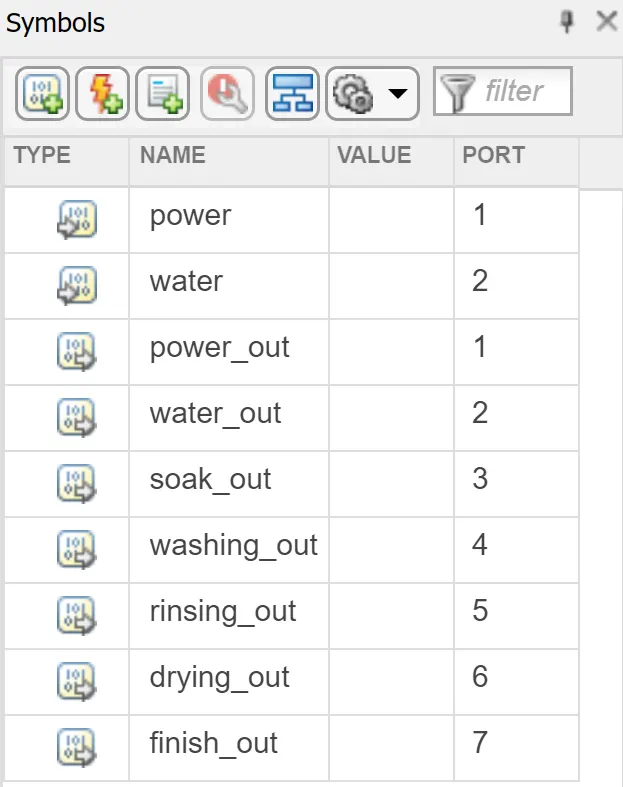
Figure 2: Data used in Control Logic Chart
The control logic begins with the state Initializing, where all the output data are assigned a value of -1. This is the state where no power and water are supplied. For the value of -1, the lamps that are connected these output data are assigned with the colour grey, to show that the washing machine is in OFF condition and need to switch on the power switch to start the machine. The lamp output for this condition is shown in Figure 3.

Figure 3: Lamp Output before the power switch is turned ON.
The Initializing state is connected to the state Water_Check. They are connected with the condition based on the input date 'power'. If the Power Switch is turned ON, the input data power gets the value 1, leading to activating the state Water_check. Here, the power_out is assigned value 1, which is linked to the green colour for power lmap. Then it compares with the state Water_Display. If the water switch is OFF, new state will be Water_Display, where the output data water_out is assigned the value 0, which is linked with the red colour for the water lamp. If the power switch is ON, and the water switch is OFF, the lamp output as shown in Figure 4 is obtained. Here, the red light means water is required, so need to turn on the water switch. If the power switch is ON, and the water Switch is ON as well, the lamp output as shown in Figure 5 is obtained. The water is available means the input data water equals 1 and it would move to state Soaking, where the output data water_out and soak_out are assigned the value 1, which is linked to the green colour of lamp, indicating that soaking process is active.

Figure 4: Lamp output when power switch is ON and Switch for Water is OFF.

Figure 5: Lamp output when power switch and switch for Water are ON.
The Soaking state will run for 200 seconds as it is connected to the state Washing with the condition 'after(200,sec). After Soaking state active for 200 seconds, the washing state will be activated afterwards. When leaving the state Soaking, the output date water_out is assigned value 3 (linked to orange colour for lamp) and soak_out is assigned value 0 (linked to red colour for the respective soak lamp). Also, when the Washing state activates, the output data washing_out is assigned the value 1, which is liked to green color for the light. The lamp output as shown in Figure 6 is obtained when Washing process starts. The Yellow colour for Water lamp means that no further water requirement is needed for the process, so even if the water switch is OFF, it won't affect the process. Soaking process is denoted with red color, which means that the soaking process is over.

Figure 6: Lamp output when Washing process starts.
The washing process will run for 100 seconds as it is linked with the state Rinsing with the condition 'after(100,sec)'. When washing process ends, the data washing_out is assigned the value 0 (linked to red color for the lamp). When the rinsing process starts, the data rinsing_out is assigned the value 1 (linked to green color) as shown in Figure 7 and it will remain in the Rinsing for 20 seconds due to the condition 'after(20,sec)' with the state Drying. When the Rinsing process ends, rinsing_out is assigned the value 0 (red light) and drying_out is assigned the value 1 (green color) as shown in Figure 8. The drying state will remain for 50 seconds due to the condition given and the finally the Finish state will be reached, where the data finish_out is assigned value 1 (green color) and drying_out is assined the value 0 (red color), refer Figure 9.

Figure 7: The lamp output when Rinsing process begins.

Figure 8: The lamp output when Drying Process begins.

Figure 9: The lamp output after the complete processes in the washing machine is done.
Simulink Model File:
To download: https://drive.google.com/file/d/168i6bgzZLaDYGQQ42DM2_3Bmaub-mKvx/view?usp=sharing
Conclusion:
A Simulink Model to implement control logic of a washing machine using Stateflow as per required sequence is done successfully.
References:
[1] https://de.mathworks.com/products/stateflow.html
[2] https://www.pinterest.com/pin/558868634987448778/
[3] https://skill-lync.com/knowledgebase/overview-of-stateflow-and-building-of-models
[4] https://skill-lync.com/knowledgebase/help-document-on-dashboard-library-blockset-2