Week 3 - Solving second order ODEs
Aim: To create a program in Matlab to solve the second order ODE of motion of a simple pendulum with damping.
OBJECTIVE:
- To write a program to simulate the transient behavior of a simple pendulum
- To create an animation of the motion of simple pendulum using MATLAB
THEORY :
Simple Pendulum –
A simple pendulum is defined to have an object that has small mass, also known as pendulum bob, which is suspended from light wire or string, such as shown in fig below.
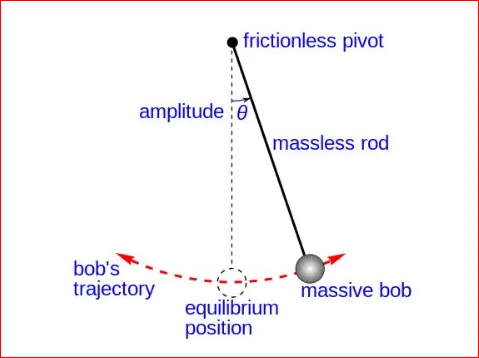
The Dynamic behavior of pendulum bob is important to understand the motion of simple pendulum. When bob is given simple push while it is at rest ,it experiences sideways force. it is displaced from its equilibrium position and start to oscillate about pivot point swinging back and forth . in general the motion of a simple pendulum is considered to be simple harmonic motion with constant amplitude and is given by equation,
`( d^2 θ)/d_(t^2 ) +g/l sin〖θ=0〗`
Where,
`θ=` Angular displacement of the pendulum bob;
`g=` Acceleration due to gravity m/`s^2`
`l=` Length of the pendulum in m.
In practice ,the motion of simple pendulum is subjected to a restoring force along with the friction and air drag which reduces their amplitude of swing with time and bring it back towards the equilibrium position. When the motion of an oscillator reduced due to external force ,the oscillator and its motion is said to be damped .These periodic motion of gradually decreasing amplitude are damped simple harmonic motion .In the damped simple harmonic motion ,the energy of the oscillator dissipates continuously. But for small damping ,the oscillation remain approximately periodic. The differential equation for the motion of a simple pendulum with damping is as follows,
`(d^2 θ)/d_(t^2 ) + b/m (dθ/dt)+ g/l sinθ=0`
Where,
`b=` damping coefficient .
`m=` mass of the pendulum bob in kg.
This differential equation is of order ‘2’ and thus is called as Second Order differential Equation (ODE) for a simple pendulum. By using this equation we can simulate the transient behavior of a simple pendulum using Matlab.
Derivation for code simplification –
Let angular displacement `θ=θ_1` and angular velocity will be,
`dθ/dt= 〖dθ〗_1/dt= θ_2` …………………..Equation NO.1
`(d^2 θ)/〖dt〗^2 =(d^2 θ)/〖dt〗^2 =d/dt (〖dθ〗_1/dt)=(dθ_2)/dt` ....…………….Equation NO.2
Substituting these in second order for a simple pendulum ,we get,
`(d^2 θ)/〖dt〗^2 +b/m dθ/dt+g/l sin〖θ=0〗`
`(d^2 θ)/〖dt〗^2 +b/m (〖dθ〗_1/dt)+g/l sin〖θ_1=0〗`
`(dθ_2)/dt+b/m θ_2+g/l sin〖θ_1=0〗`
This is first order differential equation ,hence we can write,
`〖dθ〗_1/dt = 〖 θ〗_2`
`(dθ_2)/dt = - b/m θ_2-g/l sin〖θ_1=0〗`
Writing the equation in the form of matrix, we have
`d/dt [ ■(θ_1@θ_2 ) ]=[ ■(θ_2@-b/m θ_2-g/l sin〖θ_1 〗 )]`
Where,
`θ_1=` Angular Displacement of the pendulum bob;
`θ_2=` Angular Velocity of the pendulum bob.
BY Solving the above equation in Matlab,we can get the value for Angular Displacement & Angular Velocity with respect to Time.
MATLAB Program :
Inputs : The value of the Pendulum "`l`" is taken as 1m, mass of the pendulum bob "m" is taken as 1 kg and the damping coefficient "b" is taken as 0.05 the motion of simple pendulum is simulated between time span of 0-20 sec,for Angular displacement "`θ_1` "= 0, Angular velocity "`θ_2`" = 3 rad/sec at time =0`
% Second order ODE of a simple Pendulum and its Animation
clear all
close all
clc

%Inputs
b = 0.05;
g = 9.81;
l = 1 ;
m = 1;

 % Initial condition
 theta_0 = [ 0 ; 3 ];

 %Time span
 t_span = linspace(0,20,100)

 %Solving ODE
 [t,results] = ode45(@(t,theta) ode_func(t,theta,b,g,l,m),t_span,theta_0);

 % Plotting Angular displacement and Angular velocity w.r.to Time
 figure (1)
 hold on
 plot(t,results(:,1))
 plot(t,results(:,2))
 title('Damped Harmonic motion of a Pendulum')
 legend('Angular displacement','Angular velocity')
 xlabel('Plot')
 ylabel('Time(seconds)')

%  For Loop
%  Before starting the for Loop , a counter value was defined

 ct = 1 ;
 for i = 1:length(results(:,1))
     x_start = 0
     y_start = 0
     x_end = 1*sin(results(i,1))
     y_end = -1*cos(results(i,1))

     %Plotting the animation
     figure (2)
     plot([-1 1],[0 0], 'linew',3)
     hold on
     plot([x_start x_end],[y_start y_end],'linew',3)
     hold on

     plot(x_end,y_end,'o','markersize',20,'markerfacecolor','y')
     title('Animation of transient behaviour of a pendulum')
     axis([-1.5 1.5 -1.5 1])
     pause(0.03)
     hold off


     M(ct) = getframe(gcf)
     ct =  ct + 1
 end

 %Animation of the Pendulum

 movie(M)
 videofile=VideoWriter('Pendulum Animation.avi','uncompressed avi')
 open(videofile)
 writeVideo(videofile,M)
 close(videofile)
Code explained:
- The code start with clear all, close all and clc where,
- “Clear all ” command is used to clear the data stored in the workspace.
- “Close all” command is used to close all plots and figures.
- “clc” command is used to clear the command window
- The given input values of b,g,l &m are entered and the initial condition for Angular displacement “ “ = 0 ,Angular velocity “ “ = 3 ard/sec are entered to the variable “theta_0”
- The time span of the motion of simple pendulum “t_span” is taken to be 20 sec with 600 equal intervals.
- To establish the relation between all the inputs values in second order ODE,a differential function code is written which is as follow,
function [dtheta_dt] = ode_func(t,theta,b,g,l,m)

theta1 = theta(1)
theta2 = theta(2)
dtheta1_dt = theta2;
dtheta2_dt = -(b/m)*theta2 - (g/l)*sin(theta1);
dtheta_dt = [dtheta1_dt; dtheta2_dt];
end- This function code is based on the matrix which we have derived.Here the first value of LHS row matrix is defined as ‘theta1’ i.e Angular displacement & second value is defined as ‘theta2’
- Then all the corresponding equation and reletions are entered. This function which is named as ‘ode_func.m’is then all main code with special syntax ‘ode45’
 %Solving ODE
 [t,results] = ode45(@(t,theta) ode_func(t,theta,b,g,l,m),t_span,theta_0);
Ode45
- The ode45 is a versatile ODE solver and is the first solver you should try for most problem however, if the problem is stiff or required high accuracy , the there might be other Ode solver that might be better suited for problem
- 2. ODE45 can only solve 1st order ODE …!
- 3. Ode is based on an explicit Rung-Kutta ( 4, 5 ) formula, the Dormand –Prince pair.
- Higher order ODEs can be reduced to system of coupled 1st order Odes in state variable form .
- The Ode23s solver only solves problem with mass matrix if mass matrix is constant.
- The Ode15s & Ode23t can solve the problem with mass matrix that is singularly known as differential algebraic equation (DAEs)
[ t , results] = Ode45 ( Odefun , t_span ,y0 )
Input :
results = [t,results ] contains the results which we need to plot with respect to time in which result_1 contain Angular displacement & result_2 contain Angular velocity bothjs value in radian,by using this we can calculate different value of angular displacement and angular velocity with respect to time
Odefun is a function handle of the differential equation 1st thing to go inside Ode45 solver
EX : Odefun = @( t , y ) – 0.5*y ;
Odefun must have “ t” & “ y” inputs even if only one argument is used in the differential equation.
Where, “ t” is ( 1 x 1) for the dependent variable and “ y “ is ( m x 1) the dependent variable
t_span = [ t0 t1 t2 … tf ]
- y0 = is the initial condition of y , for any sum y0 is vector and must have same length as the vector output of Odefun.
Output :
t = numerical method evaluated point , returned as column vector ( n x 1 )
y = numerical solution array ( n x m ) ,each row in y the solution at corresponding row of t.
ODE45 can only solve 1st order ODE …!
Ode is based on an explicit Rung-Kutta ( 4, 5 ) formula, the Dormand –Prince pair.
Higher order ODEs can be reduced to system of coupled 1st order Odes in state variable form .
Plotting of graph
% Plotting Angular displacement and Angular velocity w.r.to Time
 figure (1)
 hold on
 plot(t,results(:,1))
 plot(t,results(:,2))
 title('Damped Harmonic motion of a Pendulum')
 legend('Angular displacement','Angular velocity')
 xlabel('Plot')
 ylabel('Time(seconds)')

%  For Loop
%  Before starting the for Loop , a counter value was defined

 ct = 1 ;
 for i = 1:length(results(:,1))
     x_start = 0
     y_start = 0
     x_end = 1*sin(results(i,1))
     y_end = -1*cos(results(i,1))

     %Plotting the animation
     figure (2)
     plot([-1 1],[0 0], 'linew',3)
     hold on
     plot([x_start x_end],[y_start y_end],'linew',3)
     hold on

     plot(x_end,y_end,'o','markersize',20,'markerfacecolor','y')
     title('Animation of transient behaviour of a pendulum')
     axis([-1.5 1.5 -1.5 1])
     pause(0.03)
     hold off


     M(ct) = getframe(gcf)
     ct =  ct + 1
end- Using the derived ode45 results , the graph of angular displacement and angular velocity is with respect to time is plotted
- Then counter "ct" is initialized, here'ct' is variable that simply increments by a specific step value in every iteration og loop
- To provide the continuous motion to the pendulum , a 'For Loop'is used where all the value of t_span are assigned to variable "i" one at time.The co-ordinates of the points of line (x0,y0,x1,y1) and their corresponding relation are entered to form a link or string of the pendulum .This line and its motionis thus plotted using suitable Axis ([-1.5 1.5 -1.5 1]).The "Marker" command is use to form a circle or the bob of pendulum and the counter is incremented by 1.
- The "PAUSE" command is used to achieve better animation speed.
- Then "getframe" command is used to capture a motion of line and stored in variable "M".
- By using the "movie" command,Matlab is going to make a movie with all the frame stored in variable "M".
- To save this movie ,the "videofile" command is used which has a option to store the video in an Uncompressed '.avi'fromat along with the file name.
- Then the video file is opened after the plot ,the movie is run and stored in file whre we have stored code script for this program.
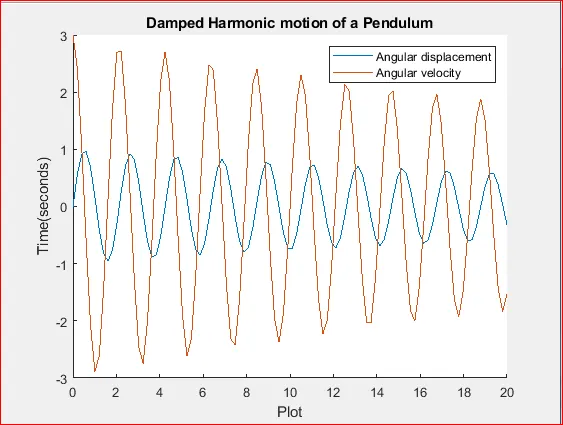
Program Output :
Conclusion :
- As seen in the graph , the periodic curve of Angular displacement and Angular velocity reduced with respect to time . This is mainly due to damping factor .It can also be stated as the simple pendulum is called as damped simple harmonic motion.
2. From the animation of the motion of simple pendulum , it can be concluded that , as the damping coefficient is increased, the motion of the pendulum reduces correspondingly and approaches the equilibrium position .Also increase in damping coefficient reduced th time taken by the pendulum to reach its equilibrium position .
ANIMATION :
Referance Link :