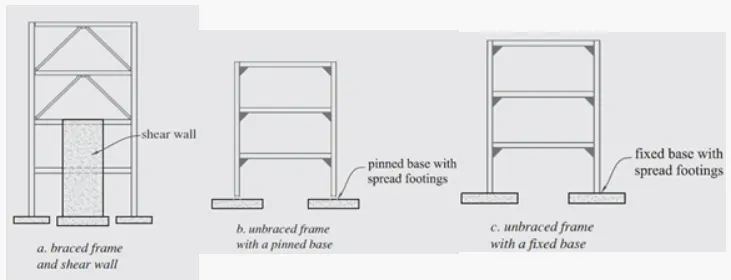
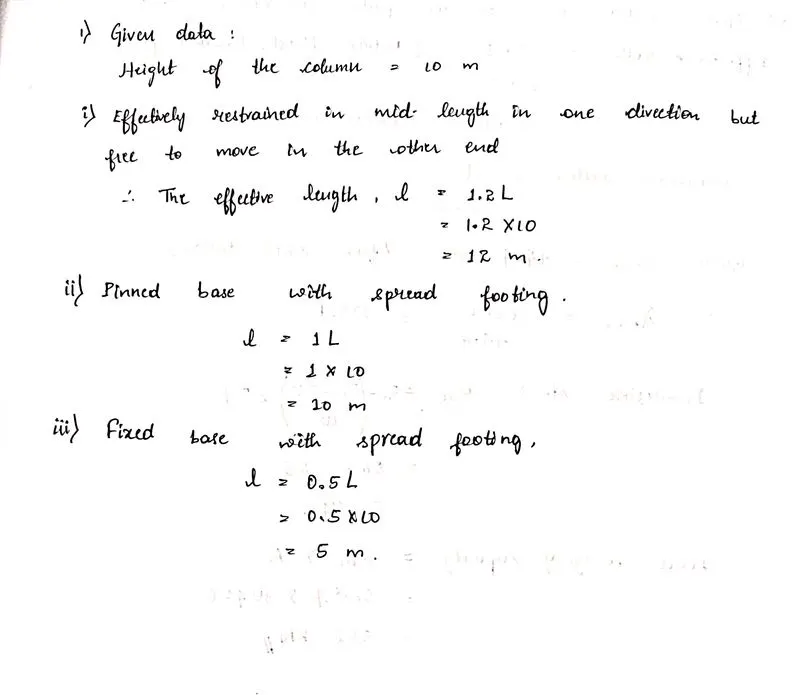
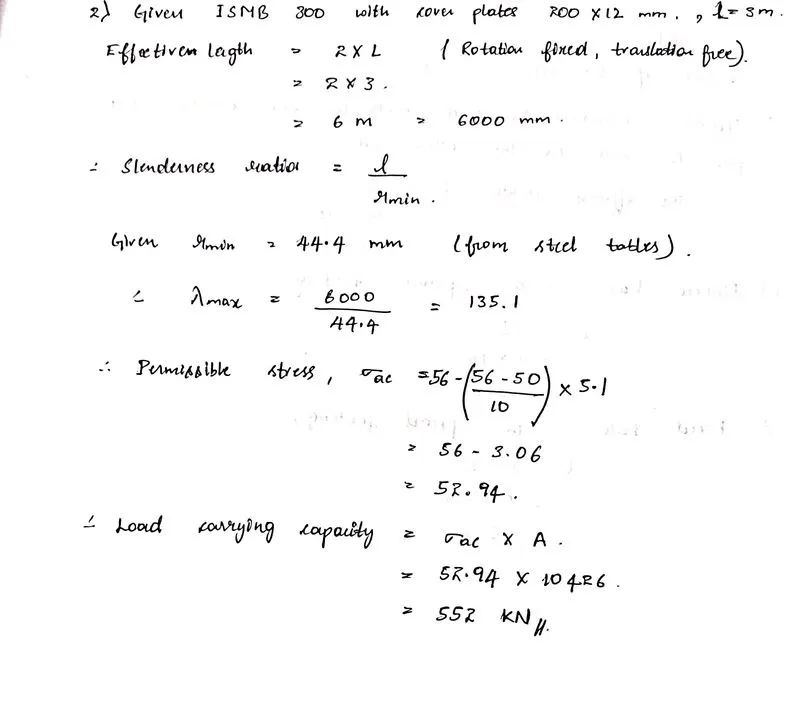
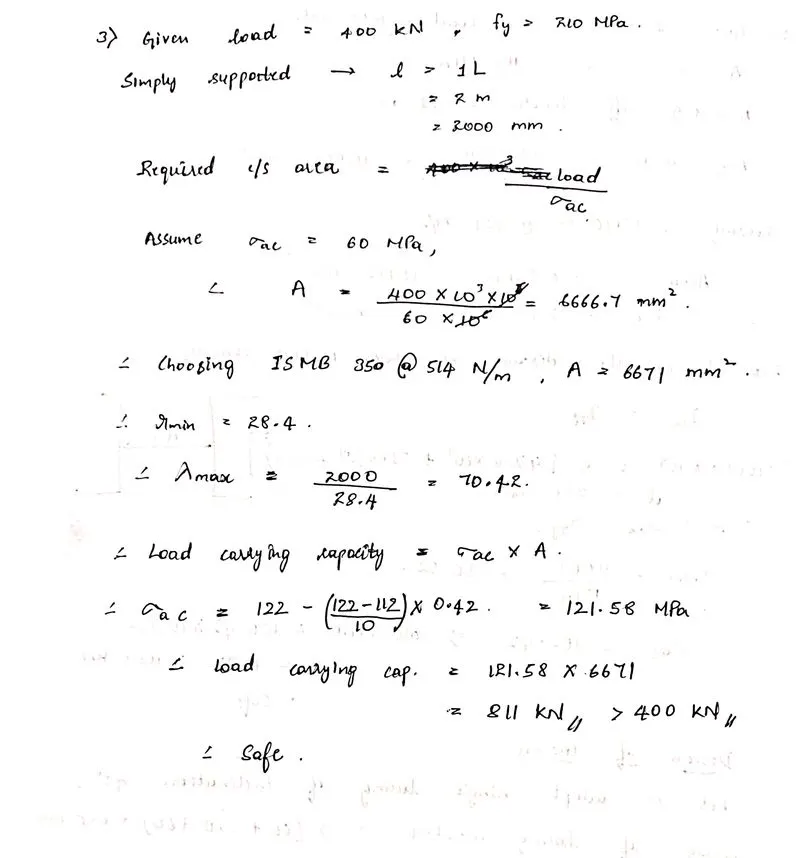
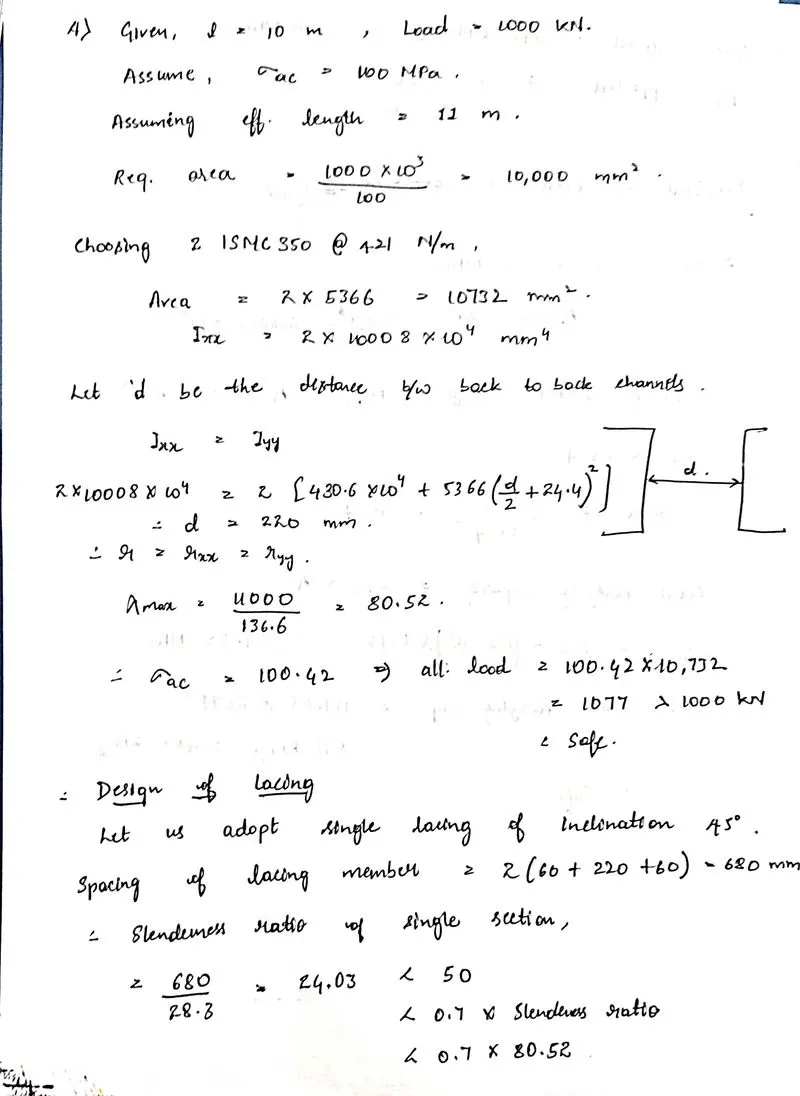
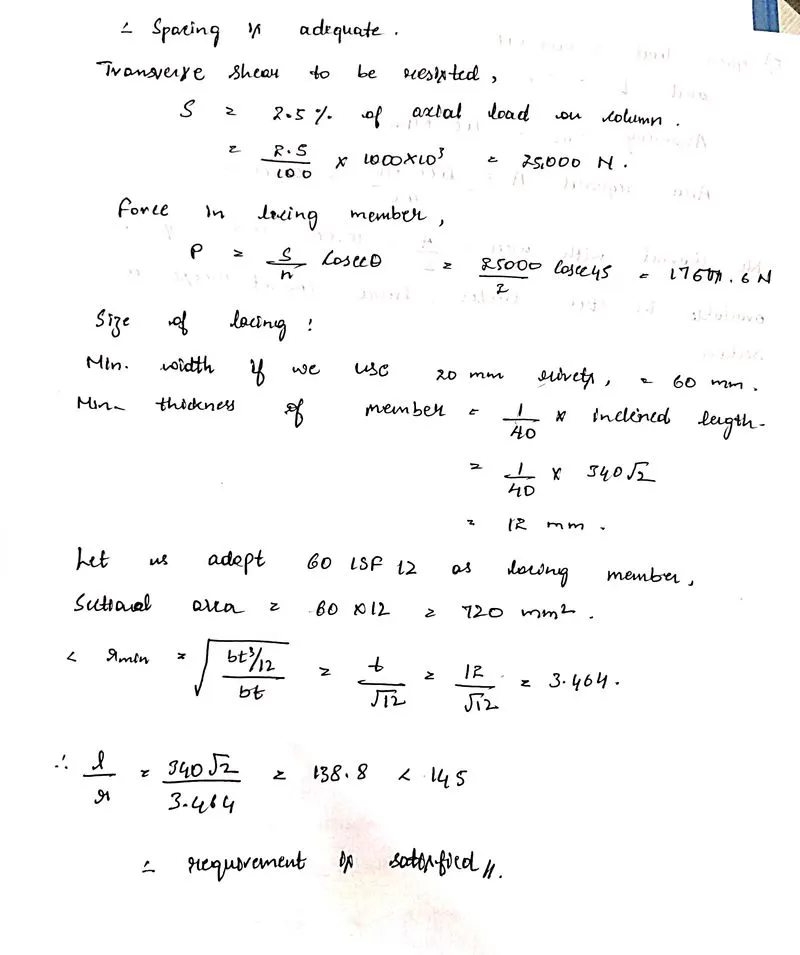
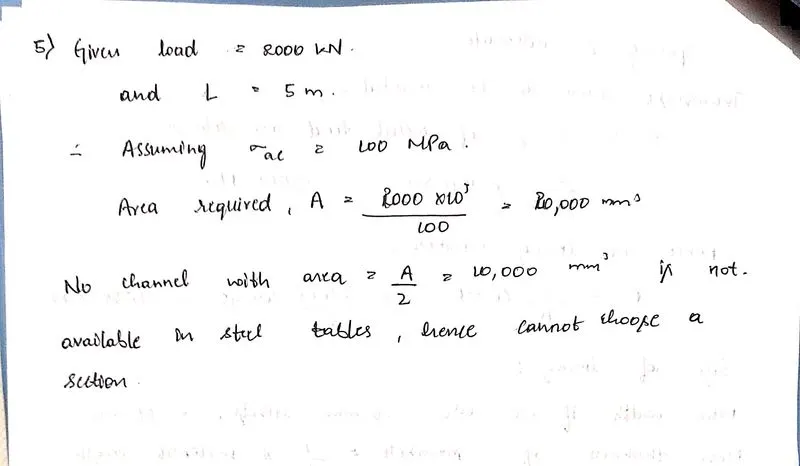
Design of Compression Member 1. Effective length factor determination problem Height of column is 10 m and it is effectively restrained in mid height in one direction (in Z direction) but free to move in other direction (Y direction). Bottom of column is Fixed and top of column is Free. Calculate effective length factor…
Afnan Khan
updated on 12 May 2022
Project Details
Leave a comment
Thanks for choosing to leave a comment. Please keep in mind that all the comments are moderated as per our comment policy, and your email will not be published for privacy reasons. Please leave a personal & meaningful conversation.
Other comments...
Read more Projects by Afnan Khan (24)
Project 1
Aim:Main frame with Lean (Grid-2) & Gable frame without Lean (Grid-15) of Proposed Coil center is to be modeled and designed with given data. Procedure: As per the attached CAD file, Proposed Coil Center Sectional View is as shown in below figure. Now,Model is prepared in Staad Pro with given data and plan as shown in…
10 Sep 2022 06:31 PM IST
Week 12 Challenge
Design of Foundation in STAAD Foundation 1. Isolated Footing Design isolated footing for a column 300 mm x 450 mm, carrying axial load of 1500 kN and Mu = 150 kNm using STAAD. Foundation. Assume that the moment is reversible. The safe bearing capacity of the soil is 200 kN/m2 at a depth of 1 metre from ground level.…
10 Sep 2022 07:14 AM IST
Week 11 Challenge
Modeling , Analysis & Design of Industrial building (PEB/Truss) in STAAD pro. 1. Purlin & Girts number determination problem Calculate total number of purlins and girts required for the building with following inputs Rafter span = 50 m Bay spacing = 8 m Roof slope = 1 in 10 Height of column = 12 m Brick wall height…
10 Sep 2022 07:12 AM IST
Week 10 Challenge
Modeling , Analysis & Design of Industrial building (PEB/Truss) in STAAD pro. 1. Purlin & Girts number determination problem Calculate total number of purlins and girts required for the building with following inputs Rafter span = 50 m Bay spacing = 8 m Roof slope = 1 in 10 Height of column = 12 m Brick wall height…
07 Sep 2022 06:51 AM IST
Week 9 Challenge
Analysis & design of Typical Steel Frame structure using STAAD. Pro (100 marks – 45 mins) 1. Design of dual slope (pitched) roof frame Design a 3 hinged pitched roof frame of a steel building. Assume no wind load acting on the walls and roof. Analyse the frame structure and draw bending moment, shear force and…
04 Sep 2022 06:41 AM IST
Week 8 Challenge
1. Applying Load Exercise For the structure modelled in previous exercise. Apply following loads Form a Load case as DL for Dead Load Apply Self weight Apply member load of 3 kN/m on the rafter Apply member load of 6 kN/m on the secondary beams Apply point load of 20 kN at node intersecting inclined member on the top chord.…
01 Sep 2022 08:25 AM IST
Week 7 Challenge
Modelling of Structure in STAAD Pro 1. Modelling of a structure exercise Model a structure with following details Bay spacing 5 m Span of Truss 30 m Shape of Truss – Pratt Truss Slope of truss 20 degree Height of the column 15 m Floor Beams at 5 m from base Secondary beams at 1.5 c/c Length of the building 50 m Column…
25 Aug 2022 01:48 PM IST
Week 6 Challenge
Structural Systems of Industrial structures 1. Chequered Plate design Design a chequered plate to carry a uniformly distributed Factored live load of 15 kN/m2. Consider the plate is spanned with dimension of 1200 mm x 5000 mm with all edges fixed. (Refer Roarks chart table 11.4) Solution: 3. Lateral Load resisting…
12 Jul 2022 05:16 PM IST
Week 5 Challenge
Design of Plate Girder 1. Shear resistance of web problem Determine PG Web thickness for given load without stiffener For a PG of size 1200 x 300 x 25x 10, Check if the web is adequate to carry a factored shear force of 1000 kN. Yield strength of plate fy is 250 Mpa. Solution: 2. Check whether intermediate stiffener required…
04 Jul 2022 03:46 PM IST
Week 4 Challenge
Design of Beams 1. Section classification problem for listed beam shapes Calculate section classification of following beam shapes ISMB 500 ISMC 200 PG 1300 x 450 x 20 x 12 Double angle (Back to back) – 2 x ISA 75x75x6 RHS - 150 x 100 x10 Builtup box – 1000 x 450 x 20 x 12 Solution: 2. Effective length problems Calculate…
19 Jun 2022 09:44 AM IST
Week 3 Challenge
Design of Compression Member 1. Effective length factor determination problem Height of column is 10 m and it is effectively restrained in mid height in one direction (in Z direction) but free to move in other direction (Y direction). Bottom of column is Fixed and top of column is Free. Calculate effective length factor…
12 May 2022 09:31 AM IST
Week 2 Challenge
1. Net Area for tension member calculation problem Calculate the net section area for the tension member as shown in Figure below. The plate size is 260 x 20 thick and Bolt size is 20 mm. Plate – Drilled Hole Solution: We know, Net section area = (b - nd)t Given, b = 260mm : t = 20mm d = 20 mm but, do = 20+2 = 22mm…
19 Mar 2022 09:44 AM IST
Week 1 Challenge
1. Truss type reasoning Out of the two through type truss systems shown below, which is the most efficient in carrying gravity load? Reason it out. Solution: Truss A is "Pratt truss" & Truss B is "Howe truss". Pratt truss is one of the most common forms of truss and is made up of vertical and diagonal members that…
22 Feb 2022 09:39 AM IST
Usage of Navigation tool , Timeliner and Clash Detection test using Naviswork
1) Use the Architecture/ Structure Project file developed by you in Week 6 to 8. Export the Revit architecture and structure model to Navisworks Cache file following the export settings discussed in class Solution: Aim: To use the structural project file developed by us in the week 6 to 8 to export the Revite Architecture…
27 Jan 2022 10:03 AM IST
Creating Conceptual mass in REVIT and Creation of Sinusoidal curve and a Parametric stadium using Dynamo
1) Using Dynamo create a set of sinusoidal points and create a curve and create a surface out of the curve. Solution: Aim: To use Dynamo and create a set of sinusoidal points and create a curve and create a surface out of the curve. Procedure: 1. Open a new Revit model (in architectural template). 2. Under the manage…
24 Jan 2022 02:29 PM IST
Preparing Schedule & Cost Estimation for a building using REVIT
1) Use the shortcut keys in Revit discussed in class to complete the following tasks and list them below Solution: Aim: To list the shortcut keys of the following : a. Using 3D model create a section box b. To create similar doors and…
14 Jan 2022 03:50 PM IST
Structural analysis of a buidling using Robot Structural Analysis
1) What are HVAC systems? Why are they essential in the modeling of buildings Solution: HVAC Systems: HVAC systems are responsible for the regulation of heat, airflow, ventilation, and air conditioning of an entire building. You won't see the machines when you enter the building but you will most certainly feel the…
31 Dec 2021 07:11 AM IST
Creating Architectural and Structural model with 3D rendering using REVIT
1) Select the type of structure you want to build from one of the three below: a. Multi-Unit Residential Apartment b. Office Buildings c. School Solution: I am going to choose "School" building from the above options. 2) Assume reasonable…
23 Dec 2021 09:44 AM IST
Usage of Collaborate tool in REVIT
1) Open an architectural template. Using the Manage tab set project base point and project shared coordinates for the project. Solution: Aim: To open an architectural template. Using the Manage tab set project base point and project shared coordinates for the project. Procedure: 1. Open Revit and choose an architectural…
11 Dec 2021 12:12 PM IST
Introduction to National Building Code and Steps in a Construction project
1) Why are building codes or standards essential for the modeling/ efficiency of drawings in Revit ? Solution: A model building code organisation is a set of building codes that are developed and maintained by a standard organisation. This standard organisation operates indenpently of the jurisdiction or area in…
20 Nov 2021 06:09 AM IST
3D Creation of Celing, Roof, Architectural plan, Structural plan, Sectional view, Elevation view and Camera specific view for a house plan using REVIT
1) Based on the project saved from Week 3, proceed from the First Floor Level. Model a Ceiling from the architecture tab above the walls at the first-floor level Solution: Aim: To model a Ceiling from the architecture tab above the walls at the first-floor level Procedure: 1. Go to architecture tab and select…
10 Nov 2021 10:08 AM IST
Creating Walls, Partition walls and Floors for a residential layout using REVIT
Question 1: Use the project file created from Week 2. Use it for this assignment. Based on your layout from week 2, using floor tool under architecture tab and select the floor with appropriate material and thickness using the property browser create a layout in the Ground floor Level. Align the floor plan with grids…
28 Oct 2021 02:29 PM IST
Creating Levels, Grids, Layout and model elements for a residential unit using REVIT
1. What is BIM? Summarize the features of BIM and benefits of using BIM over 2D CAD tools. Solution: BIM has the full form Building Information Modeling. BIM helps Architectural, engineering and construction professionals to improve the way they design, construct and opeate using tools which are more useful…
18 Oct 2021 11:05 AM IST
Introduction to REVIT concepts
1) Aim: To create a new project(Structural/ Architectural/ Construction template) from the file menu and name the project accordingly Procedure: 1. To create a new project, click on the file icon on top left of the interface. 2. Then click on "New" and then "project". 3. Select the template file you want and click…
05 Oct 2021 04:25 PM IST