Week 2- 2R Robotic Arm Challenge
AIM: To simulate the forward kinematics of the 2R arm manipulator in MATLAB.
PROBLEM STATEMENT:
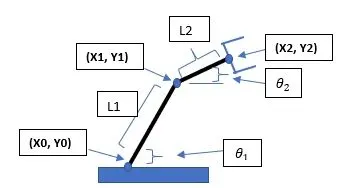
L1 is the length of link1 and l2 is the length of link 2.
`theta_1`is the angle between link 1 and horizontal and `theta_2` is between link 2 and horizontal axis.
and x0, y0 are the coordinates at the base. x1,y1 is the position of the joint between links 1 and 2.
x2, y2 is the end position of link 2.
OBJECTIVE:
- To write a Matlab code to simulate the mechanism.
- generate the animation of the plot of the positions at different angles.
CODE EXPLANATION:
- First, define the geometry of the mechanism. like the length of links.
- we are going to animate the mechanism at different angles, so the angles are defined as ranges between 0 and 90 with 10 degrees intervals.
- To find and plot positions of links at different angles we have for loop is used.
- the outer loop is for the angle between link 1 and horizontal and the inner loop is for link 2 and horizontal axis i.e., theta 2.
- then the position of links are calculated using the formula
- x0 = 0; y0 = 0
x1 = l1*cosd(THETA1), y1 = l1*sind(THETA1)
x2 = x1 + l2*cosd(THETA2);
y2 = y1 + l2*sind(THETA2); - These coordinates are then plotted.
- for creating an animation file counter variable ct is used to track each frame.
- then the Movie command is used to write the animation in the named file.
Code
%forward kinematics of 2R robotic arm manipulator
clear
close all
clc

%inputs to define the geometry of mechanism
l1 = 1;
l2 = 0.5; % lengths of two arms of manipulator

theta1 = linspace(0,90,10);
theta2 = linspace(0,90,10); %angle between arms and horizontal axis

ct = 1; %counter for keeping track of frames
for i = 1:length(theta1)
    THETA1 = theta1(i);
    for j = 1:length(theta2)
        THETA2 = theta2(j);
        x0 = 0; y0 = 0; %base of the robotic arm
        x1 = l1*cosd(THETA1); y1 = l1*sind(THETA1); %positions of link 1
        x2 = x1 + l2*cosd(THETA2);
        y2 = y1 + l2*sind(THETA2);

        %plotting
        plot([x0 x1],[y0 y1],[x1 x2],[y1,y2],'linewidth',3)
        axis([0 1.5 0 1.5])
        M(ct) = getframe(gcf); %saving the frames
        ct = ct+1;
    end
end

movie(M)
videofile = VideoWriter('Forward.avi','Uncompressed AVI');
open(videofile)
writeVideo(videofile,M)
close(videofile)
ERRORS While programming:
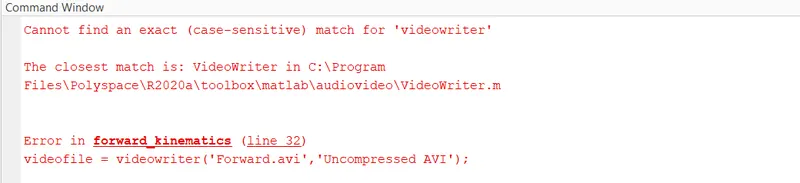
The most common error I have made during the programming is the mistakes with case-sensitive commands.
RESULTS:
The Matlab program is executed and the animation plot is hence obtained.
Link for the animation plot of 2R robotic arm manipulator: https://youtu.be/Sd87VtSnUdo.