Build a Simulink model for Doorbell using solenoid block and a Thermistor to sense the temperature of a heater & turn on or turn off the fan.
Aim:- Create the following simulink models and obeserve the result.
- Make a Simulink model of Doorbell using solenoid block with the following details:
In the above arrangement, when the switch is closed the electromagnet receives electrical power from the battery and pulls the metal arm to hit the bell producing sound. Create a situation where the switch is closed for 2 seconds and then released. Observe the physical movement of the plunger.
2. Use a thermistor to sense the temperature of a heater & turn on or turn off the fan as per below conditions:
Temperature source: 20 °C from 0 to 10 seconds, 27 °C from 10 to 30 seconds, 23 °C from 30 to 50 seconds
Fan conditions: ON if the temperature above 25 °C, OFF otherwise
Answer :-
1] Make a Simulink model of Doorbell using solenoid block with the following details:
In the above arrangement, when the switch is closed the electromagnet receives electrical power from the battery and pulls the metal arm to hit the bell producing sound. Create a situation where the switch is closed for 2 seconds and then released. Observe the physical movement of the plunger.
Theory :-
Solenoid :-
- A solenoid is a type of electromagnet, the purpose of which is to generate a controlled magnetic field through a coil wound into a tightly packed helix.
- The coil can be arranged to produce a uniform magnetic field in a volume of space when an electric current is passed through it. The term solenoid was coined in 1823 by André-Marie Ampère to designate a helical coil.
- In engineering, the term may also refer to a variety of transducer devices that convert energy into linear motion.In simple terms, a solenoid converts electrical energy into mechanical work.
- The term is also often used to refer to a solenoid valve, an integrated device containing an electromechanical solenoid which actuates either a pneumatic or hydraulic valve, or a solenoid switch, which is a specific type of relay that internally uses an electromechanical solenoid to operate an electrical switch; for example, an automobile starter solenoid or linear solenoid. Solenoid bolts, a type of electromechanical locking mechanism, also exist.
- In electromagnetic technology, a solenoid is an actuator assembly with a sliding ferromagnetic plunger inside the coil. Without power, the plunger extends for part of its length outside the coil; applying power pulls the plunger into the coil. Electromagnets with fixed cores are not considered solenoids.
- Types of Blocks used in making the subject model of Doorbell are as under;
1) Solenoid Block -
The Solenoid Block represents the electrical characteristics & generated force for solenoid.
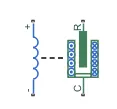
Solenoid Block
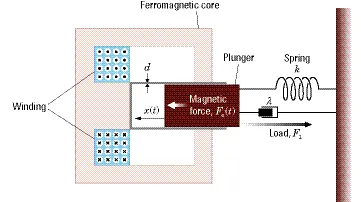
- The return spring is optional. To remove the effects of this spring from the model, set the Spring constant parameter to
0.
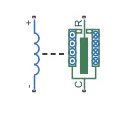
- To show the direction in which the solenoid acts, the block icon changes dynamically based on value of the Motion direction under excitation parameter.
| When The Motion direction under excitation Parameter Is Set To... | Block Icon |
|---|---|
Port R moves away from port C |
|
Port R moves towards port C |
|
2) Battery :-
- This block models a battery. If you select Infinite for the Battery charge capacity parameter, the block models the battery as a series internal resistance and a constant voltage source.

- If you select Finite for the Battery charge capacity parameter, the block models the battery as a series internal resistance plus a charge-dependent voltage source defined by:
V = Vnom*SOC/(1-beta*(1-SOC))
where SOC is the state of charge and Vnom is the nominal voltage. Coefficient beta is calculated to satisfy a user-defined data point [AH1,V1].
3) Switch :-
- The block represents a switch controlled by an external physical signal. If the external physical signal PS is greater than the threshold, then the switch is closed, otherwise the switch is open.

- The closed resistance is defined by parameter R_closed, and the open conductance is defined by parameter G_open. Both parameters must be greater than zero.
- The block has two electrical conserving ports and one physical signal port PS.
4) Pulse Generator :-
- The Pulse Generator block generates square wave pulses at regular intervals. The block waveform parameters, Amplitude, Pulse Width, Period, and Phase delay, determine the shape of the output waveform.

- The following diagram shows how each parameter affects the waveform.
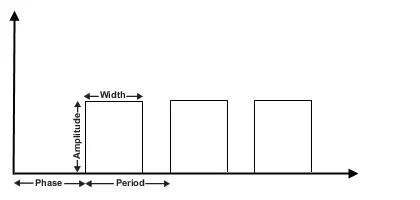
- The Pulse Generator block can emit scalar, vector, or matrix signals of any real data type. To emit a scalar signal, use scalars to specify the waveform parameters.
- To emit a vector or matrix signal, use vectors or matrices, respectively, to specify the waveform parameters. Each element of the waveform parameters affects the corresponding element of the output signal.
- For example, the first element of a vector amplitude parameter determines the amplitude of the first element of a vector output pulse. All the waveform parameters must have the same dimensions after scalar expansion. The data type of the output is the same as the data type of the Amplitude parameter.
- The block output can be generated in time-based or sample-based modes, determined by the Pulse type parameter.
Output pulses:
if (t >= PhaseDelay) && Pulse is on
Y(t) = Amplitude
else
Y(t) = 0
end
- Pulse type determines the computational technique used.
- Time-based is recommended for use with a variable step solver, while Sample-based is recommended for use with a fixed step solver or within a discrete portion of a model using a variable step solver.
5) Ideal Translational Sensor :-
- The Ideal Translational Motion Sensor block represents a device that converts an across variable measured between two mechanical translational nodes into a control signal proportional to velocity or position. You can specify the initial position (offset) as a block parameter.

- The sensor is ideal since it does not account for inertia, friction, delays, energy consumption, and so on.
- Connections R and C are mechanical translational conserving ports that connect the block to the nodes whose motion is being monitored. Connections V and P are physical signal output ports for velocity and position, respectively.
- The block positive direction is from port R to port C. This means that the velocity is measured as v = vR – vC, where vR, vC are the absolute velocities at ports R and C, respectively.
6) Scope :-
- This block is used to display signals during simulation.
7) Mechanical Translational Reference :-
- This block represents a mechanical translational reference point, that is, a frame or a ground. Use it to connect mechanical translational ports that are rigidly affixed to the frame (ground).
8) Electrical Reference :-
- Electrical reference port. A model must contain at least one electrical reference port (electrical ground).
9) Simulink-PS converter :- Converts the Simulink input signal to a Physical Signal.
10) PS-Simulink Converter :- Converts the input Physical Signal to a Simulink output signal.
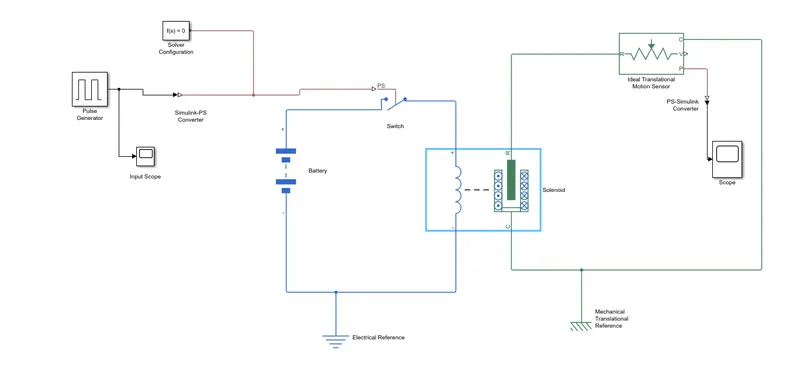
Simulink Model :- Doorbell circuit using Solenoid block
Model Drive Link :-
https://drive.google.com/file/d/1dLUeHIeuGJhpcyTItBzSj42r8ukQ3rNz/view?usp=sharing
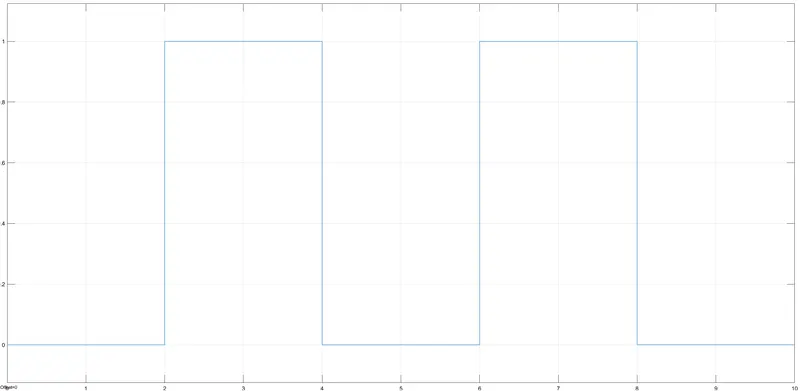
Input Graph :-
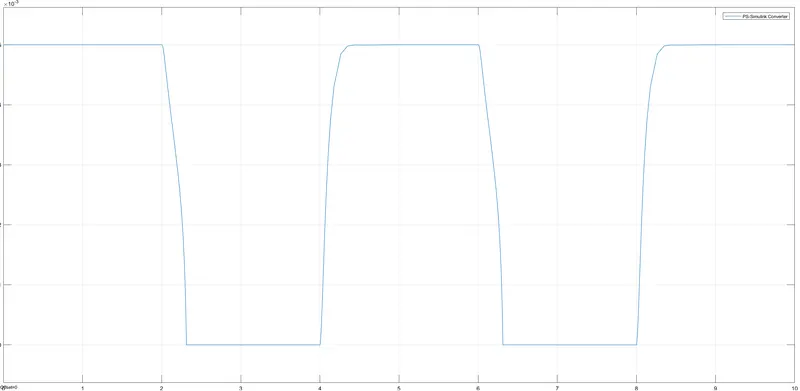
Output Graph :-
Explanation :-
- Initially, we have used Pulse Generator block to provide input square shaped waveform at regular intervals. Then, we have altered the parameters by keeping amplitude as 1, period of signal as 4 sec, Pulse width of 50% and phase delay of 2 sec.
- The details are as under;
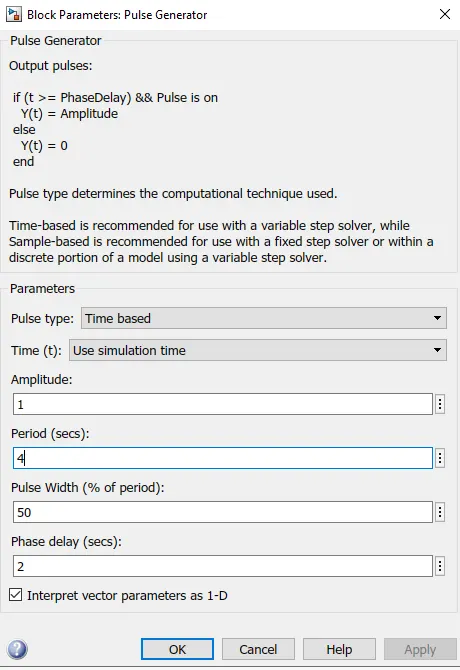
- This means that initially the pulse will be zero and at 2 secs, the pulse width will be half of period(50%), so for the next two seconds the pulse will be at amplitude ’1’ only, then it will again come down to zero at 4th second and then it will at zero for next 2 secs thus completing the periods of 4 seconds.
- From starting to ending of the pulse will take 4 secs of time periods in which only for 2 secs the amplitude will be one and for rest of time it will be zero. So, after these 4 secs period again the pulse will be generated and thus cycle continues.
- To this ‘Pulse Generator block’ a ‘Scope block’ is connected to see how the pulse is generated.
- As mentioned before, the pulse has started after 2 seconds, then for next two seconds it has amplitude of ‘1’ and then next 2 seconds the pulse is again zero. The pulse is starting from 2 seconds and ending at 6 seconds which nothing but a time period of 2 seconds.
- Thus, this represents that when amplitude is one, the switch will be closed and when it is zero the switch will open. Since our objective is only to see the change in position of plunger when switch is closed for 2 seconds so that we have the amplitude as 1 for 2 seconds in the pulse generator by making the pulse width half of the period in the inputs for ‘Pulse Generation block’.
- Thereafter, we have used Simulink-PS converter block because switch block requires an external physical signal to operate. If external physical signal applied is greater than threshold value, then switch is closed otherwise it is open.
- Further, we have taken Solenoid block and connected positive terminal of Solenoid block with positive terminal of Battery. Also, we have connected negative terminal of solenoid block to negative terminal of battery block.
- Now, the battery, switch and solenoid block is connected to ‘Electrical Reference block’ which represents the earthing of the circuit. The ‘Electrical Reference block’ should be connected with the negative terminal of the ‘Battery block’.
- Now, in the ‘Solenoid block’, ‘R’ and ‘C’ are two variables which represent the Plunger and fixed point respectively.
- Now this ‘R’ is connected to an ‘R of the ‘Ideal Translational Motion Sensor block’, which senses the position of the plunger in the ‘Solenoid block’ and gives the output.
- Now in the ‘Ideal Translational Motion Sensor block’, the outputs are given as V and P which represent the velocity and the position of the plunger. Since, we need to observe only the position of the plunger, we need the results from ‘P’ output.
- Now the ‘C’ in the ‘Ideal Translational Motion Sensor block’ represents the mechanical translational conversion port which means that the mechanical process starts from ‘R’ and ends at ‘C’ and it again starts from ‘R’ and the cycle goes on.
- So ‘C’ in the ‘Ideal Translational Motion Sensor block’ is connected to a ‘Mechanical Translational Reference block’ which represents a fixed point where it is rigidly clamped in real time.
- Similarly, ‘C’ of the solenoid block is also connected to the same ‘Mechanical Translational Reference block’ as fixed point for the solenoid.
- Since, we need the position of the plunger as output from ‘Ideal Translational Motion Sensor block’, so we have connected the port ‘P’ to a ‘PS-Simulink Converter block’ where the physical values of the port ‘P’ are converted to Simulink value which is connected to the ‘Scope block’ for generating the graph of the change in the position of the plunger from port ‘P’ of ‘Ideal Translational Motion Sensor block’.
- As mentioned above the port ‘P’ of ‘Ideal Translational Motion Sensor block’ is connected to another ‘Scope block’, and a ‘Solver Configuration block’ is also connected to this path which generates equations and solves the whole model internally to give the results of the whole Simulink model as output.
- Further, we have ran the model and double clicked on the ‘Scope block’ which is connected to ‘Ideal Translational Motion Sensor block’ to see the results.
- From the above figure, we can observe that the initial position of the plunger is at ‘5’, as from the pulse generator block, a pulse generated at 2, so in the position of the plunger is also changing at time 2 seconds and time till which the pulse amplitude is ‘1’ till that time the plunger is also at same position after the change from initial position.
- Again, as the amplitude of the pulse becomes zero, the plunger returns to its initial position back again and as the pulse cycle goes on, plunger also changes its position and comes back to its initial position.
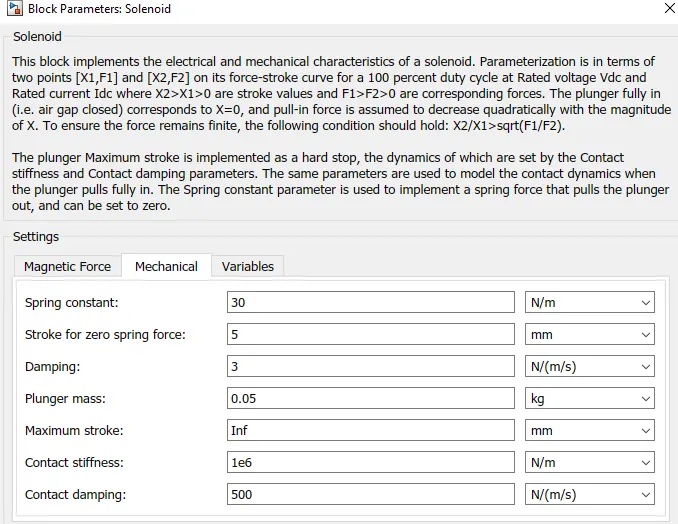
- We can also observe that when there is a change in position of the plunger, there are some wave forms at the start of changes in position. This is due to recoil of the spring, each time when the plunger is moving. So to reduce this, in the ‘Solenoid block’ we can reduce the spring constant value and increase the damping co-efficient. This will reduce the waves that are being formed and we will get a smooth graph.
- The above figure is a smoother graph. This is done by changing the values of spring constant and damping in the ‘Solenoid block’ as under;
PART 2 :-
Use a thermistor to sense the temperature of a heater & turn on or turn off the fan as per below conditions:
Temperature source: 20 °C from 0 to 10 seconds, 27 °C from 10 to 30 seconds, 23 °C from 30 to 50 seconds
Fan conditions: ON if the temperature above 25 °C, OFF otherwise
SOLUTION :-
Theory :-
Thermistor :-
-
A thermistor was first discovered by Michael Faraday in 1833 on a silver sulfide which showed a behavior of decrease in resistance when temperature increased.
-
A thermistor is a semiconductor that has a resistance capacity more than a conducting material and less than insulating material. Its electrical resistance varies with the change in the temperature or thermally sensitive resistor. There are mainly two types of thermistors, namely the Negative Temperature Coefficient (NTC) and the Positive Temperature Coefficient (PTC).
-
Thermistor’s relation with temperature also depends on the material in which it is made. A negative temperature coefficient (NTC) thermistor will decrease its resistance value when temperature increases whereas a Positive temperature coefficient (PTC) will increase its resistance when temperature increases.
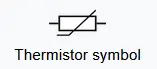
- The electronic symbol of the thermistor is given below;
- NTC thermistors are widely used in industries for different applications like temperature measurements, temperature control, and different applications NTC is an integral part of. PTC is mostly seen in circuit protection, current-limiting resistors.
- Thermistors have high sensitivity which can be up to 10 percent change per degree celsius and their typical response time is 0.5 to 5s with an operating range from -50 to ~300 °C and there are devices with more capacity.
Circuit Diagram :-
Different Types of Blocks used in Simulink model are as under;
1) Thermistor Block :-
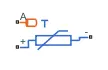
- The Thermistor block represents an NTC thermistor using the B-parameter equation. The resistance at temperature T is
R=R0exp(B(1/T−1/T0))
where:
-
R0 is the nominal resistance at the reference temperature T0.
-
B is the characteristic temperature constant.
The following equation describes the thermal behavior of the block:
Q=Kd*tc*dT/dt
where:
-
Q is the net heat flow into port A.
-
Kd is the Dissipation factor parameter value.
-
tc is the Thermal time constant parameter value.
-
dT/dt is the rate of change of the temperature.
2) Signal Builder :-
- The Signal Builder block allows you to create interchangeable groups of piecewise linear signal sources and use them in a model. You can quickly switch the signal groups into and out of a model to facilitate testing. In the Signal Builder window, create signals and define the output waveforms.
3) Switch :-

- The Switch block passes through the first input or the third input signal based on the value of the second input. The first and third inputs are data input. The second input is a control input. Specify the condition under which the block passes the first input by using the Criteria for passing first input and Threshold parameters.
-
Pass through input 1 when input 2 satisfies the selected criterion; otherwise, pass through input 3. The inputs are numbered top to bottom (or left to right).
-
The first and third input ports are data ports, and the second input port is the control port. The criteria for control port 2 are u2 >= Threshold, u2 > Threshold or u2 ~= 0.
4) Battery :-
-
This block models a battery. If you select Infinite for the Battery charge capacity parameter, the block models the battery as a series internal resistance and a constant voltage source. If you select Finite for the Battery charge capacity parameter, the block models the battery as a series internal resistance plus a charge-dependent voltage source defined by:
V = Vnom*SOC/(1-beta*(1-SOC))
where SOC is the state of charge and Vnom is the nominal voltage. Coefficient beta is calculated to satisfy a user-defined data point [AH1,V1].
5) Voltage Sensor :-
- The block represents an ideal voltage sensor, that is, a device that converts voltage measured between any electrical connections into a physical signal proportional to the voltage.

-
Connections + and - are conserving electrical ports through which the sensor is connected to the circuit. Connection V is a physical signal port that outputs voltage value.
6) Resistor :-
-
The voltage-current (V-I) relationship for a linear resistor is V=I*R, where R is the constant resistance in ohms.
-
The positive and negative terminals of the resistor are denoted by the + and - signs respectively. By convention, the voltage across the resistor is given by V(+)-V(-), and the sign of the current is positive when flowing through the device from the positive to the negative terminal. This convention ensures that the power absorbed by a resistor is always positive.
7) Controlled Temperature Source :-
-
The Controlled Temperature Source block represents an ideal source of thermal energy that is powerful enough to maintain specified temperature difference across the source regardless of the heat flow consumed by the system.

-
Connections A and B are thermal conserving ports corresponding to the source inlet and outlet, respectively. Port S is a physical signal port, through which the control signal that drives the source is applied. The temperature differential across the source is directly proportional to the signal at the control port S.
-
The block positive direction is from port A to port B. This means that the temperature differential is determined as TB – TA, where TB and TA are the temperatures at source ports.
8) Thermal Reference :-
- This block represents a reference point in a thermal network where the temperature is equal to absolute zero.
9) Electrical Reference :-
- Electrical reference port. A model must contain at least one electrical reference port (electrical ground).
10) Constant Block :-
- Output the constant specified by the 'Constant value' parameter. If 'Constant value' is a vector and 'Interpret vector parameters as 1-D' is on, treat the constant value as a 1-D array. Otherwise, output a matrix with the same dimensions as the constant value.
11) Scope :- Display signals generated during simulation.
12) Solver Configuration :- Defines solver settings to use for simulation.
13) Simulink-PS converter :- Converts the Simulink input signal to a Physical Signal.
14) PS-Simulink Converter :- Converts the input Physical Signal to a Simulink output signal.
SIMULINK MODEL :-
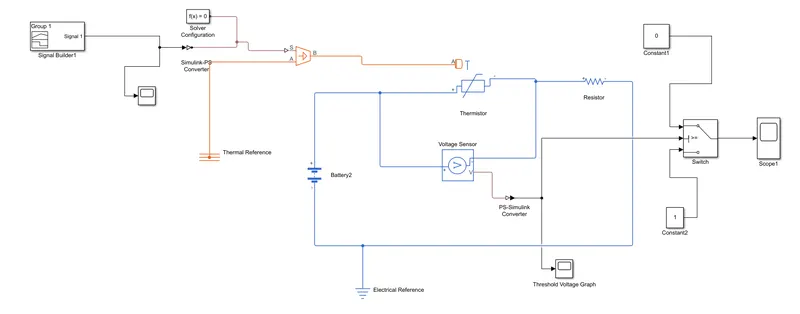
Google Drive Link :-
https://drive.google.com/file/d/1kE4Ja2D_t0dUX4Vk6G8jbjqUXEzcH5lJ/view?usp=sharing
Explanation :-
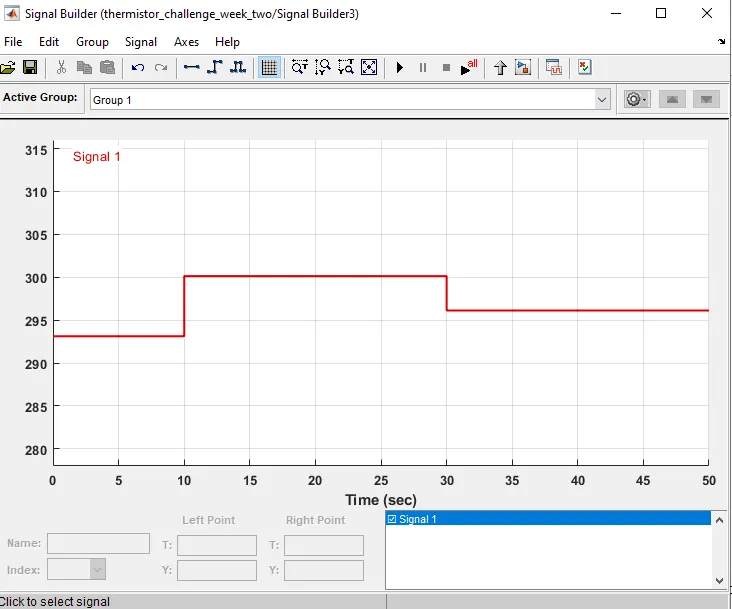
- Initially, we have used Signal builder block so that we can put our temperature source value as under;
- For 0-10 sec, temperature = 20 degree celcius
- For 10-30 sec, temperature = 27 degree celcius
- For 30-50 sec, temperature = 23 degree celcius
2. Since, controlled temperature source and thermistor block only takes values in Kelvin, hence we have converted those temperature values into kelvin and accordingly, we have made the Signal builder block as under;
3. Further, we have connected Signal builder block to Simulink-PS converter block since controlled temperature source takes only physical control signal as input. Further, we have connected output terminal B of controlled temperature source to thermal port A of Thermistor block.
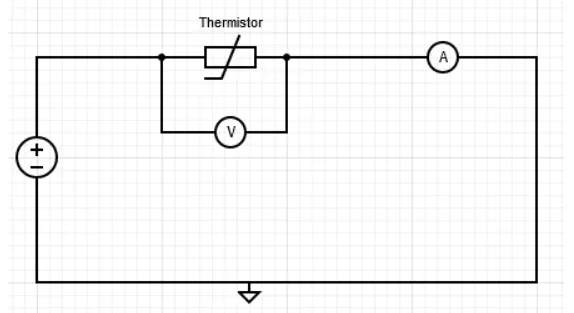
4. Thereafter, we have taken the Thermistor block to sense the temperature of circuit. Further, we have connected positive terminal of thermistor to positive terminal of battery. Here, we have used battery block as a DC voltage source. Thereafter, we have connected voltage sensor parallel to thermistor block to measure the voltage across the circuit and converts those measured voltage value into a physical signal proportional to the voltage. We have also used resistor block to provide resistance to electric flow of current.
5. Due to this, Physical signal port V of voltage sensor generated threshold voltage for given temperature conditions. However, it is physical signal. Hence, we have used PS-simulink converter to convert those physical signal into Simulink signal.
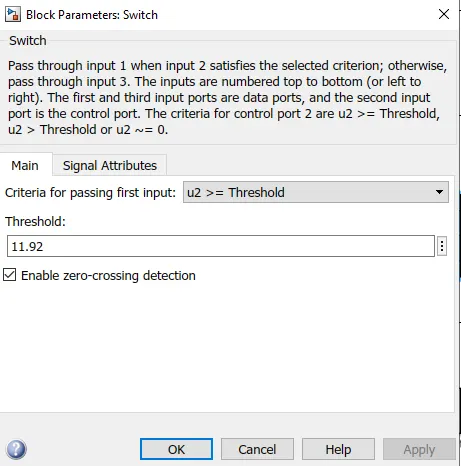
6. As per the fan conditions given in question states that fan should be on if temperature goes above 25 deg. celicus i.e. (298.13 K). Hence, we have introduced one constant block resembling temperature of 25 deg. celcuis and then calculated the threshold voltage as (11.92) required to trigger the switch so that mentioned fan condition can be satisfied.
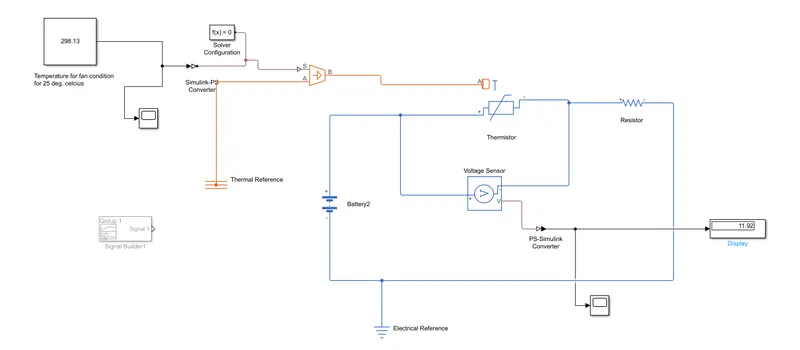
7. We have used scope block and connected to the output port V of voltage sensor & PS-simulink converter to see the voltage graph of given temperature conditions and is as under;
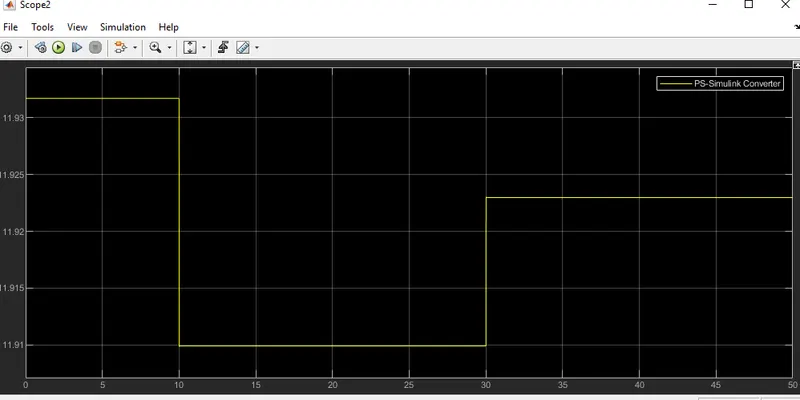
8. From the above graph, it was very evident that for time (0-10 sec), voltage is around 11.935 V at temperature 293.13 K. Further, it was observed that for time(10-30 sec), voltage is around 11.91 V at temperature 300.13 K and for time(30-50 sec), voltage is around 11.9225 v at temperature 296.13 K.
9. Hence, we can say that as soon as temperature increases in the circuit, voltage values decreases.
10. Further, we have connected voltage signal to port 2 of switch block. Here, we have have given threshold voltage value as 11.92 because as per fan condition, fan should be on when temperature goes above 25 deg. celcius.
11. Switch block has a condition such that when control signal port U2 is greater than or equal to threshold value, it passess through port 1 otherwise it passes through port 3.
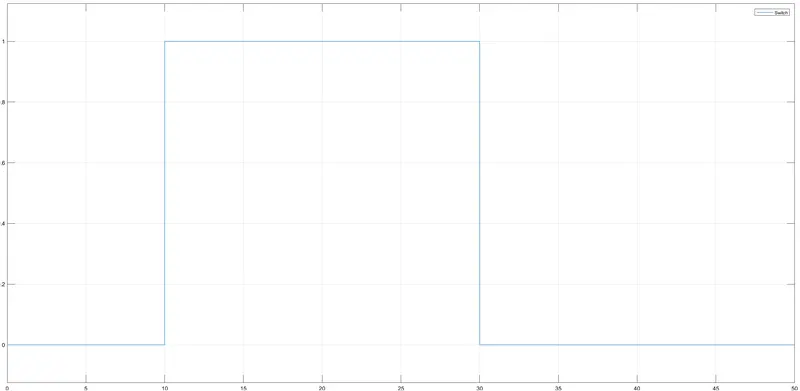
12. Hence, we can say that when temperature value is greater than 25 deg. celcius, voltage value will be less than threshold voltage value hence for that particular instance of the signal, the signal passess through port 3. Hence, for port 3, we have connected constant block of value as '1' as true condition and fan will switch on.
13. Further, when temperature value is less than 25 deg. celcius, voltage value will be more that threshold voltage value, hence for that particular instance of signal, the signal passess trough port 1. Hence, for port 1, we have connected constant block of value as '0' as false condition and fan will be switched off.
14. Scope block has been connected to output port of switch so that output graph can be observed.
Output Graph :-
Conclusion :-
1. For Doorbell challenge, we have given input as time period for 2 seconds in the pulse generator to open & close the switch. When the switch is closed the solenoid block receives electrical power from the battery and plunger moves from port R to port C to hit the bell & produce sound. Physical movement of the plunger is observed by using translational motion sensor & physical output is converted into Simulink output model is displayed in the scope. By reducing the spring constant value and increasing the damping value, vibrations will be reduced.
2. For Thermistor challenge, we observed that as soon as temperature increases in the circuit, voltage value got decreased. Hence, we have used this logic to operate fan condition as when temperature is above 25 deg. celcius, voltage value is less than threhold voltage, then it triggered the switch to operate true condition as '1' and fan gets on otherwise it is off.