Software-in-the-loop (SIL)
Model-Based Design
Model-based development is an embedded software initiative where a two-sided model is used to verify control requirements and that the code runs on target electronic hardware.
One side is the Control Model, representing the embedded software of the system. The architecture of the embedded software is modelled with blocks containing algorithms, functions and logic components. Compiled software is auto-generated from this model.
The other side is the Plant Model, representing the physical aspects of the system. Each block contains mathematics that allows it to emulate the behaviour of that physical system.
Model-Based development process
- Requirement Maturation: Hardware and Software requirement analysis is performed as the first step to weed out a maximum number of design issues.
- Model Simulation: The desired functionalities are expressed in the form of mathematical formulas which eventually becomes models using simulation tools like MathWorks Simulink.
- Testing and Validation: Software-in-loop, model-in-loop and hardware-in-loop testing are performed on the model. As it is an iterative cycle, any issue found at any stage is rectified by tracing it back to its previous stage.
- Code Generation: Code is auto-generated from the tested and verified models.
Model-Based Development- V Cycle
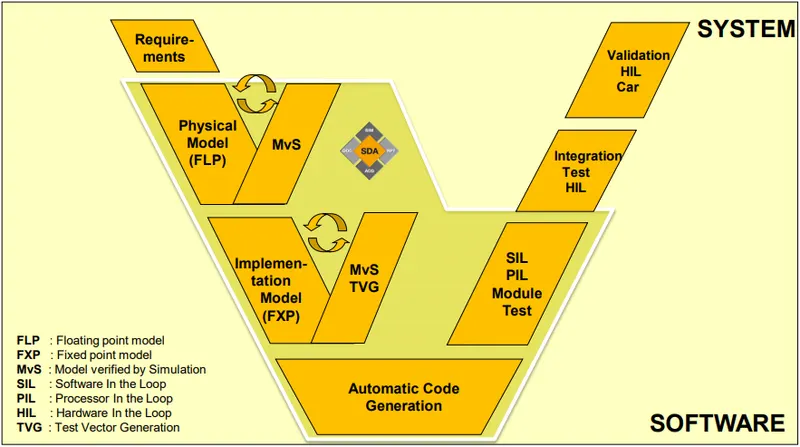
Model-based development and verification approaches are highly desirable in the development of safety-critical embedded systems because they help to identify functional and non-functional issues in the early development stage when verification complexity is relatively lower than that of the implemented systems.
Verification and validation is the backbone of any robust model-based development process. It can be used to check the accuracy of the models and algorithms based on code generated by test hardware and software interactions.
Model Verification by Simulation (MvS)
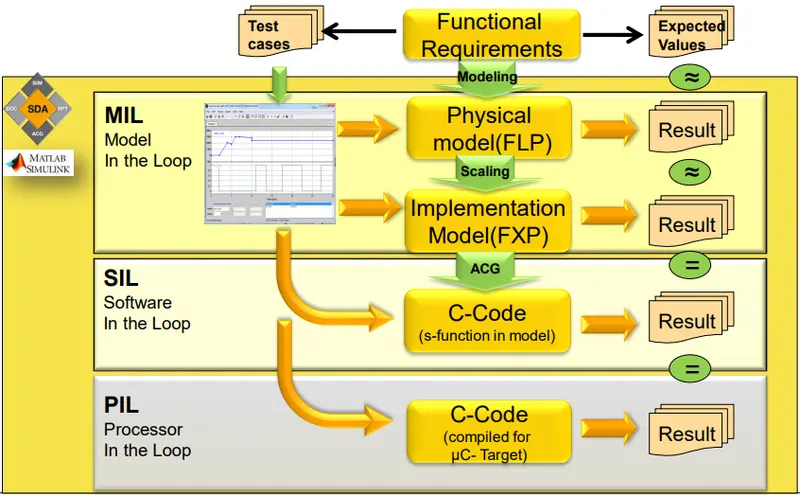
- Model-in-the-loop (MIL) to verify the accuracy and acceptability using plant model of a control algorithm
- Software-in-the-loop (SIL) to validate the behaviour of the generated C code used in the controller
- Processor-in-the-loop (PIL) to validate the referenced model by generating production code using the model reference target—this code is cross-compiled for and executed on a target processor or an equivalent instruction set simulator
Testing
Testing is a systematic way to check the correctness of the system by means of experimenting with it. The test is usually carried out on a system in a controlled environment and a verdict is given based on the behaviour during the test. For testing the system several test cases are written to examine several aspects of the system.
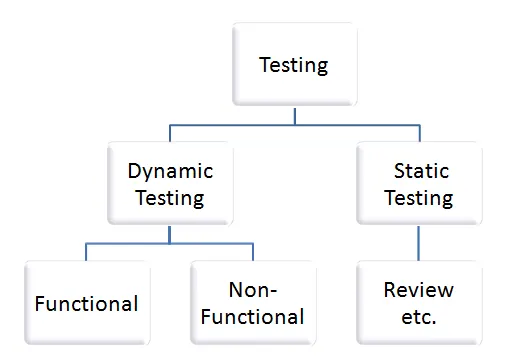
Static Techniques and Dynamic Techniques
Dynamic Testing
In Dynamic Testing, a code is executed. It checks for functional behaviour of software system, memory/CPU usage and overall performance of the system.
The main objective of this testing is to confirm that the software product works in conformance with the business requirements. This testing is also called an Execution technique or validation testing.
Dynamic testing executes the software and validates the output with the expected outcome. Dynamic testing is performed at all levels of testing and it can be either black or white box testing.
The following are part of dynamic testing
- Model-in-the-Loop (MIL): In this stage, the software is run as the diagram-based model against the plant model in a simulated electronic hardware environment. Once the performance is satisfactory, this provides a nominal baseline against the rest of the testing stages are compared.
- Software-in-the-Loop (SIL): Here, compiled software is auto-generated from the control model and run against the plant model in a simulated electronic hardware environment. This testing reveals any errors in the compiled software architecture.
- Processor-in-the-Loop (PIL): With this stage, compiled software, still auto-generated from the control model, is run against the plant model on the target electronic processor, which is a programmed FPGA or custom ASIC. This reveals any issues with compiled software and target electronic processor interaction.
- Hardware-in-the-Loop (HIL): Finally, in this stage, the compiled software, against auto-generated, is run against the plant model on the full target electronic hardware, often the final Electronic Control Unit (ECU).
Static Testing
Static Testing is a software testing technique that is used to check defects in software applications without executing the code. Static testing is done to avoid errors at an early stage of development as it is easier to identify the errors and solve the errors.
Static Testing is done in 2 ways:
- Reviews: Reviews are done in order to find the defects, issues, and ambiguities in the documents like requirements, design, etc. Reviews play an important role in static testing as it is better to find the cause of failure in the starting rather than failures at the end. Reviews in software testing consist of Informal, Walkthrough, Inspection and Technical Review.
- Static Analysis: In Static Analysis, software or an application is tested to find the structural defects in the code written by developers without actually executing it.
Review is of four types:
- Informal: In this review, the creator of the documents puts the contents in the front of the audience and everyone gives their opinion and thus defects are identified in the early stage.
- Walkthrough: It is basically performed by an expert to check the defects so that there might not be problems further in the development or testing phase.
- Peer review: Peer review means checking documents of one another to detect and fix the defects.
- Inspection: Inspection is basically the verification of documents of higher authority like the verification of software requirement specifications.
Testing Techniques
1. Black Box Testing
Black-box testing is a method of software testing that examines the functionality of an application without peering into its internal structures or workings. This method of test can be applied virtually to every level of software testing: unit, integration, system and acceptance.
2. White Box Testing
White-box testing is a method of software testing that tests internal structures or workings of an application, as opposed to its functionality. In white-box testing, an internal perspective of the system, as well as programming skills, are used to design test cases.
3. Grey Box
Grey-box testing is a combination of white-box testing and black-box testing. The aim of this testing is to search for the defects if any due to improper structure or improper usage of applications.
Functional Testing
Functional testing is a type of testing that verifies that each function of the software application operates in conformance with the requirement specification. This testing mainly involves black box testing, and it is not concerned about the source code of the application. Functional Testing is basically defined as a type of testing that verifies that each function of the system application works in conformance with the requirement and specification. Each functionality of the system application is tested by providing appropriate test input, expecting the output and comparing the actual output with the expected output.
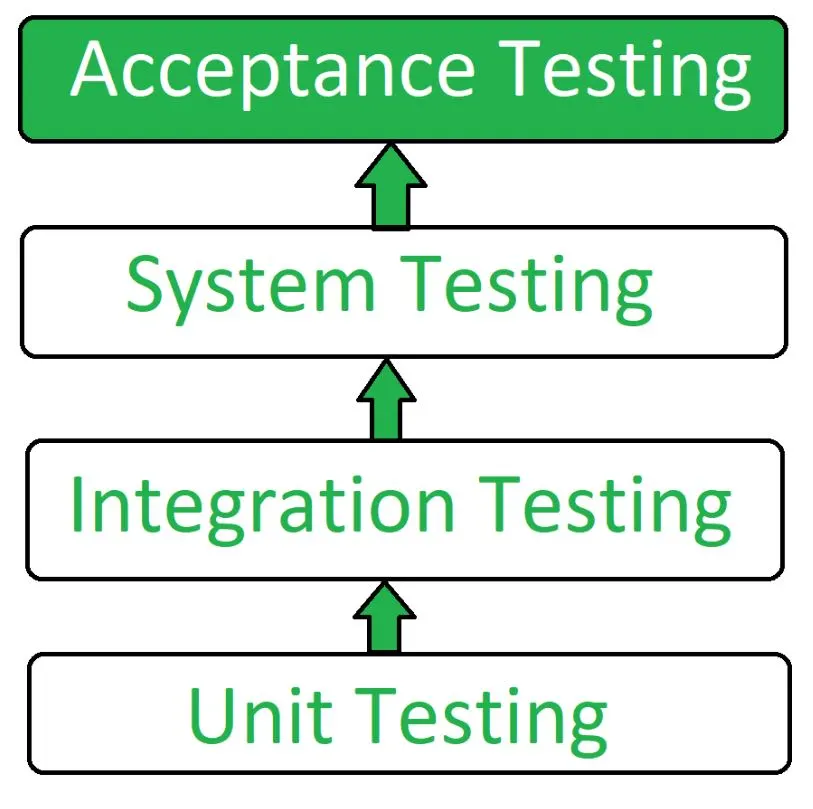
Unit Testing: Unit testing involves testing of small fragments of the source code such as operational procedures or individual functions, independent of each other. It is a part of white-box testing. Unit testing, a testing technique using which individual modules are tested to determine if there are any issues by the developer himself. It is concerned with the functional correctness of the standalone modules. The main aim is to isolate each unit of the system to identify, analyze and fix the defects.
Integration Testing: In integration testing, several units that are supposed to interact with each other are integrated and tested to verify the correctness and debug the system. It is a part of white-box testing. Integration testing is the phase in software testing in which individual software modules are combined and tested as a group. Integration testing is conducted to evaluate the compliance of a system or component with specified functional requirements. It occurs after unit testing and before validation testing.
System Testing: It is divided into functional and non-functional testing. In the functional tests, we test the entire system against the specification and requirements. It is done to evaluate the functionality of the system. It is a form of Black box strategy, system testing is done to evaluate the compliance of the system performance with the specifications mentioned in the owner's manual. In non-functional testing, we test the properties such as performance, flexibility, etc.
Acceptance Testing: It is the last level of the validation process. It is performed in a realistic environment and is mostly carried out at the customer end. Acceptance testing is conducted to determine if the requirements of the product specifications are being met as per the contractual obligations at the site.
Non-Functional Testing
Non-functional testing is a type of testing to check non-functional aspects (performance, usability, reliability, etc.) of a software application. It is explicitly designed to test the readiness of a system as per nonfunctional parameters which are never addressed by functional testing.
| Functional Testing | Non-functional Testing |
|---|---|
| It verifies the operations and actions of an application. | It verifies the behaviour of an application. |
| It is based on the requirements of the customer. | It is based on the expectations of the customer. |
| It helps to enhance the behaviour of the application. | It helps to improve the performance of the application. |
| Functional testing is easy to execute manually. | It is hard to execute non-functional testing manually. |
| It tests what the product does. | It describes how the product does. |
| Functional testing is based on the business requirement. | Non-functional testing is based on the performance requirement. |
Examples:
1. Unit Testing 2. Smoke Testing 3. Integration Testing 4. Regression Testing |
Examples:
1. Performance Testing 2. Load Testing 3. Stress Testing 4. Scalability Testing |
Smoke Testing
In software testing, smoke testing is also known as confidence testing or build verification test (BVT) or build acceptance test. It is preliminary testing to reveal simple failures severe enough to, for example, reject a prospective software release. Smoke tests are a subset of test cases that cover the most important functionality of a component or system, used to aid assessment of whether the main functions of the software appear to work correctly
Regression Testing
Regression testing is re-running functional and non-functional tests to ensure that previously developed and tested software still performs after a change. If not, that would be called a regression.
Dynamic techniques are subdivided into three more categories:
- Specification-based Testing (black-box, also known as behavioural techniques)
- Structure-based Testing (white-box or structural techniques)
- Experience-based Testing
Structure-Based Testing
Structure-based testing techniques use the internal structure of software to derive test cases. They are commonly called 'white-box or 'glass-box techniques. Structure-based techniques can also be used at all levels of testing that is unit testing or component testing, component integration testing, and system and acceptance testing.
Structure-based test design techniques are a good way to help ensure more breadth of testing. To measure what percentage of code has been exercised by a test suite (set of test cases), one or more coverage criteria is used. A coverage criterion is usually defined as a rule or requirement, which a test suite needs to satisfy.
Condition Coverage
Condition coverage is also known as Predicate Coverage in which each one of the Boolean expressions has been evaluated to both TRUE and FALSE.
Example
if ((A || B) && C)
{
  << Few Statements >>
}
else
{
   << Few Statements >>
}
Result
In order to ensure complete Condition coverage criteria for the above example, A, B and C should be evaluated at least once against "true" and "false".
So, in our example, the 3 following tests would be sufficient for 100% Condition coverage testing.
A = true | B = not eval | C = false
A = false | B = true | C = true
A = false | B = false | C = not eval
Decision Coverage
Decision coverage or Branch coverage is a testing method, which aims to ensure that each one of the possible branches from each decision point is executed at least once and thereby ensuring that all reachable code is executed.
That is, every decision is taken each way, true and false. It helps in validating all the branches in the code making sure that no branch leads to abnormal behaviour of the application.
Read A
Read B
IF A+B > 10 THEN
  Print "A+B is Large"
ENDIF
If A > 5 THEN
  Print "A Large"
ENDIF
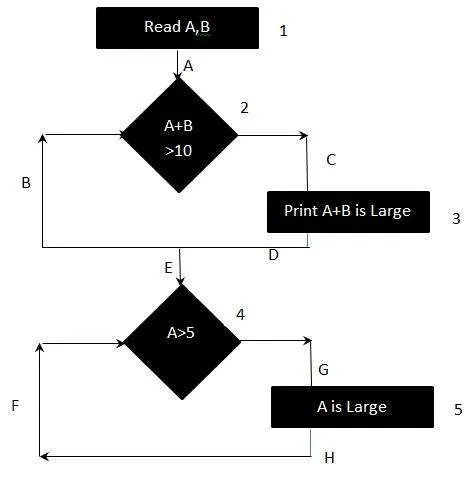
The above logic can be represented by a flowchart as:
Result
To calculate Branch  Coverage, one has to find out the minimum number of paths which will ensure that all the edges are covered.
In this case there is no single path which will ensure coverage of  all the edges at once.
The aim is to cover all possible true/false decisions.
(1) 1A-2C-3D-E-4G-5H
(2) 1A-2B-E-4F
Hence Decision or Branch Coverage is 2.
Modified Condition/Decision Coverage
The Modified Condition/Decision Coverage enhances the condition/decision coverage criteria by requiring that each condition be shown to independently affect the outcome of the decision. This kind of testing is performed on mission-critical applications which might lead to death, injury or monetary loss.
Designing Modified Condition Coverage or Decision Coverage requires a more thoughtful selection of test cases which is carried out on a standalone module or integrated components.
Characteristics of MCDC Coverage
-
Every entry and exit point in the program has been invoked at least once.
-
Every decision has been tested for all the possible outcomes of the branch.
-
Every condition in a decision in the program has taken all possible outcomes at least once.
-
Every condition in a decision has been shown to independently affect that decision's outcome.
Software in-loop testing
Step 1
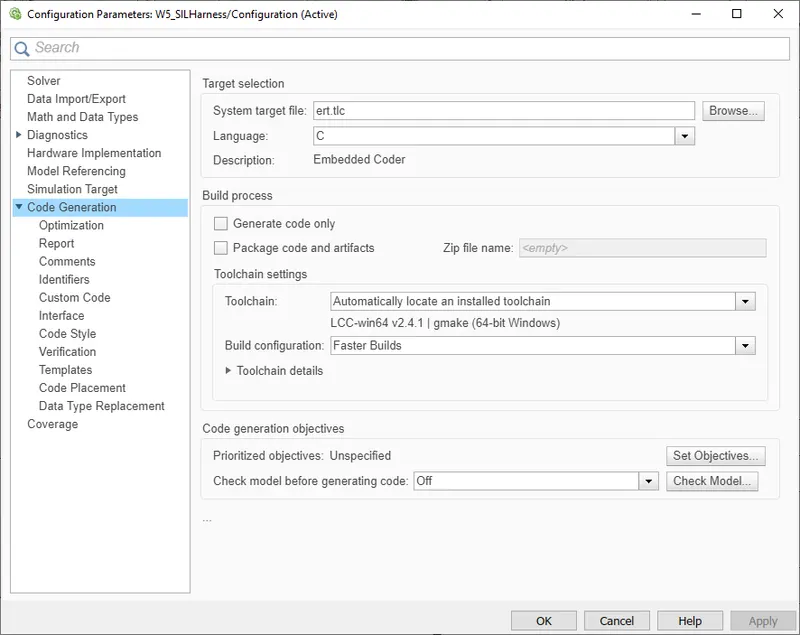
Once we have performed all the necessary checks such as the model advisor report to check model compliance as per specific standards, we can say that our model is ready for code generation.
We change the Code Generation parameters as per our system target file, here we choose embedded real-time coder with target language compiler.
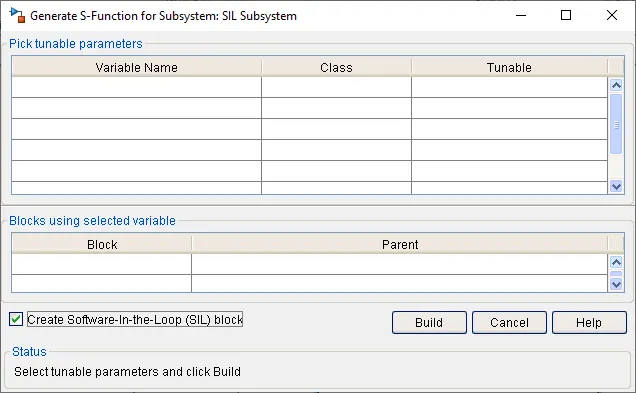
Creating an S-function block from the subsystem upon which the software in loop testing is to be performed.
First, we enable "Treat as atomic unit" under "Block Parameters"
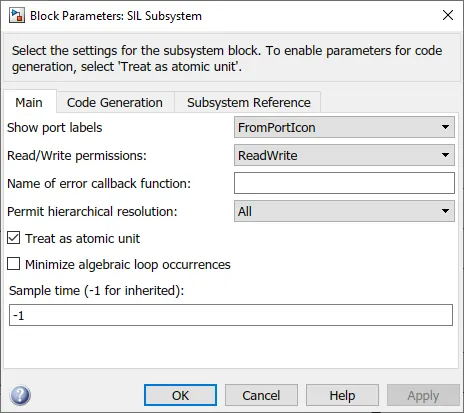
Next, we go to the "c/c++ code" option, under which we choose "Generate S-Function" and enable "Create Software-In-the-Loop (SIL) block"
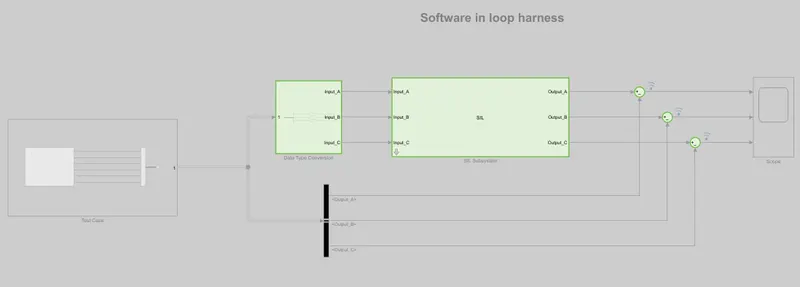
Step 2
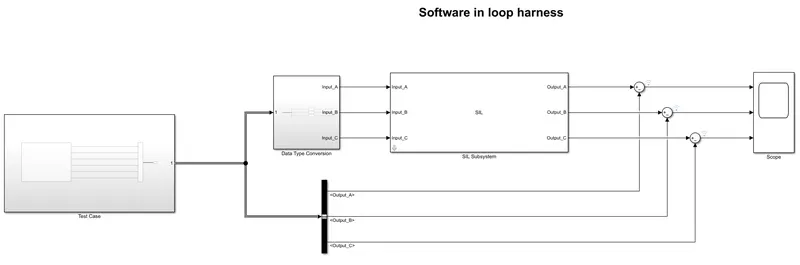
Create a test harness model where we take the subsystem to be tested and create a test harness model so that we can compare the results and test the model as per the given requirements.
Step 3
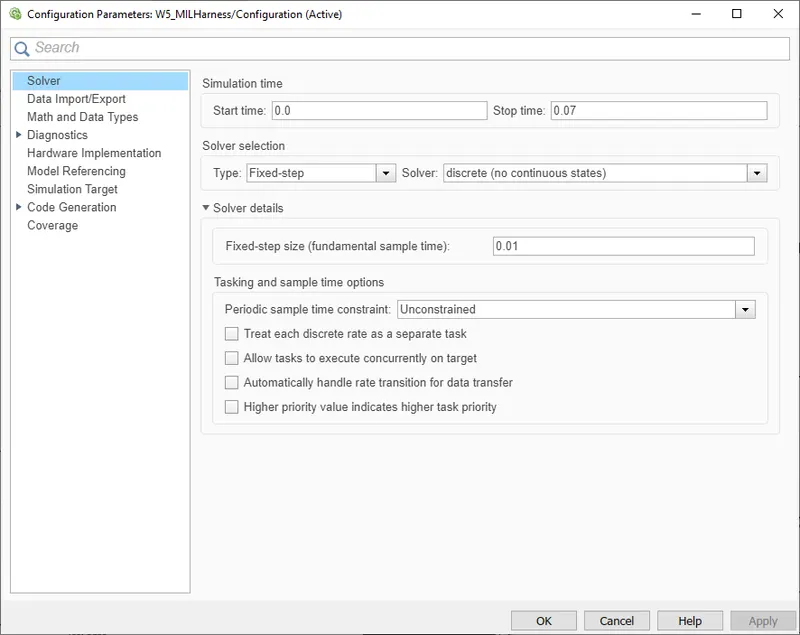
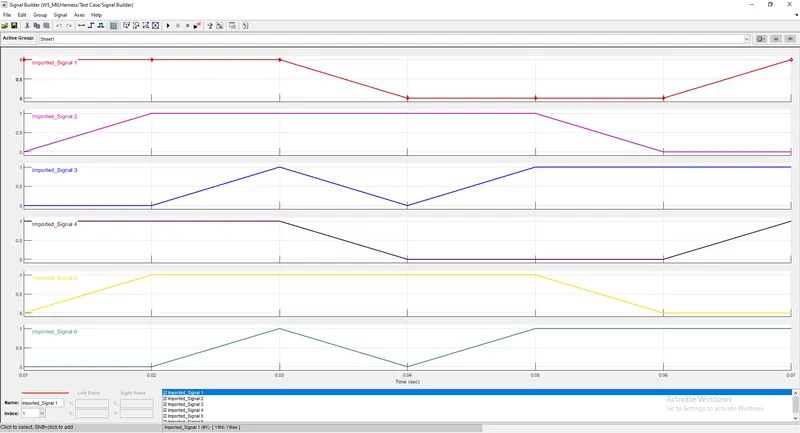
Based on the sample time and the requirement given we write test cases in order to perform software in-loop testing.
Checking the sample time
Defining the test cases
| 0.01 | 1 | 0 | 0 | 1 | 0 | 0 |
| 0.02 | 1 | 1 | 0 | 1 | 1 | 0 |
| 0.03 | 1 | 1 | 1 | 1 | 1 | 1 |
| 0.04 | 0 | 1 | 0 | 0 | 1 | 0 |
| 0.05 | 0 | 1 | 1 | 0 | 1 | 1 |
| 0.06 | 0 | 0 | 1 | 0 | 0 | 1 |
| 0.07 | 1 | 0 | 1 | 1 | 0 | 1 |
Importing data from excel to signal builder block
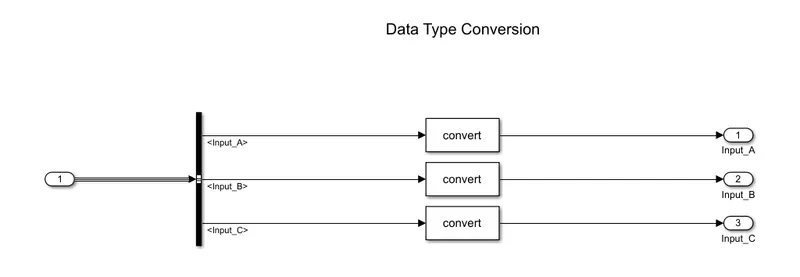
Step 4
Converting the signal from the signal builder as per the subsystem requirement.
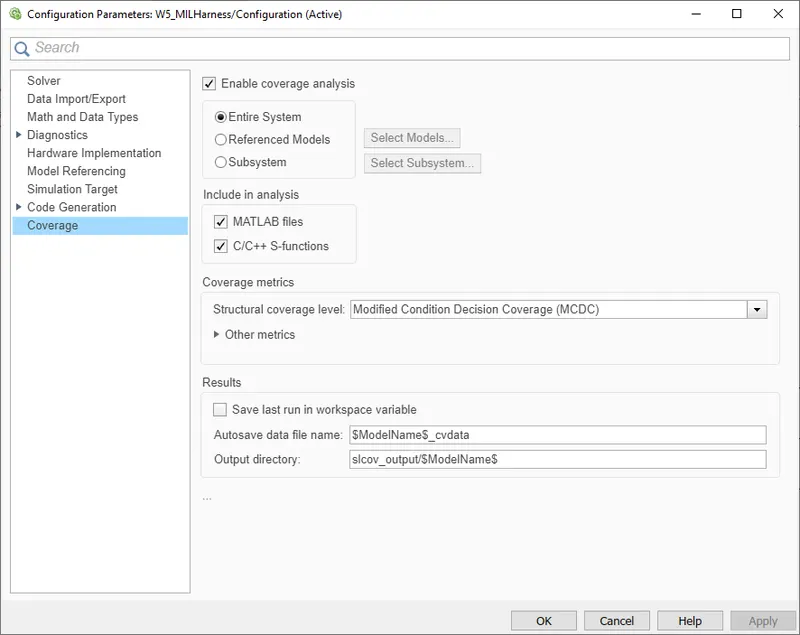
Step 5
Enabling coverage setting and choosing MCDC as structural coverage type.
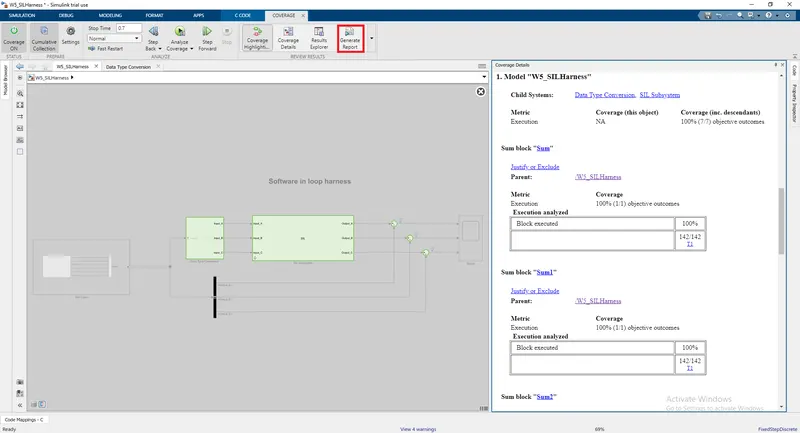
Step 6
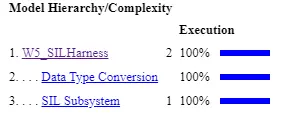
Running the simulation and analysing the test coverage report.
It is seen that we achieve 100% coverage for both condition and decision.
Generating the coverage report
Coverage Report Summary