SIMULATING THE MOTION OF SIMPLE PENDULUM BY SOLVING ORDINARY DIFFERENTIAL EQUATION
DETAILED REPORT ON SIMPLE PENDULUM
- AIM
To write a program for solving the ODE representing the motion of a simple pendulum with damping and simulate the motion between 0 to 20 seconds
- EQUATIONS/ FORMULAEUSED
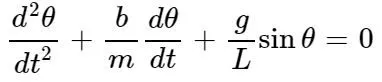
Simple Pendulum – It is usually a bob of mass m suspended from a hinge (fixed point) in a way that it oscillates (to and fro motion) when displaced from its original rest position (equilibrium point). These oscillations gradually die down over a period of time.
The way the pendulum moves depends on the Newton’s second law. When this law is written down, we get a second order Ordinary Differential Equation that describes the position of the "ball" w.r.t time.
ODE representing simple pendulum,
Given Inputs,
Length of the pendulum, L=1 m,
Mass of the bob, m=1 kg,
Damping Coefficient, b=0.05.
Gravity, g=9.81 m/s2.
3. OBJECTIVES & PROCEDURE
- The main objective of the challenge is to solve the 2nd order ODE representing motion of a simple pendulum and create an animation of a pendulum between 0 to 20 seconds for angular displacement equal to 0 and angular velocity equal to 3 rad/sec2 at time t=0.
- In the process, firstly the 2nd order ODE is spilt into two 1st order ODE so that it can be solved using the ODE 45 solver.
- The angular displacement and angular velocity equation is defined in the function program and called using the main program.
- The value of angular displacement (theta) is calculated at each point of time by using ‘for’ loops. Markers are used to plot hinge (fixed support) and Bob.
- For creating animation of oscillating pendulum, each of the plots obtained at every point of time is stitched together.
- Both animation & graph is plotted using the values obtained from angular displacement and velocity in .gif and .jpeg format respectively.
4. PROGRAM
Programming language used – Octave 5.1.1
Program
---------------------------------------------------------------------------------------
MAIN PROGRAM
---------------------------------------------------------------------------------------
% Solving Simple Pendulum motion

% time
t = [0 20];

% Initial Conditions (angular displacement, angular velocity)
theta0 = [0 3];

[t, y] = ode45(‘pendulum_function’,t,theta0);

Angular_Displacement = y(:,1);

for i = 1:length(Angular_Displacement)

T = Angular_Displacement(i);

x0 = 0;
y0 = 0;

L = 1;

x1 = L*sin(T);
y1 = -L*cos(T);

figure(1)
plot(x0,y0,’square’,’markers’,20,’markerfacecolor’,’b’)
hold on
plot ([x0 x1],[y0 y1],’linewidth’,7)
hold on
plot(x1,y1,’o’,’markers’,30,’markerfacecolor’,’r’)
hold off

axis([-1 1 -1 0]);

%Simulate the pendulum motion by stiching ech plot together
printf(‘Creating GIF- Progress... %d/%dn’, i, length(Angular_Displacement));

img = print (‘-RGBImage’);

imwrite(img, ‘animation.gif’, ‘DelayTime’, .005, ‘Compression’, ‘bzip’, ‘WriteMode’, ‘Append’);

end

-------------------------------------------------------------------------------------
FUNCTION PROGRAM
function [ydot] = pendulum_function(t,y)

  % Gravity (m/s2)
  g = 9.81;

  % Length of the pendulum (m)
  L = 1;

  % Mass of the ball (kg)
  m = 1;

  % Damping Coefficient
  b = 0.05;

ydot = zeros(2,1);

  % Rate of change of angular displacement = Angular Velocity
ydot(1) = y(2);

  % Angular Acceleration = ((-b/m)theta(2))-((g/L)sin(theta1))
ydot(2) = ((-b/m)*y(2))-((g/L)*sin(y(1)));


end
---------------------------------------------------------------------------------------
5. RESULTS
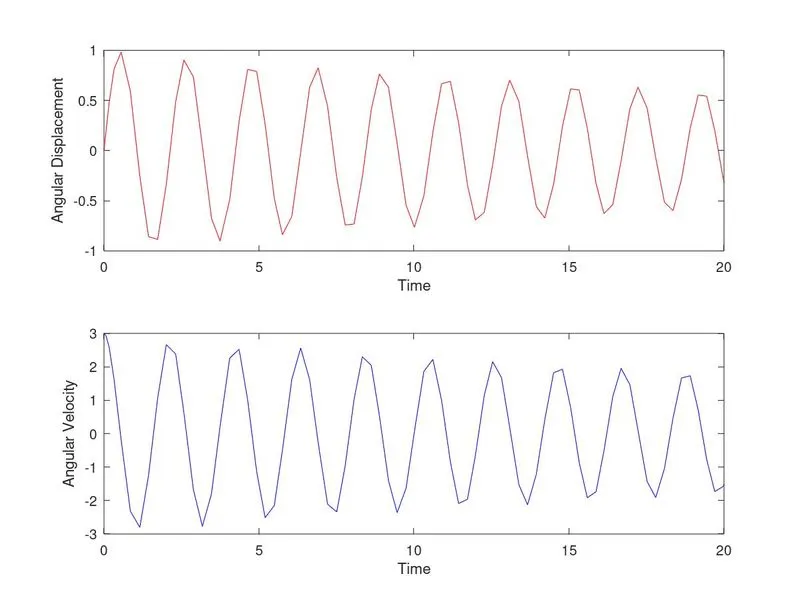
Graph
Youtube Link: https://youtu.be/Rxs1syz3n_I
6. CONCLUSION
The above graph shows the angular displacement and angular velocity versus time of a simple pendulum. Also the same values are used to animate the pendulum motion.
The program can be used to solve the ODE representing the transient behavior to simulate the system.