Project 1 - Parsing NASA thermodynamic data
Aim: To write a function that extracts the 14 coefficients and calculates the enthalpy, entropy, and specific heats for all the species in the given data file.
Theory:
File parsing-
- File parsing means reading the file from which we can extract the required data and use the data in our program.
- In this program, we have parsed a NASA THERMODYNAMIC DATA FILE through which we extracted the data to calculate Specific Heat (Cp), Enthalpy (H), Entropy (S)
Equations Used:
The file we will be using in this MATLAB program is NASA THERMODYNAMIC DATA FILE
https://drive.google.com/file/d/1AikCHDlz9s_fu8whE81qee_GD4AyYpCP/view?usp=sharing .
Using the above data, we will calculate Specific Heat (Cp), Enthalpy (H), Entropy (S) using the formula
Cp=(a1+a2*T+a3*T^2+a4*T^3+a5*T^4 )*R
H=(a1+a2*T/2+a3*T^2/3+a4*T^3/4+a5*T^4/5+a6/T)RT
S=(a1log(T)+a2*T+a3*T^2/2+a4*T^3/3+a5*T^4/4+a7)R`
The flow of the project
- Code to calculate Specific Heat (Cp), Enthalpy (H), Entropy (S)for all the species in the data file
- Code explanation.
- Results
- References
1.Code to calculate Specific Heat (Cp)Enthalpy (H)Entropy (S) for all the species in the data file
close all
clear all
clc
x = fopen('THERMO_1.txt','r')
fgetl(x) ;
% assigning global temperatures
p = fgetl(x);
Global_temp = strsplit(p,' ');
Global_temp1 = str2num(Global_temp{2});
Global_temp2 = str2num(Global_temp{3});
Global_temp3 = str2num(Global_temp{4});
fgetl(x);
fgetl(x);
fgetl(x);
%loop used to specify the individual species and extracting the
%coefficients
for i= 1:53
A = fgetl(x);
B = strsplit(A,' ');
y = length(B);
species = B{1};
Local_lowT = str2num(B{y-3});
Local_medT = str2num(B{y-1});
Local_highT= str2num(B{y-2});
tline = fgetl(x);
tline2 = fgetl(x);
tline3 = fgetl(x);
C = findstr(tline,'E');
D = findstr(tline2,'E');
E = findstr(tline3,'E');
R = 8.31446261815324;
T = linspace(Local_lowT,Local_highT,200);
%1ST LINE
a1 = tline(1:C(1)+3);
A1 = str2num(a1);
a2 = tline(C(1)+4:C(2)+3);
A2 = str2num(a2);
a3 = tline(C(2)+4:C(3)+3);
A3 = str2num(a3);
a4 = tline(C(3)+4:C(4)+3);
A4 = str2num(a4);
a5 = tline(C(4)+4:C(5)+3);
A5 = str2num(a5);
%2ND LINE
a6 = tline2(1:D(1)+3);
A6 = str2num(a6);
a7 = tline2(D(1)+4:D(2)+3);
A7 = str2num(a7);
a8 = tline2(D(2)+4:D(3)+3);
A8 = str2num(a8);
a9 = tline2(D(3)+4:D(4)+3);
A9 = str2num(a9);
a10 = tline2(D(4)+4:D(5)+3);
A10 = str2num(a10);
%3RD LINE
a11 = tline3(1:E(1)+3);
A11 = str2num(a11);
a12 = tline3(E(1)+4:E(2)+3);
A12 = str2num(a12);
a13 = tline3(E(2)+4:E(3)+3);
A13 = str2num(a13);
a14 = tline3(E(3)+4:E(4)+3);
A14 = str2num(a14);
%commands to save individual species in separate folders
mkdir(species)
cd(species)
%loop to caluclate cp,H,S for the LOCAL TEMPERATURE RANGE
if (T < Local_medT)
%SPECIFIC HEAT LT
Cp = (A8+A9.*T+A10.*T.^2+A11.*T.^3+A12.*T.^4)*R;
%ENTHALPY LT
H = (A8+(A9.*T)/2+(A10.*T.^2)/2+(A11.*T.^3)/2+(A12.*T.^4)/2+(A13./T))*R.*T;
%ENTROPY LT
S = (A8.*log(T)+A9.*T+A10.*T.^2/2+A11.*T.^3/3+A12.*T.^4/4+A14)*R;
else
%SPECIFIC HEAT HT
Cp = (A1+A2.*T+A3.*T.^2+A4.*T.^3+A5.*T.^4)*R;
%ENTHALPY HT
H = (A1+(A2.*T)/2+(A3.*T.^2)/2+(A4.*T.^3)/2+(A5.*T.^4)/2+(A6./T))*R.*T;
%ENTROPY HT
S = (A1.*log(T)+A2.*T+A3.*T.^2/2+A4.*T.^3/3+A5.*T.^4/4+A7)*R;
end
%plots for individual species
figure(1)
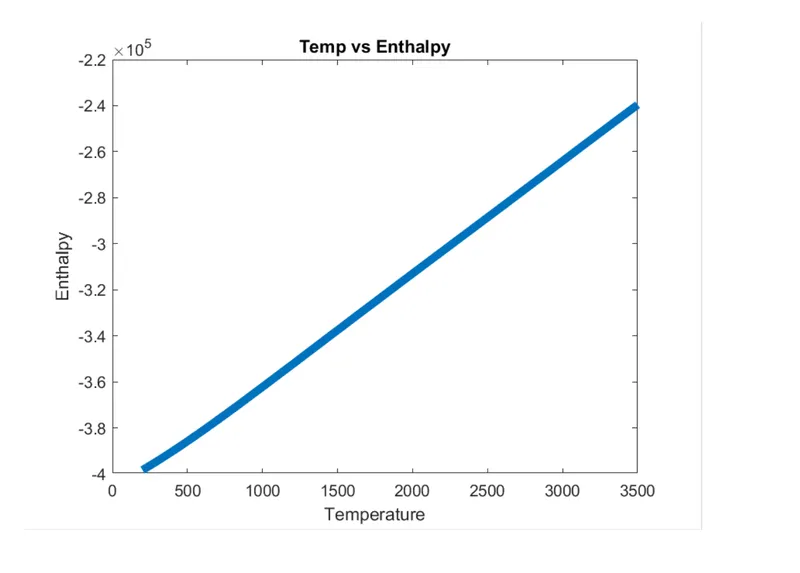
plot (T,H,'linewidth',5)
title('Temp vs Enthalpy')
xlabel('Temperature')
ylabel('Enthalpy')
figure(2)
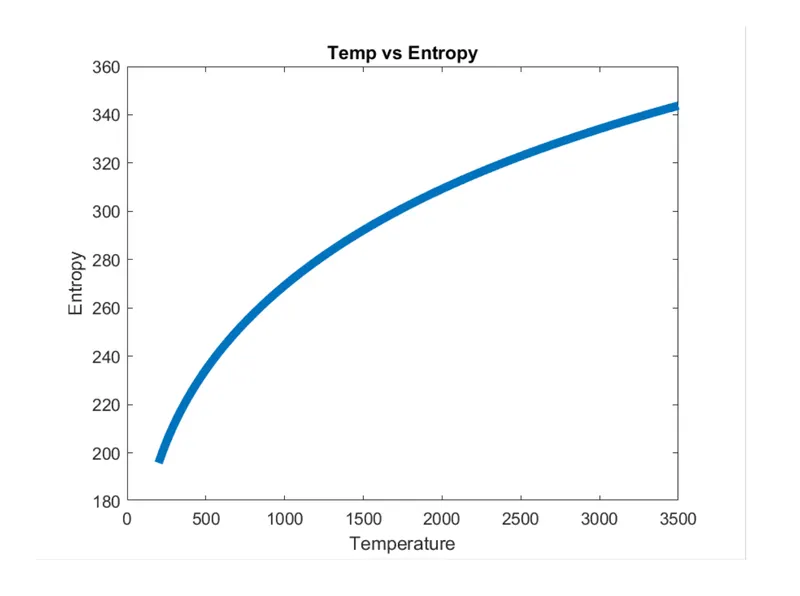
plot (T,S,'linewidth',5)
title('Temp vs Entropy')
xlabel('Temperature')
ylabel('Entropy')
figure(3)
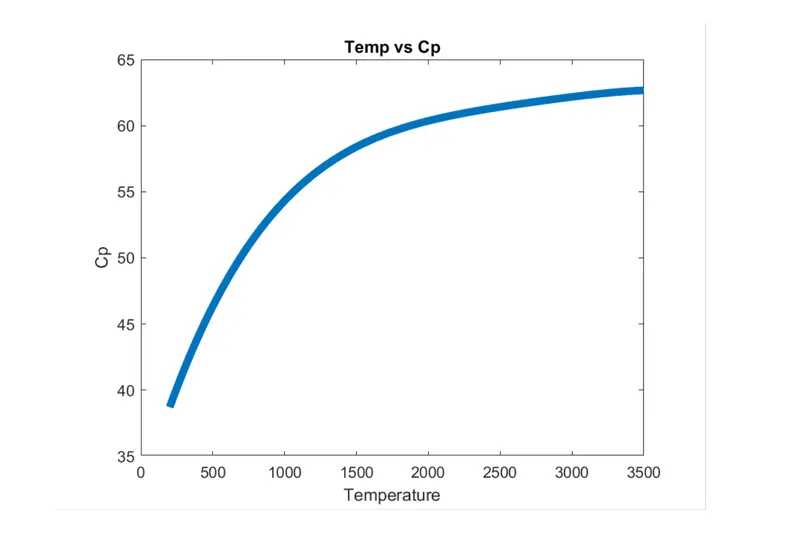
plot (T,Cp,'linewidth',5)
title('Temp vs Cp')
xlabel('Temperature')
ylabel('Cp')
%command to save the plots in the separate file
saveas(1,'T vs H.png')
saveas(2,'T vs S.png')
saveas(3,'T vs Cp.png')
cd ..%command used to change the folder for every loop
%caluclation for molecular weight of individual species
primary_elements = ['H' 'O' 'N' 'C' 'A'];
Mass = [1 16 14 12 40];
Molweight = 0;
for i = 1:length(species);
for j = 1 :length(primary_elements);
if(strcmp(species(i), primary_elements(j)));
Molweight = Molweight+ Mass(j);
k = j;
end
end
n = str2double(species(i));
if(n>1)
Molweight = Molweight+(n-1)*Mass(k);
end
end
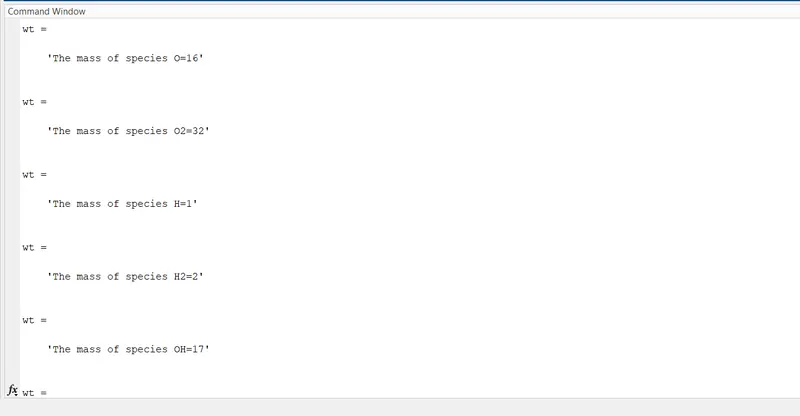
wt = sprintf('The mass of species %s=%d',species,Molweight)
end
2.Code explanation
- The initial step to start the program is to open the file through which we can parse the data and get the information through which we can calculate the desired results.
- By using the “fopen” command we will parse the data and by using the “fgetl” command we can reach the desired line of the file through which we can obtain the data.
- By using the for loop we will create a code such that from each species we will get the local low, local medium, local high-temperature values, and the 14 coefficients that are required to find the Cp, H, S.
- The FOR LOOP starts with a “fgetl” command by which we will reach the row which contains local temperatures and the species name. we can see below the file with species name and local temp values.
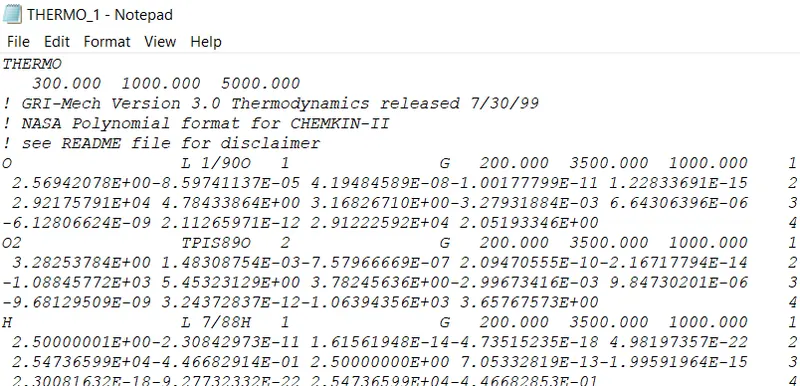
- We will assign this row to a variable and by using the “strsplit” command we will split the data in the row. By doing this we can get the individual element in the row and we can assign these elements to desired variables.
- Again by using the “fgetl” command we will read the 3 rows and assign these rows to the variables. These 3 rows consist of the unique letter E. So by using the “findstr” command we can identify the location of the E.
- Now by using the position of these letters we can identify the coefficients of the species. So the 1st coefficient starts from the initial position of the line till to the 1st position of “E” PLUS the next 3 positions.
- Similarly, the 2nd coefficient starts from the 1st position of E plus the next 4 positions till to the 2nd position of “E” PLUS the next 3 positions.
- So this logic moves on till we get all the coefficients in these 3 rows and we will assign all the coefficients to the respected variables.
- So by this point in time, we will get all coefficients of these 3 rows. So the first 7 coefficients in these rows are High-temperature coefficients and the next 7 coefficients are Low-temperature coefficients.
- Since all the coefficients are strings we will simultaneously convert the strings to numbers by using the “str2num” command and assign it to the variables.
- We will consider the temperature values for the equations in the form of an array using the linspace command. This array consists of the values b/w local low and local high temperatures of the respected species.
- To calculate Cp, H, S we will use if loop such that if the temp value from our array is less than local mid temp it will be used to calculate Cp, H, S for Lower temp coeff else the temp vales will be used to calculate High temp values.
- So by using the “plot” command we can plot Temp vs enthalpy, Temp vs entropy, Temp vs specific heat for the individual species.
- In order to save the plots, we will create a folder for individual species using the “mkdir” command, and “cd” will be used to change the folder so that every time the species changes the folder changes according to the species name.
- The next case is to find the molecular weight of the species. The primary elements of the species are Hydrogen(H), monoxide(O), Nitrogen(N), Carbon(C), Argon(A), and these are considered as an array and we will consider another array with the respective molar masses of the primary elements.
- We will use nested for loops if loop and the “strcmp” command which will allow each species to be compared primary elements. By this point in time, we can calculate the molecular weight of species except for the species which has repeating elements in it.
- Again, by using the if loop and “str2double” command we can know how many times the element is repeating in the species and we will add the same element respectively.
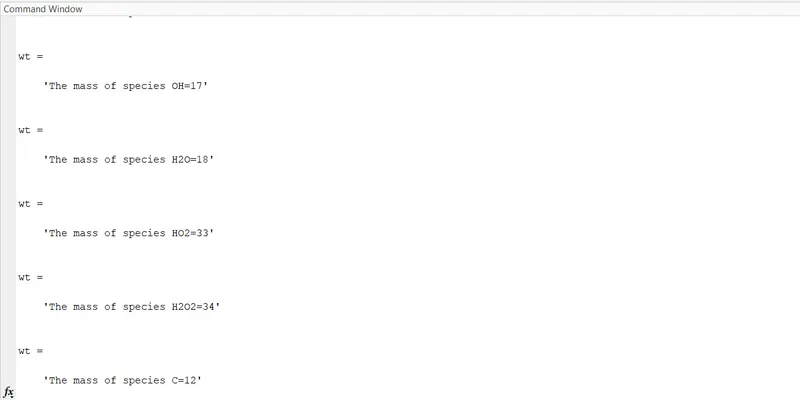
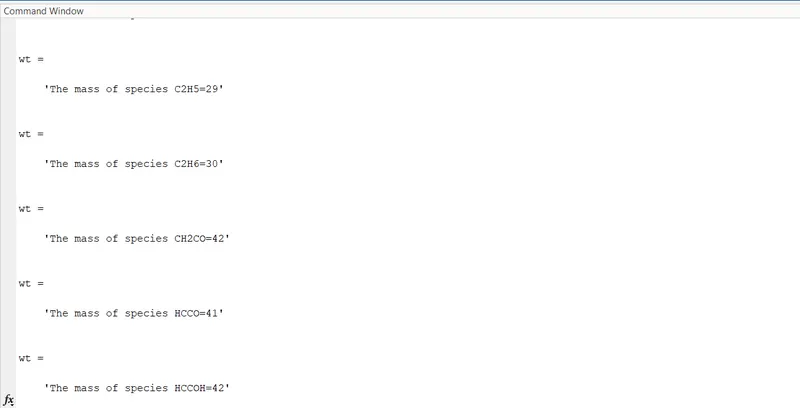
- Finally, by using the “sprintf” command we will print all the molecular weight of the species
Results:
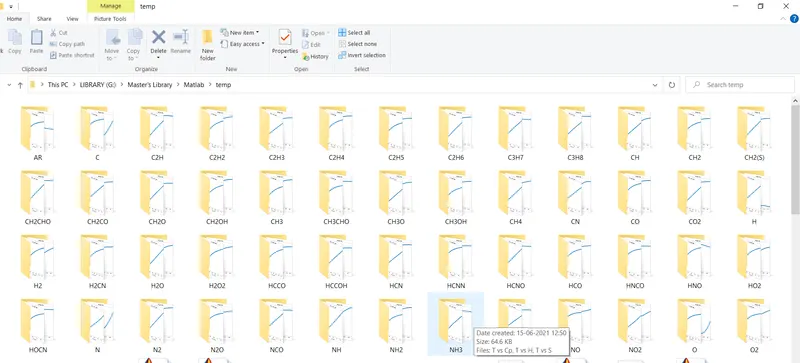
- Folders that contain plots of individual species
- Plots of O2
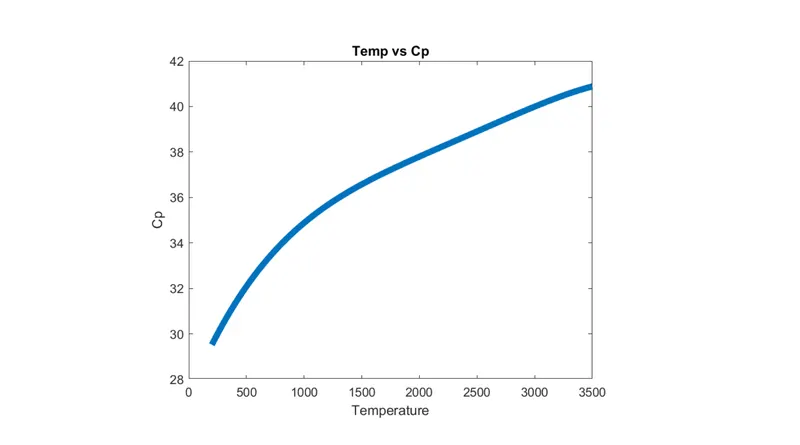
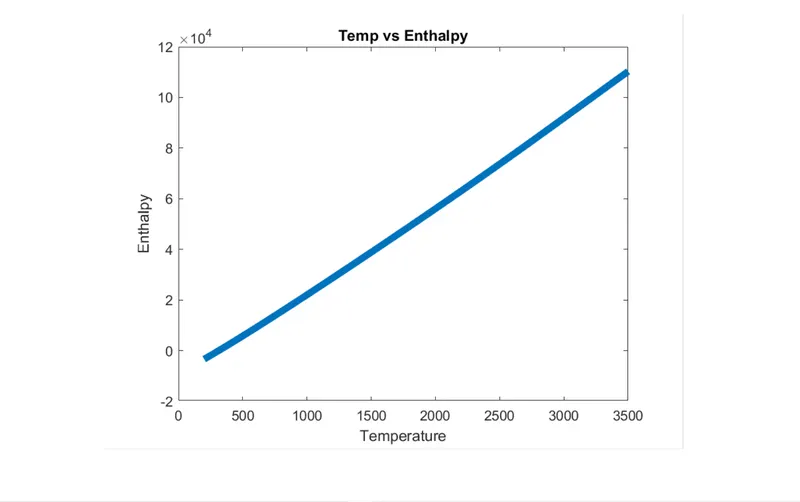
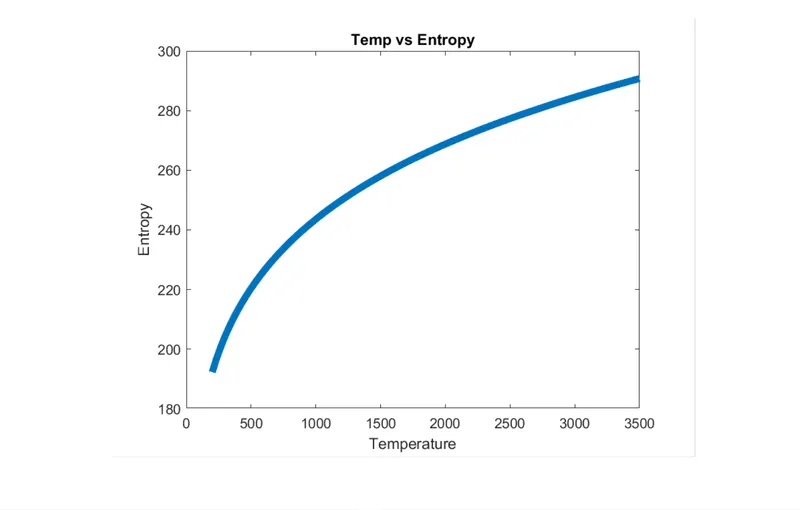
- Plots of N2
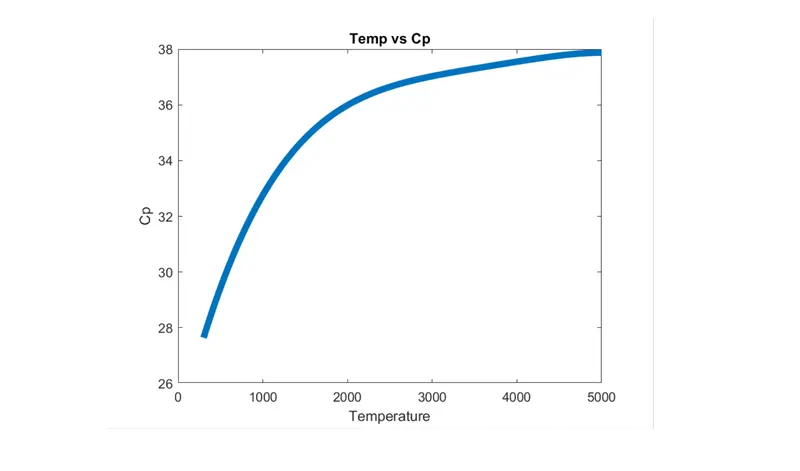
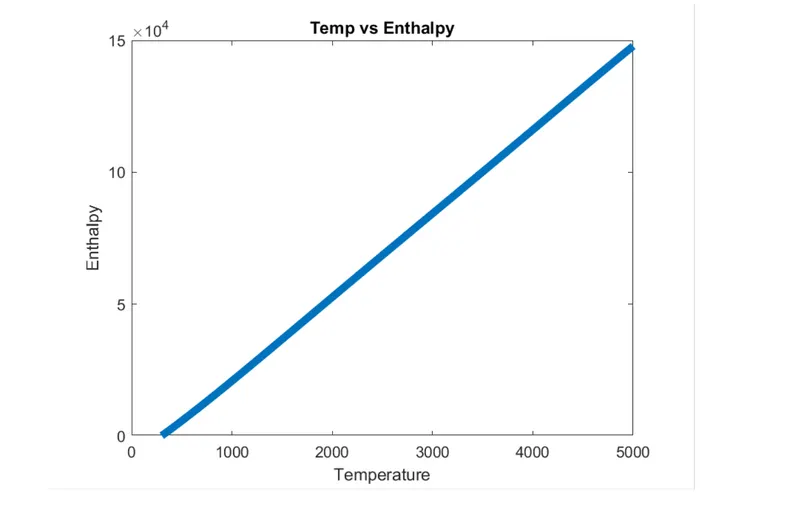
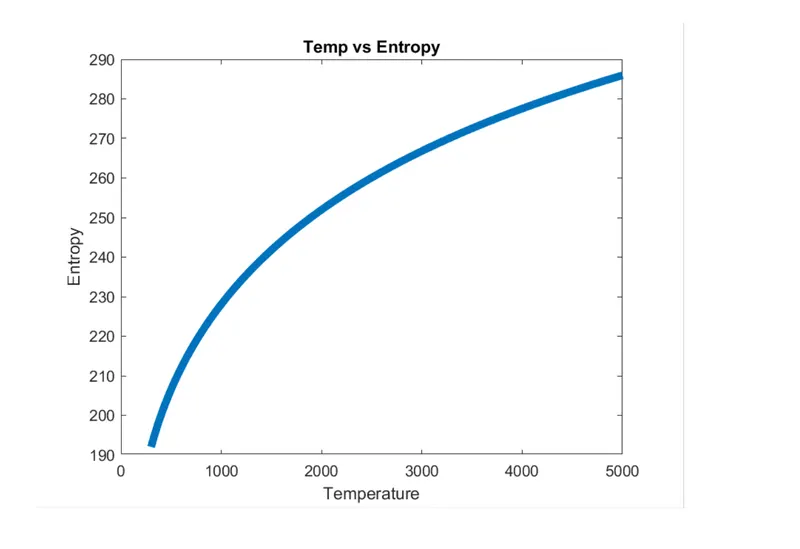
- plots of Co2
The molecular weight of some species
References
4.References
https://www.mathworks.com/help/releases/R2020b/matlab/ref/if.html
https://www.mathworks.com/help/releases/R2020b/matlab/ref/strcmp.html