Simulation of forward kinematics of a 2R Robotic Arm using Python
Aim: To write a program in python to simulate the forward kinematics of a 2R Robotic Arm.
Theory:
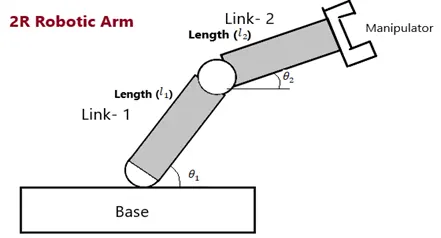
- The robotic arm consists of two links with lengths L1 & L2
- Xo, Yo is the starting point of link 1 which is attached to the base with an angle theta1
- Link2 starts from the ending point of link1 at a point X1, Y1 therefore
X1 = L1*cos(theta1)
Y1 = L2*sin(theta1)
- X2, Y2 is the endpoint of link2 which is at an angle theta2 with link1
X2 = X1+L1*cos(theta2)
Y2 =Y1+ L2*sin(theta2)
The flow of the project:
1.Code to simulate the forward kinematics of a 2R Robotic Arm.
2.Code explanation
3.Results
1.Code to simulate the forward kinematics of a 2R Robotic Arm.
import matplotlib.pyplot as plt
import numpy as np
import math
#inputs
L1 = 5
L2 = 3
x0 = 0
y0 = 0
A = np.linspace(0,math.pi/2,10)
B= np.linspace(0,math.pi/2,10)
ct = 1
for theta_1 in A:
x1 = L1*math.cos(theta_1)
y1 = L1*math.sin(theta_1)
for theta_2 in B:
x2 = x1+L2*math.cos(theta_2)
y2 = y1+L2*math.sin(theta_2)
file_name = str(ct)+'.png'
plt.figure(ct)
plt.plot([x0,x1],[y0,y1])
plt.plot([x1,x2],[y1,y2])
plt.xlim([0,10])
plt.ylim([0,6])
plt.savefig(file_name)
ct = ct+1
2.Code explanation
- Initially, we should import the libraries that are required to run the program.
- The input parameters such as L1 & L2 and Xo & Yo are considered.
- We will consider theta values in the form of an array using the “np.Linspace” command.
- By using the for loop for each value from the array we can calculate the points X1, Y1, and X2, Y2.
- By using the plt.plot command we can plot the links L1 & L2 using these points.
- At this point, we will get individual plots for each value of theta_1 and theta_2.
- I have converted all this plot into GIF using Imagick fie.
3.Results