Week 3 - Solving second order ODEs
Aim: To write a MATLAB program that solves the ODE that represents the equation of motion of a simple pendulum with damping.
Governing equation :
The equation which describes the motion of the pendulum with damping as second-order ODE is as follows
Where = angular displacement of the pendulum
T = time
b = damping co-efficient
m = mass of the bob
g = gravity
L = length of the pendulum
The flow of the Project
- Creating a function to reduce the 2nd order differential equation into 1st order differential equation.
- Code to simulate the pendulum motion.
- Explanation of the code.
- Errors face while executing the code
- Results
1.Creating a function that reduces the order of the Differential equation.
function[dtheta_dt]= ode_func(t,theta,b,g,l,m)
theta1 = theta(1);
theta2 = theta(2);
dtheta1_dt = theta2;
dtheta2_dt = -(b/m)*theta2-(g/l)*sin(theta1);
dtheta_dt = [dtheta1_dt;dtheta2_dt];
end
*Before creating the code to simulate the pendulum motion we need to create a function that involves the parameters used to solve the differential equation.
*By creating the function we can reduce the order of the differential equation which will be helpful to solve the ODE in MATLAB.
- Code to simulate Simple pendulum Motion
clear all
close all
clc
%input parameters
b = 0.05;
g = 9.81;
m = 1;
l = 1;
%range fOR Displacement and angular velocity
theta_0 = [0;3];
%timepoints
t_span = linspace(0,20,500);
%solve differential equation with ode45
[t,results]=ode45(@(t,theta)ode_func(t,theta,b,g,l,m),t_span,theta_0);
hold on
figure(1)
plot(t, results(:,1));
title('Time vs Displacement and Angular velocity ');
xlabel('Time');
ylabel('Displacement/Velocity');
plot(t, results(:,2));
legend('Displacement','Angular velocity ')
hold off
% animation of pendulam swinging
figure(3)
x0=0;
y0=0;
ct=1;
theta=results(:,1)
% co-ordination movement of bob using sin and cosine rule
for i= 1:length(t)
Theta=theta(i);
x=1*sin(Theta);
y=-1*cos(Theta);
% % plot of pendulum line from origin
plot([x0,x],[y0,y],'linewidth',4,'color','r');
hold on
plot([-1,1],[0,0],'linewidth',15,'color','b');
% % plot of pendulum bob using marker commands
plot(x,y,'Marker','o','Markerfacecolor','b','Markeredgecolor','r','Markersize',15);
title('simple pendulum animation');
axis([-1, 1,-1.5,1.5]);
grid on;
M(ct) = getframe(gcf);
ct = ct+1;
hold off;
end
movie(M)
videofile= VideoWriter('simple pendulum.avi','uncompressed AVI');
open(videofile)
writeVideo(videofile,M)
close(videofile)
- Code Explanation
*Consider the input parameters for gravity, length of the pendulum, mass of the bob, damping coefficient.
*Consider the initial conditions for the ODE in which the 1st column represents the displacement values and the 2nd column represents the range of Angular velocity values.
*Using the linspace command consider the time span in which the oscillations take place.
*Using the Ode45 solver which uses all the parameters like t, theta, ode function we created, time span we assumed, and the initial conditions we have assumed to solve the ODE.
*USING PLOT Command plot the values b/w time_span and the 1st column of the initial conditions which gives the variation of displacement of the pendulum with respect to the time.
*similarly plot the values b/w time_span and the 2nd column of the initial conditions which gives the variation of Angular velocity of the pendulum with respect to the time.
*To animate the motion of the simple pendulum first determine the coordinates where the pendulum oscillates at the point.
*use the sine and the cosine equations to determine the position of the bob in the pendulum and use the plot command to connect the initial point and the position bob is defined in the pendulum
*Using the for loop we can get the different positions of the pendulum for different values of theta.
*We can create the bob of the pendulum by using the marker command and plot the bob at the determined position.
.Finally using the movie command we can create the animation and save it in the required format.
3.Errors Faced during the code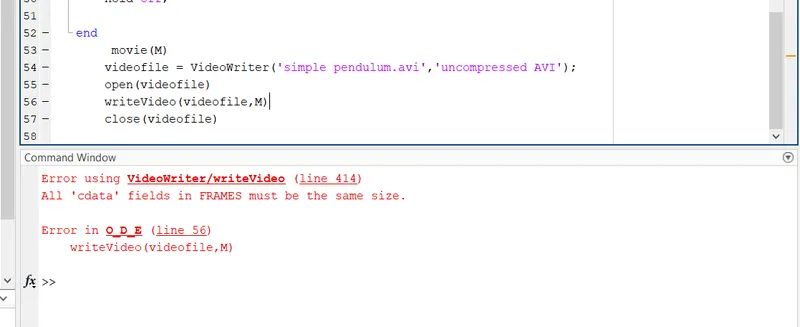
*The error was due to the incorrect usage of the equation which is used to create the animation of the pendulum.
*The equation was corrected in order to solve the error.
Results:
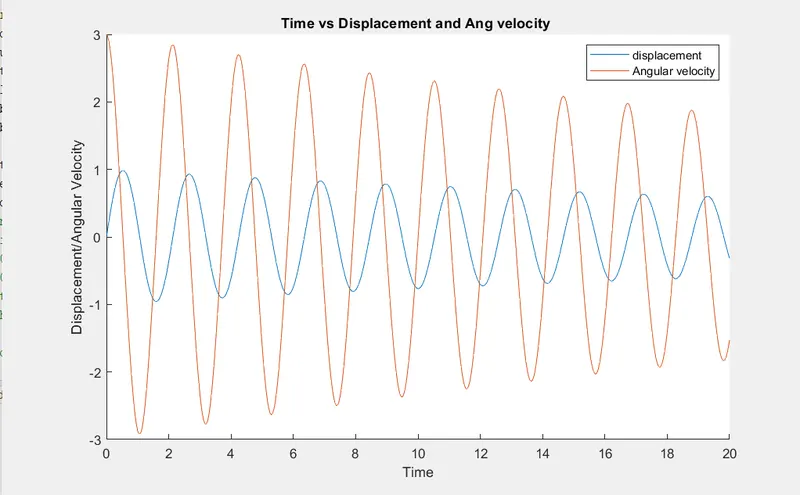
Link for animation: https://youtu.be/toUH_664k50