Python program to calculate drag force against a cyclist
Aim: To write a python program to calculate the drag force against a cyclist.
Theory:
- Whenever an object is moving through a medium it experiences an opposing force which reduces the speed of the object this force is known as a Drag force.
- Drag force mainly depends on the velocity with which the object moves and the frontal area of the object.
Equations used:
`Drag =(rho*A*V^2* Cd)/2`
rho = Density of the medium through which the object is moving(kg/m^3)
A = Frontal area of the object(m^2)
V = Velocity of the object(m/s^2)
Cd = coefficient of drag
The flow of the project:
1.Code to calculate the drag force against a cyclist
2.Code explanation
3.Results
1.Code to calculate the drag force against a cyclist
# program to calculate the drag force
import math
import matplotlib.pyplot as plt
import numpy as np
#velocity vs dragforce
#inputs required to caluclate drag force
#velocity(m/s^2)
v = [10.34,11.54,12,13.20,15.34]
#drag_coefficient
cd=0.25
#density(kg/m^3)
rho =6
#frontal area(m^2)
A = 10
#dragforce
dragforce =[]
for velocity in v:
dragforce.append( 0.5*rho*A*pow(velocity,2)*cd)
print(dragforce)
plt.plot(v,dragforce)
plt.xlabel('velocity(m/s^2)')
plt.ylabel('Dragforce(N)')
plt.show()
#Drag coefficient vs Drag force
#inputs required to caluclate drag force
#velocity(m/s^2)
v = 10
#drag_coefficient
cd=[0.25,1,1.22,2.66,3.43]
#density(kg/m^3)
rho =6
#frontal area(m^2)
A = 10
#dragforce
dragforce =[]
for coeff_drag in cd:
dragforce.append( 0.5*rho*A*pow(v,2)*coeff_drag)
print(dragforce)
plt.plot(cd,dragforce)
plt.xlabel('Coeff of drag')
plt.ylabel('Dragforce(N)')
plt.show()
2.Code explanation
- The initial step in writing a code in python is to export the required libraries t solve the problem.
- In this code, we have imported NumPy and matplotlib to solve the equations and to plot a graph.
- The required inputs to solve the drag equation are considered.
- To plot ‘velocity vs drag force’ we will consider velocity as an array with different velocities values.
- These velocities are created using the “np. linspace” command. through this command, we have created 100 different velocities between the range 10 to 25.
- We will create an empty array to store all the calculated drag values.
- By using the “for” function we can extract a single velocity value from the velocity array and calculate an individual drag force for all the velocities values.
- By using the append command each calculated drag force will be stored in the empty array for each iteration in the loop.
- to plot velocity vs drag force we will use the command “plt. plot” from which we can obtain the plot but to visualize the graph we need to use the “plt.show()” command.
- Similarly, to plot ‘coefficient of drag vs drag force’ we will create a coefficient of drag as an array with different coefficient of drag values with the “np.linspace” command.
- By using the same procedure, we can calculate the drag force and plot a graph for the coefficient of drag vs drag force.
3.Results
Velocity vs Dragforce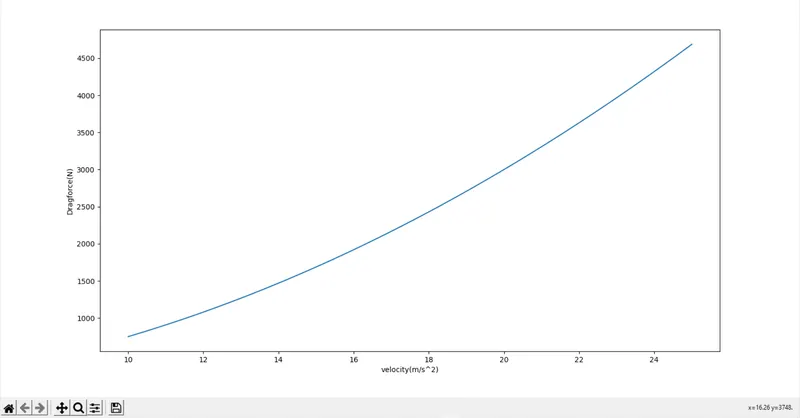
Drag values
coefficient of drag vs Drag force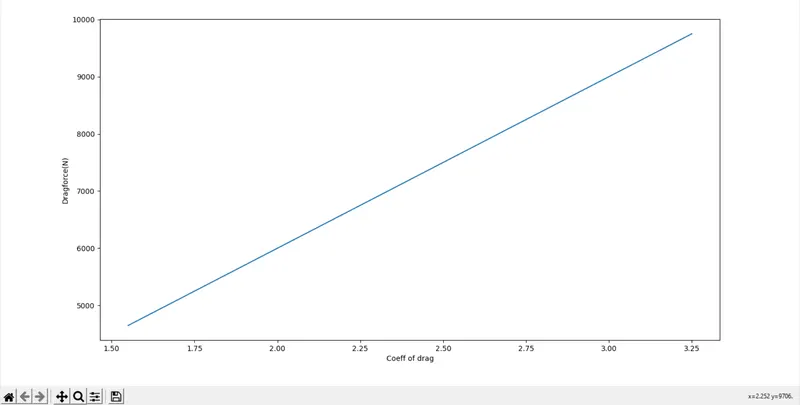
Drag values
