CURVE FITTING USING PYTHON
AIM: The aim of this program is to write a Python code to fit a linear and cubic polynomial for the cp data.
It aims to show the split wise method and explain all the parameters involved in the measurement of the fitness characteristics.
OBJECTIVES:
- Know the importance of curve fitting in real life
- Learn how to make a curve fit perfectly
- Learn the difference between best fit and perfect fit and further how to get the best fit
- Learn how to improve a curve fit especially the cubic fit
THEORY:
Curve fitting is the process of constructing a curve, or mathematical function, that has the best fit to a series of data points possibly subject to constraints. Curve fitting can involve either interpolation, where an exact fit to the data is required.
In order to find a curve which satisfies the data under question, there are four quantities which help us measure the goodness of fit criteria or how well the equation is representing the datapoints.
- The sum of squares due to error (SSE)
`SSE(Sum Of Squared Errors)= ∑_(i=1)^n(Y(i)-f(x(i)))^2`
Where y = f(x) is the fit curve
- R-square
`R^2=(SSR)/(SST)`
Where
SSR = Sum of squares of the regression which is basically the square of the difference between the value of the fitting function at a given point and the arithmetic mean of the dataset.
And SST = SSR + SSE
- Adjusted R-square
`R^2adj=[((1-R^2)(n-1))/(n-k-1)]`
Where
n is the number of datapoints
k is the number of independent variables
4. Root mean squared error (RMSE)
`RMSE=√((∑_(i=1)^n(Y(i)-f(x(i)))^2 )/n)=√((SSE)/n)RMSE=√((∑_(i=1)^n(Y(i)-f(x(i)))^2 )/n)=√((SSE)/(n))`
where n is the total number of datapoints available.
- PROGRAM AND STEPWISE EXPLANATION
- Linear curve fit
import numpy as np
import matplotlib.pyplot as plt
from scipy.optimize import curve_fit

# Linear Curve fit function

def func(t, a, b):
	return a*t + b

#reading thermodynamic data file

def read_file():
	temperature = []
	cp = []
	for line in open('data','r'):
		values = line.split(',')
		temperature.append(float(values[0]))
		cp.append(float(values[1]))
	return[temperature, cp]

#Main Program

temperature, cp = read_file()
popt, pcov = curve_fit(func, temperature, cp)
fit_cp = func(np.array(temperature), *popt)


plt.plot(temperature, cp, color = "blue", linewidth=3)
plt.plot(temperature, fit_cp,, linewidth=3)
plt.title('Linear Curve fit')
plt.legend(['Actual data', 'Curve fit'])
plt.xlabel('Temperature [K]')
plt.ylabel('Cp')

plt.show()


#Computing the mean specific heat

sum_1 = 0 # Initialization

for i in range(0,len(cp)):
	sum_1 = sum_1 + cp[i]
mean_cp = sum_1/len(cp)

print('The mean specific heat is',mean_cp)

#Computation of parameters such as SSE, SSR, SST and R^2

SSE = 0
SSR = 0

for i in range(0,len(cp)):
	SSR = SSR + pow((cp[i]-mean_cp),2)
	SSE = SSE + pow((fit_cp[i]-cp[i]),2)

SST = SSR + SSE

R_square = SSR/SST
RMSE = pow(SSE/len(cp),0.5)

print("SSR =",SSR)
print("SSE =",SSE)
print("SST =",SST)
print("R_square =",R_square)
print("RMSE =",RMSE)
OUTPUT:
b. Cubic curve fit
import numpy as np
import matplotlib.pyplot as plt
from scipy.optimize import curve_fit

# Linear Curve fit function

def func(t, a, b, c, d):
	return pow(t,3)*a + pow(t,2)*b + t*c + d

#reading thermodynamic data file

def read_file():
	temperature = []
	cp = []
	for line in open('data','r'):
		values = line.split(',')
		temperature.append(float(values[0]))
		cp.append(float(values[1]))
	return[temperature, cp]

#Main Program

temperature, cp = read_file()
popt, pcov = curve_fit(func, temperature, cp)
fit_cp = func(np.array(temperature), *popt)


plt.plot(temperature, cp, color = "blue", linewidth=3)
plt.plot(temperature, fit_cp,, linewidth=3)
plt.title('Cubic curve fit')
plt.legend(['Actual data', 'Curve fit'])
plt.xlabel('Temperature [K]')
plt.ylabel('Cp')

plt.show()


#Computing the mean specific heat

sum_1 = 0 # Initialization

for i in range(0,len(cp)):
	sum_1 = sum_1 + cp[i]
mean_cp = sum_1/len(cp)

print('The mean specific heat is',mean_cp)

#Computation of parameters such as SSE, SSR, SST and R^2

SSE = 0
SSR = 0

for i in range(0,len(cp)):
	SSR = SSR + pow((cp[i]-mean_cp),2)
	SSE = SSE + pow((fit_cp[i]-cp[i]),2)

SST = SSR + SSE

R_square = SSR/SST
RMSE = pow(SSE/len(cp),0.5)

print("SSR =",SSR)
print("SSE =",SSE)
print("SST =",SST)
print("R_square =",R_square)
print("RMSE =",RMSE)- STEPWISE EXPLANATION
- Data loading
- Assigning temperature and specific heat values to temperature and cp variables
- Calculation of polynomial coefficients
- Here, we have to find coefficients for linear polynomial and cubic polynomial.
- At this level we have to predict the values of cp for both linear polynomial and cubic polynomial cases
- After that we have to plot the graph of temperature versus Specific heat (cp) for each case.
- Now we have to find the values of the four quantities which help us decide about the goodness of the fit that are SSE, R-square, Adj R-sq, RMSE; and to do so we make use of curve fitting tool box.
Output
PROGRAM TO SHOW THE SPLITWISE METYHOD
import numpy as np
import matplotlib.pyplot as plt
from scipy.optimize import curve_fit

# Linear Curve fit function

def func1(t, a, b):
	return a*t + b


def func2(t, a, b, c, d):
	return pow(t,3)*a + pow(t,2)*b + t*c + d


#reading thermodynamic data file

def read_file():
	temperature = []
	cp = []
	for line in open('data','r'):
		values = line.split(',')
		temperature.append(float(values[0]))
		cp.append(float(values[1]))
	return[temperature, cp]

#Main Program
temperature, cp = read_file()


a = 0
b = 799

fit_cp = []
fit_cp1 =[]
for i in range(0,4):
	temp = temperature[a:b+1]
	cp_1 =  cp[a:b+1]


	popt2, pcov2 = curve_fit(func2,temp,cp_1)
	fit_cp2 = func2(np.array(temp), *popt2)

	popt22, pcov22 = curve_fit(func1,temp,cp_1)
	fit_cp22 = func1(np.array(temp), *popt22)


	for j in fit_cp2:

		fit_cp.append(j)

	for k in fit_cp22:

		fit_cp1.append(k)


	a = b+1
	b = b+800

#Plotting the different results

plt.figure(1)


plt.plot(temperature, cp, color = "blue", linewidth=3)
plt.plot(temperature, fit_cp1,, linewidth=3)
plt.title('Linear Curve fit using split wise method')
plt.legend(['Actual data', 'Curve fit'])
plt.xlabel('Temperature [K]')
plt.ylabel('Cp')
plt.show()


plt.figure(2)


plt.plot(temperature, cp, color = "blue", linewidth=3)
plt.plot(temperature, fit_cp,, linewidth=3)
plt.title('Cubic curve fit using split wise method')
plt.legend(['Actual data', 'Curve fit'])
plt.xlabel('Temperature [K]')
plt.ylabel('Cp')
plt.show()
OUTPUT:
Answers
- popt : It is the first output argument whenever the fitting function is called. It is an array which consists of the optimal (best fit) values of coefficients of the polynomial used for curve fitting for which the sum of squared residuals for a given data is minimized.
- pcov : It is the second output argument. It is a 2D array which gives an estimated values of covariance of coefficients (popt) of a polynomial. The diagonal elements of an array gives the value of covariance of a coefficient with itself which is also called as variance of that coefficient. Other non-diagonal elements of the matrix gives the covariance with other coefficients. It is a square matrix. This matrix indicates the uncertainties. pcov can be used to find the standard deviation (square root of the value of diagonal elements) of a given dataset.
- np.array(temperature) : This command is usd to access the individual element of the temperature array with the help of numpy library which is imported as "np" just at the beginning of the program. This library is used to perform the mathematical operations like addition, subtraction, multiplication, division, etc on each element of an array or between arrays.
- *in *popt : The symbol "*" in "*popt" unpack the "popt" variable which is an array so that the optimized coefficients (parameters) values can be accessed from the array "popt". In other words, the symbol "*" lets the program to refer to all values stored in the "popt" array.
Discussion
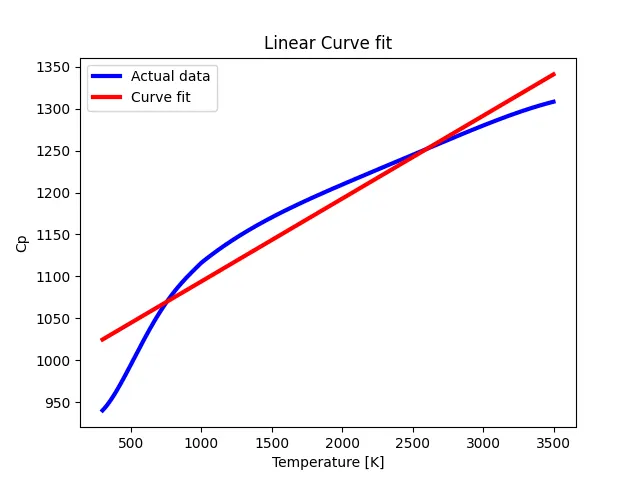
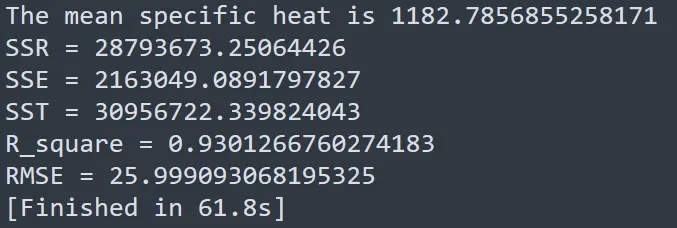
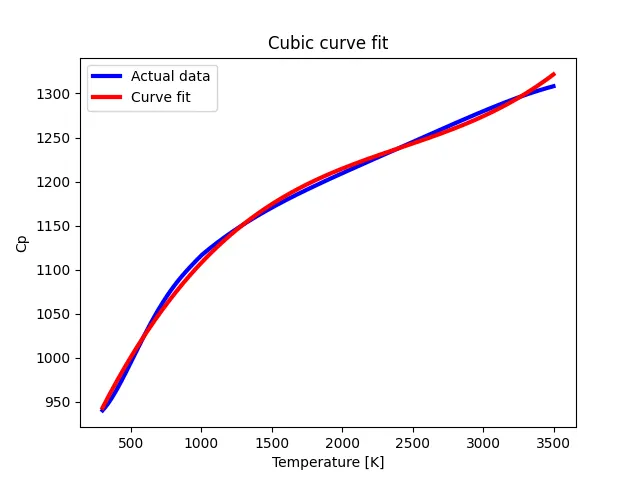
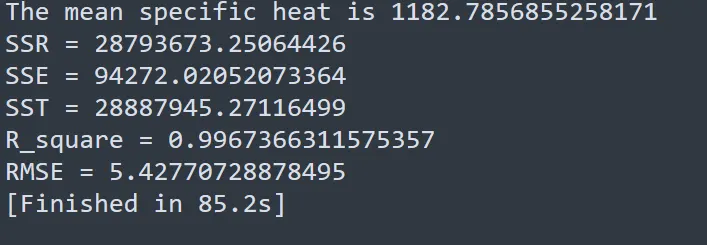
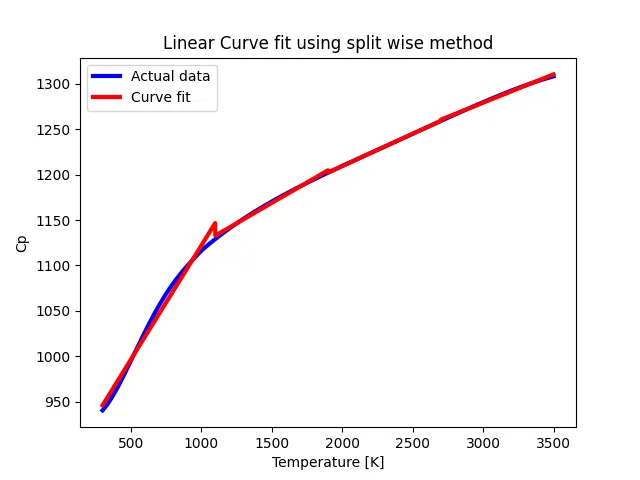
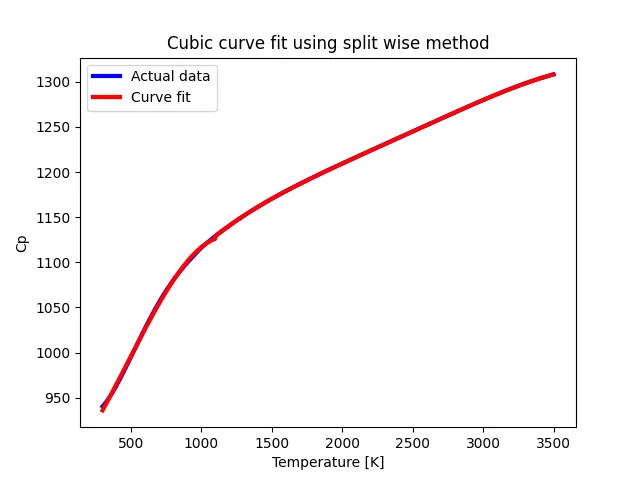
According to the first two graphs, we can see that the cubic fit is the best fit to the given data. The R-Square for linear fit is less than that in case of cubic fit. The R-Square for cubic fit is close to 1 and this means that the curve fit could be perfect in this case
This fact can be observed in the second case with the split wise method. The data is split into 4 data sets and the curve fit is performed for linear polynomial and cubic polynomial respectively. From these last two graphs, we can see that the fitting in the case of cubic fit is the best fit. Considering all the above curve fits, we have to notice that as we increase the degree of the polynomial, the error between the curve fit and the original data is reduced and by using split wise method, the goodness of the curve fit is improved. In order to get a perfect fit, we have to interpolate the datasets which means that we have to divide the original data into multiple datasets by considering the errors .
CONCLUSION
Through our work, we can say that in order to get the best fit, we have the possibility to use split wise method, or increase the order of the polynomial or to use the four parameters mentioned above in the theory part. We realized that the cubic curve fit in the case of split wise method gets improved. Thus we can say that in order to improve the cubic curve fit, we have to use the split wise method.
REFERENCES: