What is CFD? Computational Fluid Dynamics Explained for Engineers
Computational fluid dynamics (CFD) solves the equations of fluid flow and heat transfer on a computer. Here is how a CFD simulation works, from meshing and y+ to turbulence models, and how engineers decide whether to trust the result.
 Skill-Lync·Updated 17 Oct 2026·12 min read
In short
- CFD (computational fluid dynamics) solves the equations of fluid flow and heat transfer numerically, cell by cell, on a computer.
- Every simulation follows the same loop: define the question, prepare the fluid domain, mesh it, set physics and boundary conditions, solve, then check the answer.
- Most of the accuracy is decided before you press "solve": by the mesh, the turbulence model and the boundary conditions.
- A converged CFD result is not automatically a correct one. Mesh studies and comparison with test data are what make it trustworthy.
What is CFD?
Computational fluid dynamics is the branch of engineering that predicts how liquids and gases move, and how they carry heat, mass and chemical species, by solving the governing equations of fluid flow on a computer. Instead of measuring a few points in a wind tunnel, a CFD engineer gets pressure, velocity, temperature and turbulence at millions of points inside and around a design.
That makes CFD a design tool, not just an analysis tool. You can compare ten intake manifold shapes in a week, see exactly where a battery pack's coolant channel starves, or find the recirculation zone behind a side mirror that makes wind noise, all before a prototype exists.
CFD sits between two older tools. Hand calculations (pipe-flow charts, flat-plate correlations) are fast but only work for simple shapes. Physical tests are the ground truth but are slow, expensive and only measure what you put a sensor on. Good engineering teams use all three, and use each one to check the others.
The equations behind CFD
Every CFD solver is built on three conservation laws applied to a small volume of fluid:
- Conservation of mass (the continuity equation): what flows into a volume either flows out or accumulates.
- Conservation of momentum (the Navier-Stokes equations): Newton's second law for a fluid. Pressure gradients, viscous stresses and body forces such as gravity change the fluid's momentum.
- Conservation of energy: needed whenever temperature changes, heat transfer or compressibility matters.
Add equations of state, turbulence models, and models for combustion, multiphase flow or radiation as the problem needs them. For almost every real geometry, there is no closed-form solution to this set of coupled, non-linear partial differential equations. CFD gets around that by discretisation: it splits the domain into small cells and turns the differential equations into a very large set of algebraic equations, one group per cell, that a computer can solve iteratively.
| Discretisation method | Idea | Where you will meet it |
|---|---|---|
| Finite volume (FVM) | Balance fluxes across the faces of each cell, so mass, momentum and energy are conserved exactly cell by cell | Most industrial CFD: Ansys Fluent, Simcenter STAR-CCM+, OpenFOAM, CONVERGE |
| Finite element (FEM) | Approximate the solution with shape functions over each element | Multiphysics and some laminar, coupled problems (e.g. COMSOL); dominant in structural FEA |
| Finite difference (FDM) | Replace derivatives with differences on a structured grid | Research codes, simple geometries, teaching (it is how most people write their first solver) |
If you want to see this in practice, writing a 1-D or 2-D finite difference solver in MATLAB or Python for heat conduction or a lid-driven cavity is the fastest way to understand what a commercial solver is doing behind its menus.
How a CFD simulation works, step by step
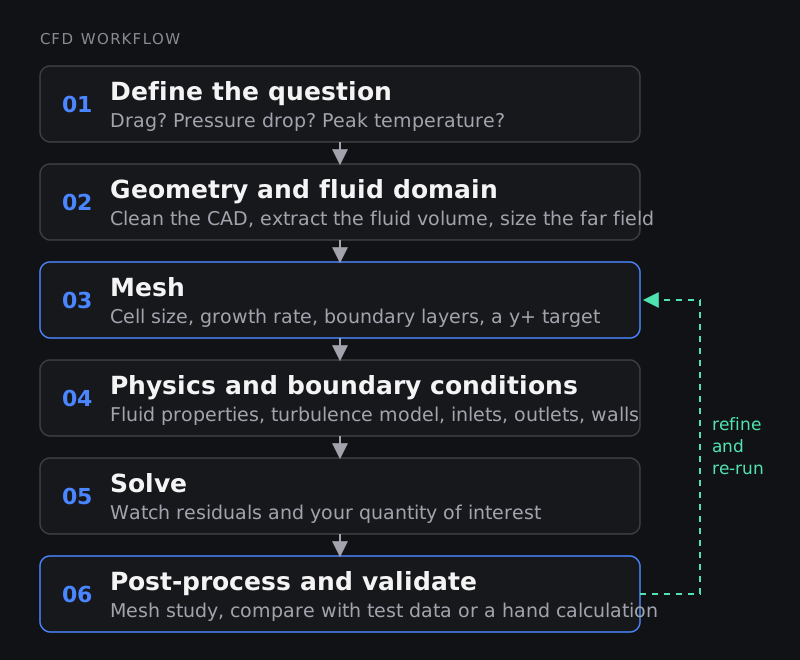
1. Define the question
Start with the number the project needs: drag coefficient within 2%, pressure drop across a filter, the hottest cell temperature in a battery module at 2C discharge. The question decides how much geometry detail you keep, whether the run is steady or transient, and how fine the mesh must be. A simulation set up "to see what happens" usually answers nothing precisely.
2. Prepare the geometry and the fluid domain
CAD models describe solids, but CFD needs the volume the fluid occupies. Engineers clean the CAD (close gaps, remove tiny fillets and fasteners that do not affect the flow), extract the internal fluid volume or build an external box around the part, and make the domain big enough that the boundaries do not squeeze the flow. For external aerodynamics, it is common to place the outlet several body lengths behind the vehicle so the wake can develop.
3. Mesh the domain
The mesh is the set of cells the equations are solved on, and it is the single biggest control you have over accuracy and run time. Cells must be small where gradients are steep (walls, shear layers, flames, shocks) and can grow where the flow is calm. Mesh quality metrics such as skewness, orthogonality and aspect ratio matter as much as cell count. Near walls you add thin prism or inflation layers to capture the boundary layer, which is where the next section comes in. Our long-form guide on meshing for CFD goes deeper on cell types.
4. Choose the physics and boundary conditions
Here you tell the solver what fluid it is (density, viscosity, whether it is compressible), which turbulence model to use, whether heat transfer, gravity, rotation, multiphase or combustion are active, and what happens at every boundary: a velocity or mass-flow inlet, a pressure outlet, no-slip walls, symmetry planes, a moving ground. Boundary conditions often dominate the answer. A wrong inlet turbulence intensity or an outlet placed inside a recirculation zone can shift results more than doubling the mesh.
5. Solve and monitor
The solver iterates until the equations are satisfied to a tolerance. Do not stop at "residuals dropped by three orders of magnitude". Also monitor the quantity you care about (drag, pressure drop, outlet temperature) and stop only when it has flattened out. For transient runs, check the time step through the CFL number (below) and average results over enough cycles.
6. Post-process and validate
Contours, streamlines and plots make the flow visible, but the engineering work is checking it: Is mass balanced between inlet and outlet? Do the forces make physical sense? Does the answer change if you refine the mesh? Does it match a test, a published benchmark or a hand calculation? If not, you go back to step 3 or 4. That loop is normal; it is how CFD earns trust.
Meshing near walls: what y+ means
Close to any wall, velocity drops from the free-stream value to zero inside a thin boundary layer. Wall friction, heat transfer and flow separation are all decided there, so how you mesh this layer matters. Engineers describe the size of the first cell with the dimensionless wall distance y+:
y+ = y · uτ / ν, where y is the distance from the wall to the first cell centre, ν is the kinematic viscosity and uτ = √(τw/ρ) is the friction velocity built from the wall shear stress.
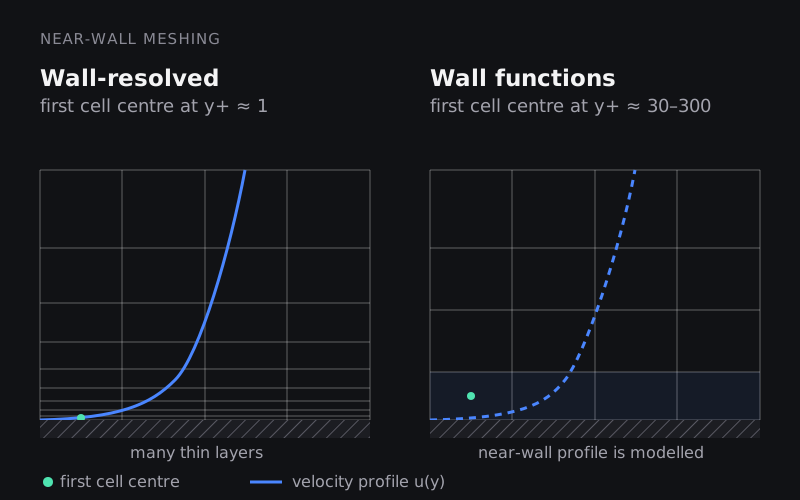
There are two strategies. Wall-resolved meshes put the first cell inside the viscous sublayer (y+ around 1) and use low-Reynolds-number turbulence models such as k-ω SST all the way to the wall. They are more accurate for separation and heat transfer but need many thin layers. Wall-function meshes put the first cell in the log-law region (roughly y+ 30 to 300) and use an empirical law of the wall to bridge the gap. They are cheaper and fine for attached flows. The region in between (about 5 to 30, the buffer layer) is where neither approach is happy, so you avoid placing the first cell there unless your solver has an "all-y+" wall treatment.
Worked example: first cell height for a car at 100 km/h
Suppose you are setting up the external aerodynamics of a 4.5 m long car at 100 km/h (27.8 m/s) in air (ρ ≈ 1.2 kg/m³, ν ≈ 1.5 × 10⁻⁵ m²/s).
- Reynolds number based on length: Re = U·L/ν = 27.8 × 4.5 / (1.5 × 10⁻⁵) ≈ 8.3 × 10⁶. Fully turbulent.
- Estimate skin friction with a turbulent flat-plate correlation, Cf ≈ 0.026 / Re1/7 ≈ 0.0027.
- Wall shear stress: τw = ½ ρ U² Cf ≈ 0.5 × 1.2 × 27.8² × 0.0027 ≈ 1.24 Pa.
- Friction velocity: uτ = √(1.24 / 1.2) ≈ 1.01 m/s.
- Distance for a target y+: y = y+ · ν / uτ. For y+ = 1, y ≈ 0.015 mm. For y+ = 50, y ≈ 0.74 mm.
In a cell-centred finite volume code, y is measured to the cell centre, so the first layer is about twice as thick: roughly 0.03 mm for a wall-resolved mesh, or about 1.5 mm for wall functions. That factor of 50 in first-layer thickness is why wall-resolved meshes are so much bigger. Treat this as a starting estimate: local shear varies over the body, so always plot y+ on the walls after the first run and adjust. Our technical blog on near-wall treatment and y+ estimation covers more cases.
Turbulence modelling in one table
Most engineering flows are turbulent, and resolving every eddy is far too expensive for design work. So CFD uses models that represent turbulence at different levels of detail:
| Approach | What it resolves | Cost | Typical use |
|---|---|---|---|
| RANS: Spalart-Allmaras | Time-averaged flow, one extra equation | Low | External aerodynamics with attached flow, aerospace |
| RANS: k-ε family | Time-averaged flow, two equations | Low | Internal flows, HVAC, mixing, with wall functions |
| RANS: k-ω SST | Time-averaged flow, blends k-ω near walls with k-ε away from them | Low to moderate | Adverse pressure gradients, separation, heat transfer; a common default |
| Hybrid RANS-LES (DES, SBES) | RANS near walls, large eddies away from them | High | Wakes, side-mirror noise, bluff bodies |
| LES | Large eddies directly, small ones modelled | Very high | Combustion, acoustics, research and high-fidelity checks |
| DNS | All scales, no turbulence model | Extreme | Research at low Reynolds numbers only |
The SST model was introduced by F. R. Menter at NASA Ames in the early 1990s and is still one of the most widely used RANS models in industry. If you want the theory, our post on RANS turbulence models is a good next read.
Steady vs transient, and the CFL number
A steady simulation looks for a flow that does not change with time and is the default for most design comparisons. A transient run is needed when the physics is inherently unsteady: vortex shedding behind a cylinder, sloshing, an engine cycle, a battery heating up over a drive cycle.
In transient runs the time step is tied to the mesh through the Courant (CFL) number, CFL = u · Δt / Δx, roughly how many cells the flow crosses per time step. With air at 30 m/s through 2 mm cells, keeping CFL at 1 means Δt ≤ 0.002 / 30 ≈ 6.7 × 10⁻⁵ s, so 0.1 s of physical time costs about 1,500 time steps. Explicit, density-based solvers need CFL below about 1 for stability; implicit pressure-based solvers can run larger steps, but small, fast flow features still need a modest CFL to be captured accurately.
How accurate is CFD, and how do you trust a result?
CFD can be very accurate, and it can be confidently wrong. The difference is process. Engineers separate two questions:
- Verification: are we solving the equations correctly? Residuals and monitors have converged, mass and energy balance, and the answer no longer changes meaningfully when the mesh and time step are refined. A systematic mesh study, for example with the Grid Convergence Index described in NASA's guide to spatial convergence, puts a number on discretisation error.
- Validation: are we solving the right equations? Compare against experiments, published benchmark cases or field data. ASME's V&V 20 standard sets out a formal method for this in CFD and heat transfer.
A quick checklist before you share a CFD result:
- Mass in equals mass out (within a fraction of a percent).
- The quantity of interest has stopped changing, not just the residuals.
- At least three meshes show the answer settling.
- Wall y+ matches the wall treatment you chose.
- Boundary conditions are not forcing the answer (the outlet is not in a recirculation zone, the domain is big enough).
- The result agrees with a hand calculation or a test within an explainable margin.
Where CFD is used
- Automotive: external aerodynamics and drag, underhood and brake cooling, cabin HVAC comfort, wind noise. See the PG Program in External Aerodynamic Simulations.
- Electric vehicles: battery pack and cold plate cooling, motor and inverter thermal management, charging-time thermal limits.
- Engines and combustion: in-cylinder flow, spray, combustion and emissions. See Advanced CFD for IC Engine Applications using CONVERGE and the Combustion CFD Specialist program.
- Aerospace and turbomachinery: wings, nacelles, compressor and turbine stages, film cooling.
- Buildings and data centres: ventilation, smoke movement, server rack cooling.
- Process, energy and biomedical: mixing tanks, heat exchangers, wind turbines, blood flow through stents and valves.
CFD software you will come across
The fundamentals transfer between tools, but job descriptions usually name one. The common ones are Ansys Fluent and Ansys CFX, Siemens Simcenter STAR-CCM+, OpenFOAM (open source, used heavily in research and increasingly in industry), CONVERGE (engines and moving geometry), and dedicated pre-processors such as ANSA for meshing. ParaView is the usual open-source post-processor. Learn one general-purpose solver properly, learn to script it, and the rest become a matter of menus.
How to start learning CFD
- Revise the physics: fluid mechanics (boundary layers, Reynolds number, pressure losses) and heat transfer. CFD only amplifies what you understand.
- Learn the numerics by coding: write a small finite difference or finite volume solver in MATLAB or Python. The Introduction to CFD using MATLAB and OpenFOAM course is built around exactly this.
- Get fluent in one solver: for example with Introduction to GUI based CFD using ANSYS Fluent.
- Get good at meshing: it is the skill employers test first. See Advanced CFD Meshing using ANSA.
- Build projects you can defend: two or three simulations with mesh studies and validation against published data are worth more than ten pretty contour plots. The PG Program in Computational Fluid Dynamics combines these steps with industry projects.
Frequently asked questions
Is CFD hard to learn?
Running a solver is not hard; getting answers you can defend is. Expect to spend most of your learning time on meshing, boundary conditions and checking results. A solid base in fluid mechanics makes everything easier.
What is the difference between CFD and FEA?
CFD solves fluid flow and heat transfer in fluids, usually with the finite volume method. FEA (finite element analysis) is most often used for stresses, deformation and vibration in solids. Many products need both, for example mapping CFD temperatures or pressures onto an FEA model.
Can CFD replace wind tunnel or physical testing?
Not completely. CFD reduces the number of tests and explains what the tests show, but tests remain the reference for validation and for certification. Most teams use CFD to explore designs and tests to confirm the final ones.
Which CFD software should a beginner learn first?
Pick the solver that is common in the industry you are targeting (Ansys Fluent and STAR-CCM+ are widespread in automotive and aerospace; CONVERGE in engine work; OpenFOAM in research and cost-conscious teams). Concepts matter more than the brand.
What does a CFD engineer do day to day?
Mostly geometry clean-up and meshing, setting up and running cases, checking convergence and mesh sensitivity, and writing short reports with clear recommendations for designers. Scripting repetitive work in Python is a big productivity boost.
Do I need a master's degree to work in CFD?
Many CFD analyst roles hire B.E./B.Tech graduates who can show strong fundamentals and real project work. Research and solver-development roles more often ask for a master's or PhD.
Sources and further reading
- NASA Glenn Research Center, Examining Spatial (Grid) Convergence
- ASME, V&V 20: Standard for Verification and Validation in CFD and Heat Transfer
- F. R. Menter, Improved two-equation k-omega turbulence models for aerodynamic flows, NASA Technical Memorandum (NTRS)
- NASA, Turbulence Modeling Resource