How to Learn CAD Design: Step-by-Step Guide for Beginners (12-Week Plan)
Which CAD software to learn first and what each costs a student today, the order to learn it in (drawings, fully defined sketches, features, assemblies, 2D drawings, GD&T), a 12-week plan with projects, the CSWA exam, and what Skill-Lync's placement data shows about design jobs and pay.
To learn CAD design as a beginner, pick one parametric 3D tool (SOLIDWORKS, CATIA or Autodesk Fusion), then learn it in the order engineers use it: read drawings, draw fully constrained sketches, build parts from features, put parts into assemblies, and make 2D drawings with tolerances. Add GD&T and design-for-manufacturing basics, prove each skill with a small project, and finish with a portfolio and a certification such as the CSWA. At 8-10 hours a week, the 12-week plan below covers that path.
In short (checked 19 Nov 2026)
- The software can cost you nothing. SOLIDWORKS Design Standard for Students is free (Windows only). Autodesk gives students and educators free one-year, renewable access to AutoCAD and Fusion. Onshape's Student plan is free, and FreeCAD (stable version 1.1.4) is open source. 3DEXPERIENCE CATIA for Students costs $60 for a one-year licence.
- The entry certification is a 3-hour exam. SOLIDWORKS' CSWA has a 70% pass mark and tests sketches, features, assemblies, mates and drawing views. Each attempt needs an exam credit, with at least 14 days between attempts.
- Design is the biggest door in. In Skill-Lync's placement records (snapshot 15 Nov 2026), 1,463 of 3,711 salaried placements (39%) were in the Design domain, at a median of ₹3.5 LPA. Cyient (212), Tata Technologies (98) and Hyundai Motor (48) hired the most.
- In India, drawings use first-angle projection. BIS SP 46 requires it for drawings made after 31 December 1991, so learn to read and draw it from day one.
This guide is for mechanical, automobile and production engineering students and graduates in India starting CAD from zero, and for anyone who opened SOLIDWORKS once and closed it again. It covers which software to choose, what to learn in which order, a week-by-week plan, the projects that prove each skill, and what Skill-Lync's own placement data shows about design jobs. Software prices and licence terms are as listed on the vendors' pages on 19 November 2026.
What is CAD design, and what does a design engineer do with it?
CAD (computer-aided design) is software for building exact digital models of parts and assemblies and the drawings used to make them. A design engineer uses it to turn a requirement (a bracket must hold 5 kg, a cover must clip onto a housing) into a model that can be checked, simulated and manufactured, and into drawings a supplier can quote and build from.
Modern mechanical CAD is parametric and feature-based. You do not draw a solid; you record a recipe. A 2D sketch with dimensions and relations becomes a feature (an extrusion, a hole, a fillet), the features stack up into a part, and parts are joined into an assembly with mates. Change a dimension in the recipe and everything downstream updates. Learning CAD is mostly learning to write that recipe so it updates the way a designer intends. This idea is called design intent.
The day-to-day work of a fresher design engineer in an Indian engineering-services company follows the same chain: modelling parts from a sketch or an old drawing, updating models after a design change, building assemblies, and producing and checking drawings against standards. Typical parts are sheet-metal brackets, plastic trims, castings and fixtures.
Which CAD software should a beginner learn first?
Learn the tool used in the industry you want to join, because the core skills transfer but employers screen for the tool they use. For automotive OEMs and engineering-services firms, start with CATIA V5 or Siemens NX. For general machinery, product design and many smaller companies, start with SOLIDWORKS. If you cannot run Windows software, use Onshape or Fusion.
| Software | Learner cost (19 Nov 2026) | Good first choice if |
|---|---|---|
| SOLIDWORKS | Students: free (Design Standard, Windows only); $60 a year for Design Premium with CSWA and CSWP exams | you want machinery, product or general mechanical design |
| CATIA (3DEXPERIENCE) | Students: $60 a year with 3 certifications, Windows only (the V5 student edition is discontinued) | you are aiming for automotive or aerospace body, plastics or harness design |
| Autodesk Fusion | Students: free, 1 year, renewable; hobbyists: free limited version | you are on a Mac, or want CAD and CAM in one tool |
| AutoCAD | Students: free, 1 year, renewable | your work is 2D: layouts, schematics, plant drawings |
| Onshape | Students: free; Free plan: public documents only | you want browser-based CAD on any computer |
| FreeCAD | Free, open source (version 1.1.4) | you want a permanently free tool |
What the hiring data says: most design hires among Skill-Lync learners went to automotive engineering-services companies. Of the 1,463 Design-domain placements in the 15 Nov 2026 snapshot, 929 (63.5%) came from the PG Program in CAD, whose courses use CATIA V5, Siemens NX, SOLIDWORKS and Autodesk Alias. That reflects what Skill-Lync teaches as much as the market. But if automotive is your target, it is a strong hint to learn CATIA or NX early rather than stopping at a hobby tool.
Two practical notes. AutoCAD alone is rarely enough for a mechanical design role, because the work is 3D and parametric; learn it as a second tool for 2D layouts. And the second 3D tool is much faster than the first: sketches, features, mates and drawing views work the same way everywhere, with different menus. Compare tool-specific options in Skill-Lync's SOLIDWORKS courses (14 as of 16 Nov 2026) and CATIA courses (23), with fees, duration and projects side by side. Weighing two tools directly? See SOLIDWORKS vs Creo.
Step 1: Can you read an engineering drawing?
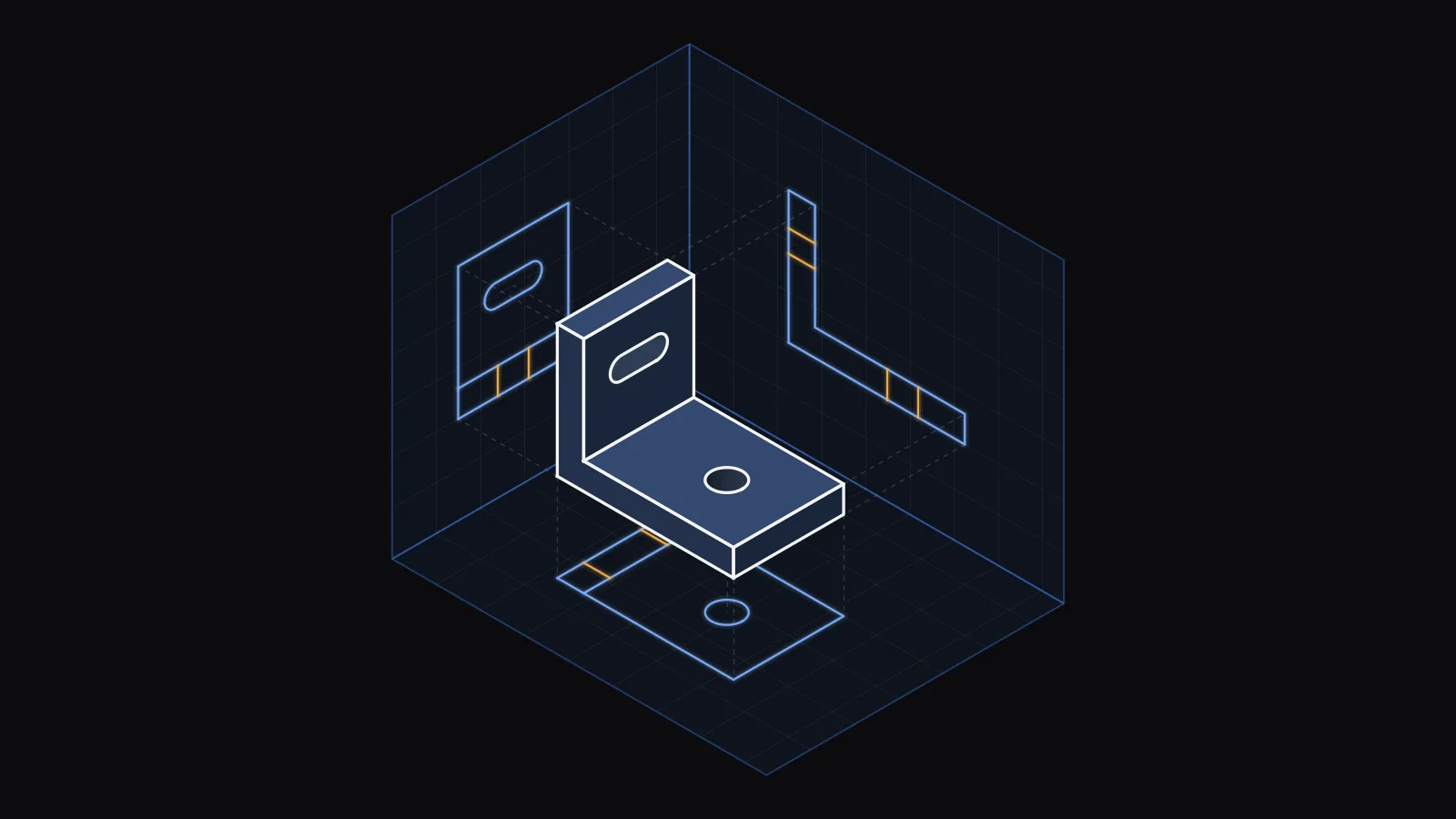
Start here, before the software. Models are usually built from drawings, and drawings are the deliverable. You need to read orthographic views, line types (visible, hidden, centre), dimensions and the projection method. In India that method is first-angle projection: BIS SP 46 requires it for drawings made after 31 December 1991.
In first-angle projection, the view from above is placed below the front view, and the view from the left is placed to the right of it. Third-angle projection, common in American drawings, does the opposite. Misreading the projection gives you a mirrored part, which is one of the classic fresher mistakes on supplier drawings. Skill-Lync's guide to the types of views in engineering drawing covers sections, auxiliary and detail views too.
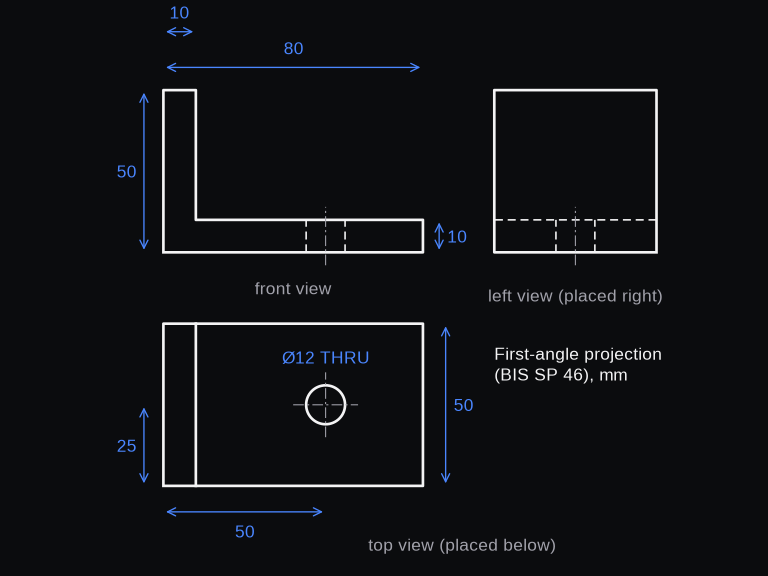
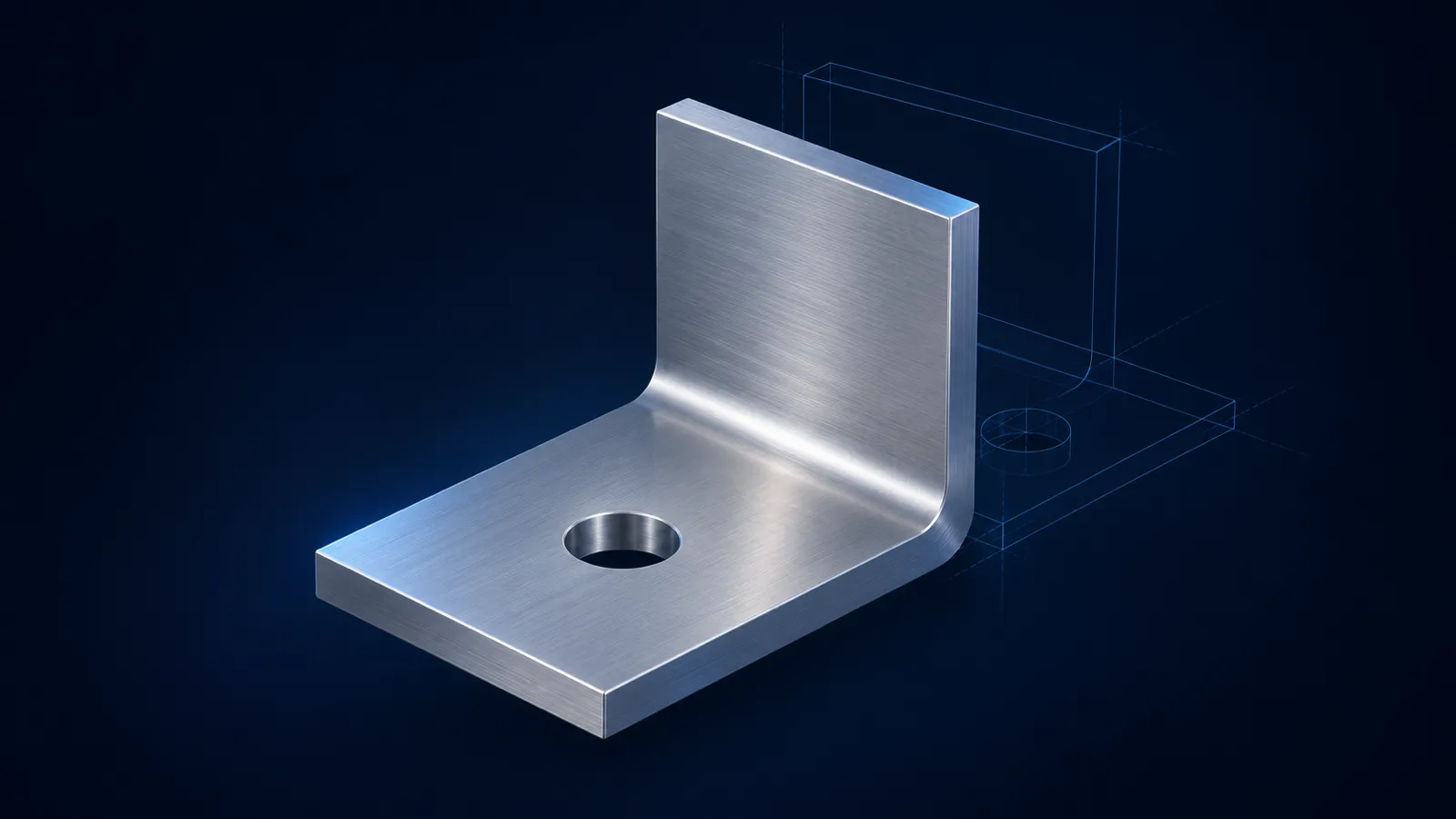
Skill-Lync's interactive Engineering Graphics book covers sheets, lines, scales and projections to BIS conventions. Model this bracket in your chosen tool once you reach Step 3: it uses a sketch, two extrudes and a hole.
Step 2: How do you make a fully defined sketch?
A sketch is fully defined when every line, arc and circle is fixed in size and position by dimensions and relations, so it has zero degrees of freedom (DOF) left. Under-defined sketches change shape unexpectedly when you edit something later. Most CAD tools colour fully defined geometry differently (black in SOLIDWORKS) so you can see what is still free.
A worked example shows how the count works. Take an 80 × 50 mm plate outline with a 20 mm hole whose centre is 55 mm from the left edge and 25 mm from the bottom.
- Each line has two endpoints with and each, so 4 DOF. A circle has a centre and a radius, so 3 DOF. Four lines and a circle start with .
- Joining the four corners (coincident relations) removes 2 each: 11 left.
- Two horizontal and two vertical relations remove 1 each: 7 left. The outline is now a rectangle that can still move and stretch.
- Putting one corner on the origin removes 2: 5 left. The width (80) and height (50) dimensions remove 1 each: 3 left.
- The hole diameter removes 1 and its two position dimensions remove 2: 0 left. The sketch is fully defined.
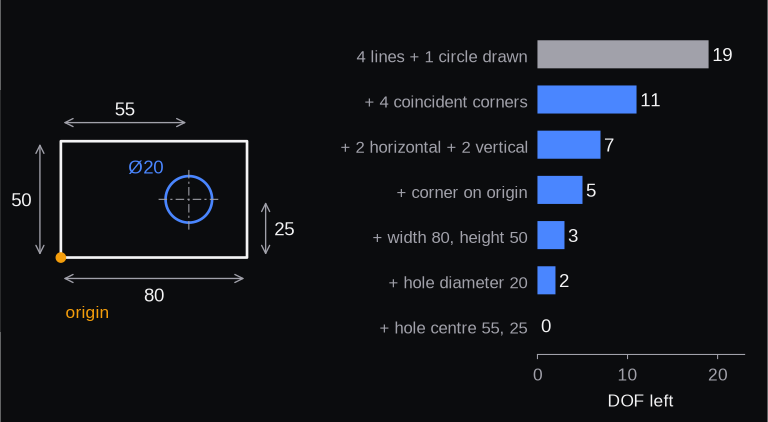
calc.py, not counted by hand.Two habits follow from this. Dimension to the features that matter for function: here, the hole position from the edges the part locates on. And never "fix" geometry just to make the sketch turn black, because a fixed entity ignores the design intent and breaks on the next change.
Step 3: Which features should you learn first for part modelling?
Learn extrude, cut, revolve, hole, fillet, chamfer, pattern, mirror and shell first: most machined, cast and moulded parts are built from them. Then add sweep and loft for pipes and blended shapes, and sheet-metal features if you want automotive or enclosure work. Practise by modelling real parts from drawings, not by following clicks.
The order of features matters as much as the features themselves. A sensible order is: base shape, then major cuts, then holes, then patterns, then fillets and chamfers last. Fillets added early create small faces that later features can lose track of, which causes rebuild errors when the model changes. Name the important features in the tree; the next person to edit your model is often you, three months later. For a CATIA walk-through of the same ideas, see part design in CATIA V5, step by step.
Good first parts: the L-bracket above, a flanged shaft (a revolve), a pulley, a pipe clamp, a gear blank with a keyway, and a shelled box with bosses. The CSWA exam tests exactly this list: sketch entities and relations, extrudes, revolves, sweeps, lofts, fillets, chamfers, patterns, materials and mass properties.
Step 4: How do assemblies and mates work?
An assembly positions parts with mates (constraints). Every free part has 6 degrees of freedom: three translations and three rotations. A concentric mate between a pin and a hole leaves 2 (sliding along the axis and spinning about it). Adding a coincident mate between a shoulder and a face stops the slide, leaving 1: a hinge.
Mate parts so the assembly moves the way the real product does: a hinge should still rotate, a slider should still slide. Over-constraining everything to "fixed" hides mistakes and makes motion studies impossible. Once an assembly is mated, run an interference check, make an exploded view and generate a bill of materials. These three outputs appear in almost every design-job test.
A bench vice (8-12 parts: body, moving jaw, screw, handle, jaw plates, pins) is the classic first assembly because it has a slider, a screw and a rotating handle. Skill-Lync's SOLIDWORKS project ideas list the 17 projects learners build most, with real reports.
Step 5: How do you make a 2D drawing from a CAD model?
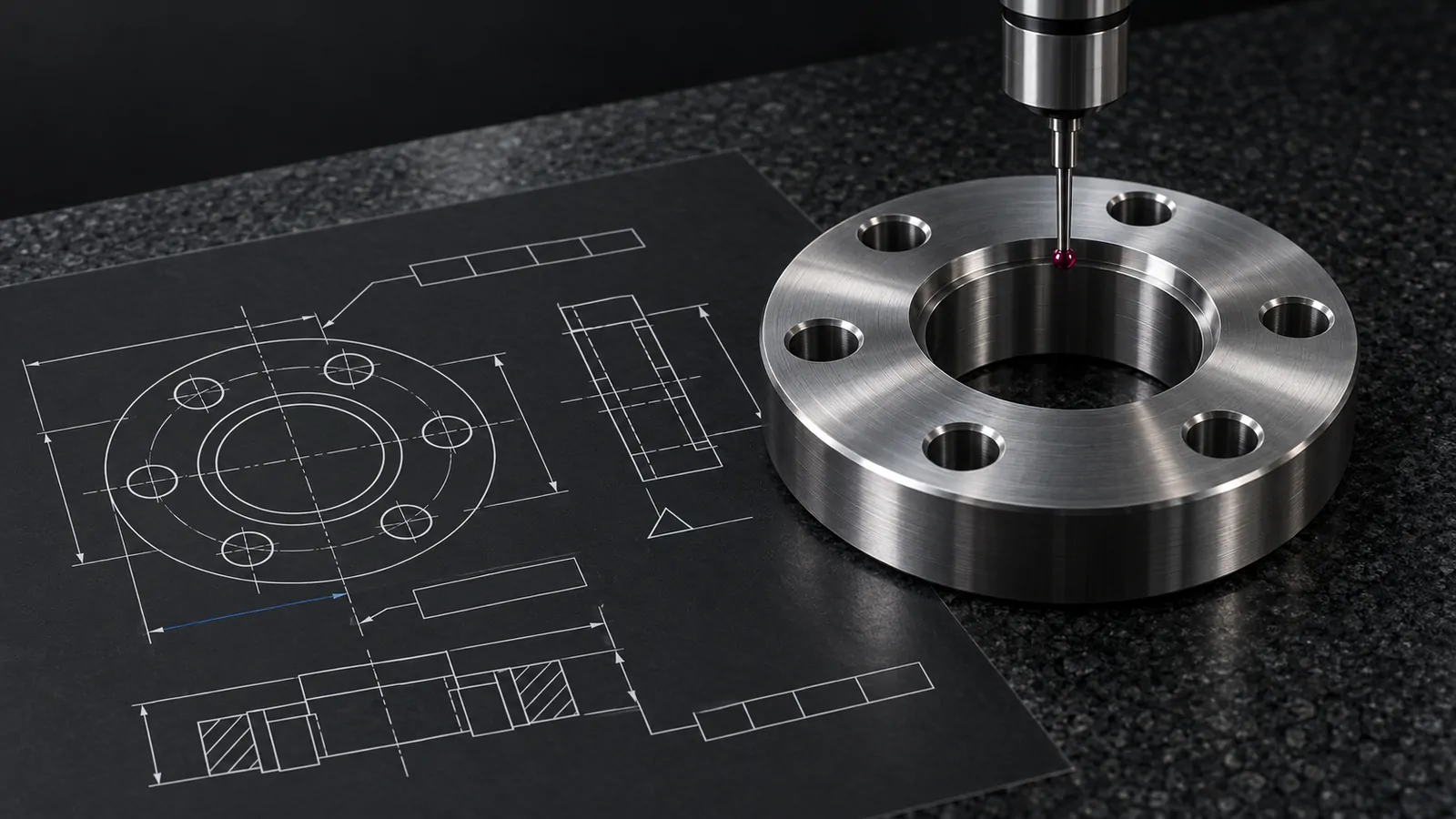
Create the drawing from the model so it stays linked: place the views (front, top, side, section and detail views as needed), add dimensions that match how the part is made and inspected, add tolerances and surface finish where they matter, and fill in the title block. Check the projection symbol, the scale and the units before you release anything.
Dimension each feature once, in the view where its shape is clearest. Dimension from datums (the faces and holes the part locates on), not from whatever edge is convenient. A drawing that a machinist has to interpret is not finished. This is the step where most beginners are weakest, and the one interviewers test with a printed drawing and a red pen.
Step 6: Do you need GD&T and design for manufacturing as a beginner?
You need the basics, yes. Geometric dimensioning and tolerancing (GD&T) controls form, orientation and position of features relative to datums, and most automotive drawings use it. Design for manufacturing (DFM) means shaping parts so they can be made cheaply: draft on moulded faces, uniform walls, sensible bend radii on sheet metal and standard hole sizes.
Start with the datum reference frame, flatness, perpendicularity, position and profile, and read real drawings that use them. Skill-Lync's posts on GD&T basics and GD&T symbols are a good start. For DFM, pick the process your target industry uses most (sheet metal for body-in-white, injection moulding for plastic trims) and model one part with its rules applied.
Step 7: Which CAD projects should beginners put in a portfolio?
Three to five finished projects beat thirty half-done tutorials. Each one should prove a different skill: one machined part with a full drawing, one assembly with motion and a bill of materials, one sheet-metal or plastic part with DFM features, and one domain project close to the job you want, such as a door trim or a fixture for automotive roles.
- Machined part + drawing: a flanged shaft or gearbox cover, fully dimensioned in first-angle projection with tolerances on the fits.
- Assembly: the bench vice or a pipe clamp, with an exploded view, interference check and bill of materials.
- Sheet metal or plastics: an enclosure with bends and flanges, or a clip-on cover with draft, ribs and bosses.
- Domain project: Skill-Lync's CATIA project ideas list the 22 projects learners build most, from a switch bezel and a door arm rest to a full door trim panel and a welding fixture, each with real learner reports.
Show the feature tree, a drawing sheet and a short note on the decisions you made, not just a render. A design lead reads the tree. See how other learners present their work in Skill-Lync student projects, and put the portfolio on a profile recruiters read: how to build a LinkedIn profile for mechanical jobs.
Step 8: Is a CAD certification worth it?
A certification is worth it as proof that you can work to time, not as a substitute for projects. The CSWA is the most common entry-level one: a 3-hour, hands-on SOLIDWORKS exam with a 70% pass mark. Passing earns a certificate and a digital badge. Each attempt needs a paid exam credit, with at least 14 days between attempts.
Two cheaper routes exist for students. SOLIDWORKS Design Premium for Students ($60 a year) includes the CSWA and CSWP exams, and 3DEXPERIENCE CATIA for Students ($60 a year) includes three certifications. Practise with the official sample exam under a timer first; the usual reason for failing the CSWA is running out of time, not lack of knowledge.
A 12-week plan to learn CAD from scratch
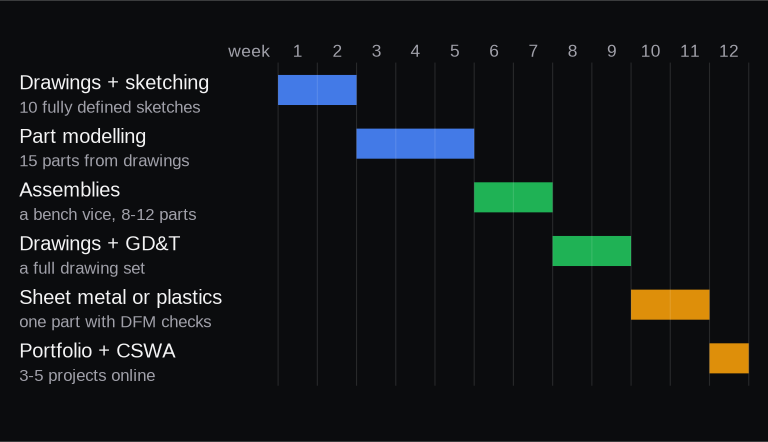
The plan assumes 8-10 hours a week, about 96-120 hours in total, in one tool. Each phase ends with something you can show. If you are already comfortable with drawings, compress weeks 1-2; if you are aiming at automotive roles, spend weeks 10-11 on sheet metal or plastics in CATIA or NX.
| Weeks | Learn | Finish with |
|---|---|---|
| 1-2 | Reading drawings (first angle), the interface, sketch tools, relations, fully defined sketches | 10 fully defined sketches from textbook drawings |
| 3-5 | Extrude, revolve, cut, hole, fillet, chamfer, pattern, mirror, shell, sweep, loft; feature order and design intent | 15 parts modelled from drawings, including the L-bracket |
| 6-7 | Mates, degrees of freedom, interference check, exploded views, bill of materials | A bench vice assembly, 8-12 parts |
| 8-9 | Drawing views, sections, dimensioning from datums, tolerances, GD&T basics, title block | A full drawing set for the vice |
| 10-11 | Sheet metal or plastic part design in your target tool; DFM rules for that process | One sheet-metal or plastic part with DFM checks |
| 12 | Timed practice (CSWA sample exam), portfolio write-ups | 3-5 projects online and a certification attempt |
Free material to follow: Skill-Lync's AutoCAD Essentials for Mechanical Engineers (44 lessons, 20.5 hours) and Basics of CATIA V5 (16 lessons, 5.2 hours) are free on Grow. SOLIDWORKS' free student account includes MySolidWorks training videos.
How long does it take to learn CAD?
You can learn the basics of one 3D CAD tool (sketches, parts, simple assemblies and drawings) in about 4-6 weeks of regular practice, and reach a job-ready level, with drawings, GD&T basics and a portfolio, in about 3 months at 8-10 hours a week. These are planning estimates, not guarantees. Speed depends on practice on real drawings, not hours of video.
A second CAD tool takes a fraction of that time because the concepts carry over. Specialised work such as Class-A surfacing, body-in-white or wiring harness design takes longer, because you are learning an engineering domain, not just a tool. That is why industry-oriented programmes run longer: the PG Program in CAD is 48 weeks with 32 projects.
Can you get a design job after learning CAD, and what does it pay?
Yes. Design was the largest single domain in Skill-Lync's placement records, but a tool alone rarely gets the job: recruiters test drawing reading, modelling speed and domain basics. In the 15 Nov 2026 snapshot, 1,463 Design-domain placements had a median starting salary of ₹3.5 LPA, with the middle half between ₹3.0 and ₹4.4 LPA.
Based on 3,711 Skill-Lync placement records up to 7 Nov 2026 (data snapshot of 15 Nov 2026). This is a starting point; we'll update it as new placements come in. These are learners who reported a placement, not the whole job market. Most offers are starting or early-career, most records are from 2021-2023, and recent years have few records.
| Group (snapshot 15 Nov 2026) | n | Median | Middle half (p25-p75) |
|---|---|---|---|
| All Design-domain placements | 1,463 | ₹3.5 LPA | ₹3.0-4.4 LPA |
| Design Engineer role (Design domain) | 1,053 | ₹3.4 LPA | ₹3.0-4.2 LPA |
| Graduate Engineer Trainee (Design domain) | 236 | ₹3.8 LPA | ₹3.0-4.6 LPA |
| Design, placed in 2023 | 411 | ₹3.6 LPA | ₹3.0-4.2 LPA |
| Design, placed in 2024 | 133 | ₹3.6 LPA | ₹3.0-4.5 LPA |
| Design, placed in 2025 (small sample) | 20 | ₹4.1 LPA | ₹3.1-5.3 LPA |
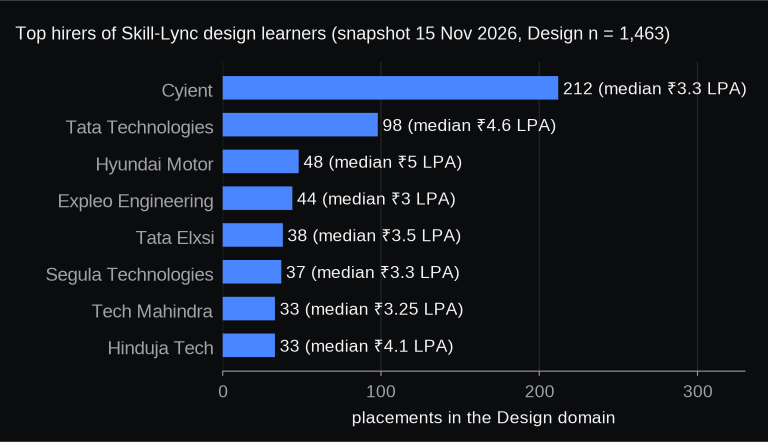
Seven of these eight are engineering-services companies, which take design work from carmakers and other manufacturers; Hyundai Motor is a carmaker itself. For role-by-role numbers, see the design engineer salary page and companies hiring mechanical engineering freshers.
What mistakes do CAD beginners make?
- Collecting tutorials instead of finishing parts. Model from drawings and check your mass or a key dimension against the answer.
- Leaving sketches under-defined, or fixing entities to silence the warning. The model breaks on the first design change.
- Fillets first. Put cosmetic fillets and chamfers at the end of the feature tree.
- Skipping drawings. Many beginners can make a model but not a drawing a supplier can quote from, and the drawing is what gets tested.
- Ignoring the projection method. First angle in India, third angle on many American drawings; check the symbol.
- Switching tools every month. Get good at one, then learn the second. It will take a fraction of the time.
Not sure whether to start with SOLIDWORKS, CATIA or NX for the roles you want? Book a free call with a Skill-Lync counsellor to map your background to a starting tool and a project plan.
Frequently asked questions
Can I learn CAD on my own for free?
Yes. SOLIDWORKS Design Standard for Students is free, Autodesk gives students free renewable one-year access to Fusion and AutoCAD, Onshape's Student plan is free and FreeCAD is open source. Pair the software with free lessons, such as Skill-Lync's free AutoCAD and CATIA V5 lessons on Grow, and practise on real drawings. What self-study usually lacks is feedback on your models and drawings.
Which is easier for beginners, SOLIDWORKS or CATIA?
SOLIDWORKS is generally easier to start with: one interface for parts, assemblies and drawings, and a large amount of beginner material. CATIA splits work into specialised workbenches and suits complex surfaces and large automotive or aerospace assemblies. If you are aiming at automotive engineering services, the extra effort of CATIA pays back; otherwise start with SOLIDWORKS and add CATIA later.
Is AutoCAD enough for a mechanical design job?
Usually not. AutoCAD is mainly used for 2D drafting, layouts and schematics, while mechanical design roles expect parametric 3D modelling, assemblies and drawings generated from the model, in SOLIDWORKS, CATIA, NX or Creo. AutoCAD is still worth knowing as a second tool, especially for plant layouts, civil or electrical drawings and reading older 2D drawings.
Do I need a powerful laptop to learn CAD?
Not to start. Simple parts and small assemblies run on most recent laptops. Check the platform first: SOLIDWORKS and CATIA for Students run on Windows only (CATIA's student licence does not work on a Mac or a virtual machine). On a Mac or a low-end machine, browser-based Onshape or Fusion are the practical choices until you need a specific desktop tool.
Is CAD design a good career in India?
It is the most common entry route into core mechanical jobs in Skill-Lync's placement data: 1,463 of 3,711 salaried placements were in Design (snapshot 15 Nov 2026), at a median of ₹3.5 LPA. Starting pay is modest. Growth comes from domain depth, such as body-in-white, plastics, GD&T or simulation, rather than from knowing more tools.
Sources and further reading
- Dassault Systèmes, SOLIDWORKS for Students (Design Standard free; Design Premium and xDesign $60/year; Premium includes CSWA and CSWP), accessed 19 Nov 2026.
- Dassault Systèmes, SOLIDWORKS Design Associate (CSWA) (3 hours, 70% minimum, topics, 14-day re-test policy), accessed 19 Nov 2026.
- SOLIDWORKS Help, Sketch Geometry Status (under defined appears blue, fully defined black).
- Dassault Systèmes, 3DEXPERIENCE CATIA for Students and CATIA V5 Student Edition (no longer available online), accessed 19 Nov 2026.
- Autodesk, Autodesk education software access (free, one year, renewable while eligible) and Autodesk Fusion for personal use (non-commercial, under $1,000 USD a year), accessed 19 Nov 2026.
- PTC Onshape, Education plans and Managing your Onshape account and subscription (Free plan documents are public; Student plan eligibility and yearly renewal), accessed 19 Nov 2026.
- FreeCAD, Downloads (current stable version 1.1.4) and FreeCAD blog (26.3 release candidates, October-November 2026), accessed 19 Nov 2026.
- Bureau of Indian Standards, SP 46:2003 Engineering Drawing Practice for Schools and Colleges (first-angle method for drawings after 31 December 1991; arrangement of views, 8B.3).
- Skill-Lync placement records,
placement-statssnapshot of 15 Nov 2026 (3,711 records with salary up to 7 Nov 2026; Design domain n = 1,463). Aggregates only.