Genetic Algorithm to Maximize a Function
To optimise the stalagmite function and find the global maxima of the function.
Genetic Algorithm (Ga) is a search-based optimization technique based on the principles of Genetics and Natural Selection. It is frequently used to find optimal or near-optimal solutions to difficult problems which otherwise would take a lifetime to solve. It is frequently used to solve optimization problems, in research, and in machine learning.
Optimization is the process of finding better results. Optimisation helps to find the best results under a set of of prioristised criteria or constraints. It is a procedure which is executed iteratively by comparing the various solutions till an optimum solution is found.
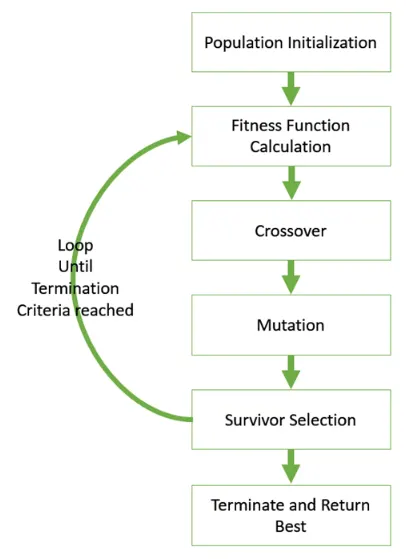
Outline on how Genetic Algorithm works
-
The algorithm begins by creating a random initial population.
-
The algorithm then creates a sequence of new populations. At each step, the algorithm uses the individuals in the current generation to create the next population. To create the new population, the algorithm performs the following steps:
-
Scores each member of the current population by computing its fitness value. These values are called the raw fitness scores.
-
Scales the raw fitness scores to convert them into a more usable range of values. These scaled values are called expectation values.
-
Selects members, called parents, based on their expectations.
-
Some of the individuals in the current population that have lower fitness are chosen as elite. These elite individuals are passed to the next population.
-
Produces children from the parents. Children are produced either by making random changes to a single parent—mutation—or by combining the vector entries of a pair of parents—crossover.
-
Replaces the current population with the children to form the next generation.
-
-
The algorithm stops when one of the stopping criteria is met.
Population
Population is a subset of solutions in the current generation. It can also be defined as a set of chromosomes. There are several things to be kept in mind when dealing with GA population −
1.The diversity of the population should be maintained otherwise it might lead to premature convergence.
2.The population size should not be kept very large as it can cause a GA to slow down, while a smaller population might not be enough for a good mating pool. Therefore, an optimal population size needs to be decided by trial and error.
Creating the Next Generation
At each step, the genetic algorithm uses the current population to create the children that make up the next generation. The algorithm selects a group of individuals in the current population, called parents, who contribute their genes—the entries of their vectors—to their children. The algorithm usually selects individuals that have better fitness values as parents
Fitness Function
The fitness function simply defined is a function which takes a candidate solution to the problem as input and produces as output how “fit” our how “good” the solution is with respect to the problem in consideration.
In most cases the fitness function and the objective function are the same as the objective is to either maximize or minimize the given objective function.
So, here our Fitness function is Staglamite Function
`f(x,y)=f_(1,x)f_(2,x)f_(1,y)f_(2,y)`
`f_(1,x)=[sin(5.1pix+0.5)]^6`
`f_(1,y)=[sin(5.1piy+0.5)]^6`
`f_(2,x)=exp[-4ln(2)((x-0.0667)^2)/(0.64)]`
`f_(2,y)=exp[-4ln(2)((y-0.0667)^2)/(0.64)]`
Parent Selction
Parent Selection is the process of selecting parents which mate and recombine to create off-springs for the next generation. Parent selection is very crucial to the convergence rate of the GA as good parents drive individuals to a better and fitter solutions.
Fitness Proportionate Selection is one of the most popular ways of parent selection. In this every individual can become a parent with a probability which is proportional to its fitness. Therefore, fitter individuals have a higher chance of mating and propagating their features to the next generation. Therefore, such a selection strategy applies a selection pressure to the more fit individuals in the population, evolving better individuals over time.
Consider a circular wheel. The wheel is divided into n pies, where n is the number of individuals in the population. Each individual gets a portion of the circle which is proportional to its fitness value.
Example Roulette Wheel Selction
In a roulette wheel selection, the circular wheel is divided as described before. A fixed point is chosen on the wheel circumference as shown and the wheel is rotated. The region of the wheel which comes in front of the fixed point is chosen as the parent. For the second parent, the same process is repeated.
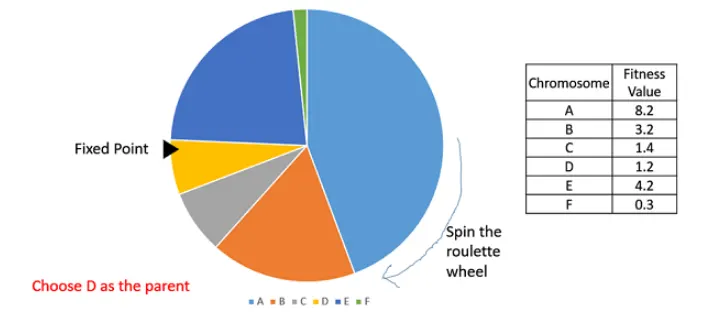
It is clear that a fitter individual has a greater pie on the wheel and therefore a greater chance of landing in front of the fixed point when the wheel is rotated. Therefore, the probability of choosing an individual depends directly on its fitness.
Creating New Generation
At each step, the genetic algorithm uses the current population to create the children that make up the next generation. The algorithm selects a group of individuals in the current population, called parents, who contribute their genes—the entries of their vectors—to their children. The algorithm usually selects individuals that have better fitness values as parents
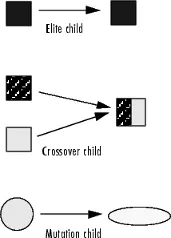
The genetic algorithm creates three types of children for the next generation:
-
Elite are the individuals in the current generation with the best fitness values. These individuals automatically survive to the next generation.
-
Crossover are created by combining the vectors of a pair of parents or genes in the current generation and combines them to form a child.
-
Mutation children are created by introducing random changes, or mutations, to a single parent.
Advantages of GAs
GAs have various advantages which have made them immensely popular. These include −
- Does not require any derivative information (which may not be available for many real-world problems).
- Is faster and more efficient as compared to the traditional methods.
- Has very good parallel capabilities.
- Optimizes both continuous and discrete functions and also multi-objective problems.
- Provides a list of “good” solutions and not just a single solution.
- Always gets an answer to the problem, which gets better over the time.
- Useful when the search space is very large and there are a large number of parameters involved.
Limitations of GAs
Like any technique, GAs also suffer from a few limitations. These include −
- GAs are not suited for all problems, especially problems which are simple and for which derivative information is available.
- Fitness value is calculated repeatedly which might be computationally expensive for some problems.
- Being stochastic, there are no guarantees on the optimality or the quality of the solution.
- If not implemented properly, the GA may not converge to the optimal solution.
Writing the Stalagmite Function and modifying it to return global maxima of the function
Staglamite Function
`f(x,y)=f_(1,x)f_(2,x)f_(1,y)f_(2,y)`
`f_(1,x)=[sin(5.1pix+0.5)]^6`
`f_(1,y)=[sin(5.1piy+0.5)]^6`
`f_(2,x)=exp[-4ln(2)((x-0.0667)^2)/(0.64)]`
`f_(2,y)=exp[-4ln(2)((y-0.0667)^2)/(0.64)]`
As the function Ga funtion retuen the minimum value of a function we add negative sign to the stalagmite so that the maximum value become the minimum value.
`f(x,y)=-f_(1,x)f_(2,x)f_(1,y)f_(2,y)`
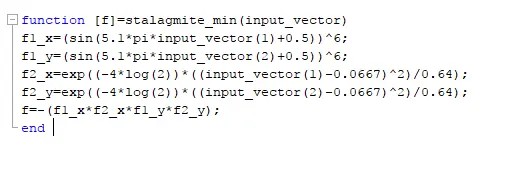
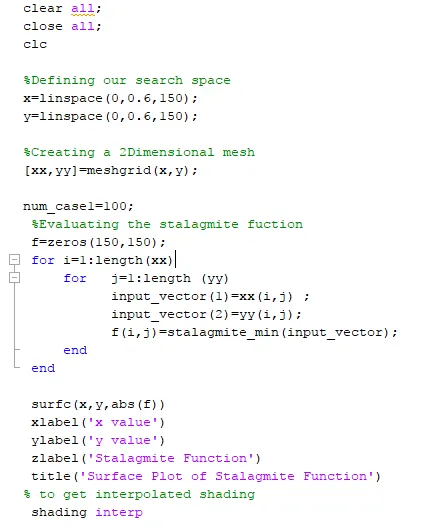
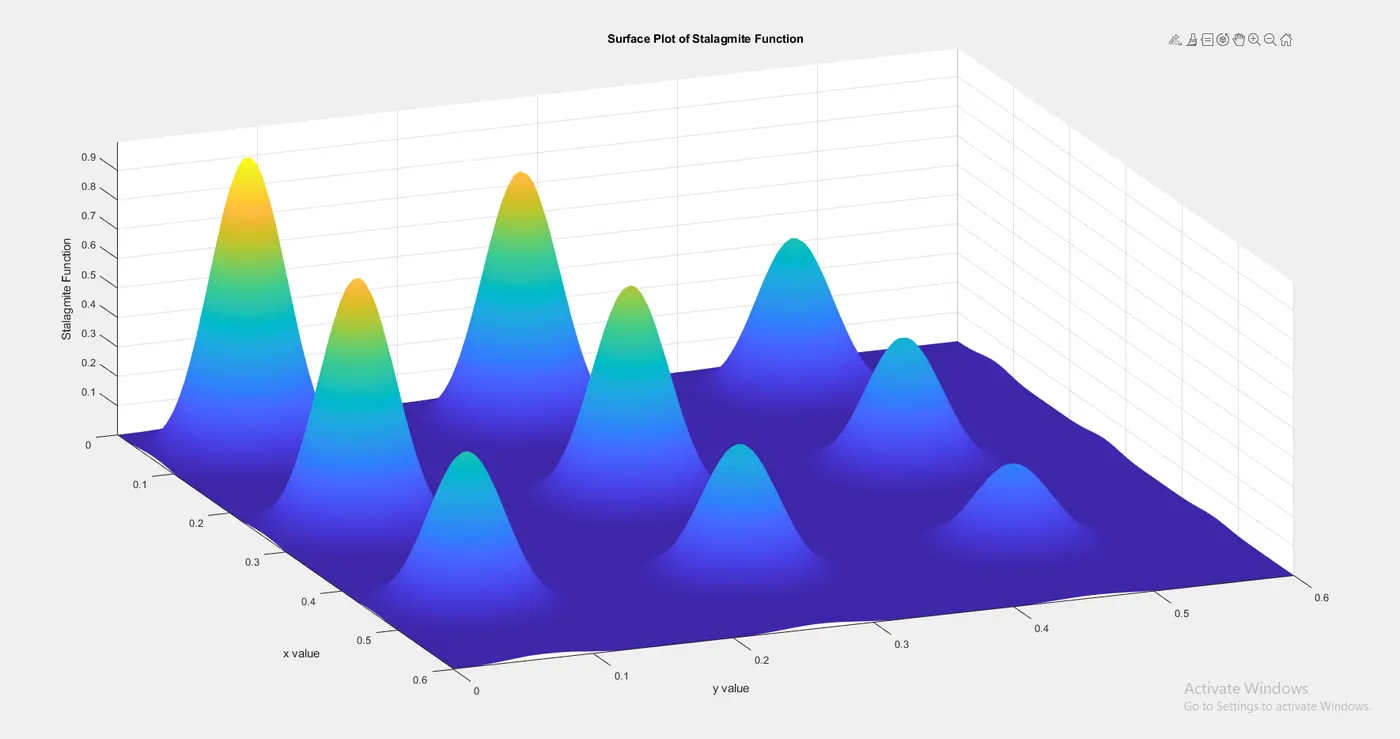
Consider values of x and y ranges from 0 to 0.6. in order to get a smooth plot we divide them into 125 values using the linspace function. We create a surface grid using the function meshgrid and we run a loop to find the values of Stalagmite function corresponding to the grid.
We plot the obtained results from Stalagmite functions against the x and y values using a surface plot.
we change the shading pattern to be interpolated for the plot and assign title with axis labels.
Running the Ga Function
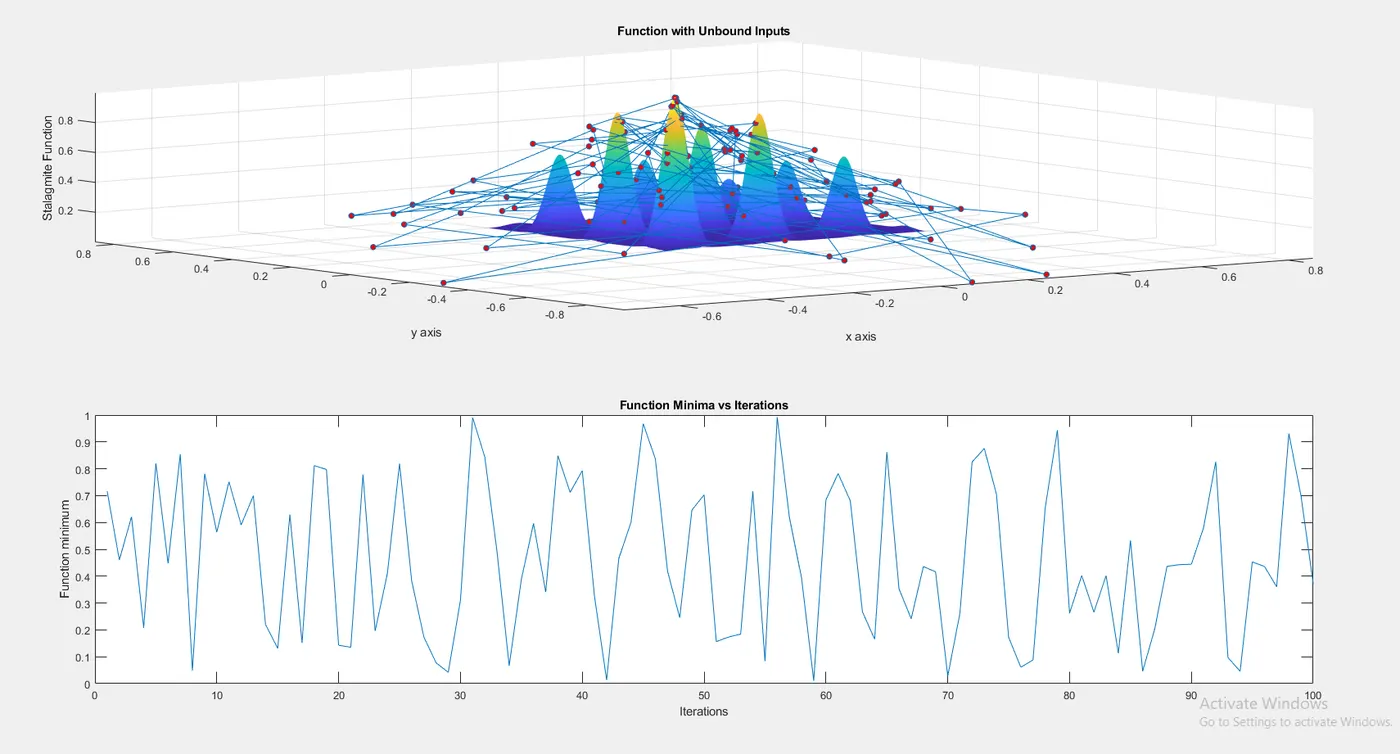
Case 1 Unbounded Inputs
Here we have not constrained the inputs taken by the ga function.
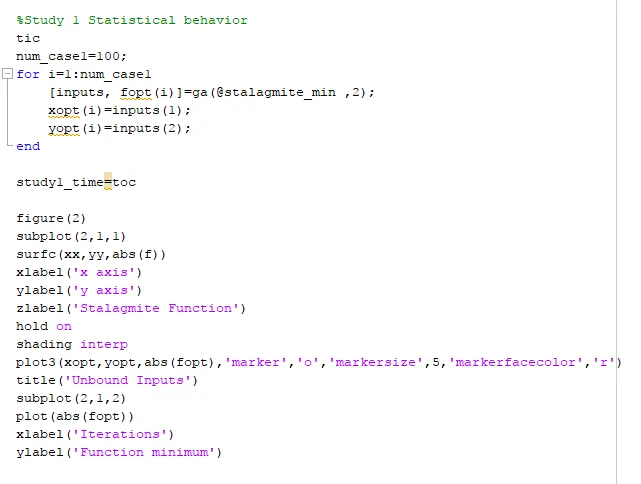
We create a loop to run the Ga function for 100 times and store the values of results given by the function. We store the minima returned by the function in variable fopt and the corresponding values of inputs in xopt and yopt. We also track the time taken to by the function by using the function tic and toc.
The obtained results are plotted on the existing surface generated by the Stalagmite function for this we split the plot into 2X1 grid using the subplot function and plot the values of opt and the corresponding values of inputs in xopt and yopt on the same sub plot which are seen as the 'O' points.
in the next subplot we plot the minima returned by the Ga function corresponding to the interactions.
[inputs, fopt(i)]=ga(@stalagmite_min ,2)
Here Ga minimizes the function stalagmite which is dependent upon 2 variables x and y.
the returned values from the Ga function are 'inputs'
inputs are the values returned by the Ga function corresponding to the minima given by the ga function at fopt.
x = ga(fun,nvars) finds a local unconstrained minimum, x, to the objective function, fun. nvars is the dimension (number of design variables) of fun.
Case 2 Bounded inputs
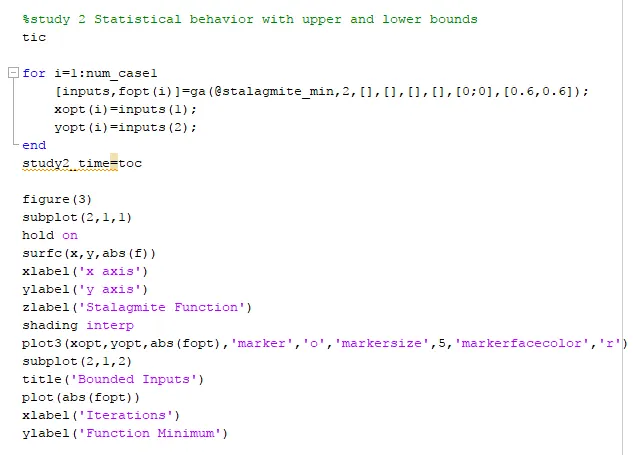
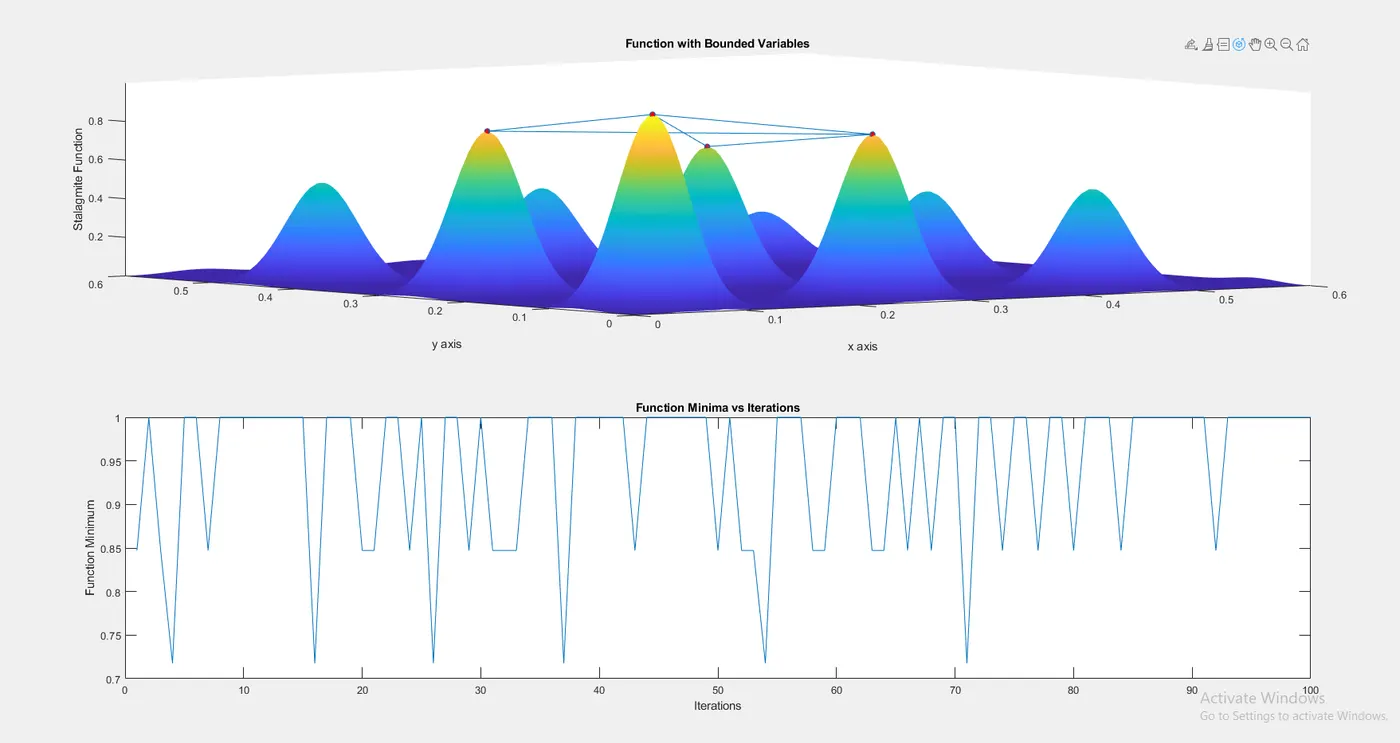
Here we constrain the values of x and y taken by the Ga function where x and y ranges from 0.1 to 0.6.
We create a loop to run the Ga function for 100 times and store the values of results given by the function. We store the minima returned by the function in variable fopt and the corresponding values of inputs in xopt and yopt. We also track the time taken to by the function by using the function tic and toc.
The obtained results are plotted on the existing surface generated by the Stalagmite function for this we split the plot into 2X1 grid using the subplot function and plot the values of opt and the corresponding values of inputs in xopt and yopt on the same sub plot which are seen as the 'O' points.
in the next subplot we plot the minima returned by the Ga function corresponding to the interactions.
[inputs2,fopt2(i)]=ga(@stalagmite_min,2,[],[],[],[],[0;0],[0.6,0.6]);
[x,fval]=ga(fun,nvars,A,b,Aeq,beq,lb,ub) where
x is the solution
fval is the value of fucntion 'fun' at x.
nvars is the number of design variables on which fun is dependent
A is Linear inequality constraints, specified as a real matrix. A is an M-by- nvar matrix, where M is the number of inequalities.
b is Linear inequality constraints, specified as a real vector. b is an M-element vector related to the A matrix. If you pass b as a row vector, solvers internally convert b to the column vector b(:)
Aeq is Linear equality constraints, specified as a real matrix. Aeq is an Me-by-nvar matrix, where Me is the number of equalities.
beq is Linear equality constraints, specified as a real vector. beq is an Me-element vector related to the Aeq matrix. If you pass beq as a row vector, solvers internally convert beq to the column vector beq(:).
Here Ga minimizes the function stalagmite which is dependent upon 2 variables x and y and the
inputs are the values returned by the Ga function corresponding to the minima given by the ga function at fopt.
x = ga(fun,nvars) finds a local unconstrained minimum, x, to the objective function, fun. nvars is the dimension (number of design variables) of fun.
lb is Lower bounds, specified as a real vector or array of doubles. lb represents the lower bounds element-wise in lb ≤ x ≤ ub.
ub is Upper bounds, specified as a real vector or array of doubles. ub represents the upper bounds element-wise in lb ≤ x ≤ ub.
Case 3
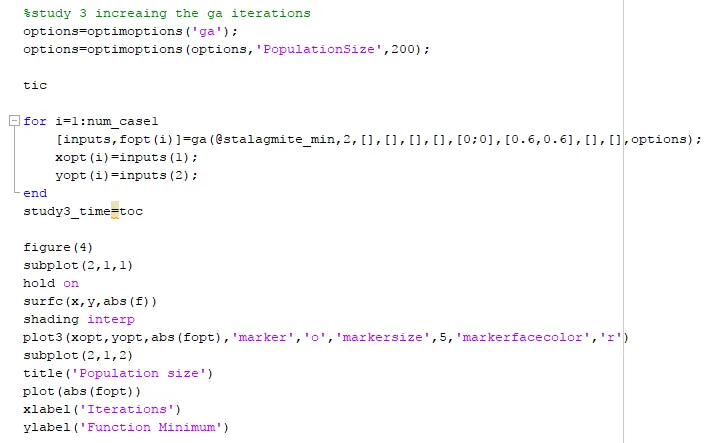
In order to optimize the result given by the Ga function, we increase the Population size in the given values of x and y that ranges from 0 to 0.6.
In Matlab by default, the population size is 50 when the number of varaiables<=5, else 200
To run the genetic algorithm with the default options, call ga with the syntax
[x,fval] = ga(@fitnessfun, nvars)
The input arguments to ga are
-
@fitnessfun— A function handle to the file that computes the fitness function. -
nvars— The number of independent variables for the fitness function.
The output arguments are
-
x— The final point -
fval— The value of the fitness function atx
In order to Specify the PopulationSize
You can specify any of the options that are available for ga by passing options as an input argument to gausing the syntax
[x,fval] = ga(@fitnessfun,nvars,[],[],[],[],[],[],[],options)
This syntax does not specify any linear equality, linear inequality, or nonlinear constraints.
You create options using the function optimoptions.
options = optimoptions(@ga);
This returns options with the default values for its fields. ga uses these default values if you do not pass in options as an input argument.
We create a loop to run the Ga function for 100 times and store the values of results given by the function. We store the minima returned by the function in variable fopt and the corresponding values of inputs in xopt and yopt. We also track the time taken to by the function by using the function tic and toc.
The obtained results are plotted on the existing surface generated by the Stalagmite function for this we split the plot into 2X1 grid using the subplot function and plot the values of opt and the corresponding values of inputs in xopt and yopt on the same sub plot which are seen as the 'O' points.
in the next subplot we plot the minima returned by the Ga function corresponding to the interactions.
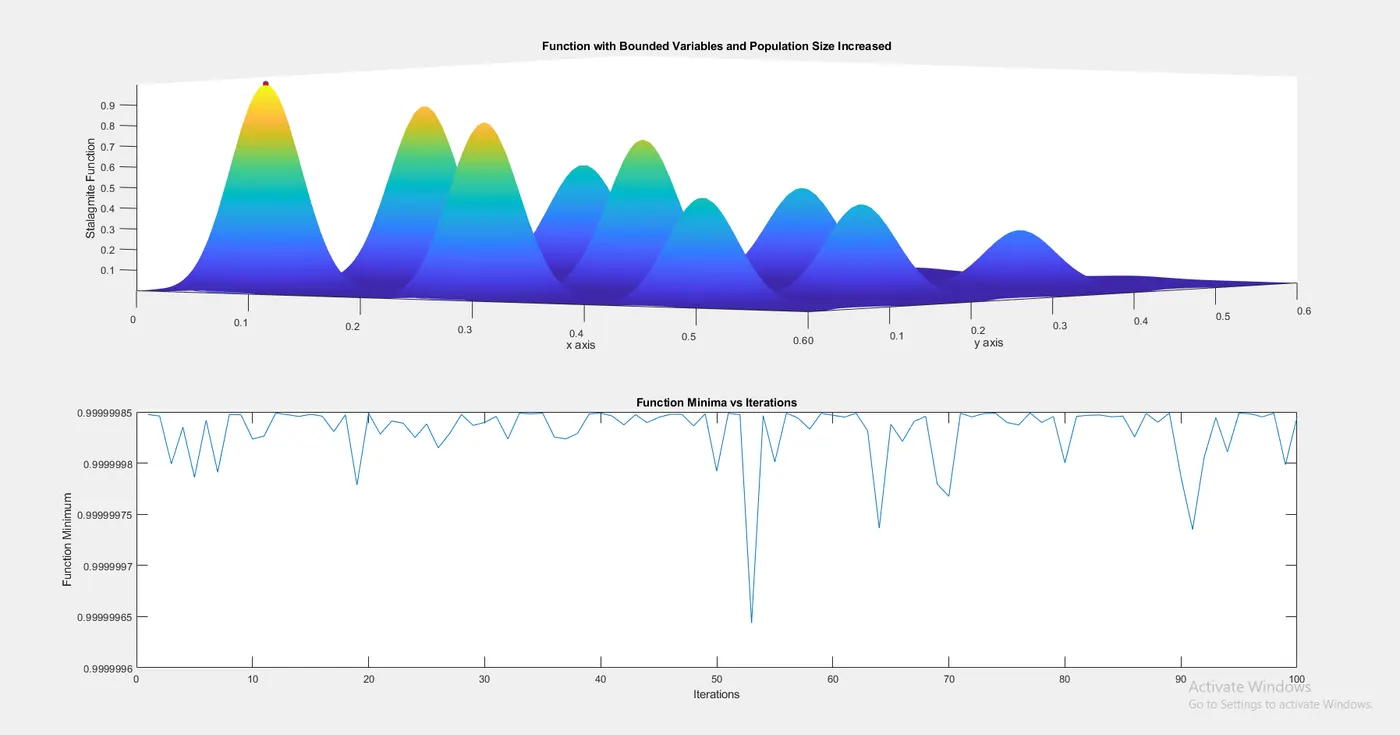
Case 3 plot returns the maximum value 1 for all the 100 iterations, which is is our maximum value for the function in the given domain where the values of x and y range from 0 to 0.6.
clear all;
close all;
clc

%Defining our search space
x=linspace(0,0.6,150);
y=linspace(0,0.6,150);

%Creating a 2Dimensional mesh
[xx,yy]=meshgrid(x,y);


 %Evaluating the stalagmite fuction
 f=zeros(150,150);
 for i=1:length(xx)
     for   j=1:length (yy)
           input_vector(1)=xx(i,j) ;
           input_vector(2)=yy(i,j);
           f(i,j)=stalagmite_min(input_vector);
     end
 end

 surfc(x,y,abs(f))
 xlabel('x value')
 ylabel('y value')
 zlabel('Stalagmite Function')
 title('Surface Plot of Stalagmite Function')
% to get interpolated shading
 shading interp


%Study 1 Statistical behavior
tic
num_case1=100;
for i=1:num_case1
    [inputs, fopt(i)]=ga(@stalagmite_min ,2);
    xopt(i)=inputs(1);
    yopt(i)=inputs(2);
end

study1_time=toc

figure(2)
subplot(2,1,1)
surfc(xx,yy,abs(f))
xlabel('x axis')
ylabel('y axis')
zlabel('Stalagmite Function')
hold on
shading interp
plot3(xopt,yopt,abs(fopt),'marker','o','markersize',5,'markerfacecolor','r')
title('Function with Unbound Inputs')
subplot(2,1,2)
plot(abs(fopt))
xlabel('Iterations')
ylabel('Function minimum')


%study 2 Statistical behavior with upper and lower bounds
tic

for i=1:num_case1
    [inputs,fopt(i)]=ga(@stalagmite_min,2,[],[],[],[],[0;0],[0.6,0.6]);
    xopt(i)=inputs(1);
    yopt(i)=inputs(2);
end
study2_time=toc

figure(3)
subplot(2,1,1)
hold on
surfc(x,y,abs(f))
xlabel('x axis')
ylabel('y axis')
zlabel('Stalagmite Function')
shading interp
plot3(xopt,yopt,abs(fopt),'marker','o','markersize',5,'markerfacecolor','r')
subplot(2,1,2)
title('Bounded Inputs')
plot(abs(fopt))
xlabel('Iterations')
ylabel('Function Minimum')


%study 3 increaing the ga iterations
options=optimoptions('ga');
options=optimoptions(options,'PopulationSize',200);

tic

for i=1:num_case1
    [inputs,fopt(i)]=ga(@stalagmite_min,2,[],[],[],[],[0;0],[0.6,0.6],[],[],options);
    xopt(i)=inputs(1);
    yopt(i)=inputs(2);
end
study3_time=toc

figure(4)
subplot(2,1,1)
hold on
surfc(x,y,abs(f))
shading interp
plot3(xopt,yopt,abs(fopt),'marker','o','markersize',5,'markerfacecolor','r')
subplot(2,1,2)
title('Population size')
plot(abs(fopt))
xlabel('Iterations')
ylabel('Function Minimum')
Errors occurred
1. The function name was misspelled

2. Parentheses was not closed

References:-
1. https://www.tutorialspoint.com/genetic_algorithms/genetic_algorithms_introduction.htm
2. https://skill-lync.com/knowledgebase/genetic-algorithm-explained
3. https://in.mathworks.com/help/gads/how-the-genetic-algorithm-works.html#f6192