Project
Aim-To study and analyze the BAJA ATV Model using Simulink and compare between different models
Objectives-
- To prepare a technical report explaining the functions of the subsystem and blocks used for preparing the model
- To ecplain in details all the diffrerences between all the model provided
- To understand and comment on the result.
Types of Model studies:-
- BAJA ATV Model without dashboard
- Baja ATV Model- Data extraction
- Baja ATV Model with Dasboard
- BAJA ATV Model- Mapped lookup table without dashboard
Baja ATV Model – Mapped lookup table with Dashboard
Introduction:-
All Terrain Vehicle
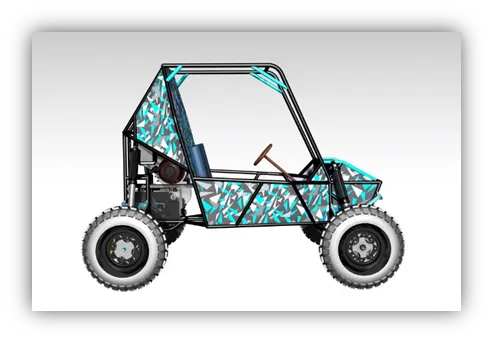
An all-terrain vehicle (ATV) is defined as a motorized off-highway vehicle designed to travel on four low-pressure or non-pneumatic tires, having a seat designed to be straddled by the operator and handlebars for steering control.
BAJA SAE;-
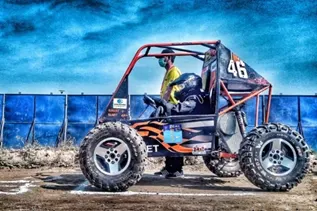
Baja SAE is an Collegiate Design Series competition run by the Society of Automotive Engineers International. Teams of students from universities all over the world design and build small off-road cars. The cars all have engines of the same specifications.
Continuously Variable Transmission(CVT)
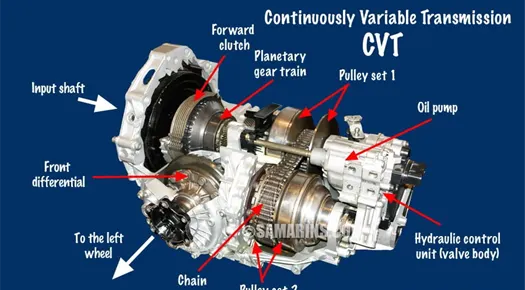
A continuously variable transmission is an automatic transmission that can change seamlessly through a continuous range of gear ratios. This contrasts with other transmissions that provide a limited number of gear ratios in fixed steps
Main and critical blocks used
Generic Engine Block
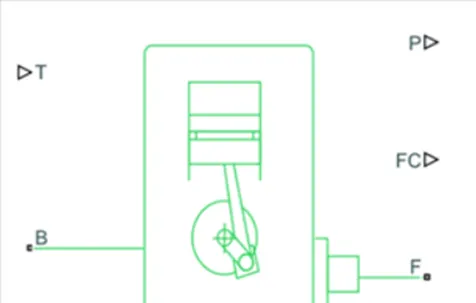
The Generic Engine block represent a general IC Engine. Engine types include spark ignition and Compressed Ignition. Else its alos divided into the two universal category of External Combustion Engine and Internal Coubustion Engine. Its basically comprised of the Crankshaft, Piston, Connecting rod, Cylinder head, Valves and Cylinder Block
Main Parts
- B- Rotational Conserving port representing the Engine Block
- F-Rotational Conserving Port Represent the Crankshaft
- T- Physical signed input port specifically the normalixed Engine Throttle
- P- Physical signal output port
- FC-Physically signal output port repoeting the fueling
Simple Gear
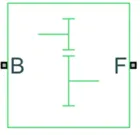
The Simple Gear block represent a gearbox that constrains that connected to driveline axis of the base gear B and the follower gear, F, to Create with the fixed ration
The follower base gear ratio is
Where:
- NB is the number of teeth in the base gear
- NF is the number of the teeth in the follower gears
Main Ports;-
B- Base
F-Follower
Variable Ratio Transmission Block;-
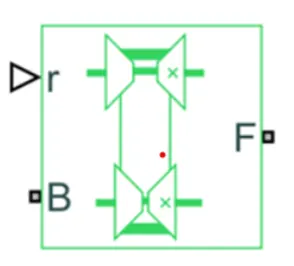
The Variable Ratio of the transmission block gear box that dynamically transfer the motion
Torque between the two connected driveshaft axes base and follower
Ignoring dynamics of the transmission complinaces to corporate with a varible gear ratio control that you control. You can choose whether the follower axis rotate the same
Main Ports-
- B- Base pulley or drive pulley
- F- Follower pulley or driven pulley
- R – Variable Transmission Ratio (Input)
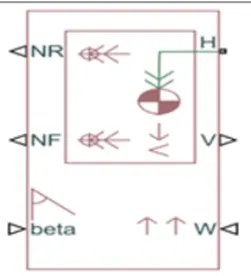
The Vehicle body block represent a two axle vehicle body in the longitudinal motion. The Vehicle can have the same or a different number of wheels on each axle
The block accounts for body mass aerodynamics drag road incline and weight distribution between axle
The block has an option to include an externally defined inertia. The mass, inertia and center
Input
- Beta- Road incline angle
- W- Head wind speed(m/s)
- CG- Center of Gravity
- M- Mass(KG)
- J- Externally defined moment of inertia.
Output-
NR- Rear Axle Normal Force
NF- Front axle Normal Force
V- Longitudnal velocity
Conserving Ports:-
H- Horizontal Motion
Double Shoe Brake
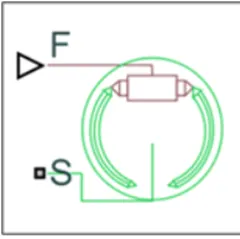
The double shoe block represent a frictional brake with two pivoted shoes that press against a rotating drum to produce a braking system. The rigid shoe sit inside or outside the rotating drum to produce a braking system.
Input-
F- Physical singnal input port associated with the applied actuating force.
Conserving Ports:-
S- Rotational conserving port associated with the the rotating drum.
Tire(Magic Formula)Block:-
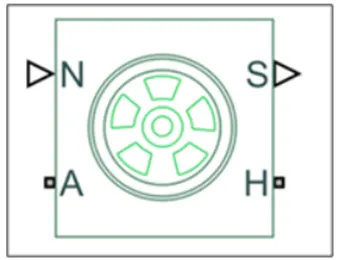
The tire block model with the longitudnal behavior given by the magic formula an empirical equation based on the four fitting coefficient. The Block can model tire dynamics under constant or variable pavement condition.
The longitudnal direction of the tire is the same as its direction of motion as it’s a roll on pavement.
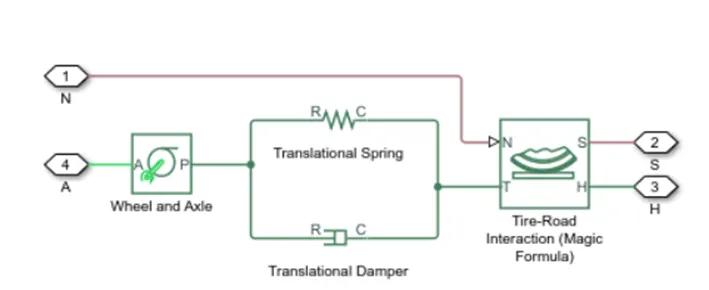
Equivalent Model
The full tire model is equivalent to this Simscape/Simscape Driveline component diagram. It simulates both transient and steady[1]state behavior and correctly represents starting from, and coming to, a stop. The Translational Spring and Translational Damper are equivalent to the tire stiffness C and damping b . The Tire-Road Interaction (Magic Formula) block models the longitudinal force F on the tire as a function of F and k′ using the Magic Formula, with k′ as the independent slip variable. The Wheel and Axle radius is the wheel radius r . The Mass value is the effective mass, Iwr2w. The tire characteristic function f(k′, F ) determines the longitudinal force F . Together with the driveshaft torque applied to the wheel axis, F determines the wheel angular motion and longitudinal motion. Without tire compliance, the Translational Spring and Translational Damper are omitted, and contact variables revert to wheel variables. In this case, the tire effectively has infinite stiffness, and port P of Wheel and Axle connects directly to port T of Tire-Road Interaction (Magic Formula). Without tire inertia, the Mass is omitted.
Limitations: The Tire (Magic Formula) block assumes longitudinal motion only and includes no camber, turning, or lateral motion. Tire compliance implies a time lag in the tire response to the forces on it. Time lag simulation increases model fidelity but reduces simulation performance.
Input ports:
N – Normal Force: Physical signal input port associated with the normal force acting on the tire. The normal force is positive if it acts downward on the tire, pressing it against the pavement.
M- Magic formula coefficients: Physical signal input port associated with the Magic Formula coefficients. Provide the Magic Formula coefficients as a four-element vector, specified in the order [B, C, D, E].( Port M is exposed only if the Main > Parameterize by parameter is set to Physical signal Magic Formula coefficients) Common tyre parameters: Magic Formula B coefficient: 10 Magic Formula C coefficient: 1.9 Magic Formula D coefficient: 1 Magic Formula E coefficient: 0.97
Output ports
S – Tire Slip: Physical signal output port associated with the relative slip between the tire and road
Conserving ports:
A – Axle: Mechanical rotational port associated with the axle that the tire sits on.
H – Mechanical translational port associated with the wheel hub that transmits the thrust generated by the tire to the remainder of the vehicle
Other Blocks used:
- Solver Configuration – To specify the solver parameters before starting the simulation
- Signal Builder – To input the Brake, Throttle and CVT Ratio
- Simulink to PS Converter – To convert the Simulink signal to Simscape environment
- PS to Simulink Converter – To convert Simscape signal to Simulink environment
- Mechanical Reference – To make sure all the components are clamped to the ground
- Rotational free end: The Rotational Free End block represents a mechanical rotational port that rotates freely, without torque.
- Scope – To display different graphs
- Display – To view the calculated engine power
- Inertia – To represent the solid inertia
- Rotational Motion Sensor – To sense the rotational motion from the engine and give output as rpm
- PS Terminator - Terminator for unconnected physical signal outputs
- PS Constant - Generate constant physical signal
- Rotational Free End – For mechanical component (Tire)
- Custom Measure Gauge – To measure the brake and throttle input
- Knob – To increase, decrease and vice-versa of throttle and brake inputs
- Lookup Table – To insert the CVT values from the workspace
- Step – To increase or decrease an input value for a defined time interval
BAJA ATV MODEL WITHOUT DASHBOARD (cvtModel)
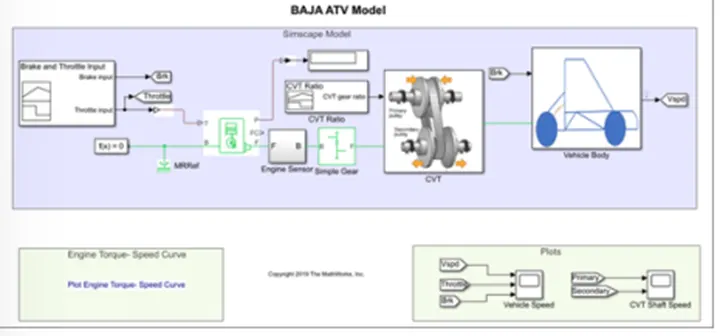
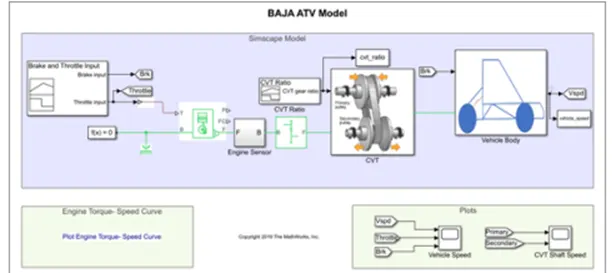
i.The throttle signal is generated by signal builder block and inputted to generic engine.
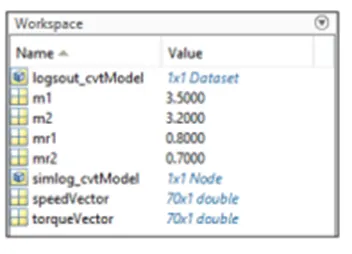
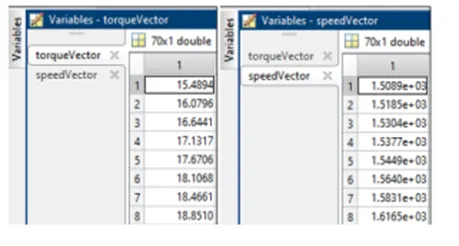
ii.The torque and speed vector are inputted from the matlab workspace
iii.The engine will generate the output rpm which can be taken from the crankshaft output. This speed will be given to the Ideal Rotational Motion Sensor to sense the output rpm.
iv.The same output speed will be given to a simple gear mechanism to reduce the speed where the Gear Ratio is ‘4’.
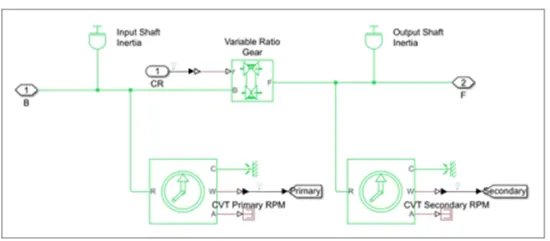
v.Then the output speed from the gear reducer will be given to the Variable Ratio Transmission block (CVT).
vi.The CVT ratio is provided to the Variable Ratio Transmission (CVT) block through Signal Builder. vii.The speed is controlled by the variable CVT ratios and the controlled output speed is inputted to the vehicle axle.
viii.The brake signal is generated by the signal builder and inputted to the vehicle body (Double Shoe Brake) for applying the brake to axle.
ix.The power from the CVT is inputted to the axle and the vehicle accelerates according to the speed. x.Then the Velocity is taken as output from the vehicle body for further analysis
.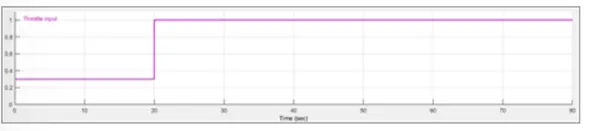
Throttle starts at 0.3 and then it steps to 1 at the 20 second
Brake input signal

he brake input remains zero through the whole simulation
Cvt ratio input:
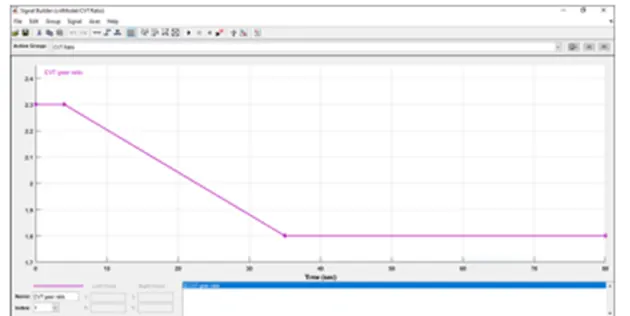
Cvt ratio starts at 2.3 ,then 5 sec it gradually reduces until it reaches 1.8 at 35 second and it remains so till the end of the simulation
ENGINE SENSOR SUB-BLOCK:
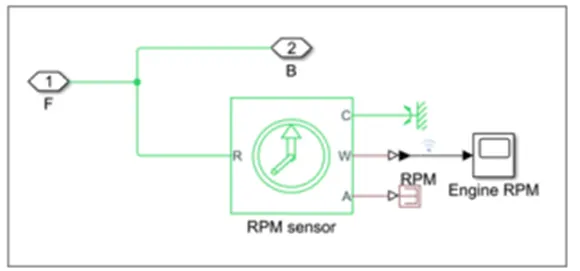
This subblock measure engine rotational speed as it takes the output of the engine as its input and outputs engine Rpm
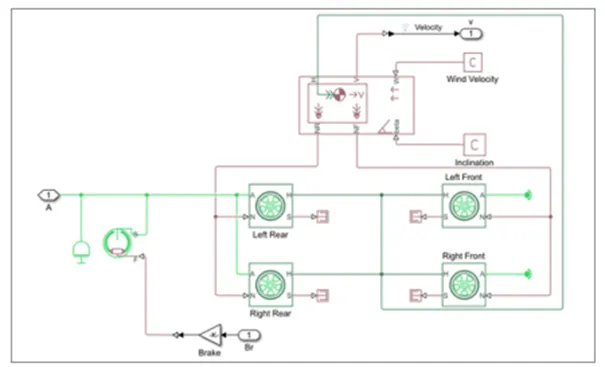
The model shows that the vehicle is rear wheel drive as the output from the gearbox is inputted to the rear axle, then an inertia is added to simulate axle inertia, then the shoe brake s conserving port is connected to the axle, and then the same axle connects the two rear tyres while the front tyres is free to rotate on a rotational free end. All the tyres H hub port is connected together and then connected to the vehicle H port, Also the rear tyres N port is connected together and then connected to the vehicle body Nr output ports, while the front are connected to the Nf vehicle body output ports, the vehicle body takes the road inclination and wind velocity from physical constants.
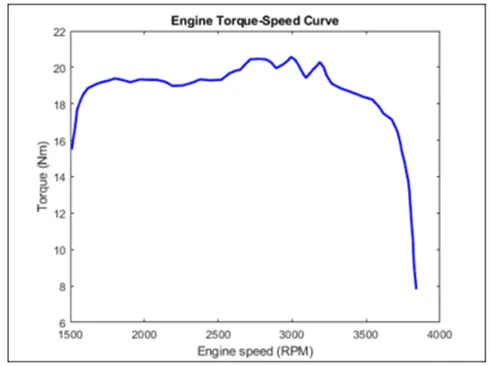
The torque and speed are inputted from the matlab workspace window to the generic engine block to generate the output RPM accordingly. This plot behavior is generic to all ICE
Engine speed plot:
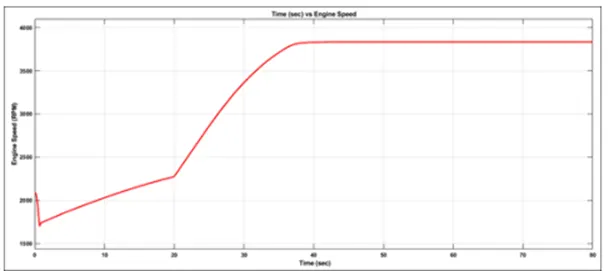
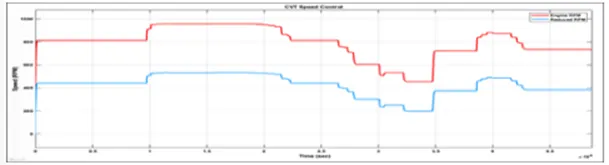
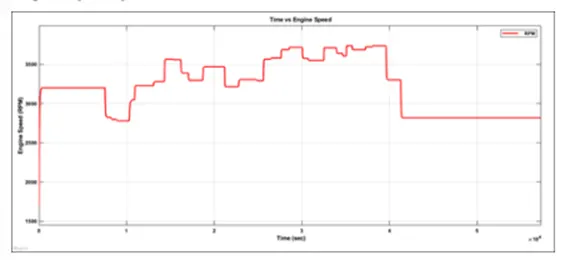
The engine rpm generated according to the throttle, speed and torque inputs. It is clearly evident how the step increase in throttle at 20 second resulted in an increase in the engine revolutions from 2,250 to 3,800 RPM
Engine speed vs. Gear reduction speed plot
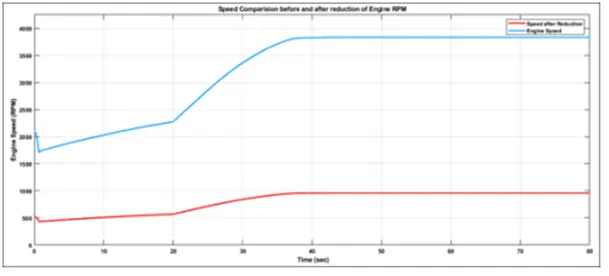
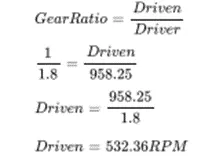
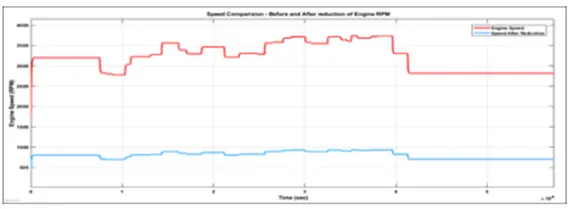
The engine reduced speed is controlled by various CVT Ratios. For verification the maximum RPM is calculated at 1.8 gear ratio which is applicable from the 35 second. Maximum RPM (Before Reducing) = 958.25 rpm CVT Ratio = 1:1.8 The reduced maximum rpm is 532.36 rpm which can be verified from the plot.
Step
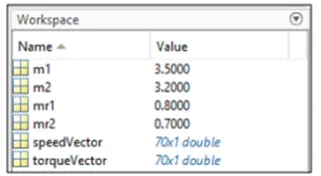
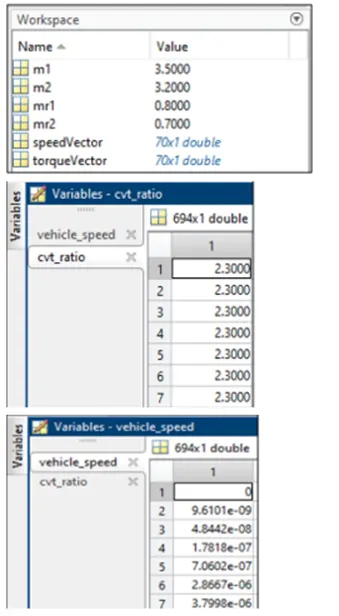
The model workflow process is same as the process of ‘BAJA ATV model without Dashboard’. The small addition is here the CVT Ratio and Vehicle Speed data are extracted using ‘To Workspace’ block
Results:
The results are same as ‘BAJA ATV model without Dashboard’ but an additional output is the CVT Ratio and Vehicle Velocity to the Workspace.
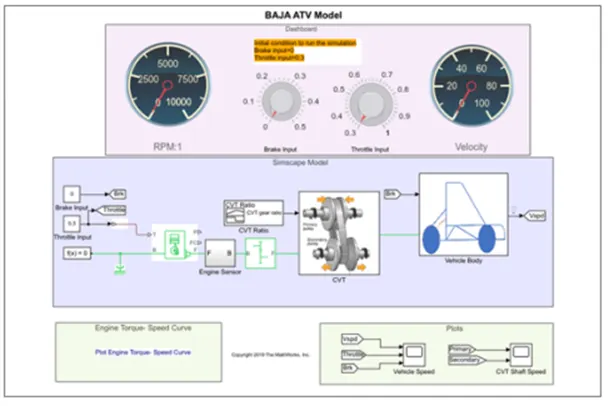
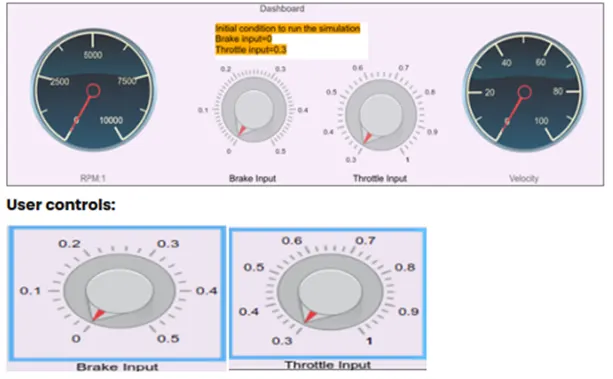
Steps: The model workflow process is same as the process of ‘BAJA ATV model without Dashboard’ but the throttle and brake inputs are controlled by the user with knobs
The cvt subblock is the same as the previous model “BAJA ATV model without Dashboard” but instead of Signal Builder Block for CVT Ratio the 2-D Lookup Table is used. The interpolations and extrapolation methods are set to linear. It needs to be loaded in the workspace having the file name as Lookuptable_data.mat Lookup Table: A lookup table is an array of data that maps input values to output values, thereby approximating a mathematical function. Given a set of input values, a lookup operation retrieves the corresponding output values from the table. If the lookup table does not explicitly define the input values, Simulink can estimate an output value using interpolation, extrapolation, or rounding, where: - Interpolation is a process for estimating values that lie between known data points. - Extrapolation is a process for estimating values that lie beyond the range of known data points. - Rounding is a process for approximating a value by altering its digits according to a known rule. A lookup table block uses an array of data to map input values to output values, approximating a mathematical function. Given input values, Simulink performs a “lookup” operation to retrieve the corresponding output values from the table. If the lookup table does not define the input values, the block estimates the output values based on nearby table values. At last the vehicle speed output is given as a feedback to the 2-D Lookup Table so that we can verify that the velocity of the vehicle is changing perfectly when the CVT Ratio changes. The vehicle speed is converted to m/s from Kmph.
In this BAJA ATV Model, the Engine is pre-set to run at 3300 rpm with the throttle value of ‘0.3’. And the velocity at 45 KMPH. The CVT Ratio for minimum and maximum speed of the engine was pre-defined as 2.3 and 1.8 respectively. When the simulation is started the initial throttle value 0.3 is achieved so that the CVT Ratio is nearby to 1.85. When the throttle is being increased the CVT Ratio move towards 1.8 where the state is maximum engine speed. Simultaneously when the throttle is being decreased the CVT ratio will move towards 1.85. While the braking is applied the CVT Ratio increases so that it can achieve the nearest state of 2.3 (Minimum Engine Speed). When braking is reduced the CVT Ratio move towards 1.85 which is the basic throttle input 0.3 or if any other throttle value is applied it would reach that CVT Ratio state.
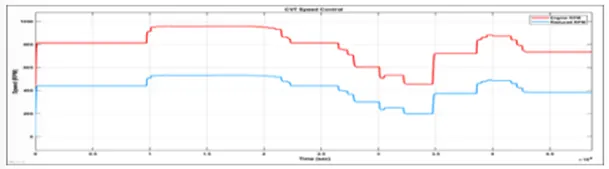
From the graph we can infer that the vehicle was first running at minimum rpm of 3300 rpm and then throttle is applied (step-up) then braking (step-down) then brake is released so that engine rpm is increased then braking is applied.