Project 2 - Measuring the distance of an object using ultrasonic sensor and also smoothen the sensor data using moving average filter
Q: In this project the implementation of code for “Measuring distance of an object using ultrasonic distance sensor (28015 Ping) and also smoothen the sensor data using moving average filter”.
Ans:
Aim: To Measured distance of an object using ultrasonic distance sensor (28015 Ping) and display it on the LCD display.
Explanation:
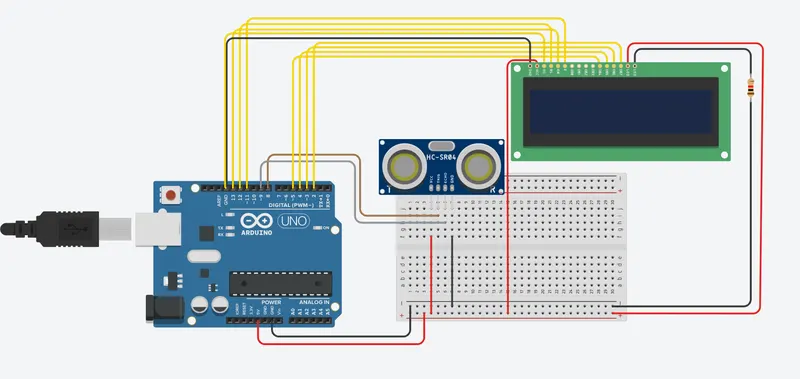
The ultrasonic sensor has 4 pins that are vcc, trigger, echo, ground. the vcc pin is connected to the 5v of the arduino and trigger and echo pins are connected to the digital pins 8 and pin 9 . trigger is used as an output and echo is receive the reflected signal and send to find the distance of the object and trigger is used to display the distance value in the LCD display. the lcd pins are wired below:
To wire your LCD screen to your board, connect the following pins:
- LCD RS pin to digital pin 12
- LCD Enable pin to digital pin 11
- LCD D4 pin to digital pin 5
- LCD D5 pin to digital pin 4
- LCD D6 pin to digital pin 3
- LCD D7 pin to digital pin 2
- LCD R/W pin to GND
- LCD VSS pin to GND
- LCD VCC pin to 5V
- LCD LED+ to 5V through a 220 ohm resistor
- LCD LED- to GND
Code:
#include <LiquidCrystal.h> // lcd library include


#define trigger 8 // defining the trigger pin

#define echo 9  // defining the echo pin


LiquidCrystal lcd(12,11,5,4,3,2); // declaring the pins of the lcd RS, EN, D4,D5,D6,D7


float time=0,distance=0; // Declaring the variables in float


void setup()

{

 lcd.begin(16,2); // begin the LCD

 pinMode(trigger,OUTPUT); // pinmode declaration of the trigger pin
 pinMode(echo,INPUT); // pin mode declaration of the echo pins

 lcd.print(" Ultra sonic"); // printing on lcd

 lcd.setCursor(0,1); // zero row coloum 1

 lcd.print("Distance Meter"); // printing on lcd

 delay(2000);

 lcd.clear();

}


void loop()

{

 lcd.clear();

 digitalWrite(trigger,LOW); // trigger pin to low

 delayMicroseconds(2);

 digitalWrite(trigger,HIGH);// trigger pin to high to get the signals

 delayMicroseconds(10);

 digitalWrite(trigger,LOW);// trigger pin to low

 delayMicroseconds(2);

 time=pulseIn(echo,HIGH); // get the time value from echo pin is stored in variable time.
//formula for finding the distance
  // distance =((time * sound in the air) /20000)
 distance=time*340/20000;

 lcd.clear();

 lcd.print("Distance:");// printing on lcd

 lcd.print(distance);// printing the distance value on lcd

 lcd.print("cm"); // printing on lcd


 delay(1000);

}
Output:
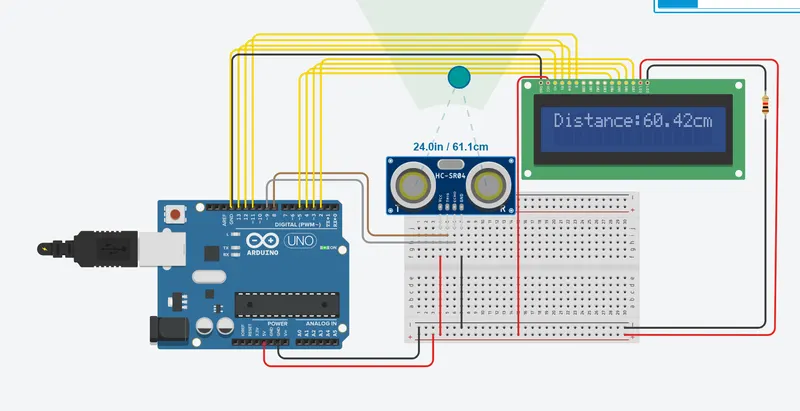
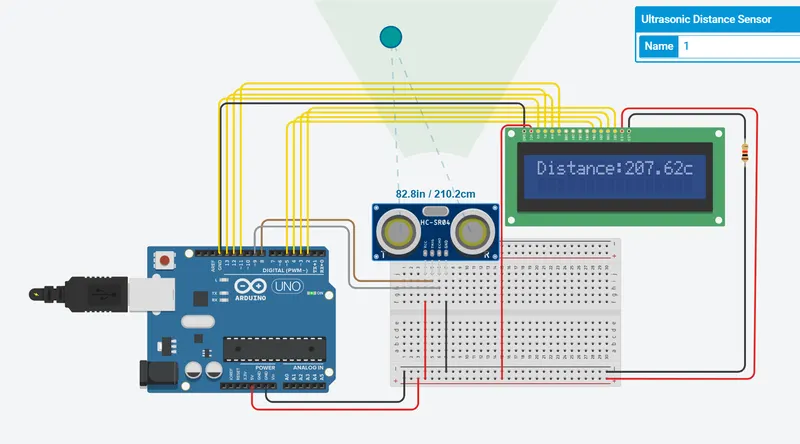
Note:
In the ultrasonic sensor shoes the 210.3 but in the display the distance = 207.62 cm so, this will occurs on the hardware side only.
--------------------------------------*************************-----------------------------------------