Electrical · PG program

Post Graduate Program inPG Program in Embedded Systems for EV Applications

Our embedded system course trains engineers in advanced concepts of using embedded systems in EV applications. The program is an introduction to embedded systems for engineers who want to start their careers in this exciting domain, training students in advanced industry-oriented concepts using real-world projects.

Duration
24 weeks
Content
198 hours
Courses
9
Projects
23
Mode
Online
Overview

What you'll
be able to do.

The Post Graduate Program in PG Program in Embedded Systems for EV Applications is an online PG program from Skill-Lync: 24 weeks, 198 hours of content, 9 courses and 23 industry projects.

  • A thorough understanding of the importance of Embedded Systems in Electric Vehicles
  • Hands-on experience with the different Software and Programming Languages used in building an Embedded System for an Electric Vehicle application
  • A glimpse of how the automotive industry works to produce an Embedded Automotive System
  • Learning different problem solving approaches to be considered while designing an Embedded Automotive System

Why this program

  • This program will provide knowledge in bare metal programming and the development of device drivers for controller peripherals and porting Linux to the ARM platform.
  • The course focuses on industry-relevant tools (Simulink Design Verifier, Simulink test, Simulink coverage, Polyspace, LDRA Test Suite) and practices involved in the verification and validation of embedded software written by hand and developed with auto code generation.
  • Job Opportunities
    • Firmware engineers/ device driver developer
    • V&V engineers
    • Embedded software testing engineers
    • Model-Based Development engineers.
  • Higher Education can be pursued in the following domains:
    • Embedded Software Engineering
    • Autonomous Driving
    • Electric Vehicle and Battery technology

Revise the theory first: free interactive book

Hydraulics and Pneumatics: 24 chapters mapped to the Anna University, VTU, SPPU, Mumbai University and KTU syllabi, with interactives and worked examples.

Revise the theory first: free interactive book

Mechatronics: 16 chapters mapped to the Anna University, VTU, SPPU, Mumbai University and KTU syllabi, with interactives and worked examples.

Tools you'll use
SimulinkMATLABC ProgrammingSTM32CubeIDEEmbedded LinuxAVR ATmega328SimulIDEMicrochip StudioArm Cortex M4 - STM32Mbed SimulatorCAN ProtocolLRDA Tool Suite

Compare all 18 Skill-Lync electric vehicle courses · Compare all 10 Skill-Lync embedded systems courses · Compare all 48 Skill-Lync MATLAB and Simulink courses · Best AUTOSAR course in India: other providers compared · Best embedded systems course in India: other providers compared

Curriculum

12 courses,
111 modules.

Get the full syllabus ↓
  1. 01Embedded Programming Essentials18 modules
    1. C Language for Embedded Programming, C Input /Output Functions, C Data Types for Embedded Programming, C Language OperatorsW01
      • What an Embedded System is
      • Traits and Architecture of an Embedded System
      • Embedded Hardware and Software
      • Why C-language is Preferred for Embedded SW Development
      • Installing Tool Chain
      • Installing STM32CubeIDE
      • Installing GCC Compiler
      • Creating a New Project
      • Basic Elements of a C-Program
      • C-Program Layout
      • Standard I/O - Library
      • getchar and putchar
      • printf and sprintf
      • scanf and sscanf
      • C Data Types
      • Signed Data Representation
      • Data Type - Overflow/Underflow Issues
      • C99 Data Types
      • Fixed Point and Floating-Point Representation
      • FPU Usage
      • ‘Enum’ and ‘Typedef’
      • Operators in C
      • Operators Precedence and Associativity
    2. C Control Statements, Function Prototypes, Introduction to Pointers, C Storage Classes and Type QualifiersW02
      • Control Statements in ‘C’ language
      • ‘if-else’
      • Loops for Iterations
      • Switch Case for Multiple Selections
      • Tips and Traps for Switch-Case
      • ‘if-else’ vs ‘switch’
      • ‘goto’ Statement and Labels
      • Introduction to vFunctions
      • Advanced Control Flow with ‘setjmp( )’ and ‘longjmp( )’
      • Functions ()
      • Function Prototypes
      • Recursive Function
      • Function Pitfalls
      • Introduction to Pointers
      • Call by Value Vs Call by Reference
      • Pointer Arithmetic
      • Functions as ‘Pointer'
      • C Storage Classes
        • Automatic
        • External
        • Static
        • Register
    3. C Compilation Process, C Preprocessor Directives, Arrays in C, Arrays to Functions, and Array of Function PointersW03
      • Stages of the Compilation Process
        • Pre-processing
        • Compilation
        • Assembling
        • Linking
      • GCC Commands for Each Stage
      • Preprocessor Directives in C
      • Macros and their Types
      • Conditional Compilation
      • #pragma
      • Introduction to Arrays
      • Array Initialization
      • Accessing Array Elements
      • 2D Arrays
      • 3D Arrays
      • Pointers and Arrays
      • Passing Array Elements to a Function
      • Array of Pointers
      • ‘Function’ as ‘Pointer’ - Function Pointers
      • Array of Function Pointers
    4. Command Line Arguments, Variadic Functions, Strings and String Functions in C, Structures in C, Unions and Bitfields in CW04
      • Command Line Arguments in C
      • Variadic Functions in C
      • Strings in C language
      • String Functions from
      • Structure Declaration in C
      • Array of Structures
      • Pointer Objects to Structure
      • Memory Allocation of Structure and Structure Padding
      • Structure Padding Comparison
      • Bit Fields
      • Unions
    5. Advanced Function Arguments, Advanced Pointers-Void Pointers, File Operations in C, Standard Libraries CW05
      • Function Pointers
        • Passing Function Pointers as Arguments to a Function
      • Inline Functions
      • Passing a String as a Function Argument
      • Returning a String from a Function
      • Passing Arrays to Function Arguments
      • Returning Multiple Values from a Function
      • Passing Structure Pointers as Function Arguments
      • Passing an Array of Structures to a Function
      • Double Pointers with Example
      • Void pointers with Example
      • Miscellaneous Features
      • File I/O Handling
      • Read and Write Operations
      • Error Handling Mechanisms
      • General Properties of C Library
      • Functions of C Library
      • Need for Libraries - Static vs. Dynamic Libraries
      • Utility Functions
    6. C Memory Management, Dynamic Memory Allocation, Modular C Programming, Modular C Programming, and C Program OptimizationW06
      • C Memory Model
      • Dynamic Memory Allocation on Heap
      • Miscellaneous Memory Functions
      • Variable Length Arrays
      • Creating a User-Defined Library
      • Makefile Project in STMCubeMX IDE
      • Creating a Custom Makefile
      • Introduction to Debugging
      • Debugging using GDB Tool
      • Debugging using Preprocessor Directives
      • Optimization for Memory Usage and Execution Speed
      • Optimization Methods
      • Code Level Optimization
    7. Stack and Stack Operations, Queue and Queue Operations, Linked List, Finite State MachineW07
      • Fundamental Concepts of Data Structures
      • Operation on Data Structure
      • Arrays and Array Operations
      • Stack and Standard Stack Operations
      • Fundamental Concepts of Queue
      • Operations performed in Queue
      • Different Types of Queue
      • Fundamental concepts of Linked List
      • Types of Linked List
        • Singly Linked List
        • Doubly Linked List
        • Circular Linked List
        • Doubly Circular Linked List
      • Introduction to FSM (Finite State Machine)
      • State Diagram
      • Explanation of State Diagram
      • State Table
      • Implementation of State Machine
      • Mealy State Machine
      • Moore State Machine
    8. Process Management in C, Embedded Design PatternsW08
      • Threads
      • Memory Model of Threads
      • Library
      • Process Vs Threads
      • IPC Mechanism
      • Different Design Patterns of Embedded System
      • Hardware Adapter Pattern
      • Observer Pattern
      • Debounce Pattern
      • Interrupt Pattern
      • Polling Pattern
    9. C and Embedded C StandardsW09
      • C Standards
      • K&R C
      • K&R Standards
      • ANSI C
      • C90 Standards
      • C99 Standards
      • C11 Standards
      • Embedded C
      • C-General Coding Standards
      • Embedded C Standards
    10. AUTOSAR C Rules and MISRA C GuidelinesW10
      • Common Pitfalls in C Language
      • Overstepping of Array Boundaries
      • Example of Faulty Code
      • Buffer Overflow
      • Stack Overflow
      • Glimpse into AUTOSAR and MISRA
      • Prominent MISRA C Rules
    11. Introduction to C++ and OOPS-Part 1W11
      • Introduction of C++
        • What is C++?
        • Program Paradigm
        • ANSI/ISO Vs Standard C++
        • C++ Syntax and Structure
        • C++ Language Fundamentals
        • Benefits of C++ over C
      • C vs C++
        • Procedural Vs OOP
        • Compiling a C Program in C++ Environment
        • Undefined Behavior in C and C++
        • Void * in C vs C++
        • Name Mangling
        • Use of Extern C in C++ Programming
        • Structures in C Vs Class in C++
      • C++ Vs Java
        • Similarities between C++ and Java
        • Exception Handling in C++ vs Java
        • Default Virtual Behavior in C++ Vs Java
        • Floating Point Operations and Property of Associativity in C, C++, and Java
      • Dynamic Memory Allocation
        • malloc()
        • calloc()
        • realloc()
        • free
        • new
        • delete
        • malloc Vs new
        • free Vs delete
      • Object Oriented Programming
        • OOP’s Concepts - Briefing
        • Class
          • Default Access Specifier in a Class
          • Access Modifiers
          • Constructor
          • Destructor
          • Assignment Operator
          • Copy Constructor
          • Default Member Functions in a Class
        • Object
    12. OOPS - Part 2W12
      • Object-Oriented Programming
        • Encapsulation
        • Abstraction
        • Message Passing
        • Dynamic Binding
        • Data Hiding
        • Inheritance
          • Use of Inheritance
          • Modes of Inheritance
          • Types of Inheritance
            • Single Inheritance
            • Multiple Inheritance
            • Hierarchical Inheritance
            • Multiple Inheritance
            • Hybrid Inheritance
          • Multipath Inheritance
        • Diamond Problem
    13. OOPS - Part 3W13
      • Object-Oriented Programming
        • Polymorphism
          • Compile Time Polymorphism
            • Function Overloading
            • Operator Overloading
          • Runtime Polymorphism
            • Function Overriding
            • Virtual Keyword
            • VTable
            • Vptr-V Pointer
            • Virtual Functions
            • Abstract Class
            • Pure Virtual Function
            • Interface Vs Abstract Class
    14. Constructor and DestructorsW14
      • Constructor and Destructor
        • Virtual Constructor
        • Virtual Destructor
        • Virtual Copy Constructor
        • Shallow Copy Vs Deep Copy
        • Default Constructor and Copy Constructor
        • Copy Constructor and Assignment Operator
        • Dangling Pointer
        • Void Pointer and Opaque Pointer
        • Null Pointer and Wild Pointer
        • Private Constructor
        • Private Destructor
        • Copy Elision
        • Explicit Keyword
    15. Keywords in C++W15
      • Static Keyword in C++
        • Static Variables in a Function
        • Static Variables in a Class
        • Static Members of Class - Static Class Objects
        • Static Member Functions in a Class
      • Const Keyword in C++
      • Mutable Keyword in C++
      • Friend Function and Friend Class in C++
      • This Pointer in C++
        • ‘this’ Pointer
        • Types of ‘this’ Pointer
        • Delete ‘this’
    16. Type CastingW16
      • Type Casting in C++
        • Implicit Cast
        • Explicit Cast
        • dynamic_cast
        • static_cast
        • reinterpret_cast
        • const_cast
      • Member Initializer List in C++
        • Use of Initializer Lists
        • Member Initializer Lists
    17. Exception HandlingW17
      • Exception Handling in C++
        • Exception Handling in C++
        • Base Class and Derived Class Exception Handling
        • Catch Block in C++
        • Object Destruction
        • Stack Unwinding in C++
      • Templates in C++
        • Introduction to Templates
        • Function Templates
        • Class Templates
        • Template Specialization
    18. Multi-ThreadingW18
      • Multithreading in C++
      • Posix Threads
      • Std::thread
      • Inter-Process Communication
      • What is IPC?
      • Various Methods in IPC
      • Smart Pointers
      • Use of Smart Pointers
      • Types of Smart Pointers
      • Auto Pointer
      • Unique Pointer
      • Shared Pointer
      • Weak Pointer
  2. 02Fundamentals of Embedded Systems12 modules
    1. Role of Embedded Systems in Mechatronic SystemsW01

      Embedded systems are used in the control of mechanical parts in mechatronic systems. Analog control is now being replaced with digital controllers like microprocessors or microcontrollers. It is important for learners to understand the basics of embedded systems, and their application in electronic control units used in the automotive industry.

      In this week, you will learn about

      • Basics of Embedded Systems
      • Basics of Automotive ECUs
      • Case Studies and Reference Designs of ECUs
    2. ARM (MCU) ArchitectureW02

      The Advanced RISC Machines (ARM) architecture processor is a 32-bit microcontroller. As these processors are Reduced Instruction Set Computers (RISC), they consolidate all their functions down to a single chip. ARM processors are widely used in electronic gadgets like mobile phones. It is important to understand the basics of ARM processor architecture and their applications when learning about embedded systems.

      In this week, you will learn about

      • Basic Features of ARM Processor
      • Products Details and Product Roadmap
      • ARM Cortex Processor Internals
      • Cortex Microcontroller Software Interface Standard (CMSIS)
      • ARM Cortex M4 Programming Model
    3. Sensors, Actuators, and Instrumentation ClusterW03

      Embedded systems have sensors and actuators. Sensors convert physical inputs into electrical signals that are then fed to the processor. Actuators take the resulting electrical signals from the processor and convert them into a physical output. Both sensors and actuators are important parts of embedded systems, due to which learners must understand associated concepts and terminologies.

      In this week, you will learn about

      • System Basics
      • Basic Concepts of Sensors and Actuators
      • Types, Functions, and Applications
      • Sensor Terminology
      • Technology of Sensors and Role of Sensors and Actuators in Automotive Systems
      • Automotive Instrumentation Cluster Basics
      • Actuators
    4. Embedded Systems DevelopmentW04

      Embedded systems are designed differently depending on their requirements and applications. It is important to understand the different embedded systems, and how they vary in applications.

      In this week, you will learn about

      • Embedded Systems Bare Metal Programming
      • Philosophy
      • General Real Time Operating System (RTOS) Concepts
      • Bare Metal vs. RTOS
      • Bare Metal/RTOS/OS: Comparison
      • Examples of Bare Metal, RTOS, OS Development
    5. Software Development Life CycleW05

      The software development life cycle (SDLC) elaborates on the process involved in designing and developing software. It defines each phase of the process, and how it optimizes the quality of software. Embedded systems also go through an SDLC to develop a high quality model. It is important to understand each phase of the SDLC and how each one relates to the development of embedded systems.

      In this week, you will learn about

      • Basics of SDLC
      • Phases of SDLC
      • SDLC Models
      • SDLC Frameworks
    6. Introduction to Safety StandardsW06

      The Motor Industry Software Reliability Association (MISRA) C coding guidelines offer a defined framework for developing and testing codes for automotive software. They focus on improving the safety and security of embedded systems. To think at an industry level, it is important to understand the safety standards and their implications in embedded systems.

      In this week, you will learn about

      • Different Safety Standards in Various Domains
      • Secure Programming in C
      • Less Secure Areas of C Program
      • Secure C Coding Standards MISRA C
    7. Get Started with Tinkercad, SimulIDE, MBED PlatformW07

      Arduino is used in the development of embedded systems. It has an AVR microcontroller that can be programmed to perform a specific application. Tinkercad is used in the designing, programming, and simulation of Arduino based systems. SimulIDE can also be used for the simulation of electronic circuits. It is important to understand these simulators and their use in embedded systems.

      In this week, you will learn about

      • What is Arduino?
      • Why Arduino?
      • Most Common Arduino Platforms
      • What is Tinkercad?
      • How to use Tinkercad & Simulate Circuits
      • Download and Install SimulIDE
      • Blink Program and Simulation in SimulIDE
      • Introduction to Mbed
      • CMSIS
      • ARM Microcontroller Introduction
    8. Arduino Digital Pins, GPIO Input/Output Modes, and Methods of Programming Digital GPIOW08

      Pins on an Arduino board can be configured according to user needs. Each pin can be configured as either an input or output pin. SimulIDE is used to execute Arduino codes. It is important to understand the input and output configurations of Arduino, as well as how SimulIDE can be used to simulate circuits.

      In this week, you will learn about

      • Demonstration of the Working of Dio Pins - Led Chaser
      • Voltmeter Project in Simul Ide
      • L298 Motor Driver in Simulide
      • Relay in Simulide
      • Digital Inputs
      • Digital Outputs
    9. Introduction to Analog Data, Analog to Digital Conversion, Digital to Analog Conversion, Analog Data, ADC, and DAC in MbedW09

      While analog data is continuous in nature, digital data is discrete in nature. There are analog to digital converters (ADC) that change analog data into digital data. Embedded systems need ADCs to acquire and process signals from the environment. It is important to understand the basics of analog and digital data, as well as ADCs.

      In this week, you will learn about

      • Analog Data
      • NTC circuit example
      • Analog to digital conversion
      • Digital to analog conversion
      • Working with analog pins and simulate a code
      • Simulate a code for Thermometer using TMP36 Sensor in Tinkercad Simulator
      • LDR in SIMULIDE
      • Voltmeter in SIMULIDE
      • Libraries in Mbed
      • Reading and logging data from analog inputs
      • DAC in Mbed
      • Analog Output in Mbed
    10. Timers in AVR based Microcontrollers, Concepts of PWM, and PWM in MbedW10

      Arduinos can be programmed to have timers that are used to measure and record events with time. It makes use of a counter that counts according to the clock frequency. It is important to understand how timers are configured in Arduino boards, and how they can be simulated using SimulIDE.

      In this week, you will learn about

      • Timers in Arduino UNO
      • Blink using timers
        • 500ms Blink Example code
      • Need of PWM
      • Fade
      • Simulation of Illustrating the analogWrite() function
      • H bridge
      • DC motor control
      • Servo motor mechanism
      • Servo mechanism- PWM pin in SIMULIDE
      • Timers in ARM based microcontrollers
    11. Interrupts, Demonstration, and AdvantagesW11

      Interrupts can be programmed into Arduinos to prioritize processes and execute them immediately. The microcontroller will then finish executing the block of code it is on, and immediately shift to the high priority code. It is important to understand how to program interrupts into Arduinos.

      In this week, you will learn about

      • About Interrupts
      • Demonstration of Interrupts using Push Buttons
      • Advantages of Interrupts with Example
      • Polling Method
        • Simulating a Code for Blinking the LED
      • Problems in Polling Method
      • Example of Interrupts in Mbed
    12. Serial Communication Protocols W12

      Serial communication transfers data as binary pulses. UART is a communication protocol which uses asynchronous serial communication. There is also a serial peripheral interface that is a synchronous protocol used to transfer data at higher speeds. It is important to understand the different communication protocols used in embedded systems.

      In this week, you will learn about

      • Introduction to Serial Communication
      • Types of serial communication
      • UART communication protocol
        • Simulate a code for communication between two Arduino using UART protocol
      • I2C communication Protocol
        • Simulate a code for communication between two Arduino using I2C protocol
      • SPI communication Protocol
        • Simulate a code for communication between two Arduino using SPI protocol
  3. 03AVR Bare Metal Programming- Live Sessions8 modules
    1. Arduino Vs Bare Metal Programming and Compiling Program with Custom Make FilesW01
      • Memory Blocks of Microcontroller
      • Measuring Memory Occupied by the Code using Arduino Library
      • Measuring Clock Cycles taken by the Instructions of Arduino Library
      • Internal I/O Circuit Diagram of Microcontroller
      • Accessing Registers using Specific Address
      • Comparison of Code Size and Clock Utilization of Arduino Library and Bare Metal Coding
      • Need for Writing a Custom Make File
    2. Pinout and Features of Atmega328 and AVR ArchitectureW02
      • Pin Out Details of Atmega328
      • Pin Description at a Glance
      • Features of Atmega38
      • AVR Architecture
    3. Setting up Microchip Studio for AVR using SimulIDE to Simulate the Target Environment and Input & Output Ports of Atmega328W03
      • Setting up Microchip Studio
      • Introduction to SimulIDE
      • Flashing the Code on the Virtual Atmega328 Microcontroller in SimulIDE
      • I/O Pin Block Diagram
      • I/O Ports and their Functions
      • Register Description of I/O ports
    4. Debugging the Code in Microchip Studio and Basics of Timers, Counters, and PWMW04
      • Starting a Debugging Session
      • Various Windows of Debugging
      • Adding Breakpoints
      • Timer Clock Sources
      • Counter Unit
      • Output Compare Unit
      • Compare Match Output
      • Modes of Operation
    5. LCD Interface and Basics of ADCW05
      • Deep Dive into 2*16 LCD Display
      • Common Commands for HD78044 LCD
      • Simulation of LCD Interfacing
      • Basics of ADC
      • Registers Associated with ADC of Atmega328
    6. Analog Comparator and InterruptW06
      • Introduction to Interrupt
      • Interrupt Service Routine(ISR)
      • Registers Associated with Interrupt
      • Code and Simulation of ISR
      • Introduction to Analog Comparator
    7. Communication Protocols and Non-Volatile MemoriesW07
      • Basics of UART, SPI, and I2C
      • Harvard and Von-Neumann Architecture
      • Program Memory Map
      • Write to and Read from the Flash Memory
      • Concepts of the Boot Loader
      • EEPROM
      • Program to Store Data into EEPROM
    8. Saving Power and Code ProtectionW08
      • Concept of Power Saving
      • Power Reduction Register
      • Different Sleep Modes of Atmega
      • Wake Up Sources
      • Watchdog Timer
  4. 04Software Verification and Validation and System Testing for Hand Code8 modules
    1. Introduction to Verification and Validation and System TestingW01
      • What is verification? (Real-world examples)
      • What is Validation and how it is different from verification? (Real-world examples)
      • Identifying Verification and Validation from the V- Cycle
      • Developer’s Mindset Vs Tester’s Mindset
      • Explaining various stages of validation (Unit Testing, Integration Testing, System Testing) with regards to verification phases in V-cycle
        • System Testing
        • Blackbox Testing
        • Functional Testing
        • Smoke Testing
      • Usage of V-model in present Agile world
      • SAFE (Scaled Agile Framework) concepts to illustrate ARTs
    2. Test Case Development from Requirements – IW02
      • Introduction to Test Coverage Levels (C0, C1, MCDC)
      • Introduction to Different Test Design Techniques
      • Choosing Test Design Techniques for Various System Requirements (Examples)
    3. Test Case Development from Requirements – IIW03
      • Test Cases Vs Test Specification
      • Writing a Test Plan
      • How to Write a Test Case for the Requirements?
      • Usage of Doors to Create Test Cases for the Requirements (Traceability)
      • Hands-on Examples (Using Excel) [CLIMA, BSW]
    4. Static Analysis and MISRA-C GuidelinesW04
      • What is MISRA-C?
        • How are we using it for Safety-critical SW?
      • Important Rules of MISRA-C
        • How to identify and fix them?
      • What is Static Analysis?
        • Where is Static Analysis in V-cycle?
      • Explaining Errors in Static Analysis (Case Studies)
      • Heuristics Vs Formal Methods
      • Hands-on Examples
    5. Unit Testing and Integration TestingW05
      • Unit Testing and Integration Testing
        • Why do we need it?
      • Why do we need SIL?
      • SIL Levels and Coverage Levels
      • Stub Functions
      • Hands-on Examples
    6. Automation and CI/CDW06
      • Overview of Test Automation
      • Introduction to Constructs of Infrastructure for CI/CD
      • Introduction to Git Hub
    7. Tool Introduction, Familiarization and Static AnalysisW07
      • Overview of LDRA Toolsuite
      • Analysis Scope Definition
      • UI View and Usage
      • LDRA -Tbrun, Tbvision, and TBReports Overview
    8. Unit Testing and Integration TestingW08
      • Unit White Box Testing of Simple Project - (Array, Structure, Pointer, Linked lists)
        • Adding Test Cases, Executing Tests, and Understanding Test Report
        • Fixing Defects Detected from Tests
        • Analyzing Coverage and Adding Test Case to Increase Coverage
        • Generating Test Cases using Different Techniques
          • MC/DC, Equivalence Class, Boundary Check, etc., using MCDC Planner
        • Stubs
      • Unit Blackbox Testing of Simple Project
        • Adding Test Cases, Executing Tests, and Understanding Test Report
      • Integration Testing
        • Adding Test Cases, Executing Tests, and Understanding Test Report
        • Identifying and Fixing Defects Detected from Tests
  5. 05Device Drivers and Serial Communication Protocols7 modules
    1. Theoretical Introduction to ARM on-chip peripherals W01
    2. Bare metal programming with board bring up W02
    3. Driver development for GPIO, UART, SPI, I2C interfacesW03
    4. Hands-on Peripheral Interfacing using SPI/I2C Interfaces W04
    5. Theoretical Introduction on CAN, Ethernet, ARINCW05
    6. CAN Driver Development (Hands-on)W06
    7. CAN data analysis and visualization (Hands-on)W07
  6. 06ARM Cortex MCU Programming12 modules
    1. Day 1 - Introduction to Embedded SystemsW01
      • Introduction to Embedded System
      • ARM Cortex Microcontroller Family
      • Introduction to Embedded System Development Process
        ○ Tool Chain
        ○ Cross-compilation
    2. Day 2 - ARM Cortex M4 ArchitectureW02
      • ARM Cortex M4 Architecture (2 hours)
      • Key Features of ARM Cortex M4
      • Key Advantages of ARM cortex M4
        • ARMV7E-M Architecture
          • Instruction Set
          • Processor Data Types
          • Alignment Support
        • Digital Signal Processing
        • Scalability and Power Efficiency
      • Architecture Building Blocks
        • WIC - Wake up Interrupt Controller
        • NVIC - External Interrupts 1 to 240
        • MPU
        • FPU
        • Interfaces
        • Debug
    3. Day 3 - Cortex M4 Register & Board Bring-upW03
      • Core Registers
        • Special purpose Register
          • Program status Register
          • Special Purpose Mask Register
          • Special Purpose Control Register
      • ST Evaluation Board
        • Board Bring-up and Project Creation
        • First Program Compilation and Download
        • Register Set
    4. Day 4 - System Timer and Exception ModelW04
      • System Timer (Systick)
        • System Timer and its Operation
        • Systick Register and Systick Configuration
      • ARM Cortex V7 Exception Model
        • Exceptions Supported
        • Exception Number Definitions
        • Vector Table and Exception Priorities
        • Reset Behavior and Stack Alignment on Exception
    5. Day 5 - Memory Map and Boot ProcessW05
      • Memory Management for CortexM4
        • Memory addressing
          • Code Memory
          • SRAM
          • Peripherals
          • External RAM - (Off-chip memory)
        • Booting Process
          • External Reset
          • Booting Process
    6. Day 6 - System Clock & EndiannessW06
      • System Clock Configuration
        • Three Different Clock Sources (SYSCLK)
          • HSI 8 MHZ RC Oscillator Clock
          • HSE Oscillator Clock
          • PLL Clock
        • Clock Configuration using STcube
        • System Clock Initialization using Code
        • PLL Clock Configuration
      • Endianness
        • Cortex M4 Endianness
        • Little and Big Endian
    7. Day 7 - Reset and Power ManagementW07
      • Power Control/Operational Modes
        • Power Supplies
        • Power Supply Supervisor
        • Low Power Modes
          • Sleep Mode
          • Stop Mode
          • Standby Mode
          • Auto-Wakeup Mode from Low Power Mode
      • Resets (ST Cortex M4 Micro)
        • Power Reset
        • System Reset
        • RTC Domain Reset
    8. Day 8 - Nested Vectored Interrupt ControllerW08
      • NVIC Operations & NVIC Registers
      • External Interrupt Behavior
      • Interrupt Vector Table
      • Polling vs Interrupt
      • NVIC - Execution of Single Interrupt in Detail
    9. Day 9 - Watchdog TimerW09
      • What and Why Watchdog Timer is Required?
      • Hardware and Software Watchdog Timer
      • Independent Watchdog Timer and Window Watchdog Timer
      • Example/Working of Any Watchdog Timer with Example
    10. Day 10 - ARM Cortex M4 Microcontroller DMA ProgrammingW10
      • DMA (Direct Memory Access Controller)
        • Introduction
        • DMA Main Features
        • DMA Functional Description
        • DMA Interrupts
        • DMa Registers
        • DMA Interface with UART Communication
    11. Day 11 - Bare Metal & ARM BusesW11
      • ARM Core - ST 32
        • Internal Buses
        • Instruction Set
        • Hardware Wise Consideration for ARM Core
        • Peripheral interfaces with Core
        • How different Vendors use ARM core for their Products
      • Baremetal Embedded Dev and Make/Linker scripts
        • bare metal and RTOS
        • Example of Project Creation using KEIL/ST Cube for Bare Metal and RTOS
        • Config File Creation & Explanation
        • Code Optimization Technique
        • Dis-assembly Listing
    12. Day 12 - STM32Fx ARM Cortex M4 Microcontroller Custom Bootloader DevelopmentW12
      • Bootloader
        • IAP (In-Application programme) Overview
        • Principle of IAP
        • IAP Driver Description (Flowchart of IAP)
        • Running the IAP Driver
        • IAP Driver Menu
        • User Programming Conditions (Memory Map )
  7. 07Embedded Linux on ARM6 modules
    1. IntroductionW01
      • Why Linux?
      • Common Embedded Linux Systems
      • History of Linux
      • Development Model of Linux
      • Open Source vs Closed Source
      • Open Sourcing Licensing Models
      • Gatekeepers of Linux
    2. Architecture of Embedded Linux system - Part-1W02
      • Embedded Systems vs Non-Embedded systems
      • Primary bootloader (ROM Code)
      • Secondary bootloader (U-boot)
      • Hardware Architecture.
      • Choosing the right development board
    3. Architecture of Embedded Linux System - Part-2W03
      • Embedded Linux Development Setup
      • High-Level Software Architecture
      • Memory Layout and Partitioning
      • Root Filesystem
      • Application Layer
      • Choosing the right Distribution
    4. Embedded Hardware Basics Part-1W04
      • Bus Architecture in SoC Design
      • Memory Interfaces
      • Ethernet Interface
      • Wireless Connectivity (BT/WiFi)
      • Power Management
    5. Embedded Hardware Basics Part-2W05
      • Touch Screen Interface
      • SPI/I2C Interface
      • Display Interface
      • Reading Schematics
    6. Development Tools and Host SetupW06
      • Host Machine Configuration
      • Installing Host Tools
      • Cross Compiler Toolchain
      • Eclipse IDE
  8. 08Linux Driver Development12 modules
    1. IntroductionW01
      • Introduction to Linux
      • Getting the Kernel Source
      • Kernel Configuration
      • Kernel Building
      • Kernel Installation
      • Kernel Upgradation
    2. Linux Kernel ModuleW02
      • Application Vs Kernel Module
      • Hello World Module
      • Compilation - In-tree and out-tree
      • KConfig Framework
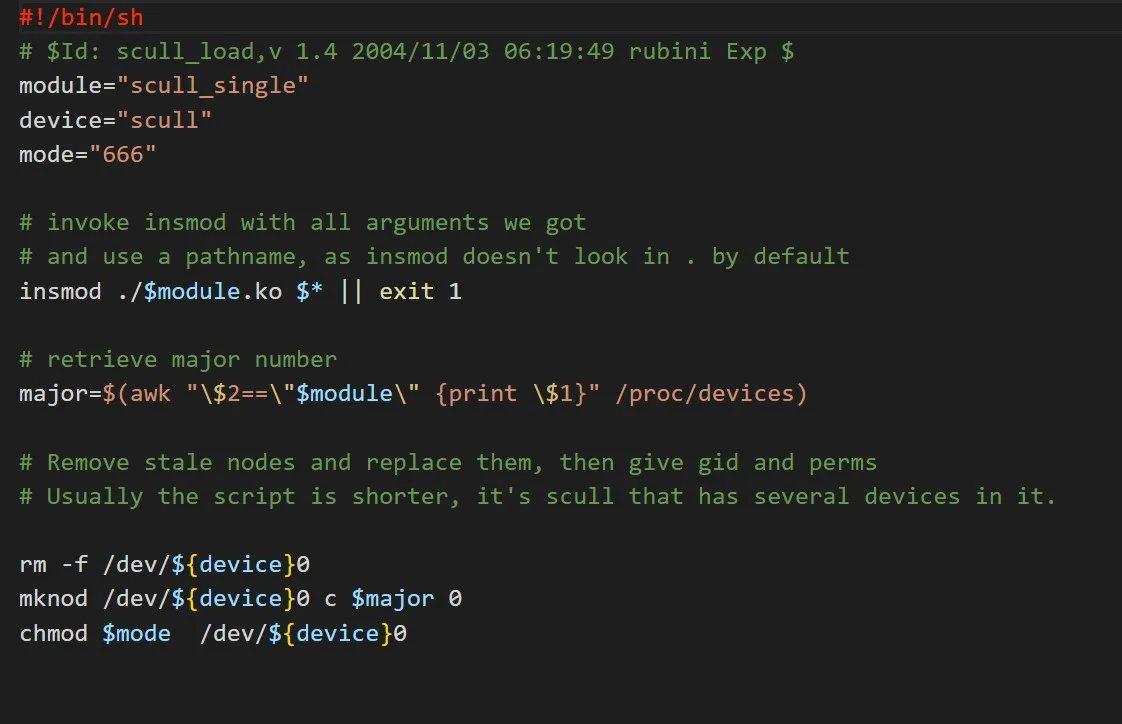
      • Loading and Unloading Module
      • Module Parameters
    3. Character Driver W03
      • Major and Minor Numbers
      • Data Structures
      • Char Driver Registration
      • File Operations - Open, Release, Read, and Write
      • Testing with User Space Application
    4. Debugging TechniquesW04
      • Debug by Printing
      • Debug by Querying
      • Debug by Watching
      • System Faults
    5. Concurrency and Race ConditionW05
      • Concurrency
      • Semaphores and Mutex
      • Completions
      • Spinlocks
      • Alternatives to Locking
    6. Advanced Character DriverW06
      • Ioctl
      • Blocking I/O
      • Poll
      • Asynchronous Notification
      • Seeking a Device
      • Access Control on Device File
    7. Timers and MemoriesW07
      • Jiffies
      • Software Timer
      • Workqueues
      • Tasklets
      • Memories
      • Kmalloc and kzalloc
      • devm_kzalloc
    8. BeagleBone BringupW08
      • Cross Compiler
      • Buildroot Setup
      • Uboot - Environmental Variables
      • Parameter Passing to Kernel
      • SD Card and Nand Flash Booting
    9. Platform Devices - I2C InterfacingW09
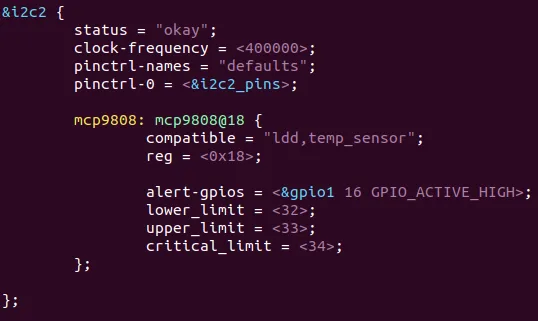
      • Platform Devices and Drivers
      • Device Tree
      • I2C Client Drivers
      • Misc Subsystem
      • Interfacing with MPU6050 Sensor
    10. Interrupt HandlerW10
      • Communicating with Hardware
        • Using I/O Ports
        • Using I/O Memory
      • Writing the BBB UART Driver
      • Interrupt Handlers
      • Top and Bottom Halves
      • Writing the BBB UART Interrupt Handler
    11. Sysfs and GPIO InterfacingW11
      • Device Model - Kobjects and Ksets
      • Sysfs - Creation and different attributes
      • GPIO Subsystem
        • Legacy Integer-based
        • Descriptor based on Device Tree
      • GPIO and Sysfs
      • Example Code – Led Interfacing to BBB
    12. BeagleBone Network ApplicationW12
      • Network Application
      • HTTP Server
      • Database - Mysql
  9. 09Introduction to Physical Modeling using Simscape4 modules
    1. Introduction to the Modeling of Complex SystemsW01

      As complex systems have numerous parts interacting with each other, they are difficult to model. Mathematical models can be used to model these complex systems, and provide an understanding of how they function. By using Simscape, engineers can develop physical models, model control systems, and test performance at the system level. It is important for learners to understand complex system modeling using Simulink, and physical system modeling using Simscape.

      This week will cover

      • Importance of mathematical modeling
      • Block diagram approach & model-based design for engineering systems
      • Basics of the Simulink environment
      • Creating a simple model
      • Obtaining results
      • Basics of various Simulink toolboxes
    2. Simulation Configuration and SimscapeW02

      Simscape is used to develop models that represent physical systems in the Simulink environment. It also lets users assess system-level performance. When setting up a model for simulation on Simulink, there are specific configurations to be followed. It is important for learners to understand how to model and configure simulations using Simscape.

      This week will cover

      • How models run in Simulink
      • Types of solvers
      • Model configuration
      • Continuous & discrete-time systems
      • Timestep
      • Solving ordinary differential equations (ODEs)
      • Physical modeling using Simscape
    3. Simulink with Script and WorkspaceW03

      Simulink and MATLAB are closely integrated as Simulink models can be developed, solved, and interacted with by using MATLAB scripts. These script files have a series of statements with commands and functions that can be carried out at runtime. Simulink models can also access the MATLAB Base Workspace and Model Workspace to identify required parameters. It is important for learners to understand how MATLAB and Simulink are interfaced.

      This week will cover

      • Using a script file with Simulink models
      • Creating a subsystem
      • Variant subsystem
      • Projects
      • Template
      • Lookup tables
      • Running simulation in steps
    4. Stateflow for Control LogicW04

      Stateflow is used to elaborate on how MATLAB and Simulink respond to events, time-based variables, and input signals. It is a graphical programming platform based on finite state machines that can be used by engineers to design control logic. It is important for learners to understand the use of Stateflow in engineering applications.

      This week will cover

      • Control logic for engineering applications
      • Using a finite state machine
      • Making logic diagrams
  10. 10Software Verification and Validation and System Testing for Model-Based Development10 modules
    1. Role of MBD as per V Cycle and ASPICE Process OverviewW01
      • Introduction to Model-Based Development
      • Overview of Software Development Lifecycle
      • V Cycle in Automotive Embedded Software Development
      • ASPICE Process Overview
      • ASPICE Maturity Levels
      • Stakeholders in Software Engineering Process Group
    2. Japanese MATLAB Automotive Advisory Board (JMAAB)W02
      • JMAAB:
        • Style Guidelines Overview
        • Guidelines for Model Configuration Parameters
        • Guidelines for Model Architecture
        • Guidelines for Naming Conventions
        • Guidelines for Simulink Blocks
        • Guidelines for Stateflow Blocks
    3. Simulink Requirement ManagerW03
      • Understanding Software Requirements and Requirement Elicitation
      • Introduction to Simulink Requirement Toolbox
      • Converting Requirements into Model
        • Requirement Tagging and Traceability in MATLAB Simulink Environment
      • Requirement Management Offline
    4. Fixed Point Toolbox in MATLAB SimulinkW04
      • Introduction to:
        • Fixed-Point Data Types
        • Floating-Point Data Types
        • Range
        • Precision
        • Scaling
          • Fixed Point Data Type
          • Floating Point Data Type
      • Defining Signal Range and Scaling Factor in MATLAB Simulink
      • Introduction to Fixed Point Toolbox in MATLAB Simulink
    5. Control Algorithm Development for TFT Cluster Display for SpeedometerW05
      • Requirement Elicitation using Requirement Manager Toolbox
      • Model Development as per JMAAB Guidelines
      • Signal and parameter Fixing using Fixed-Point Toolbox
      • Model Advisor Check
    6. Simulink Design Verifier ToolboxW06
      • Introduction to Simulink Design Verifier Toolbox
      • Introduction to Different Modes of Design Verifier
        • Design Error Detection
      • Introduction to Different Modes of Design Verifier
        • Test Generation and Property Proving Methods
      • Analyzing SLDV Results
        • Dead Logic and Falsified Conditions
    7. Introduction to Testing Theories and Coverage AnalysisW07
      • Difference Between Verification & Validation
      • Types of Functional Testing:
        • Unit Testing
        • Functional Testing
        • Integration Testing
      • Types of Coverage and Coverage Analysis Report
      • Functional Test Criteria Creation Process

    8. Model in Loop ValidationW08
      • Introduction to Model in Loop Validation
      • Analyzing Simulink Test Report
      • Test Automation Creation and Test Coverage using Simulink Design Verifier
    9. Polyspace Static Code AnalysisW09
      • Introduction to Polyspace Static Code Analysis
      • Polyspace Bug Finder Overview
      • Polyspace Code Prover Overview
      • Functional Validation using Software in Loop
    10. Simulink Test Manager ToolboxW10
      • Introduction to Simulink Test Manager Toolbox
      • Setting up Simulink
        • Test File
        • Test Suite
      • Automating Test Reports Creation using Simulink Test Manager
      • Baseline Testing and Back to Back Testing using Simulink Test Manager
  11. 11Introduction to Hybrid Electric Vehicle using MATLAB and Simulink4 modules
    1. Traction Power Equations, Driving Cycle & Importance of ModellingW01
      • The following topics are discussed this week.
        • Vehicle Response for Different Drive Cycle Patterns
        • Wide-open Throttle Calculations
        • Vehicle Power Requirement Calculations
          • Rolling Resistance
          • Air Drag
          • Hill Climbing
          • Acceleration Forces
        • Driving Patterns
        • Vehicle Testing Standards
        • Important Terms and Definitions Related to Driving Cycle
        • Energy Expenditure Calculation
    2. Hybrid Electric Vehicle ArchitectureW02
      • The advanced simulator tool (ADVISOR tool) is discussed this week, which gives an idea of a detailed profile for vehicle modeling and reasoning.
      • Also, the following topics are covered:
        • Different Configurations of Power Train Components
          • Battery Electric Vehicle
          • Hybrid Electric Vehicle: Series, Parallel, and Series-Parallel
        • MATLAB Simulation
          • ADVISOR and Powertrain Block Set
        • Various Modeling Options and Control Strategies
    3. Electric Motors and Power Converters For PropulsionW03
      • In this week, the following topics are covered:
        • Electrical Engineering Terminologies
        • Fundamentals of DC and AC Motors
          • Working Principle, Characteristics, and Control
        • Understanding Power Electronics
        • Basic DC Converter Circuit Operation
        • Power Devices and Switching Losses
        • Power Electronic Control of PMDC, PMBLDC, and Induction Motor
        • Inverter Operation, Sine PWM, Variable Frequency Control
        • Review of Induction Motor Controller
          • Connections and Features
          • Limitations of Variable Frequency Control
          • Introduction to Vector Control
    4. Braking of Electrical Motors & Motor Efficiency PlotsW04
      • The following topics are covered this week:
        • Braking Requirements of the Vehicle
        • Methods of Braking of DC and Induction Motors
          • Regenerative Braking and Dynamic Braking
        • Electrical and Mechanical Brakes Coordination
        • Braking Control Strategies
  12. 12Introduction to Battery Technology for Electric Vehicle10 modules
    1. Energy and electrochemistryW01
      • Sources of energy for propulsion & their comparison: Net Calorific Value & Conversion efficiency
      • History and background of battery technology
      • Electrochemistry fundamentals & terminologies
      • Lithium-ion battery and different chemistries
    2. Important terms and characteristicsW02
      • Portable power applications and electrical load requirements
      • Factors affecting the choice of EV battery systems
      • Commercially available lithium-ion cells
      • Electrical characteristics of battery: Capacity, C-rate, impedance, DOD, SOC, SOH, Life cycles, Mechanical characteristics, Form factor, Safety
    3. Mathematical ModellingW03

      In this week, the following topics are covered:

      • Reading cell manufacturer’s specifications
      • Cell characterization
      • Tools and standard testing
      • Battery capacity estimation algorithms
      • Electrical equivalent circuit & mathematical model in MATLAB
    4. Battery Pack ConstructionW04

      In this week, the following topics are covered:

      • Battery modules and complete battery pack system
      • Assembly methods
      • Electrical connections
      • Cell level protection system
      • Battery pack level protection system
      • Understanding laptop battery pack system
    5. New Energy Storage Technologies W05

      In this week, the following topics are covered:

      • Other energy sources: New battery technologies, Ultracapacitor, Fuel cell, Flywheel
      • Hybridization of energy storage systems
    6. Battery Management System: IntroductionW06

      In this week, the following topics are covereed:

      • Battery pack requirements: Measurement
      • Protection and management
      • Cell balancing
      • Battery pack electronics
      • Battery Management System (BMS): Functionality, technology and topology (centralized, modular, master-slave, distributed)
    7. Battery Management System: DesignW07

      In this week, the following topics are covered:

      • BMS Application Specific Integrated Circuit (ASIC) selection
      • Analog BMS design
      • Digital BMS design
      • BMS deploying: Installing, testing and troubleshooting
    8. Battery ChargingW08

      In this week, the following topics are covered:

      • Battery charge management
      • MATLAB simulation of battery charging circuit
      • Charger circuit overview
      • EV charging technology review
      • Charging behavior: life cycle & safety
    9. Thermal ManagementW09

      In this week, the following topics are covered:

      • Types of temperature sensors
      • Thermal management system
      • Thermal model of battery pack
      • Drive cycle simulation and vehicle range estimation
      • Cooling materials and methods
    10. Recent Trends and EconomyW10

      In this week, the following topics are covered:

      • Communication systems for battery pack
      • Review of electric car battery pack
      • Important considerations
      • Recent trends: Grid level energy storage
      • Solar & wind integration
      • Recycling and pricing
Industry projects

23 projects
you'll ship.

Our projects are designed by experts in the industry to reflect industry standards. By working through our projects, Learners will gain a practical understanding of what they will take on at a larger-scale in the industry. In total, there are 23 Projects that are available in this program.

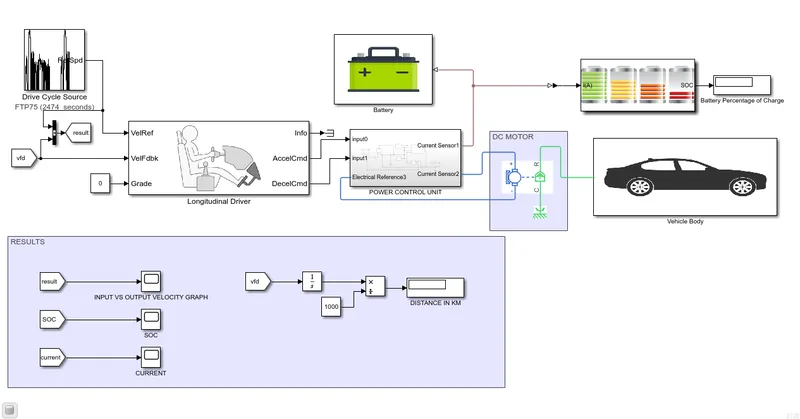
Modelling of Electric Vehicle Using DC Motor Drive
Introduction to Hybrid Electric Vehicle using MATLAB and Simulink

Modelling of Electric Vehicle Using DC Motor Drive

In this project, the students will model an electric car using MATLAB. The MATLAB model of the car uses a lithium-ion battery and a DC motor. Students will use suitable blocks from…

Design of Electric Powertrain
Introduction to Hybrid Electric Vehicle using MATLAB and Simulink

Design of Electric Powertrain

The project objective is to design an electric powertrain that is capable of towing an aircraft. Here, the students will design an Electric Powertrain with a type of motor, its pow…

Implementation of Complementary Filter Application
Embedded Linux on ARM

Implementation of Complementary Filter Application

A complementary filter application running on the Embedded linux environment to fuse the Accelerometer and Gyro Values of MPU6050 is implemented.

Implementation of Character device
Embedded Linux on ARM

Implementation of Character device

Implement a Character Device driver for the customized Embedded linux

DC Motor Control Using L293 Driver
AVR Bare Metal Programming- Live Sessions

DC Motor Control Using L293 Driver

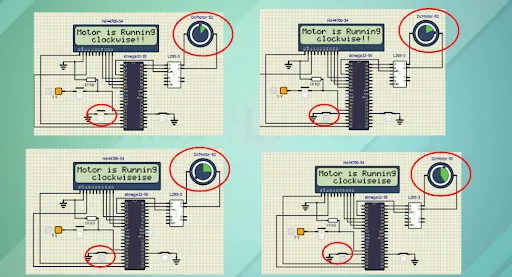
During this project work, the learners will implement a DC motor control using an L293 driver and print the running status of the motor on an LCD screen. Also, they will simulate t…

Interfacing HC-SR04 Ultrasonic Sensor with Atmega328p
AVR Bare Metal Programming- Live Sessions

Interfacing HC-SR04 Ultrasonic Sensor with Atmega328p

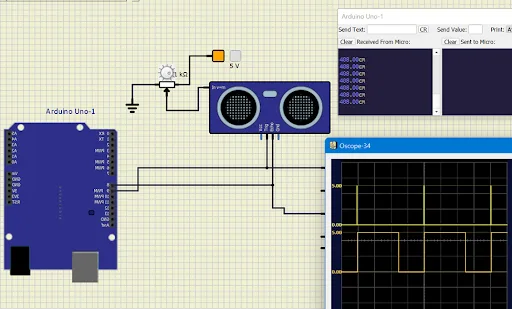
During this project work, the learners will interface the HC-SR04 ultrasonic sensor with an Atmega 328P. This hardware can be used for rear parking assistance. They will also simul…

Develop a Full-Featured Character Driver as a Loaded Module
Linux Driver Development

Develop a Full-Featured Character Driver as a Loaded Module

In this project, the students will be developing a full-featured character driver as a loaded module. The module should be added to the kernel configuration Kconfig build system wi…

Design and Development of a Web-based Temperature Control System using BeagleBone Black
Linux Driver Development

Design and Development of a Web-based Temperature Control System using BeagleBone Black

In this project, the learners will design and develop a web-based temperature control system using the BeagleBone Black. The students will submit a complete, deployable embedded Io…

TFT Cluster Speedometer Display
Software Verification and Validation and System Testing for Model-Based Development

TFT Cluster Speedometer Display

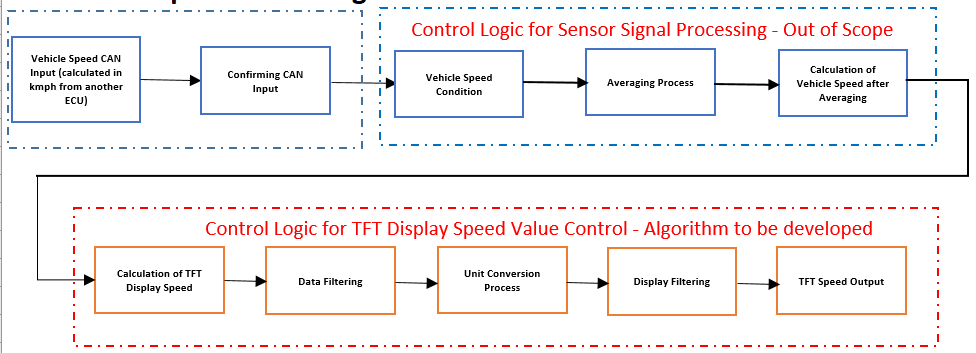
Students are required to consider the vehicle speed CAN input, and apply a standard vehicle speed averaging process. After averaging, the vehicle speed should be considered as one …

Coolant Temperature Meter SWC Development
Software Verification and Validation and System Testing for Model-Based Development

Coolant Temperature Meter SWC Development

Students are required to consider the engine coolant temperature signal CAN input (calculated in degrees Celsius from another ECU) and apply the standard averaging process. After a…

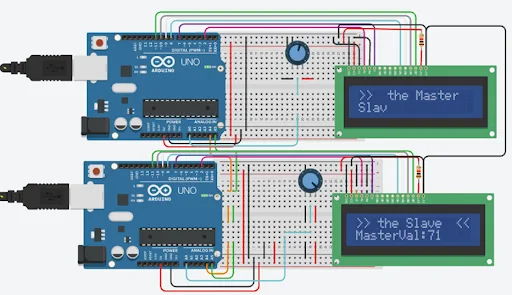
Interfacing a 16*2 LCD with 2 Arduino’s using (I2C) Communication Protocol
Fundamentals of Embedded Systems

Interfacing a 16*2 LCD with 2 Arduino’s using (I2C) Communication Protocol

In this project, learners will have to interface a 16*2 LCD display with two Arduino microcontroller boards. Learners will have to configure communication between the Arduino and 1…

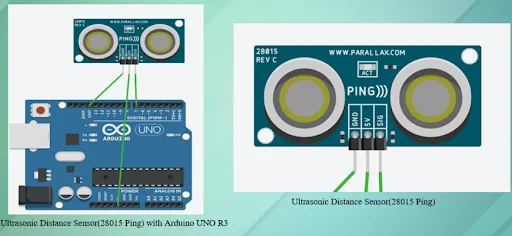
Measuring the Distance of an Object Using Ultrasonic Sensor
Fundamentals of Embedded Systems

Measuring the Distance of an Object Using Ultrasonic Sensor

Learners will have to measure the distance of an object using an ultrasonic sensor, and enhance the sensor data using the moving average filter. In addition to this, learners will …

+ 11 more projects in the full syllabus

Placements

233 learners placed
from this program.

Companies
130
Median CTC
4 LPA
20264.5 LPA
PELLETRONIX
Embedded Engineer

Sarath
20253.5 LPA
Nordex group
Control Engineer

Rithish E.
20252.4 LPA
Alfresco
Design Intern

Satyaki G.
20254.2 LPA
iOrbit Digital Technologies
Embedded Engineer

Divakar
20255.2 LPA
TEPL
Embedded Engineer

Ahmed R.
20242.5 LPA
Transcal
Callibration Enginer

Sai P.
Learner stories

Learners from this program.
In their own words.

Videos from Skill-Lync's YouTube channel.

Patrick KiranQuest GlobalElectro Learn's PG Program in Embedded Systems for EV Applications
SinchanaQuest GlobalElectro Learn PG Program in Embedded Systems for EV Applications
Kannaiah YanglaPGET, Tata TechnologiesPG in Embedded Software Development & Validation for EV
SuchitraPGET, Tata TechnologiesPG Program in Embedded Systems for EV Applications
BalakrishnanEmbedded Software Tester, L&T Technology ServicesPG Program in Embedded Systems for EV Applications
Priyanka LaleEmbedded Test Engineer, Knorr-BremsePG Program in Embedded Systems for EV Applications
Guide

Embedded systems for EVs, explained.

by the Skill-Lync team

What does an embedded engineer in an EV company actually do?

Writes, connects and tests the software inside the vehicle's control units: the battery management system (BMS), the motor controller, the vehicle control unit, the charger and the instrument cluster. The program prepares you for four job families it names: firmware or device driver developer, verification and validation (V&V) engineer, embedded software tester and model-based development (MBD) engineer.

An embedded system is a small computer built into a product to do one job, like the controller inside a washing machine. A car has dozens of them, called ECUs (electronic control units), talking to each other over networks such as CAN.

  • Firmware and drivers. Code that sits right on the chip: reading sensors, driving outputs, moving bytes over UART, SPI, I2C and CAN. Projects here: a CAN driver for an STM32 tested in loopback and then between two boards, and an I2C driver checked with a USB logic analyser.
  • Application software. The logic on top. In the free Embedded Programming Essentials lesson, the instructor splits the industry in two: outside automotive, a real-time operating system plus drivers plus a C or C++ application; in automotive, basic software from an AUTOSAR stack bought and configured off the shelf, with the application built in Simulink and turned into C by auto code generation. Projects: a TFT speedometer and a coolant-temperature gauge, each averaging a signal that arrives over CAN.
  • V&V and testing. Proving the code does what the requirements say. Projects: a static code review against MISRA C:2012 and CERT, and white-box tests that reach 100% statement, branch and MC/DC coverage. MC/DC (modified condition/decision coverage) means every condition inside an if is shown to change the outcome on its own.

The EV part of the program is modelling, not firmware: Simscape, a hybrid-vehicle course and a battery course, with projects such as a BMS fault test in Simulink.

Bare-metal, RTOS or embedded Linux: which one, and when?

Use bare-metal (no operating system) when one chip does one tightly timed job. Use an RTOS (real-time operating system) when one microcontroller juggles several timed jobs. Use embedded Linux when you need networking, files, a screen or rich drivers on a bigger application processor, and can accept looser timing.

  • Bare-metal is one main loop plus interrupts. Think of a single chef with one recipe and a doorbell: nothing runs that you did not write, so timing is predictable and the code is small. The AVR course does this on an ATmega328, writing to registers by address and comparing code size and clock cycles against the Arduino library.
  • RTOS adds a scheduler that switches between tasks by priority, like a head chef deciding which order goes next. A BMS is a typical fit: measure cells, balance them, answer on CAN and log faults, each on its own deadline.
  • Embedded Linux runs on processors with a memory management unit, such as the BeagleBone Black used in the driver course (a 1 GHz TI AM335x ARM Cortex-A8 with 512 MB of DDR3). It suits telematics, displays and data logging. Standard Linux is not built to guarantee a deadline in microseconds.

Why deadlines decide it. The free lesson's example is ignition: if cylinder 1 must fire at 10 ms and cylinder 3 at 30 ms, a late spark is a failure, not a slow answer. That is a hard real-time system. Take an inverter switching at an assumed 10 kHz: its current loop gets s, which is 100 µs, for every cycle. That job stays on a microcontroller.

Where the program covers each. Fundamentals of Embedded Systems week 4 compares bare metal, RTOS and OS. ARM Cortex MCU Programming day 11 creates bare-metal and RTOS projects in Keil and STM32Cube. Embedded Linux on ARM covers the boot chain (ROM code, then the U-Boot bootloader) and Linux Driver Development the kernel side. The catch: none of the 12 courses is dedicated to an RTOS such as FreeRTOS, so plan extra practice there if BMS or motor-control firmware is your target.

How fast is a UART, and why does 115200 baud fail on a 16 MHz AVR? A worked example

A UART sends each byte as a frame of 10 bits in the common 8N1 format: 1 start bit, 8 data bits, no parity, 1 stop bit. At 115200 baud one byte takes 86.8 µs. But a 16 MHz ATmega328P can only make 111,111 baud from its clock, a 3.5% error, above the ±2.0% its datasheet recommends.

UART (universal asynchronous receiver-transmitter) has no shared clock wire. Each side times the bits with its own clock, like two people counting seconds to stay in step. If they count at different speeds they drift, and by the end of the frame they read the wrong bit.

Step 1: timing. At 9600 baud, 10 bits take 1.042 ms, so at most 960 bytes a second. At 115200 baud a byte takes 86.8 µs: 11,520 bytes a second.

Step 2: the baud divider. The ATmega328P datasheet gives, for normal speed:

  • 9600 baud: , so UBRR = 103. The real rate is baud, +0.2%. Fine.
  • 115200 baud: the sum gives 7.68, so UBRR = 8 and the real rate is baud, −3.5%. The datasheet's table shows the same.
  • Double-speed mode (U2X, dividing by 8): UBRR = 16 gives 117,647 baud, +2.1%. But the recommended limit in that mode is ±1.5%, so it is still outside.

Why it fails: the receiver checks the stop bit about 9.5 bit-times after the start edge. A 3.5% error has shifted it by about a third of a bit by then. Add the other side's clock error and noise, and frames start to break. Two 16 MHz AVRs set the same way share the error and agree, so the problem can hide while two identical boards talk and show up when the other side is a PC or a chip with an accurate clock.

The fix is a clock that divides evenly. The datasheet lists 0.0% error at 115.2k for a 14.7456 MHz crystal (UBRR = 7). The AVR course covers UART in week 7 and the driver course writes UART drivers.

How do you set one bit in a register, and a CAN bit rate on an STM32? A worked example in C

With bit masks: OR (|=) sets a bit, AND with the inverted mask (&= ~) clears it, XOR (^=) toggles it, and shift-then-AND reads it. A register is a 32-bit word where each bit or group of bits controls one thing, so you change your bits and leave the rest alone. A mask works like a stencil over the word.

The same tool configures a CAN bit rate. On an STM32's bxCAN peripheral, each CAN bit is cut into time quanta (tq), small ticks of the peripheral clock, like counting beats in a bar of music:

  • 1 tq to synchronise, then bit segment 1 (BS1, 1 to 16 tq), then bit segment 2 (BS2, 1 to 8 tq). The prescaler (1 to 1024) sets how many clock cycles make one tq.
  • The receiver samples the bit between BS1 and BS2. ST's guide recommends a sample point of 87.5%, with 85 to 90% acceptable at 500 kbit/s.

Worked example. Target 500 kbit/s with the CAN clock at 45 MHz, the APB1 clock in ST's NUCLEO-F439ZI example (use your board's own value). One bit lasts 2 µs, which is 90 clock cycles. A prescaler of 5 gives tq = 111.1 ns and 18 tq per bit: 1 + 15 + 2. The sample point is , inside the range. A prescaler of 6 (15 tq, 1 + 12 + 2) gives 86.7%, also fine. 87.5% exactly would need 8, 16 or 24 tq per bit, and 90 cycles divide into none of them.

The register stores each value minus 1, at the positions given in ST's device header: prescaler in bits 0 to 9, BS1 in 16 to 19, BS2 in 20 to 22, the resync jump width (SJW) in 24 to 25. This compiles and runs with any C compiler on a PC:

#include <stdio.h>
#include <stdint.h>

#define BIT(n) (1UL << (n))

int main(void) {
    uint32_t odr = 0xF00F;     /* a copy of a GPIO output register */
    odr |= BIT(5);             /* set bit 5     */
    odr &= ~BIT(3);            /* clear bit 3   */
    odr ^= BIT(15);            /* toggle bit 15 */
    printf("ODR = 0x%04lX, bit 5 = %lu\n",
           (unsigned long)odr, (unsigned long)((odr >> 5) & 1UL));

    /* CAN_BTR fields hold (value - 1) */
    uint32_t brp = 5, bs1 = 15, bs2 = 2, sjw = 1;
    uint32_t btr = ((sjw - 1) << 24) | ((bs2 - 1) << 20)
                 | ((bs1 - 1) << 16) | (brp - 1);
    printf("CAN_BTR = 0x%08lX\n", (unsigned long)btr);
    return 0;
}
/* prints:
ODR = 0x7027, bit 5 = 1
CAN_BTR = 0x001E0004 */

Check it by hand: 0xF00F with bit 5 set is 0xF02F, bit 3 cleared gives 0xF027, bit 15 toggled gives 0x7027. For the CAN register: BS2 − 1 = 1 at bit 20 is 0x00100000, BS1 − 1 = 14 (0xE) at bit 16 is 0x000E0000, and prescaler − 1 = 4. Together: 0x001E0004. To change one field later, clear it with its mask first, for example btr &= ~(0xFUL << 16) before writing a new BS1.

On the chip the register is a volatile pointer, and |= is a read-modify-write: an interrupt landing in between can undo another pin's change. That is why STM32 GPIO also has a BSRR register, where writing 1 to bit n sets pin n and writing 1 to bit n + 16 resets it, in one write. For binary and hex basics, see the Digital Electronics book.

How do you turn an ADC reading into volts without floating point? A worked example

Scale with integers in millivolts: multiply first, divide last, and round. For an assumed 12-bit ADC with a 3.3 V reference reading a 12 V battery through a 100 kΩ / 22 kΩ divider, a raw count of 2685 becomes 11,999 mV. Divide first and the same reading becomes 0.

An ADC (analog-to-digital converter) turns a voltage into a whole number. A 12-bit ADC counts from 0 to 4095, like a ruler with 4,096 marks between 0 and the reference voltage. Many small microcontrollers, the ATmega328 among them, have no floating-point unit, so float maths runs in slow software. Integer maths in millivolts (a simple form of fixed point) keeps it fast and exact enough. Embedded Programming Essentials covers fixed and floating point in week 1.

Assumed values (for illustration): 3.3 V reference; a divider of 100 kΩ on top and 22 kΩ below, so the pin sees of the battery and 18.3 V maps to full scale. A true 12.0 V gives V at the pin, which an ideal ADC reads as count 2685.

#include <stdio.h>
#include <stdint.h>

#define VREF_MV 3300UL   /* ADC reference, mV       */
#define FULL    4095UL   /* 12-bit full-scale count */
#define R_TOP   100UL    /* divider, kilo-ohms      */
#define R_BOT   22UL

uint32_t batt_mv(uint32_t raw) {
    uint32_t num = raw * VREF_MV * (R_TOP + R_BOT);
    uint32_t den = FULL * R_BOT;
    return (num + den / 2) / den;   /* round, do not truncate */
}

int main(void) {
    printf("%lu mV\n", (unsigned long)batt_mv(2685));
    printf("%lu mV\n", (unsigned long)batt_mv(4095));
    printf("%lu mV\n", (unsigned long)(2685 / FULL * VREF_MV));
    return 0;
}
/* prints:
11999 mV
18300 mV
0 mV */
  • 11,999 mV, not 12,000. One count is worth mV at the battery, so the reading is within one step. That step size is the resolution you can promise.
  • Overflow check. The largest numerator is , below the 32-bit limit of 4,294,967,295. On an 8-bit AVR, int is 16 bits, so the UL suffixes matter.
  • Order matters. The last line divides first: 2685 / 4095 is 0 in integer maths, and 0 times anything is 0.
  • 4095 or 4096? ST's own conversion macro divides by 4095 for 12 bits, and this code follows it. Some texts use 4096; the difference is 0.02%, far below a resistor's tolerance.

What do the 12 courses in the program cover?

C and C++, then microcontrollers (AVR and ARM Cortex-M4), device drivers and serial protocols including CAN, embedded Linux and Linux drivers, software verification and validation, and three EV modelling courses. The program lists 23 projects. Three of its courses have free lessons you can watch first.

  1. Embedded Programming Essentials (18 weeks): C from data types and pointers to memory, state machines, MISRA C and AUTOSAR C rules, then C++ up to multi-threading. Its LMS list has 76 lessons, about 35 hours. The free lesson sets up STM32CubeIDE but builds every program for the PC with MinGW GCC, so the C is practised on your laptop, not on a board.
  2. Fundamentals of Embedded Systems (12 weeks): ECUs, ARM architecture, sensors, the development life cycle, safety standards, then GPIO, ADC, timers, PWM, interrupts and serial protocols in Tinkercad, SimulIDE and Mbed simulators.
  3. AVR Bare Metal Programming, live sessions (8 weeks): ATmega328 registers, Microchip Studio, timers, ADC, interrupts, UART/SPI/I2C, flash, EEPROM and sleep modes.
  4. Device Drivers and Serial Communication Protocols (7 weeks): drivers for GPIO, UART, SPI and I2C, then CAN driver development and CAN data analysis.
  5. ARM Cortex MCU Programming (12 days): Cortex-M4 registers, SysTick, the interrupt controller (NVIC), clocks, watchdog, DMA, and a custom bootloader.
  6. Embedded Linux on ARM (6 weeks) and Linux Driver Development (12 weeks): boot chain, kernel modules, character drivers, concurrency, BeagleBone bring-up, I2C, interrupts and a UART driver. Driver Development's LMS list has 38 lessons, about 18.5 hours.
  7. Two V&V courses (8 and 10 weeks): test cases from requirements, MISRA C, unit and integration testing, CI/CD; then for Simulink models, JMAAB guidelines, Simulink Design Verifier, model-in-the-loop testing, Polyspace and Simulink Test.
  8. EV modelling: Physical Modeling using Simscape (4 weeks), Introduction to Hybrid Electric Vehicles (4 weeks) and Introduction to Battery Technology (10 weeks).

Before you enrol, watch the free lessons of Embedded Programming Essentials, Fundamentals of Embedded Systems and Linux Driver Development. The last walks through getting the kernel source with git, configuring it with menuconfig and building it with make. To weigh this program against others, see the best embedded systems courses in India.

Does this program lead to embedded jobs?

It is the program with the most embedded placements in our records. As of 19 Nov 2026, 235 of Skill-Lync's 3,905 placement records come from it, from 2022 to 2026. The median disclosed starting salary is ₹4.0 LPA (223 disclosed), and the middle half earned about ₹3.5 to ₹5.0 LPA.

  • Titles (counted from the job-title field of these 235 records): 121 contain embedded or firmware, such as Embedded Engineer and Embedded Software Engineer. 67 more are graduate engineer trainee (GET) or trainee roles. The rest are design, MBD, software, testing and hardware titles.
  • Employers hiring most often: Cyient (13), Nexteer Automotive (12), Expleo (10), Tata Technologies (6), L&T Technology Services (5) and Sona Comstar (5).
  • Disclosed offers ranged from ₹2.0 to ₹10.0 LPA. 199 records are marked as freshers.

The catch: 182 of the 235 placements were in 2022 and 2023, and only 7 in 2025 and 2026. These are self-reported starting offers from a learner sample, so read them as where this path has led, not a forecast. For wider pay data, see embedded engineer salaries.

Which Skill-Lync embedded course fits you?

CourseLengthProjectsToolsFee
PG Program in Embedded Systems for EV Applications (this page)12 courses: C, AVR, STM32, CAN, Linux drivers, V&V24 weeks, 198 h23Simulink, MATLAB, C Programming, STM32CubeIDE, Embedded Linux, AVR ATmega328, SimulIDE, Microchip Studio, Arm Cortex M4 - STM32, Mbed Simulator, CAN Protocol, LRDA Tool Suite₹2,75,000
Pre-Graduate Program in Embedded Systems4 courses: C, AVR bare metal, V&V and MBD16 weeks, 94 h9MATLAB, Simulink, C Programming, STM32CubeIDE, AVR ATmega328, SimulIDE, Microchip Studio, LRDA Tool Suite₹1,50,000
Embedded Programming EssentialsC and C++ for embedded, practised on a PC35 h3C Programming, STM32CubeIDE₹40,000
AVR Bare Metal Programming- Live SessionsATmega328 registers, timers, ADC and UART8 weeks, 18 h2AVR ATmega328, SimulIDE, Microchip Studio₹40,000
Linux Driver DevelopmentKernel modules and drivers on BeagleBone12 weeks, 19 h2Embedded Linux₹40,000
Introduction to Automotive Embedded Systems and AUTOSARAUTOSAR, CAN, MIL/SIL/HIL and ISO 2626212 weeks, 44 h2MATLAB, Simulink₹40,000

Lengths, projects and fees are taken from each course page on 19 Nov 2026; fees are the Premium plan in INR, including all charges.
Fee

One fee.
Everything included.

Become job ready with our comprehensive industry focused curriculum for freshers & early career professionals

Premium
₹2,75,000
Inclusive of all chargesEMI from ₹14,375/month
  • Career Service Assurance
  • Personalized Career Services Mentorship
  • 1 Year Access
  • Personalized Page
  • Live Individual & Group Sessions
  • Personalized & Hands-On
  • Job-Oriented Industry Relevant Curriculum
Check eligibility →
FAQ

Questions,
answered.

Will I be able to get an e-verification after completing the PG embedded system course ?

You will get an e-verified profile after completing the course, which you can share on platforms like LinkedIn.

Will I get any support if I have questions?

Yes. The Premium plan lists live individual and group sessions to resolve queries (individual sessions are scheduled case by case, depending on the engineers' availability) and support over mail and telephone.

What will be the mode of delivery of the course?

The program is delivered 100% online, through recorded video lessons, live sessions and projects.

Will I get a chance to work on any projects during the course?

Yes. The program lists 23 projects, among them a CAN driver for an STM32, an I2C driver checked with a logic analyser, character drivers for embedded Linux, a TFT speedometer and MISRA C code reviews.

How long will I get access to the course if I subscribe to the premium plan?

The Premium plan includes 1 year of access to Skill-Lync's learning management system (LMS).

What is an embedded system?

An embedded system is a blend of hardware systems with software applications built to perform specific tasks.

Next step

Not sure it's
the right fit?

A counsellor will walk you through the syllabus, projects and fee options — and tell you honestly if another course suits you better.

Get the syllabus + a call back

We'll email the full syllabus and call within one working day.

By submitting you agree to our Terms and Privacy Policy.

Call usEnquire
Talk to a career counsellor

Talk to a career counsellor

Free 20-minute call. We'll map the right course to where you want to work.

By submitting you agree to our Terms and Privacy Policy.