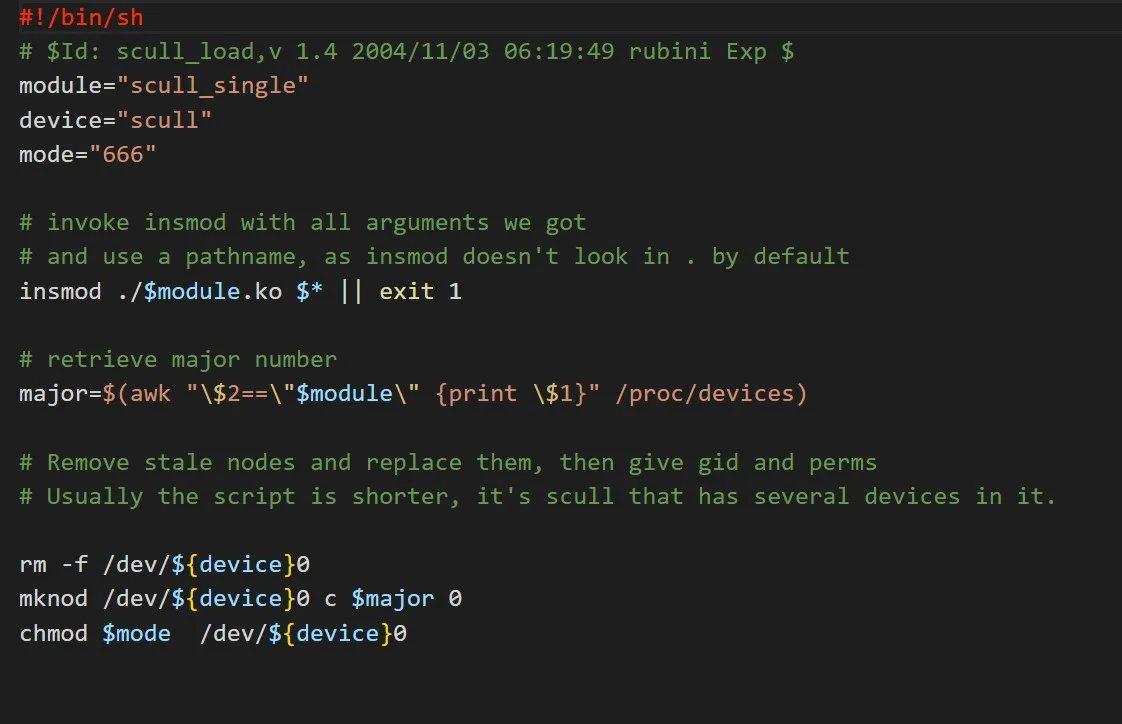
Develop a Full-Featured Character Driver as a Loaded Module
In this project, the students will be developing a full-featured character driver as a loaded module. The module should be added to the kernel configuration Kconfig build system wi…
Learn all about Linux Device Driver Development.
Linux Driver Development is an online course from Skill-Lync: 12 weeks, 19 hours of content and 2 industry projects.
1 h 8 min of this course's own recorded sessions, with transcripts, on Grow by Skill-Lync:
Our projects are designed by experts in the industry to reflect industry standards. By working through our projects, Learners will gain a practical understanding of what they will take on at a larger-scale in the industry. In total, there are 2 Projects that are available in this program.
In this project, the students will be developing a full-featured character driver as a loaded module. The module should be added to the kernel configuration Kconfig build system wi…
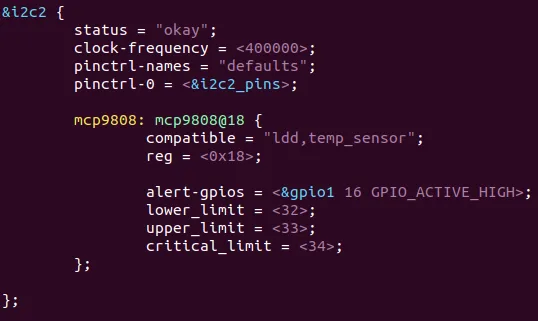
In this project, the learners will design and develop a web-based temperature control system using the BeagleBone Black. The students will submit a complete, deployable embedded Io…
Video stories from learners of related electrical programs, from Skill-Lync's YouTube channel.
by the Skill-Lync team
A device driver is kernel code that knows how to talk to one piece of hardware and shows it to programs as a simple file. Programs run in user space with limited rights. Drivers run in kernel space, where one bad pointer can crash the whole machine. Week 2 of the syllabus starts from "Application Vs Kernel Module".
Think of a restaurant. Customers sit in the dining room (user space). They never walk into the kitchen. They hand an order to a waiter and get a plate back. The kitchen (kernel space) has the knives and the gas, and a mistake there stops service for everyone. A driver is the cook who knows one appliance: the oven, the grill, the coffee machine. The waiter is the system call, such as open, read, write and ioctl.
The free first lesson, Linux Kernel Introduction, draws this picture: applications such as an editor and a browser on top, the kernel below with its subsystems and the device drivers, and the hardware at the bottom. The instructor says the course concerns writing a device driver and reusing the kernel subsystems rather than changing them. That is a sensible split. Most driver work is learning which subsystem to plug into.
The same free lesson covers getting, configuring and building the kernel source, which is how the course begins. Later lessons are locked, so this page describes them only by the syllabus.
Every device file carries a pair of numbers, a major and a minor, packed into one 32-bit value called dev_t. The kernel header gives the minor 20 bits, so the major gets the other 12. Week 3 of the course, "Character Driver", opens with Major and Minor Numbers.
The major number says which driver handles the file. The minor says which device that driver is talking to. Think of a block of flats: the major is the building, the minor is the flat number. The macro that packs them is MKDEV, and MAJOR and MINOR take them apart again. In the kernel header include/linux/kdev_t.h they are:
#define MINORBITS	20
#define MAJOR(dev)	((unsigned int) ((dev) >> MINORBITS))
#define MINOR(dev)	((unsigned int) ((dev) & MINORMASK))
#define MKDEV(ma, mi)	(((dev_t)(ma) << MINORBITS) | (mi))
In plain maths, with major and minor :
Run MKDEV by hand in Python. The major 240 is a made-up number for the example, not a number a real driver owns:
MINORBITS = 20                              # from include/linux/kdev_t.h
def mkdev(major, minor):
    return (major << MINORBITS) | minor     # the MKDEV macro
dev = mkdev(240, 5)                         # 240 is a made-up major number
print(dev, hex(dev))
print(dev >> MINORBITS, dev & ((1 << MINORBITS) - 1))   # MAJOR and MINOR
print(2**12 - 1, 2**20 - 1)                 # largest major, largest minor
It prints:
251658245 0xf000005
240 5
4095 1048575
So , which is 0xf000005 in hex. Shifting right by 20 gives the major back, and masking the low 20 bits gives the minor. Twelve bits allow majors up to 4,095. Twenty bits allow minors up to 1,048,575, so one driver can serve a very large number of devices.
One catch: the same header file carries an older definition for programs outside the kernel that splits the number 8 bits and 8 bits. The 12 and 20 split is the kernel's own. A driver author normally uses the macros and never shifts by hand, so the layout can change without breaking the code.
An ioctl is a request a program sends to a driver for something that does not fit read or write, such as "set the sample rate". Its command number packs four fields into 32 bits: direction, size, a type letter and a sequence number. Week 6, "Advanced Character Driver", starts with Ioctl.
Think of a customs form with four boxes. One says whether the goods are going in or out. One says how big the parcel is. One names the shipper, and one gives a serial number. The header include/uapi/asm-generic/ioctl.h sets the widths: the number field gets 8 bits, the type field 8 bits, the size field 14 bits and the direction field 2 bits. Its own comment says this limits the parameter size to 16 kB minus 1. The macro _IOW means user space writes and the kernel reads.
Here is direction, size, type and number. Take the usual textbook form _IOW('a', 1, int). The letter 'a' is 97 in ASCII, and an int is assumed to be 4 bytes. This code builds the number and takes it apart again:
NRBITS, TYPEBITS, SIZEBITS = 8, 8, 14        # from include/uapi/asm-generic/ioctl.h
TYPESHIFT = NRBITS                           # nr sits in bits 0-7
SIZESHIFT = TYPESHIFT + TYPEBITS             # type in bits 8-15, size from bit 16
DIRSHIFT = SIZESHIFT + SIZEBITS              # direction in the top 2 bits, from bit 30
WRITE = 1                                    # user space writes, kernel reads
def ioc(d, t, n, s):
    return (d << DIRSHIFT) | (t << TYPESHIFT) | n | (s << SIZESHIFT)
cmd = ioc(WRITE, ord('a'), 1, 4)             # _IOW('a', 1, int), assuming a 4-byte int
print(hex(cmd))
print((cmd >> DIRSHIFT) & 3, chr((cmd >> TYPESHIFT) & 255), cmd & 255, (cmd >> SIZESHIFT) & 0x3fff)
print(2**14 - 1)                             # largest size field
It prints:
0x40046101
1 a 1 4
16383
By hand: , then , then , then 1. They add to 1,074,028,801, which is 0x40046101. The leading 4 is the direction bit sitting at the top. Reading 0x40046101 in a log tells you at a glance that it is a write of 4 bytes, from type 'a', number 1.
The catch is that this is the generic header, and the header itself says an architecture may override the size and direction widths. Check your own target before you trust a number copied from a blog.
A jiffy is one tick of the kernel's clock. The kernel adds 1 to a counter called jiffies HZ times a second, so a tick lasts 1/HZ seconds. HZ is a build setting, not a law. Week 7, "Timers and Memories", covers Jiffies, Software Timer, Workqueues and Tasklets.
Think of a wall clock that only has an hour hand. You can set an alarm for any whole number of ticks and no finer. The mainline Kconfig file kernel/Kconfig.hz offers 100, 250, 300 and 1000 for HZ and defaults to 250. A vendor kernel on a board may choose differently, so read CONFIG_HZ from yours. The conversion for a delay is plain arithmetic, and the kernel helper msecs_to_jiffies does it for you:
The trap is the counter's size. On a 32-bit kernel it is an unsigned long of 32 bits, so it wraps back to 0 after ticks. A naive comparison then gives a wrong answer for a few ticks. The kernel macro time_after compares through a signed difference, as the header shows: (long)((b) - (a)) < 0. This code shows the wrap and the fix:
M = 2**32                                    # jiffies is an unsigned long: 32 bits on a 32-bit kernel
for hz in (100, 250, 1000):
    print(f"HZ={hz}: tick {1000/hz:g} ms, 200 ms = {200*hz//1000} jiffies, wraps after {M/hz/86400:.1f} days")
def time_after(a, b):                        # same idea as the kernel macro: is a later than b?
    return (b - a) % M >= M // 2             # (long)(b - a) < 0 on a 32-bit kernel
deadline = (M - 10 + 50) % M                 # 50 ticks from a start that is 10 ticks before the wrap
now = M - 5                                  # 5 ticks after the start
print("early:", now > deadline, time_after(now, deadline))
now = (M - 10 + 60) % M                      # 60 ticks after the start
print("late: ", now > deadline, time_after(now, deadline))
It prints:
HZ=100: tick 10 ms, 200 ms = 20 jiffies, wraps after 497.1 days
HZ=250: tick 4 ms, 200 ms = 50 jiffies, wraps after 198.8 days
HZ=1000: tick 1 ms, 200 ms = 200 jiffies, wraps after 49.7 days
early: True False
late:  True True
At HZ=250 a 200 ms timer is 50 jiffies and a tick is 4 ms, so no timer can be finer than 4 ms. The counter wraps after 198.8 days at HZ=250 and after 49.7 days at HZ=1000. In the "early" line the deadline has wrapped to a small number while the clock has not yet, so the naive test wrongly says the deadline has passed and time_after correctly says it has not. The kernel also starts jiffies at INITIAL_JIFFIES, defined as -300*HZ cast to unsigned int. That puts the first wrap 300 seconds after boot, so a wrap bug shows within minutes and not after weeks.
The honest limit is that a jiffy timer is coarse and can fire late. It suits a watchdog or a polling delay. It is not for microsecond signals.
A device tree is a text file that describes the hardware on a board, so the kernel does not have to guess. Each device in it has a compatible property: a list of names that the kernel matches against the names a driver says it handles. Week 9 of the syllabus teaches Platform Devices and Drivers, Device Tree and I2C Client Drivers.
Think of a guest list at the door. The device tree is the list of who is on the board. Each driver holds a short list of names it can serve, and the kernel introduces the two when a name matches. The kernel documentation shows the idea with the TI BeagleBoard xM, whose root node says:
compatible = "ti,omap3-beagleboard-xm", "ti,omap3450", "ti,omap3";The kernel usage-model page says this list is sorted from the most specific name (the exact board) to the least specific (the family of chips). Nodes at the root become platform devices that can be bound to a platform driver. Devices on a bus become children of that bus, for example each i2c_client sits under an i2c_master. On the driver side the kernel header names the field of_match_table, described as "The open firmware table".
Here is a toy of the idea in Python. It is not the kernel's code:
board = ["ti,omap3-beagleboard-xm", "ti,omap3450", "ti,omap3"]   # most specific first
driver_handles = {"ti,omap3450", "ti,omap3"}                      # what a driver says it can run
for pos, name in enumerate(board):
    if name in driver_handles:
        print(pos, name)
        break
It prints:
1 ti,omap3450Position 1 means the driver matched the second name, the chip, and not the board. That is why a driver written for the chip can serve many boards. Week 9 then uses this to interface the MPU6050 motion sensor over I2C. To work out how long an I2C transfer takes at a given clock rate, use the I2C calculator. We do not repeat that arithmetic here.
It is a 12-week syllabus on writing Linux kernel modules and device drivers, taught on the BeagleBone Black with Embedded Linux as the named tool. The recordings run to 38 sessions of about 19 hours in all, with 2 projects. It goes from building the kernel to character drivers, locking, timers, I2C, interrupts, sysfs and GPIO.
The 2 projects are "Develop a Full-Featured Character Driver as a Loaded Module", which asks for a Kconfig entry with the tristate option, and "Design and Development of a Web-based Temperature Control System using BeagleBone Black", a deployable system for remote temperature monitoring.
It is part of the PG Program in Embedded Systems for EV Applications and the Electric Vehicle Design and Development program. You will want C and some comfort at a Linux shell first. The syllabus does not state a prerequisite, so that is our reading. For the C and microcontroller groundwork, see the Microcontrollers book. For other providers and fees, see the embedded systems course comparison, and the embedded systems hub for the wider topic.
Our records cannot show it for this course. As of 22 Nov 2026, none of Skill-Lync's 3,905 placement records names this course, and none has Linux, kernel, driver or BSP in the job title. The nearest signal is embedded engineer roles, mostly from the embedded program that includes this course.
Nearly all of those titles are plain "Embedded Engineer" or trainee-grade embedded roles. Only 2 titles say firmware and none says Linux. So the data shows embedded jobs, not Linux driver jobs, and these are not outcomes of this course alone. The sample is self-reported by learners, and is mostly 2021 to 2023 starting offers. Treat it as a floor on what we can see, not a market size.
Read the course as a skill, not a job promise. A character driver and a working BeagleBone project you can show and explain are worth more in an interview than a certificate. The comparison page covers fees and alternatives.
| Course | Length | Projects | Tools | Fee |
|---|---|---|---|---|
| Linux Driver Development (this page)Kernel modules and drivers on BeagleBone | 12 weeks, 19 h | 2 | Embedded Linux | ₹40,000 |
| PG Program in Embedded Systems for EV ApplicationsPG program that includes this course | 24 weeks, 198 h | 23 | Simulink, MATLAB, C Programming, STM32CubeIDE, Embedded Linux, AVR ATmega328, SimulIDE, Microchip Studio, Arm Cortex M4 - STM32, Mbed Simulator, CAN Protocol, LRDA Tool Suite | ₹2,75,000 |
| Embedded Programming EssentialsC and C++ for embedded first | 35 h | 3 | C Programming, STM32CubeIDE | ₹40,000 |
| AVR Bare Metal Programming- Live SessionsBare-metal registers, timers, UART | 8 weeks, 18 h | 2 | AVR ATmega328, SimulIDE, Microchip Studio | ₹40,000 |
| Fundamentals of Embedded SystemsECUs, ARM Cortex-M and sensors | 12 weeks, 13 h | 2 | Mbed Simulator, SimulIDE | ₹40,000 |
| Introduction to Automotive Embedded Systems and AUTOSARAUTOSAR, CAN and ISO 26262 | 12 weeks, 44 h | 2 | MATLAB, Simulink | ₹40,000 |
Lengths, projects and fees are taken from each course page on 22 Nov 2026; fees are the Premium plan in INR, including all charges.
Become job ready with our comprehensive industry focused curriculum for freshers & early career professionals
A counsellor will walk you through the syllabus, projects and fee options — and tell you honestly if another course suits you better.