Week 8 - Simulation of a backward facing step in OpenFOAM
Simulation of a backward facing step in OpenFOAM
Objective :
- To simulate 2-D incompressible fluid flow over a backward facing step using openFoam
- Plotting Velocity vs time for x = 0.085m for noslip condition of the wall
- Understand the significance of grading factor for meshing from the results
Understanding the characteristics of the fluid under focus and its governing equations :
The fluid has the following characteristics
1. Incompressible
2. Rotational (Viscous Flow)
3. Laminar
4. Steady Flow
Conservation of mass for 2-D Steady - Incompressible flow
`frac{del(rho*u)}{delt} + frac{del(rho*v)}{delt} = 0`
Eulers equation of Motion :
`frac{delp]{delx} = (rho*b_x) - [frac{delrhou}{delt} + u*frac{delrhou}{delx} + v*frac{delrhou}{dely}]*dx = 0`
`frac{delp]{dely} = (rho*b_y) - [frac{delrhov}{delt} + u*frac{delrhov}{delx} + v*frac{delrhov}{dely}]*dy = 0`
`frac{delp]{delz} = (rho*b_z) - [frac{delrhow}{delt} + u*frac{delrhow}{delx} + v*frac{delrhow}{dely}]*dz = 0`
Due to the incompressible nature of the fluid under concentration it cannot be said that density `rho` can be constant throughout. Due to convective terms in transport equation (Euler's Equation of Motion), density can vary with resect to position but not time.
Generalizing the following terms
`frac{delp}{delx} + frac{delp}{dely} +frac{delp}{delz} =dp`
`u*frac{delw}{delx} + v*frac{delw}{dely} + w*frac{delw}{delz} = vec v*(nablaU)`
After Simplification
`dp - 1/2*rho*dv^2 + rho*g*dz + rho*(frac{dvec v}{dt}*dl) - rho*[dvecl*(vecV xx vec omega)] = 0`
NOTE :
Rotationality of the fluid depends on the vorticity element of the term which is the curl of the velocity vector `omega = nabla xx vec V`
Therefore
a) If the fluid is Irrotational in Nature
`[(vecV xx vec omega)] = 0`
b) If the fluid flow is along a streamline
`[dvecl*(vecV xx vec omega)] = 0`
Factors affecting the conversion of Irrotational to rotational flow :
1. Presence of Solid Boundary (Viscous Effects)
2. Presence of Shock Waves
3. Thermal Stratification
4. Coriolis forces on system
Boundary layer development over the wall
Laminar Fluid :
The reynolds number for the fluid must be < 2000
i.e `R_e = (v*l)/nu < 2000`
Step wise procedure for the problem :
Tracking the right tutorial
1. Open Foam tutorials can be opened in terminal using shortcut 'tut'
2. Then change directory to incompressible folder
3. Then change directory to icoFoam
4. Then change directory to cavity
5. Enter cavity folder
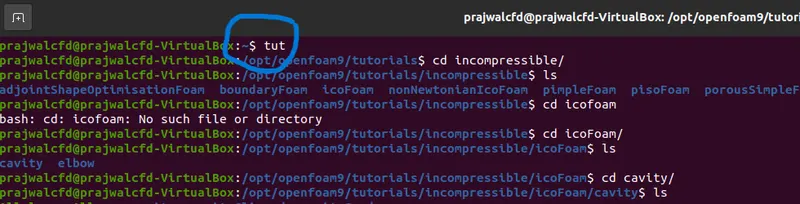
6. Copy the cavity folder to run folder usng cp -r command
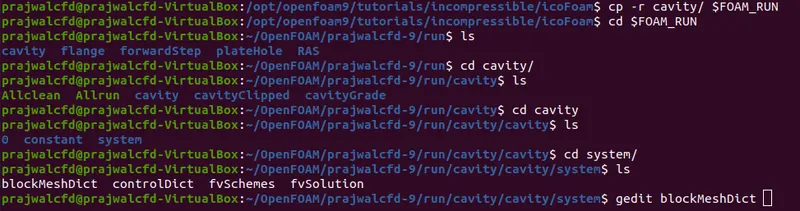
7. Change directory to 'Run' Folder
8. Enter Cavity folder
9. Enter system folder
Creating geometry
10. Now we have to create geometry by editing blockmeshdict
Vertices co-ordinates for the geometry has to be found out using the given dimensions in the question
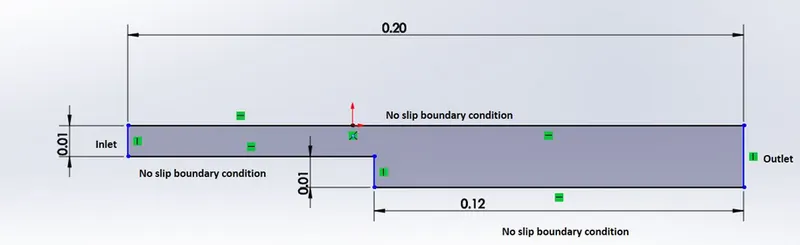
Meshing using hex & grading factor for mesh
11. Meshing for the blocks are done using hex and the mesh grading factor for this example is 1
Grading factor :
Grading factor for the mesh = Ratio of Size of the end cell to the Size of the first cell
- No of mesh grids along x = 200
- No of mesh grids along y = 20
- No of mesh grids along z = 1
hex (0 1 2 3 11 12 13 14) (200 20 1) simpleGrading (1 1 1)Simple grading is used to input grading factor for mesh in x,y & z direction
Initialising Boundary Conditions
12. Boundary conditions are given
* Inlet - type (Patch)
* Outlet - type (Patch)
* Fixedwalls - type (wall) - No-Slip condition is employed for fxed walls
* frontandback - type(empty) - 2D flow hence, the faces in z axis are taken as empty
Blockmesh Code edited vertices for grading factor of 1:
/*--------------------------------*- C++ -*----------------------------------*\
  =========                 |
  \\      /  F ield         | OpenFOAM: The Open Source CFD Toolbox
   \\    /   O peration     | Website:  https://openfoam.org
    \\  /    A nd           | Version:  9
     \\/     M anipulation  |
\*---------------------------------------------------------------------------*/
FoamFile
{
    format      ascii;
    class       dictionary;
    object      blockMeshDict;
}
// * * * * * * * * * * * * * * * * * * * * * * * * * * * * * * * * * * * * * //

convertToMeters 0.01;

vertices
(
    (0 0 0)
    (8 0 0)
    (8 0.5 0)
    (0 0.5 0)
    (8 1 0)
    (0 1 0)
    (20 1 0)
    (20 0.5 0)
    (20 0 0)
    (20 -1 0)
    (8 -1 0)

    (0 0 0.6)
    (8 0 0.6)
    (8 0.5 0.6)
    (0 0.5 0.6)
    (8 1 0.6)
    (0 1 0.6)
    (20 1 0.6)
    (20 0.5 0.6)
    (20 0 0.6)
    (20 -1 0.6)
    (8 -1 0.6)
);

blocks
(
    hex (0 1 2 3 11 12 13 14) (200 20 1) simpleGrading (1 1 1)
    hex (3 2 4 5 14 13 15 16) (200 20 1) simpleGrading (1 1 1)
    hex (2 7 6 4 13 18 17 15) (200 20 1) simpleGrading (1 1 1)
    hex (1 8 7 2 12 19 18 13) (200 20 1) simpleGrading (1 1 1)
    hex (10 9 8 1 21 20 19 12) (200 20 1) simpleGrading (1 1 1)
);

edges
(
);

boundary
(
    Inlet
    {
        type patch;
        faces
        (
            (0 11 14 3)
            (3 14 16 5)
        );
     }
        Outlet
    {
        type patch;
        faces
        (
            (9 8 19 20)
            (8 7 18 19)
            (7 6 17 18)
        );
    }


    fixedWalls
    {
        type wall;
        faces
        (
            (4 5 16 15)
            (4 15 17 6)
            (0 1 12 11)
            (9 20 21 10)
            (1 10 21 12)
        );
    }

    frontAndBack
    {
        type empty;
        faces
        (
            (11 12 13 14)
            (14 13 15 16)
            (13 18 17 15)
            (12 19 18 13)
            (21 20 19 12)
            (0 3 2 1)
            (3 5 4 2)
            (2 4 6 7)
            (1 2 7 8)
            (10 1 8 9)
        );
    }
);

mergePatchPairs
(
);

// ************************************************************************* //
13. Setting up Initial Conditions for the problem

- Now Enter 0 folder which consists of Initial conditions for the problem that is at time = 0s
- Editing velocity in gedit U
- Input velocity in only x direction as 1 m/s
/*--------------------------------*- C++ -*----------------------------------*\
  =========                 |
  \\      /  F ield         | OpenFOAM: The Open Source CFD Toolbox
   \\    /   O peration     | Website:  https://openfoam.org
    \\  /    A nd           | Version:  9
     \\/     M anipulation  |
\*---------------------------------------------------------------------------*/
FoamFile
{
    format      ascii;
    class       volVectorField;
    object      U;
}
// * * * * * * * * * * * * * * * * * * * * * * * * * * * * * * * * * * * * * //

dimensions      [0 1 -1 0 0 0 0];

internalField   uniform (0 0 0);

boundaryField
{
    Inlet
    {
        type            fixedValue;
        value           uniform (1 0 0);
    }

    Outlet
    {
        type            zeroGradient;

    }

    fixedWalls
    {
        type            noSlip;
        value  	 uniform (0 0 0);
    }

    frontAndBack
    {
        type            empty;
    }
}

// ************************************************************************* //
14. Initialize computing conditions by editing controldict
Calculating Courant number for better stable results
`C = [frac{U*Deltat}{Deltax}]`
For better stable results (C < 1)
For Velocity = 1 m/s
`deltax =`length of the grid along x
Considering x to be the dominant factor for mesh length
`deltax = 0.2/200`
where
0.2m is the total length of x
200 are the no of grid points along x
Length of grid = 0.001m i.e 1e-3
Therfore for better convergence & stability, Time step `delta t < 1e-3`
Hence have chosen Time step to be`delta t = 1e-5`
/*--------------------------------*- C++ -*----------------------------------*\
  =========                 |
  \\      /  F ield         | OpenFOAM: The Open Source CFD Toolbox
   \\    /   O peration     | Website:  https://openfoam.org
    \\  /    A nd           | Version:  9
     \\/     M anipulation  |
\*---------------------------------------------------------------------------*/
FoamFile
{
    format      ascii;
    class       dictionary;
    location    "system";
    object      controlDict;
}
// * * * * * * * * * * * * * * * * * * * * * * * * * * * * * * * * * * * * * //

application     icoFoam;

startFrom       startTime;

startTime       0;

stopAt          endTime;

endTime         1 ;

deltaT          1e-5;

writeControl    timeStep;

writeInterval   20;

purgeWrite      0;

writeFormat     ascii;

writePrecision  6;

writeCompression off;

timeFormat      general;

timePrecision   6;

runTimeModifiable true;


// ************************************************************************* //
15. Checking blockMesh
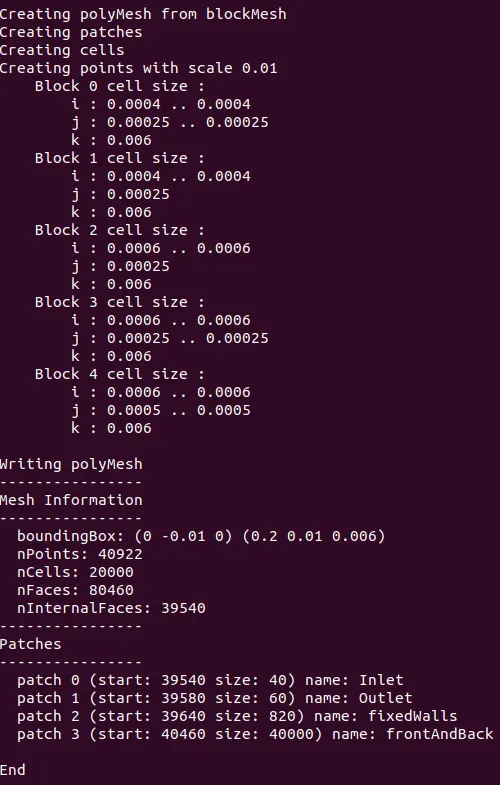
Making sure that the right Boundary names appear
15. Checking Mesh
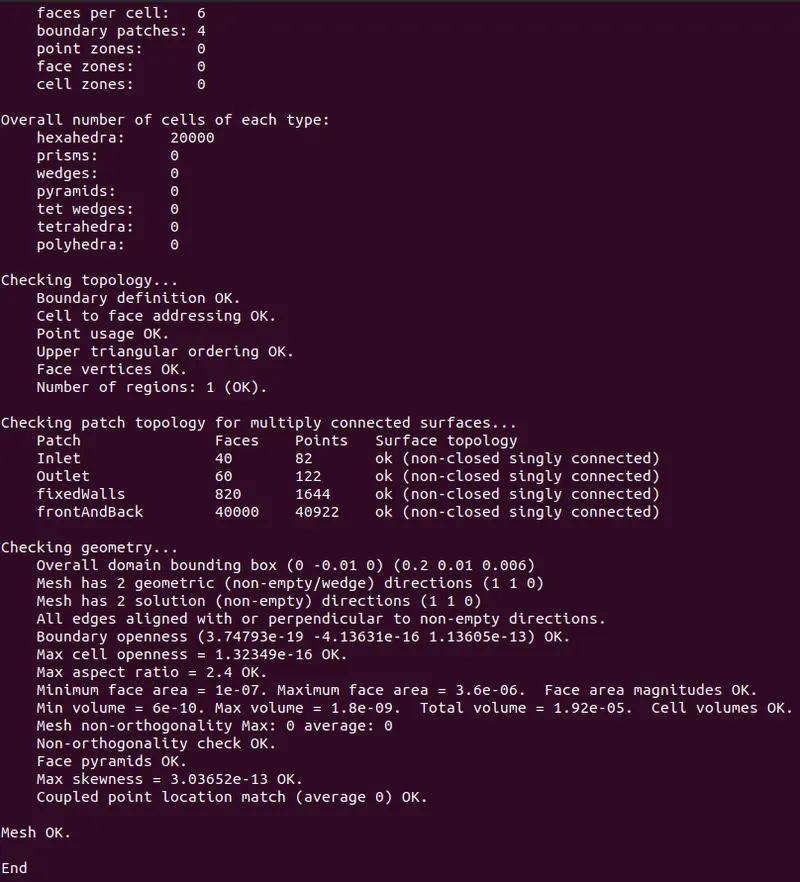
- Type of Mesh - Hexahedral
- No of cells - 20000
Ensuring that Skewness of the mesh is as low as possible for better results
15. Solving using icoFoam solver
Enter icoFoam in the terminal after the previous step

We can clearly see that, Courant number is well beyond 1 and is as expected while initialising the problem
16. Results & Post-Processing
- Check Meshing over Geometry

To make uniform mesh sizes for all blocks, slight alterations are made
hex (0 1 2 3 11 12 13 14) (80 5 1) simpleGrading (1 1 1)
hex (3 2 4 5 14 13 15 16) (80 5 1) simpleGrading (1 1 1)
hex (2 7 6 4 13 18 17 15) (120 5 1) simpleGrading (1 1 1)
hex (1 8 7 2 12 19 18 13) (120 5 1) simpleGrading (1 1 1)
hex (10 9 8 1 21 20 19 12) (120 10 1) simpleGrading (1 1 1)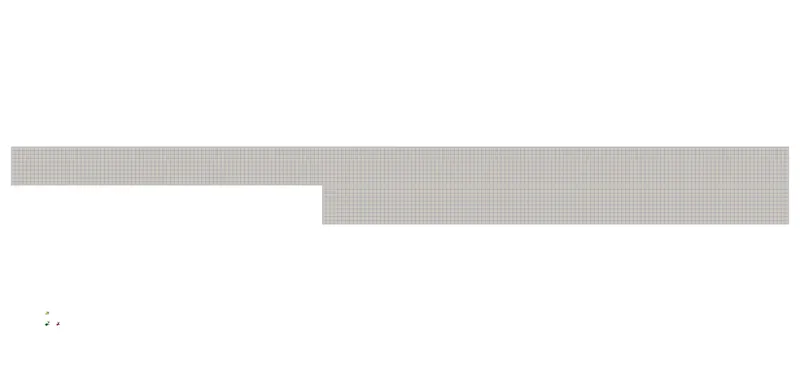
Zooming the backward step for mesh details
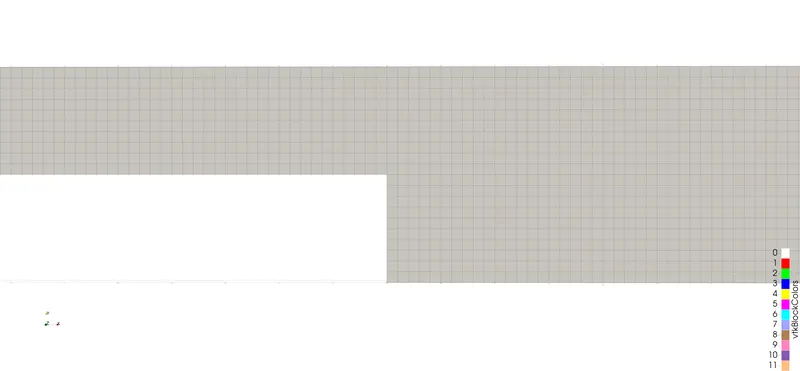
Velocity distribution over the domain
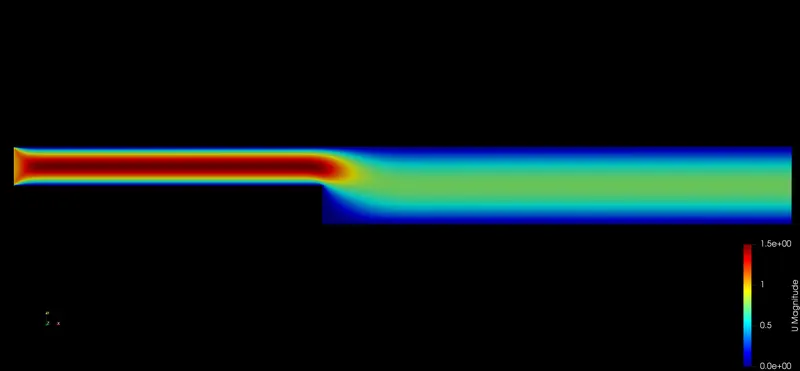
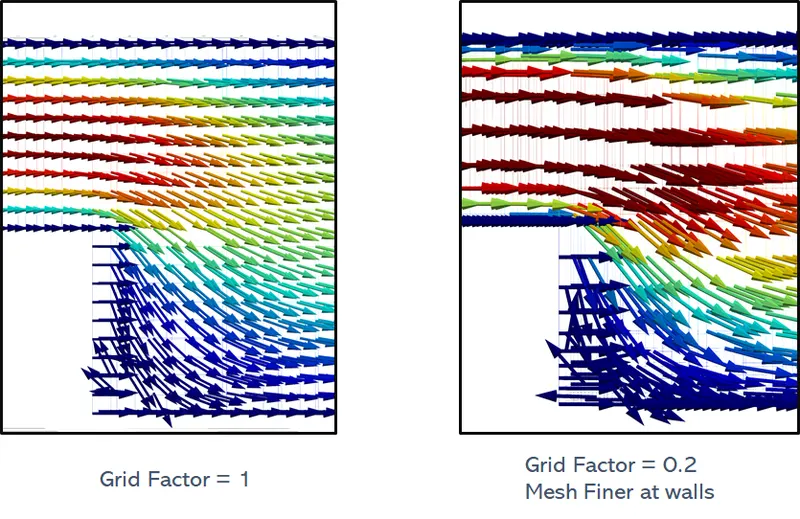
Point of Flow seperation (Recirculation Zone) for grading factor = 1
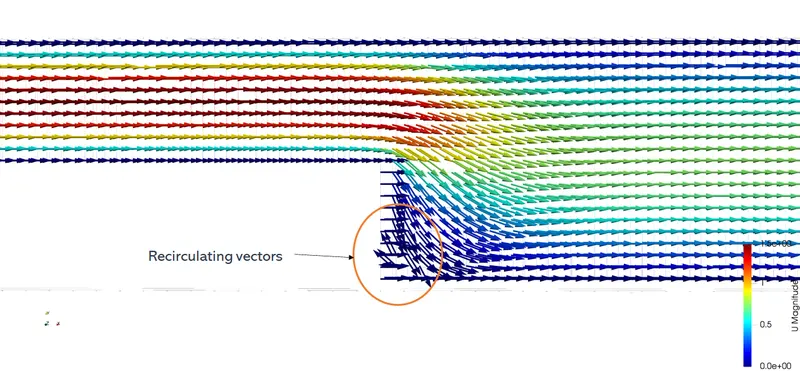
Whenever there is relative movement between a fluid and a solid surface, whether externally round a body, or internally in an enclosed passage, a boundary layer exists with viscous forces present in the layer of fluid close to the surface. Boundary layers can be either laminar or turbulent. A reasonable assessment of whether the boundary layer will be laminar or turbulent can be made by calculating the Reynolds number of the local flow conditions.
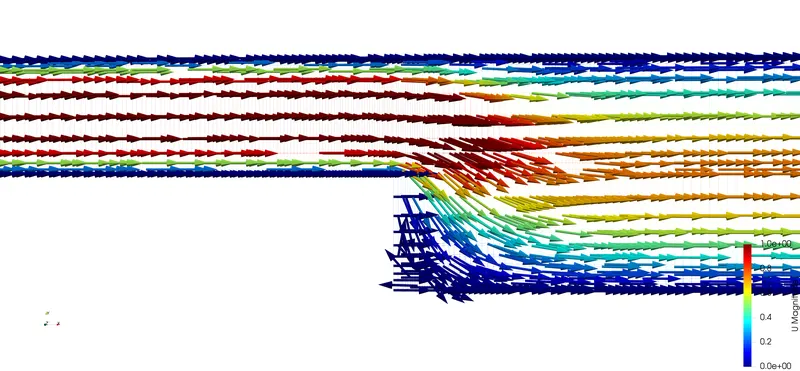
The point of seperation which is a detachment of a boundary layer from a surface into wake. Separation occurs in flow that is slowing down, with pressure increasing, after passing the thickest part of a streamline body or passing through a widening passage, for example.
Velocity Profile at domain expansion region
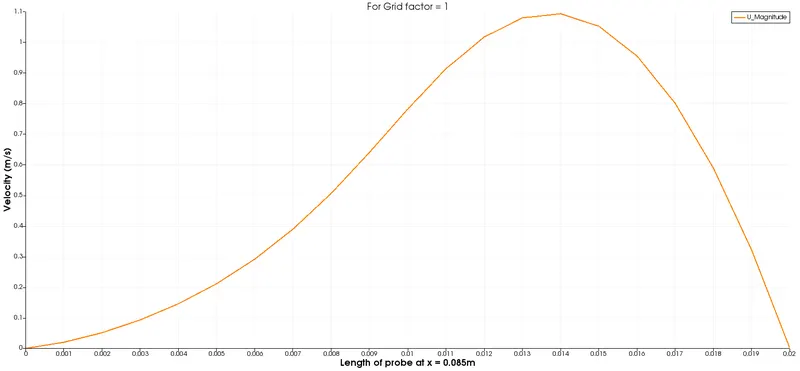
The above plot mainly is dependent on the effect of no slip condition at the surface of the wall.
For y = 0.01389m, Ux = 1.1042 m/s
CASE II
For grid factor of 0.2
Check Meshing over Geometry
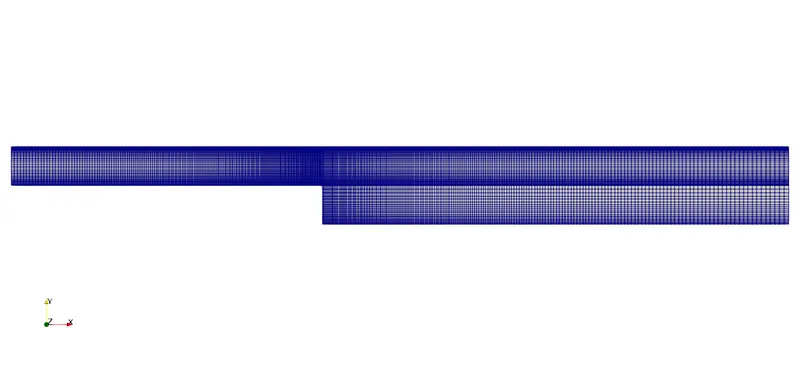
To make uniform mesh sizes for all blocks, slight alterations are made
    hex (0 1 2 3 11 12 13 14) (80 5 1) simpleGrading (0.2 5 1)
    hex (3 2 4 5 14 13 15 16) (80 5 1) simpleGrading (0.2 0.2 1)
    hex (2 7 6 4 13 18 17 15) (120 5 1) simpleGrading (5 0.2 1)
    hex (1 8 7 2 12 19 18 13) (120 5 1) simpleGrading (5 5 1)
    hex (10 9 8 1 21 20 19 12) (120 10 1) simpleGrading (5 5 1)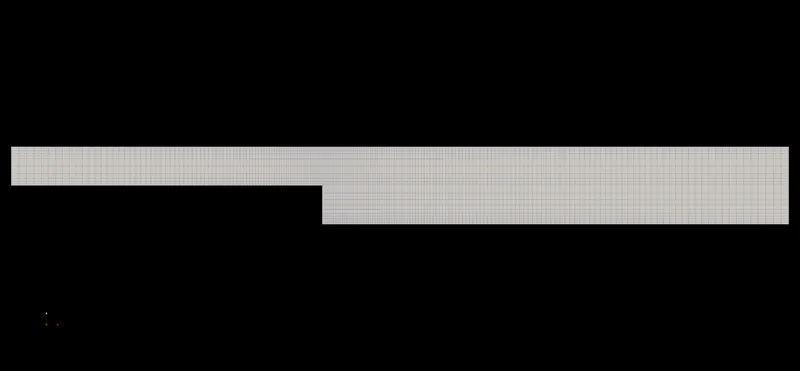
Velocity distribution for grading factor = 0.2
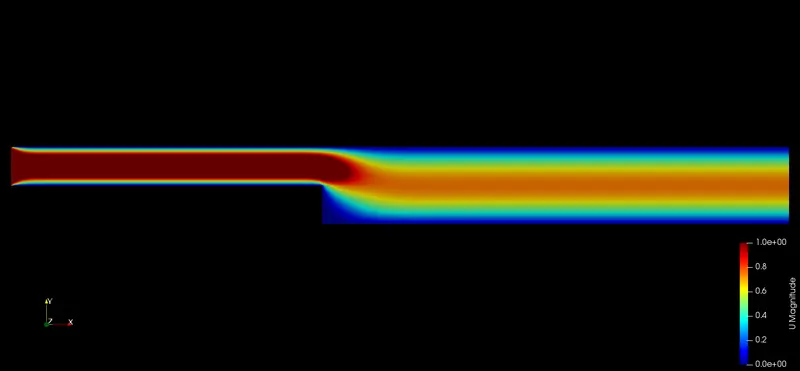
Point of Flow seperation (Recirculation Zone) for grading factor = 0.2
Velocity Profile at domain expansion region
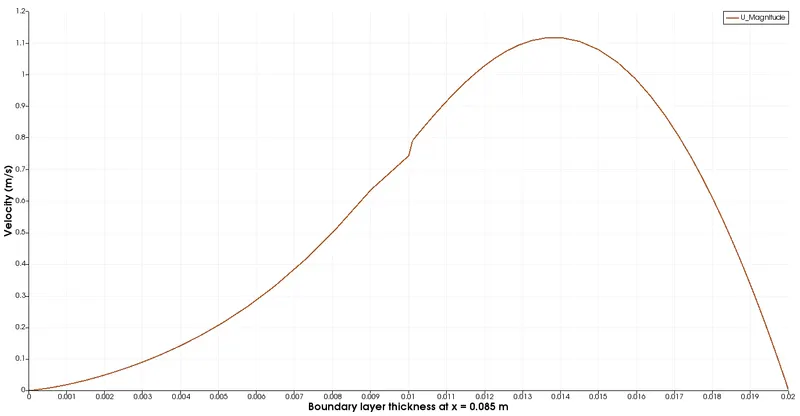
The above plot mainly is dependent on the effect of no slip condition at the surface of the wall.
For y = 0.014012m, Ux = 1.1023 m/s
The effect of grading factor
Multi-grading of a block
• Using a single grading to describe mesh grading permits only one-way grading of the block.
• For example, to mesh the square cavity with grading towards all the walls requires four blocks, each one with different grading.
• To reduce complexity and effort we can use multi-grading to control grading within separate divisions of a single block, rather than have to define several blocks with one grading per block
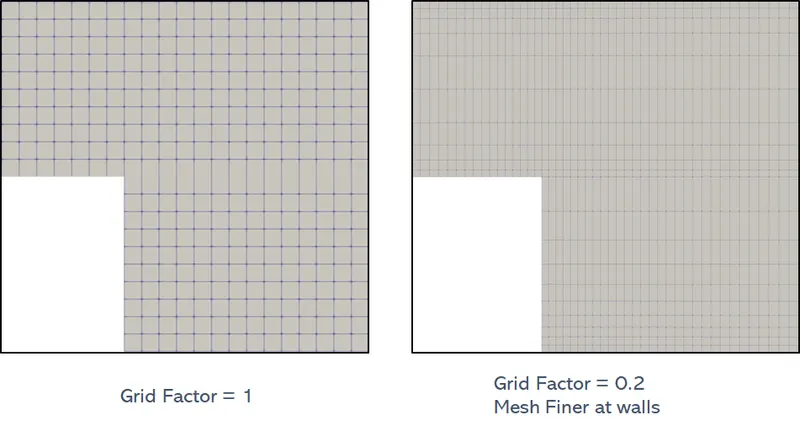
Flow Seperation zones for different grid factors