Curve fit for a data using Python
Objective
> A code to fit a linear and cubic polynomial for the Cp data.
data - (https://drive.google.com/file/d/1vWi9Vj3AdQf0gqUK1u9jwS8zg92BHGR0/view)
> The above data file consists of two columns Temprature in K and Specific heat (cp)
> Definition of
> popt ,pcov
> np.array(temprature)
> *in*popt
> How to do perfect curve fit.
Program
import numpy as np
import matplotlib.pyplot as plt
from scipy.optimize import curve_fit

#Curve fit functions
def linear_func(t,a,b):
	return a*t+b
def quadratic_func(t,a,b,c):
	return a*pow(t,2)+b*t+c
def cubic_func(t,a,b,c,d):
	return a*pow(t,3)+b*pow(t,2)+c*t+d
def quartic_func(t,a,b,c,d,e):
	return a*pow(t,4)+b*pow(t,3)+c*pow(t,2)+d*t+e


#Function to read data file
def read_file():
	temp = []
	cp = []
	for line in open('data','r'):
		value = line.split(',')
		temp.append(float(value[0]))
		cp.append(float(value[1]))
	return[temp,cp]


#Curve fit for linear equation
temp,cp = read_file()
popt,pcov = curve_fit(linear_func,temp,cp)
fit_cp = linear_func(np.array(temp),*popt)
plt.figure(1)
plt.plot(temp,cp,color='blue')
plt.plot(temp,fit_cp,color='red')
plt.legend(['Actual data','Curve fit'])
plt.title('Linear curve fit')
plt.xlabel('Temprature in [k]')
plt.ylabel('Cp')


#Curve fit for quadratic equation
popt,pcov = curve_fit(quadratic_func,temp,cp)
fit_cp = quadratic_func(np.array(temp),*popt)
plt.figure(2)
plt.plot(temp,cp,color='blue')
plt.plot(temp,fit_cp,color='red')
plt.legend(['Actual data','Curve fit'])
plt.title('Quadratic curve fit')
plt.xlabel('Temprature in [k]')
plt.ylabel('Cp')


#Curve fit for cubic equation
popt,pcov = curve_fit(cubic_func,temp,cp)
fit_cp = cubic_func(np.array(temp),*popt)
plt.figure(3)
plt.plot(temp,cp,color='blue')
plt.plot(temp,fit_cp,color='red')
plt.legend(['Actual data','Curve fit'])
plt.title('Cubic curve fit')
plt.xlabel('Temprature in [k]')
plt.ylabel('Cp')


#Curve fit for quartic equation
popt,pcov = curve_fit(quartic_func,temp,cp)
fit_cp = quartic_func(np.array(temp),*popt)
plt.figure(4)
plt.plot(temp,cp,color='blue')
plt.plot(temp,fit_cp,color='red')
plt.legend(['Actual data','Curve fit'])
plt.title('Quartic curve fit')
plt.xlabel('Temprature in [k]')
plt.ylabel('Cp')
plt.show()
Program explanation
> The required modules are imported.
> The equations used to fit are
Linear - `a*t+b`
Quadratic - `a*t^2+b*t+c`
Cubic - `a*t^3+b*t^2+c*t+d`
Quartic - `a*t^4+b*t^3+c*t^2+d*t+e`
> The above given equations are defined as functions.
> To read the data file and get the values a function is created.
> Two open arrays are created for temprature and specific heat to store the values from the data file respectively.
> A loop is made to run for every line of the data file using open command.
> Since the data file consists of two columns they are split using the (line.split(',')) command which is assigned to a variable named, value.
> Therefore, the zero index of value have the temprature data and the first index of value have cp data.
> The values are converted into float and are appended to the temp and cp array respectively.
> To curve fit the linear equation the temprature and cp values are assigned from the data file using the function.
> The curve_fit function from the scipy module is used with parameters such as linear function defined, temprature and cp.
> When using curve_fit function we get two outputs which are popt the coefficient values of the function and pcov which is the covariance matrix.
> Then the defined function is passed with the temperature values using the numpy module and the coefficients using *popt, which is then stored in the fit_cp variable.
> A figure with two plots actual curve and curve fit is generated using the plot commands.
> The above similar procedure is continued for the higher degree equations defined.
Terms explanation
POPT and PCOV

When the curve_fit function is used it gives two output popt and pcov
Popt: This variable stores the values of the coefficients of the function defined.
Pcov: It is the covariance matrix which have the estimated values of the co-variance in the parameters of the popt. It can be used to find the deviation of the parameters from the mean value
np.array(Temprature)

To pass all the temprature values as as array to the function, the numpy module is used.
*in*popt
Instead of passing all the coefficients of the function, the popt variable is used and by using the asterisk(*) helps the variable to refer the coefficients in the function.
Results of the program
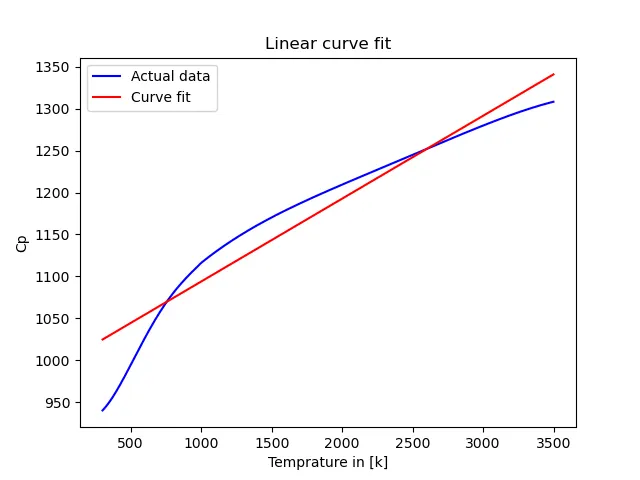
Linear function
`a*t+b`
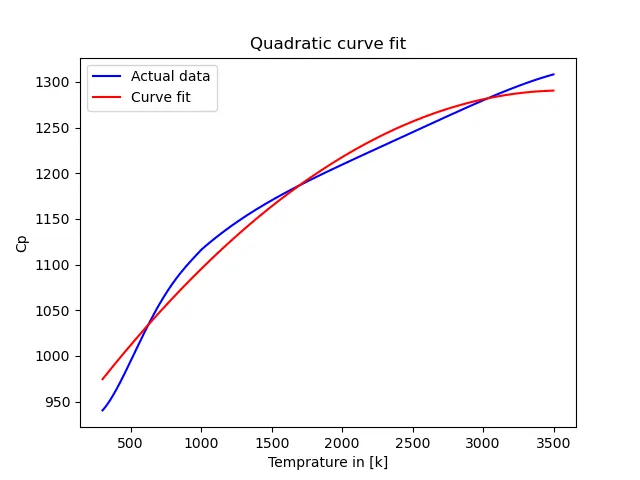
Quadratic function
`a*t^2+b*t+c`
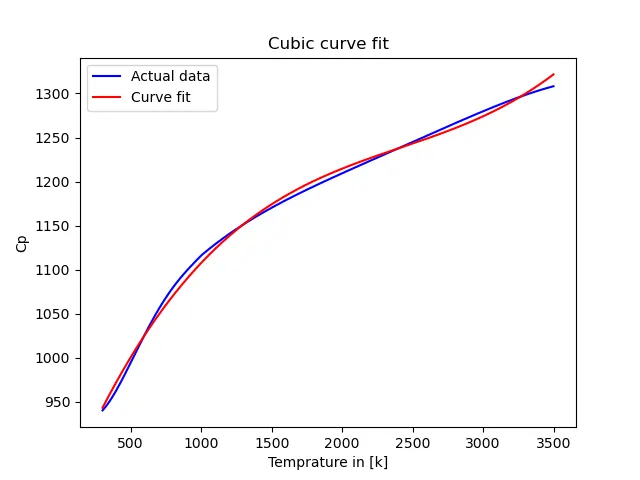
Cubic function
`a*t^3+b*t^2+c*t+d`
Quartic function
`a*t^4+b*t^3+c*t^2+d*t+e`
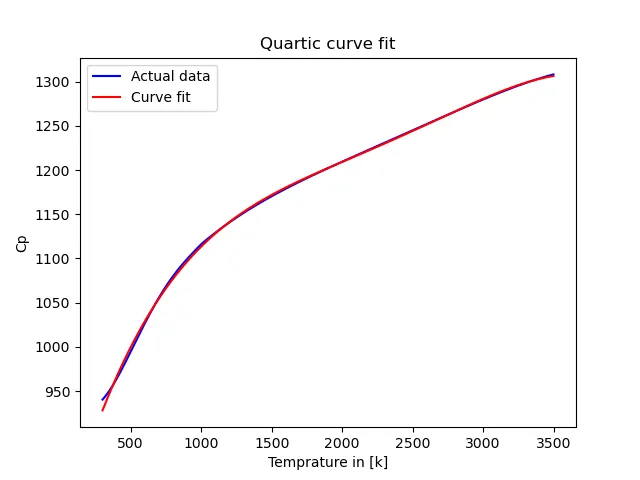
> From the above plots it is seen that as the degree of the polynomial increases the curve fit gets better
How to do perfect curve fit.
> The data can be split into to partitions and can be plotted which can give perfect fit
> Increasing the degree of the polynomial gives perfect fit