Week -2
1. Simulink model of Doorbell using Solenoid.
Objective : Plot the physical movement of the plunger in a situation where the switch is closed for every 2 seconds and then released. (Assuming an input signal with Amplitude = 1, Period = 10 seconds, Pulse width = 20%, Phase delay = 2 seconds)
Working Principle of Doorbell with Solenoid:
The Solenoid is an electromagnet, where a metal piston is surrounded by coiled wire. The piston is of magnetically conductive material, so that when excited using electromagnetic field, it can be moved back and forth. In the Doorbell where we used the solenoid a situation where the loop becomes closed or the switch becomes closed every 2 seconds is created by providing a square pulse created using pulse generator in every 2 seconds, with phase delay of 2 seconds. Now when the physical signal is given to the switch, if the input is greater than the threshold value of switch, then the switch is closed and the circuit becomes closed. Since the switch is closed, the current passes from battery to the solenoid, where it has metallic piston which contains an iron core mounted on non-metallic bar. When the circuit, is open, there is no current passing and the iron core is pushed out of the coiled wire by the spring. When the sircuit is closed the iron core is drawn to the coil by the electro-magnetic field produced and strikes at the end of the piston to the first tone bar which vibrates and producess the ding sound. When the current is not flowing through the circuit, the iron core is pushed to outside of the coil, since there will be no more electromagnetic field and the core strikes at the other tone bar where is produces dong sound. As long as the circuit is closed and current is passing, the piston will remain in the position where it touches the first tone bar. Here the generated pulse will be supplied to switch for every 2 seconds. Untill the last pulse is generated, this process will be repeated.
Simulink Model:
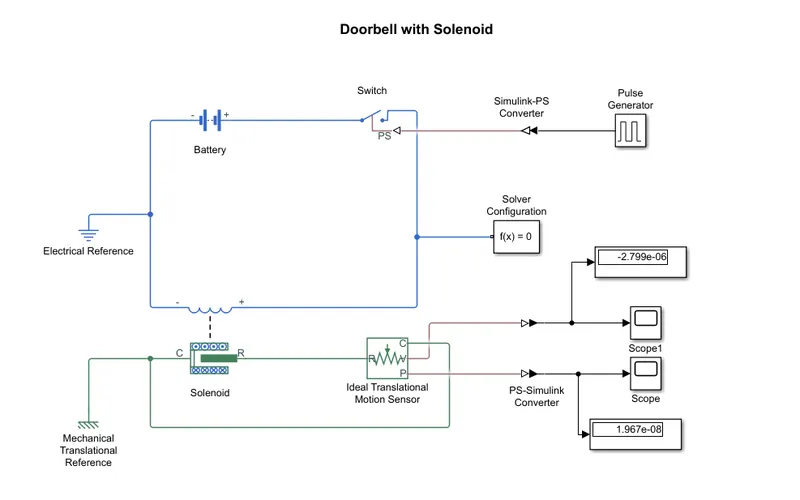
- A pulse generator is used to create the square pulse that need to be used as input physical signal for the cirvuit.
- A switch, battery and solenoid are connected in such a way that the circuit is closed and a electrical reference or ground is connected.
- A mechanical translational sensor is used inorder to get the plunger position and is connected to scope, along with mechanical translational reference.
- A Simulink-PS convertor and PS-Simulink converter is used to convert the signals at input and output.
The position of the plunger is plotted in the below graph obtained from scope:
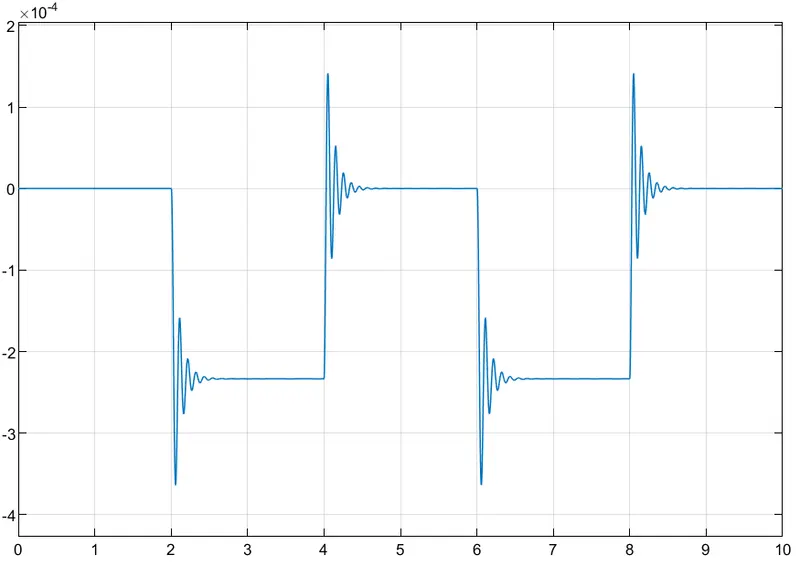
The above graph shows the position of plunger where the pulse is generated in every 2 seconds. The piston moves, vibrates and hits the first tone bar and remains in its position until the next pulse in generated. The process is repeated till seconds since the pulse is generated with a period of 10 seconds.
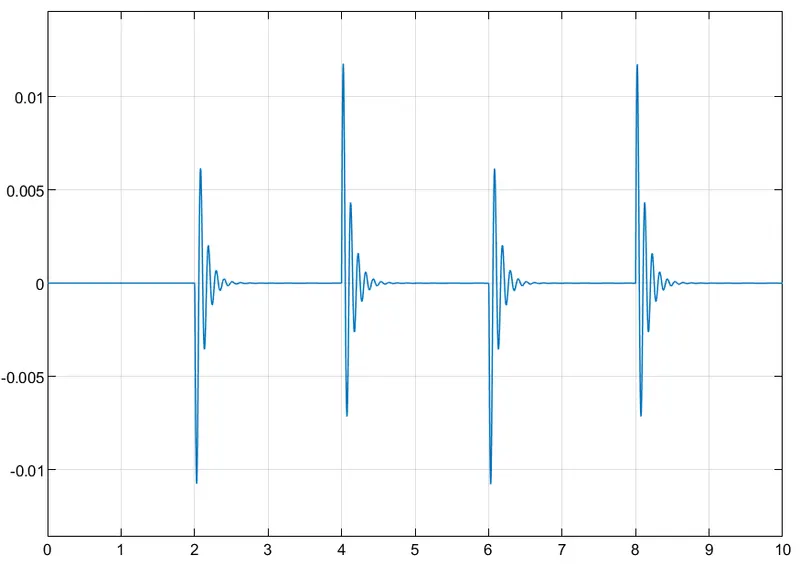
The velocity of the plunger each time it gets triggered in the below graph.
2. Thermistor to sense Temperature of a heater and turn on or off fan according to given conditions.
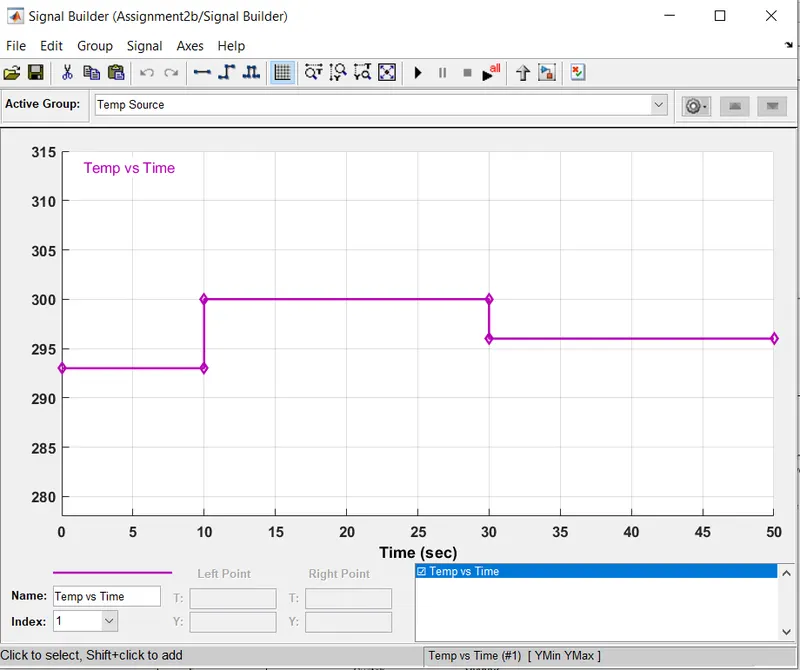
Temperature source : 20 Degree Celsius from 0 to 10 secs, 27 Degree Celsius from 10 to 30 secs, 23 Degree Celsius from 30 to 50 secs.
Fan condition : ON if the temperature is above 25 Degree Celsius and OFF otherwise.
Thermistor:
Thermistor is a solid state thermally sensitive transducer with 2 terminals. It can chnage its resistive value proportional to small chnages in temperature since they are constructed using sensitive semi-conductor matal oxides, with metallised connecting leads formed into ceramic disc or bead.
Simulink Model :
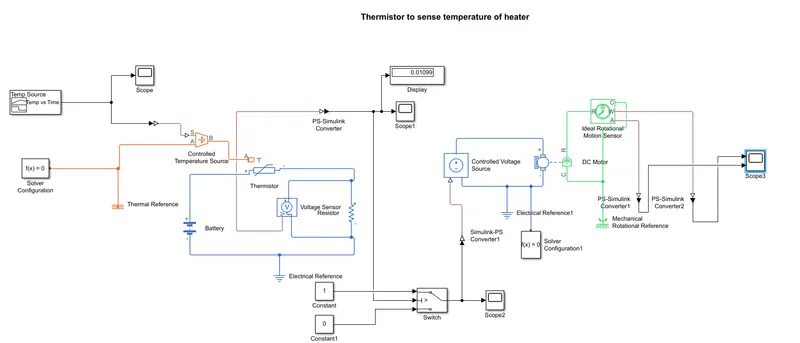
In the above model, a signal builder is used to create input signal as temperatures at different time intervals. The given temperatures were converted to Kelvin as 20, 27 and 23 Degree Celsius to (approximate values)293, 300 and 296 Kelvin respectively. The signal in 0-10s, 10-30s and 30-50s is created using the Signal Builder. A Simulink-PS Converter is used inorder to convert the input to physical signal and is given as input to the Controlled Temperature Source. The 2 inputs for the Thermistor are thermal input from Controlled temperature source and electric current from battery.
When the temperature to the thermistor increases, the temperature of the semiconductor in the thermistor increases and the current will pass through it. The number if active charge carriers will be increased which chnages it into conduction mode, which in turn will create more electrons, which contributes to increase in current. Since the amout of current need to be regulated, a resistor is connected in series with the thermistor, so as to regulate the current passing through it. The display connected will show the amount of desirable voltage which is kept as threshold value for the switch. If the value is more than 0, then the switch will be chnaged to ON mode and current will pass to the DC motor. If the value is less than 0, switch will be in OFF mode and no current will pass to the DC motor and the circuit will be open. When the circuit is closed, current will pass into the DC motor, which converts the input electrical energy to mechanical energy, which is then used as input force to rotate the fan. The fan will continue to rotate until the temperature of the heater is decreased. There is an ideal rotational motion sensor is connected to the motor, to sense the working of DC motor and to get the velocity and angular displacement of the DC motor. Electrical References and Mechanical references are connected to Electrical and Mechanical systems respectively and Solver configuration block is also connected in bith systems.
Input Signal created using Signal Builder:
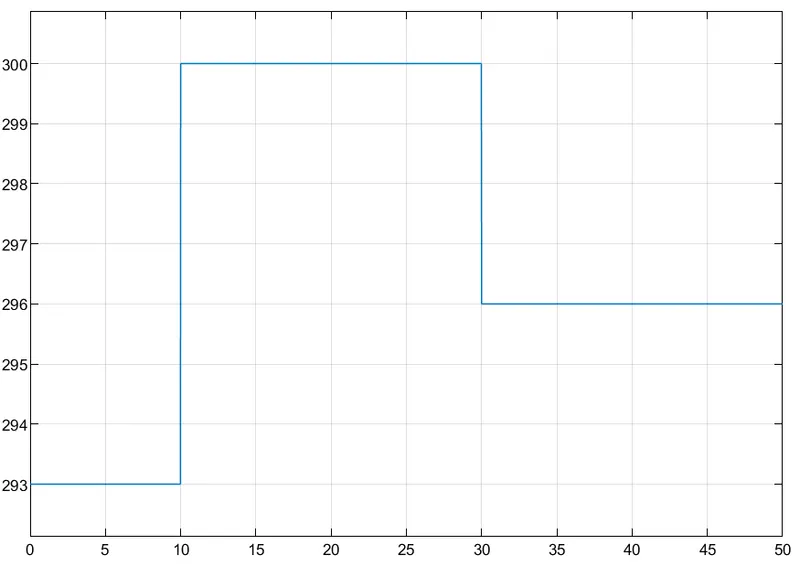
Time versus Voltage plot:
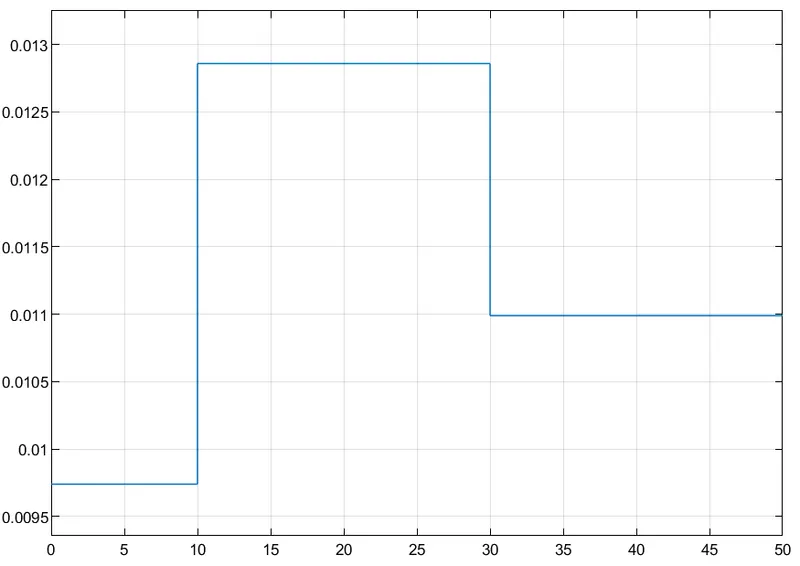
From this plot, we will be able to get the voltage generated in each temperatue with respect to time.
Time versus Controlled Voltage plot:
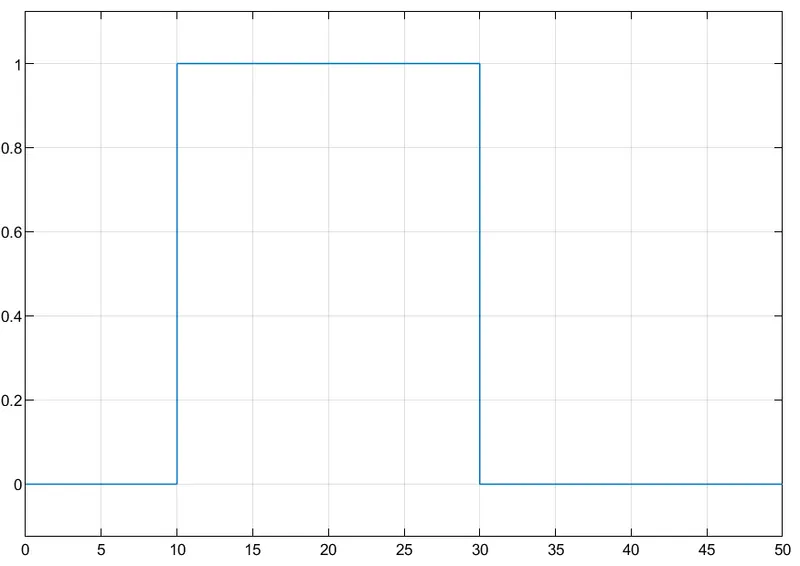
From this plot, we can get the threshold value of 0.01099, which need to be provided for the switch control.
Simulation Result:
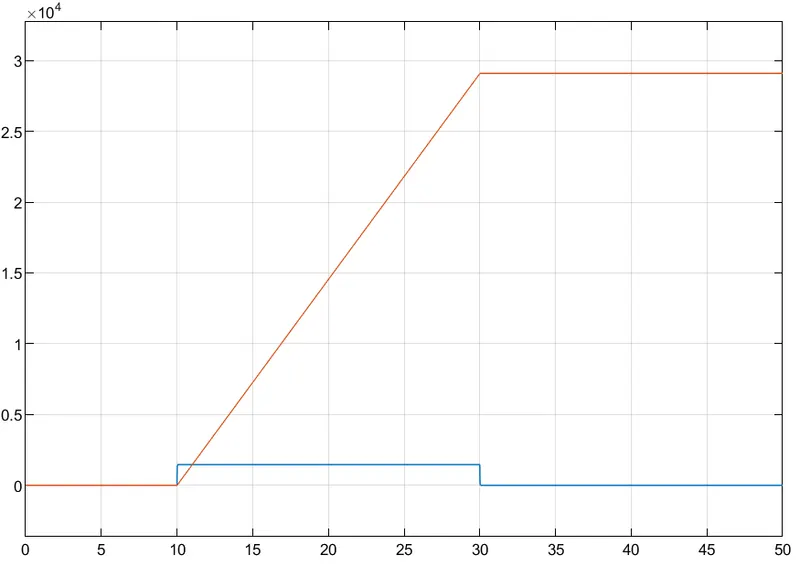
This plot shows the output of Time versus Velocity as well as Angular Displacement. The Time vs Velocity graph is plotted in Blue and Time versus Angular displacement is plotted in Red.
From the output it shows that if the Temperature exceeds 25 Degree Celsius then the Fan is turned ON.