Project: BAJA All-Terrain Vehicle Analysis [SIMULINK]
Aim:
To use Simulink to research, evaluate, and create a full report on the BAJA All-Terrain Vehicle (ATV) model and compare its various modes.
Theory:
All-Terrain Vehicle
An all-terrain vehicle (ATV) is a motorized off-road vehicle with four low-pressure or non-pneumatic tires, a seat meant to be straddled by the operator, and steering control handlebars (refer Figure 1). It is built to tackle a wider range of terrain than most other vehicles, as the name implies. Although it is a street legal vehicle in certain nations, it is illegal in the majority of Australian states, territories, and provinces, as well as the United States and Canada. ATVs are classified into 2 types based on the manufacturer's designation. The manufacturer designed Type I ATVs for usage by a single operator with no passengers. These ATVs are referred to as Tandem ATVs. At slower speeds, the extra wheels provide more stability. Although most have three or four wheels, six-wheel variants are available for certain needs. The manufacturer designed Type II ATVs for usage by an operator and a passenger, and they have a dedicated seating location behind the operator. Utility terrain vehicles (UTVs) or side by side are multiple user analogs with side-by-side seats. Both classes share a lot of the same powertrain components.
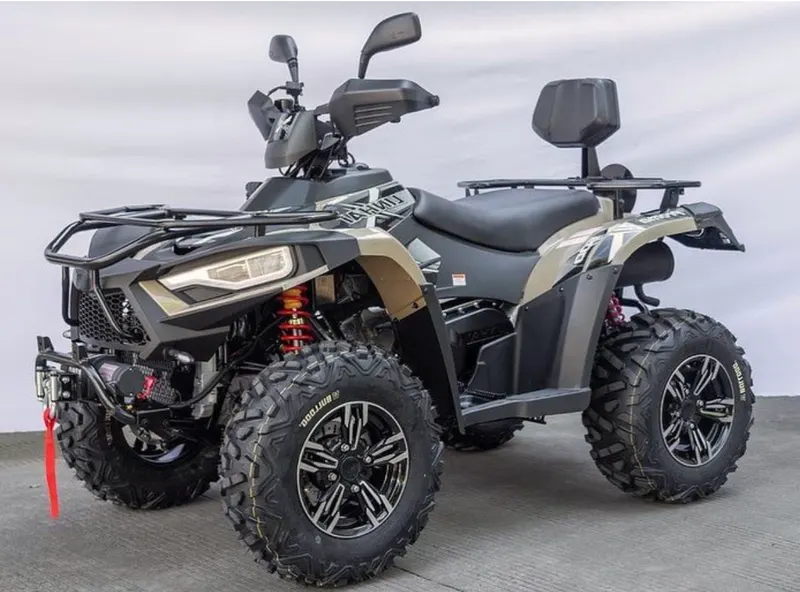
Figure 1: All-Terrain Vehicle [1]
Baja SAE
The Society of Automotive Engineers International (SAE International ) hosts the competition, Baja SAE College Design series. Small off-road cars are designed and built by teams of students from universities all over the world, as shown in Figure 2. The cars all have the same engine specifications. The engine is a single cylinder Briggs & Stratton Model 19 Vanguard engine with a displacement of 305cc and a power output of roughly 10 horsepower (7.5 kW) as of 2018.
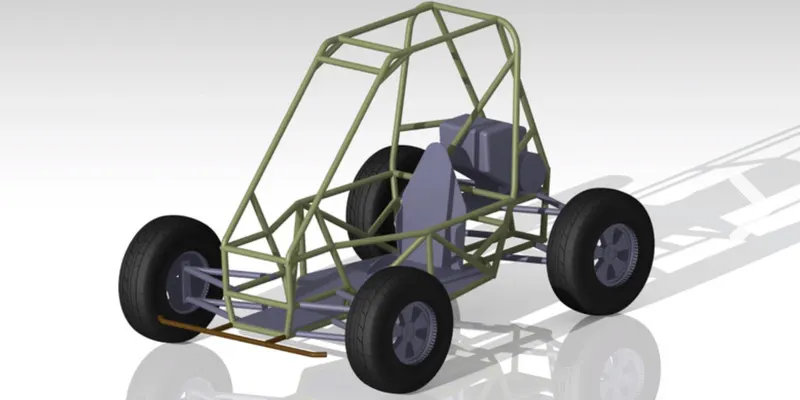
Figure 2: ATV developed for SAE Baja [2]
The purpose of Baja SAE racing is to develop, build, and race off-road cars that can resist the most extreme conditions. The vehicles used in Baja SAE racing resemble dune buggies in appearance. The competitions were previously known as "Mini Baja". The Baja SAE challenges students to design, fabricate, and validate a single-seater for-wheeled off-road vehicle that will compete in a series of events over the course of three days that will assess the vehicle's sound engineering practices, agility in terms of gradeability, speed, acceleration, and maneuverability characteristics, and finally its ability to withstand the back-breaking durability test.
Continuous Variable Transmission
A continuous variable transmission (CVT) is a gearbox that may gradually change to any effective gear ratio between the driver and driven shafts within a predetermined upper and lower limit, allowing the engine to run at high combustion efficiency.
The CVT is built to meet the requirements of the SAE Baja race. This gearbox outperforms manual transmissions in terms of acceleration and handling, as well as being more cost-effective than other transmissions on the market. CVT is the ideal alternative for balancing fuel economy and vehicle performance. A CVT allows the engine to function at high combustion efficiency, resulting in lower emissions and better fuel economy, thanks to changing gear ratios between the driving and driven shafts. In general, a car has just 4 to 6 specific gear ratios from which to choose, whereas a CVT has unlimited changeable gear ratios, allowing the engine to keep a steady speed as the vehicle speeds up. If the CVT is shifted so that the engine is held at the RPM where it runs most efficiently and produces the greatest power, the car will perform better. CVTs may function smoothly with no unexpected jerks, unlike manual transmissions, because there are no steps between effective gear ratios.
Objectives:
- Understand the All-Terrain Vehicle and the SAE BAJA.
- Understand the working principle of Continuous Variable Transmission.
- Study and Analysis of ATV Model without Dashboard.
- Study and Analysis of ATV Model with Dashboard with varying input.
I. Simulink ATV Model without Dashboard (cvtModel.slx):
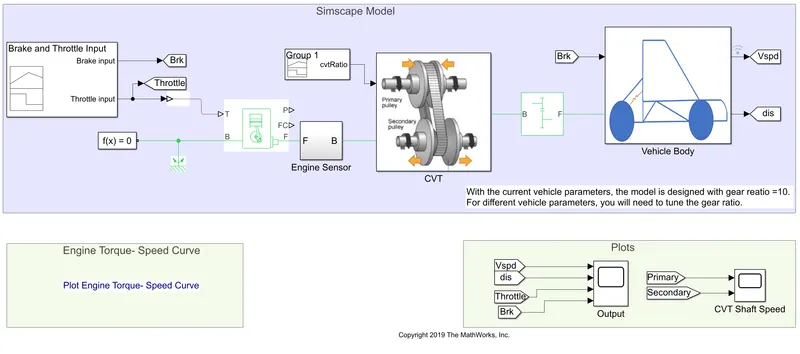
Blocks used and their purposes:
- Signal Builder: You can use the signal builder to generate interchangeable groups of piecewise linear signal sources to utilize in a model.
- Goto: The Goto block sends its input to the From blocks that correspond to it. The input can be a signal with a real or complex value, or a vector with any data type. You can send a signal from one block to another using the From and Goto blocks without actually joining them.
- Simulink PS Converter: Converts the Simulink input signal to a physical Signal.
- Generic Engine: It is a system level model of spark ignition and diesel engines that can be used when only the fundamental parameters are available in the early stages of modeling.
- Solver Configuration: The Solver configuration block specifies the solver parameter that your model requires before the simulation can begin.
- Mechanical Rotational Reference: It represents a reference point, or frame, for all mechanical rotational ports.
- Engine Sensor: It is a subsystem model which consists of the following simulation blocks.
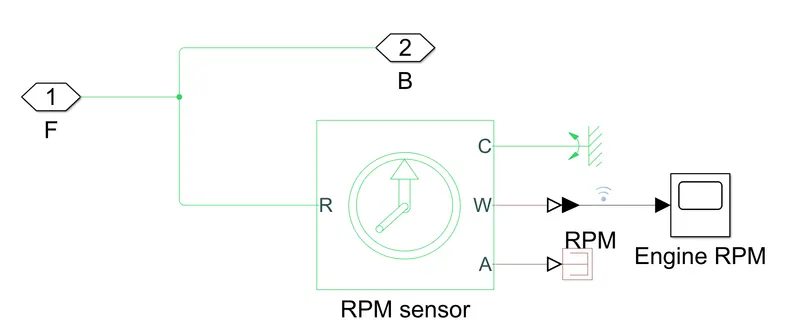
- Ideal Rotational Motion Sensor: The Ideal Rotational Motion Sensor block is a device that translates an across variable measured between two mechanical rotational nodes into a control signal proportional to angular velocity or angle. As a block argument, you can give the beginning angular position (offset).
- Mechanical rotational reference: represents a reference point, or frame, for all mechanical rotational ports.
- PS-Simulink Converter: This block converts the input physical signal to a Simulink output signal.
- Scope: displays the signal generated during simulation.
- PS terminator: This block is to terminate physical signal outputs.
- CVT: It is a subsystem model which consists of the following simulation blocks.
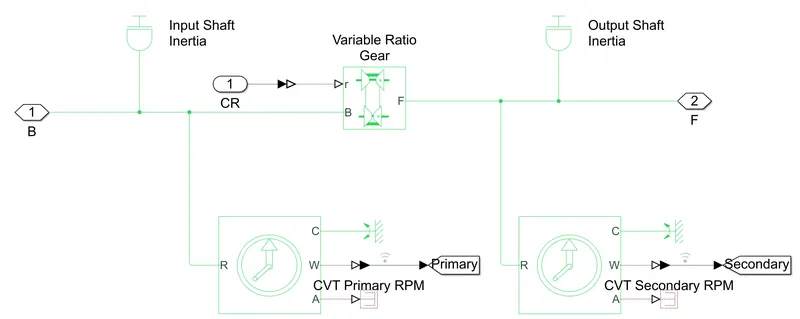
- Inertia: The block represents an ideal mechanical rotational inertia.
- Ideal Rotational Motion Sensor: The Ideal Rotational Motion Sensor block is a device that translates an across variable measured between two mechanical rotational nodes into a control signal proportional to angular velocity or angle. As a block argument, you can give the beginning angular position (offset).
- Mechanical rotational reference: represents a reference point, or frame, for all mechanical rotational ports.
- PS-Simulink Converter: This block converts the input physical signal to a Simulink output signal.
- Goto: The Goto block sends its input to the From blocks that correspond to it. The input can be a signal with a real or complex value, or a vector with any data type. You can send a signal from one block to another using the From and Goto blocks without actually joining them.
- PS terminator: This block is to terminate physical signal outputs.
- Variable Ratio Transmission: represents a variable ratio gearbox, such as a mechanical belt CVT, an electric transmission, or a hydraulic transmission.
- Simple Gear: The block is for a fixed ratio gear or gearbox.
- Vehicle Body: It is a subsystem model which consists of the following simulation blocks.
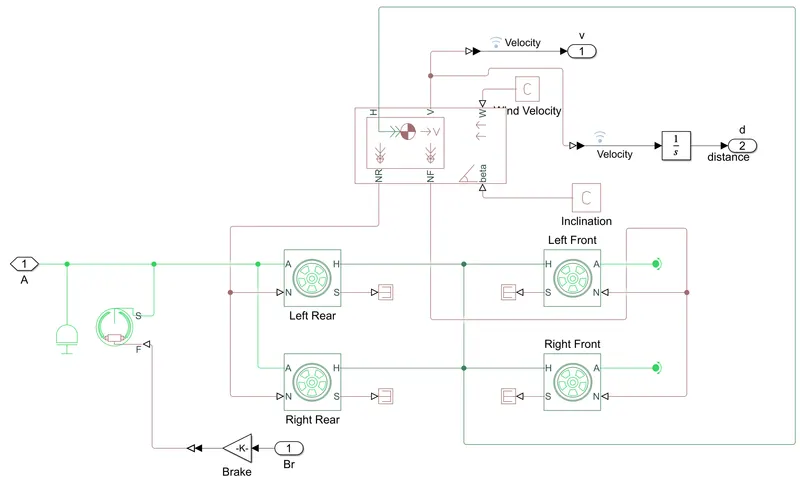
- Inertia: The block represents an ideal mechanical rotational inertia.
- Double Shoe Brake: A frictional brake with two pivoted rigid shoes that push against a rotating drum to provide braking action is represented by the Double-Shoe Brake block. In a diametrically opposed design, the rigid shoes sit inside or outside the revolving drum. The rigid shoes press against the revolving drum due to a positive actuating force. The rotating drum slows down due to viscous and contact friction between the drum and the rigid shoe surfaces.
- Gain: Element wise gain or matrix gain.
- Tire: represents the longitudinal behavior of a highway tire characterized by the tire magic formula.
- PS terminator: This block is to terminate physical signal outputs.
- Vehicle Body: A two-axle vehicle body in longitudinal motion is represented by the Vehicle Body block. Each axle might have the same number of wheels or a different number of wheels. Due to acceleration and road profile, the block accounts for body mass, aerodynamic drag, road gradient, and weight distribution between axles. Pitch and suspension dynamics can be included if desired. In relation to the ground, the vehicle does not move vertically.
- PS Constant: Block to create a physical signal constant.
- PS-Simulink Converter: This block converts the input physical signal to a Simulink output signal.
- Integrator: gives the output of the integral of its input signal with respect to the time.
- From: The From block receives a signal from a related Goto block and outputs it. The output data type is the same as the Goto block's input data type. You can send a signal from one block to another using the From and Goto blocks without actually joining them.
- Scope: displays signals generated during simulation.
Explanation of the Model:
The throttle and the brake input created using the signal builder is shown in Figure 3, and the throttle is provided to the Generic Engine. It can be observed that no brake is applied, but a constant throttle is applied to the entire time of study.
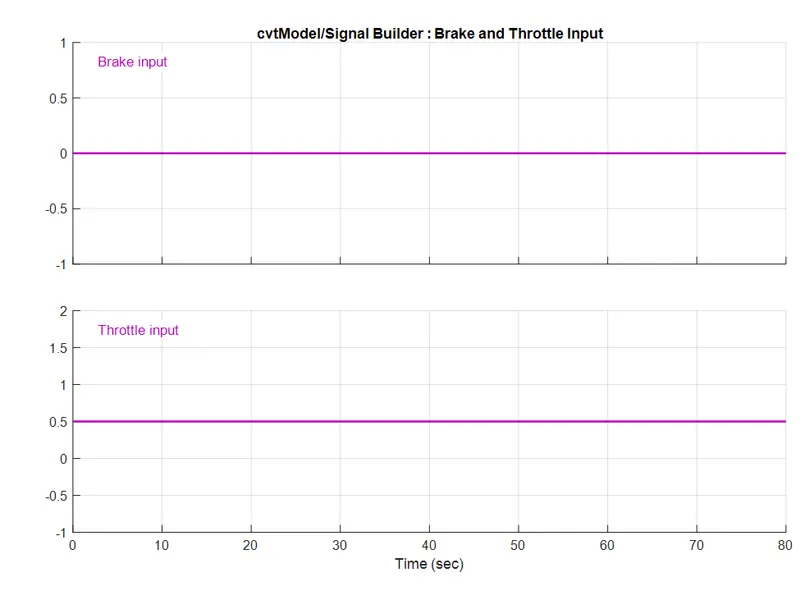 Figure 3: Input Throttle and brake
The throttle input is converted to the physical signal using PS-Simulink converter and is provided to the Generic Engine. The initial condition of the engine block has already been set, and Speed Vector and Torque Vector are provided as input. The input data provided to the model can be seen in Figure 4.
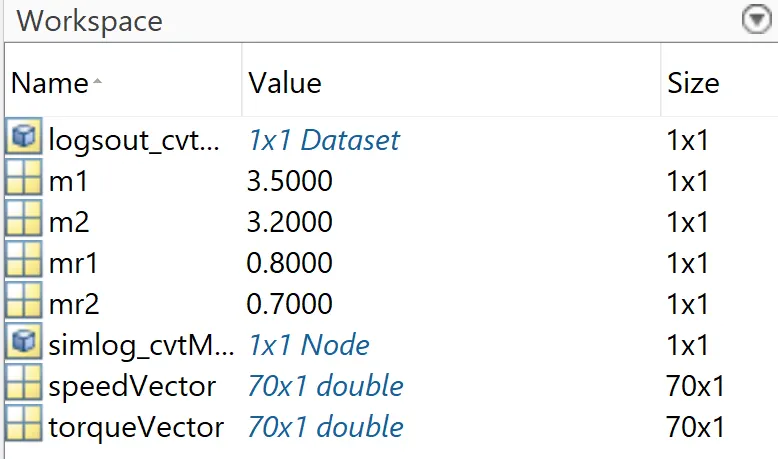
Figure 4: Input data for the model.
As seen in Figure 4, some inputs are provided in Workspace. The graphical representation of Input speed and torque to the Generic engine is represented in Figure 5 and 6. These data provide the relation between torque and rpm of the engine as shown in Figure 7.
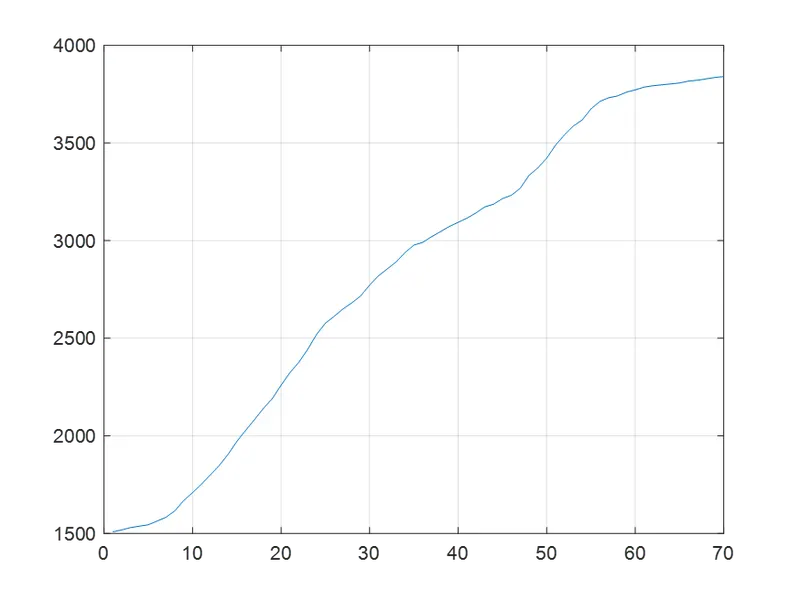
Figure 5: Speed Input to the Generic Engine.
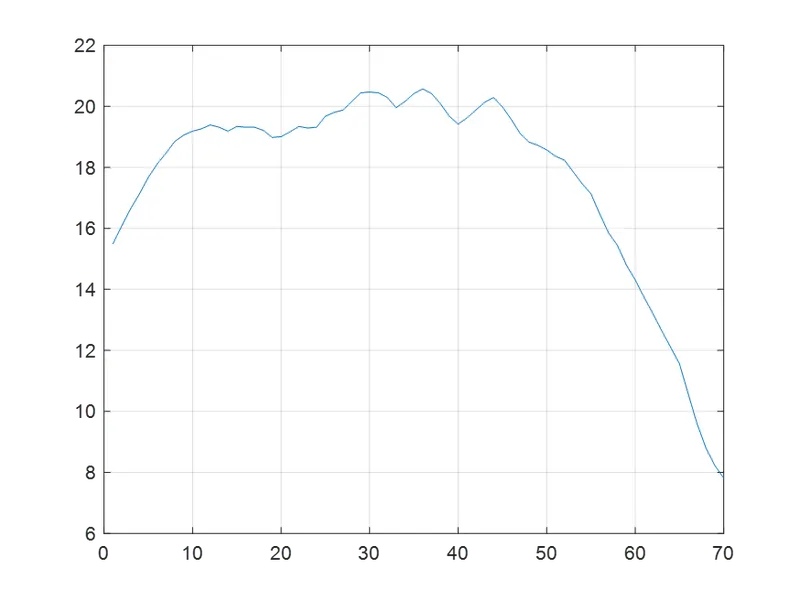
Figure 6: Torque Input to the Generic Engine.
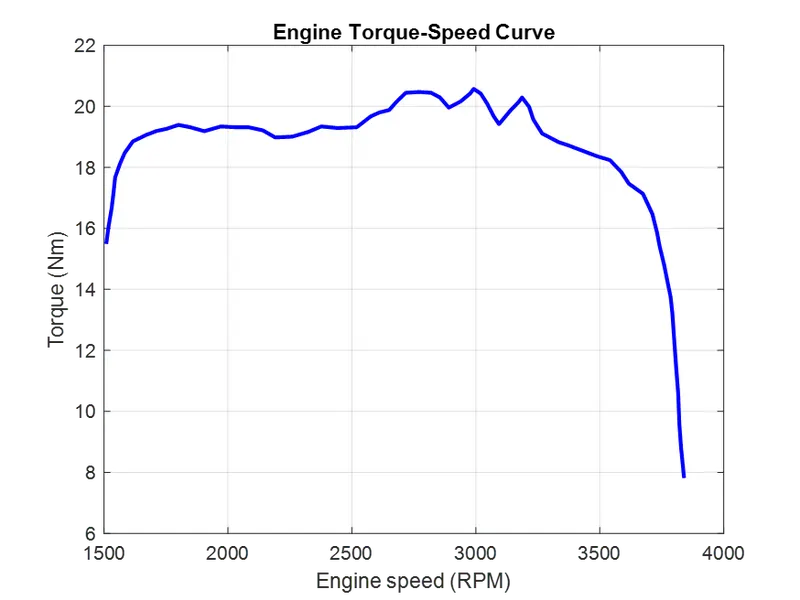
Figure 7: Engine Torque - Speed Characteristic Curve.
The output from the Generic Engine is passed is provided to the subsystem Engine Sensor, where it records the rpm of the engine during the simulation, and then it is forwarded towards the CVT transmission. The engine rpm sensed by the Engine sensor can be viewed through the scope in the Engine Sensor subsystem as shown in Figure 8.
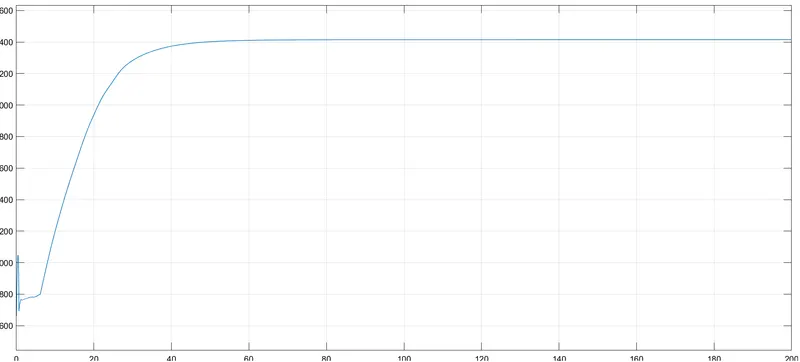
Figure 8: Engine rpm detected by Engine Sensor.
The CVT subsystem is provided with two inputs. One is the rpm directly from the Generic Engine, and other is the gear ratio at each time. The CVT subsystem converts changes the rpm from the engine to the appropriate rpm for the wheels of the vehicle before the gear reduction by simple gear using the gear ratio built using Signal builder as shown in Figure 9.
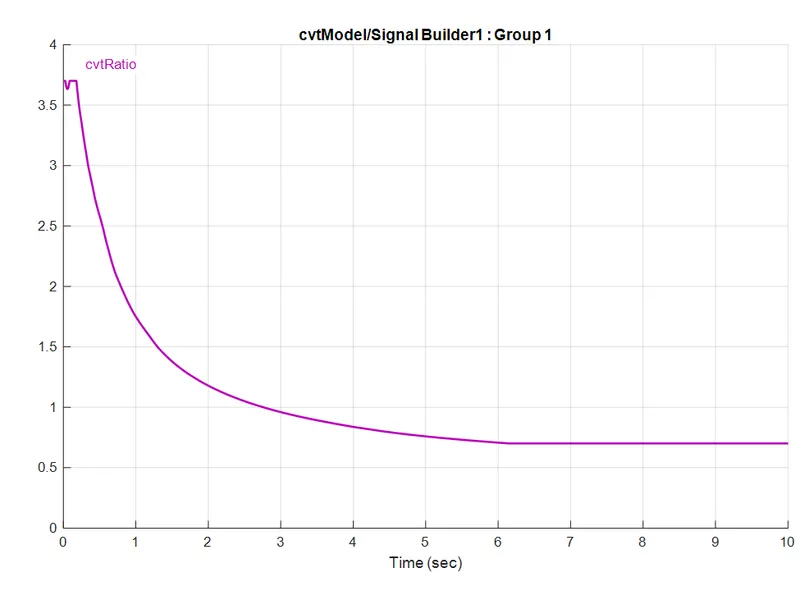
Figure 9: Gear ratio given to the CVT subsystem using Signal Builder.
The CVT subsystem also has two Ideal Rotational motion sensors to detect the rpm before passing the variable gear ratio and after passing. The rpm detected before passing Variable Ratio Gear will be similar as detected by Engine Sensor (there will be minor difference due to inertia fixed on the axle). These two detected rpm is compared in the Plots subsystem using the scope CVT Shaft Speed as shown in Figure 10. The signal from the CVT block is passed through the simple gear block which can say acts as a differential gearbox before passing to the vehicle body (tires). For this respective model, a gear reduction of 10 is allocated .
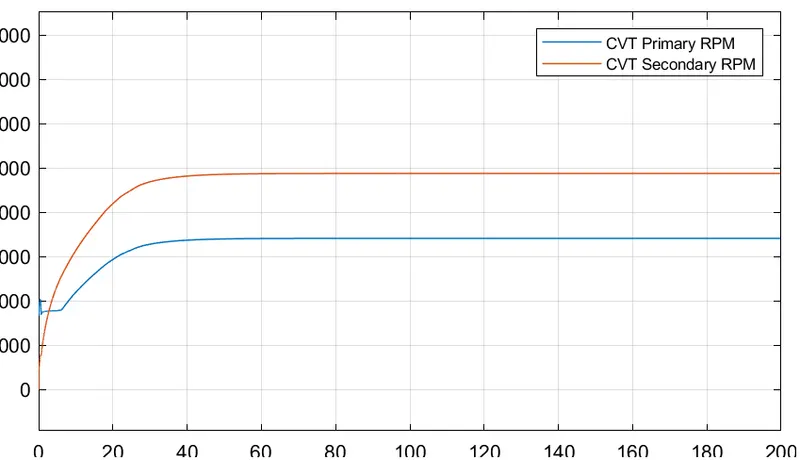
Figure 10: rpm before and after passing the Variable Ratio Gear.
In the Vehicle Body block, two inputs are provided. One from the engine, which is rpm after gear reduction, and the other is the brake input. Since the model is designed on the two-wheel drive system, the input signal from engine from simple gear is provided to both rear wheels of the vehicle body. The rotational inertia of the shafts is connected to the engine input signal before it reaches tire since there will be rotational inertia of the shafts. The Double Shoe Brake block receives the other input brake after it is passed through the gain block which acts as an intensifier to the input brake signal. The brakes are independently connected to the input power, therefore, the output signal from the double shoe brake block is connected to the engine before it reaches the tire. There is a vehicle body block inside the vehicle body subsystem. This enables to incorporate the body mass, aerodynamic drag, road gradeability, and weight distribution between the axles due to acceleration and road profile, with the help of the vehicle dynamics data provided to the block it distributes the normal forces on the tires accordingly. The vehicle body block provides the actual velocity of the vehicle as output, where this signal passes through the integrator block gives the distance covered by the vehicle.
The input signals (throttle and brake) along with the output signals (velocity of the vehicle and distance covered by the vehicle) are connected to the same scope Output in the subsystem Plots which enables to get a generalized comparison of the signals as shown in Figure 11.
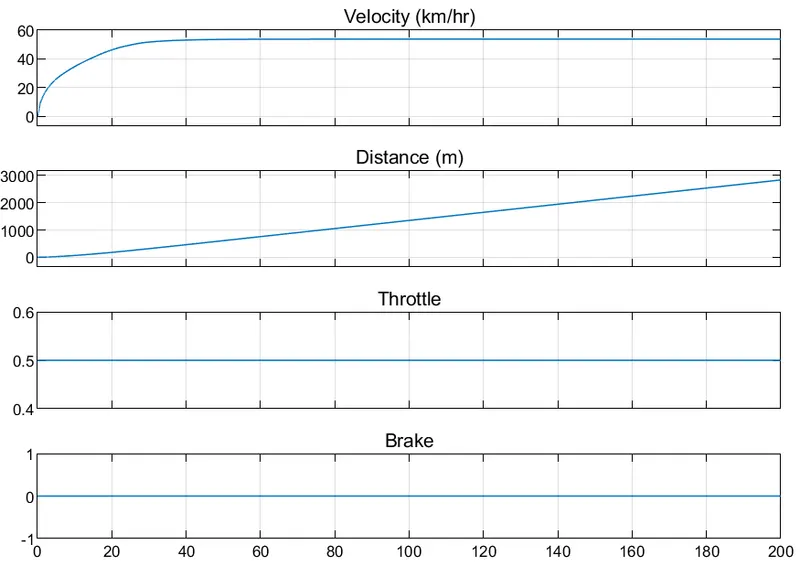
Figure 11: Input and Output Signals.
Observation and Conclusion:
The initial velocity/rpm of the engine is defined as 1750 rpm, then as the throttle value is constant input, the input rpm of the engine increases accordingly and reaches a constant value, which is the maximum value.
The engine rpm looks similar to the rpm at the primary shaft. The difference will be due to inertia and other factors which accounts for some losses.
The simulation is done for 200 seconds, where a constant throttle and a zero-brake input is provided. Initially, the velocity of the vehicle is increased rapidly and then thereafter, a constant rpm is reached, where the velocity of vehicle becomes constant as well. As we know that, the integration of velocity gives the distance travelled, during the initial simulation time, the distance travelled is parabolic and then the line becomes straight.
II. Simulink ATV Model with Dashboard (cvtModel_dashboard.slx):
The model is identical to the previous model, with the exception that the throttle and brake values can be altered while the simulation is running and then view the consequences.
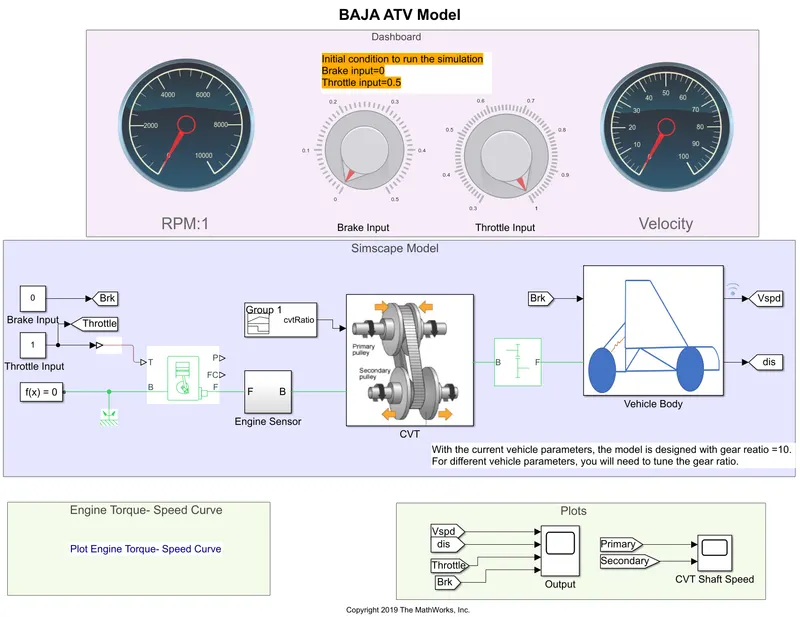
Blocks used and their purposes:
- Circular Gauge: display an input value on a customized gauge.
- Knob: block to set a value to tune parameter or variables.
- Constant: a constant value is given as output specified by the constant value parameter.
- Goto: The Goto block sends its input to the From blocks that correspond to it. The input can be a signal with a real or complex value, or a vector with any data type. You can send a signal from one block to another using the From and Goto blocks without actually joining them.
- Simulink PS Converter: Converts the Simulink input signal to a physical Signal.
- Generic Engine: It is a system level model of spark ignition and diesel engines that can be used when only the fundamental parameters are available in the early stages of modeling.
- Solver Configuration: The Solver configuration block specifies the solver parameter that your model requires before the simulation can begin.
- Mechanical Rotational Reference: It represents a reference point, or frame, for all mechanical rotational ports.
- Engine Sensor: It is a subsystem model which consists of the following simulation blocks.
- Ideal Rotational Motion Sensor: The Ideal Rotational Motion Sensor block is a device that translates an across variable measured between two mechanical rotational nodes into a control signal proportional to angular velocity or angle. As a block argument, you can give the beginning angular position (offset).
- Mechanical rotational reference: represents a reference point, or frame, for all mechanical rotational ports.
- PS-Simulink Converter: This block converts the input physical signal to a Simulink output signal.
- Scope: displays the signal generated during simulation.
- PS terminator: This block is to terminate physical signal outputs.
- CVT: It is a subsystem model which consists of the following simulation blocks.
- Inertia: The block represents an ideal mechanical rotational inertia.
- Ideal Rotational Motion Sensor: The Ideal Rotational Motion Sensor block is a device that translates an across variable measured between two mechanical rotational nodes into a control signal proportional to angular velocity or angle. As a block argument, you can give the beginning angular position (offset).
- Mechanical rotational reference: represents a reference point, or frame, for all mechanical rotational ports.
- PS-Simulink Converter: This block converts the input physical signal to a Simulink output signal.
- Goto: The Goto block sends its input to the From blocks that correspond to it. The input can be a signal with a real or complex value, or a vector with any data type. You can send a signal from one block to another using the From and Goto blocks without actually joining them.
- PS terminator: This block is to terminate physical signal outputs.
- Variable Ratio Transmission: represents a variable ratio gearbox, such as a mechanical belt CVT, an electric transmission, or a hydraulic transmission.
- Simple Gear: The block is for a fixed ratio gear or gearbox.
- Vehicle Body: It is a subsystem model which consists of the following simulation blocks.
- Inertia: The block represents an ideal mechanical rotational inertia.
- Double Shoe Brake: A frictional brake with two pivoted rigid shoes that push against a rotating drum to provide braking action is represented by the Double-Shoe Brake block. In a diametrically opposed design, the rigid shoes sit inside or outside the revolving drum. The rigid shoes press against the revolving drum due to a positive actuating force. The rotating drum slows down due to viscous and contact friction between the drum and the rigid shoe surfaces.
- Gain: Element wise gain or matrix gain.
- Tire: represents the longitudinal behavior of a highway tire characterized by the tire magic formula.
- PS terminator: This block is to terminate physical signal outputs.
- Vehicle Body: A two-axle vehicle body in longitudinal motion is represented by the Vehicle Body block. Each axle might have the same number of wheels or a different number of wheels. Due to acceleration and road profile, the block accounts for body mass, aerodynamic drag, road gradient, and weight distribution between axles. Pitch and suspension dynamics can be included if desired. In relation to the ground, the vehicle does not move vertically.
- PS Constant: Block to create a physical signal constant.
- PS-Simulink Converter: This block converts the input physical signal to a Simulink output signal.
- Integrator: gives the output of the integral of its input signal with respect to the time.
- From: The From block receives a signal from a related Goto block and outputs it. The output data type is the same as the Goto block's input data type. You can send a signal from one block to another using the From and Goto blocks without actually joining them.
- Scope: displays signals generated during simulation.
Explanation of the Model:
The throttle and the brake input is provided using the knob block as shown in Figure 12, and the throttle is provided to the Generic Engine.
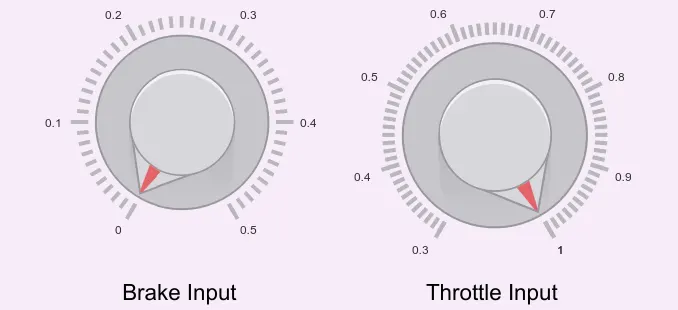
Figure 12: Brake and Throttle Input using Knob block.
The throttle input using knob is linked with the constant block, is converted to the physical signal using PS-Simulink converter and is provided to the Generic Engine. The initial condition of the engine block has already been set, and Speed Vector and Torque Vector are provided as input. The input data provided to the model can be seen in Figure 13.
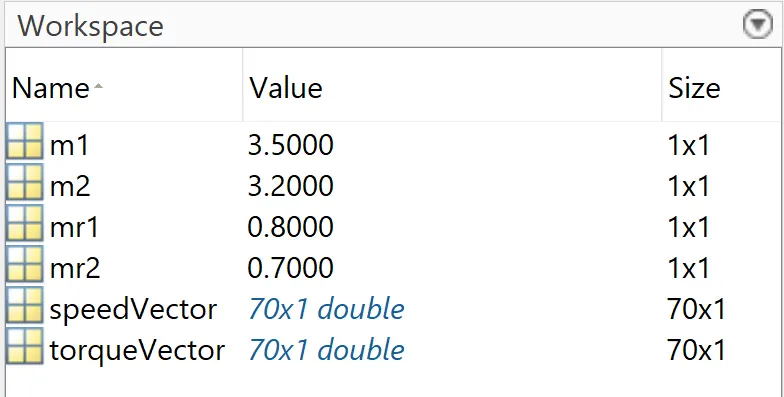
Figure 13: Input data for the model.
As seen in Figure 13, some inputs are provided in Workspace. The graphical representation of Input speed and torque to the Generic engine (seen in Figure 13 as speedVector and torqueVector) are represented in Figure 14 and 15.
Figure 14: Speed Input to the Generic Engine.
Figure 15: Torque Input to the Generic Engine.
The output from the Generic Engine is passed is provided to the subsystem Engine Sensor, where it records the rpm of the engine during the simulation, and then it is forwarded towards the CVT transmission. The engine rpm sensed by the Engine sensor can be viewed through the scope in the Engine Sensor subsystem.
The CVT subsystem is provided with two inputs. One is the rpm directly from the Generic Engine, and other is the gear ratio at each time. The CVT subsystem converts changes the rpm from the engine to the appropriate rpm for the wheels of the vehicle before the gear reduction by simple gear using the gear ratio built using Signal builder as shown in Figure 16.
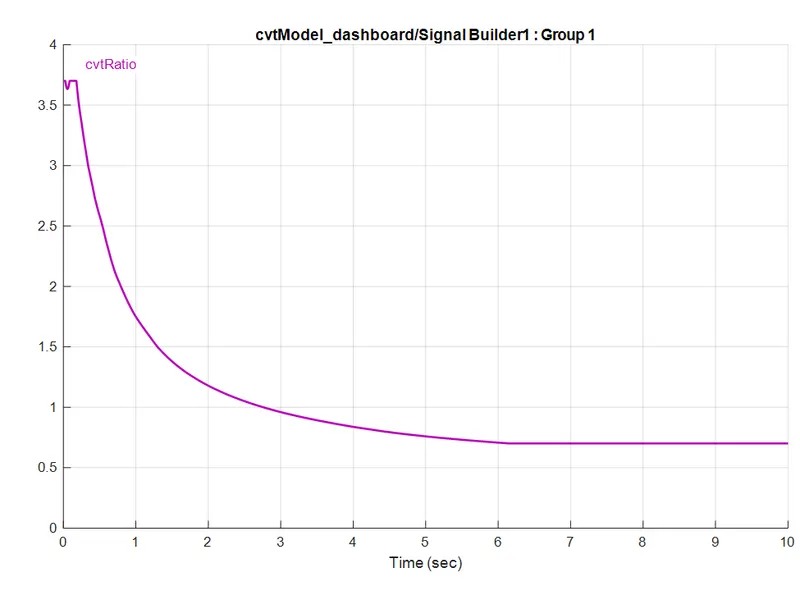
Figure 16: Gear ratio given to the CVT subsystem using Signal Builder.
The CVT subsystem also has two Ideal Rotational motion sensors to detect the rpm before passing the variable gear ratio and after passing. The rpm detected before passing Variable Ratio Gear will be similar as detected by Engine Sensor (there will be minor difference due to inertia fixed on the axle). The signal from the CVT block is passed through the simple gear block which can say acts as a differential gearbox before passing to the vehicle body (tires).
In the Vehicle Body block, two inputs are provided. One from the engine, which is rpm after gear reduction, and the other is the brake input through Knob block. Since the model is designed on the two-wheel drive system, the input signal from engine from simple gear is provided to both rear wheels of the vehicle body. The rotational inertia of the shafts is connected to the engine input signal before it reaches tire since there will be rotational inertia of the shafts. The Double Shoe Brake block receives the other input brake after it is passed through the gain block which acts as an intensifier to the input brake signal. The brakes are independently connected to the input power, therefore, the output signal from the double shoe brake block is connected to the engine before it reaches the tire. There is a vehicle body block inside the vehicle body subsystem. This enables to incorporate the body mass, aerodynamic drag, road gradeability, and weight distribution between the axles due to acceleration and road profile, with the help of the vehicle dynamics data provided to the block it distributes the normal forces on the tires accordingly. The vehicle body block provides the actual velocity of the vehicle as output, where this signal passes through the integrator block gives the distance covered by the vehicle.
The Model is run in real time, and the Brake Input as well as the Throttle input is varied using the knob. The output obtained from the Output scope in the Plots area is shown in Figure 17. It can be seen that both the inputs Throttle and brake is varied randomly in order to imitate the real life situation, leading to the varying velocity of the vehicle. The distance travelled by the vehicle can also be seen where it is not a straight line.
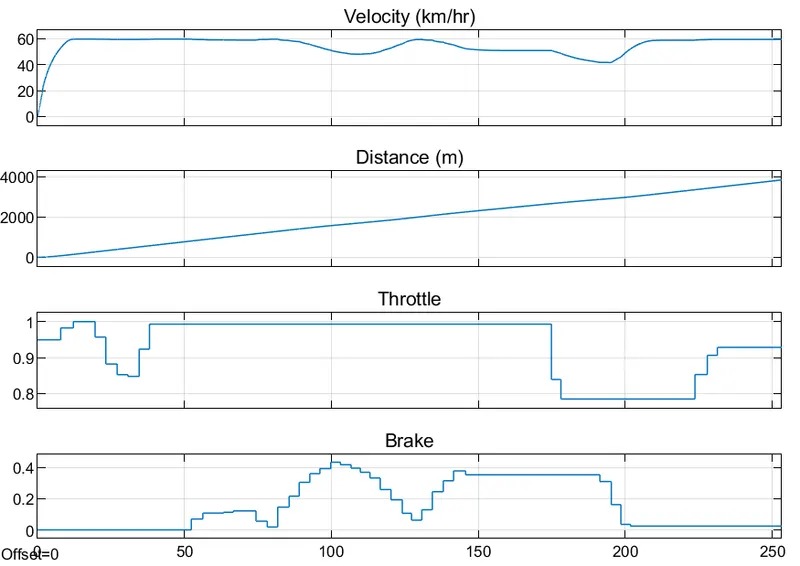
Figure 17: Input and Output Signals
The rpm before and after the CVT subsystem is plotted as seen in Figure 18. The signal from the CVT subsystem is then passed to simple Gear, where a gear reduction of 10 happens. The Engine Torque - Speed Characteristic Curve can be seen in Figure 19.
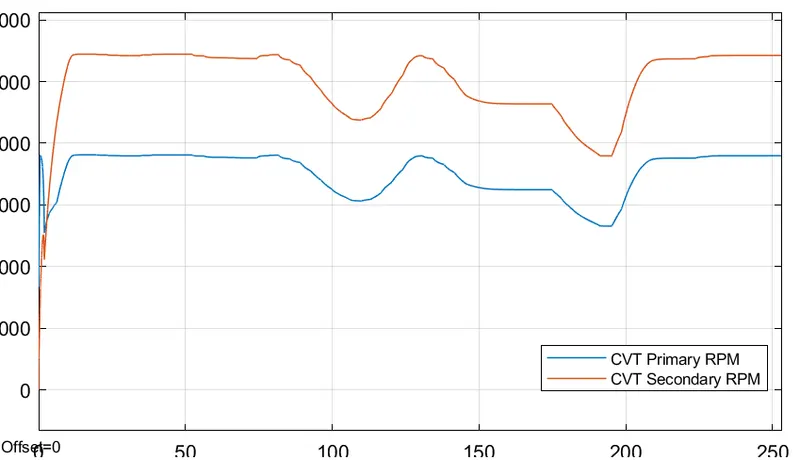
Figure 18: rpm before and after passing the Variable Ratio Gear.
Figure 19: Engine Torque - Speed Characteristic Curve.
Conclusion:
The Simulink model 'BAJA ATV Model, cvtModel_dashboard.slx' is same as 'cvtModel.slx' except that the input throttle and brake can be provided using the knob.
From these models, it is observed that, one can easily understand how the vehicle will perform under the provided condition. The time required to attain a certain velocity and time to stop vehicle running at a particular velocity completely can be found using these models. The maximum speed attained by the vehicle can also be found.
The main purpose of this model is to help in verifying the performance of the vehicle under the constructed brake and throttle system.
Downloadable Link:
The model can be downloaded from: https://www.mathworks.com/matlabcentral/fileexchange/70576-baja-all-terrain-vehicle-atv-model
References:
[1] https://www.motorcyclesdata.com/2022/03/03/all-terrain-vehicles/
[2] https://grabcad.com/library/baja-sae-all-terrain-vehicle-2
[3] https://de.mathworks.com/help/physmod/sdl/ref/vehiclebody.html
[4] https://de.mathworks.com/help/simulink/dashboard.html
[5] https://de.mathworks.com/help/simulink/ug/load-data-using-the-from-workspace-block.html