Project 1 - Parsing NASA thermodynamic data
Objective
1) To Read ,Extract and operate Data Present in thermo30.data
2) To extract the 14 co-efficients for a given species.
3)To calculate the enthalpy, entropy and specific heats using the NASA polynomials.
4)To calculate the molecular weight of each species.
5) To Plot the Cp, Enthalpy and Entropy of all species present in Thermo Data. 6) To save plots of particular species in a appropriate directory.
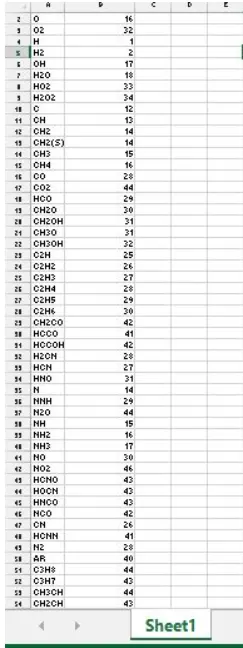
7) To Generate and save table containing molecular weight and Species Name.
Theory
Parsing is the process of analysing a string of symbols, either in natural language, computer languages or data structures, conforming to the rules of a formal grammar.Within computational linguistics the term is used to refer to the formal analysis by a computer of a sentence or other string of words into its constituents, resulting in a parse tree showing their syntactic relation to each other, which may also contain semantic and other information.
[1] In the following Program we are using NASA Polynomial format for CHEMKIN-II.The Chemkin thermo file format is based very closely on the NASA (1971) file format [2][3].To read more about chemkin thermo file format click Read about Chemkin Format.
The view NASA Thermodynamic Data File[4] Click NASA Thermodynamic Data
Code synthesis
Reading thermodynamic file
The file can be opened using fopen command [5] and permission is set to read
filelD = fopen(filename,permission)
e.g f
l=fopen('thermo30.dat.txt7r.)
Calculating No of lines
Using for loop running infinite times, the program reads file line by line by using fgetl command[6]. Then it compares the line with term "END' to find out the end of file using strcmp command[7].If it returns true then loop breaks and value of no of lines is equal to count of loop at break[8].
e.g
for i=1:Inf
line= fgetl(f1); flag=strcmp
(line,'END'); if(flag==1)
no_of_lines=i; break;
end
end
Calculating No of species
present It can be calculated by simple formula
no_of_species=(no_of_lines-6)/4;
Finding global temperature range
Finding Global Temperature Range To find global temperature range, first file pointer is set to initial line by using frewind command [9].Then first line is dumped and second line is read and stored in String. Then this string is broken from locations of space(' ')by using strsplit command[10] and then correct strings from broken strings are selected and converted it to numerical value by str2double command[11].
e.g
%finding Global Temperature Range
frewind(fl); % to bring file pointer to intial position of file
fgetl(f1); %reading the first line
data = fgetl(fl); %reading the second
line split = strsplit(data,"); % separating string by space
for i = 1:length(split)
gt(i) = str2double(split{i}); %convrsion of string charaters to numbers
end
global_min = gt(2); %global min temperature
limit = gt(3); %global med temperature
global_high = gt(4); %global max temperature
Creating a main body of program
Main body of program runs in for loop ,for times equal to no of species present in data.This loop contains various functions to get diffferent data which are as follows
a) get_coff is function to evaluate all 14 coefficients of a particular species.Then first 7 coefficient gets stored in h_coff and last 7 coefficient get stored in 1_coff.
b) A time array is created using linspace command.
c)get_cp, get_h, get_s are the functions to evaluate Cp , enthalpy and entropy respectively for a particular spieces.
d)get_element is a function to get spieces Name for a particular spieces.
e)get_mw is a function to get spieces molecular weight for a particular spieces.
f)get_plots is a function to plot spieces data and save result figures in jpg format for a particular spieces.
g)Chemical_formula is an array to store all spieces name. Transpose of Chemical_formula and molecular_wt is used to create a table by using table command[12] and table in written in xlsx format by using writetable command [13].
for k=i:no_of_species
str=k;
coff=get_coff(fl,str); %function to get 14 coefficients
h_coff=coff(1:7); % high Temperature coefficients
l_coff=coff(8:14); % low Temperature coefficient
temp=linspace(300,3500,320); % this temperature range is a best fit between local and global temperature
cp=get_cp(h_coff,l_coff,temp,limit); % function to attain cp value for particular Spieces
H=get_h(h_coff,l_coff,temp,limit); % function to attain Enthapy value for particular Spieces
S=get_s(h_coff,l_coff,temp,limit); % function to attain Entropy value for particular Spieces
element=get_element(fl,str); % function to attain spiecies Name value for particular Spieces molecular_wt(k)=get_mw(element) ; % function to attain spiecies Molecular Weight value for particular Spieces
get_plots(cp,H,S,temp,element); %function to attain Plots and saving plots to relevant location for particular Speices
chemical_formula(k)={get_element(fl,str)}; %storing spieces Name in a cell array
end
%generating table to store results of molecular weight
Spieces_Molecular_weight = table(chemical_formula', molecular_wt'); %generating table
Spieces_Molecular_weight.Properties.VariableNames = {'Spieces' Molecular_weight' }; %Naming table variables
writetable(Spieces_Molecular_weight,'Spieces_Molecular_weight.xlsx'); % saving table in xlsx format.
Creating get_coeff function
This function can be understood by following statements
a) 'i' indicates line number where coefficient data of particular species is stored.
b) File pointer is set to initial line by using frewind command.
c) Using textscan command[14] data can be read and stored from ith line as shown below. Then using fgetl command data of next two lines is stored.
d) Since textscan creates a cell arrayof lxl , the cell array 'd' is converted into char string using char command and since is cell array '{}' is used.
e)Location of exponent E is found out using strfind command[15],then first coefficient is stored in string format and then it is converted to number by using str2double command. Same procedure is caried out to find out all remaining coefficient.Then an array is created to store all 14 coefficients.
function[coffl=get_coff(f1,str)
i=4*(str-1)+7; % getting spiecies Number
frewind(f1); % to bring file pointer to intial position of file
d = textscan(f1,'%s',1,'delimiter','n', 'headerlines',i-1); % to read line from i position
D=char(d{1}); %converting cell array to string
E=fgetl(f1); % Reading next line
F=fgetl(f1); % Reading next line
%Finding Location of Exponent in D,E,F
string a=strfind(D,'E');
b=strfind(E,'E');
c=strfind(F,'E');
%getting 14 coefficients
a1=D(1:a(1)+3);
a1=str2double(a1);
a2=D(a(1)+4:a(2)+3);
a2=str2double(a2);
a3=D(a(2)+4:a(3)+3);
a3=str2double(a3);
a4=D(a(3)+4:a(4)+3);
a4=str2double(a4);
a5=D(a(4)+4:a(5)+3);
a5=str2double(a5);
a6=E(1:b(1)+3);
a6=str2double(a6);
a7=E(b(1)+4:b(2)+3);
a7=str2double(a7);
a8=E(b(2)+4:b(3)+3);
a8=str2double(a8);
a9=E(b(3)+4:b(4)+3);
a9=str2double(a9);
a10=E(b(4)+4:b(5)+3);
a10=str2double(a10);
a11=F(1:c(1)+3);
a11=str2double(a11);
a12=F(c(1)+4:c(2)+3);
a12=str2double(a12);
a13=F(c(21+4:c(3)+31:
a13=str2double(a13);
al4=F(c(3)+4:c(4)+3);
al4=str2double(a14);
coff=[al a2 a3 a4 a5 a6 a7 a8 a9 al0 all a12 a13 a14];
Creating get_cp function
This function takes inputs as high temperature coefficients , low temperature coefficients, temprature array and limit to decide whether to use high cofficient or low coefficients. This functions contains a simple for loop to carry out operations at each temperature in temperature array. Cp can be calculated by using
Cp/R = al + a2 T + a3 TA2 + a4 TA3 + a5 TA4
then if condition is used to decide, whether to use high coefficient or low coefficients and it is decided by value stored in limit variable.
function [Cp]=get_cp(high_temp,low_temp,temp,limit)
R=8.314; %unit j/mol*K
% Calculating Cp for different temperatures
for i=1:length(temp)
terml = high_temp(1);
term2 = high_temp(2).*temp(i);
term3 = high_temp(3).xtemp(i)^2;
term4 = high_temp(4).*temp(i)^3;
term5 = high_temp(5).xtemp(i)^4;
term6 = low_temp(1);
term7 = low_temp(2).*temp(i);
term8 = low_temp(3).*temp(i)^2;
term9 = low_temp(4).*temp(i)^3;
term10 = low_temp(5).*temp(i)^4;
if temp(i)>=1imit
Cp(i)= R.*(term1+ term2 +term3+ term4+term5);
else
Cp(i)=R.*( term6 +term7 +term8 +term9 +term10);
end
end
end
Creating get_h function
This function takes inputs as high temperature coefficients , low temperature coefficients, temprature array and limit to decide whether to use high cofficient or low coefficients. This functions contains a simple for loop to carry out operations at each temperature in temperature array. Enthalpy can be calculated by using
H/RT = al + a2 T /2 + a3 T^2 /3 + a4 T^3 /4 + a5 T^4 /5 + a6/T
then if condition is used to decide, whether to use high coefficient or low coefficients and it is decided by value stored in limit variable.
function [H]=get_h(high_temp,low_temp,temp,limit)
R=8.314; %unit 7/mol*K
% Calculating enthalpy for different temperatures
for i=1:length(temp)
term1=high_temp(1).*temp(i);
term2=(high_temp(2).*temp(i)^2)/2;
term3=(high_temp(3).*(temp(i)^3))/3;
term4=(high_temp(4).*(temp(i)^4))/4;
term5=(high_temp(5).*(temp(i)^5))/5;
term6=high_temp(6);
term7=low_temp((1).*temp(i);
term8=(low_temp((2).*temp(i)^2)/2;
term9=(low_temp((3).*(temp(i)^3))/3;
term10=(low_temp((4).*(temp(i)^4))/4;
ter11=(low_temp((5).*(temp(i)^5))/5;
term12=low_temp(6);
if temp(i)>=limit
H(1)=R.*(term1+term2+term3+term4+term5+term6);
else
H(1)=R.*(term7+term8+term9+term10+term11+term12);
end
end
end
Creating get_s function
This function takes inputs as high temperature coefficients , low temperature coefficients, temprature array and limit to decide whether to use high cofficient or low coefficients. This functions contains a simple for loop to carry out operations at each temperature in temperature array. Entropy can be calculated by using
S/R = al InT + a2 T + a3 T^2 /2 + a4 T^3 /3 + a5 T^4 /4 + a7
then if condition is used to decide, whether to use high coefficient or low coefficients and it is decided by value stored in limit variable.
function [S]=get_s(high_temp,low_temp,temp,limit)
R=8.314; %unit 7/mol*K
% Calculating Entropy for different temperatures
for i=1:length(temp)
term1=high_temp(1).*(log(temp(i)));
term2=high_temp(2).*temp(i);
term3=(high_temp(3).*(temp(i)^2))/2;
term4=(high_temp(4).*(temp(i)^3))/3;
term5=(high_temp(5).*(temp(i)^4))/4;
term6=high_temp(7);
term7=low_temp(1).*(log(temp(i)));
term8=low_temp(2).*temp(i);
term9=(low_temp(3).*(temp(i)^2))/2;
term10=(low_temp(4).*(temp(i)^3))/3;
term11=(low_temp(5).*(temp(i)^4))/4;
term12=high_temp(7);
if temp(i)>=1imit
S(i)=R.*(term1+term2+term3+term4+term5+term6);
else
S(1)=R.*(term7+term8+term9+term10+term11+term12);
end
end
end
Creating get_element function
This function can be understood by following statements:-
a) 'i' indicates line number where species name of particular species is stored.
b) File pointer is set to initial line of file by using frewind command.
c) Using textscan command data can be read and stored from ith line as shown below.
d) Since textscan creates a cell arrayof lxl , the cell array 'r' is converted into char string using char command and since is cell array'{}' is used.
e)Location of space C ')is found out using strfind command ,then string is stored in 'ele' by using simple transformation shown below in code.
function [ ele]=get_element (fl, str)
i=4*(str-1)+6; % getting spiecies Number
frewind(f1); % Setting file pointer to intial position of file
r= textscan(f1,'%s',1,'delimiter','n','headerlines',i-1); % reading line from i position
'R=char(r{1}); %converting cell array to string
u=strfind(R,"); %Finding Location of ' ' in r string
ele=R(1:u(1)-1); %element Name
end
Creating get_mw function
Creating get_mw function
This function takes input as spiecies name and do calculations to evaluate the molecular weight.This function can be understood in following steps:-
a) an array 'a' containing single element name is created and simultaneously another array 'at_w' is created to store element's molecular weight at same index as single element name index.
b) Simpe for loop is run for times equal to length of 'element' array provided at input. Another nested for loop is run for times equal to length of 'a'
c)In nested loop each letter in spiecies name is compared with element name stored in a. then using if statement it is found out if its true or false. If its true molecular weight gets added and nested loop breaks .If it is found false it repeats the loop. str2double is used to find out if spiecies contains any numaric value. Again if statement is used to check if value of n is greater than 1. If its true then molecular weight get adjusted by following formula mentioned in code. If false for loop repeats.
function [W]=get_mw(element)
a = ['H', 'C' ,'N', '0', 'A'];
at_w = [1 ,12, 14, 16, 40]; W=0;
%Calculating molecular weight of Spieces
for i=1:length(element)
for j=1:length(a)
if (strcmp(element(i),a(j))==1)
W=W+at_w(j);
J=j; %storing the index of the matched element
break; %to terminate For loop of j after strings gets matched
end
end
n=str2double(element(i));
if(n>1)
W=W+(at_w(j).*(n)) -at_w(j);
end
end
end
Creating get_plot function
Creating get_plot function
This function takes inputs as specific heat, enthalpy,entropy , temperature and species name as input.Working of this function can be understood by following statements:-
a)Two strings 'properties of ' and element are merged by strcat command[16] and new directory is created using mkdir having name stored in 'txt' string.
b) similarly txtl ,txt2 and txt2 strings are created and they are used as defining legends title.
c)Then ploting is caried out for specific heat by using simple plot command. To save figure saveas command [17] is used. To decide location of save, directory of program is changed to location stored in 'f. f location string can be set by using fullfile command[18]. After saving, directory location is reset to program directory by using another variable to store intial location of program.
d) Step 'c' is repeated to plot enthalpy and entropy.
function[]=get_plots(cp,H,S,temp,element)
txt=strcat('Properties of ',element); %adding two strings
mkdir(txt); %Making directory of string stored in txt
%Creating Legends title
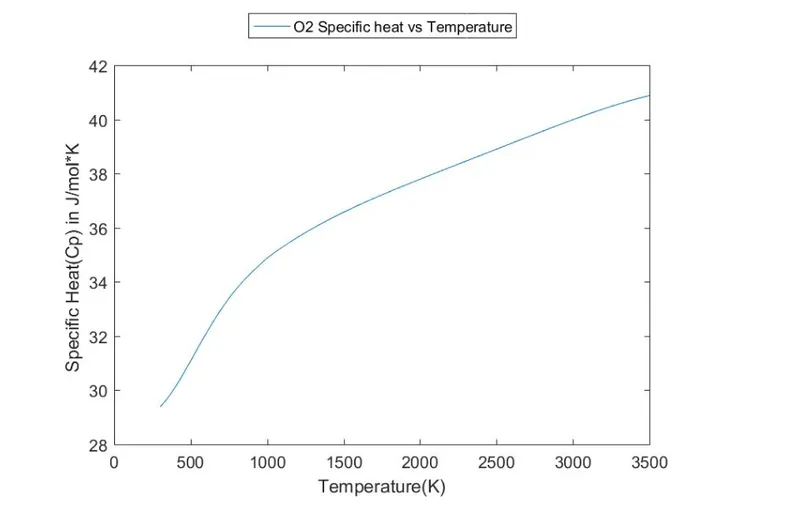
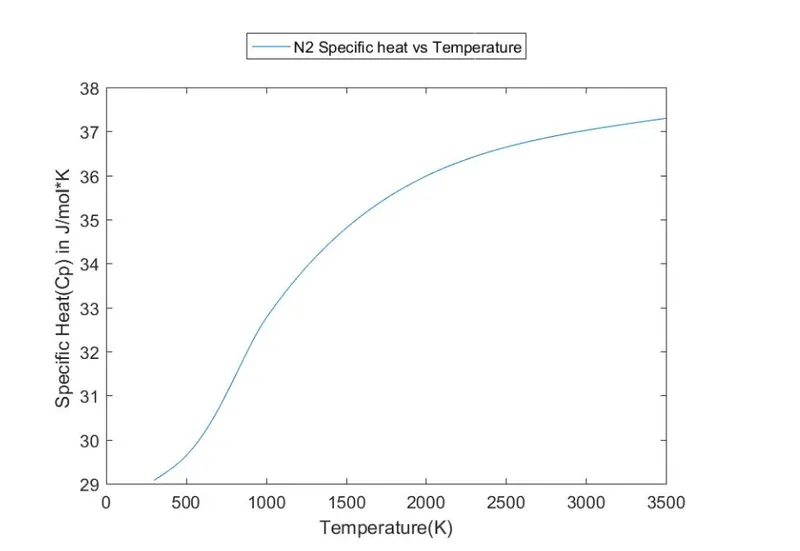
txtl=strcat(element,' Specific heat vs Temperature');
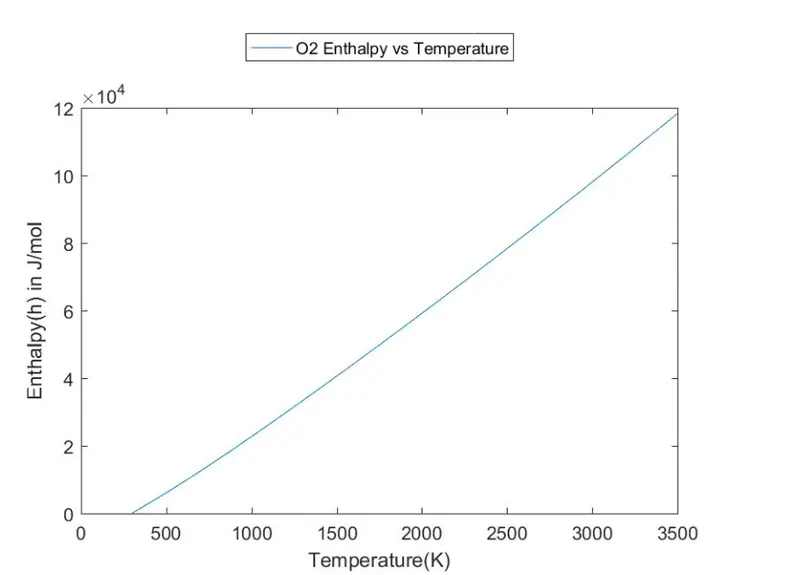
txt2=strcat(element,' Enthalpy vs Temperature');
txt3=strcat(element,' Entropy vs Temperature');
%Ploting and saving figure(1)
plot(temp,cp);
legend(txtl,'Location','northoutside') % creating legend at particular location
xlabel('Temperature(K)');
ylabel('Specific Heat(Cp) in J/mol*K ');
intial_f=pwd; %storing path of current directory
f=fullfile(txt) %storing path of result directory
cd(f) ; %switching to result directory
saveas(figure(1),[pwd 7specific_heat_vs_Temp_plot.jpg]);
cd(intial_f); %switching back to original directory
%saving figures cd(intial_f); %switching back to original directory
figure(2)
plot(temp,H);
legend(txt2,'Location','northoutside'); % creating legend at particular location
xlabel('Temperature(K)');
ylabel('Enthalpy(h) in 7/mol');
cd(f) ; %switching to result directory
saveas(figure(2),[pwd '/Enthaply_vs_Temp_plot.jpe]); cd(intial_f); %switching back to original directory
figure(3)
plot(temp,S);
legend(txt3,'Location','northoutside'); % creating legend at particular location
xlabel('Temperature(K)');
ylabel('Entropy(s) in 7/mol'K ');
cd(f) ; %switching to result directory saveas(figure(3),[pwd '/Entropy_vs_Temp_plot.jpg']);
cd(intial_f); %switching back to original directory
end
Code
Main code
clc
clear all
close all
format longE; %Set the output format to LongEng.
%opening file thermo30.dat.txt
f1=fopen('thermo30.dat.txt','r');
% Calculating No of lines
for i=1:Inf
line= fgetl(f1);
flag=strcmp(line,'END');
if(flag==1)
no_of_lines=i;
break;
end
end
%finding Global Temperature Range
frewind(f1); % to bring file pointer to intial position of
file fgetl(f1); %reading the first line
data = fgetl(f1); %reading the second line
split = strsplit(data,"); % separating string by space
for i = 1:length(split)
gt(i) = str2double(splitlil); %convrsion of string charaters to numbers
end
global_min = gt(2); %global min temperature
limit = gt(3): %global med temperature
global_high=gt(4); 5global max temperature
%calculating Total number of species present in thermo.data
no_of_species=(no_of_lines-6)/4;
%Data Processing
for k=1:no_of_species
str=k; coff=get_coff(fl,str); %function to get 14 coefficients
h_coff=coff(1:7); % high Temperature coefficients
l_coff=coff(8:14); % low Temperature coefficient
temp=linspace(300,3500,320); % this temperature range is a best fit between local and global temperature
cp=get_cp(h_coff,l_coff,temp,limit); % function to attain cp value for particular Spieces
H=get_h(h_coff,l_coff,temp,limit); % function to attain Enthapy value for particular Spieces
S=get_s(h_coff,l_coff,temp,limit); % function to attain Entropy value for particular Spieces
element=get_element(fl,str); % function to attain spiecies Name value for particular Spieces
molecular_wt(k)=get_mw(element) ; % function to attain spiecies Molecular Weight value for particular Species
get_plots(cp,H,S,temp,element); %function to attain Plots and saving plots to relevant location for particular species
chemical_formula(k)={get_element(fl,str)}; %storing spieces Name in a cell array
end
%generating table to store results of molecular weight
Spieces_Molecular_weight = table(chemical_formula', molecular_wt'); %generating table
Spieces_Molecular_weight.Properties.VariableNames = {'Spieces' Molecular_weight' }; %Naming table variables
writetable(Spieces_Molecular_weight,'Spieces_Molecular_weight.xlsx'); % saving table in xlsx format.
%end
Code function
function[coffl=get_coff(f1,str)
i=4*(str-1)+7; % getting spiecies Number
frewind(f1); % to bring file pointer to intial position of file
d = textscan(f1,'%s',1,'delimiter','n', 'headerlines',i-1); % to read line from i position
D=char(d{1}); %converting cell array to string
E=fgetl(f1); % Reading next line
F=fgetl(f1); % Reading next line
%Finding Location of Exponent in D,E,F string
a=strfind(D,'E');
b=strfind(E,'E');
c=strfind(F,'E');
%getting 14 coefficients
a1=D(1:a(1)+3);
a1=str2double(a1);
a2=D(a(1)+4:a(2)+3);
a2=str2double(a2);
a3=D(a(2)+4:a(3)+3);
a3=str2double(a3);
a4=D(a(3)+4:a(4)+3);
a4=str2double(a4);
a5=D(a(4)+4:a(5)+3);
a5=str2double(a5);
a6=E(1:b(1)+3);
a6=str2double(a6);
a7=E(b(1)+4:b(2)+3);
a7=str2double(a7);
a8=E(b(2)+4:b(3)+3);
a8=str2double(a8);
a9=E(b(3)+4:b(4)+3);
a9=str2double(a9);
a10=E(b(4)+4:b(5)+3);
a10=str2double(a10);
a11=F(1:c(1)+3);
a11=str2double(a11);
al2=F(c(1)+4:c(2)+3);
a12=str2double(a12);
a13=F(c(2)+4:c(3)+3);
a13=str2double(a13);
a14=F(c(3)+4:c(4)+3);
a14=str2double(a14);
coff=[al a2 a3 a4 a5 a6 a7 a8 a9 a10 a11 a12 a13 a14];
function [Cp]=get_cp(high_temp,low_temp,temp,limit)
R=8.314; %unit j/mol*K
% Calculating Cp for different temperatures
for i=1:length(temp)
terms = high_temp(1);
term2 = high_temp(2).*temp(i);
term3 = high_temp(3).*temp(i)^2;
term4 = high_temp(4).*temp(i)^3;
term5 = high_temp(5).*temp(i)^4;
term6 = low_temp(1);
term7= low_temp(2).*temp(i);
term8 = low_temp(3).*temp(i)^2;
term9 = low_temp(4).*temp(i)^3;
term10 = low_temp(5).*temp(i)^4;
if temp(i)>=limit
Cp(i)= R.*(term1 +term2 +term3 +term4 +term5);
else
Cp(i)=R.*( term6 +term7 +term8 +term9 +term10);
end
end
end
function [H]=get_h(high_temp,low_temp,temp,limit)
R=8.314; %unit 7/mol*K
% Calculating enthalpy for different temperatures
for i=1:length(temp)
term1=high_temp(1).*temp(i);
term2=(high_temp(2).*temp(i)^2)/2;
term3=(high_temp(3).*(temp(i)^3))/3;
term4=(high_temp(4).*(temp(i)^4))/4;
term5=(high_temp(5).*(temp(i)^5))/5;
term6=high_temp(6);
term7=low_temp(1).*temp(i);
term8=(low_temp(2).*temp(i)^2)/2;
term9=(low_temp(3).*(temp(i)^3))/3;
term10=(low_temp(4).*(temp(i)^4))/4;
term11=(low_temp(5).*(temp(i)^5))/5;
term12=low_temp(6);
if temp(i)>=1imit
H(i)=R.*(term1+term2+term3+term4+term5+term6);
else
H(i)=R.*(term7+term8+term9+term10+term11+term12);
end
end
end
function[ele]=get_element(fl,str)
i=4*(str-1)+6; % getting spiecies Number
frewind(f1); % Setting file pointer to intial position of file
r = textscan(f1,'%s',1,'delimiter','n', 'headerlines',i-1); % reading line from i position
R=char(r{1}); %converting cell array to string
u=strfind(R,"); %Finding Location of ' in R string
ele=R(1:u(1)-1); %element Name
end
function [W]=get_mw(element)
a = ['H', 'C' ,'N', '0', 'A'];
at_w = [1 ,12, 14, 16, 40]; W=0;
%Calculating molecular weight of Spieces
for i=1:length(element)
for j=1:length(a) if (strcmp(element(i),a(j))==1)
W=W+at_w(j);
l=j; %storing the index of the matched element
break; %to terminate For loop of j after strings gets matched
end
end
n=str2double(element(i));%finding numbers in spiecies name
if (n>1)
W=W+(at_w(7).*(n)) -at_w(7);
end
end
end
function[]=get_plots(cp,H,S,temp,element)
txt=strcat('Properties of ',element); %adding two strings
mkdir(txt); %Making directory of string stored in txt
%Creating Legends title
txtl=strcat(element,' Specific heat vs Temperature');
txt2=strcat(element,' Enthalpy vs Temperature');
txt3=strcat(element,' Entropy vs Temperature');
%Ploting and saving figure(1)
plot(temp,cp); legend(txt1,'Location','northoutside') % creating legend at particular location
xlabel('Temperature(K)');
ylabel('Specific Heat(Cp) in j/mol*K ');
intial_f=pwd; %storing path of current directory
f=fullfile(txt); %storing path of result directory
cd(f) ; %switching to result directory
saveas(figure(1),[pwd 7specific_heat_vs_Temp_plot.jpg'1); %saving figures
cd(intial_f); %switching back to original directory
figure(2)
plot(temp,H);
legend(txt2,'Location','northoutside'); % creating legend at particular location
xlabel('Temperature(K)');
ylabel('Enthalpy(h) in j/mol');
cd(f) ; %switching to result directory
saveas(figure(2),[pwd '/Enthaply_vs_Temp_plot.jpg']);
cd(intial_f); %switching back to original directory
figure(3)
plot(temp,H);
legend(txt3,'Location','northoutside'); % creating legend at particular location
xlabel('Temperature(K)');
ylabel('Enthalpy(h) in j/mol');
cd(f) ; %switching to result directory
saveas(figure(3),[pwd '/Enthaply_vs_Temp_plot.jpg']);
cd(intial_f); %switching back to original directory
Results
Results for O2
Results for N2
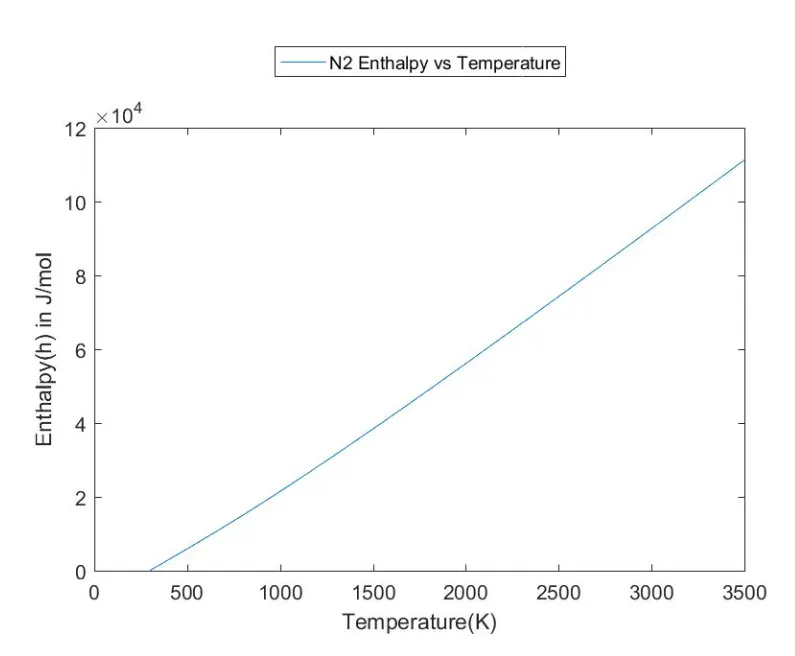
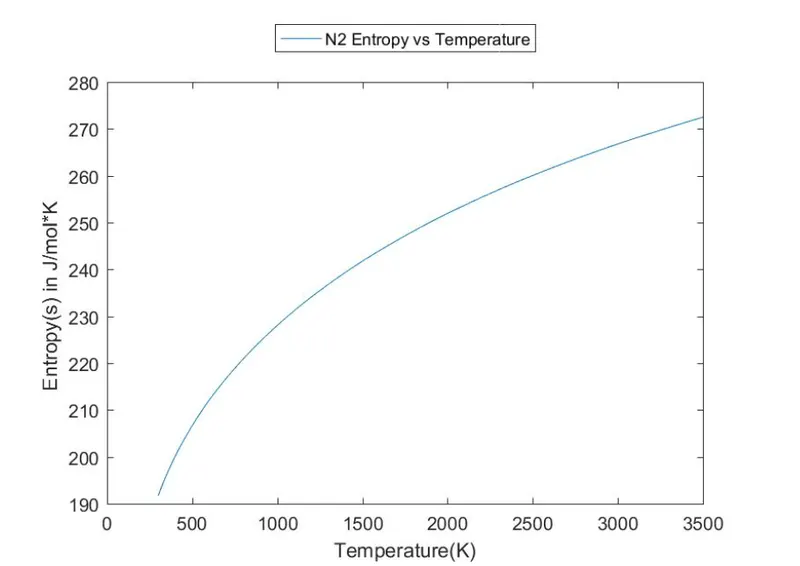
Results for Co2
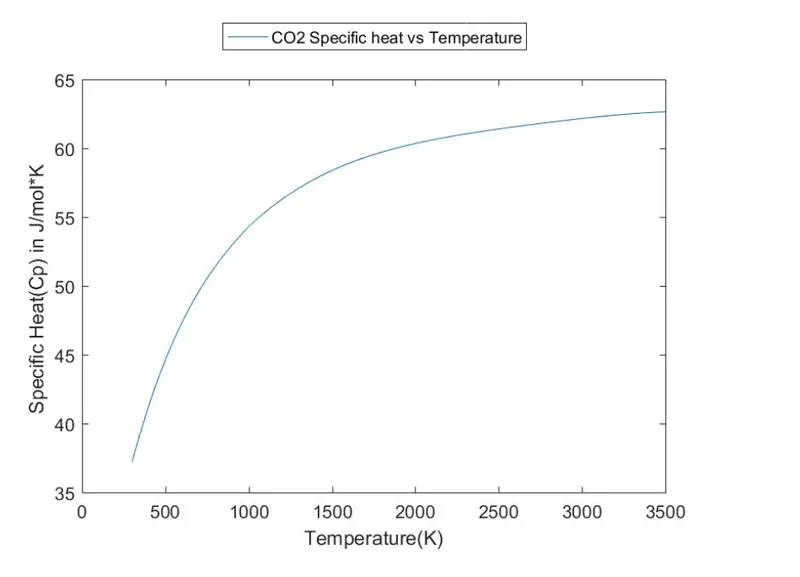
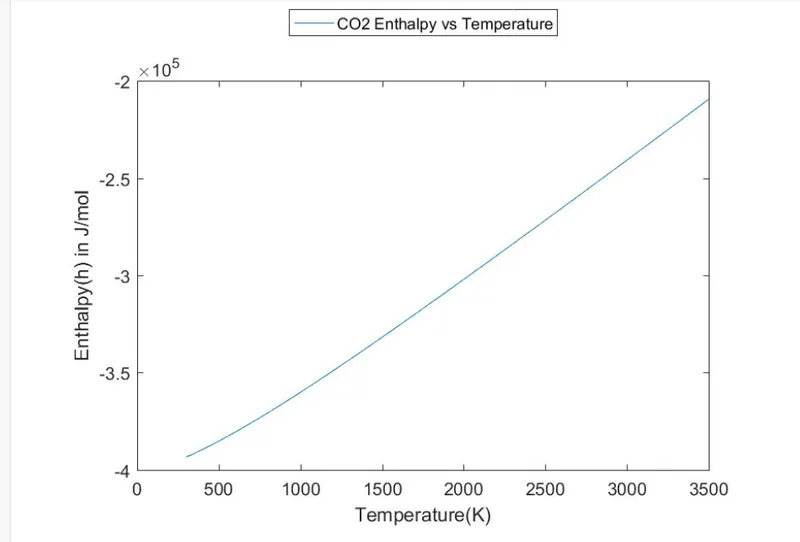
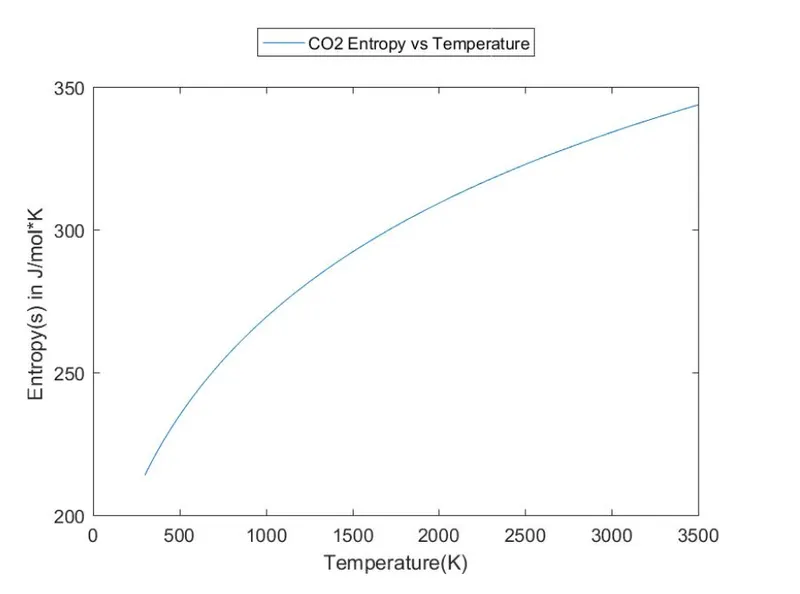
Table generated