Compare the results and effect of applying different contact interface types to a crush tube model in Hype crush
OBJECTIVE: The objective of this model is to compare the results and effect of applying different contact interface types to a crush tube model.
TASK :
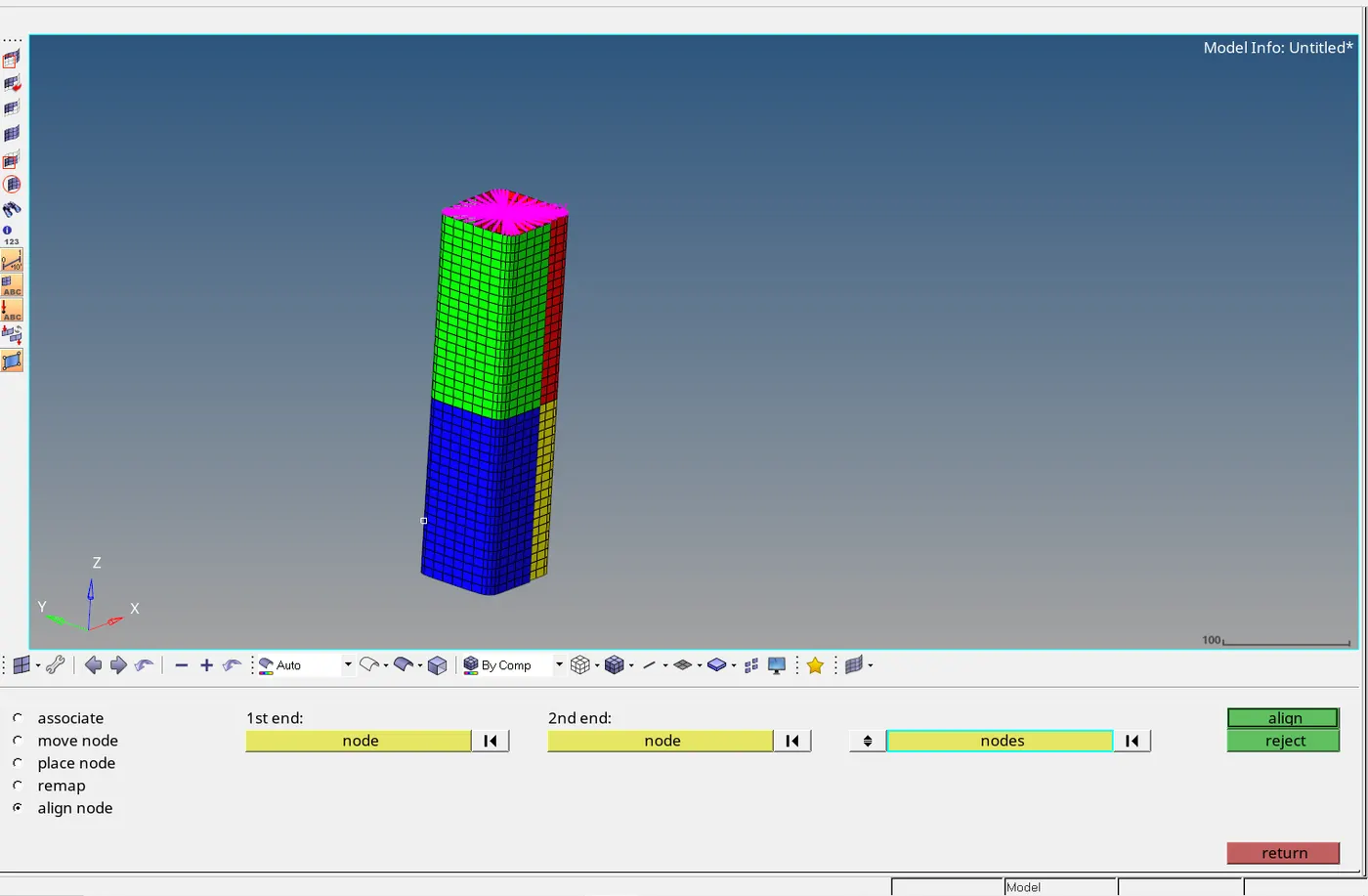
- Create the mesh for bumper assembly,mesh size should be 6mm.
- Run the crash tube model as it is.
- Change the Inacti=6 and run.
- Create the type 11 contact and run.
- Remove both notches and remove boundary condition on rigid body node then run.
- Create a new notch in the middle ,select the whole section and run.
- Create a new notch with nodes only from opposing 2 faces and run.
These 6 cases are going to be investigated and compared with each other.
INTRODUCTION
Interfaces & Contact Modelling
Interfaces are defined to model how parts interact when they come into contact with each other. The method used is the penalty method.
Penalty method threats the behaviour between slave and master as springs that generate resistive forces as a function of penetration.imagine a surface with a gap which the slave node must penetrate. When the slave is approaching the master, springs are created and this springs can be linear or non linear.
Below are some of interface types in hypercrush
- Type 7 : General node to surface
- Type 11 : Edge to Edge
- Type 24 : Single surface ,surfaace to surface, nodes to surface ,pressfit analysis
- Type 2 : Node to surface
PROCEDURE
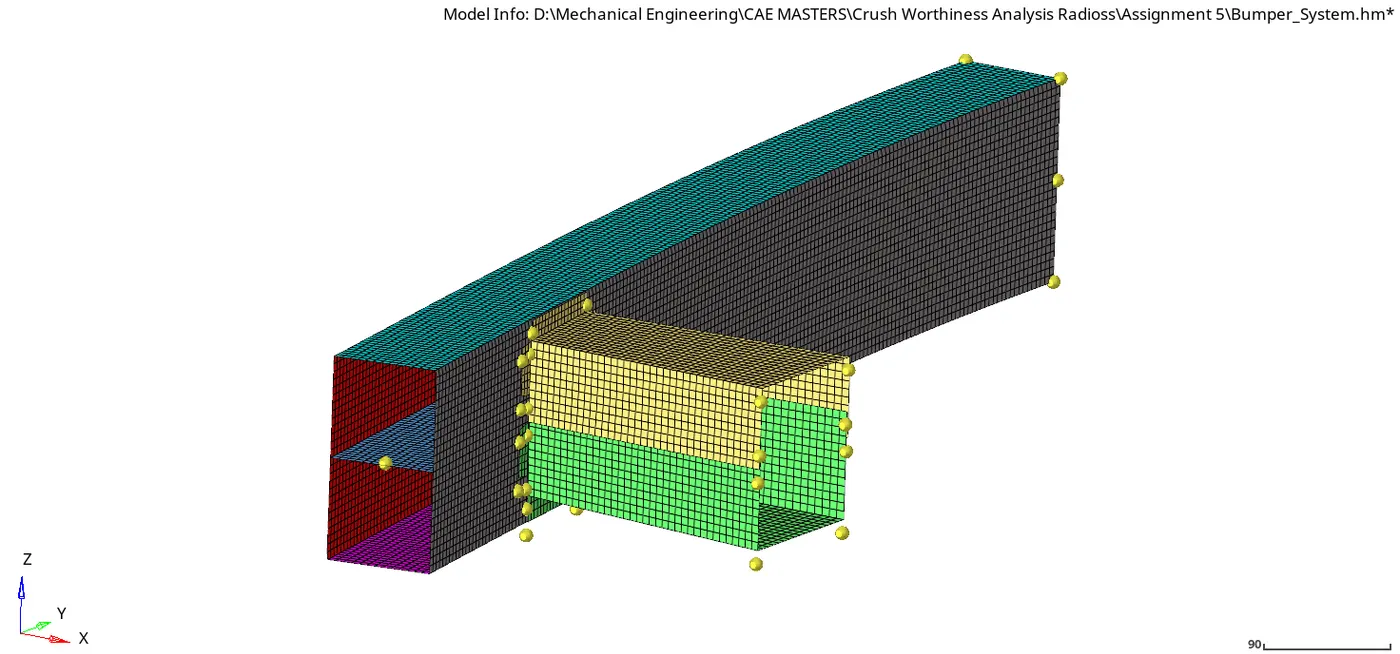
- The bumper is meshed with quad shell element and and element size of 6mm. Below is an image of the finalized mesh from hypermesh
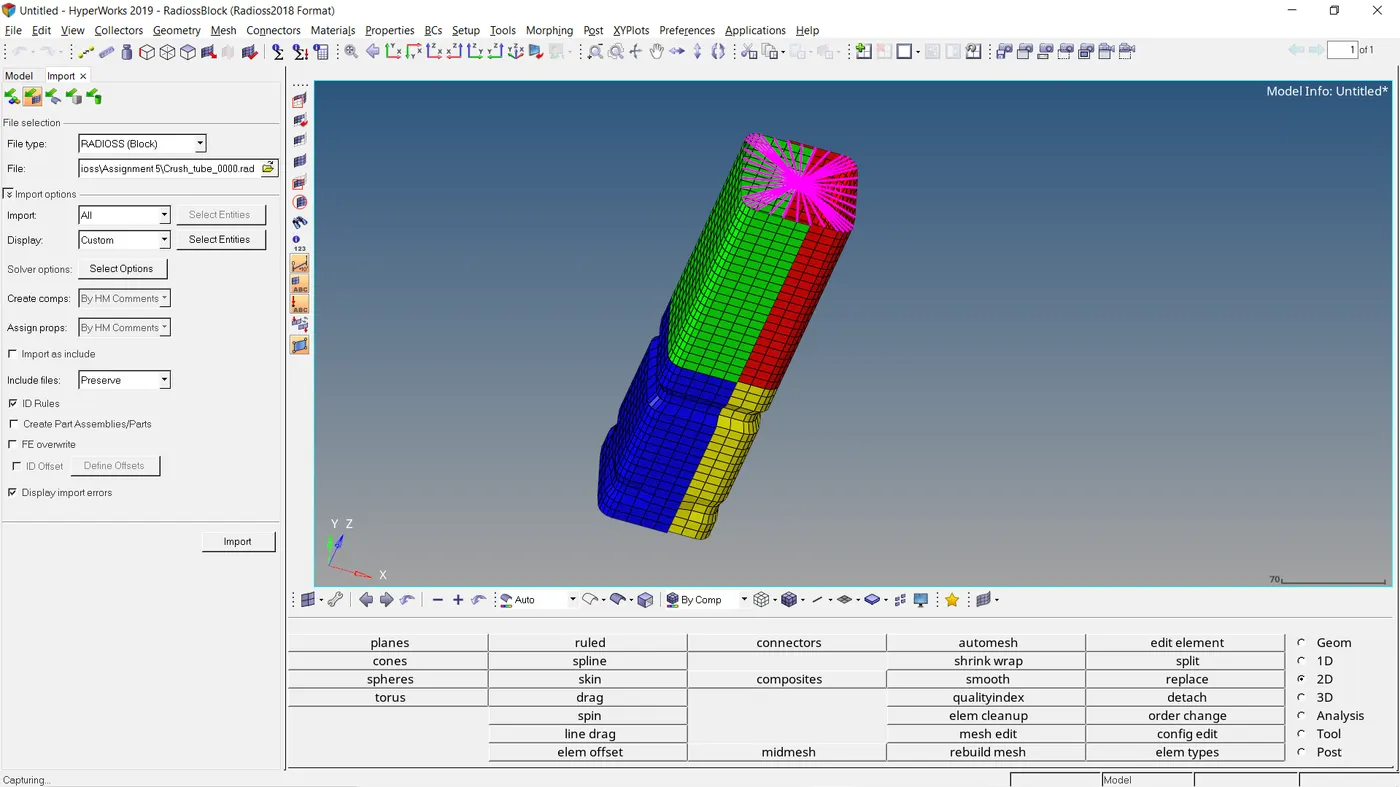
- The crush tube below which is imported into hypermesh is going to be analysed and results are going to be compared according to 6 cases.
| CASES |
DESCRIPTION |
|
1 |
Run the crash tube model as it is. |
|
2 |
Change the Inacti=6 and run. |
|
3 |
Create the type 11 contact and run. |
|
4 |
Remove both notches and remove boundary condition on rigid body node then run. |
|
5 |
Create a new notch in the middle ,select the whole section and run. |
|
6 |
Create a new notch with nodes only from opposing 2 faces and run. |
TYPE 7
Interface TYPE7 is a multi-usage impact interface, modeling contact between a master surface and a group of slave nodes. It is also possible to consider heat transfer and heat friction.
- A node can at the same time be a slave and a master node.
- Each slave node can impact each master segment; except if it is connected to this segment.
- A node can impact on more than one segment.
- A node can impact on the two sides, on the edges and on the corners of each segments.
- It is a fast search algorithm without limitations.
- Time step is reduced in case of high impact speed or contacts with small gap.
- It does not work properly if used with a rigid body at high impact speed or rigid body with small gap.
- It does not solve edge to edge contact.
Parameters which control type 7 card
- Igap - determines how the size of the gap is calculated
-
Gapmin Minimum gap for impact activation - Inacti - Action to be taken if initial penetration exist
- Istif - affect how stiffness of the interface is calculated
- Iform - Friction formulation is of two types( Viscous and stiffness type) . The laer is used normally for structural analysis.
- Istif - The minimum stiffness is controled here
- Idel - If elements are attached to a deleted slave node this option specifies what is to be done to control it
Recommended properties for tpe ( 7&11)
- Igap - 2: This option sets a variable gap parameter to provide the gap between the components
-
Gapmin >0.5mm : Half of the thinnest part is mostly used - Inacti - 6 -Gap is variable with time, but initial gap is adjusted as (the node is slightly depenetrated):
gap0=Gap–P0–5%⋅(Gap–P0)">gap0=Gap–P0–5%⋅(Gap–P0). Also reduce penetrations to less than 30% of the gap
- Istif - 4 - the softest stiffnes between the slave and the master is used.
- Iform - 2- Stiffness friction Formulation. Not specified in type 11
- Istif - 1000N/mm -The minimum stiffness is controled here to avoid very low stiffness
- Idel - 2- Slave nodes are removed because of element deletion
PROPERTY CARD
There are two property card set with a material thickness difference of 3mm and 2mm. The remaining properties are the same and are listed below.
- Card Image - P1_SHELL
- Ishell - QEPH shell formulation
- Ismstr - Used value in DEF_Shell
- ithick - Thickness change is taken into account
- iplast - iterative projection with three newton iteration.
MATERIAL CARD
- Card Image - M2_PLAS_JOHN_ZERIL
- Initial Density - 0.00000785kg/mm3
- Youngs Modulus- 210Gpa
- Poisson ratio - 0.3
- Yield stress -0.206
- Hardening Modulus (UTS) (b) = 0.45
- Hardening Exponent (n) = 0.5
CASE_1
- The crash tube model is run as it is using hypermesh radioss analysis tab
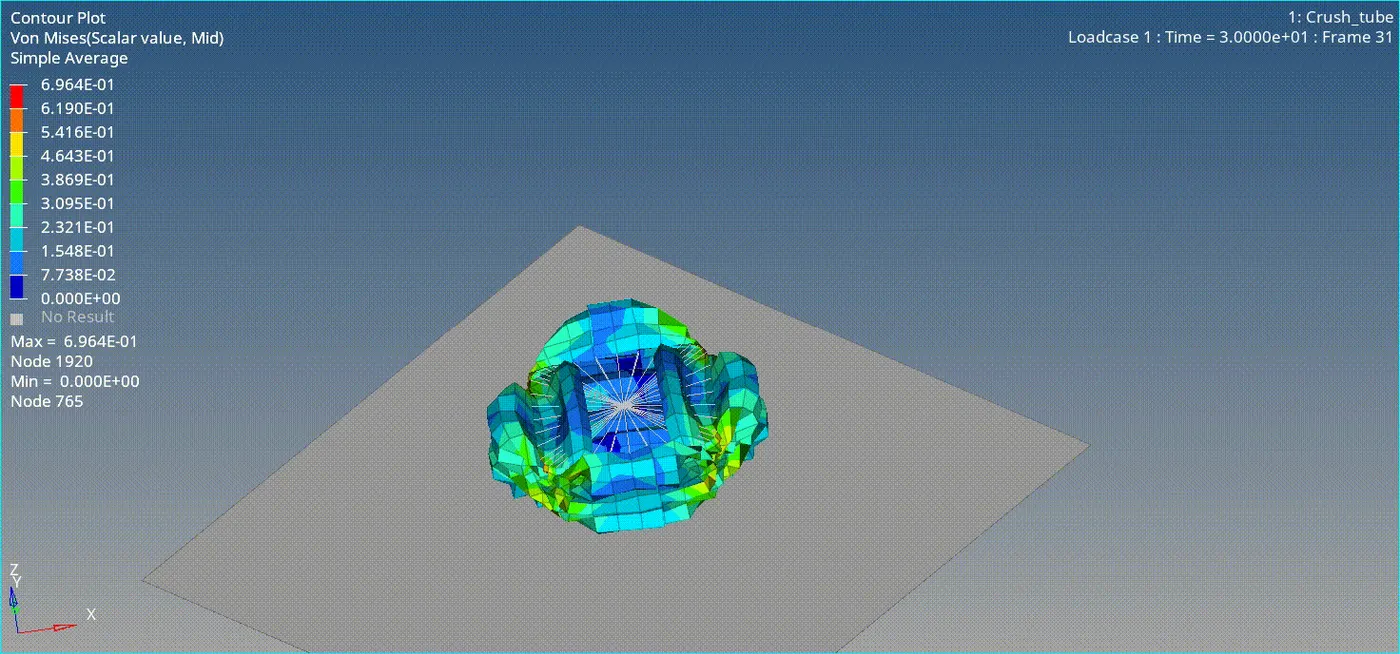
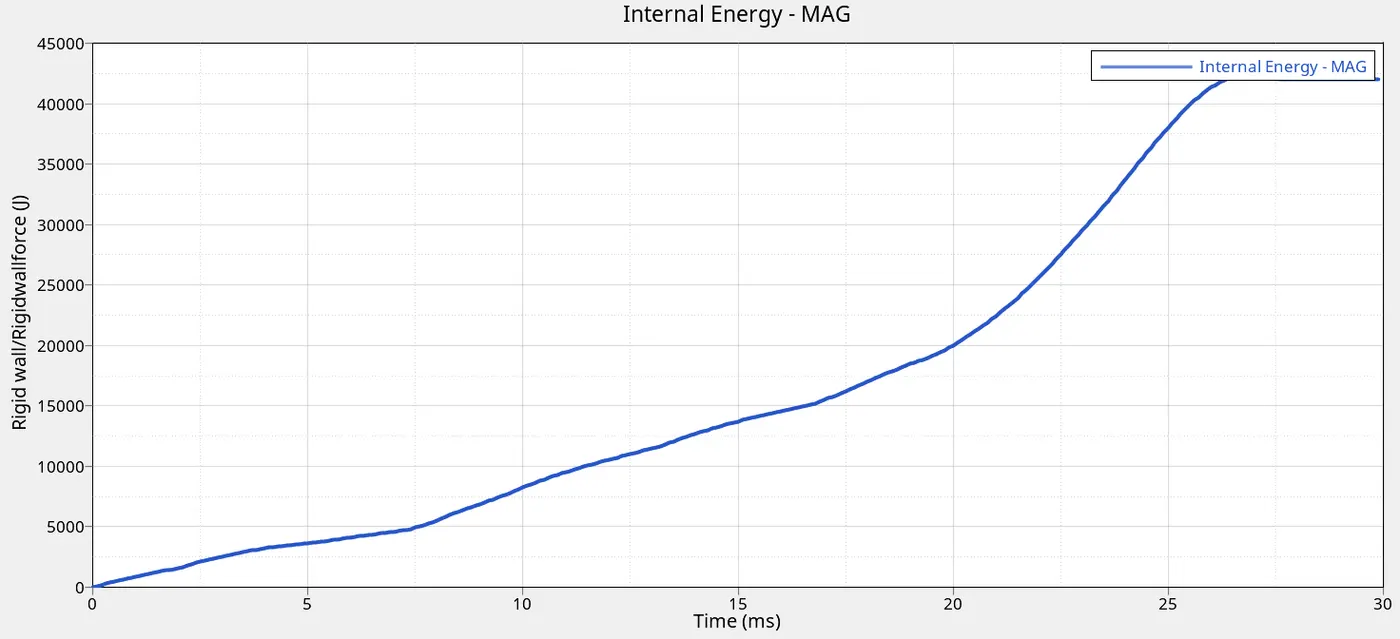
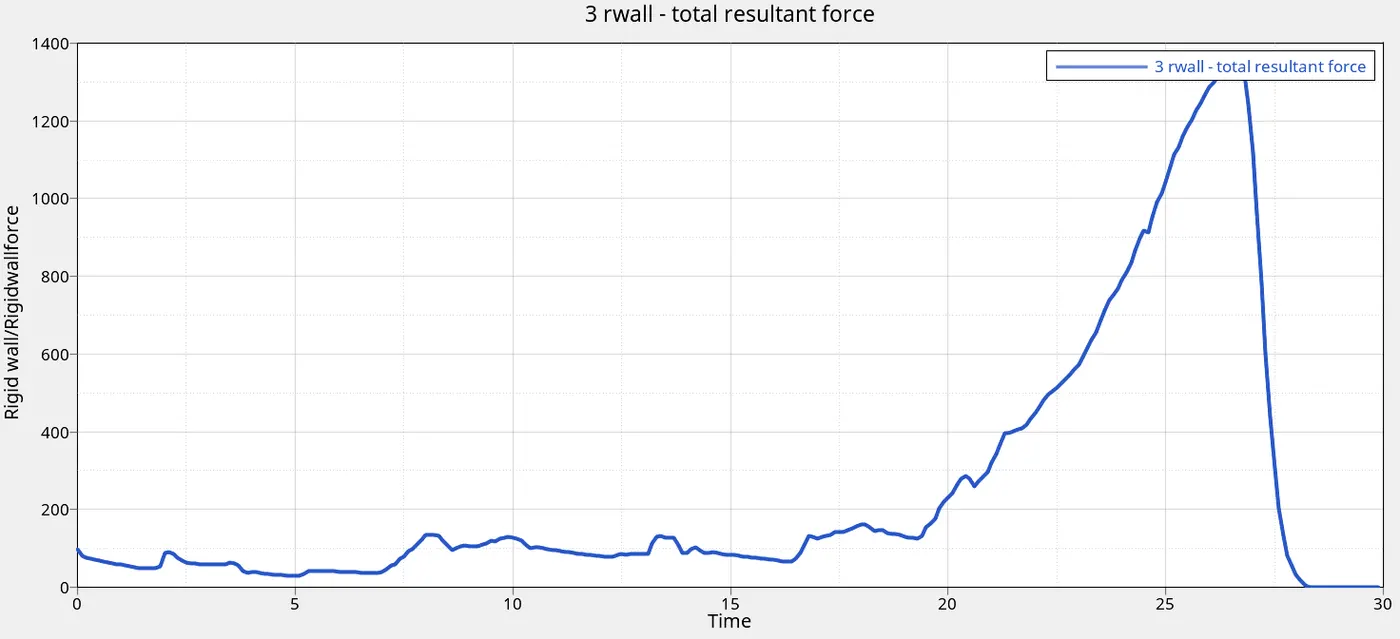
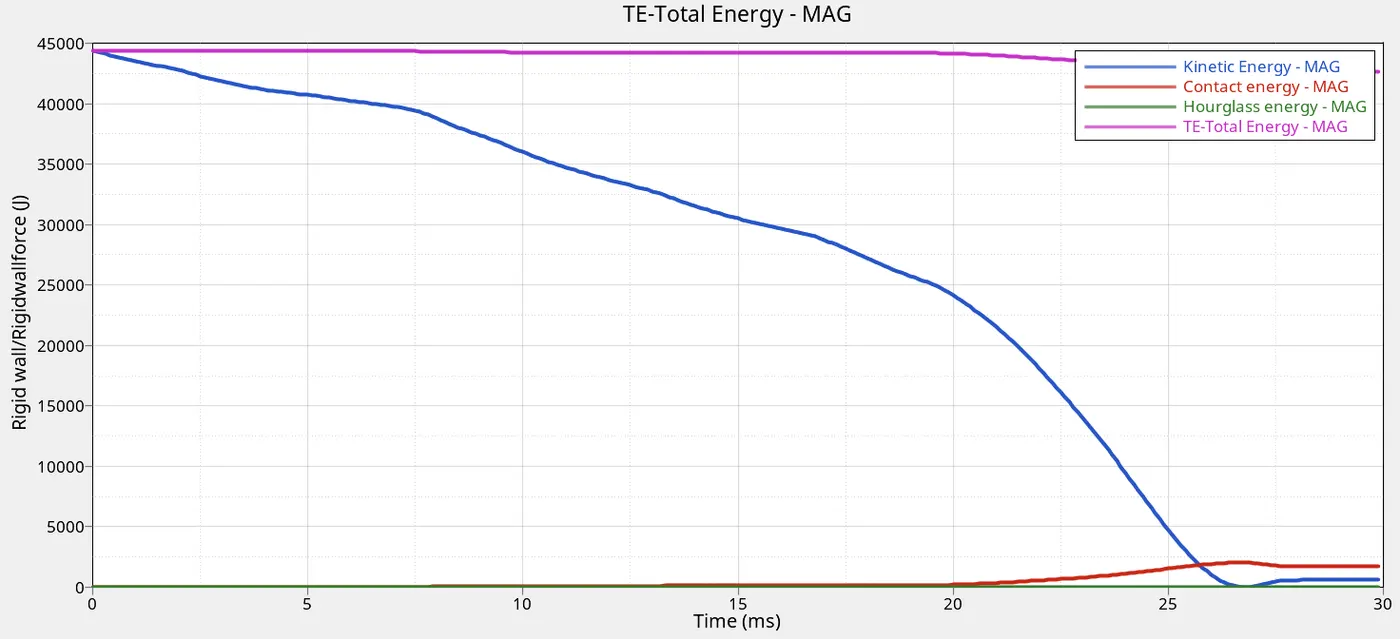
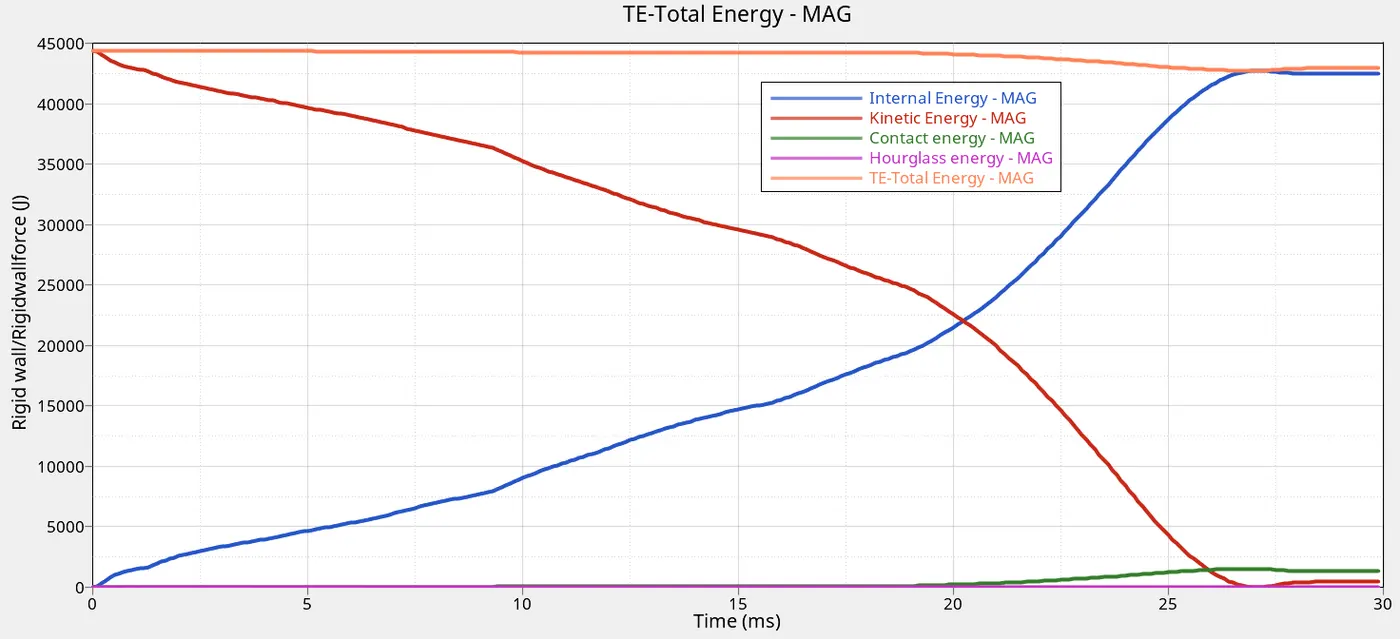
- The post processing results of Von misses stress, Rigid wall forces ,contact energy, internal energy , hourglass and Kinetic energy is plotted . This analysis is done by importing the .t01 and .hd3 files in hypergraph and hyperview respectivley.
-
Total number cycle 83691
Energy error -3.8%
Mass error 0.000
Time of simulation 01:56
Von_Misses Stress
Internal Energy
Rigid wall forces
Total Energy, Hourglass,Contact and Kinetic Energy
CASE_2
Setting contact interface card to type 7 and setting inacti value to 6
| Total number cycle |
83691 |
| Energy error |
-3.8% |
| Mass error |
0.000 |
| Time of simulation |
01:58 |
Von-misses stress
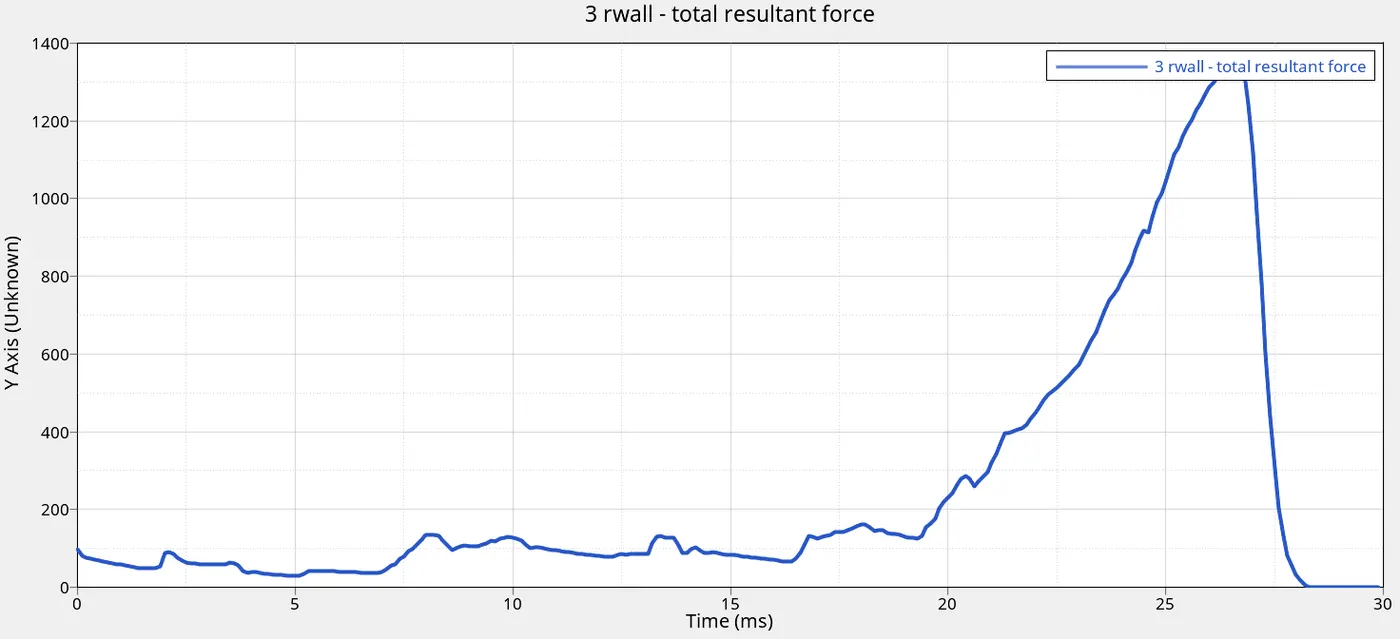
Rigid wall forces
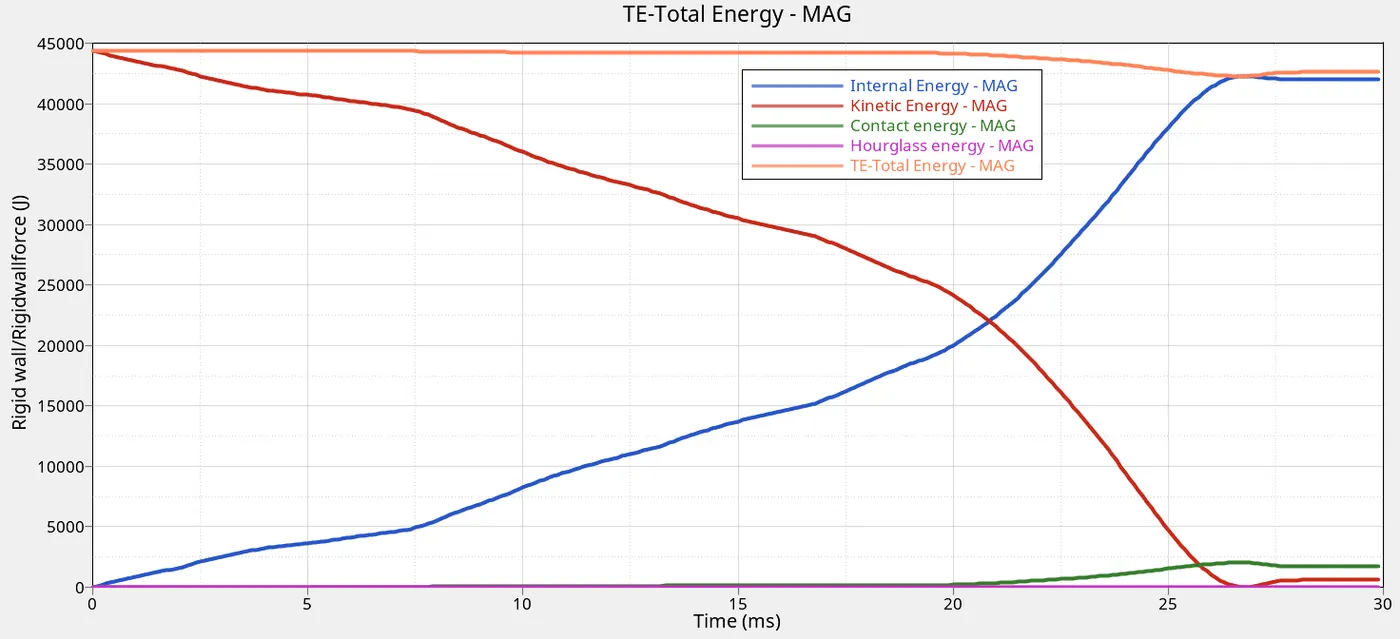
Total Energy, Internal, Hourglass,Contact and Kinetic Energy
CASE_3
Create the type 11 contact and run with Type_7
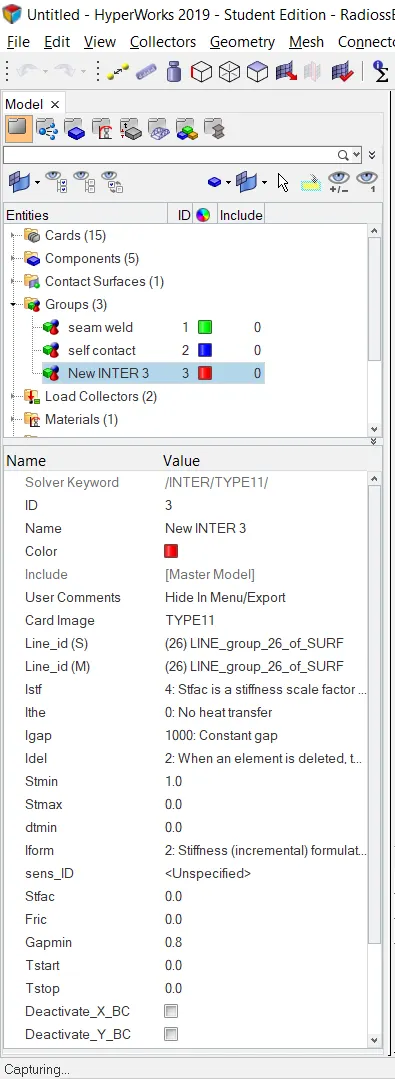
| Total number cycle |
81644 |
| Energy error |
-3.5% |
| Mass error |
0.000 |
| Time of simulation |
02:08 |
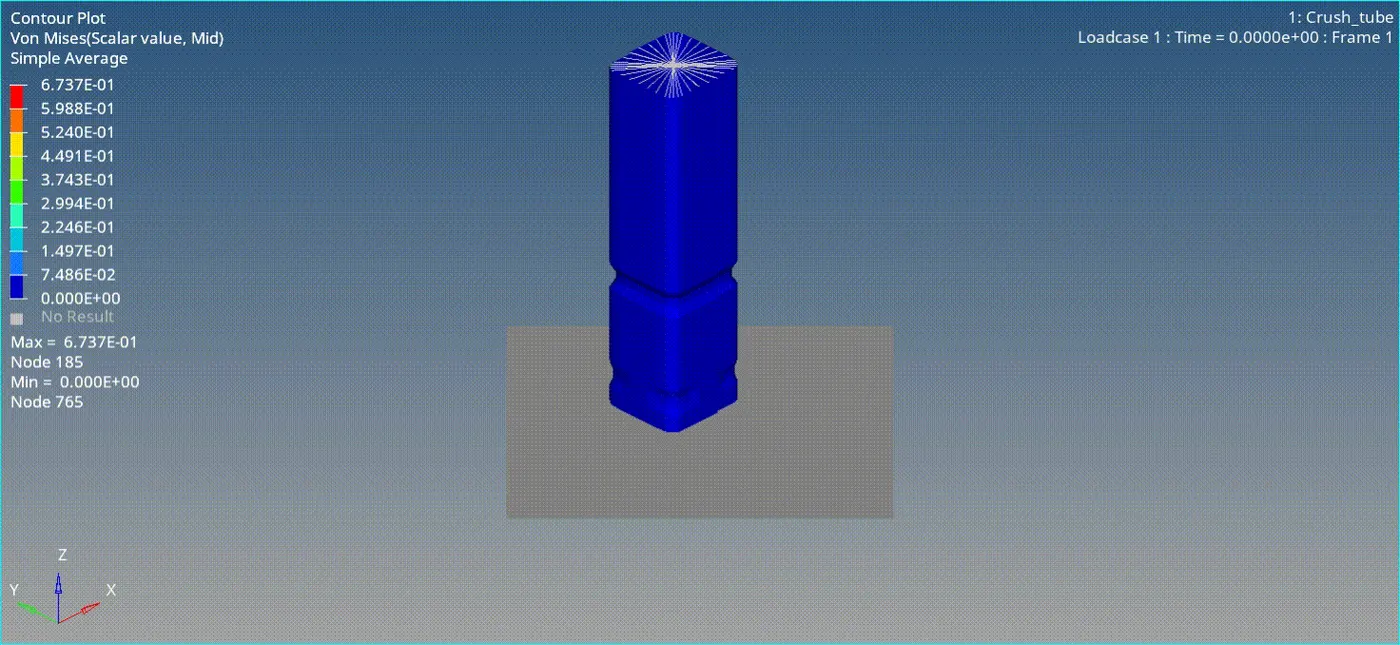
Von-misses stress
Rigid wall forces
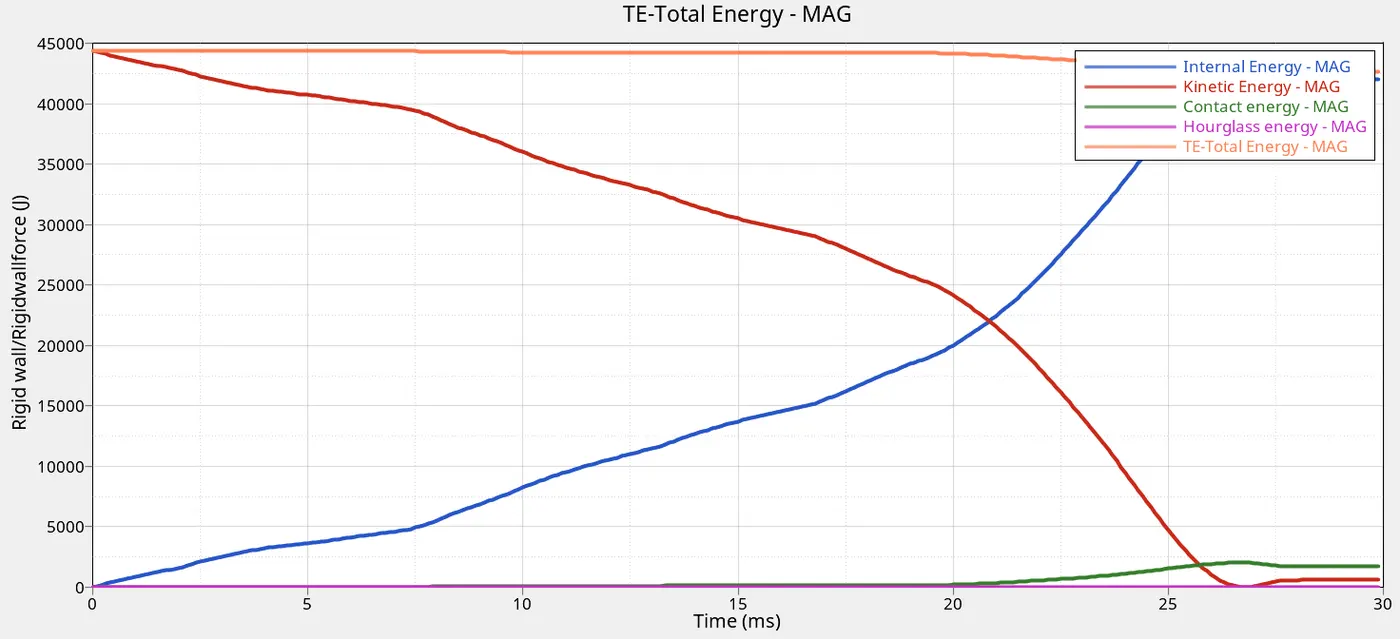
Total Energy,Internal, Hourglass,Contact and Kinetic Energy
CASE_4
Combine Type_7 & Type_11 with removed notches and removed boundary condition on rigid body node then run.
| Total number cycle |
73521 |
| Energy error |
-2.3% |
| Mass error |
0.000 |
| Time of simulation |
01:50 |
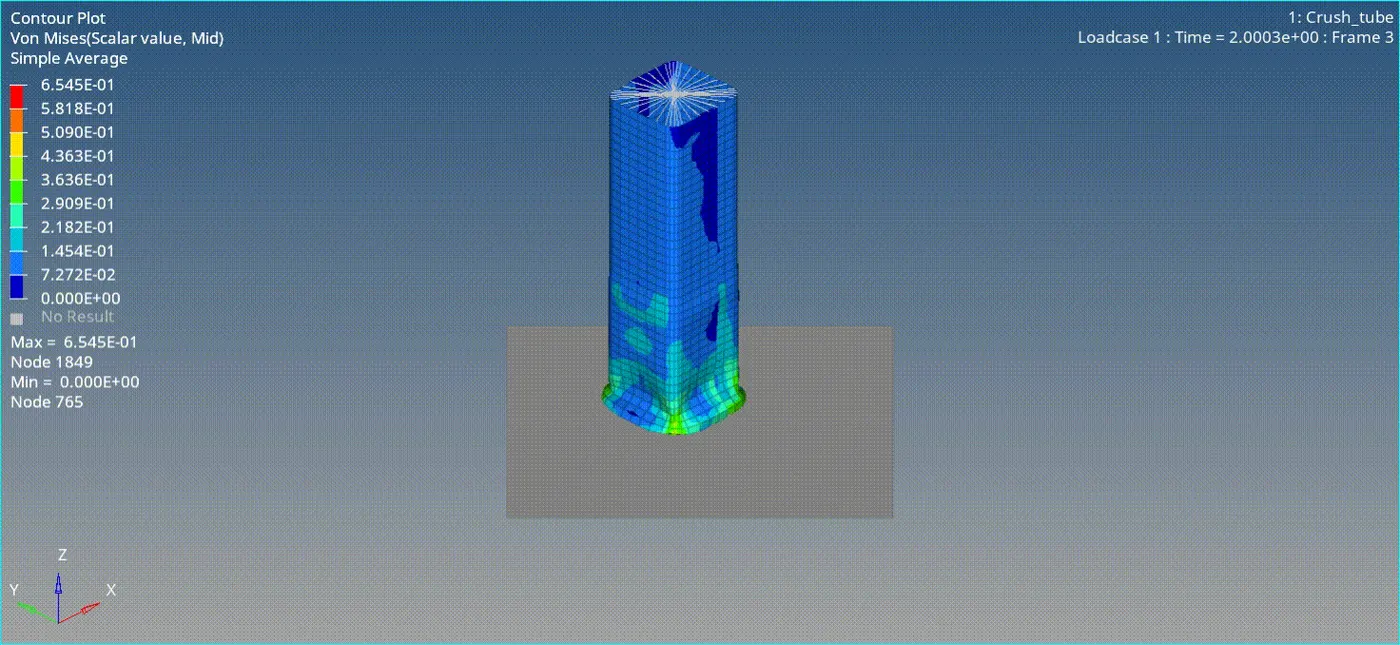
Von-misses stress
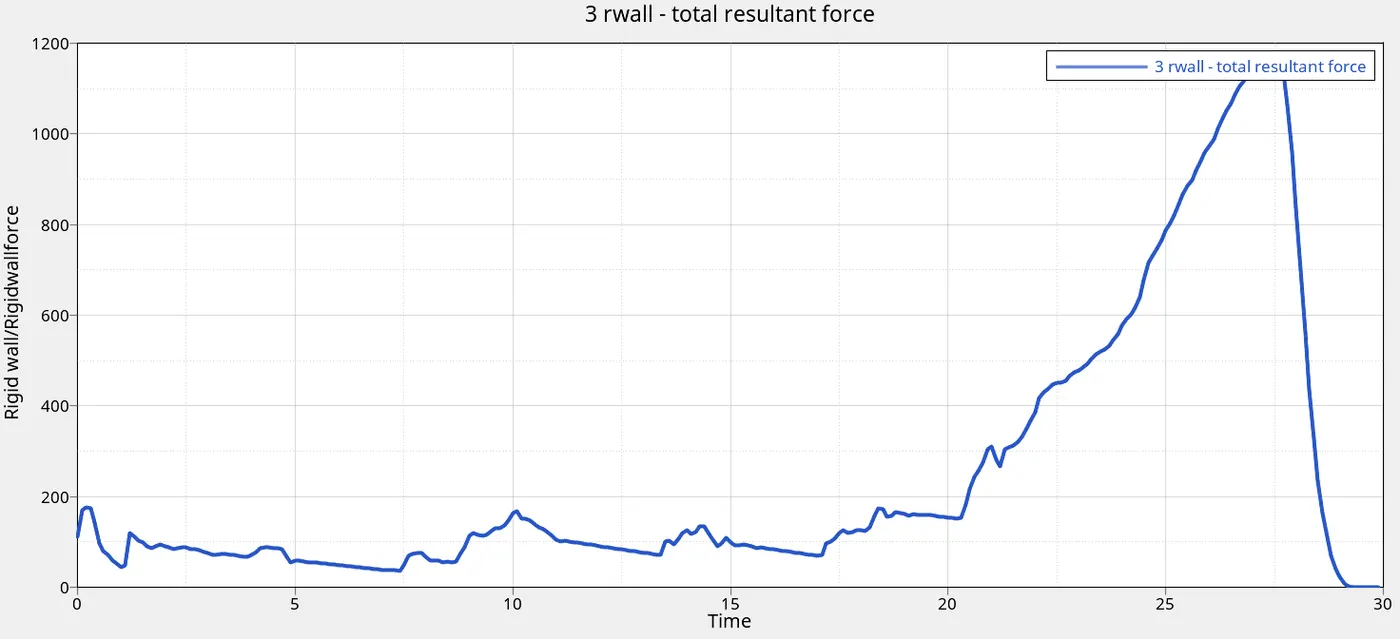
Rigid wall forces
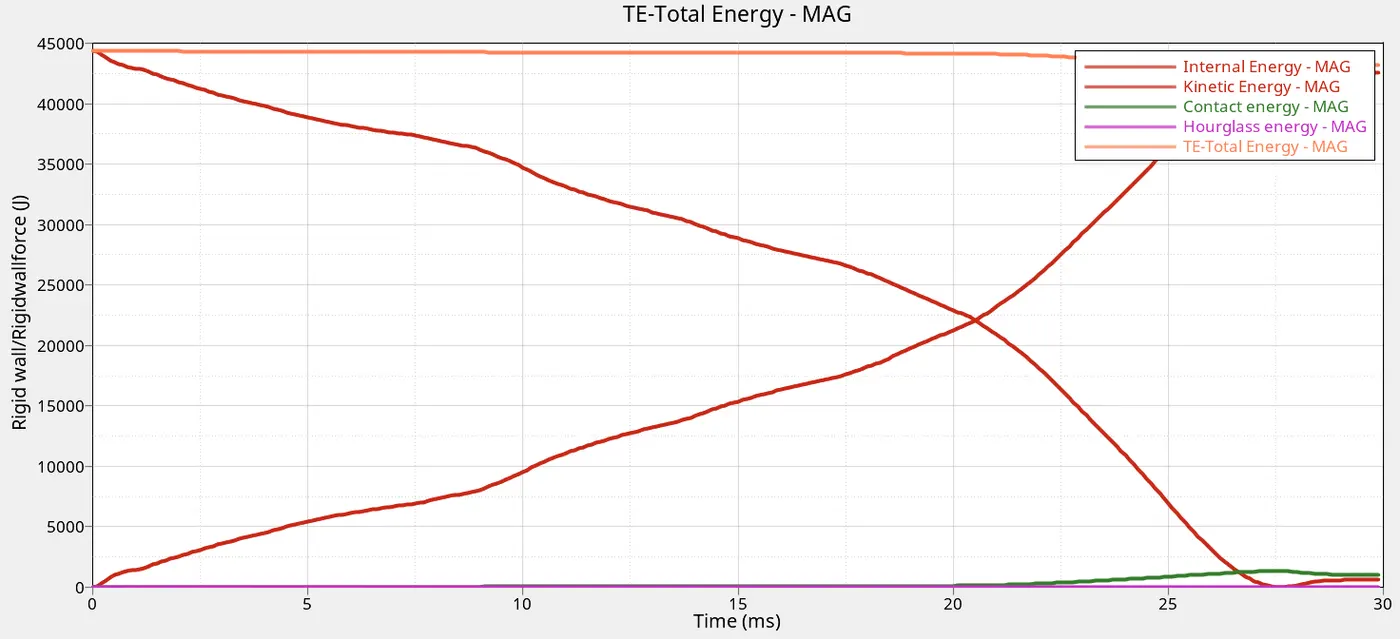
Total Energy,Internal, Hourglass,Contact and Kinetic Energy
CASE_5
Combine Type_7 & Type_11 and create a new notch in the middle.
| Total number cycle |
81023 |
| Energy error |
-2.7 |
| Mass error |
0.000 |
| Time of simulation |
02:20 |
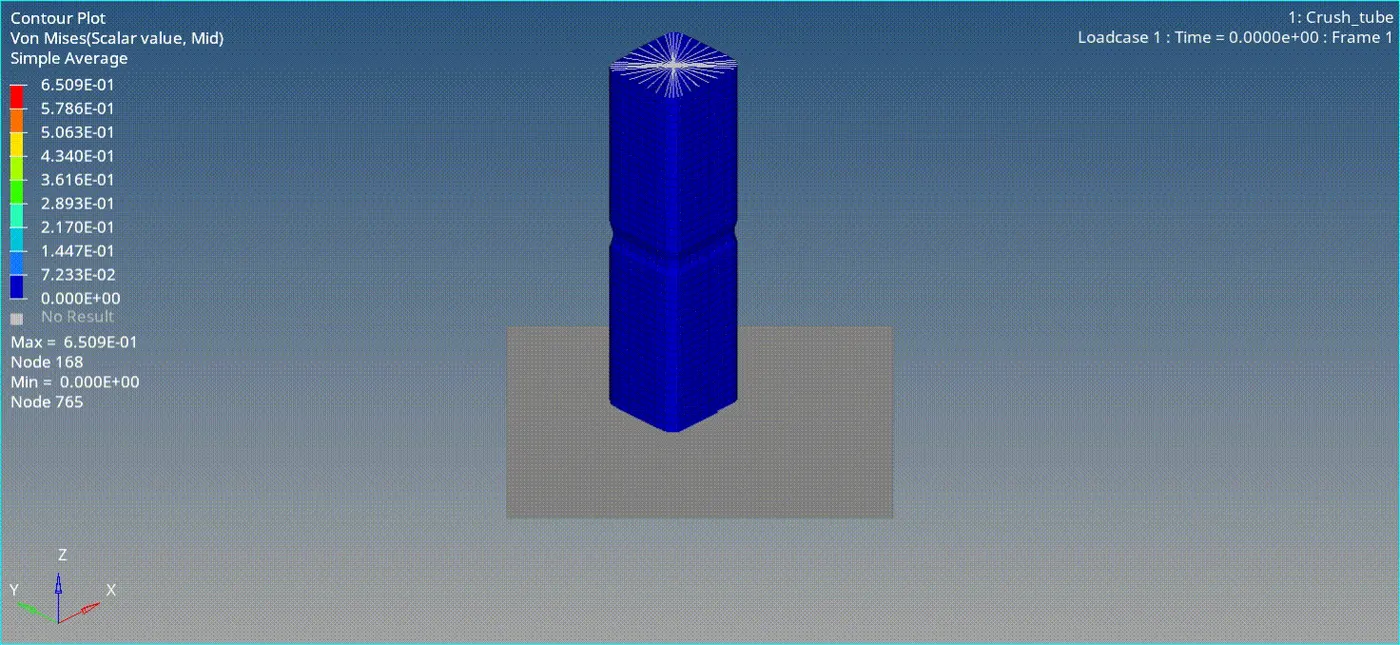
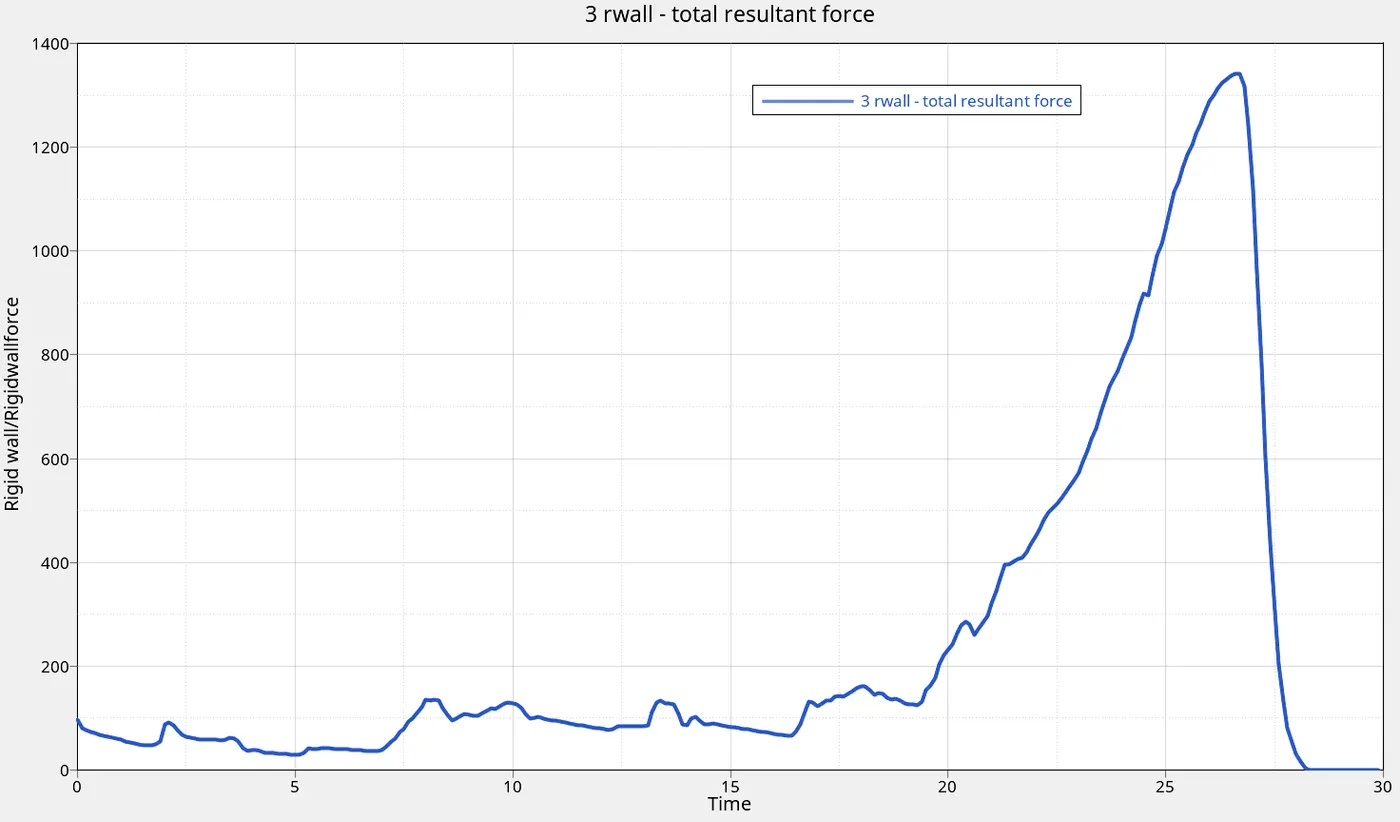
Von-misses stress
Rigid wall forces
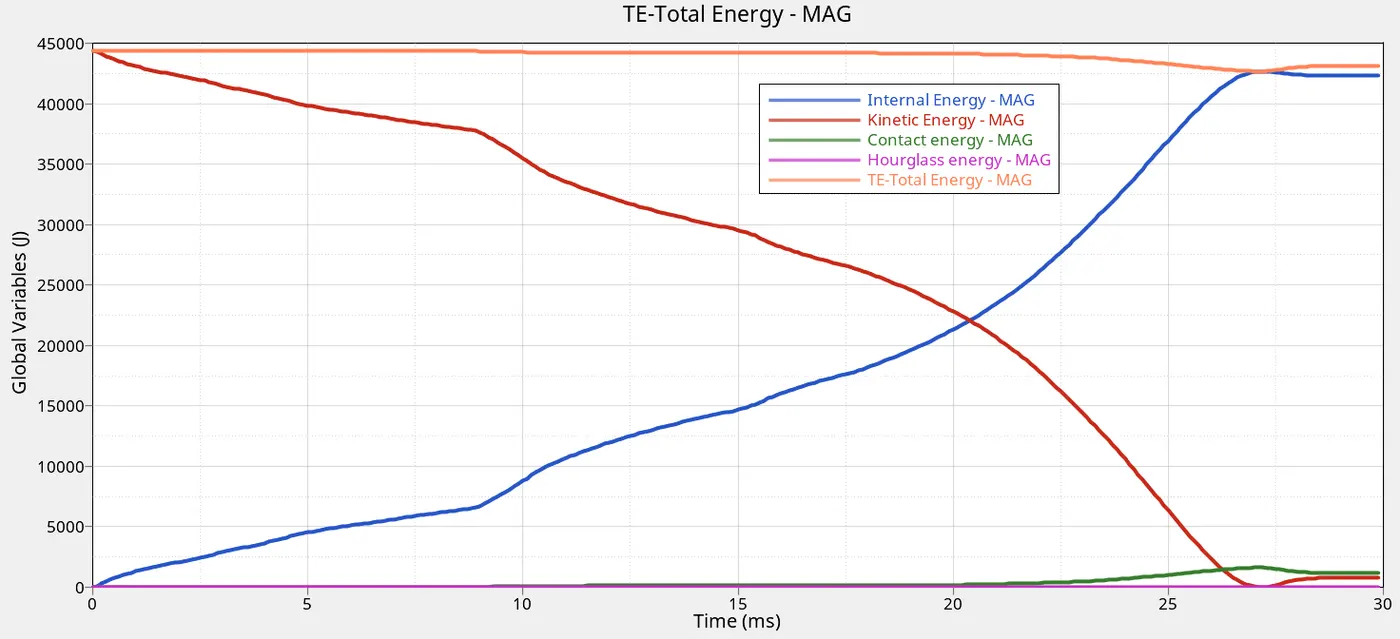
Total Energy,Internal, Hourglass,Contact and Kinetic Energy
CASE_6
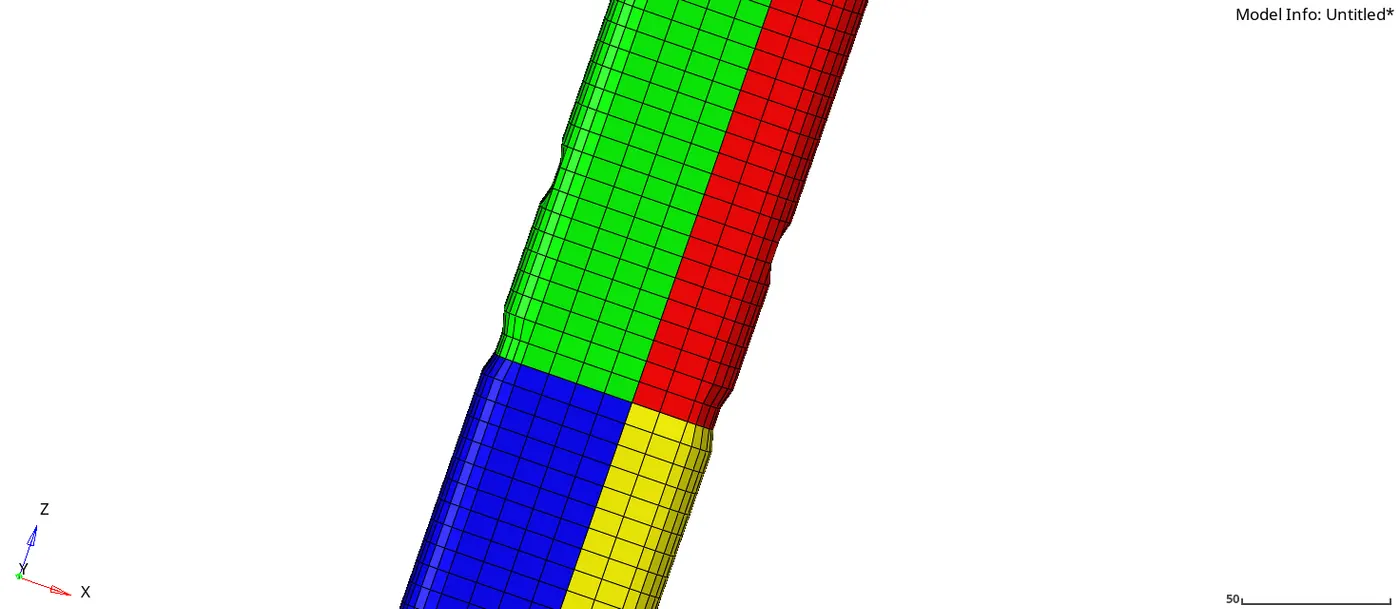
Combine Type_7 & Type_11 and create a new notch with nodes only from opposing 2 faces and run.
| Total number cycle |
82600 |
| Energy error |
-2.8 |
| Mass error |
0.00 |
| Time of simulation |
02:16 |
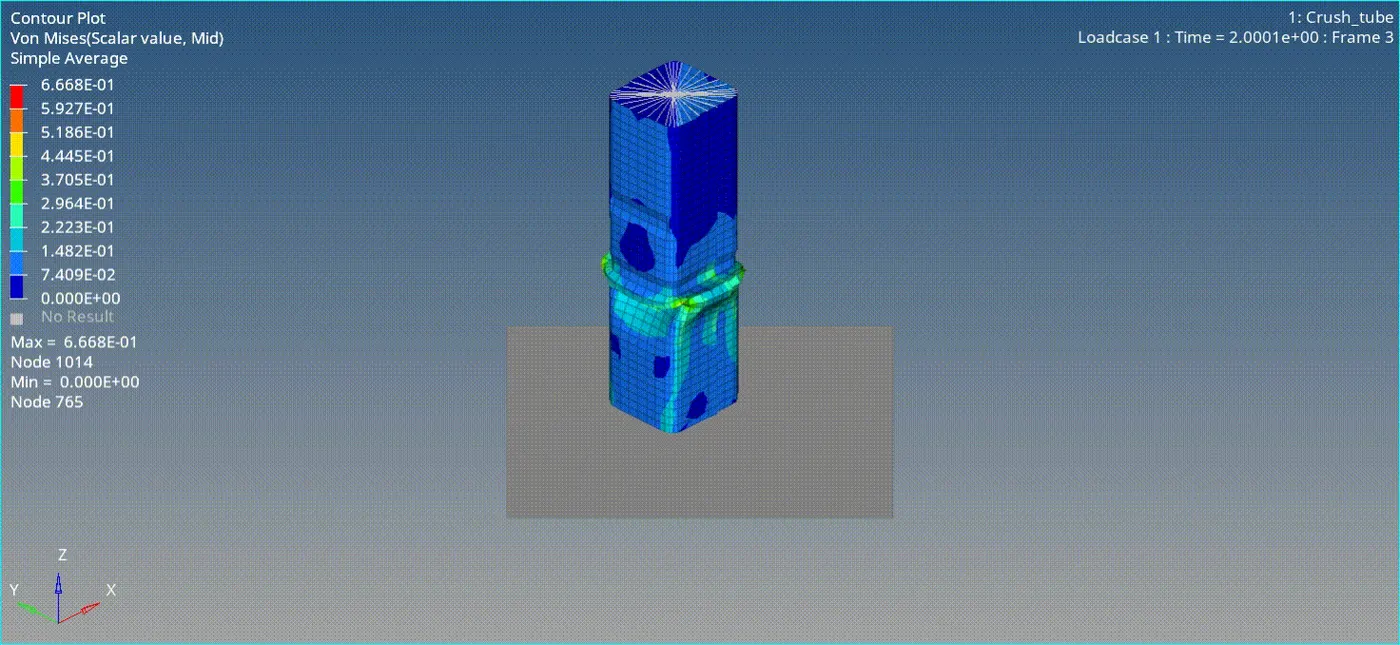
Von-misses stress
Rigid wall forces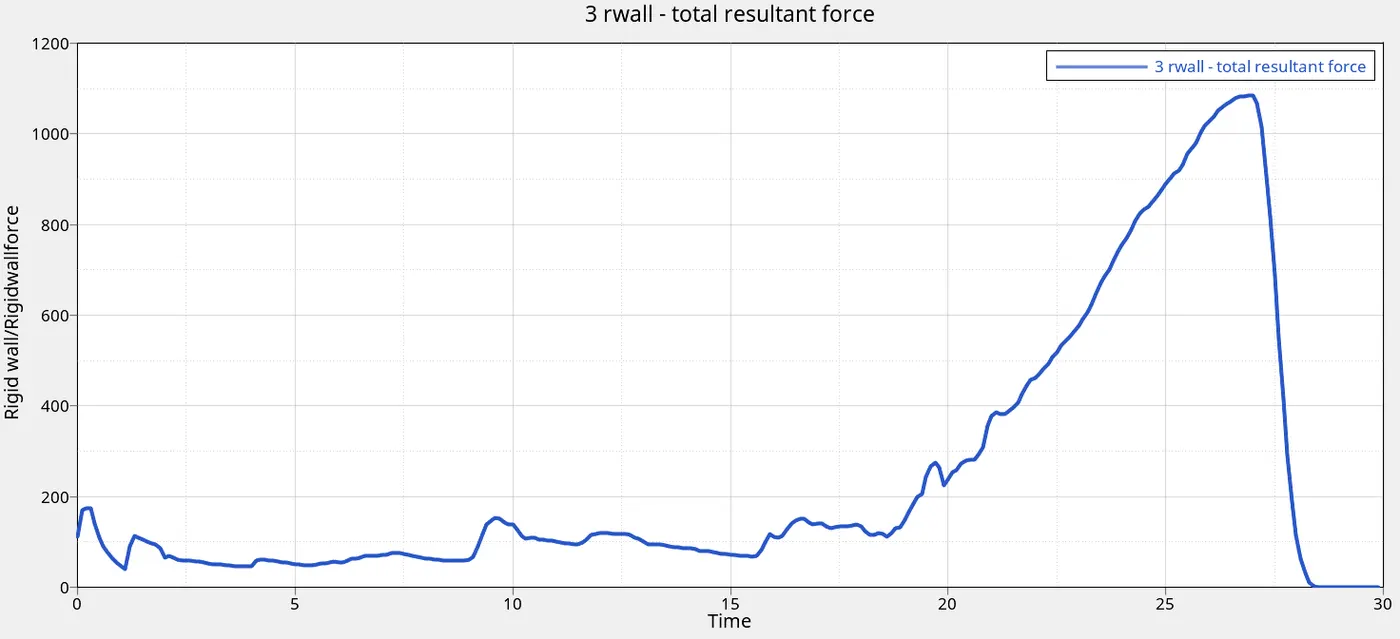
Total Energy,Internal, Hourglass,Contact and Kinetic Energy
RESULTS AND CONCLUSION
CASE TIME CYCLES MASS ERROR ENERGY ERROR COMMENTS
| 1 | 1.56 | 83691 | 0 | -3.8 | The mass error remained constant throughout. |
| 2 | 2:29 | 83600 | 0 | -3.8 | |
| 3 | 3:00 | 81976 | 0 | -4.1 | The energy error decreased the most with the |
| 4 | 2:08 | 73615 | 0 | -2.7 | notch removed. The notches increases the |
| 5 | 2:45 | 78837 | 0 | -3.1 | energy error. |
| 6 | 2:57 | 81887 | 0 | -3.1 | |
Cases Von Misses stress Comments
| 1 | 0.6964Gpa | It can be seen that notches |
| 2 | 0.6964Gpa | have higher stresses,and the |
| 3 | 0.6737Gpa | notches after case_3 have |
| 4 | 0.6545Gpa | low stresses.The effrct of notches is |
| 5 | 0.6509Gpa | evident here.Removing the notches |
| 6 | 0.6668Gpa | reduces the stress. |
RIGID WALL FORCES
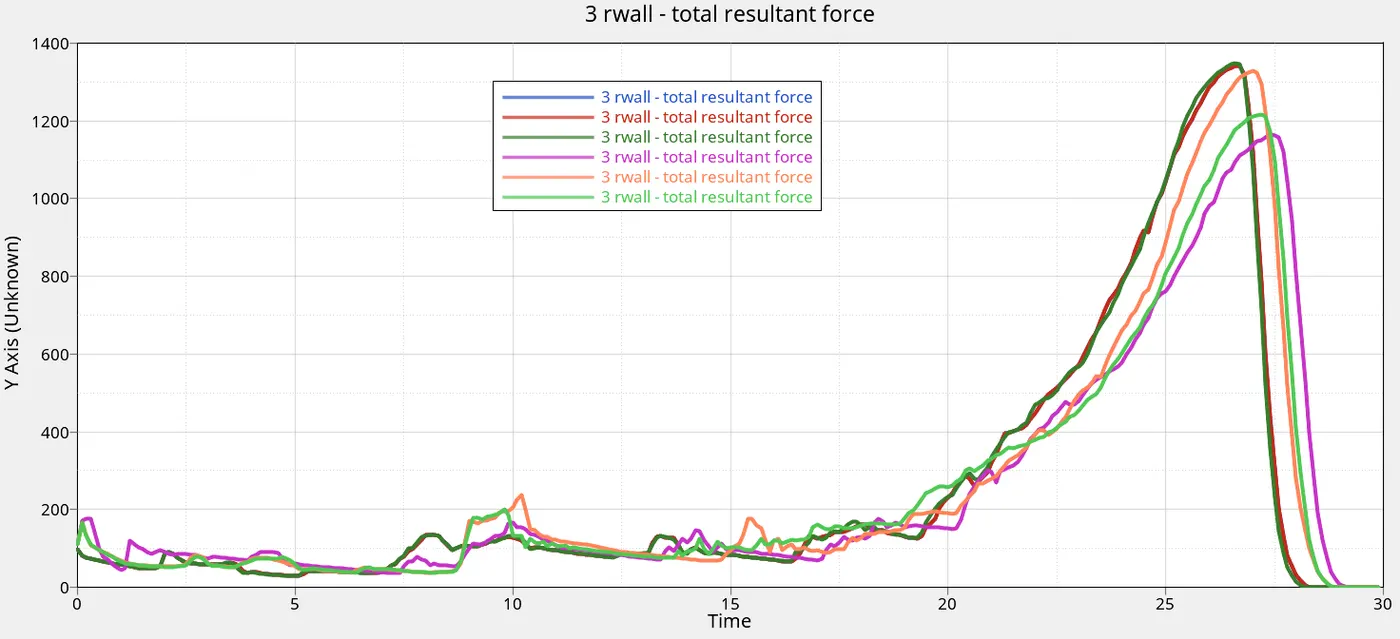
| CASES | RIGID WALL FORCES |
| 1 | 1350J |
| 2 | 1350J |
| 3 | 1350J |
| 4 | 1150J |
| 5 | 1300J |
| 6 | 1200J |
it can be seen that the forces on the wall was the same for first three cases , but reduced the most in case 4 without the notches. It increased back after adding the notch in the middle and at the sides. This means that less force is resisted from wall in case 4 due to low stiffness without the notch and if the notches placements are controlled lower Forces are developed compared with the early cases.
CONTACT ENERGY
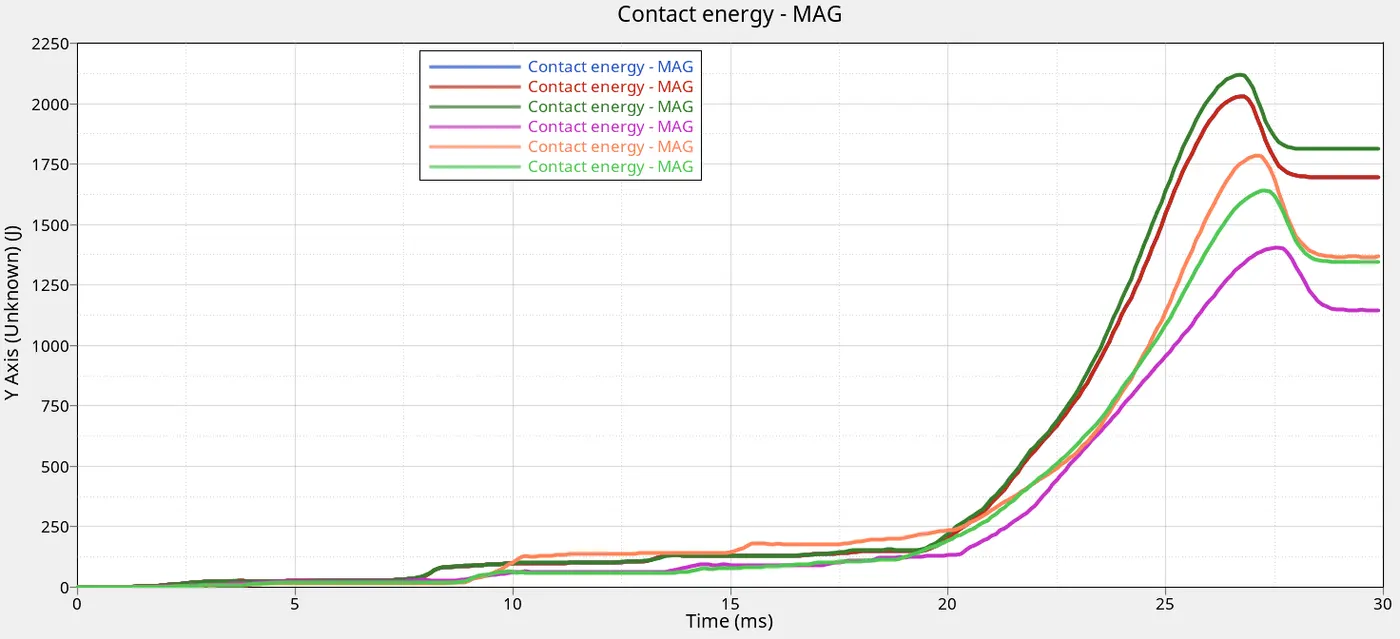
| CASES | CONTACT ENERGY |
| 1 | 2020J |
| 2 | 2020J |
| 3 | 2125J |
| 4 | 1375J |
| 5 | 1770J |
| 6 | 1625J |
it can be seen that the contact energy the same for first two cases , but reduced the most in case 4 without the notches. It increased back after adding the notch in the middle and at the sides. This means that less contact energy is present in case 4 due to low stiffness without the notch and if the notches placements are controlled lower contact energy are developed compared with the early cases. The contact energy reduced a bit in case 3 after adding the type 11.That means edges crossing are controlled to capture the phhysics correctly.
Contact energy is proportional to the rigid wall forces.
INTERNAL ENERGY
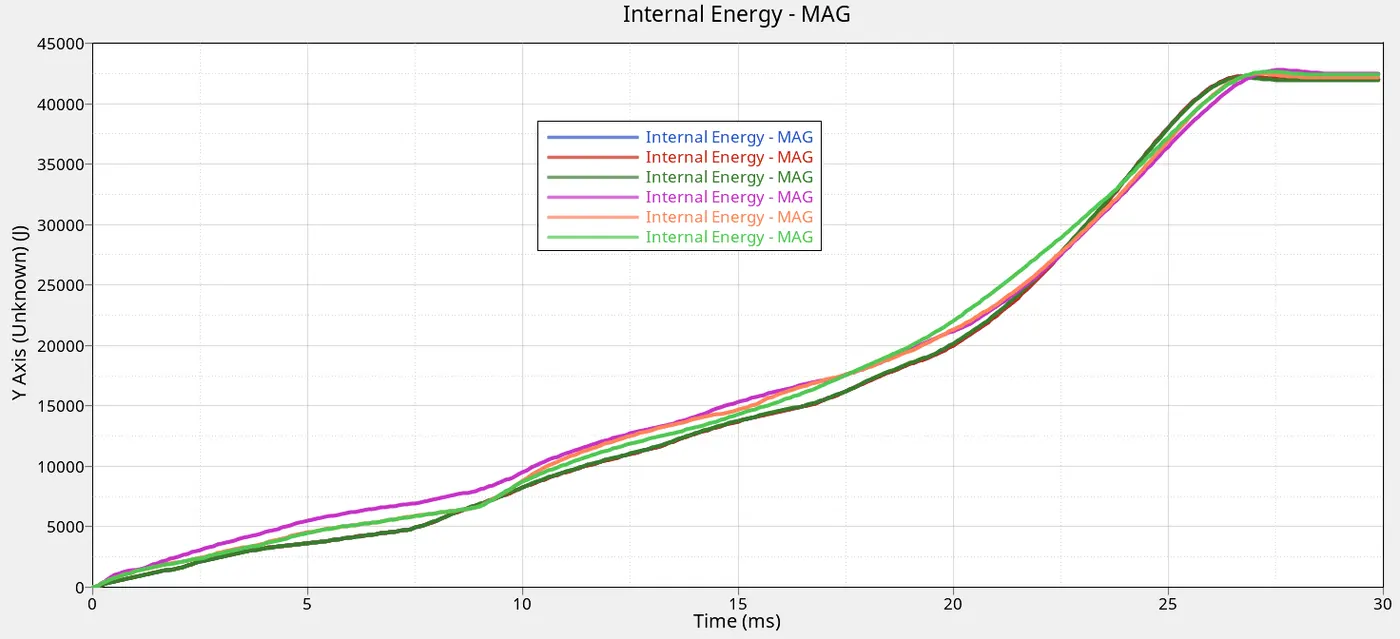
| CASES | INTERNAL ENERGY | TIME |
| 1 | 42.5KJ | 26ms |
| 2 | 42.5KJ | 26ms |
| 3 | 42.5KJ | 26ms |
| 4 | 42.9KJ | 28ms |
| 5 | 42.5KJ | 28ms |
| 6 | 42.5KJ | 28ms |
it can be seen that the internal energy was roughly the same for all cases , but the time at which maximumis reach varies. It took a longer time to reach maximum for the cases 4 and after. Depending on the location of the notches, the maximum internal energy is reached faster or slower.
For all simulations the hourglass remain constant at zero due to physical stabilization which is set in the property card, kinetic and total energy all remained the same for all simulations.
CONCLUSION
No difference was seen in case1 and 2 because the was no initial penetration in the model (inact=6)
The notches affect the simulation in many ways. They are first to collapse during compression. Also the position of the notches controlls the variation of contact, internal and rigid wall forces.The presence of notches increases the stress and the energies.
For all simulations the hourglass remain constant at zero due to physical stabilization which is set in the property card, kinetic and total energy all remained the same for all simulations.
Depending on the location of the notches, the maximum internal energy is reached faster or slower.