Forward kinematics of a 2R - Robotic Arm
AIM : i)To write a program in Matlab to simulate the forward kinematics of a 2R Robotic Arm.
ii)Create an animation file of the plot.
DESCRIPTION:
Here we are going to deal with the linkage known as Forward kinematics of a 2R robotic arm(2R means 2-Rotating link i.e., 2 is a number of links and R is a rotation) using basic arms of the robot.
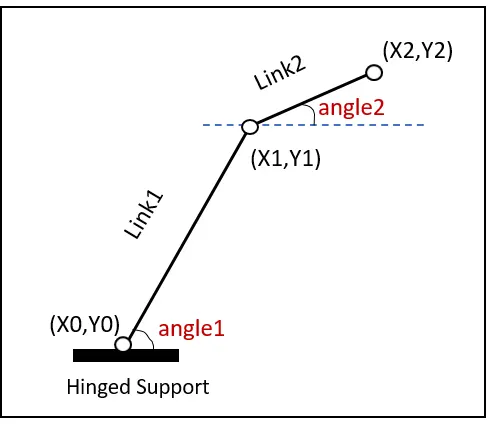
1. A 2R robotic arm contains 2 links and r rotational joints.
2. Length of link1 is l1 and length of link2 is l2.
3. Link1 is making an angle θ">θθ1 w.r.t x-axis and link2 is making an angle θ">θθ2 w.r.t x-axis.
Calculating the position of link1:
Link 1 has 2 end points.Starting point is fixed to the base or hinged support of the robot. and its coordinates are (X0,Y0).
Ening point is connected to link2 and its coordinates are (X1,Y1).
X0 = 0
Y0= 0
X1 = l1*cosd(θ1">θ1θ1)
Y1 = l1*cosd(θ1">θ1θ1).
Calculating the position of the Link-2.
Link2 has 2 end points. Starting point of link2 is the ending point of link1 and its coordinates are (X1,Y1).
Ending points are (X2,Y2).
X2 = X1 + l2*cosd(θ2">θ2θ2)
Y2 = Y1 + l2*cosd(θ2">θ2θ2)
Basic Program:
Basic program represents the basic idea of the plot where we get only 2D plot but no animation.
% Forward kinematics of a 2R robotic arm mainpulator
clear all
close all
clc
% Inputs
l1 = 1;
l2 = 0.5;

theta1 = 45;
theta2 = 30;

% Coordinates
x0 = 0;
y0 = 0;

x1 = x0 + l1*cosd(theta1);
y1 = y0 + l1*sind(theta1);

x2 = x1 + l2*cosd(theta2);
y2 = y1 + l2*sind(theta2);
% plotting
line([x0 x1],[y0 y1],'linewidth',3,'color','r')
line([x1 x2],[y1 y2],'linewidth',3,'color','m')
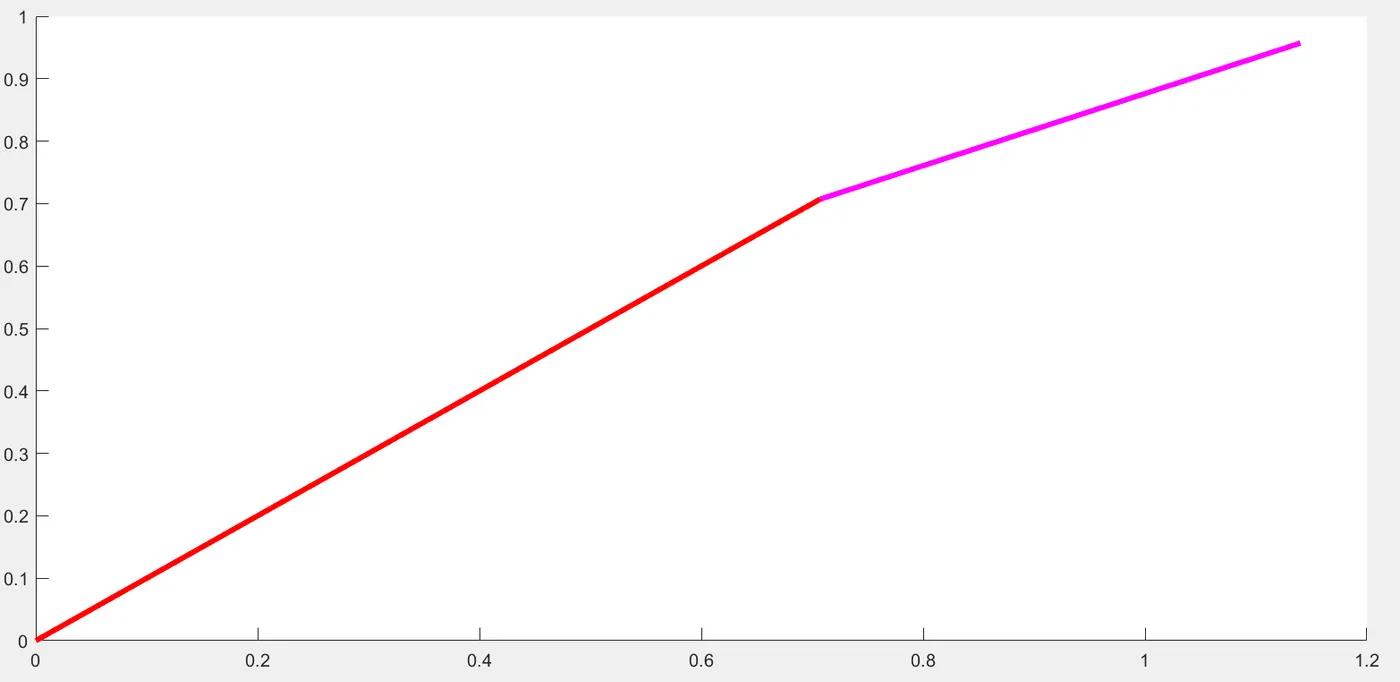
Result of the basic program:
theta1 = linspace(0,90,10);
theta2 = linspace(0,90,10);for i = 1:length(theta1);
THETA1 = theta1(i);
for j= 1:length(theta2);
THETA2 = theta2(j);x0 = 0;
y0 = 0;
x1 = x0 + l1*cosd(theta1);
y1 = y0 + l1*sind(theta1);
x2 = x1 + l2*cosd(theta2);
y2 = y1 + l2*sind(theta2);
% plotting
line([x0 x1],[y0 y1],'linewidth',3,'color','r')
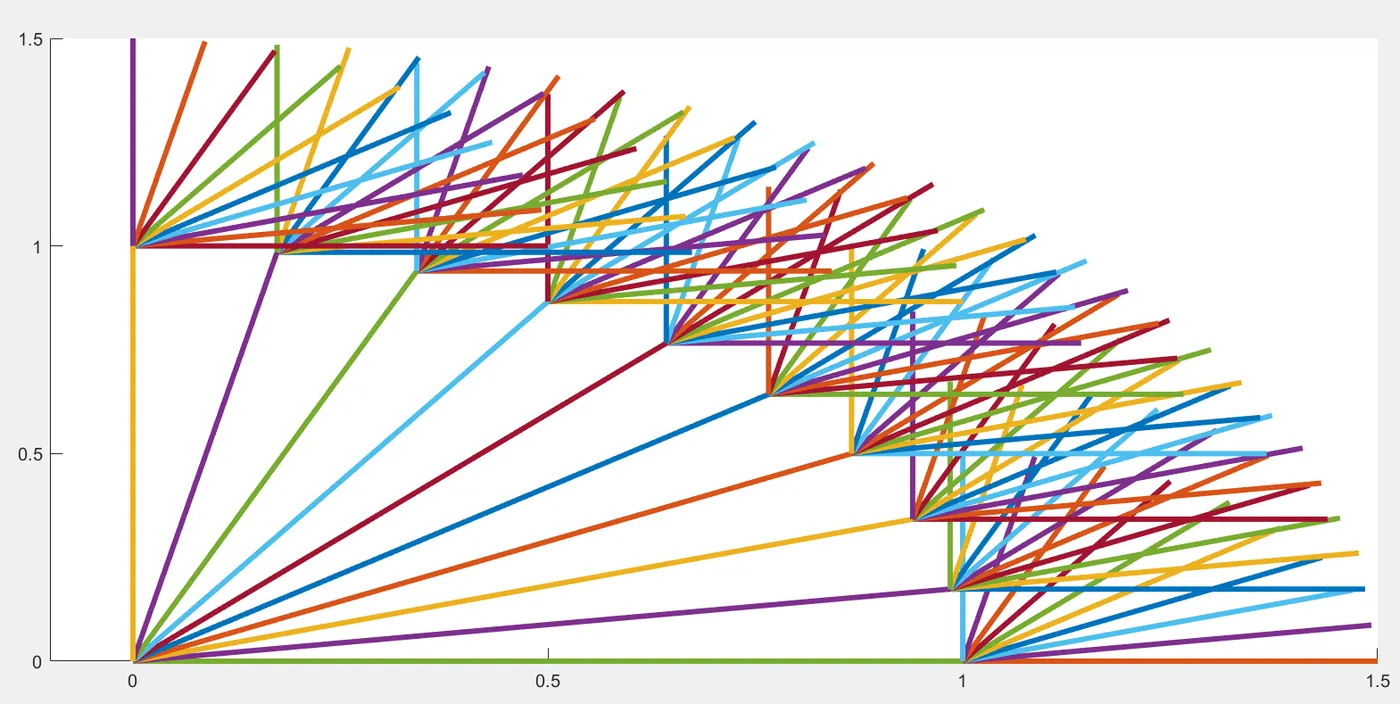
line([x1 x2],[y1 y2],'linewidth',3,'color','m')- We got an animated plot with different colors
clear all
close all
clc
%Inputs
l1 = 1;
l2 = 0.5;
theta1 = linspace(0,90,10);
theta2 = linspace(0,90,10);
ct = 1;
for i = 1:length(theta1);
    THETA1 = theta1(i);
    for j= 1:length(theta2);
    THETA2 = theta2(j);
x0 = 0;
y0 = 0;
x1 = x0 + l1*cosd(THETA1)
y1 = y0 + l1*sind(THETA1)
x2 = x1 + l2*cosd(THETA2)
y2 = y1 + l2*sind(THETA2)
%plotting
plot([x0 x1],[y0 y1],[x1 x2],[y1 y2] ,'linewidth',3)
axis([-0.1 1.5 0 1.5]),
pause(0.03)
M(ct)=getframe(gcf)
ct = ct+1;
end
end
movie(M)
videofile = VideoWriter('forward_kinematics.avi','Uncompressed AVI')
open(videofile)
writeVideo(videofile,M)
close(videofile)ERRORS:
for i = 1:length(theta1);
    THETA1 = theta1(i);
    for j= 1:length(theta2);
    THETA2 = theta2(i);