DussehraFestive scholarship on Skill-Lync courses, this week onlyFestive scholarship is openOffer ends Wed, 21 Oct, 11:59 pm IST.
Dussehra 2026

Start your next chapter this Dussehra

Tell us where you want to work. A counsellor will match you to the right course and confirm the festive scholarship you qualify for.

  • Festive scholarship on course fees, confirmed on your call
  • Free 20-minute call to map the right course to your goal
  • Real industry projects and placement support with every course

Offer ends Wed, 21 Oct, 11:59 pm IST

3,905 engineers placed since 2019 · 1,277 hiring companies

By submitting you agree to our Terms and Privacy Policy.

You're on the list

Browse courses
Civil · Course

Introduction and Applications of Hydrologic Engineering Center’s- River Analysis System (HEC-RAS)

A 3 month software oriented course on the use of HEC-RAS for analyzing river models and their behavior

Duration
12 weeks
Content
28 hours
Projects
2
Mode
Online
Overview

What you'll
be able to do.

  • This program will guide students to know what river analysis software is and how it will help them to enter the industry.
  • This program allows the user to perform the one and two-dimensional hydraulic calculations for a full network of natural and constructed channels.
  • This program is utilized for stream investigation which is utilized in various businesses for calculation of flood levels of waterways, flood hazard mapping, floodplain management and so forth.
Tools you'll use
HEC-RAS
Curriculum

12 modules,
built with industry.

  1. 01Introduction and Applications of Hydrologic Engineering Center’s- River Analysis System (HEC-RAS)12 modules
    1. Introduction to HEC-RASW01
      • In this session, you will learn
        • Introduction, General philosophy & Development of software, Hydraulic Model & Types of hydraulic models
        • The importance of software, General applications of HEC-RAS, and Overview of capabilities of HEC-RAS
        • The principles of Hydraulic analysis
        • How to download and instal the software
    2. User interface of HEC-RAS & Data required for hydraulic modelW02
      • In this session, you will learn
        • In detail about the applications of HEC-RAS
        • The user interface of HEC-RAS and Program Structure
        • About different tools: Main window of HEC-RAS
        • Basic data required for developing Hydraulic model: Channel description, Cross sections, Boundary conditions, and Flow & Boundary conditions
        • How HEC-RAS works: C/S data, flow data, boundary conditions
        • About geometric data tools and editor: River reach creation, Junctions, Cross sections, Bridges & Culverts, Inline structures, and lateral structures
    3. Geometry Editor tool & Develop basic river model with HEC-RASW03
      • In this session, you will learn
        • The key points about cross section geometry
        • About the tools and data available in cross section geometry, reach lengths, Roughness coefficient, Contraction & expansion coefficients, bank stations etc
        • The steps involded in developing Hydraulic Model with HEC-RAS
        • How to Develop basic river model using HEC-RA
    4. Supportive software’s & Its use in HEC-RASW04
      • In this session, you will learn
        • How to use supportive software’s which are used to develop hydraulic model in HEC-RAS like AutoCAD, QGIS, and HEC-HMS
        • In detail about steady flow condition
        • How to use supportive software’s for finding out the boundary condition of river
        • How to use of AutoCAD in hydraulic modeling to calculate river reach lengths and C/S data
        • How to use AutoCAD for obtaining C/S of rivers
        • How to develop river model using HEC-RAS to calculate the River reach & its tributaries, Junction details, Importing cross sections, etc
    5. Flow calculations & its use in Steady flow analysisW05
      • In this session, you will learn
        • Different methods for flow calculations, and discussion using UH Method, Empirical formulas, and Stream gauge data
        • How to download Toposheets & its use in catchment area calculation
        • How to use Google earth, UH method for flow calculation
        • How to use calculated flow for steady flow analysis in HEC-RAS
    6. Computation of Hydraulic model & viewing resultsW06
      • In this session, you will learn
        • How to use HEC-HMS software
        • How to develop river model using HEC-RAS: Flow & Boundary conditions, Computation of model, Viewing Graphical, and tabular & exporting results
    7. Inline & Lateral StructuresW07
      • In this session, you will learn
        • About Bridges & Culverts
        • About Gates & Weirs
        • How to prepare bridge & culvert data from Survey data
        • How to develop hydraulic model with the help of Bridges and Culverts
        • How to prepare Gates & Weirs data from Survey data
        • How to develop hydraulic model with the help of Gates & weirs
    8. River analysis with inline structuresW08
      • In this session, you will learn
        • About common errors while entering bridge, culvert, gates, and weirs data
        • How to resolve errors and run the model
        • Viewing results of inline & lateral structures
        • About the effect of inline & lateral structures on watercourse
        • About GIS tool: RAS Mapper
    9. Geographic information system (GIS) & Digital Elevation ModelW09
      • In this session, you will learn
        • The introduction to QGIS software
        • The procedure to download Digital Elevation Model (DEM): Bhuvan, USGR
        • How to create Digital Elevation Model (DEM) with available data
        • How to import DEM in QGIS software
        • The different parameters of DEM
        • How to identify different structures with DEM
        • How to develop contours, and different symbologies in QGIS
    10. RAS MapperW10
      • In this session, you will learn
        • About the step by step procedure to develop hydraulic model with RAS Mapper
        • How to develop Hydraulic model with the help of RAS Mapper
        • How to run & view results in RAS Mapper
        • The key points about RAS Mapper
    11. Unsteady flow Analysis & Applications of HEC-RASW11
      • In this session, you will learn
        • The basics of Unsteady flow analysis
        • How to Compute hydraulic model for unsteady flow
        • About Floodplain management & Flood hazard mapping, Roadway crossing & Bridge design
    12. River analysis with combination of GIS Tool & topographical SurveyW12
      • In this session, you will learn
        • How to develop hydraulic model with combination of GIS tool & Survey data
        • How to develop model to finalize Roadway crossing and bridge design across the river
        • The Key points of HEC-RAS
        • In detail about HEC-RAS applications and the objectives of HEC-RAS
Industry projects

2 projects
you'll ship.

Our projects are designed by experts in the industry to reflect industry standards. By working through our projects, Learners will gain a practical understanding of what they will take on at a larger-scale in the industry. In total, there are 2 Projects that are available in this program.

Hydraulic Model for any major river

Hydraulic Model for any major river

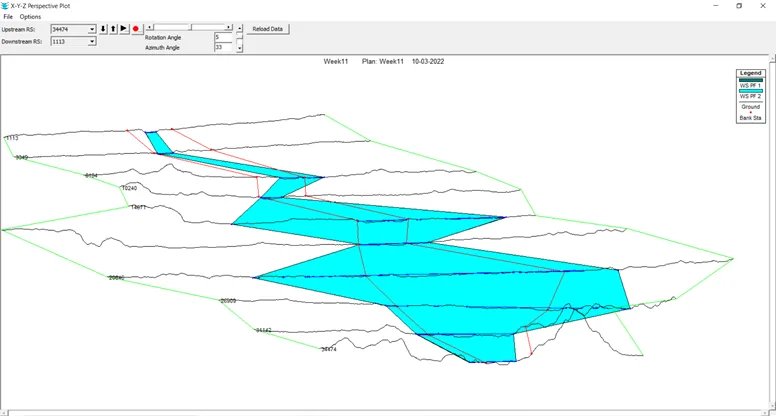
In this project, you are required to develop a hydraulic model for a major river in your area without considering any obstruction to the watercourse.
Flood Level Computation

Flood Level Computation

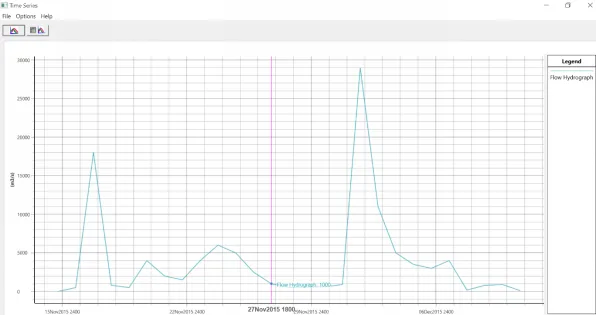
In this project, the students will be asked to compute flood levels for any major river with the given conditions.

Fee

One fee.
Everything included.

Become job ready with our comprehensive industry focused curriculum for freshers & early career professionals

Premium
₹40,000
Inclusive of all charges
  • 1 Year Access
  • Personalized Page
  • Live Individual & Group Sessions
  • Personalized & Hands-On
  • Job-Oriented Industry Relevant Curriculum
Check eligibility →
FAQ

Questions,
answered.

What is HEC RAS?
HEC – RAS is a type of computer program used to model water flow through systems comprising of open channels and computation of water surface profiles.
Which software and tools are taught during the course?

The key software used to elucidate the concepts of this course is HEC – RAS, which will be taught in great depth during the course.
In case I face any issues, will I get help to resolve them?

If you are facing any questions or doubts, you can get in touch with our support engineers through video, telephone or email support to get help.
Which projects will I work on during this course?

During the course, you will work on two projects, including a Hydraulic model for any major river and computation of flood levels for any major river.
What is the medium of offering the course?

The course will be delivered through online videos by expert faculty.
Will I get an e-verification after completion of the course?

Yes, you will get a shareable e-verified profile which you can upload on social media platforms.
Does Skill-Lync offer any community forums where I can get support?

Yes, you can join community forums to communicate with experts and batchmates from Skill-Lync.
Does Skill-Lync offer any job assistance after completion of the course?

Yes, you can get guidance from experts at Skill-Lync regarding jobs and placement.
Next step

Not sure it's
the right fit?

A counsellor will walk you through the syllabus, projects and fee options — and tell you honestly if another course suits you better.

Get the syllabus + a call back

We'll email the full syllabus and call within one working day.

By submitting you agree to our Terms and Privacy Policy.

Call usEnquire

Talk to a career counsellor

Free 20-minute call. We'll map the right course to where you want to work.

By submitting you agree to our Terms and Privacy Policy.