AI Agents for Mechanical Engineering: What They Actually Do in CAD and CAE
An AI agent is not a chatbot. It takes a goal, opens your engineering tools, runs them in a loop and reports back. Here is what that looks like in a real FEA job, step by step, which products do it today, where agents fail, and where an engineer must still check the work.
 Skill-Lync·25 Oct 2026·14 min read
In short
- An AI agent is software that takes a goal, uses engineering tools on its own (CAD, a mesher, a solver, a script), checks what came back and keeps going until it can report a result.
- In mechanical work, agents are best today at the repetitive middle of a job: geometry clean-up, setting up standard simulations, running variants, writing reports and checking drawings against rules.
- They are weakest where engineering judgement lives: choosing loads and boundary conditions, spotting results that run fine but are physically wrong, and signing off.
- Treat an agent like a fast junior engineer whose work you must review. The checks in this guide are the ones that review needs.
"AI agent" is now printed on almost every engineering software launch. SimScale has one inside Onshape. Siemens has one that writes PLC code. Autodesk has published servers that let outside AI models drive Fusion. A start-up demo shows an agent designing a marine propeller drive from one sentence.
Some of this is real and useful. Some of it is a demo video. This guide separates the two by looking at what an agent actually does, click by click, in a job every CAE engineer knows: a structural check of a bracket.
Chatbot, copilot, agent: what is the difference?
The three words get mixed up, but they describe different levels of involvement in your work.
- A chatbot answers questions. You ask "which element type should I use for a thin bracket?" and it replies. Nothing in your model changes. Think of a senior colleague you phone for advice.
- A copilot sits inside your tool and helps with the step in front of you: it finds a command, explains an error, suggests a fillet. You still drive. Siemens describes its Design Copilot NX in these terms, as a natural-language way to find answers, best practices and documentation inside NX.
- An agent is given a goal and works through the steps itself. It opens the CAD file, calls the mesher, starts the solver, reads the log, fixes what broke and comes back with a report. Think of handing a ticket to a junior engineer who then goes and does the work.
A sponsored article on engineering.com this August put the distinction neatly: a chatbot talks about your work, an agent takes part in it. That is why agents are both more useful and more dangerous. A wrong chatbot answer is a bad suggestion. A wrong agent action is a bad model that looks finished.
How an engineering agent works
Under the marketing, almost every engineering agent has the same five parts.
- A goal. "Check that this bracket meets a factor of safety of 2 under the brake load case."
- Context. The CAD file, the load specification, the material, company standards, past projects. The more of this the agent can read, the fewer assumptions it has to invent.
- Tools. The things it can actually operate: a CAD kernel, a mesher, a solver, a Python interpreter, a file system. Without tools, it is just a chatbot.
- A loop. Plan a step, call a tool, read the result, decide the next step. Repeat until done or stuck.
- Checks and gates. Tests the agent runs on its own output (did the mesh pass quality checks? did the solver converge?) and points where it must stop and ask a human.
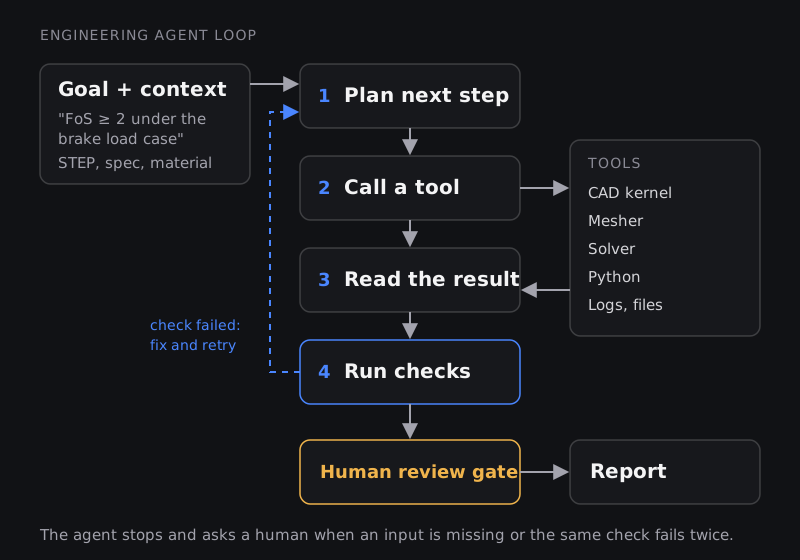
How agents plug into engineering software
For an agent to "call the solver", the solver needs a door it can knock on. Two doors matter today.
The first is scripting APIs. Most serious CAE tools can be driven by code: Python through the PyAnsys libraries for Ansys products, journal files in Fluent, Tcl in HyperMesh, text dictionaries in OpenFOAM. Anything you can script, an agent can in principle run. Ansys runs webinars on exactly this, showing general-purpose coding agents such as Claude Code, OpenAI Codex, Cursor and GitHub Copilot driving Ansys Mechanical and Mechanical APDL to build models, run them, post-process and write reports.
The second is the Model Context Protocol (MCP). Think of MCP as a standard plug socket for AI tools: if a program exposes an MCP server, any MCP-capable AI assistant can see its list of actions and call them, without custom wiring. In April 2026 Autodesk announced two public MCP servers for Fusion, one that runs locally and executes modelling commands while Fusion is open, and one that queries Fusion design data in the cloud. Comsol has said Multiphysics 2027 will ship with an MCP server. Research systems such as Foam-Agent expose their CFD functions the same way.
This matters for your career more than any single product. The skill that transfers is knowing how your tool is driven by code, because that is the layer every agent stands on.
Walk-through: an agent runs a bracket stiffness check
Here is a realistic structural job, broken into the steps an agent takes, the tool it calls at each step, the check it can run on itself, and the point where an engineer has to look. The bracket and numbers are an illustration, not a product demo.
The request: "Here is the STEP file of a cast aluminium suspension bracket. It is bolted at the two lower holes. The upper eye sees 4 kN along the vehicle's longitudinal axis from braking. Material is A356-T6. Tell me the peak von Mises stress, the factor of safety on yield and the deflection at the eye."
| Step | What the agent does | Tool it calls | Check it can run itself | Where a human must look |
|---|---|---|---|---|
| 1. Read the request | Extracts load, direction, supports, material and the outputs wanted. Lists what is missing. | The language model itself | Every required input has a value and a unit | Is "bolted at two holes" really a fixed support? Is 4 kN the right load case, or is it one of several? |
| 2. Prepare geometry | Imports the STEP, removes tiny cosmetic fillets and logos, checks for sliver faces and gaps | CAD kernel or pre-processor script | Volume before and after clean-up changes by less than a set percentage | Did it remove a fillet that actually controls the peak stress? |
| 3. Mesh | Second-order tetrahedral mesh with local refinement at fillets and bolt holes | Mesher | Element quality metrics pass; no failed elements | Is the mesh fine enough where the answer is decided? |
| 4. Set up physics | Assigns A356-T6 properties, applies fixed supports to the bolt holes and a 4 kN force on the eye | Solver API | Units consistent; load magnitude matches the request | Fixed supports stiffen the model. Should it be bolt pretension with contact instead? |
| 5. Solve | Runs a linear static analysis | Solver | Solver finished without warnings | Linear static is only valid while stresses stay below yield |
| 6. Post-process | Extracts peak stress, deflection and reaction forces | Post-processor script | Reaction forces sum to the applied load | Is the peak stress real, or a singularity at a sharp corner or support edge? |
| 7. Refine | Halves the element size near the peak and solves again | Mesher and solver | Peak stress changes by less than a set tolerance | If the peak keeps climbing with every refinement, it is not a number you can design to |
| 8. Report | Writes a short report with plots, inputs, assumptions and the factor of safety | Document generator | Every number in the report traces to a file | Sign-off. The agent cannot take responsibility for the part. |
Two checks worth doing by hand, with numbers
Reaction force balance. The reactions at the supports must add up to the applied load. If the agent applied 4,000 N and the reactions sum to 3,996 N, the 0.1% difference is numerical noise. If they sum to 2,000 N, half the load went somewhere else: it was applied to the wrong face, split across a symmetry plane that does not exist, or entered in the wrong unit. The model will still produce beautiful colour plots. Only the balance tells you it is wrong.
Mesh convergence of the peak. Suppose the agent reports these peak stresses at three element sizes near a sharp internal corner (illustrative numbers):
| Local element size | Peak von Mises stress | Change |
|---|---|---|
| 2.0 mm | 118 MPa | - |
| 1.0 mm | 131 MPa | +11% |
| 0.5 mm | 152 MPa | +16% |
The change is growing, not shrinking. That is the signature of a stress singularity: at a perfectly sharp re-entrant corner the theoretical stress is infinite, so every refinement finds a bigger number. A real converged peak would change less with each step. The fix is engineering, not computing: model the actual fillet radius from the drawing, or judge the region with a different criterion. An agent that reports "152 MPa, factor of safety 1.4" here has reported a mesh artefact as a result. If you want the background, our guides on why meshing matters and what FEA is cover both checks.
What is on the market today
The products below are grouped by what they act on. The descriptions are the vendors' own claims as reported in the trade press, not independent test results.
| Category | Examples | What is claimed | Worth knowing |
|---|---|---|---|
| CAD copilots | Siemens Design Copilot NX; Autodesk Assistant in Fusion, Inventor, Moldflow and Vault | Natural-language help inside the CAD tool; Autodesk says its Assistant can now execute tasks across 3D models through "prompt to API" | Mostly assistive: you stay in control of each step |
| Design-review agents | bananaz Design Agent; Leo AI Inspection Agent | Read CAD and drawings, flag DFM problems, run tolerance stack-ups, check against ASME Y14.5 and ISO 1101 | Useful as a second pair of eyes; the rule set is only as good as the standards you feed it |
| Design-generation agents | Leo AI Design Agent; Neural Concept AI Design Copilot | From requirements to an editable CAD assembly; Neural Concept says 10 to 1,000 times more design variants per iteration | engineering.com's editor described the Leo demo as a fast, pre-recorded video and said he would "wait and see" |
| Simulation agents | SimScale Engineering AI (including inside Onshape); Rescale agents; coding agents driving Ansys Mechanical | From one prompt: prepare geometry, propose a setup, mesh, run CFD, FEA or thermal, return results; engineers can pause and edit the setup | The closest match to the walk-through above |
| Physics AI (surrogates) | Neural Concept, PhysicsX, Ansys SimAI and GeomAI, in-house models at GM | Predict simulation results in seconds or minutes instead of hours | Not agents themselves, but agents increasingly call them. See our guide to surrogate models |
| Automation engineering | Siemens Eigen Engineering Agent in TIA Portal | Writes PLC code, builds HMI screens, configures devices, and checks its own work; Siemens reports pilots at more than 100 companies | Siemens frames the goal as shortening repetitive phases, "not to replace engineers" |
| Factory operations | GE Appliances' agents built on Google's Gemini Enterprise | Hundreds of narrow agents that summarise shifts, flag anomalies and spot drift on lines | Each agent is tied to one workflow and its outputs are reviewed by people |
A pattern runs through the credible deployments. GE Appliances' logistics vice president told engineering.com that the company manages its agents "the same way we manage people", because "they can drift, they can make mistakes." SimScale's own director of solution engineering wrote that agents should handle execution while engineers keep judgement and validation. The vendors closest to real customers are the most careful about human checkpoints.
Where agents fail
These are the failure modes reported by researchers and practitioners, and the ones you will see first if you try an agent on your own work.
1. Underdefined requests get filled with guesses
A simulation is a set of equations; it needs numbers. A plain-English request leaves gaps, and the agent fills them. Keysight's simulation product manager, quoted in Digital Engineering, put it bluntly: give the tool an underdefined problem and "you're asking it to fill the gaps", which opens the door to hallucination. The habit that prevents this is old-fashioned: write the request like a test specification, with units, load cases, supports and pass criteria.
2. Statistically likely is not physically correct
A language model produces the most plausible next step. Physics does not care about plausibility. The same Digital Engineering article notes that an AI tool may not "know" that an absolute temperature cannot go below zero or that inflow must equal outflow. Your conservation checks (mass, energy, force balance) catch exactly this class of error.
3. "It ran" is not "it is right"
The ChatCFD research team measured this gap directly on 315 OpenFOAM benchmark cases. Their agent ran 82.1% of the cases to completion, but only 68.12% met their measure of physical fidelity. Roughly one case in seven ran cleanly and was still not physically meaningful. Our post on AI agents for CFD walks through why.
4. Errors compound across a chain of agents
When one agent prepares geometry, another meshes and a third interprets results, a small error early becomes a confident wrong answer late. Barna Szabó, a pioneer of p-version finite elements, argued on the ESRD blog that any serious agentic system must put verification, validation and uncertainty quantification first, because building agents on weak simulation practice is "like building a skyscraper on quicksand".
5. Demos use clean data; your project does not
Real assemblies have missing parts, inconsistent units, legacy naming and undocumented decisions. An agent that is impressive on a tidy demo file may stall on a supplier's STEP export. Test any tool on your own messy files before you trust it.
6. Reviewing takes time too
Machine Design quoted Kai Lin Woon of the University of Malaya on growing evidence that, on complex or highly contextual tasks, the need to review AI output can slow work down. Agents speed up the standard parts of a job. They do not yet speed up the subtle or novel parts, and those are usually where the risk sits.
How to use agents well
- Start with bounded, checkable tasks. Batch geometry clean-up, standard load cases on a part family, report generation, drawing checks. Tasks where a wrong answer is cheap to catch.
- Write the request like a spec. Inputs with units, the load cases, the supports, the output you want and the acceptance criterion.
- Demand an audit trail. Every number in the report should trace back to an input file, a script and a log. If you cannot rerun it, you cannot trust it.
- Keep your own checks. Force or mass balance, a mesh study on the quantity you care about, a hand calculation within an explainable margin.
- Keep a human gate before anything leaves the team. In regulated or safety-critical work this is not optional; MIT Technology Review Insights' 2026 survey of product engineering leaders, sponsored by L&T Technology Services, found verification, governance and explicit human accountability treated as mandatory for AI that informs physical designs.
What this means for mechanical engineers
The work that agents absorb first is the work that fills a fresher's week today: cleaning geometry, setting up the tenth variant of the same analysis, formatting reports. The work that remains is defining the problem, choosing what to model, checking answers against physics and taking responsibility for the result.
That shifts what a strong junior engineer looks like. Knowing the menus of one solver matters less. Knowing the physics well enough to catch a wrong answer, and knowing how to drive a tool from Python, matters more. Our companion post on whether AI will replace mechanical engineers turns this into a concrete skills plan.
If you want to build those skills in a structured way, the PG Program in Automation & Pre-Processing for FEA & CFD Analysis covers scripting the pre-processing work agents automate, Python for Mechanical Engineers covers the language most engineering APIs speak, and the PG Program in CAE builds the FEA judgement no agent supplies.
Frequently asked questions
Is an AI agent the same as generative design?
No. Generative design (topology optimisation) is a physics-driven algorithm that removes material where it is not needed. An agent is a planner that operates tools. An agent might call a generative design tool as one of its steps.
Can I use ChatGPT or Claude to run Ansys or OpenFOAM today?
Yes, through scripting. General coding agents can write and run PyAnsys scripts or OpenFOAM case files on your machine, and Ansys runs webinars showing exactly this. You still need a licensed, installed solver, and you must check what the agent built.
Do I need to learn programming to work with engineering agents?
You need enough to read what the agent wrote and run it yourself. Python is the common language across PyAnsys, OpenFOAM tooling, Fusion's API and most data work. You do not need to be a software engineer.
Are AI agents safe to use on safety-critical parts?
Only with full human verification and sign-off. Practitioners quoted by Digital Engineering recommend a "solver in the loop": the AI proposes, and a trusted solver or test confirms. Certification still rests on validated analysis and testing.
Which engineering agent should a student learn first?
None in particular. Products change every few months. Learn one CAE tool deeply, learn to script it, and learn to verify results. Those skills carry over to whichever agent your employer uses.
Sources and further reading
- engineering.com, Opinion: AI agents are stepping up for engineering simulation (Steven Lainé, SimScale, 12 Mar 2026)
- engineering.com, SimScale launches Engineering AI Agent within Onshape (16 Sep 2026)
- engineering.com, Agentic AI: The Next Step for Hardware Engineering (sponsored by Altium, 14 Aug 2026)
- engineering.com, The agentic era for mechanical design (12 Aug 2026)
- engineering.com, Autodesk announces Fusion MCP servers and more AI updates (22 Apr 2026)
- engineering.com, Multiphysics gets MCP server and Onshape gets SimScale agent (23 Sep 2026)
- engineering.com, bananaz launches AI design agent for mechanical engineers (2 Oct 2025)
- engineering.com, Neural Concept launches AI design copilot for engineers (9 Jan 2026)
- engineering.com, Inside GE Appliances' AI agent rollout (28 May 2026)
- Digital Engineering 24/7, Catching Your AI's Hallucination (Kenneth Wong, 30 Jun 2026)
- Digital Engineering 24/7, Siemens Brings AI Copilot, Immersive Design to NX (10 Jul 2025)
- Siemens, The new AI agent doesn't just make suggestions (press release, 19 Jun 2026)
- Ansys Innovation Space, Agentic AI for Ansys Mechanical and MAPDL Workflows (webinar)
- Machine Design, Will AI Replace Programmers? What Elon Musk's Prediction Means for Mechanical Engineers (Treena Hein, 13 Jul 2026)
- MIT Technology Review Insights, Pragmatic by design: Engineering AI for the real world (sponsored by L&T Technology Services, 12 Mar 2026)
- E. Fan et al., ChatCFD: An LLM-Driven Agent for End-to-End CFD Automation, arXiv:2506.02019
- B. Szabó, Great Expectations: Agentic AI in Mechanical Engineering, ESRD blog (11 Dec 2025)