Can an AI Agent Run Your CFD? How LLM Agents Set Up OpenFOAM Cases, and Where They Fail
Research agents now turn a one-line prompt into a running OpenFOAM case most of the time. We walk through what such an agent does for a backward-facing step, file by file, show the numbers it should calculate, and list the checks that separate a case that runs from a result you can trust.
 Skill-Lync·25 Oct 2026·11 min read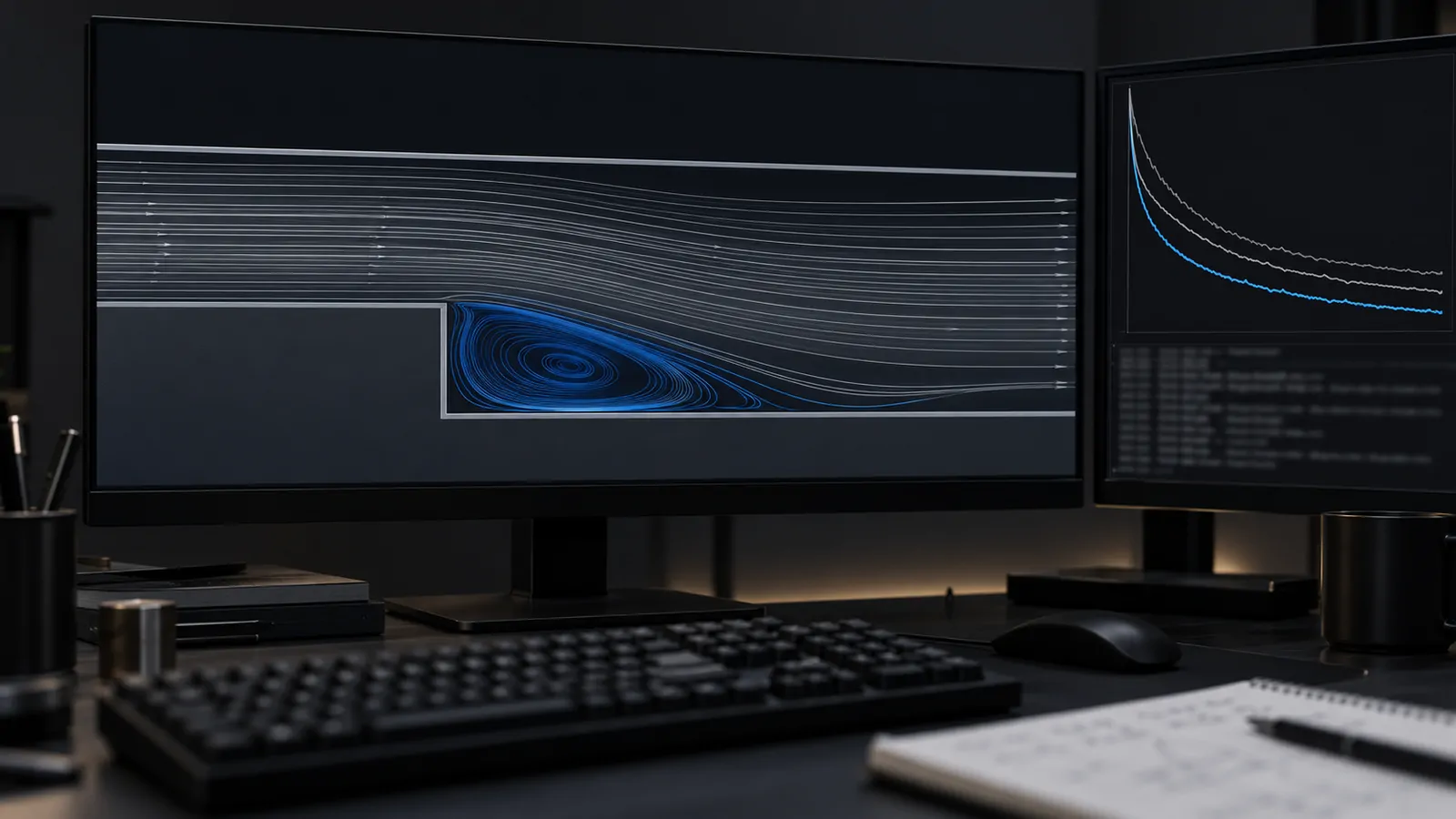
In short
- Several research groups have built LLM agents that turn a plain-English request into a complete OpenFOAM case: mesh, physics, solver settings, run and plots.
- On their own benchmarks the best of them run most cases to completion. Foam-Agent reports 88.2% on 110 tasks; ChatCFD reports 82.1% on 315 cases.
- Running is not the same as being right. ChatCFD's authors found only 68.12% of cases were physically meaningful by their measure.
- The gap is filled by checks a CFD engineer already knows: the Reynolds number, inlet turbulence, y+, mass balance, mesh independence and comparison with experiment. This post shows each one on a worked example.
CFD looks like the perfect job for an AI agent. An OpenFOAM case is just a folder of text files. Every tool runs from the command line. Every run writes a log that says what went wrong. An agent that can read and write text, run commands and read logs has, in principle, everything it needs.
In practice, the hard part of CFD was never typing the files. It was knowing which physics to switch on, what numbers to put at the inlet and whether the answer at the end means anything. That is exactly where the research shows agents still slip.
Why OpenFOAM is the testbed
OpenFOAM is open source, scriptable from top to bottom and has hundreds of tutorial cases, which makes it the natural choice for researchers building CFD agents. It also has a learning curve that most students remember.
A case has three folders. Think of them as a recipe card set:
0/is the starting state: one file per field (velocityU, pressurep, turbulence quantitiesk,omega,nut) with the value at every boundary.constant/holds the ingredients: fluid properties, the turbulence model choice and the mesh once it is built.system/is the method: how to build the mesh (blockMeshDict), how long to run (controlDict), which discretisation schemes (fvSchemes) and which linear solvers (fvSolution).
Every patch name, field name and keyword has to agree across these files, and the exact file names differ between the two main OpenFOAM distributions and between versions. A single mismatch stops the run. That makes OpenFOAM unforgiving for humans and a good stress test for agents.
What the research agents are
Four systems show where the field is. Their benchmarks, models and success definitions differ, so do not compare numbers across rows.
| System | How it works | Reported result |
|---|---|---|
| MetaOpenFOAM | An "assembly line" of role-playing agents (architect, input writer, runner, reviewer) with retrieval over OpenFOAM tutorials | An early reference point. Later papers re-ran it on their own benchmarks: 55.5% in the Foam-Agent paper, 6.2% in the ChatCFD paper |
| Foam-Agent 2.0 (Yue et al.) | Multi-agent framework with a meshing agent that can use external meshes or generate geometry with Gmsh, HPC job scripts, ParaView post-processing, and its functions exposed through the Model Context Protocol | 88.2% success on 110 simulation tasks using Claude 3.5 Sonnet |
| ChatCFD (Fan et al.) | Structured knowledge bases, a precise error locator and iterative reflection, running on DeepSeek-R1/V3 | 82.1% execution success and 68.12% physical fidelity on 315 cases; about 192,000 tokens and US$0.21 per case |
| General coding agents (Xiao et al., 2026) | An off-the-shelf coding agent with light guidance: reuse the nearest tutorial and repair errors by reading logs | Prompt guidance sharply raised completion on tutorial-like cases; stronger models markedly improved mesh generation on obstacle-flow cases |
Two findings matter for practitioners. First, ChatCFD's ablation study showed that removing its database of solver templates dropped accuracy to 48%: the agent works because it starts from known-good cases, not because it understands CFD from first principles. Second, Xiao and colleagues found the biggest differences between models showed up in geometry and meshing, the step human CFD engineers also find hardest.
Walk-through: what an agent does for a backward-facing step
Here is a request a student might type, and the steps a well-built agent should take. The physics and numbers are worked out in full so you can check an agent's choices against them.
The request: "Simulate steady air flow over a 2D backward-facing step. Step height 25 mm, inlet velocity 10 m/s. Report where the flow reattaches."
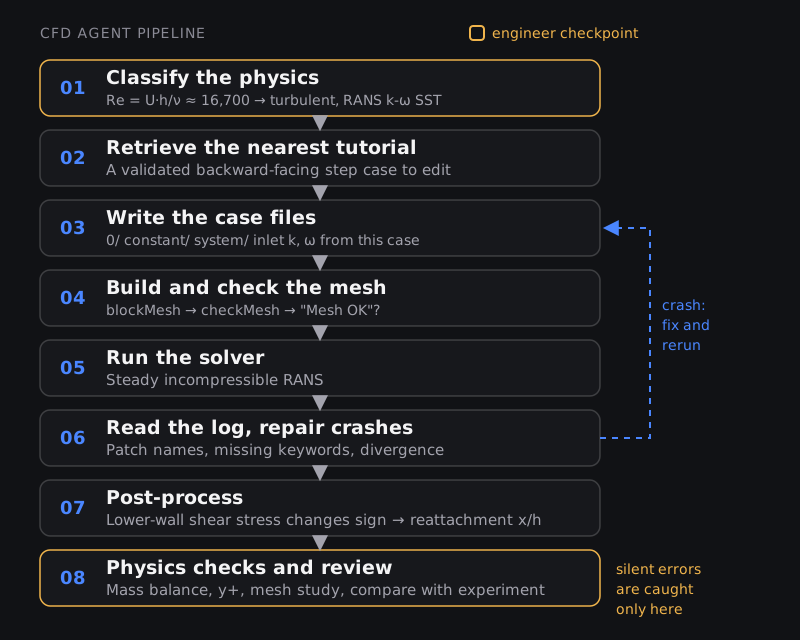
Step 1: Classify the physics (the agent must calculate, not guess)
The first decision is laminar or turbulent, and the Reynolds number decides it. Using the step height h as the length scale and air at room temperature (kinematic viscosity ν ≈ 1.5 × 10⁻⁵ m²/s):
Reh = U · h / ν = 10 × 0.025 / (1.5 × 10⁻⁵) ≈ 16,700
That is well into turbulent separated flow, so a steady RANS model is a reasonable first choice. k-ω SST is a common default for separation because it behaves well in adverse pressure gradients; our post on RANS turbulence models explains why. In older OpenFOAM releases and the openfoam.com line, that means the steady incompressible solver simpleFoam. Recent OpenFOAM Foundation releases instead run the incompressibleFluid module through the foamRun application. That difference is itself a trap for agents trained on older tutorials.
If the prompt does not say "turbulent" and the agent skips this calculation, it may run a laminar case. That case will converge, produce smooth plots and predict a reattachment point that is simply wrong. Nothing in the log will complain.
Step 2: Retrieve the nearest known case
OpenFOAM ships a backward-facing step tutorial called pitzDaily for simpleFoam, with a step of similar size and a 10 m/s inlet. A good agent copies it and edits it rather than writing every file from scratch. That is exactly the "tutorial reuse" strategy that lifted completion rates in the Xiao et al. study. It is also how experienced engineers start.
Step 3: Write the boundary conditions and inlet turbulence
The velocity file 0/U needs a condition on every patch. For this 2D case it looks like this:
boundaryField
{
    inlet        { type fixedValue;  value uniform (10 0 0); }
    outlet       { type zeroGradient; }
    upperWall    { type noSlip; }
    lowerWall    { type noSlip; }
    frontAndBack { type empty; }
}
The empty type on the front and back faces is what makes an OpenFOAM case two-dimensional. Forget it and the solver treats the case as a thin 3D slab.
The turbulence fields need inlet values, and these are numbers, not keywords. With a turbulence intensity of 5% (a common estimate for a wind-tunnel-like inlet) and a length scale of 10% of the step height:
- Turbulent kinetic energy:
k = 1.5 (U · I)² = 1.5 × (10 × 0.05)² = 0.375 m²/s² - Length scale:
l = 0.1 × 0.025 = 0.0025 m - Specific dissipation rate:
ω = √k / (Cμ0.25 · l) = 0.612 / (0.548 × 0.0025) ≈ 450 s⁻¹, with Cμ = 0.09
A common agent failure is to copy these values unchanged from whichever tutorial it retrieved. If that tutorial had a different velocity or scale, the inlet turbulence is wrong and so is the shear layer that controls reattachment. Ask any agent to show this calculation.
Step 4: Build and check the mesh
The agent runs blockMesh to build a structured mesh from the geometry blocks, then checkMesh, which reports non-orthogonality, skewness and aspect ratio and ends with "Mesh OK" or a list of failed checks. A sensible agent treats a failed check as a stop. It also has to grade cells towards the walls and the shear layer behind the step, where the gradients are steepest. Our guide on CFD meshing covers why.
Step 5: Run, read the log and repair
This is where agents genuinely save time. Suppose the mesh file names the exit patch outflow while 0/U calls it outlet. OpenFOAM stops with a fatal error saying it cannot find a patch field entry for outflow. An agent reads that line, finds the mismatch, renames the entry and reruns, in seconds. ChatCFD's authors credit much of their success to exactly this kind of error locator.
The trap is that only crashes produce error messages. A wrong turbulence model, a wrong inlet value or a too-coarse mesh produce no error at all.
Step 6: Post-process the quantity asked for
Reattachment is where the flow on the lower wall stops running backwards. In practice you compute the wall shear stress on the lower wall (OpenFOAM has a wallShearStress function for this) and find the point downstream of the step where its streamwise component changes sign. Report it as a multiple of the step height, x/h, so it can be compared with published data.
Step 7: The checks that decide whether to believe it
| Check | What to look for | Who can do it |
|---|---|---|
| Physics choice | Re calculated, turbulence model justified for separated flow | Agent can calculate; engineer approves |
| Inlet turbulence | k and ω derived from this case's velocity and scale, not copied | Agent can show the working; engineer checks it |
| Convergence | Residuals have dropped and the reattachment point has stopped moving between iterations | Agent, automatically |
| Mass balance | Outlet mass flow equals inlet mass flow to a fraction of a percent | Agent, automatically |
| Near-wall mesh | Wall y+ suits the wall treatment chosen (see our y+ guide) | Agent can compute; engineer judges |
| Mesh independence | x/h changes little between a coarse, medium and fine mesh | Agent can run; engineer interprets |
| Validation | x/h compared with experimental data for a similar expansion ratio and Reynolds number | Engineer: choosing the right reference is judgement |
An agent that skips the last four rows has delivered a case that runs, which is roughly what an 82% execution rate measures. The difference between 82% and 68% in the ChatCFD results is, in effect, this table.
Failure modes to expect
- Silent physics errors. Laminar instead of turbulent, the wrong solver for compressible flow, gravity forgotten in a buoyancy case. All run cleanly.
- Copied numbers. Inlet turbulence, time steps and relaxation factors lifted from a tutorial with different conditions.
- Version drift. File names and keywords that changed between OpenFOAM releases. A model trained on old tutorials writes old syntax.
- Geometry and meshing beyond blocks. Real CAD needs clean-up and unstructured meshing. This is where model capability made the biggest difference in the 2026 coding-agent study.
- Stopping on residuals alone. Residuals can flatten while the quantity you care about is still drifting.
- Confident summaries. ChatCFD's physics interpreter scored 97.4% on summary fidelity, which is impressive, but a fluent summary of a wrong run is still wrong. Read the numbers, not the paragraph.
Where agents genuinely help a CFD engineer
- Setting up variants. Ten inlet velocities, five step heights, three meshes: tedious by hand, ideal for an agent working from one validated base case.
- Debugging crashes. Reading a 2,000-line log and pointing to the offending dictionary entry.
- Writing the glue. Batch scripts, HPC job files, post-processing scripts that extract the same numbers from every run.
- Onboarding. Explaining what each file and keyword does while you build your first cases.
Notice the common thread: the agent is most valuable after a human has set up and validated one good case. That makes your first validated case, and your ability to judge it, the scarce skill.
How to get ready
- Learn the case structure by hand. Build pitzDaily and two or three other tutorials yourself, then change them. The Introduction to CFD using MATLAB and OpenFOAM course starts here, and Advanced CFD using OpenFOAM goes further.
- Script everything. If you can drive OpenFOAM from Python (generate cases, launch runs, parse logs), you can direct an agent and check its work. Python for Mechanical Engineers covers the basics.
- Make validation a habit. Every project in your portfolio should end with a mesh study and a comparison with published data. The PG Program in Computational Fluid Dynamics is built around industry projects that do this.
- Then try an agent. Give it a case you have already validated and see where it differs from you. That is the fastest way to learn what to check.
New to CFD altogether? Start with our explainer on what CFD is and how a simulation works.
Frequently asked questions
Can ChatGPT or Claude set up an OpenFOAM case?
A general model can write plausible case files, and a coding agent running on your machine can also run them and fix errors from the log. Research systems built on these models complete most benchmark cases. You still need to check the physics choices and validate the result.
Will AI agents replace CFD engineers?
Not on current evidence. They automate case setup and debugging, the parts of the job that are already routine for experienced engineers. Choosing models, judging meshes and validating results remain human work, and the research shows exactly those steps are where agents fall short.
Do these agents work with Ansys Fluent or STAR-CCM+?
The published research mostly uses OpenFOAM because it is open and text-based. Commercial tools can be scripted (Fluent through PyFluent and journals, STAR-CCM+ through Java macros), and vendors and platforms such as SimScale are shipping their own simulation agents. The same checks apply.
How much does it cost to run a CFD agent?
ChatCFD's authors report about 192,000 language-model tokens and about US$0.21 per case with their setup. Compute for the CFD itself is extra and is usually the larger cost.
What is "physical fidelity" in the ChatCFD paper?
It is the authors' metric for whether a completed simulation is scientifically meaningful, not just whether it ran. It is a useful idea even outside research: always score "did it run" and "is it right" separately.
Sources and further reading
- L. Yue et al., Foam-Agent 2.0: An End-to-End Composable Multi-Agent Framework for Automating CFD Simulation in OpenFOAM, arXiv:2509.18178
- E. Fan et al., ChatCFD: An LLM-Driven Agent for End-to-End CFD Automation with Structured Knowledge and Reasoning, arXiv:2506.02019 (Advanced Intelligent Discovery, 2025)
- K. Xiao et al., A Preliminary Assessment of Coding Agents for CFD Workflows, arXiv:2602.11689 (Feb 2026)
- engineering.com, SimScale launches Engineering AI Agent within Onshape (16 Sep 2026)
- Digital Engineering 24/7, Catching Your AI's Hallucination (Kenneth Wong, 30 Jun 2026)
- OpenFOAM Foundation, OpenFOAM User Guide (case structure, blockMesh, checkMesh, tutorials)