Wiring harness design in CATIA V5 - 3D modeling Week 5 & 6 Challenge
Steps followed while Routing the following harness layout in Electrical workbench.
1) load all the 10 connectors in catia and define all of them electrically in electrical past design workbench.
2) Create a product with harness assembly assemblies named "Harness A" and "Harness B".
3) Add the connecors in the respective harness assembly and position all the connectors in the appropriate location as per the layout in mechanical assembly design workbench.
4) Define the both the harness assemblies electrically by using geometric bundle command.
5) Finish routing by creating the bundle segments as per the layout.
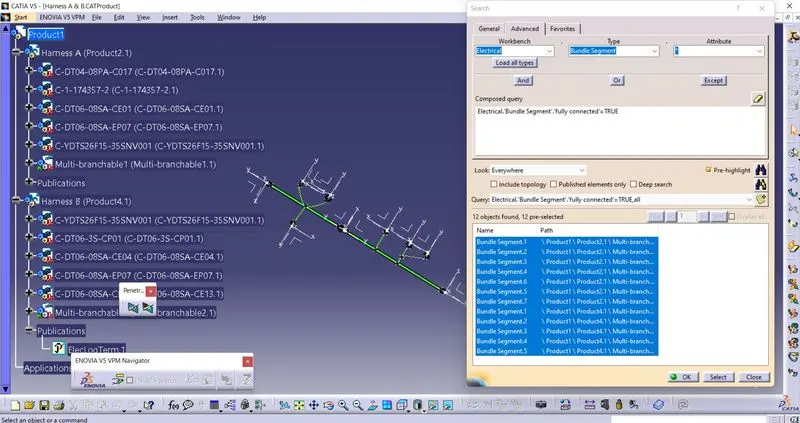
6) To Check the bundle continuity. Go to edit, search, and select the electrical workbench, bundle segment and fullyconnected option. click on true and check the listed bundle segments.
7) To add the annotaions go to assembly design click on "view creation" command to create the plane and then use the "flag note with leader" command to add the required notes.
8) To generate a CATpart file from the product. switch to mechanical assembly design. Go to tools and then click on "Generate CATpart from product". select the product and click on ok.