Menu

IIT Certification Programs

Workshops

Projects

Blogs

Careers

Student Reviews


More

Academic Training

Informative Articles

Find Jobs

We are Hiring!


All Courses

Choose a category

Loading...

All Courses

All Courses

logo

Wiring harness design in CATIA V5 - 3D modeling Week 4 Challenge

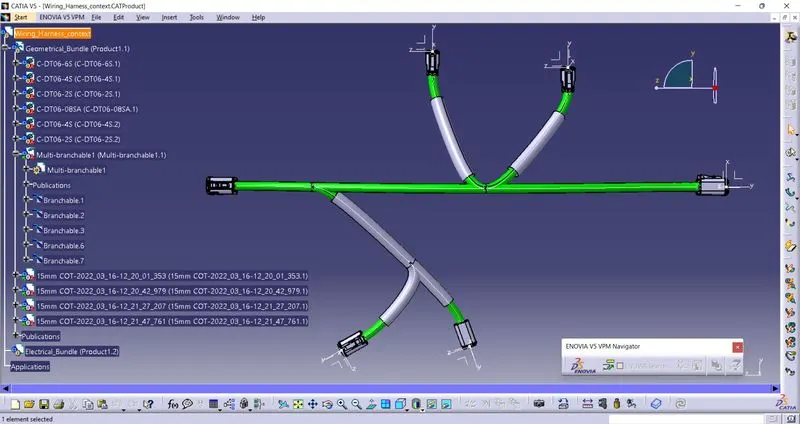
Steps to be followed to Route the given harness layout and to add the protective covering.1) Create a product(main) named "Wiring_harness_context"2) Create a new product(Sub) named "Geometrical_Bundle" and "Electrical_Bundle"3) Open the Geometrical_Bundle product in a new window and add all the components required (DT06-4S,…

    Project Details

    Loading...

    Leave a comment

    Thanks for choosing to leave a comment. Please keep in mind that all the comments are moderated as per our comment policy, and your email will not be published for privacy reasons. Please leave a personal & meaningful conversation.

    Please  login to add a comment

    Other comments...

    No comments yet!
    Be the first to add a comment

    Read more Projects by Ashwin Kumar (7)

    Project 2

    Objective:

    Assignment: Route the Wiring harness on Given car body and Prepare flatten view drawing in CATIA V5. Application of all Packaging rules, Industry best practices studied in this course shall be demonstrated in design. Apply Protection coverings as required. The first step involved in Wiring harness design process is "Input…

    calendar

    19 Apr 2022 05:13 AM IST

    • CATIA
    Read more

    Project 1

    Objective:

    Assignment: Route the Wiring harness on Given Engine and Prepare flatten view drawing in CATIA V5. The first step involved in Wiring harness design process is "Input Collection".All the required data like Physical Architecture (gives the location of the components), BOM(Bill of Materials), Vehicle Specification (Assembly…

    calendar

    14 Apr 2022 05:20 PM IST

    Read more

    Wiring harness design in CATIA V5 - 3D modeling Week 7 Challenge

    Objective:

    Steps followed while Flattening and flattened view creation of the given wiring harness assembly1. Save the wiring harness assembly which should be flattened.2. Create a new product and (add the catalog when required) use the "Harness flattening parameters" command to add the parameters. Save the file in the folder where…

    calendar

    28 Mar 2022 04:51 AM IST

      Read more

      Wiring harness design in CATIA V5 - 3D modeling Week 5 & 6 Challenge

      Objective:

      Steps followed while Routing the following harness layout in Electrical workbench.1) load all the 10 connectors in catia and define all of them electrically in electrical past design workbench.2) Create a product with harness assembly assemblies named "Harness A" and "Harness B".3) Add the connecors in the respective harness…

      calendar

      23 Mar 2022 09:00 AM IST

        Read more

        Wiring harness design in CATIA V5 - 3D modeling Week 4 Challenge

        Objective:

        Steps to be followed to Route the given harness layout and to add the protective covering.1) Create a product(main) named "Wiring_harness_context"2) Create a new product(Sub) named "Geometrical_Bundle" and "Electrical_Bundle"3) Open the Geometrical_Bundle product in a new window and add all the components required (DT06-4S,…

        calendar

        16 Mar 2022 07:50 AM IST

          Read more

          Wiring harness routing & packaging Rules Week 3 Challenge

          Objective:

          REPORT WRITTING FOR Q1:Steps to be followed to define the given P- Clamp as an Electrical suppot.1) Download the P-Clamp CAD model and load the file in Catia.2) Create the Geometrical parameters like points and planes required for defining the P-clamp as Support part in the part design module.3) Now, Switch to Electrical…

          calendar

          14 Mar 2022 08:04 AM IST

            Read more

            Wiring harness design in CATIA V5 - 3D modeling Week 2 Challlenge

            Objective:

            Steps followed to define connectors & Connector clip as an electrical part in electrical part design workbench.1)Download the connectors and clip from the link in stp format and load them in catia(DT06 – 08SA, Tyco 174357-2, Tyco 85229-1)2)Create the Geometrical set like point at the bundle entry side,mating side and…

            calendar

            09 Mar 2022 02:50 PM IST

              Read more
              Showing 1 of 7 projects