Creating macro for auto reflecting elements in Hypermesh using TCL/TK
AIM: To create a macro in TCL/TK to autoreflect elements from given FE part in Hypermesh.
PROCEDURE:
The macro for auto reflecting elements must do the following:
1. Ask for name of new component in which reflected elements will be stored
2. Ask the user for original and target geometries
3. Create centroid of original and target geometries and obtain the nodes of the center of the two centroids
4. Use the center node as base point for reflection
5. Reflect the elements into the respective components
The code prepared for the given assignment is given below:
proc nastran {a t1} {
	set n [concat $a $t1 "mm"]
	if {[hm_entityinfo exist comps $n]==0} {
		*createentity comps name=$n
		*createmark comps 1 $n
		set compid [hm_getmark comps 1]} else {puts "Entity already exists"}
	if {[hm_entityinfo exist props $n]==0} {
		*createentity props cardimage=PSHELL includeid=0 name=$n
		*createmark properties 2 $n
		set propid [hm_getmark props 2]
		set clr [hm_getvalue comps name=$n dataname=color]
		*setvalue props id=$propid STATUS=1 95=$t1 color=$clr
		*setvalue comps id=$compid propertyid ={props $propid}}
	}

proc radioss {b t2} {
	set m [concat $b $t2 "mm"]
	if {[hm_entityinfo exist comps $m]==0} {
		*createentity comps cardimage=Part includeid=0 name=$m
		*createmark comps 1 $m
		set compid [hm_getmark comps 1]} else {puts "Entity already exists"}
	if {[hm_entityinfo exist props $m]==0} {
		*createentity props cardimage=P1_SHELL includeid=0 name=$m
		*createmark properties 1 $m
		set propid [hm_getmark props 1]
		set clr2 [hm_getvalue comps name=$m dataname=color]
		*setvalue props id=$propid STATUS=1 431=$t2 color=$clr2
		*createmark comps 1 $m
		*propertyupdate comps 1 $m}
	}

proc reflect {} {
	*clearmarkall 1
	*clearmarkall 2
	set name [hm_getstring Component_Name "Enter the name of the reflect component followed by _"]
	*createmarkpanel comps 1 "Please select the component to be reflected"
	set o_geom [hm_getmark comps 1]
	*createmarkpanel comps 1 "Please select the component containing target geometry"
	set t_geom [hm_getmark comps 1]
	*createmarkpanel comps 1 "Please select the FE components to be reflected"
	set o_fea [hm_getmark comps 1]
	set profile [hm_info templatetype]
	foreach i $o_fea {
		set t [hm_getthickness comps $i]
		set old_n [hm_entityinfo name comps $i]
		set n [concat $name $t "mm"]
		$profile $name $t
		*createmark elems 1 $old_n
		*copymark elems 1 $n
		*displaycollectorwithfilter comps "off" "$old_n" 1 0
		}
	*createmark comps 2 "displayed"
	*autocolorwithmark comps 2
	*clearmarkall 1
	*clearmarkall 2

	*createmark surfaces 1 "by collector" $o_geom
	set o_cog [hm_getcentroid surfaces 1]
	*createnode [lindex $o_cog 0] [lindex $o_cog 1] [lindex $o_cog 2] 0
	*createmark nodes 2 -1
	set o_node [hm_getmark nodes 2]
	*createmark surfaces 1 "by collector" $t_geom
	set t_cog [hm_getcentroid surfaces 1]
	*createnode [lindex $t_cog 0] [lindex $t_cog 1] [lindex $t_cog 2] 0
	*createmark nodes 2 -1
	set t_node [hm_getmark nodes 2]

	set intercepts [hm_getdistance nodes $o_node $t_node 0]
	*clearmarkall 1
	*createnodesbetweennodes $o_node $t_node 1
	*createmark nodes 1 -1
	set m_node [hm_getmark nodes 1]
	set m_value [hm_nodevalue $m_node]

	*clearmarkall 1
	*createmark elems 1 "displayed"
	*createplane 1 [lindex $intercepts 1] [lindex $intercepts 2] [lindex $intercepts 3] [lindex $m_value 0 0] [lindex $m_value 0 1] [lindex $m_value 0 2]
	*reflectmarkwithoption elems 1 1 0
	*clearmarkall 1; *clearmarkall 2
	*createmark comps 1 "displayed"
	*equivalence comps 1 0.01 1 0 0
	*clearmarkall 1
	*createmark comps 1 "all"
	set all_comp [hm_getmark comps 1]
	}
reflect
The breakdown of the code is as follows:
proc nastran {a t1} {
	set n [concat $a $t1 "mm"]
	if {[hm_entityinfo exist comps $n]==0} {
		*createentity comps name=$n
		*createmark comps 1 $n
		set compid [hm_getmark comps 1]} else {puts "Entity already exists"}
	if {[hm_entityinfo exist props $n]==0} {
		*createentity props cardimage=PSHELL includeid=0 name=$n
		*createmark properties 2 $n
		set propid [hm_getmark props 2]
		set clr [hm_getvalue comps name=$n dataname=color]
		*setvalue props id=$propid STATUS=1 95=$t1 color=$clr
		*setvalue comps id=$compid propertyid ={props $propid}}
	}
This is a procedure named "nastran" which has two input variables "a" and "t1". It creates a variable "n" with concatenation of "a" "t1" and "mm". Then it checks if component named "n"already exists. If component "n"does not exist, then a component with name "n"is created and added to a mark. Then set "compid" to the component id of component "n".
Then an if loop is created to check if property named "n"exists. If it does not exist, then property named "n"is created and property id is assigned to "propid". Then the property is assigned the same color as its respective component. Thickness as given by "t1" is assigned to the property. Then the component is assigned its respective property.
Similarly, a procedure is named "radioss" for radioss profiles.
proc reflect {} {
	*clearmarkall 1
	*clearmarkall 2
	set name [hm_getstring Component_Name "Enter the name of the reflect component followed by _"]
	*createmarkpanel comps 1 "Please select the component to be reflected"
	set o_geom [hm_getmark comps 1]
	*createmarkpanel comps 1 "Please select the component containing target geometry"
	set t_geom [hm_getmark comps 1]
	*createmarkpanel comps 1 "Please select the FE components to be reflected"
	set o_fea [hm_getmark comps 1]
	set profile [hm_info templatetype]
Another third procedure is created named "reflect". In this procedure, variable "name" is assigned to the user input for name of the reflected component. Then user is asked for original and target geometry which is stored in "o_geom" and "t_geom" respectively. Then user is asked for FE components to be reflected which is stored in variable "o_fea".
	foreach i $o_fea {
		set t [hm_getthickness comps $i]
		set old_n [hm_entityinfo name comps $i]
		set n [concat $name $t "mm"]
		$profile $name $t
		*createmark elems 1 $old_n
		*copymark elems 1 $n
		*displaycollectorwithfilter comps "off" "$old_n" 1 0
		}
A foreach loop is created for every component "i" present in list "o_fea". The thickness of the component "i" is stored in variable "t" and name of the component "i" is stored in "old_n". A new variable "n" has the concatenation of "name" "t" and "mm". Then respective profile procedure is called with variables "name" and "t" as input. This creates the respective component and property to which the reflected elements will be added later.
A mark is created for all elements in components "old_n" and are copied to component "n". Then the components "old_n" are turned off and the foreach loop is ended.
*createmark comps 2 "displayed"
	*autocolorwithmark comps 2
	*clearmarkall 1
	*clearmarkall 2

	*createmark surfaces 1 "by collector" $o_geom
	set o_cog [hm_getcentroid surfaces 1]
	*createnode [lindex $o_cog 0] [lindex $o_cog 1] [lindex $o_cog 2] 0
	*createmark nodes 2 -1
	set o_node [hm_getmark nodes 2]
	*createmark surfaces 1 "by collector" $t_geom
	set t_cog [hm_getcentroid surfaces 1]
	*createnode [lindex $t_cog 0] [lindex $t_cog 1] [lindex $t_cog 2] 0
	*createmark nodes 2 -1
	set t_node [hm_getmark nodes 2]
The displayed components are autocolored. Then a mark is created with all surfaces in "o_geom". The centroid for target and original geometries is created and stored in "t_cog" and "o_cog" respectively. A node is created at each centroid named "t_node" and "o_node" respectively.
	set intercepts [hm_getdistance nodes $o_node $t_node 0]
	*clearmarkall 1
	*createnodesbetweennodes $o_node $t_node 1
	*createmark nodes 1 -1
	set m_node [hm_getmark nodes 1]
	set m_value [hm_nodevalue $m_node]
An intercept is set between the two centroid nodes and node is created between them. This node is stores as "m_node" and its coordinates are stores in "m_value".
	*clearmarkall 1
	*createmark elems 1 "displayed"
	*createplane 1 [lindex $intercepts 1] [lindex $intercepts 2] [lindex $intercepts 3] [lindex $m_value 0 0] [lindex $m_value 0 1] [lindex $m_value 0 2]
	*reflectmarkwithoption elems 1 1 0
	*clearmarkall 1; *clearmarkall 2
	*createmark comps 1 "displayed"
	*equivalence comps 1 0.01 1 0 0
	*clearmarkall 1
	*createmark comps 1 "all"
	set all_comp [hm_getmark comps 1]
	}
reflect
A mark is created with all displayed elements and a plane is created at intercept values and center point between the centroids. Then the elements are reflected with the created plane as reference. Then the equivalence is checked and the "reflect" command is called.
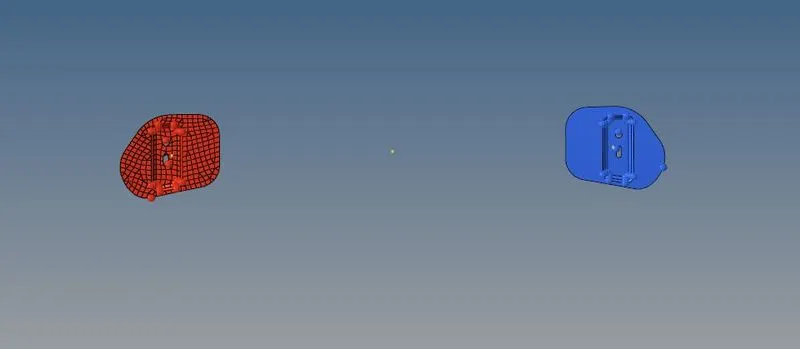
The below figure shows two hinges before reflection:
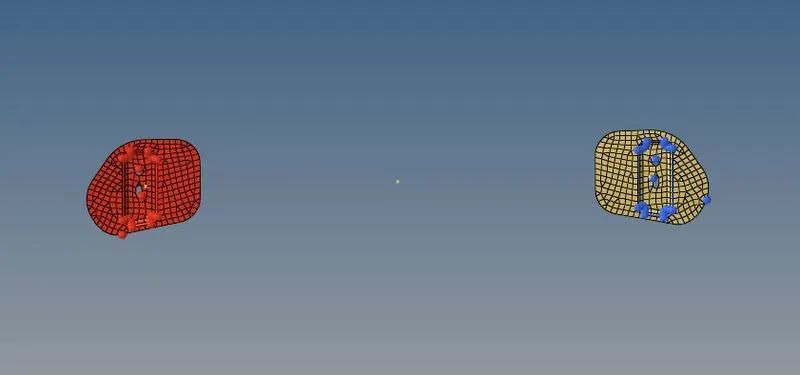
After using the macro, the following result is obtained:
CONCLUSION: The required macro file for auto reflecting in Hypermesh using TCL/TK was successfully created and demonstrated.