Week 8 - Simulation of a backward facing step in OpenFOAM
OBJECTIVE :
- To stimulate an Incompressible -laminar-viscous flow through the backward -facing step and perform a transient stimulation
- To stimulate the flow using the normal grading factor (GF = 1)
- To stimulate the flow with a grading factor of 0.2 . The cells are smaller/finer near the walls
INTRODUCTION :
In this project the stimulation of incompressible laminar flow over a backward facing step is performed in Open Foam. The blockmesh for the Backward facing step is created using the BlockMeshdict.C file . The whole simulation for the backward flowing step is setup using the Linux command line.
Incompressible Flow :
In fluid dynamics, an incompressible flow is one in which the density of any fluid parcel, i.e. any tiny volume of fluid flowing in the flow, remains constant.
Laminar flow :
Laminar flow occurs when the fluid flows in infinitesimal parallel layers with no disruption between them, In laminar flows, fluid layers slide in parallel, with no eddies, swirls or currents normal to the flow itself.
Viscous Flow :
The fluid which has more resistance to flow is called viscous fluid. Viscosity is a property of a fluid, which is a degree of the amount of resistance between the fluid layers.
PROCCEDURE :
In oder to solve the Backward facing step problem using Open Foam we have to follow the enlisted steps :
1. Select the appropriate tutorial from the tutorial folder
2. In this case the Pitz daily (Example problem) from the Incompressible folder in the Tutorials folder is selected and copied to FOAM_RUN folder and renamed as pitz_daily_incomp
3. Copy the BlockmeshDict for the PitzDaily problem from the source folder in Tutorials folder to the corresponding Folder in FOAM_RUN
4. Edit the Blockmeshdict file with the specified requirements
5. Specify the Start time,End time , time steps for the Backward facing steps in control dict file
6. Specify the Initial conditions for pressure,velocity in the 0 folder
7. Run the blockMesh command
8. Select the required Solver in this case IcoFoam
BLOCK MESH FILE :
The BlockMeshDict.C file in the Tutorials system folder creates the Mesh and Geometry and hence the folder is modified to create a backward facing step . The backward facing step is divided into blocks and the vertices are numbered as shown in the Figure 1 . The Right handed coordinate system is followed as illustrated in the figure.
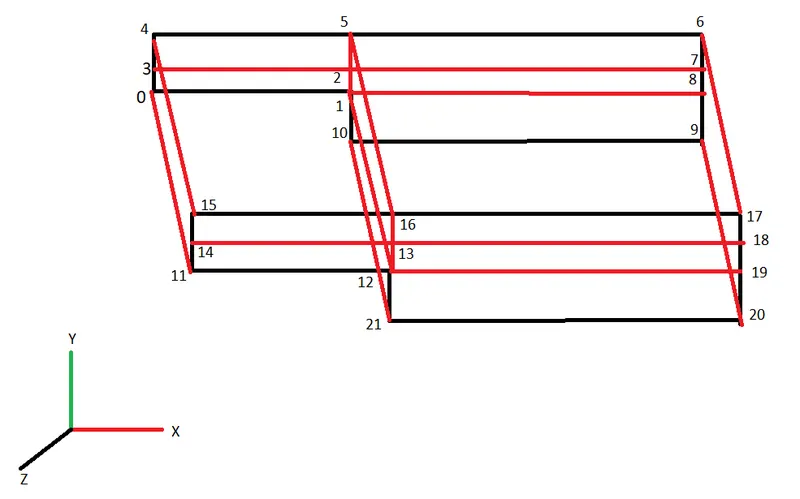
Figure 1 : Block Mesh Geometry
Mesh Specififcations :
1. No of cells along the X direction (Longer dimension) = 200
2. No of cells along the Y direction (Shorter Dimension) = 20
3. Graded Mesh of a factor 0.2 and 0.8
Graded Mesh :
Mesh Grading Enables to Fine or grade the meshes at the edges , The Mesh grading factor is defined as :-
`f =` Size of `(End cell)/ ( s tart cell)`
Boundry conditions :
The Boundry conditions for the backward facing step is defined
Inlet
Outlet
Empty Faces : The Front and Back faces are defined as the Type empty faces because these faces doesnt play any role in the stimulation
Noslip Walls : The top and bottom faces are defined as No-slip walls ,The noSlip boundary condition is an alternative to the zero fixedValue boundary condition for velocity. There is no difference between them.
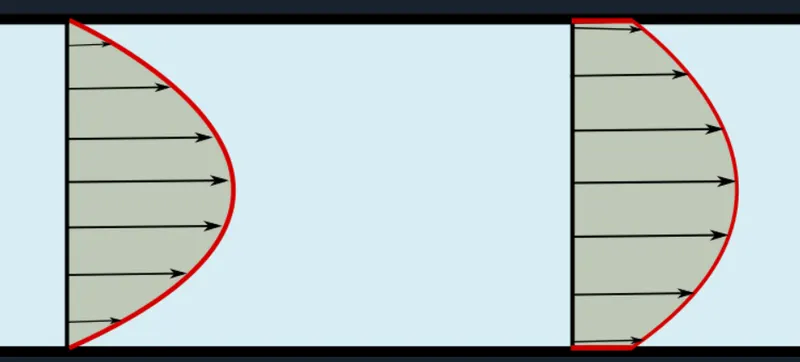
Figure 2 : Right side (No slip Condition) Left side (Slip condition)
The BlockMeshDict.C file is as shown below : (Grading factor : 1 1 1)
/*--------------------------------*- C++ -*----------------------------------*\
  =========                 |
  \\      /  F ield         | OpenFOAM: The Open Source CFD Toolbox
   \\    /   O peration     | Website:  https://openfoam.org
    \\  /    A nd           | Version:  8
     \\/     M anipulation  |
\*---------------------------------------------------------------------------*/
FoamFile
{
    version     2.0;
    format      ascii;
    class       dictionary;
    object      blockMeshDict;
}
// * * * * * * * * * * * * * * * * * * * * * * * * * * * * * * * * * * * * * //

convertToMeters 0.01;

vertices
(
    // 1st Face set

    (0 0 0)             //0
    (8 0 0)            //1
    (8 0.5 0)         //2
    (0 0.5 0)          //3
    (0 1 0)            //4
    (8 1 0)            //5
    (20 1 0)           //6
    (20 0.5 0)         //7
    (20 0 0)           //8
    (20 -1 0)          //9
    (8 -1 0)           //10

    // 2nd Face set

    (0 0 0.6)          //11
    (8 0 0.6)          //12
    (8 0.5 0.6)        //13
    (0 0.5 0.6)        //14
    (0 1 0.6)          //15
    (8 1 0.6)          //16
    (20 1 0.6)         //17
    (20 0.5 0.6)       //18
    (20 0 0.6)         //19
    (20 -1 0.6)        //20
    (8 -1 0.6)         //21


);

blocks
(
    hex (0 1 2 3 11 12 13 14) (80 10 1) simpleGrading (1 1 1)

    hex (3 2 5 4 14 13 16 15) (80 10 1) simpleGrading (1 1 1)

    hex (2 7 6 5 13 18 17 16) (120 10 1) simpleGrading (1 1 1)

    hex (1 8 7 2 12 19 18 13) (120 10 1) simpleGrading (1 1 1)

    hex (10 9 8 1 21 20 19 12) (120 20 1) simpleGrading (1 1 1)


);

edges
(
);

boundary
(
    inlet
    {
        type patch;
        faces
        (
            (3 0 11 14)
            (4 3 14 15)
        );
    }
    outlet
    {
        type patch;
        faces
        (
            (9 8 19 20)
            (8 7 18 19)
            (7 6 17 18)
        );
    }
    frontAndBack
    {
        type empty;
        faces
        (
            (0 3 2 1)
            (11 12 13 14)
            (3 4 5 2)
            (14 13 16 15)
            (2 5 6 7)
            (13 18 17 16)
            (1 2 7 8)
            (12 19 18 13)
            (10 1 8 9)
            (21 20 19 12)


        );
    }

       noslipwall
    {
        type wall;
        faces
        (
            (5 4 15 16)
            (5 16 17 6)
            (0 1 12 11)
            (10 9 20 21)
            (1 10 21 12)

        );
    }

);

mergePatchPairs
(

);

//***********************************************************************//
Figure 3 : BlockmeshDict.C file
ControlDict File :
This File contains the Information about the Start time , End Time , Time step and the type of solver used . The ControlDict file is modified as required :
/*--------------------------------*- C++ -*----------------------------------*\
  =========                 |
  \\      /  F ield         | OpenFOAM: The Open Source CFD Toolbox
   \\    /   O peration     | Website:  https://openfoam.org
    \\  /    A nd           | Version:  8
     \\/     M anipulation  |
\*---------------------------------------------------------------------------*/
FoamFile
{
    version     2.0;
    format      ascii;
    class       dictionary;
    location    "system";
    object      controlDict;
}
// * * * * * * * * * * * * * * * * * * * * * * * * * * * * * * * * * * * * * //

application     icoFoam;

startFrom       startTime;

startTime       0;

stopAt          endTime;

endTime         3;

deltaT          1e-3;

writeControl    timeStep;

writeInterval   20;

purgeWrite      0;

writeFormat     ascii;

writePrecision  6;

writeCompression off;

timeFormat      general;

timePrecision   6;

runTimeModifiable true;
Figure 4 : ControlDict.C file
Pressure (Initial conditon) :
The Pressure conditions are set as required :
/*--------------------------------*- C++ -*----------------------------------*\
  =========                 |
  \\      /  F ield         | OpenFOAM: The Open Source CFD Toolbox
   \\    /   O peration     | Website:  https://openfoam.org
    \\  /    A nd           | Version:  8
     \\/     M anipulation  |
\*---------------------------------------------------------------------------*/
FoamFile
{
    version     2.0;
    format      ascii;
    class       volScalarField;
    object      p;
}
// * * * * * * * * * * * * * * * * * * * * * * * * * * * * * * * * * * * * * //

dimensions      [0 2 -2 0 0 0 0];

internalField   uniform 0;

boundaryField
{
    inlet
    {
        type            zeroGradient;
    }

    outlet
    {
        type            fixedValue;
        value           uniform 0;
    }

    frontAndBack
    {
        type            empty;
    }
    noslipwall
    {
        type            zeroGradient;
    }
}

// ************************************************************************* //
Figure 5 : Initial Boundry condition (Pressure file )
Velocity (Initial Condition) :
The Initial velocity condition for the stimulation is set to 0.085 m as required from the intet of the Backward Facing step .
/*--------------------------------*- C++ -*----------------------------------*\
  =========                 |
  \\      /  F ield         | OpenFOAM: The Open Source CFD Toolbox
   \\    /   O peration     | Website:  https://openfoam.org
    \\  /    A nd           | Version:  8
     \\/     M anipulation  |
\*---------------------------------------------------------------------------*/
FoamFile
{
    version     2.0;
    format      ascii;
    class       volVectorField;
    object      U;
}
// * * * * * * * * * * * * * * * * * * * * * * * * * * * * * * * * * * * * * //

dimensions      [0 1 -1 0 0 0 0];

internalField   uniform (0 0 0);

boundaryField
{
    inlet
    {
        type            fixedValue;
        value           uniform (0.085 0 0);
    }

    outlet
    {
        type            zeroGradient;

    }

    frontAndBack
    {
        type            empty;
    }
    noslipwall
    {
        type            noSlip;
    }
}

// ************************************************************************* //
Figure 6 : Initial Boundry condition (Velocity File )
Solver :
Since we have setup the problem and the geometry with the initial and boundry conditions . Now its essential to choose an solver for the problem . For choosing an appropriate solver we have to folllow some assumptions which are as follows :
i. The Fluid is Newtonian
ii. The flow is incompressible & Laminar
iii. Low Reynolds number
iv. Zero frictional losses
The solver chosen considering above assumptions is ICOFOAM it solves the incompressible laminar Navier-stroke equation (contunuity and Momentum ) using the PISO Algorithm . In this case we are not using the Energy Equation.
After doing all the setup the ICOFOAM Solver is run Manually .
We can run the solver using the command line following the proccedure :
shiva@shiva-VirtualBox:~/OpenFOAM/shiva-8/run$ tut
shiva@shiva-VirtualBox:/opt/openfoam8/tutorials$ ls
Allclean  combustion       electromagnetics  IO          resources
Allrun    compressible     financial         lagrangian  stressAnalysis
Alltest   discreteMethods  heatTransfer      mesh
basic     DNS              incompressible    multiphase
shiva@shiva-VirtualBox:/opt/openfoam8/tutorials$ cd incompressible/pisoFoam/LES/
shiva@shiva-VirtualBox:/opt/openfoam8/tutorials/incompressible/pisoFoam/LES$ ls
motorBike  pitzDaily  pitzDailyMapped
shiva@shiva-VirtualBox:/opt/openfoam8/tutorials/incompressible/pisoFoam/LES$ cp -r pitzDaily/ $FOAM_RUN/pitz_Daily_incomp_flow
shiva@shiva-VirtualBox:/opt/openfoam8/tutorials/incompressible/pisoFoam/LES$ run
shiva@shiva-VirtualBox:~/OpenFOAM/shiva-8/run$ ls
blockMesh_tr                pitzDaily_Basic
cavity_test                 pitz_Daily_incomp_flow
dam_break                   pitz_Daily_incomp_gr_0.2
elbow_test                  pitz_Daily_incomp_gr_0.8
files_backward_facing_step  pitzDaily_simplefoam
flange_test                 pitzDaily_test_compressible
pitzDaily                   pitzDaily_trial1
shiva@shiva-VirtualBox:~/OpenFOAM/shiva-8/run$ cd pitz_Daily_incomp_flow/
shiva@shiva-VirtualBox:~/OpenFOAM/shiva-8/run/pitz_Daily_incomp_flow$ ls
0  Allrun  constant  system
shiva@shiva-VirtualBox:~/OpenFOAM/shiva-8/run/pitz_Daily_incomp_flow$ blockMesh
shiva@shiva-VirtualBox:~/OpenFOAM/shiva-8/run/pitz_Daily_incomp_flow$ icoFoam
Fig 7 : Command line for Running the simulation
OUTPUT :
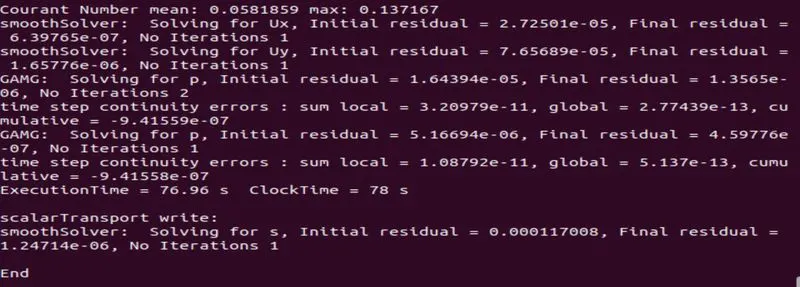
Fig 8 : Command line output
The Block mesh file with No grading factor (1 1 1) is as displayed below :
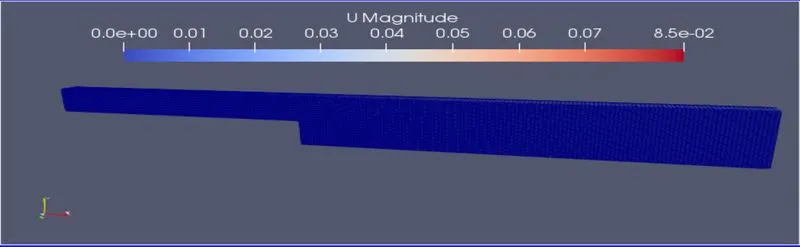
Figure 9 : Backward facing step geometry with block mesh and grading factor (1 1 1)
The velocity profile for the stimulation of the Backward facing step is as Displayed :
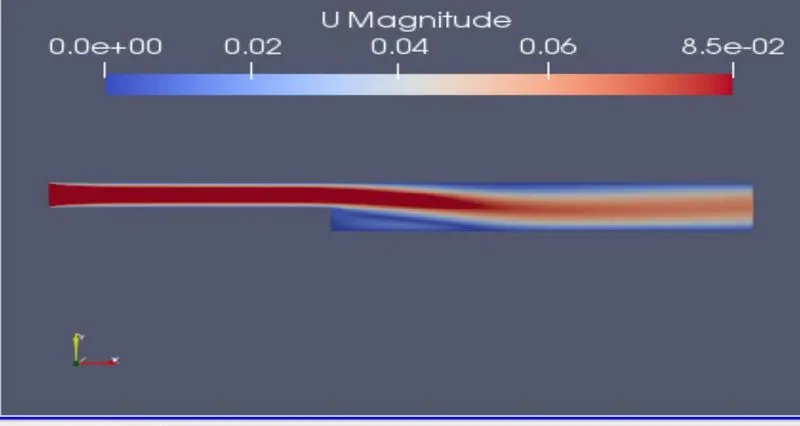
Figure 10 : Velocity Flow diagram grading factor (1 1 1)
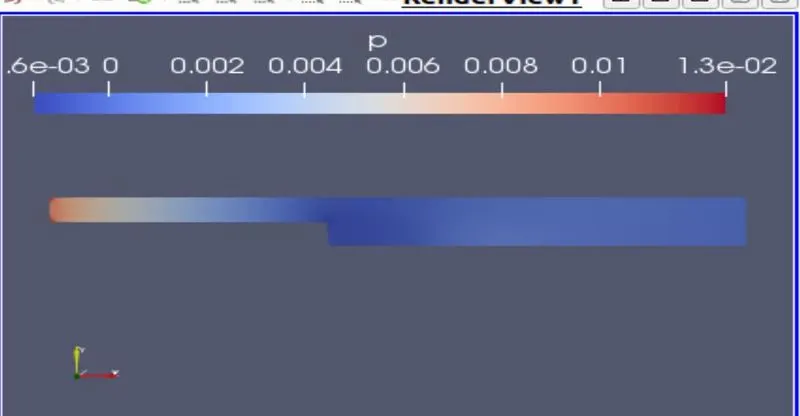
Figure 11: Pressure variance ( For grading factor 1 1 1)
The Grading factor (0.2 0.2 1)
The Grading factor makes the mesh finer and more accurate at the end cells/Edge cells , For this slight changes are made in the blockmeshDict file
blocks
(
    hex (0 1 2 3 11 12 13 14) (80 10 1) simpleGrading (0.2 0.2 1)

    hex (3 2 5 4 14 13 16 15) (80 10 1) simpleGrading (0.2 0.2 1)

    hex (2 7 6 5 13 18 17 16) (120 10 1) simpleGrading (0.2 0.2 1)

    hex (1 8 7 2 12 19 18 13) (120 10 1) simpleGrading (0.2 0.2 1)

    hex (10 9 8 1 21 20 19 12) (120 20 1) simpleGrading (0.2 0.2 1)

)
Figure 12 : Code changes in the BlockMeshDict.C File
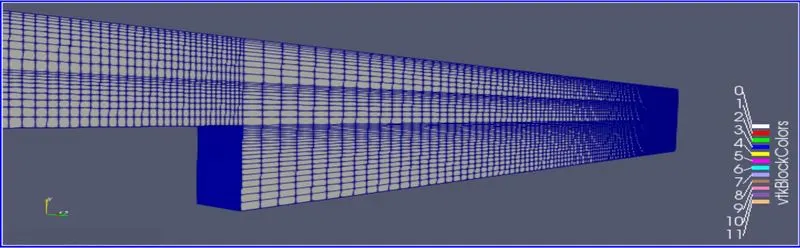
Fig 13 : Graded Mesh Geometry (0.2 0.2 1)
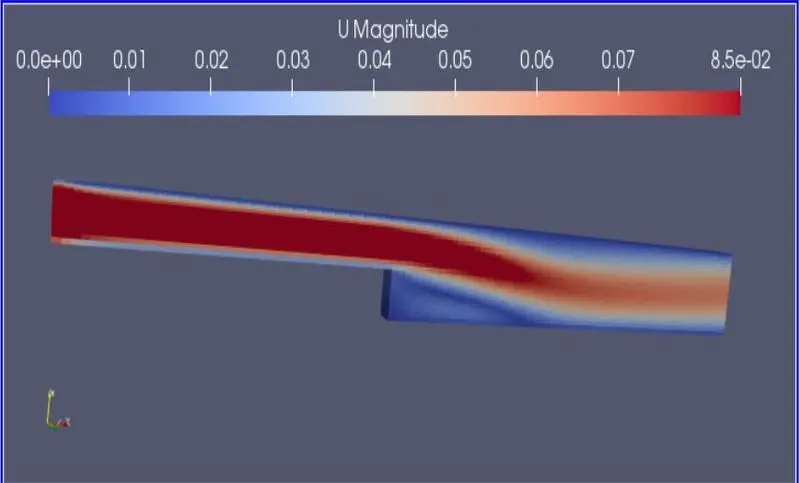
Fig 14 : Velocity Flow Diagram (0.2 0.2 1)
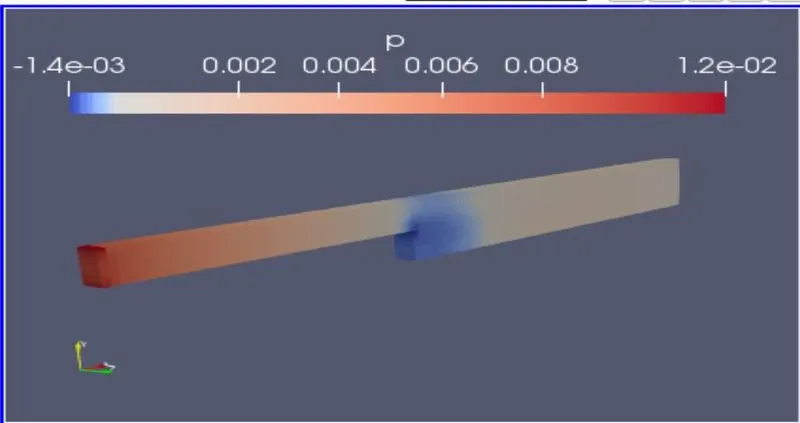
Fig 15 : Pressure variance (0.2 0.2 1)
From this figure we can see that there is a low pressure created near the step , Since the grading factor is increased the results get more accurate.
Plots :
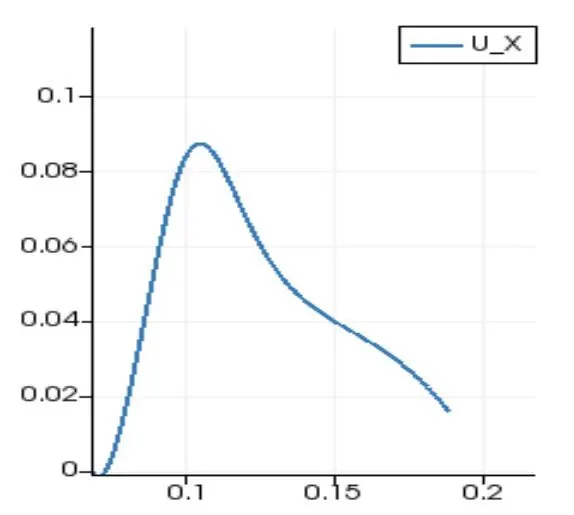
Figure 16 : Velocity flow plot for the Backward facing step with respect to time ( grading Factor (1 1 1))
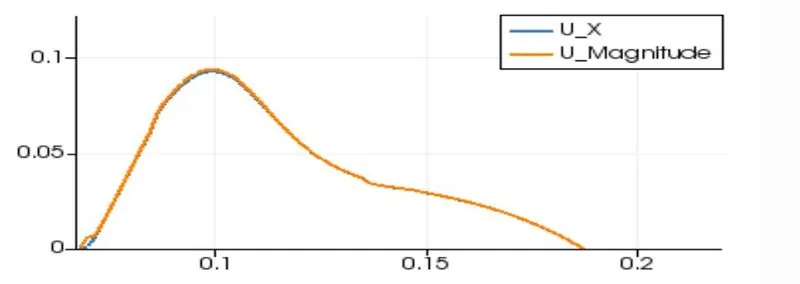
Figure 17 : Velocity flow plot for the Backward facing step with respect to time ( grading Factor (0.2 0.2 1))
From the plots we can figure out that as mesh size gets smaller and finer the results get more accurate and finite .
Conclusion:
By changing the simple grading factor from the value of 0.2 tot 1 the mesh becomes finer and the solution becomes very accurate. Overall the change in size of simple grading factor (mesh size) the result remains the same as approximately.The execution time is lower for lower mesh grading factor.