Week 8 - Simulation of a backward facing step in OpenFOAM
1. Case 1 - Grading factor of 1
- Editing the blockmesh file in the system folder, where the 'blockMeshDict' file is edited as per the domain vertices, blocks, the inlet, the outlet, the no slip conditioned wall and the other walls, which is shown below.
/*--------------------------------*- C++ -*----------------------------------*\
  =========                 |
  \\      /  F ield         | OpenFOAM: The Open Source CFD Toolbox
   \\    /   O peration     | Website:  https://openfoam.org
    \\  /    A nd           | Version:  10
     \\/     M anipulation  |
\*---------------------------------------------------------------------------*/
FoamFile
{
    format      ascii;
    class       dictionary;
    object      blockMeshDict;
}
// * * * * * * * * * * * * * * * * * * * * * * * * * * * * * * * * * * * * * //

convertToMeters 1;

vertices
(
    (0 0 0)            //0
    (0.08 0 0)         //1
    (0.08 0.005 0)     //2
    (0 0.005 0)        //3
    (0.08 0.01 0)      //4
    (0 0.01 0)         //5
    (0.20 0.01 0)      //6
    (0.20 0.005 0)     //7
    (0.20 0 0)         //8
    (0.20 -0.01 0)     //9
    (0.08 -0.01 0)    //10
    (0 0 0.1)         //11
    (0.08 0 0.1)      //12
    (0.08 0.005 0.1)  //13
    (0 0.005 0.1)     //14
    (0.08 0.01 0.1)   //15
    (0 0.01 0.1)      //16
    (0.20 0.01 0.1)   //17
    (0.20 0.005 0.1)  //18
    (0.20 0 0.1)      //19
    (0.20 -0.01 0.1)  //20
    (0.08 -0.01 0.1)  //21
);

blocks
(
    hex (0 1 2 3 11 12 13 14) (80 10 1) simpleGrading (1 1 1)   //Block1
    hex (3 2 4 5 14 13 15 16) (80 10 1) simpleGrading (1 1 1)   //Block2
    hex (2 7 6 4 13 18 17 15) (120 10 1) simpleGrading (1 1 1)  //Block3
    hex (1 8 7 2 12 19 18 13) (120 10 1) simpleGrading (1 1 1)  //Block4
    hex (10 9 8 1 21 20 19 12) (120 20 1) simpleGrading (1 1 1) //Block5
);

edges
(
);

boundary
(
    inlet
    {
        type wall;
        faces
        (
            (0 11 14 3)
            (3 14 16 5)
        );
    }
    outlet
    {
        type wall;
        faces
        (
            (9 8 19 20)
            (8 7 18 19)
            (7 6 17 18)
        );
    }
    noSlipWall
    {
        type wall;
        faces
        (
            (4 5 16 15)
            (4 15 17 6)
            (0 1 12 11)
            (9 20 21 10)
            (1 10 21 12)
        );
    }
    frontAndBack
    {
        type empty;
        faces
        (
            (0 3 2 1)
            (11 12 13 14)
            (3 5 4 2)
            (13 15 16 14)
            (2 4 6 7)
            (13 18 17 15)
            (1 2 7 8)
            (12 19 18 13)
            (10 1 8 9)
            (21 20 19 12)
        );
    }
);

mergePatchPairs
(

);
// ************************************************************************* //- Editing the 'controlDict' file to constrain the simulation timeperiod, timestep, time precision, etc, and the file for the this case is illustrated below.
/*--------------------------------*- C++ -*----------------------------------*\
  =========                 |
  \\      /  F ield         | OpenFOAM: The Open Source CFD Toolbox
   \\    /   O peration     | Website:  https://openfoam.org
    \\  /    A nd           | Version:  10
     \\/     M anipulation  |
\*---------------------------------------------------------------------------*/
FoamFile
{
    format      ascii;
    class       dictionary;
    location    "system";
    object      controlDict;
}
// * * * * * * * * * * * * * * * * * * * * * * * * * * * * * * * * * * * * * //

application     icoFoam;

startFrom       startTime;

startTime       0;

stopAt          endTime;

endTime         3;

deltaT          1e-4;

writeControl    timeStep;

writeInterval   20;

purgeWrite      0;

writeFormat     ascii;

writePrecision  6;

writeCompression off;

timeFormat      general;

timePrecision   6;

runTimeModifiable true;


// ************************************************************************* //
- Editing the initial velocity for this case is shown below.
/*--------------------------------*- C++ -*----------------------------------*\
  =========                 |
  \\      /  F ield         | OpenFOAM: The Open Source CFD Toolbox
   \\    /   O peration     | Website:  https://openfoam.org
    \\  /    A nd           | Version:  10
     \\/     M anipulation  |
\*---------------------------------------------------------------------------*/
FoamFile
{
    format      ascii;
    class       volVectorField;
    object      U;
}
// * * * * * * * * * * * * * * * * * * * * * * * * * * * * * * * * * * * * * //

dimensions      [0 1 -1 0 0 0 0];

internalField   uniform (0 0 0);

boundaryField
{
    inlet
    {
        type            fixedValue;
        value           uniform (1 0 0);
    }

    outlet
    {
        type            zeroGradient;
    }

    noSlipWall
    {
	type		noSlip;
    }

    frontAndBack
    {
        type            empty;
    }
}

// ************************************************************************* //
- The initial pressure for the case shown below.
/*--------------------------------*- C++ -*----------------------------------*\
  =========                 |
  \\      /  F ield         | OpenFOAM: The Open Source CFD Toolbox
   \\    /   O peration     | Website:  https://openfoam.org
    \\  /    A nd           | Version:  10
     \\/     M anipulation  |
\*---------------------------------------------------------------------------*/
FoamFile
{
    format      ascii;
    class       volScalarField;
    object      p;
}
// * * * * * * * * * * * * * * * * * * * * * * * * * * * * * * * * * * * * * //

dimensions      [0 2 -2 0 0 0 0];

internalField   uniform 0;

boundaryField
{
    inlet
    {
        type            zeroGradient;
    }

    outlet
    {
        type            fixedValue;
	value		uniform 0;
    }

    noSlipWall
    {
	type		zeroGradient;
    }

    frontAndBack
    {
        type            empty;
    }
}

// ************************************************************************* //
- Finally editing the physical propreties file in the constant folder for this case is shown below.
/*--------------------------------*- C++ -*----------------------------------*\
  =========                 |
  \\      /  F ield         | OpenFOAM: The Open Source CFD Toolbox
   \\    /   O peration     | Website:  https://openfoam.org
    \\  /    A nd           | Version:  10
     \\/     M anipulation  |
\*---------------------------------------------------------------------------*/
FoamFile
{
    format      ascii;
    class       dictionary;
    location    "constant";
    object      physicalProperties;
}
// * * * * * * * * * * * * * * * * * * * * * * * * * * * * * * * * * * * * * //

nu              [0 2 -1 0 0 0 0] 0.01;


// ************************************************************************* //
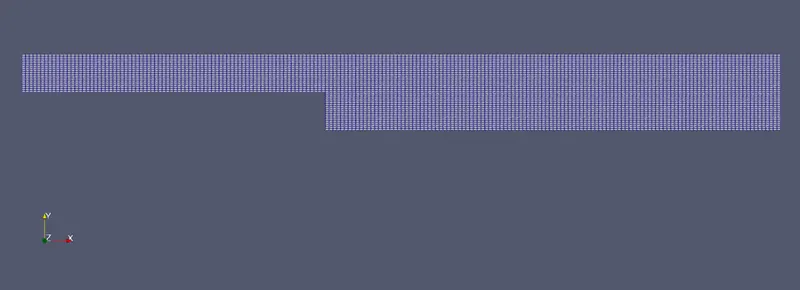
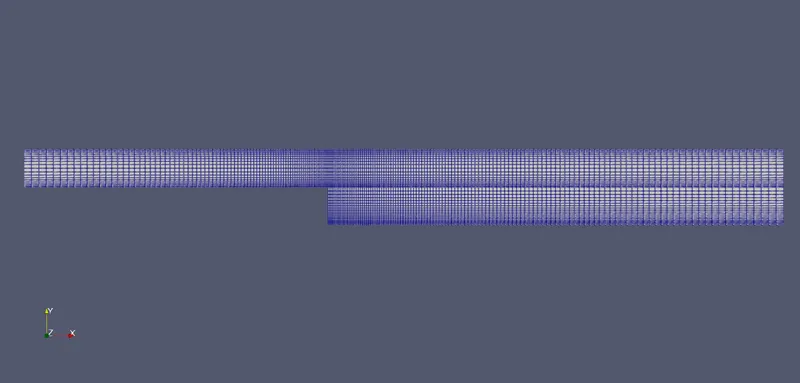
After this when the icofoam model is run, after creating the mesh by executing the blockMesh command, and run a checkup for the blockmesh using checkMesh command. and finally running the icofoam model and viewing it on paraview we get the blockmesh of the domain as shown below.
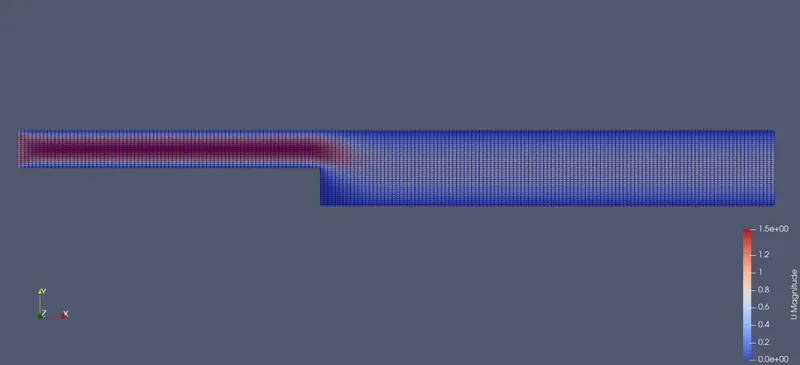
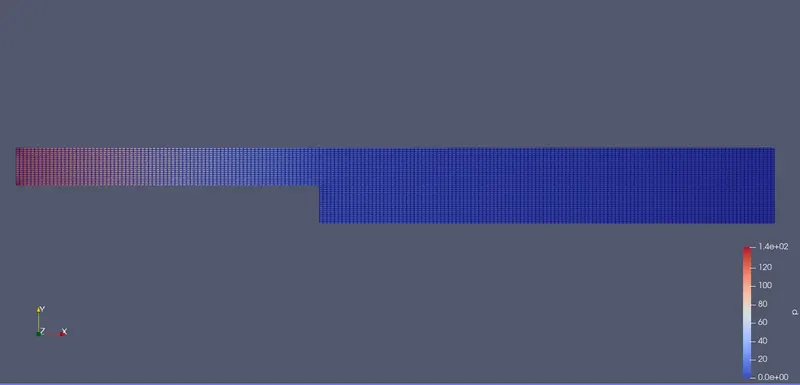
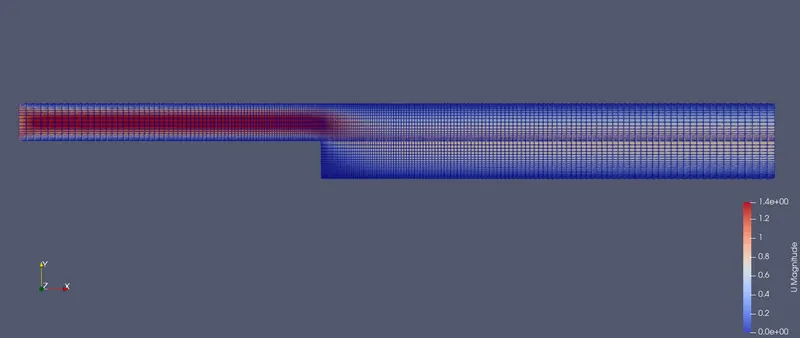
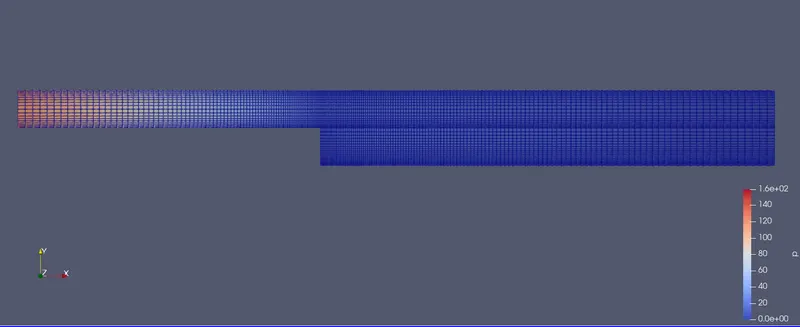
The velocity and the pressure graph at the end of the simulation is depicted below.
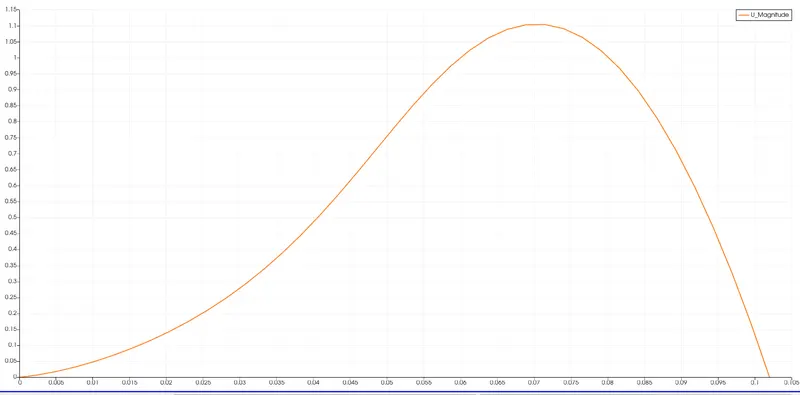
The velocity profile curve at 0.085m from inlet is shown below.
2. Case 2 - Grading factor of 0.2
Grading factor- When solving a numerical problem, meshing is essential. Meshing plays an important role, finer the mesh more accurate the result, but runtime increases. So the grading factor comes into place. Grading factor helps to optimise the mesh size. With a greater grading factor, the mesh becomes more coarse and with a lower grading factor the mesh becomes finer, with the help of this, the mesh is optimised nearer to the area of concern. The advantage of using grading factor is that even though the number of elements in the mesh remains constant, the stabilty of the solution is not at all affected, and doesnot sacrifice accuracy, while optimising the runtime.
- Editing the blockmesh file in the system folder, where the 'blockMeshDict' file is edited as per the domain vertices, blocks, the inlet, the outlet, the no slip conditioned wall and the other walls, which is shown below, using the suitable grading factor.
/*--------------------------------*- C++ -*----------------------------------*\
  =========                 |
  \\      /  F ield         | OpenFOAM: The Open Source CFD Toolbox
   \\    /   O peration     | Website:  https://openfoam.org
    \\  /    A nd           | Version:  10
     \\/     M anipulation  |
\*---------------------------------------------------------------------------*/
FoamFile
{
    format      ascii;
    class       dictionary;
    object      blockMeshDict;
}
// * * * * * * * * * * * * * * * * * * * * * * * * * * * * * * * * * * * * * //

convertToMeters 1;

vertices
(
    (0 0 0)            //0
    (0.08 0 0)         //1
    (0.08 0.005 0)     //2
    (0 0.005 0)        //3
    (0.08 0.01 0)      //4
    (0 0.01 0)         //5
    (0.20 0.01 0)      //6
    (0.20 0.005 0)     //7
    (0.20 0 0)         //8
    (0.20 -0.01 0)     //9
    (0.08 -0.01 0)    //10
    (0 0 0.1)         //11
    (0.08 0 0.1)      //12
    (0.08 0.005 0.1)  //13
    (0 0.005 0.1)     //14
    (0.08 0.01 0.1)   //15
    (0 0.01 0.1)      //16
    (0.20 0.01 0.1)   //17
    (0.20 0.005 0.1)  //18
    (0.20 0 0.1)      //19
    (0.20 -0.01 0.1)  //20
    (0.08 -0.01 0.1)  //21
);

blocks
(
    hex (0 1 2 3 11 12 13 14) (80 10 1) simpleGrading (0.2 5 1)   //Block1
    hex (3 2 4 5 14 13 15 16) (80 10 1) simpleGrading (0.2 0.2 1)   //Block2
    hex (2 7 6 4 13 18 17 15) (120 10 1) simpleGrading (5 0.2 1)  //Block3
    hex (1 8 7 2 12 19 18 13) (120 10 1) simpleGrading (5 5 1)  //Block4
    hex (10 9 8 1 21 20 19 12) (120 20 1) simpleGrading (5 5 1) //Block5
);

edges
(
);

boundary
(
    inlet
    {
        type wall;
        faces
        (
            (0 11 14 3)
            (3 14 16 5)
        );
    }
    outlet
    {
        type wall;
        faces
        (
            (9 8 19 20)
            (8 7 18 19)
            (7 6 17 18)
        );
    }
    noSlipWall
    {
        type wall;
        faces
        (
            (4 5 16 15)
            (4 15 17 6)
            (0 1 12 11)
            (9 20 21 10)
            (1 10 21 12)
        );
    }
    frontAndBack
    {
        type empty;
        faces
        (
            (0 3 2 1)
            (11 12 13 14)
            (3 5 4 2)
            (13 15 16 14)
            (2 4 6 7)
            (13 18 17 15)
            (1 2 7 8)
            (12 19 18 13)
            (10 1 8 9)
            (21 20 19 12)
        );
    }
);

mergePatchPairs
(

);
// ************************************************************************* //
- Editing the 'controlDict' file to constrain the simulation timeperiod, timestep, time precision, etc, and the file for the this case is illustrated below.
/*--------------------------------*- C++ -*----------------------------------*\
  =========                 |
  \\      /  F ield         | OpenFOAM: The Open Source CFD Toolbox
   \\    /   O peration     | Website:  https://openfoam.org
    \\  /    A nd           | Version:  10
     \\/     M anipulation  |
\*---------------------------------------------------------------------------*/
FoamFile
{
    format      ascii;
    class       dictionary;
    location    "system";
    object      controlDict;
}
// * * * * * * * * * * * * * * * * * * * * * * * * * * * * * * * * * * * * * //

application     icoFoam;

startFrom       startTime;

startTime       0;

stopAt          endTime;

endTime         3;

deltaT          1e-5;

writeControl    timeStep;

writeInterval   20;

purgeWrite      0;

writeFormat     ascii;

writePrecision  6;

writeCompression off;

timeFormat      general;

timePrecision   6;

runTimeModifiable true;


// ************************************************************************* //
- Editing the initial velocity for this case is shown below.
/*--------------------------------*- C++ -*----------------------------------*\
  =========                 |
  \\      /  F ield         | OpenFOAM: The Open Source CFD Toolbox
   \\    /   O peration     | Website:  https://openfoam.org
    \\  /    A nd           | Version:  10
     \\/     M anipulation  |
\*---------------------------------------------------------------------------*/
FoamFile
{
    format      ascii;
    class       volVectorField;
    object      U;
}
// * * * * * * * * * * * * * * * * * * * * * * * * * * * * * * * * * * * * * //

dimensions      [0 1 -1 0 0 0 0];

internalField   uniform (0 0 0);

boundaryField
{
    inlet
    {
        type            fixedValue;
        value           uniform (1 0 0);
    }

    outlet
    {
        type            zeroGradient;
    }

    noSlipWall
    {
	type		noSlip;
    }

    frontAndBack
    {
        type            empty;
    }
}

// ************************************************************************* //
- The initial pressure for the case shown below.
/*--------------------------------*- C++ -*----------------------------------*\
  =========                 |
  \\      /  F ield         | OpenFOAM: The Open Source CFD Toolbox
   \\    /   O peration     | Website:  https://openfoam.org
    \\  /    A nd           | Version:  10
     \\/     M anipulation  |
\*---------------------------------------------------------------------------*/
FoamFile
{
    format      ascii;
    class       volScalarField;
    object      p;
}
// * * * * * * * * * * * * * * * * * * * * * * * * * * * * * * * * * * * * * //

dimensions      [0 2 -2 0 0 0 0];

internalField   uniform 0;

boundaryField
{
    inlet
    {
        type            zeroGradient;
    }

    outlet
    {
        type            fixedValue;
	value		uniform 0;
    }

    noSlipWall
    {
	type		zeroGradient;
    }

    frontAndBack
    {
        type            empty;
    }
}

// ************************************************************************* //
- Finally editing the physical propreties file in the constant folder for this case is shown below.
/*--------------------------------*- C++ -*----------------------------------*\
  =========                 |
  \\      /  F ield         | OpenFOAM: The Open Source CFD Toolbox
   \\    /   O peration     | Website:  https://openfoam.org
    \\  /    A nd           | Version:  10
     \\/     M anipulation  |
\*---------------------------------------------------------------------------*/
FoamFile
{
    format      ascii;
    class       dictionary;
    location    "constant";
    object      physicalProperties;
}
// * * * * * * * * * * * * * * * * * * * * * * * * * * * * * * * * * * * * * //

nu              [0 2 -1 0 0 0 0] 0.01;


// ************************************************************************* //
After this when the icofoam model is run, after creating the mesh by executing the blockMesh command, and run a checkup for the blockmesh using checkMesh command. and finally running the icofoam model and viewing it on paraview we get the blockmesh of the domain as shown below.
The velocity and the pressure graph at the end of the simulation is depicted below.
The velocity profile curve at 0.085m from inlet is shown below.
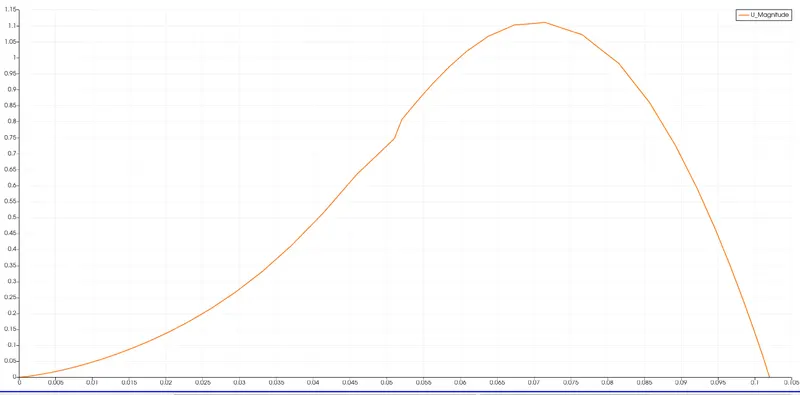
In both the cases the velocity graph comes out to be similar with the first case bears a smooth curve than the second case velocity curve.