Week 8 - Simulation of a backward facing step in OpenFOAM
To create the geometry as shown in the figure, we need edit the blockMeshDict file that is available in the system folder of the case setup.
Geometry Creation:
Let us consider creating the geometry using 5 blocks as shown in the figure below,
The Isometric View with Indexing in following order.
Below are the detailed steps to be followed to simulate the Backward facing step profile in OpenFoam :-
1) At first, we need search for the suitable tutorial in the OpenFoam for the given physics of flow. Type 'tut' Open Foam will direct to tutorial folder, open by 'ls' & change directory to by 'cd incompressible/icoFoam/'. As the given flow is transient & Incompressibly laminar, icoFaom is the right solver.
2) Will select 'cd cavity/cavity/' directory & type 'ls'. Where 3 files will be present - 0(Intial condition) , constant & system. Now will copy this cavity folder from tutorial to our run folder by command ' cp -r cavity/ $FOAM_RUN/cavity_test'. we have created a new file name in Run folder and from now on will only do changes/run script files & all only in this Run-directory.
3) Defining Mesh Goemetry : In this step, we need to go into system folder & open 'blockMeshDict' C++ script file by 'gedit blockMeshDict' command. Here will make changes or define our goemetry in following steps :
a) change 'convertToMeters' scale to 0.01 for easy vertixing (ex. length = 0.2m*0.01=20)
b) vertices: - from above indexing order start defining vertices distances from the origin of local plane (0,0,0) `rarr`(x,y,z). 0 to 21 vertices.
c) creating blocks:- with hexogonal shape mesh will define the rectangular block with 8 vertices in proper order from local plane face to front face. 5 block are created accordingly.
Then inside the second parenthesis, Mesh size are to be provided along (x,y,z) and same size to maintained along y-axis adjacent blocks. and at third parenthesis, Grading of mesh are kept simple with same along all axis in case-1 and at case-2 will refine the mesh near walls.
d) boundary conditions :- Inlet & outlet faces type to be patch because it will be transperent or flow takes through. Next Front and Back faces as empty type ; Top, bottom(Noslipwalls) & step faces as wall type. Here 4 vertices of each sub-face to be difined in a proper order, in such way/direction that vector pointing outside the particular face.
4) After defining the boundaries correctly, to check if you have given defined them correctly, execute the blockMesh & checkMesh command in the terminal.Now open paraFoam, select all the patches and click apply. You will now be able to see the boundary conditions that have been applied to the geometry.
5) Next step is to setup initial conditions & time interval - Will go back to '0' folder and change the 'p' & 'U' script files, where will set intial values of velocity & pressure at all boundary faces , also should change back to the same difined wall names. (without any space). Next will navigate to 'controlDict' file and set the time step & simulation end run time. Note :- values should will affect the CFL no. & thus time marching.
6) plolyMesh file generation :- come back to main cavity directory & run 'blockMesh' command ,now polyMesh will be created from blockMeshDict and get saved in constant folder. then run 'checkMesh' command to check the correctness of goemetry.
7) Now will do time maching transient solution by executing 'icoFaom' command. (It takes enough time depending mesh size)
8)Post-processing :- Open 'paraFoam' by command & select U & p field in pipeline properties and apply to view the profile.click on surface with edges to view with grid & run the simulation to observe the U & p over the domain.
/*--------------------------------*- C++ -*----------------------------------*\
  =========                 |
  \\      /  F ield         | OpenFOAM: The Open Source CFD Toolbox
   \\    /   O peration     | Website:  https://openfoam.org
    \\  /    A nd           | Version:  8
     \\/     M anipulation  |
\*---------------------------------------------------------------------------*/
FoamFile
{
    version     2.0;
    format      ascii;
    class       dictionary;
    object      blockMeshDict;
}
// * * * * * * * * * * * * * * * * * * * * * * * * * * * * * * * * * * * * * //

convertToMeters 0.01;

vertices
(
    (0 0 0) //0
    (8 0 0) //1
    (8 0.5 0) //2
    (0 0.5 0) //3
    (8 1 0) //4
    (0 1 0) //5
    (20 1 0) //6
    (20 0.5 0) //7
    (20 0 0) //8
    (20 -1 0) //9
    (8 -1 0) //10
    (0 0 0.1) //11
    (8 0 0.1) //12
    (8 0.5 0.1) //13
    (0 0.5 0.1) //14
    (8 1 0.1) //15
    (0 1 0.1) //16
    (20 1 0.1) //17
    (20 0.5 0.1) //18
    (20 0 0.1) //19
    (20 -1 0.1) //20
    (8 -1 0.1) //21
);

blocks
(
    hex (0 1 2 3 11 12 13 14) (100 20 1) simpleGrading (1 1 1) //0
    hex (3 2 4 5 14 13 15 16) (100 20 1) simpleGrading (1 1 1) //1
    hex (2 7 6 4 13 18 17 15) (200 20 1) simpleGrading (1 1 1) //2
    hex (1 8 7 2 12 19 18 13) (200 20 1) simpleGrading (1 1 1) //3
    hex (10 9 8 1 21 20 19 12) (200 40 1) simpleGrading (1 1 1) //4
);

edges
(
);

boundary
(
    Inlet
    {
        type patch;
        faces
        (
            (0 11 14 3)
            (3 14 16 5)
        );
    }
    Outlet
    {
        type patch;
        faces
        (
            (9 8 19 20)
 	    (8 7 18 19)
	    (7 6 17 18)
        );
    }
    frontAndBack
    {
        type empty;
        faces
        (

            (11 12 13 14)
            (14 13 15 16)
            (13 18 17 15)
            (12 19 18 13)
            (21 20 19 12)
            (0 3 2 1)
            (3 5 4 2)
            (2 4 6 7)
            (1 2 7 8)
            (10 1 8 9)
        );
    }
    Noslipwalls
    {
        type wall;
        faces
        (
            (5 16 15 4)
            (4 15 17 6)
            (10 21 12 1)
            (0 1 12 11)
            (10 9 20 21)
        );
    }
);

mergePatchPairs
(
);

// ************************************************************************* //
/*--------------------------------*- C++ -*----------------------------------*\
========= |
\\ / F ield | OpenFOAM: The Open Source CFD Toolbox
\\ / O peration | Website: https://openfoam.org
\\ / A nd | Version: 8
\\/ M anipulation |
\*---------------------------------------------------------------------------*/
FoamFile
{
version 2.0;
format ascii;
class dictionary;
location "system";
object controlDict;
}
// * * * * * * * * * * * * * * * * * * * * * * * * * * * * * * * * * * * * * //
application icoFoam;
startFrom startTime;
startTime 0;
stopAt endTime;
endTime 0.05;
deltaT 0.00001;
writeControl timeStep;
writeInterval 20;
purgeWrite 0;
writeFormat ascii;
writePrecision 6;
writeCompression off;
timeFormat general;
timePrecision 6;
runTimeModifiable true;
// ************************************************************************* ///*--------------------------------*- C++ -*----------------------------------*\
========= |
\\ / F ield | OpenFOAM: The Open Source CFD Toolbox
\\ / O peration | Website: https://openfoam.org
\\ / A nd | Version: 8
\\/ M anipulation |
\*---------------------------------------------------------------------------*/
FoamFile
{
version 2.0;
format ascii;
class volScalarField;
object p;
}
// * * * * * * * * * * * * * * * * * * * * * * * * * * * * * * * * * * * * * //
dimensions [0 2 -2 0 0 0 0];
internalField uniform 0;
boundaryField
{
Inlet
{
type zeroGradient;
}
Outlet
{
type fixedValue;
value uniform 0;
}
frontAndBack
{
type empty;
}
Noslipwalls
{
type zeroGradient;
}
}
// ************************************************************************* ///*--------------------------------*- C++ -*----------------------------------*\
========= |
\\ / F ield | OpenFOAM: The Open Source CFD Toolbox
\\ / O peration | Website: https://openfoam.org
\\ / A nd | Version: 8
\\/ M anipulation |
\*---------------------------------------------------------------------------*/
FoamFile
{
version 2.0;
format ascii;
class volVectorField;
object U;
}
// * * * * * * * * * * * * * * * * * * * * * * * * * * * * * * * * * * * * * //
dimensions [0 1 -1 0 0 0 0];
internalField uniform (0 0 0);
boundaryField
{
Inlet
{
type fixedValue;
value uniform (1 0 0);
}
Outlet
{
type zeroGradient;
}
frontAndBack
{
type empty;
}
Noslipwalls
{
type noSlip;
value uniform (0 0 0);
}
}
// ************************************************************************* //Case -1 :
Grid view (even all around)

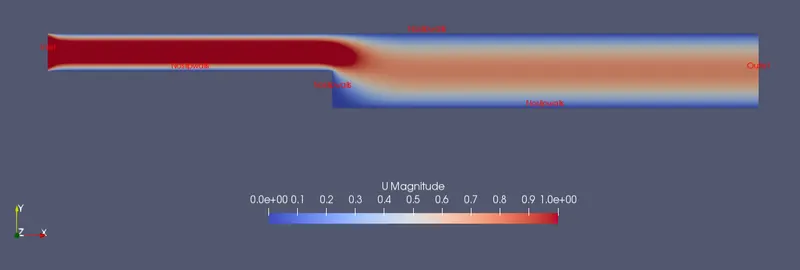
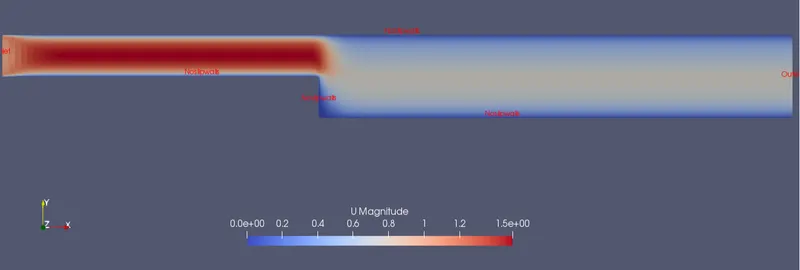
Velocity distribution after attaining steady state
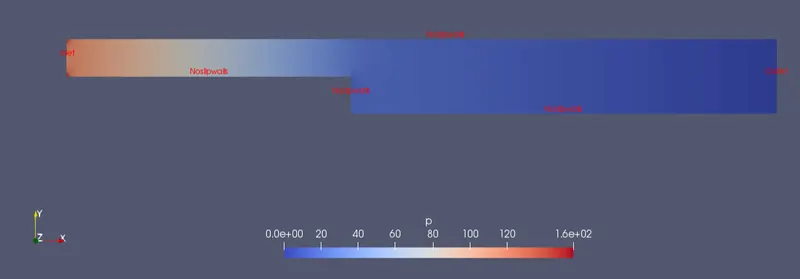
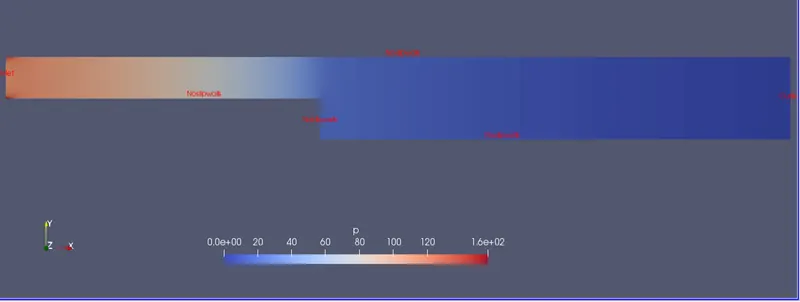
Pressure distribution after attaining steady state
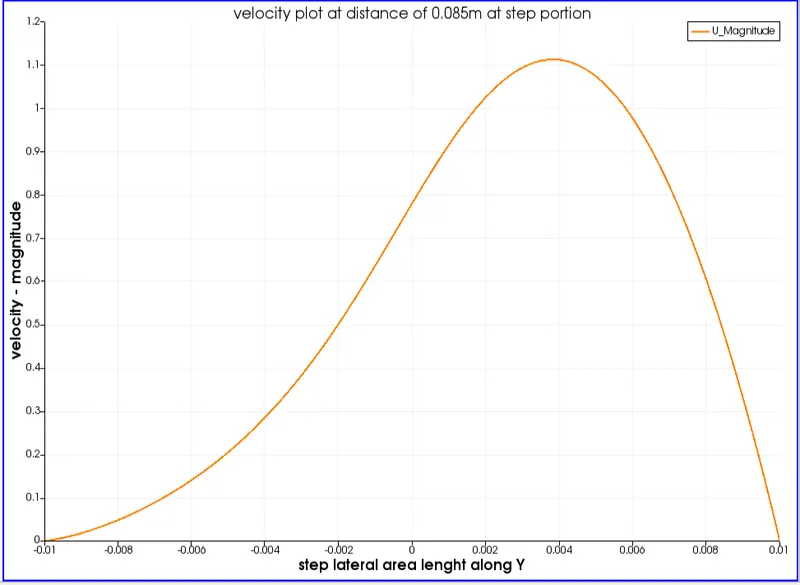
velocity profile at 0.085 m from the inlet
Case 2 :-
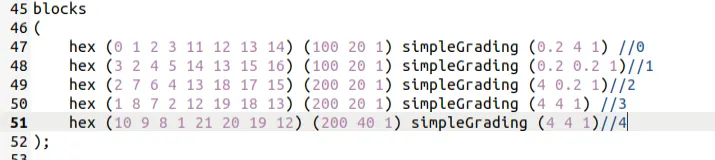
Here in order to grade/ refine using simpleGrading ,we can change the values according to follwing relation b/w mesh ends along each axes w.r.t direction.
Grade factor = Final mesh size / Initial Mesh size.
Why Grading/Growth factor is essential for meshing ?
As we know in CFD Informations in boundaries are very important or basic requirement of any problem. So, it is very essential to have fine mesh i.e, fine solution near boundaries or other physic changing regions. By idea of Grading mesh we can easily obtain required mesh positions without changing the no. mesh/cells.
Following are the only changes done in blockMeshDict file :
Graded grid view at walls

Velocity distribution after attaining steady state
Pressure distribution after attaining steady state
velocity profile at 0.085 m from the inlet
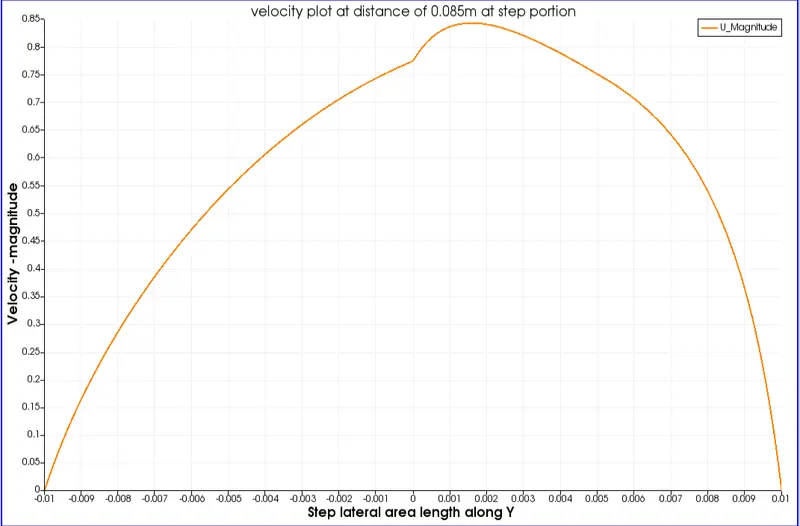
Here in this case2 compared to case1, it is visible that velocities near Noslip walls just after step is present in case2 that case1. and there is sharp peak in case2.