Week 8 - Simulation of a backward facing step in OpenFOAM
Objective:
In this challenge, we are going to simulate an incompressible-laminar-viscous flow through the backward facing step geometry. This is a transient simulation.
Procedure followed:
Under this, we will be explaining each and every step followed while doing simulation.
1.Selecting the right Solver:
While we aim to solve a problem using OpenFoam, firstly we need to look for the solver. The solver should be able to solve same governing equations, which are also governing the present problem. To know what equations the solver is solving, we need to go to applications folder and then select solver folder and then select the solver based on our need. When we open the solver file, we can see the equations which are being solved for.
For our case, we have selected the icoFoam solver.
2.Selecting the tutorial:
Once we select the solver, we go to the tutorials folder and then go to the same folder with the selcted solver name to it. Among the examples choose one tutorial, which will require least modifications to it. We will copy the entire selected tutorial to run folder. This is done because, we don't to make any changes to the OpenFoam folders. In order to perform the simulations, we deliberately created the run folder. Now, we will run the simulation and view the results in Paraview. This makes us familiar with the tutorial.
For our case, we have selected the elbow tutorial.
3.Creating blockMeshDict file:
We will erase all the folder generated during the previous step and start modifying the tutorial to our requirement. First step is to create (if not present in the tutorial) or modify (if present in the tutorial) the blockMeshDict file. This file when run using blockMesh command, this will generate the files named boundary, faces, neighbour, owner and points in the constant folder of the tutorial. These files together describe the mesh completely. Therefore, we can note that blockMeshDict file is way to generate the mesh and blockMesh is ths command. The mesh can be generated from other softwares geometric models, if the mesh is very complicated. Then we will use a different command to generate the mesh. While writing blockMeshDict file, we need to follow the syntax to avoid errors. So, to avoid errors, best way to write blockMeshDict file is to copy the blockMeshDict file from the tutorials and modify it. We can view the generated mesh, before running to simulations in paraview. This gives the confidence that our geometry is correct.
4. Modifying '0' folder:
'0' folder basically contains the initial and boundary conditions. This folder is present in the constant folder of the tutorial. We will open and modify, each and every file present in the constat folder. In our case we modified the 'p' and 'U' files, according to our problem.
For our case, we specified uniform flow properties as initial condition. And the velocity at inlet and pressure at outlet is specified as boundary conditions at inlet and outlet. And at all the other surfaces the, boundary conditions are specified according to the physics of the flow. The inlet velocity is chosen, based on the Reynold number criterion for laminar flow. A value much lower than that is chosen for simulation.
5.Modifying the controlDict file:
ControlDict file contains the main controlling parameteres like the run time, step size of time etc.
For our case we changed run time and step size of time.
6.Modifying the transportProperties:
Modifying transport properties in the transportProperties file in the constant folder.
For our case, we modified kinematic viscosity.
7.Running the simulation:
The simulation is run using command window, by typing the name of the applictaion.
For our case, we type the name of the solver (icoFoam), to start the simulation. We didn't use the Allrun command for this purpose, because it requires modification of the Allrun file.
After following the above procedures, the following files were obtained as pasted below:
blockMeshDict file (with the given meshing specifications and no mesh grading)
/*--------------------------------*- C++ -*----------------------------------*\
  =========                 |
  \\      /  F ield         | OpenFOAM: The Open Source CFD Toolbox
   \\    /   O peration     | Website:  https://openfoam.org
    \\  /    A nd           | Version:  8
     \\/     M anipulation  |
\*---------------------------------------------------------------------------*/
FoamFile
{
    version     2.0;
    format      ascii;
    class       dictionary;
    object      blockMeshDict;
}
// * * * * * * * * * * * * * * * * * * * * * * * * * * * * * * * * * * * * * //

convertToMeters 0.01;

vertices
(
   (0 0 0)
   (8 0 0)
   (8 0.5 0)
   (0 0.5 0)
   (8 1 0)
   (0 1 0)
   (20 1 0)
   (20 0.5 0)
   (20 0 0)
   (20 -1 0)
   (8 -1 0)
   (0 0 0.01)
   (8 0 0.01)
   (8 0.5 0.01)
   (0 0.5 0.01)
   (8 1 0.01)
   (0 1 0.01)
   (20 1 0.01)
   (20 0.5 0.01)
   (20 0 0.01)
   (20 -1 0.01)
   (8 -1 0.01)

);

blocks
(
    hex (0 1 2 3 11 12 13 14) (80 5 1) simpleGrading (1 1 1)
    hex (3 2 4 5 14 13 15 16) (80 5 1) simpleGrading (1 1 1)
    hex (2 7 6 4 13 18 17 15) (120 5 1) simpleGrading (1 1 1)
    hex (1 8 7 2 12 19 18 13) (120 5 1) simpleGrading (1 1 1)
    hex (10 9 8 1 21 20 19 12) (120 10 1) simpleGrading (1 1 1)

);

edges
(
);

boundary
(
    inlet
    {
        type patch;
        faces
        (
            (0 11 14 3)
            (3 14 16 5)


        );
    }
    outlet
    {
        type patch;
        faces
        (
            (8 7 18 19)
            (9 8 19 20)
            (7 6 17 18)
        );
    }
    frontAndBack
    {
        type empty;
        faces
        (
            (0 3 2 1)
            (3 5 4 2)
            (10 1 8 9)
            (1 2 7 8)
            (2 4 6 7)
            (11 12 13 14)
            (14 13 15 16)
            (21 20 19 12)
            (12 19 18 13)
            (13 18 17 15)
        );
    }
    noslipwalls
    {
        type walls;
        faces
        (
            (16 15 4 5)
            (15 17 6 4)
            (0 1 12 11)
            (10 21 12 1)
            (10 9 20 21)
        );
    }
);

mergePatchPairs
(
);

// ************************************************************************* //
TransportProperties file (Kinematic Viscosity of water is taken for calculation)
/*--------------------------------*- C++ -*----------------------------------*\
  =========                 |
  \\      /  F ield         | OpenFOAM: The Open Source CFD Toolbox
   \\    /   O peration     | Website:  https://openfoam.org
    \\  /    A nd           | Version:  8
     \\/     M anipulation  |
\*---------------------------------------------------------------------------*/
FoamFile
{
    version     2.0;
    format      ascii;
    class       dictionary;
    location    "constant";
    object      transportProperties;
}
// * * * * * * * * * * * * * * * * * * * * * * * * * * * * * * * * * * * * * //

nu              [0 2 -1 0 0 0 0]    1e-6; // @


// ************************************************************************* //
'p' file (initial and boundary conditions)
/*--------------------------------*- C++ -*----------------------------------*\
  =========                 |
  \\      /  F ield         | OpenFOAM: The Open Source CFD Toolbox
   \\    /   O peration     | Website:  https://openfoam.org
    \\  /    A nd           | Version:  8
     \\/     M anipulation  |
\*---------------------------------------------------------------------------*/
FoamFile
{
    version     2.0;
    format      ascii;
    class       volScalarField;
    object      p;
}
// * * * * * * * * * * * * * * * * * * * * * * * * * * * * * * * * * * * * * //

dimensions      [0 2 -2 0 0 0 0];

internalField   uniform 0;

boundaryField
{
    inlet
    {
        type            zeroGradient;
    }

    outlet
    {
        type            fixedValue;
        value           uniform 0;
    }

    noslipwalls
    {
        type            zeroGradient;
    }

    frontAndBack
    {
        type            empty;
    }
}

// ************************************************************************* //
'U' file (inlet velocity calculated based on Reynold's number criterion for laminar flow)
/*--------------------------------*- C++ -*----------------------------------*\
  =========                 |
  \\      /  F ield         | OpenFOAM: The Open Source CFD Toolbox
   \\    /   O peration     | Website:  https://openfoam.org
    \\  /    A nd           | Version:  8
     \\/     M anipulation  |
\*---------------------------------------------------------------------------*/
FoamFile
{
    version     2.0;
    format      ascii;
    class       volVectorField;
    object      U;
}
// * * * * * * * * * * * * * * * * * * * * * * * * * * * * * * * * * * * * * //

dimensions      [0 1 -1 0 0 0 0];

internalField   uniform (0 0 0);

boundaryField
{

    inlet
    {
        type            fixedValue;
        value           uniform (1 0 0);
    }


    outlet
    {
        type            zeroGradient;
    }

    noslipwalls
    {
        type            noSlip;
    }

    frontAndBack
    {
        type            empty;
    }
}

// ************************************************************************* //
controlDict file
/*--------------------------------*- C++ -*----------------------------------*\
  =========                 |
  \\      /  F ield         | OpenFOAM: The Open Source CFD Toolbox
   \\    /   O peration     | Website:  https://openfoam.org
    \\  /    A nd           | Version:  8
     \\/     M anipulation  |
\*---------------------------------------------------------------------------*/
FoamFile
{
    version     2.0;
    format      ascii;
    class       dictionary;
    location    "system";
    object      controlDict;
}
// * * * * * * * * * * * * * * * * * * * * * * * * * * * * * * * * * * * * * //

application     icoFoam;

startFrom       latestTime;

startTime       0;

stopAt          endTime;

endTime         3;

deltaT          0.0005;

writeControl    timeStep;

writeInterval   20;

purgeWrite      0;

writeFormat     ascii;

writePrecision  6;

writeCompression off;

timeFormat      general;

timePrecision   6;

runTimeModifiable true;


// ************************************************************************* //
Case studies:
Mesh specification
- Number of cells along the x direction (longer dimension) = 200
- Number of cells along the longer y direction = 20;
The effect of grading factor can be felt by making the changes in the blockMeshDict file.
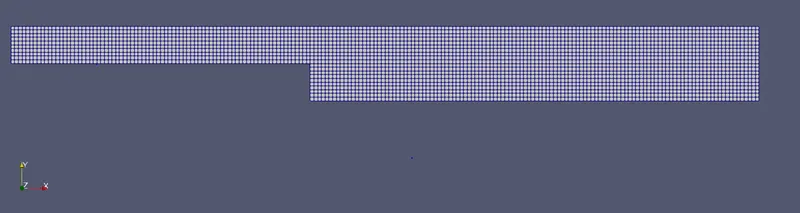
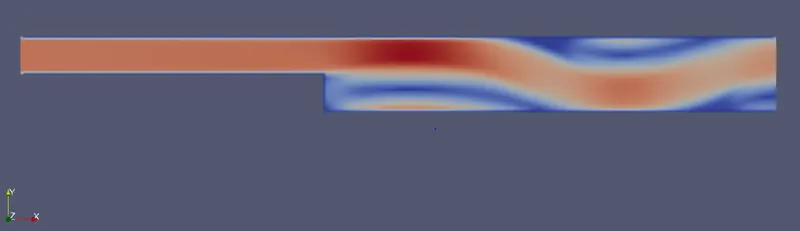
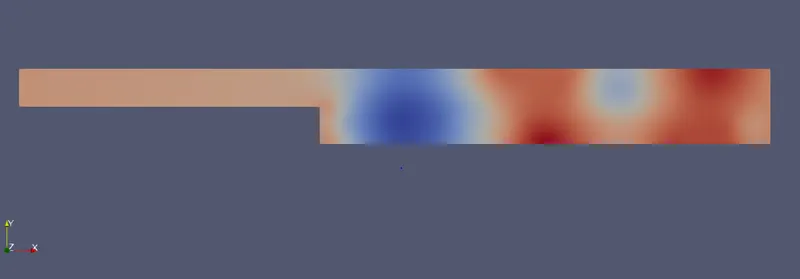
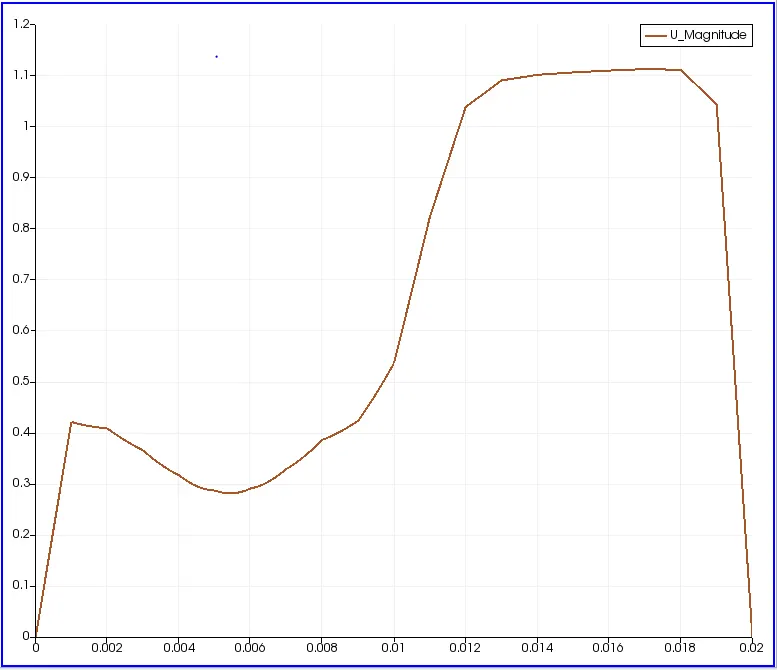
Case 1 - Simulate the flow without using any grading factor (i.e., GF = 1)
blockMeshDict file used
/*--------------------------------*- C++ -*----------------------------------*\
  =========                 |
  \\      /  F ield         | OpenFOAM: The Open Source CFD Toolbox
   \\    /   O peration     | Website:  https://openfoam.org
    \\  /    A nd           | Version:  8
     \\/     M anipulation  |
\*---------------------------------------------------------------------------*/
FoamFile
{
    version     2.0;
    format      ascii;
    class       dictionary;
    object      blockMeshDict;
}
// * * * * * * * * * * * * * * * * * * * * * * * * * * * * * * * * * * * * * //

convertToMeters 0.01;

vertices
(
   (0 0 0)
   (8 0 0)
   (8 0.5 0)
   (0 0.5 0)
   (8 1 0)
   (0 1 0)
   (20 1 0)
   (20 0.5 0)
   (20 0 0)
   (20 -1 0)
   (8 -1 0)
   (0 0 0.01)
   (8 0 0.01)
   (8 0.5 0.01)
   (0 0.5 0.01)
   (8 1 0.01)
   (0 1 0.01)
   (20 1 0.01)
   (20 0.5 0.01)
   (20 0 0.01)
   (20 -1 0.01)
   (8 -1 0.01)

);

blocks
(
    hex (0 1 2 3 11 12 13 14) (80 5 1) simpleGrading (1 1 1)
    hex (3 2 4 5 14 13 15 16) (80 5 1) simpleGrading (1 1 1)
    hex (2 7 6 4 13 18 17 15) (120 5 1) simpleGrading (1 1 1)
    hex (1 8 7 2 12 19 18 13) (120 5 1) simpleGrading (1 1 1)
    hex (10 9 8 1 21 20 19 12) (120 10 1) simpleGrading (1 1 1)

);

edges
(
);

boundary
(
    inlet
    {
        type patch;
        faces
        (
            (0 11 14 3)
            (3 14 16 5)


        );
    }
    outlet
    {
        type patch;
        faces
        (
            (8 7 18 19)
            (9 8 19 20)
            (7 6 17 18)
        );
    }
    frontAndBack
    {
        type empty;
        faces
        (
            (0 3 2 1)
            (3 5 4 2)
            (10 1 8 9)
            (1 2 7 8)
            (2 4 6 7)
            (11 12 13 14)
            (14 13 15 16)
            (21 20 19 12)
            (12 19 18 13)
            (13 18 17 15)
        );
    }
    noslipwalls
    {
        type walls;
        faces
        (
            (16 15 4 5)
            (15 17 6 4)
            (0 1 12 11)
            (10 21 12 1)
            (10 9 20 21)
        );
    }
);

mergePatchPairs
(
);

// ************************************************************************* //
Generated mesh:
Velocity field:
pressure field:
Velocity Magnitude profile:
Case 2 - Simulate the flow with grading factor of 0.2. The cells should be finer near the walls (includig the step wall)
time step used is 0.00005 (for coourant criterion)
blockMeshDict file used
/*--------------------------------*- C++ -*----------------------------------*\
  =========                 |
  \\      /  F ield         | OpenFOAM: The Open Source CFD Toolbox
   \\    /   O peration     | Website:  https://openfoam.org
    \\  /    A nd           | Version:  8
     \\/     M anipulation  |
\*---------------------------------------------------------------------------*/
FoamFile
{
    version     2.0;
    format      ascii;
    class       dictionary;
    object      blockMeshDict;
}
// * * * * * * * * * * * * * * * * * * * * * * * * * * * * * * * * * * * * * //

convertToMeters 0.01;

vertices
(
   (0 0 0)
   (8 0 0)
   (8 0.5 0)
   (0 0.5 0)
   (8 1 0)
   (0 1 0)
   (20 1 0)
   (20 0.5 0)
   (20 0 0)
   (20 -1 0)
   (8 -1 0)
   (0 0 0.01)
   (8 0 0.01)
   (8 0.5 0.01)
   (0 0.5 0.01)
   (8 1 0.01)
   (0 1 0.01)
   (20 1 0.01)
   (20 0.5 0.01)
   (20 0 0.01)
   (20 -1 0.01)
   (8 -1 0.01)

);

blocks
(
    hex (0 1 2 3 11 12 13 14) (160 5 1) simpleGrading (1 5 1)
    hex (3 2 4 5 14 13 15 16) (160 5 1) simpleGrading (1 0.2 1)
    hex (2 7 6 4 13 18 17 15) (240 5 1) simpleGrading (5 0.2 1)
    hex (1 8 7 2 12 19 18 13) (240 5 1) simpleGrading (5 5 1)
    hex (10 9 8 1 21 20 19 12) (240 10 1) simpleGrading (5 5 1)

);

edges
(
);

boundary
(
    inlet
    {
        type patch;
        faces
        (
            (0 11 14 3)
            (3 14 16 5)


        );
    }
    outlet
    {
        type patch;
        faces
        (
            (8 7 18 19)
            (9 8 19 20)
            (7 6 17 18)
        );
    }
    frontAndBack
    {
        type empty;
        faces
        (
            (0 3 2 1)
            (3 5 4 2)
            (10 1 8 9)
            (1 2 7 8)
            (2 4 6 7)
            (11 12 13 14)
            (14 13 15 16)
            (21 20 19 12)
            (12 19 18 13)
            (13 18 17 15)
        );
    }
    noslipwalls
    {
        type walls;
        faces
        (
            (16 15 4 5)
            (15 17 6 4)
            (0 1 12 11)
            (10 21 12 1)
            (10 9 20 21)
        );
    }
);

mergePatchPairs
(
);
Generated Mesh:

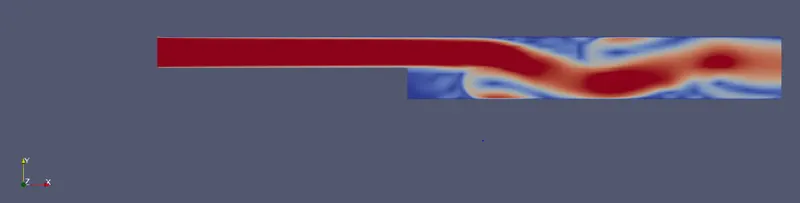
Velocity field:
Pressure field:

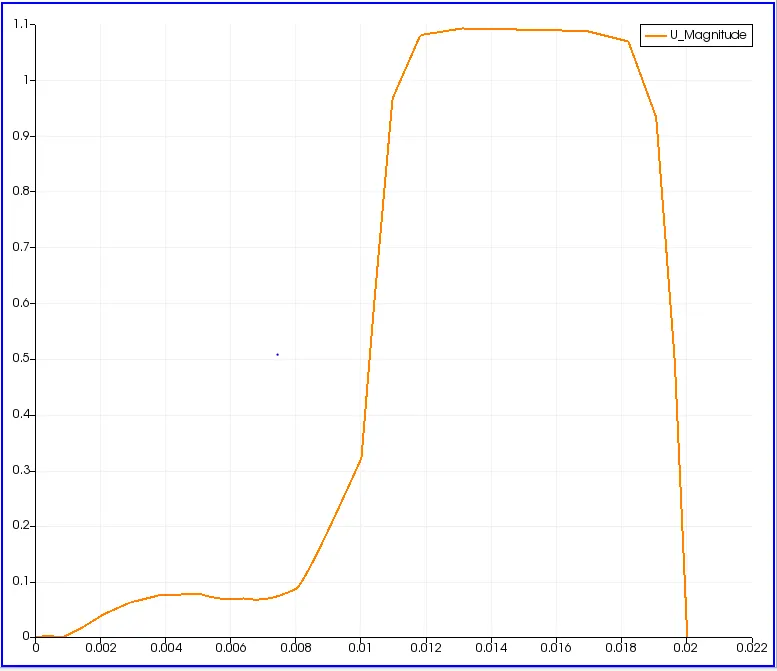
Velocity magnitude profile:
Remark:
Grading factor is required because, we can improve the accuracy of the results without increasing the number of grids. We can make grid finer at the locations where the gradients are more. It also improves the computational efficiency.