Creating a widget to show/hide free and T-edges in Hypermesh using TCL/TK
AIM: To create a code in TCL/TK to display free and T-edges for displayed elements and make all the components transparent.
PROCEDURE:
Part A: Display free and T edges and automatically create nodes on free nodes for tolerance value of 0.01
The following code was built for the purpose of displaying edges and nodes:
*clearmarkall 1
*setdisplayattributes 4 1
*createmark elems 1 "displayed"
*equivalence elements 1 0.01 0 0 0
*createmark elements 1 "displayed"
*equivalence elements 1 0.01 3 0 0
*createmark nodes 1 "retrieve"
*nodemarkaddtempmark 1
if {[hm_entityinfo exist components tedge]==0} {
	*findedges1 elements 1 1 0 0 30
	if {[hm_entityinfo exist components ^edges]==1} {
	set a [hm_getvalue components name="^edges" dataname=id]
	*setvalue components id=$a name=tedge}}
if {[hm_entityinfo exist components tedge]==1} {*createmark components 1 "tedge"
	*setvalue components mark=1 color=#00ffff
	*setcomponentdisplayattributes "tedge" 2 1}
*createmark elements 1 "displayed"
*findedges1 elements 1 0 0 0 30
*setcomponentdisplayattributes "^edges" 2 1
The breakdown of the code is given below:
*clearmarkall 1
*setdisplayattributes 4 1
*createmark elems 1 "displayed"
*equivalence elements 1 0.01 0 0 0
*createmark elements 1 "displayed"
*equivalence elements 1 0.01 3 0 0
*createmark nodes 1 "retrieve"
*nodemarkaddtempmark 1
The first line clears any existing marks. The second line changes the display attributes to make the elements appear more transparent. This helps the engineer to easily notice the free edges. Then a mark is created containing all displayed elements. This mark is then checked for equivalence at tolerance of 0.01. Then the nodes which are appearing at the equivalence are saved and retrieved as a mark. Then nodes are added to the mark of temporary nodes. This creates nodes at the point where free nodes are present.
if {[hm_entityinfo exist components tedge]==0} {
	*findedges1 elements 1 1 0 0 30
	if {[hm_entityinfo exist components ^edges]==1} {
		set a [hm_getvalue components name="^edges" dataname=id]
		*setvalue components id=$a name=tedge}}
An if loop is created with the condition that a component named "tedge" does not already exist. Then the command *findedges is given to find all the T-edges. A component named "^edges" is created. Another if loop is created with the condition that a component named "^edges" is present. If it is present, then a value is assigned for variable "a" which gives it the component id of the component "^edges". Then the component name of "^edges" is changed to "tedge".
if {[hm_entityinfo exist components tedge]==1} {*createmark components 1 "tedge"
	*setvalue components mark=1 color=#00ffff
	*setcomponentdisplayattributes "tedge" 2 1}
An if loop is conducted on condition that component "tedge" exists and a mark is created for it. Then the colour is changed to #00ffff which is cyan colour. Then the display attributes of the tedge is changed to appear thicker.
*createmark elements 1 "displayed"
*findedges1 elements 1 0 0 0 30
*setcomponentdisplayattributes "^edges" 2 1
Finally, another mark containing all displayed elements is created and free edges are detected in the second line. This creates a component named "^edges" whose display attributes are changed to appear thicker using the third line.
Part B: Create a code to turn off free edge display and restore previous window
The code for this part is as follows:
*setdisplayattributes 2 0
if {[hm_entityinfo exist components tedge]==1} {*createmark components 1 "tedge";*deletemark components 1}
if {[hm_entityinfo exist components ^edges]==1} {*createmark components 1 "^edges";*deletemark components 1}
The first line changes the display back to solid view and the second and third line delete the components "^edges" and "tedge", hence removing the free and T edge displays.
Another code was made to separately remove the nodes attached to the free nodes as follows:
*createmark nodes 1 "displayed"
*nodemarkcleartempmark 1
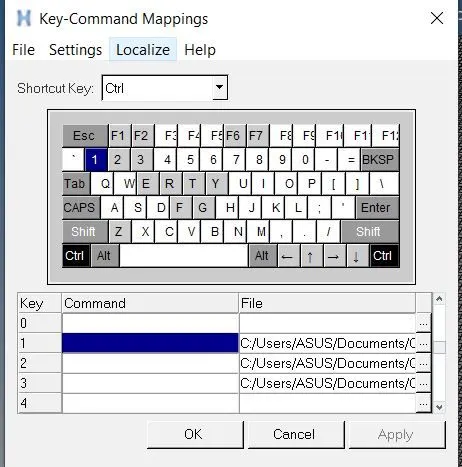
These codes are in separate tcl files and can be attached to keybindings in Hypermesh by going to Preferences => Keyboard settings as shown below:
These keybindings are used in components as shown below:
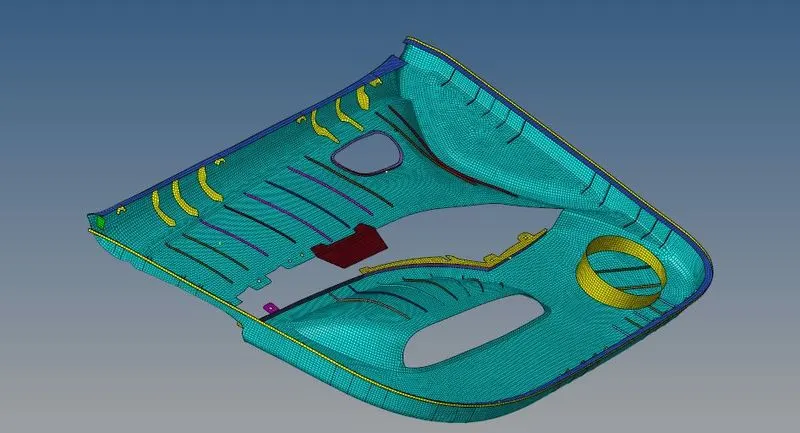
This is the original view of a meshed component. After running the first code we get the following view:
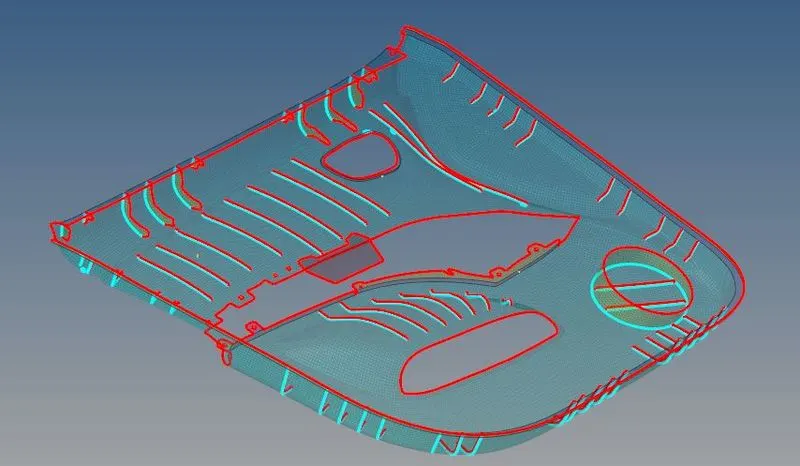
As can be seen, free edges are highlighted by red color and T-edges are cyan. Then the second code is run which changes the view as shown below:
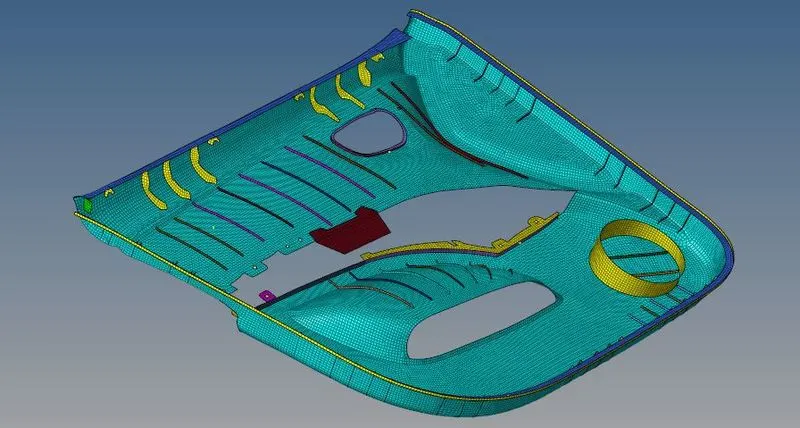
In regions of free nodes, nodes are also created as shown below:
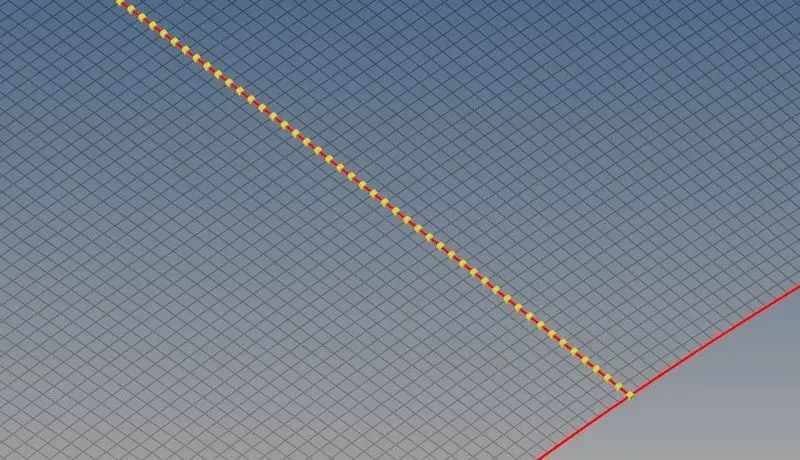
The third code can be used to delete these nodes as well.
The above three were put into procedures in order to create a widget for Hypermesh and the code for the widget is as follows:
*clearmarkall 1
proc default {} {*setdisplayattributes 2 0
	if {[hm_entityinfo exist components tedge]==1} {*createmark components 1 "tedge";*deletemark components 1}
	if {[hm_entityinfo exist components ^edges]==1} {*createmark components 1 "^edges";*deletemark components 1}}

proc disp_edges {} {*setdisplayattributes 4 1
	*createmark elems 1 "displayed"
	*equivalence elements 1 0.01 0 0 0
	*createmark elements 1 "displayed"
	*equivalence elements 1 0.01 3 0 0
	*createmark nodes 1 "retrieve"
	*nodemarkaddtempmark 1
	if {[hm_entityinfo exist components tedge]==0} {
		*findedges1 elements 1 1 0 0 30
		if {[hm_entityinfo exist components ^edges]==1} {
		set a [hm_getvalue components name="^edges" dataname=id]
		*setvalue components id=$a name=tedge}}
	if {[hm_entityinfo exist components tedge]==1} {*createmark components 1 "tedge"
		*setvalue components mark=1 color=#00ffff
		*setcomponentdisplayattributes "tedge" 2 1}
	*createmark elements 1 "displayed"
	*findedges1 elements 1 0 0 0 30
	*setcomponentdisplayattributes "^edges" 2 1}
set a .window
catch {destroy $a}
toplevel $a -class TopClass
wm title $a "Free and T edges"
wm geometry $a 420x200+400+400
wm resizable $a 0 0
wm deiconify $a
button $a.01 -text "Show edges" -font "times 20 bold" -command {disp_edges}
place $a.01 -x 10 -y 10 -width 300 -height 35
button $a.02 -text "Hide edges" -font "times 20 bold" -command {default}
place $a.02 -x 10 -y 70 -width 300 -height 35
button $a.03 -text "Hide temp nodes" -font "times 20 bold" -command {*createmark nodes 1 "displayed"
	*nodemarkcleartempmark 1}
place $a.03 -x 10 -y 130 -width 400 -height 35
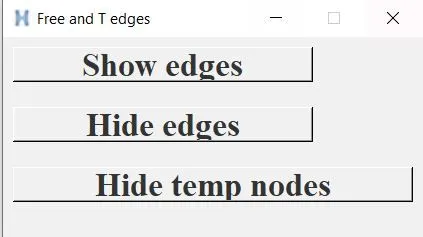
The buttons for "Show edges", "Hide edges" and "Hide nodes" were created inside a window. The window is shown below:
CONCLUSION: The tcl/tk code for creating a widget to show free and T-edges for Hypermesh was successfully created.