Creating a GUI for Hypermesh to delete all displayed entities and reordering remaining entities using TCL/TK
AIM: To create a graphical user interface (GUI) in tcl/tk for deleting displayed entities, empty entities, reordering and renumbering entities alphabetically and to create a master button to execute all the aforementioned commands in Hypermesh.
PROCEDURE:
The code created for the present assignment is given below:
*clearmarkall 1

proc del_linpoint {a} {*createmark $a 1 "displayed"
	*createmark elems 2 "displayed"
	if {[hm_marklength elements 2] ==0} {if {[hm_marklength $a 1]!=0} {*deletemark $a 1}}}

proc del_entity {g} {*createmark $g 1 "displayed"; if {[hm_marklength $g 1]!=0} {*deletemark $g 1}}

proc del_empty {b} {*EntityPreviewEmpty $b 1; if {[hm_marklength $b 1]!=0} {*deletemark $b 1}}

proc del_unused {c} {*EntityPreviewUnused $c 1; if {[hm_marklength $c 1]!=0} {*deletemark $c 1}}
proc del_all {f} {*createmark $f 1 "all"; if {[hm_marklength $f 1]!=0} {*deletemark $f 1}}

proc reord {d} {*createmark $d 1 "all"; if {[hm_marklength $d 1]!=0} {*collectormarkmove $d 1 1 1}}

proc renum {e} {*createmark $e 1 "all"; if {[hm_marklength $e 1]!=0} {*renumbersolverid $e 1 1 1 0 0 0 0 0}}

proc master {} { del_all solids; del_entity surfaces; del_linpoint points; del_linpoint lines;
	del_entity components; del_entity elements
	del_empty components; del_empty elems; del_empty assemblies; del_unused properties
	del_unused materials; reord components; reord materials; reord properties
	reord assemblies; renum elems; renum components; renum materials; renum properties; renum assemblies
		}
proc reorder {} {reord components; reord materials; reord properties; reord assemblies}
proc renumber {} {renum elems; renum components; renum materials; renum properties; renum assemblies}
set win .window
catch {destroy $win}
toplevel $win -class TopClass
wm title $win {"Cleaning Tools"}
wm geometry $win 850x600+200+200
wm resizable $win 0 0
wm deiconify $win

button $win.01 -text "Delete Points" -command {del_linpoint points} -font {times 20 bold}
place $win.01 -x 10 -y 10 -width 200 -height 35
button $win.02 -text "Delete Lines" -command {del_linpoint lines} -font {times 20 bold}
place $win.02 -x 10 -y 70 -width 200 -height 35
button $win.03 -text "Delete Surfaces" -command {del_entity surfaces} -font {times 20 bold}
place $win.03 -x 10 -y 130 -width 230 -height 35
button $win.04 -text "Delete Solids" -command {del_all solids} -font {times 20 bold}
place $win.04 -x 10 -y 190 -width 200 -height 35
button $win.05 -text "Delete Empty Components" -command {del_empty components} -font {times 20 bold}
place $win.05 -x 10 -y 250 -width 400 -height 35
button $win.06 -text "Delete Empty Elements" -command {del_empty elements} -font {times 20 bold}
place $win.06 -x 10 -y 310 -width 400 -height 35
button $win.07 -text "Delete Empty Assemblies" -command {del_empty assemblies} -font {times 20 bold}
place $win.07 -x 10 -y 370 -width 400 -height 35
button $win.08 -text "Delete Unused Properties" -command {del_unused properties} -font {times 20 bold}
place $win.08 -x 10 -y 430 -width 400 -height 35
button $win.09 -text "Delete Unused Materials" -command {del_unused materials} -font {times 20 bold}
place $win.09 -x 10 -y 490 -width 400 -height 35
button $win.10 -text "Master Check" -command {master} -font {times 20 bold}   -bg red
place $win.10 -x 10 -y 550 -width 200 -height 35
button $win.11 -text "Reorder entities" -command {reorder} -font {times 20 bold}
place $win.11 -x 420 -y 10 -width 250 -height 35
button $win.12 -text "Renumber entities" -command {renumber} -font {times 20 bold}
place $win.12 -x 420 -y 70 -width 270 -height 35
button $win.13 -text "Delete displayed Components" -command {del_entity components} -font {times 20 bold}
place $win.13 -x 420 -y 130 -width 420 -height 35
button $win.14 -text "Delete displayed Elements" -command {del_entity elements} -font {times 20 bold}
place $win.14 -x 420 -y 190 -width 420 -height 35
button $win.15 -text "Delete displayed Surfaces" -command {del_entity surfaces} -font {times 20 bold}
place $win.15 -x 420 -y 250 -width 420 -height 35
button $win.16 -text "Delete unused nodes" -command {del_empty nodes} -font {times 20 bold}
place $win.16 -x 420 -y 310 -width 420 -height 35
The breakdown of the code is given below:
*clearmarkall 1

proc del_linpoint {a} {*createmark $a 1 "displayed"
	*createmark elems 2 "displayed"
	if {[hm_marklength elements 2] ==0} {if {[hm_marklength $a 1]!=0} {*deletemark $a 1}}}
The first line removes any previously created marks. The second line creates a procedure named "del_linpoint" which when given a variable "a" creates a mark for all displayed entities of type "a". For example, if we give "a" as "lines", then the procedure will create a mark containing all displayed lines. Then another mark of number 2 is created which includes all displayed elements. If no elements are displayed in the current display window, and if the length of the mark created for "a" is greater than 0, then all the entities "a" displayed are deleted. This is done because lines and points that are part of elements cannot be deleted due to topological constraints and therefore a null case is created if elements exist.
proc del_entity {g} {*createmark $g 1 "displayed"; if {[hm_marklength $g 1]!=0} {*deletemark $g 1}}

proc del_empty {b} {*EntityPreviewEmpty $b 1; if {[hm_marklength $b 1]!=0} {*deletemark $b 1}}

proc del_unused {c} {*EntityPreviewUnused $c 1; if {[hm_marklength $c 1]!=0} {*deletemark $c 1}}
proc del_all {f} {*createmark $f 1 "all"; if {[hm_marklength $f 1]!=0} {*deletemark $f 1}}
Four more procedures are created, the first one being named "del_entity" which deletes the displayed entities like surfaces, elements, etc which are not constrained by other entities. The second procedure named "del_empty" deletes empty entities. The third procedure named "del_unused" deletes unused entities such as properties and materials that are not assigned to any components. The fourth procedure "del_all" deletes all existing entities. This is for solids because solids are generally unnecessary especially in cases of 2D meshing, and therefore can all be deleted.
proc reord {d} {*createmark $d 1 "all"; if {[hm_marklength $d 1]!=0} {*collectormarkmove $d 1 1 1}}

proc renum {e} {*createmark $e 1 "all"; if {[hm_marklength $e 1]!=0} {*renumbersolverid $e 1 1 1 0 0 0 0 0}}
The two procedures created are named "reord" and "renum" which are done for reordering and renumbering respectively. The entities that are not deleted are reordered according to their names, and then the reordered entities are renumbered accordingly.
proc master {} { del_all solids; del_entity surfaces; del_entity components; del_entity elements
	del_linpoint points; del_linpoint lines
	del_empty components; del_empty elems; del_empty assemblies; del_unused properties
	del_unused materials; reord components; reord materials; reord properties
	reord assemblies; renum elems; renum components; renum materials; renum properties; renum assemblies
		}
proc reorder {} {reord components; reord materials; reord properties; reord assemblies}
proc renumber {} {renum elems; renum components; renum materials; renum properties; renum assemblies}
A "master" procedure is created which does the following in sequence:
1. Delete all solids
2. Delete all displayed surfaces, components and elements
3. Delete all displayed points and lines
4. Delete all empty components, elements and assemblies
5. Delete all unused properties and materials
6. Reorder entities based on names and then renumber
Separate procedures named "reorder" and "renumber" are created to do the reordering and renumbering separately and autonomously.
set win .window
catch {destroy $win}
toplevel $win -class TopClass
wm title $win {"Cleaning Tools"}
wm geometry $win 850x600+200+200
wm resizable $win 0 0
wm deiconify $win
A window named "win" is created with dimensions 850x600.
button $win.01 -text "Delete Points" -command {del_linpoint points} -font {times 20 bold}
place $win.01 -x 10 -y 10 -width 200 -height 35
button $win.02 -text "Delete Lines" -command {del_linpoint lines} -font {times 20 bold}
place $win.02 -x 10 -y 70 -width 200 -height 35
button $win.03 -text "Delete Surfaces" -command {del_entity surfaces} -font {times 20 bold}
place $win.03 -x 10 -y 130 -width 230 -height 35
button $win.04 -text "Delete Solids" -command {del_all solids} -font {times 20 bold}
place $win.04 -x 10 -y 190 -width 200 -height 35
button $win.05 -text "Delete Empty Components" -command {del_empty components} -font {times 20 bold}
place $win.05 -x 10 -y 250 -width 400 -height 35
button $win.06 -text "Delete Empty Elements" -command {del_empty elements} -font {times 20 bold}
place $win.06 -x 10 -y 310 -width 400 -height 35
button $win.07 -text "Delete Empty Assemblies" -command {del_empty assemblies} -font {times 20 bold}
place $win.07 -x 10 -y 370 -width 400 -height 35
button $win.08 -text "Delete Unused Properties" -command {del_unused properties} -font {times 20 bold}
place $win.08 -x 10 -y 430 -width 400 -height 35
button $win.09 -text "Delete Unused Materials" -command {del_unused materials} -font {times 20 bold}
place $win.09 -x 10 -y 490 -width 400 -height 35
button $win.10 -text "Master Check" -command {master} -font {times 20 bold}   -bg red
place $win.10 -x 10 -y 550 -width 200 -height 35
button $win.11 -text "Reorder entities" -command {reorder} -font {times 20 bold}
place $win.11 -x 420 -y 10 -width 250 -height 35
button $win.12 -text "Renumber entities" -command {renumber} -font {times 20 bold}
place $win.12 -x 420 -y 70 -width 270 -height 35
button $win.13 -text "Delete displayed Components" -command {del_entity components} -font {times 20 bold}
place $win.13 -x 420 -y 130 -width 420 -height 35
button $win.14 -text "Delete displayed Elements" -command {del_entity elements} -font {times 20 bold}
place $win.14 -x 420 -y 190 -width 420 -height 35
button $win.15 -text "Delete displayed Surfaces" -command {del_entity surfaces} -font {times 20 bold}
place $win.15 -x 420 -y 250 -width 420 -height 35
button $win.16 -text "Delete unused nodes" -command {del_empty nodes} -font {times 20 bold}
place $win.16 -x 420 -y 310 -width 420 -height 35
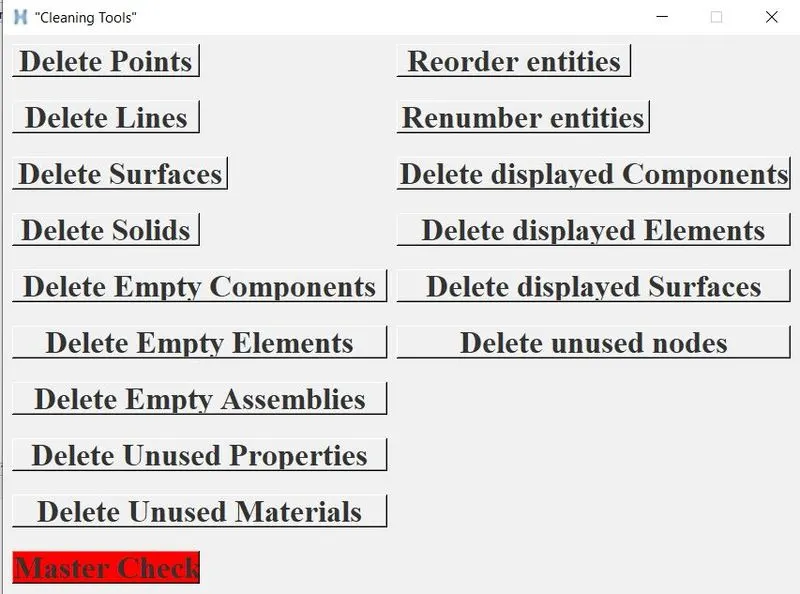
16 buttons are created for the window "win" with layout as given below:
This was used for a frame assembly with initial conditions as given below:
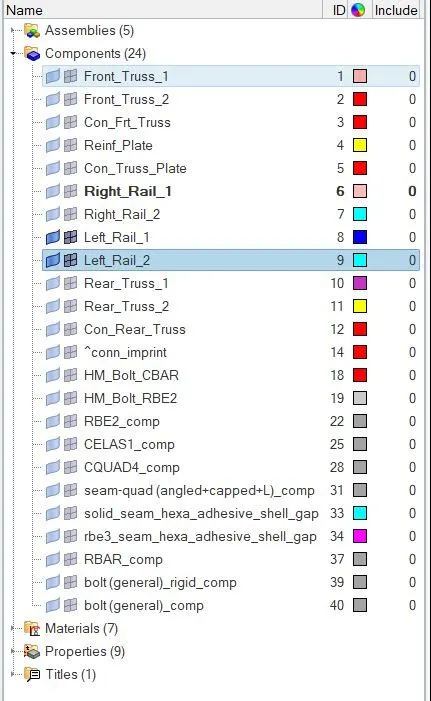
Two components "Left_Rail_1" and "Left_rail_2" are displayed. When master check is performed, the following occurs:
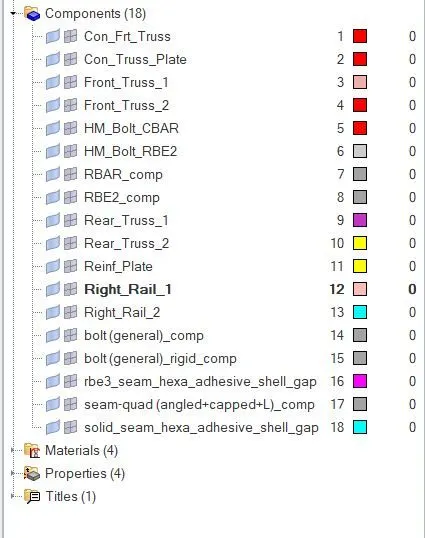
As can be seen, not only do the displayed components and elements get deleted, but also the elements that are unused such as the weld elements present between these components which become unused due to deletion are also deleted. The remaining components are reordered and renumbered. Same goes for other entities such as materials, properties, etc.
CONCLUSION: A GUI was created for Hypermesh for cleaning entities was created successfully using TCL/TK.