Week 5 Sphere pressing on a plate
Objective: To perform the analysis to simulate a sphere pressing on a plate.
Procedure:
- Drop the static structural.
- From the Engineering data select the Non Linear static structural
- Import the model from library
- Open the Mechanical Module.
- Rename the Geometry
- Click on the connections and delete the default connections
- Right click on the Cotacts and add Manual contact region
- For the contact select the curved surface of the sphere
- For the target select the top surface of the plate
- Select the type as frictional
- Select the coefficient as 0.74
- Generate the default mesh
- For Analysis settings, let the steps be 4
- Solver type be direct
- Weak springs be off
- Switch ON the Large Deflection
- Insert the Fixed support for plate and select the base of the plate
- Insert the Displacement, select the top surface of the sphere
- Define the symmetric region
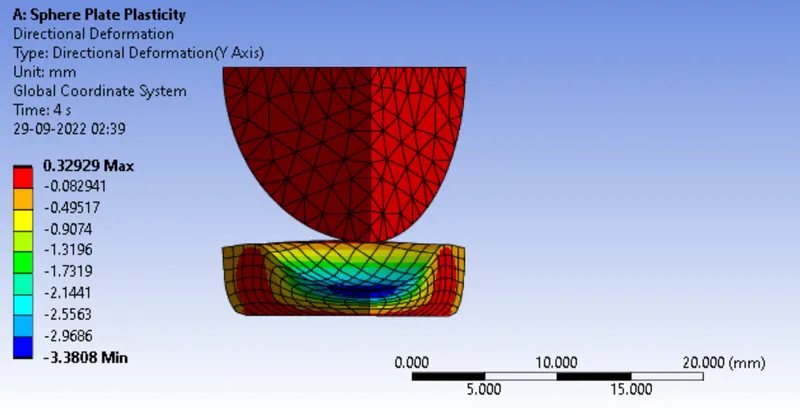
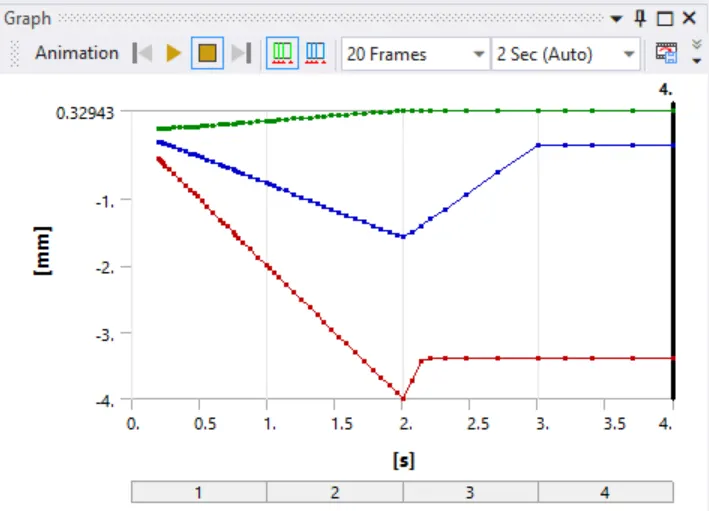
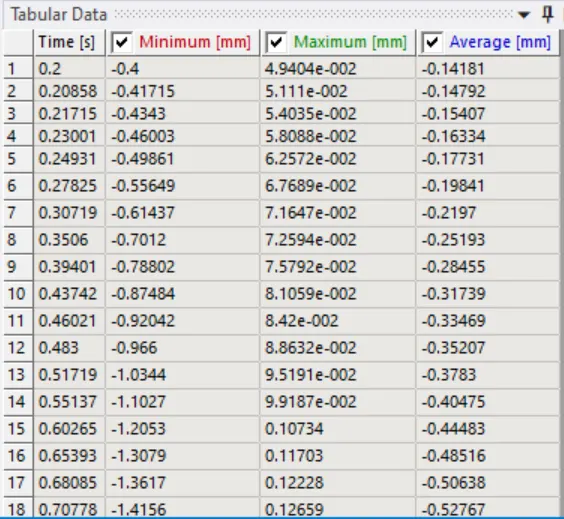
Directional Plastic Deformation:
Result:
Maximum Deformation is 0.32929 mm on the Plate
Conclusion:
When the sphere is pressed onto plate for 4mm the plate deforms for 0.32929 mm and Equivalent stress is 3307.1 MPa.